
Electronic Communication in Business | 6 Key Types
Updated April 2026
Executive Summary
Electronic communication is the backbone of modern business operations, enabling real-time collaboration, global reach, and efficient information exchange. This guide breaks down the six core types of e-communication—email, instant messaging, video conferencing, websites/blogs, phone calls, and SMS—highlighting their unique strengths, ideal use cases, and strategic considerations for enterprise adoption.
For organizations evaluating communication infrastructure, the key decision factors extend beyond feature lists: deployment model (cloud vs. on-premises), integration capabilities with existing workflows, governance requirements, and total cost of ownership often determine long-term success. Platforms like TrueConf address enterprise-grade needs by offering secure, scalable video collaboration with flexible deployment options, making them a strong fit for regulated industries and hybrid work environments.
|
Communication Type |
Best For |
Key Strength |
Primary Limitation |
Enterprise Consideration |
|---|---|---|---|---|
|
|
Formal correspondence, documentation, marketing campaigns |
Asynchronous, searchable, universally adopted |
Low urgency perception, inbox overload |
Requires robust archiving and compliance controls |
|
Instant Messaging |
Quick team coordination, real-time problem solving |
Speed, informal tone, group collaboration |
Context fragmentation, notification fatigue |
Needs clear usage policies and channel governance |
|
Video Conferencing |
Remote meetings, client presentations, training |
Visual engagement, non-verbal cues, screen sharing |
Bandwidth dependency, scheduling complexity |
Evaluate deployment model and participant scalability |
|
Websites & Blogs |
Brand building, content marketing, lead generation |
Evergreen content, SEO value, centralized hub |
Requires ongoing content investment |
Integrate with CRM/analytics for conversion tracking |
|
Phone Calls & Voicemail |
High-stakes negotiations, personalized support |
Human connection, immediate feedback |
No automatic transcript, harder to scale |
Consider VoIP integration and call recording compliance |
|
SMS/Text Messages |
Urgent alerts, appointment reminders, promotions |
High open rates, mobile-first, concise |
Character limits, opt-in requirements |
Ensure GDPR/CPRA compliance for customer messaging |
Self-Hosted Team Messenger with Video Conferencing
A cutting-edge team collaboration server with personal and group chats, UltraHD video conferences, and advanced AI-powered features — free for up to 1,000 users!
Evolution of Electronic Communication in Business
E-communication has evolved in the 1970s and 1980s with the advent of emails and fax machines, offering a faster and more proficient alternative to outdated postal mail.
Thanks to email communication, companies were able to exchange information in real time. Fax machines allowed quick document transfers, greatly facilitating and speeding up work for lots of people. These tools have reduced dependence on physical paperwork.
The 1990s and 2000s witnessed significant advancements with the rise of instant messaging and mobile communication. ICQ and MSN Messenger introduced real-time text-based communication, elevating collaboration between team members. This period was also marked by the emergence of websites and digital platforms, a pivotal step that eventually led to modern innovations, which now empowers businesses to create and manage their online presence effortlessly.
The expansion of smartphones and mobile applications has transformed e-communications. People could interact with each other from almost anywhere in the world. Social media platforms have also become important business tools , email accounts promoting products and sharing information, with resources such as AccsMarket offering solutions that support various social media management needs.
Insight #1: Deployment Model Matters More Than Features
Many organizations evaluate communication tools based solely on user-facing features, overlooking how deployment architecture impacts security, compliance, and control.
Cloud-hosted solutions offer rapid scalability but may raise data residency concerns for regulated sectors. On-premises or hybrid deployments—like those supported by TrueConf Server—provide greater governance over data flow, audit trails, and integration with internal identity providers.
This distinction is critical for enterprises in finance, healthcare, or government, where communication infrastructure must align with internal IT policies and regulatory frameworks.
In recent years, electronic communications have evolved with the advent of cloud technologies and video conferencing. Platforms like Zoom, Microsoft Teams and TrueConf have become essential for facilitating remote work, especially during the COVID-19 pandemic, when enterprises had to adapt to distributed work environments.
Take your team communication to the next level with TrueConf!
A powerful self-hosted video conferencing solution for up to 1,000 users, available on desktop, mobile, and room systems.
Benefits of Electronic Communication
Here are some of the advantages of e-communication:
- Speed and Efficiency. Electronic communications can instantly transmit information. They significantly speed up the decision-making and response process compared to, for example, mailing. This speed can be especially useful for organizations that use enterprise agile development as it will allow them to quickly adapt to changing market conditions and needs.
- Cost-Effectiveness. If we compare paper-based and electronic methods of communication, we will see that the latter allow us to eliminate the costs associated with printing, mailing, physical storage and sending information across different locations.
- Global Reach. Electronic communications allow companies to easily cooperate with their clients, partners and employees worldwide.
- Record Keeping. Electronic communication leaves a digital footprint which is very convenient if you need to track your conversations, search for important information and keep records for auditing. Emails, chat logs and cloud storage securely save messages for you to always find them when it is needed.
- Security Options. Encryption and secure messaging make e-communication safe. Moreover, VPNs and secure network messengers provide additional protection for your data from unauthorized access, making it essential to get VPN services that ensure a higher level of security for your online activities.
- Convenience and Flexibility. In today’s world, people can easily communicate using smartphones, laptops and tablets. As businesses depend more on mobile devices for day-to-day operations, MDM solutions for small businesses can make it easier to manage those devices securely while keeping communication accessible for distributed teams. This makes interaction more accessible, whether for personal conversations or business purposes.
- Improved Customer Engagement. Prompt and high-quality communication with potential and current clients can help companies increase their sales, improve customer success renewal and build long-term relationships.
|
Benefit |
Tactical Impact |
Strategic Value |
|---|---|---|
|
Speed and Efficiency |
Faster response cycles, reduced meeting overhead |
Accelerated time-to-market, agile decision-making |
|
Cost-Effectiveness |
Lower operational spend on printing, postage, storage |
Reallocated budget toward innovation and growth |
|
Global Reach |
Seamless collaboration across time zones |
Access to global talent pools and market expansion |
|
Record Keeping |
Simplified compliance audits, knowledge retention |
Institutional memory, reduced legal exposure |
|
Security Options |
Protected intellectual property, secure client data |
Trust preservation, regulatory alignment |
Types of Electronic Communications in Business
E-communication includes a variety of tools that businesses use to maintain efficient interactions with their customers and employees. Let’s go through the six main types:
1. Email
Emails are frequently used in business. They are perfect for internal and external communication, allowing you to:
- send and receive messages;
- share documents;
- exchange confidential information and more.
Email is an essential business tool for both marketing and customer service.
In marketing, emails allow companies to reach their target audience through email marketing, advertising campaigns and special offers. These campaigns can also include a back in stock email, which notifies customers when a previously sold-out product is available again, encouraging them to make a purchase. Many businesses partner with email marketing agencies to plan and execute these campaigns effectively, typically using cold email software.
In the field of customer service, email is necessary to handle inquiries, support requests and gather feedback.
Regardless of whether email is used for marketing or problem solving, it is versatile and helps build and maintain strong relationships with customers.
2. Instant Messaging and Live Chat
Instant messaging (IM) and live chat are very common for internal communication in companies. Solutions like Slack, Microsoft Teams and TrueConf let teams to interact in real time, quickly overcome issues and communicate effectively.
Instant messaging enhances collaboration by offering features like group chats, file sharing and integration with other project management tools to streamline communication across platforms. It helps teams to coordinate actions, solve problems quickly and manage projects.

3. Video Conferencing
Video conferencing provides a visual element that enhances engagement and understanding between people.
Platforms like TrueConf enable teams to hold virtual meetings with up to 1,500 participants, conduct interviews and collaborate with clients worldwide. This is something no business can survive without nowadays.
TrueConf’s Ultra HD video and high-quality audio make participating in virtual conferences user-friendly and help maintain attention and engagement throughout the meeting.
The platform offers interactive features such as:
- screen sharing;
- whiteboard use;
- virtual hand-raising.
They allow participants to feel involved in the conference and take an active part in it. The platform also supports conference rooms for small group discussions, promoting productive collaboration. These tools make the server an excellent solution to ensure all participants are satisfied with their conference experience, while generating fresh ideas.
Kudremukh Iron Ore Limited (KIOCL)|Case Study
KIOCL provided their employees with secure tools for collaboration, video calls, and team messaging by implementing TrueConf Server. An autonomous system unified more than 1,000 employees allowing to facilitate work meetings in hybrid and online modes from any location.

4. Websites and Blogs
Websites and blogs help businesses to engage with a wider audience and act as a centralized platform for sharing valuable content. Regularly reviewing performance through a simple website audit can help identify gaps and ensure your content continues to attract and retain visitors effectively.
Blogs, in particular, can establish the company as an industry expert, providing value to clients while enhancing brand visibility. By regularly publishing well-thought-out, informative, and engaging content companies can become opinion leaders, gain their audience’s trust, and attract new leads.
Blogging allows companies to:
- demonstrate their knowledge on relevant topics; by publishing case studies, tutorials, and insights, businesses can highlight their expertise not only in their industry but also in specialized areas, showcasing practical experience and results to potential clients. Web design agencies do this well with content such as roundups of the best contractor websites, which double as design inspiration while also showing off their own client work.
- create opportunities to inform possible clients about products, services, and trends in the web development or web design industry;
- increase brand awareness and rank higher in search engine results.
For instance, blogs demonstrate how written articles can be repurposed into dynamic visual content that captures attention, boosts engagement, and extends reach across platforms like YouTube, Instagram, and Facebook. Businesses should focus on web setup, website hosting, domain management, and design to maintain a successful online presence and drive more traffic to their sites.
5. Phone Calls and Voicemails
Phone calls remain an essential form of e-communication. They offer a personal approach and direct interaction with customers which is sometimes lacking in other forms of digital interaction. An AI Receptionist enhances this experience by ensuring every call is answered promptly and professionally, delivering the same personal touch customers expect. Voicemail also allows the sender to convey important messages if the recipient can’t respond.
In the context of the digital transformation of sales, phone calls continue to play a vital role by bridging the gap between automated processes and human connection. While many aspects of the sales cycle are now supported by digital tools, real-time conversations provide the human touch necessary for complex decision-making. A reliable business phone system ensures seamless communication between teams and clients, enabling sales representatives to manage calls efficiently and maintain professionalism. Advanced systems with features like call recording, analytics, and CRM integration further enhance productivity and customer experience.
Phone calls, unlike email and SMS, provide real-time interaction. They allow sellers to establish mutual understanding faster.
The capacity to promptly address issues, handle objections and dynamically exchange information makes telephone conversations excellent for negotiations. Moreover, the personal nature of voice communication helps to gain trust which is important for establishing successful business relationships.
6. SMS or Text Messages
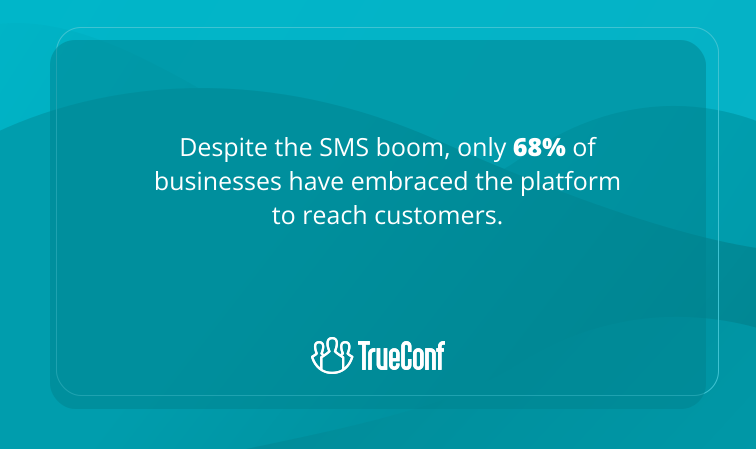
SMS or text messaging is a swift way to communicate important information. It is often used for reminders, alerts and notifications. In business SMS helps to send customers promotional offers, order confirmations, service updates and more. When you need to reach your whole list at once, some tools let you send a text to multiple contacts in a single broadcast rather than messaging people individually. Additionally, ecommerce surveys can be conducted via SMS to gather feedback on customer satisfaction and preferences. The high open rate of SMS makes it perfect for delivering urgent information. For teams that already rely on email for most of their communication, the simplest way to add SMS to the mix is to send texts directly from the inbox. Comparing the best email to SMS service options can help businesses find a solution that fits their workflow without requiring a separate messaging platform or technical setup.
Etiquette for business texting
Maintain professionalism while texting your colleagues and clients because it’s crucial for effective business interactions. You should never forget to keep your messages clear and concise, be polite and avoid slang or overly casual language. Here are some important pieces of advice to improve your communication via texts:
- 1. get permission before initiating text communication, make sure the recipient is ready to interact with you through SMS;
- 2. messages should be sent during regular business hours unless it’s urgent, respecting boundaries;
- 3. avoid using emojis in formal contexts and proofread your texts before sending them.
Communication Type
|
Communication Type |
Ideal Use Case |
Not Recommended For |
Scalability Tip |
|---|---|---|---|
|
|
Detailed proposals, formal approvals, marketing nurture streams |
Urgent decisions, rapid-fire brainstorming |
Use templates and rules to reduce manual sorting |
|
Instant Messaging |
Quick clarifications, team stand-ups, informal feedback |
Complex negotiations, confidential HR discussions |
Create channel naming conventions to avoid chaos |
|
Video Conferencing |
Client pitches, training sessions, cross-functional workshops |
One-way announcements, simple status updates |
Leverage breakout rooms for large-group engagement |
|
Websites/Blogs |
Thought leadership, SEO-driven lead generation, product education |
Time-sensitive alerts, personalized customer support |
Repurpose blog content into social snippets and emails |
|
Phone Calls |
High-value sales conversations, sensitive feedback, crisis management |
Routine updates, multi-party coordination |
Integrate with CRM to auto-log call outcomes |
|
SMS |
Appointment reminders, outage alerts, two-factor authentication |
Lengthy explanations, visual demonstrations |
Use short codes and clear opt-out instructions |
Insight #3: Governance Policies Prevent Tool Proliferation
Without clear guidelines, teams adopt communication tools ad-hoc, leading to fragmented workflows, security gaps, and compliance risks.
Proactive governance—defining which tools are approved for which scenarios, establishing data retention rules, and training staff on appropriate usage—ensures that communication infrastructure supports rather than hinders business objectives.
Platforms that offer centralized admin controls, like TrueConf Server, simplify policy enforcement across departments and regions.
Examples of Electronic Communication in Business
Real-world applications demonstrate how different communication types solve specific business challenges:
|
Business Scenario |
Recommended Channel |
Why It Works |
Alternative Option |
|---|---|---|---|
|
Quarterly board meeting |
Video conferencing |
Visual presence, document sharing, recording capability |
In-person meeting with dial-in option |
|
IT incident response |
Instant messaging + SMS alert |
Immediate notification, rapid coordination, audit trail |
Email chain (too slow for critical incidents) |
|
Client onboarding |
Email + video call combo |
Formal documentation + personal relationship building |
Phone-only (lacks visual documentation sharing) |
|
Employee announcements |
Email + intranet post |
Permanent record + searchable archive |
SMS (too informal, limited formatting) |
|
Customer support ticket |
Email + live chat escalation |
Written record + real-time resolution option |
Social media DM (harder to track and escalate) |
|
Product launch campaign |
Blog + email + SMS sequence |
Multi-channel reach with tailored messaging per segment |
Single-channel approach (limits audience coverage) |
Practical implementation examples:
- A financial services firm uses TrueConf for secure client consultations with end-to-end encryption, while reserving email for formal contract delivery and SMS for appointment reminders.
- A manufacturing company combines video conferencing for remote equipment troubleshooting with instant messaging for shift handovers and email for compliance documentation.
- An educational institution leverages blogs for thought leadership, video conferencing for virtual classrooms, and SMS for emergency campus notifications.
Best Electronic Communication Tools for Teams
Selecting the right tool depends on team size, workflow complexity, security requirements, and budget. Below is a comparison of leading solutions across key dimensions:
|
Tool Category |
Representative Options |
Strengths |
Limitations |
Best For |
|---|---|---|---|---|
|
Unified Messaging |
Slack, Microsoft Teams, TrueConf |
Centralized chat, file sharing, app integrations |
Can become noisy without governance |
Tech teams, agile projects, remote collaboration |
|
Video Collaboration |
Zoom, Google Meet, TrueConf |
HD video, screen sharing, recording |
Bandwidth intensive, scheduling overhead |
Client meetings, training, cross-functional workshops |
|
Email Platforms |
Gmail, Gmail-based helpdesk tools, Outlook, ProtonMail |
Universal adoption, rich formatting, automation |
Low engagement for urgent matters |
Formal communication, marketing, documentation |
|
Secure Enterprise |
TrueConf Server, Mattermost, Rocket.Chat |
On-premises deployment, compliance controls, SSO |
Higher setup complexity, IT resource needs |
Regulated industries, government, healthcare |
|
Customer Engagement |
Intercom, Zendesk, TrueConf Guest Access |
Omnichannel support, analytics, automation |
Cost scales with usage volume |
Sales teams, support centers, client services |
Insight #4: Total Cost of Ownership Extends Beyond Licensing
When comparing communication tools, factor in hidden costs: training time, integration development, administrative overhead, and potential compliance penalties.
A lower-priced cloud tool may require expensive third-party security add-ons, while an on-premises solution like TrueConf Server may have higher initial setup but lower long-term risk exposure for data-sensitive organizations.
Try TrueConf Server Free!
- 1,000 online users with the ability to chats and mske one-on-one video calls.
- 10 PRO users with the ability to participate in group video conferences.
- One SIP/H.323/RTSP connection for interoperability with corporate PBX and SIP/H.323 endpoints.
- One guest connection to invite a non-authenticated user via link to your meetings.

Electronic Communication Challenges and Barriers
Despite its advantages, electronic communication introduces specific challenges that organizations must proactively address:
- Information Overload: Employees receive hundreds of messages daily across multiple channels, leading to missed priorities and decision fatigue.
- Security and Compliance Risks: Unsecured channels can expose sensitive data; inconsistent retention policies create legal vulnerability.
- Tool Fragmentation: Teams using different platforms create silos, reducing visibility and increasing context-switching costs.
- Digital Fatigue: Excessive video meetings and constant notifications contribute to burnout and reduced productivity.
- Accessibility Gaps: Not all tools support screen readers, captioning, or low-bandwidth environments, excluding some users.
- Cultural and Language Barriers: Global teams may misinterpret tone in text-based communication or struggle with asynchronous collaboration across time zones.
|
Challenge |
Mitigation Strategy |
Tool Feature to Look For |
|---|---|---|
|
Information overload |
Channel purpose definition + notification policies |
Priority inbox, Do Not Disturb scheduling, AI summarization |
|
Security risks |
Encryption standards + access audits |
End-to-end encryption, role-based permissions, audit logs |
|
Tool fragmentation |
Approved tool stack + integration layer |
API ecosystem, SSO support, unified admin console |
|
Digital fatigue |
Async-first culture + meeting guidelines |
Recording + transcription, agenda templates, time limits |
|
Accessibility gaps |
WCAG compliance + inclusive design |
Live captions, keyboard navigation, low-bandwidth mode |
|
Cultural barriers |
Communication guidelines + training |
Translation support, tone indicators, async documentation |
Secure Electronic Communication for Business
Security is non-negotiable for enterprise communication. A robust security posture requires layered controls across technology, policy, and people:
Technical Controls
- End-to-end encryption for messages and media
- Multi-factor authentication and SSO integration
- Data loss prevention (DLP) and content scanning
- Secure file transfer with expiration and access logs
- On-premises or hybrid deployment options for data sovereignty
Policy Controls
- Clear acceptable use policies per communication channel
- Data classification and handling procedures
- Retention and deletion schedules aligned with regulations
- Incident response protocols for communication breaches
People Controls
- Regular security awareness training
- Role-based access reviews
- Phishing simulation and reporting mechanisms
|
Security Requirement |
Cloud-First Approach |
On-Premises/Hybrid Approach |
|---|---|---|
|
Data residency |
Vendor guarantees + regional data centers |
Full control over physical and logical storage location |
|
Encryption management |
Vendor-managed keys (optional customer-managed) |
Customer-controlled key management and rotation |
|
Compliance auditing |
Shared responsibility model + vendor reports |
Internal audit trails + custom reporting |
|
Integration with IAM |
SaaS connectors + SCIM provisioning |
Direct LDAP/AD integration + custom identity flows |
|
Incident response |
Vendor SLA + joint investigation |
Full internal control over forensic analysis |
For organizations with strict compliance requirements—such as finance, healthcare, or government—platforms like TrueConf that support on-premises deployment provide critical advantages: data never leaves corporate infrastructure, encryption keys remain under internal control, and audit logs integrate with existing SIEM systems. In healthcare settings specifically, this extends to operational tools like a visitor management system for clinics, which must also meet the same strict data governance standards.
Electronic Communication Best Practices
Maximize effectiveness and minimize risk with these actionable guidelines:
- Define channel purpose: Document which tool to use for which scenario (e.g., “Urgent issues → IM; Formal approvals → Email; Client presentations → Video with presentation maker“).
- Standardize naming and structure: Use consistent channel names, email signatures, and meeting templates to reduce cognitive load.
- Automate routine workflows: Use rules, bots, and integrations to handle repetitive tasks like ticket routing or meeting scheduling.
- Train teams on etiquette: Provide guidelines for tone, response expectations, and cross-cultural communication norms.
- Monitor and iterate: Regularly review usage analytics and feedback to refine your communication stack.
- Prioritize accessibility: Ensure all tools support assistive technologies and offer low-bandwidth alternatives.
- Document decisions: Use shared knowledge bases to capture meeting outcomes and action items, reducing redundant discussions.
|
Practice |
Implementation Tip |
Expected Outcome |
|---|---|---|
|
Channel purpose definition |
Create a one-page “Communication Playbook” |
Reduced tool confusion, faster onboarding |
|
Notification hygiene |
Encourage “focus hours” and priority tagging |
Lower burnout, higher deep-work productivity |
|
Async-first mindset |
Default to documented updates before scheduling meetings |
Better time zone inclusion, reduced meeting load |
|
Security by design |
Embed compliance checks into workflow templates |
Fewer policy violations, smoother audits |
|
Quarterly surveys on communication effectiveness |
Continuous improvement, higher adoption |
Internal vs External Electronic Communication
Communication strategies differ significantly based on audience. Understanding these distinctions prevents missteps and optimizes engagement.
|
Dimension |
Internal Communication |
External Communication |
|---|---|---|
|
Primary Goal |
Alignment, productivity, culture |
Conversion, support, online brand protection |
|
Tone & Style |
Informal, direct, context-rich |
Polished, brand-consistent, audience-tailored |
|
Security Level |
Role-based access, internal encryption |
Public-facing controls, guest access management |
|
Compliance Focus |
Labor laws, internal policies |
GDPR, CPRA, industry-specific regulations |
|
Tool Preference |
Integrated suites (chat + video + docs) |
Omnichannel platforms (email + chat + social) |
|
Measurement |
Engagement metrics, project velocity |
Conversion rates, NPS, resolution time |
Key considerations for internal communication:
- Prioritize integration with existing productivity tools to reduce context switching
- Enable rich collaboration features like co-editing, threaded discussions, and @mentions
- Support both synchronous (video, chat) and asynchronous (docs, forums) modes
Key considerations for external communication:
- Ensure brand consistency across all customer touchpoints
- Implement clear escalation paths from self-service to human support
- Protect customer data with explicit consent flows and transparent privacy practices
Insight #5: Guest Access Requires Separate Governance
When external parties join internal communication channels (e.g., clients in video calls, contractors in chat), they introduce unique security and compliance considerations.
Solutions like TrueConf Guest Access allow controlled external participation without compromising internal network security—enabling collaboration while maintaining clear boundaries between internal and external data flows.
Tips to Improve Electronic Communications
To maximize the benefits of electronic communication in business, consider these practical tips:
- Be Clear and Laconic: avoid long messages, speak to the point. This helps recipients quickly understand your message without any confusion.
- Choose the Suitable Channel: pick the appropriate communication tool according to your purpose. Emails for formal discussions, instant messaging for swift exchanges, video meetings for better connection. Make sure to also use the necessary infographics, and data to make visual elements for your calls.
- Leverage Automation: automated responses are convenient for routine interaction like customer inquiries or appointment reminders.
- Prioritize Security: protect important business information and reduce the risk of data breaches by using secure communication tools, encryption, and business VPN solutions.
Conclusion
Electronic communication is crucial for modern businesses. It allows them to connect to clients, partners and employees across the globe. Whether it’s a video conference call, an instant message or an email, each type serves its unique purpose in boosting your productivity. Implementing the right tools can help businesses greatly benefit from the power of electronic communication.
FAQ
What is the most secure type of electronic communication for business?
Security depends less on the channel and more on implementation: end-to-end encryption, access controls, and audit logs matter most. For video and messaging, platforms like TrueConf offer on-premises deployment options, giving organizations full control over data residency and encryption keys—critical for regulated industries.
How do I choose between video conferencing platforms for enterprise use?
Evaluate beyond participant limits: consider deployment flexibility (cloud vs. on-premises), integration with existing identity systems, recording compliance features, and administrative controls. TrueConf supports hybrid deployment models and LDAP/AD integration, making it suitable for enterprises with strict IT governance requirements.
Can electronic communication tools integrate with existing business systems?
Yes—modern platforms offer APIs and pre-built connectors for CRM, HRIS, productivity suites, Office 365 signature manager solutions, social media management tools, and even expert SEO service workflows. When evaluating options, verify support for SSO, calendar sync, and webhook capabilities. TrueConf provides REST APIs and directory integration to streamline workflows and reduce manual context-switching.
What are the key considerations for hybrid work communication?
Prioritize tools that work consistently across office and remote environments, with features like background noise suppression, mobile optimization, and asynchronous collaboration options. TrueConf’s adaptive bandwidth technology and cross-platform clients ensure reliable performance regardless of location or device.
How does on-premises deployment affect communication tool selection?
On-premises deployment offers greater control over data, compliance, and customization but requires internal infrastructure management. For organizations with strict data sovereignty policies, solutions like TrueConf Server provide enterprise-grade video collaboration without sending sensitive communications through public clouds.
Which communication type is best for customer engagement?
It depends on the use case: email for nurture campaigns, SMS for urgent alerts, video for personalized consultations, and even specialized workflows related to web development, a web design expert, website hosting, or indoor trampoline businesses. A layered strategy works best. TrueConf supports customer-facing video interactions with secure guest access and recording options, enabling high-touch engagement while maintaining compliance.
What security features should I look for in business communication tools?
Essential features include end-to-end encryption, role-based access controls, audit logging, and compliance certifications (e.g., GDPR, HIPAA readiness). TrueConf emphasizes security by design, with options for private key management and deployment within corporate firewalls to meet stringent enterprise requirements.
About the Author
Olga Afonina is a technology writer and industry expert specializing in video conferencing solutions and collaboration software. At TrueConf, she focuses on exploring the latest trends in collaboration technologies and providing businesses with practical insights into effective workplace communication. Drawing on her background in content development and industry research, Olga writes articles and reviews that help readers better understand the benefits of enterprise-grade communication.


Follow us on social networks