
15 Best Icebreakers for Virtual Meeting
Updated April 2026
Executive Summary
Virtual icebreakers are structured activities that transform awkward silences into productive engagement at the start of online meetings. When implemented correctly, they reduce meeting fatigue, accelerate team bonding, and improve information retention. This guide preserves the original 15 icebreakers while adding strategic frameworks for selection, platform-specific implementation tips, and decision criteria for enterprise teams evaluating collaboration tools like TrueConf or Microsoft Teams.
|
Category |
Best For |
Time Required |
Platform Features Needed |
Expected Outcome |
|---|---|---|---|---|
|
Quick Questions |
Daily standups, small teams |
2-5 min |
Chat, reactions |
Faster warm-up, lower barrier to participation |
|
Interactive Activities |
Team building, onboarding |
5-10 min |
Screen share, breakout rooms |
Deeper personal connections, cultural alignment |
|
Competitive Games |
Large groups, low-engagement teams |
10-15 min |
Polls, whiteboard, scoring |
High energy, memorable shared experience |
|
Reflection Prompts |
Retrospectives, strategy sessions |
3-7 min |
Recording, transcription |
Thoughtful contributions, documented insights |
Key Takeaway: The most effective icebreaker matches your team’s size, meeting purpose, and technical environment. Enterprise platforms with robust admin controls—like TrueConf’s on-premises deployment or Microsoft Teams’ compliance features—enable icebreakers that respect data governance while fostering engagement.
What are Virtual Icebreakers?
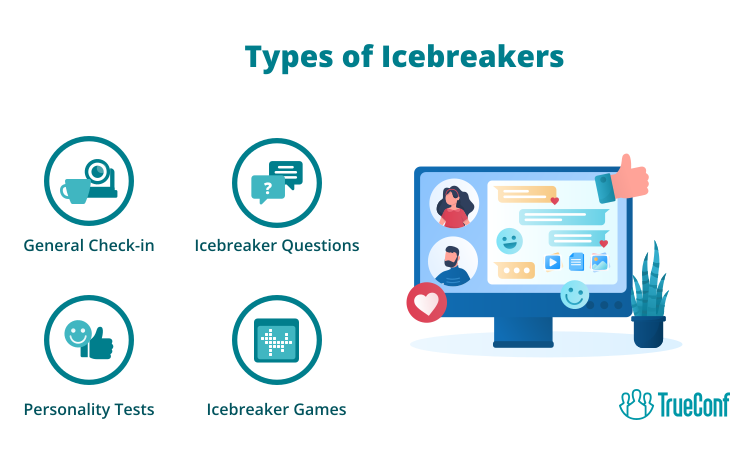
Virtual icebreakers include such things as activities, games, questions etc. Simple word-based activities, such as 2 Letter Games, can also work well as quick virtual icebreakers because they are easy to explain and encourage fast participation.
All of these events’ purpose is to help everybody overcome the initial awkwardness or silence that may arise when people first meet each other at a virtual gathering. Icebreakers encourage participants to relax and boost them to establish personal contacts before moving on to the main meeting agenda. Ask attendees to give a brief virtual tour of their makerspace setup or workspace to spark conversation.
Insight #1: Synchronous vs. Asynchronous Engagement
Many teams overlook that icebreakers do not always need to happen live.
Platforms supporting persistent chat or asynchronous video—such as TrueConf’s messaging layer or Microsoft Teams’ clip sharing—allow relationship-building to continue between meetings.
This is especially important for global teams working across time zones, where fully live icebreakers can exclude some participants.
Consider a hybrid approach: start meetings with a 2-minute live prompt, then continue the discussion asynchronously in chat or recorded follow-ups.
Advantages of Virtual Icebreakers
Icebreakers’ purpose is to help you:
- 1. Develop connection. Consistent use of icebreakers allows employees to get closer, which leads to more effective and productive collaboration, establishes communication and strengthens teamwork.
- 2. Reduce stress. Sometimes virtual meetings can seem too formal and impersonal, which leads to tension or anxiety. Simple games or funny questions can help everyone calm down, which is necessary for open and honest communication.
- 3. Boost engagement. People are often shy to express their opinions in a virtual environment, which makes them feel disconnected from the general conversation. Smooth out nerves in high-pressure contexts (like Ivy League admissions interviews), helping participants feel more at ease from the start. Icebreakers encourage everyone to share their thoughts or join a simple activity, which helps them overcome the internal barrier.
- 4. Set a positive tone. The beginning of a meeting often influences the way participants contribute to the rest of it. If the gathering starts with an engaging icebreaker, people can become more receptive to new ideas and more cooperative when working on tasks.
- 5. Encourage creativity. Icebreakers like problem solving, word association or storytelling stimulate the brain, which increases people’s creativity, productivity and inspires innovative thinking.

Icebreaker Type Comparison: When to Use What
|
Icebreaker Format |
Ideal Team Size |
Best Meeting Type |
Technical Requirements |
Risk Level |
|---|---|---|---|---|
|
Quick Questions |
3-15 people |
Daily syncs, check-ins |
Basic audio/video |
Low: minimal prep, easy opt-out |
|
Show & Tell Activities |
5-20 people |
Onboarding, retrospectives |
Screen share, camera |
Medium: requires participant prep |
|
Competitive Games |
10-50+ people |
All-hands, team events |
Polls, whiteboard, scoring |
High: needs facilitation, time buffer |
|
Reflection Prompts |
4-12 people |
Strategy, 1:1s |
Recording, transcription |
Low-Medium: depends on psychological safety |
5 Icebreaker Questions for Virtual Meetings
1. What’s one surprising thing you’ve learned recently?
This question encourages people to share interesting facts and engage in fun conversations.
2. What superpower do you want and why?
Asking this allows people to share some interesting information about themselves and boost their imagination.
3. What’s the best productivity hack you know?
If you want to bring people closer and also learn some useful information, ask similar questions.
4. What countries would you like to visit?
Travel-related questions usually excite people and let them share some of their dreams and goals, like experiencing business class flights to their dream destinations. Learning deep information about somebody can bring everyone closer.
5. Which books or movies are your favourite and why?
Finding out that somebody loves the same things as you or getting some great recommendations is always nice and inspires really interesting conversations.
Insight #2: Deployment Model Impacts Icebreaker Feasibility
Enterprise buyers often evaluate video platforms on security and scalability, but overlook how deployment architecture affects engagement features.
On-premises solutions like TrueConf Server give IT teams full control over data residency and integration with internal directories—critical for regulated industries running icebreakers that might capture personal preferences or photos.
Cloud-native alternatives like Microsoft Teams offer faster feature updates but require careful configuration of data loss prevention policies when using interactive elements.
Always map your icebreaker content types (text, image, video) to your platform’s governance capabilities before rollout.
5 Icebreaker Activities for Virtual Meetings
1. Show and Tell
Show something from your workspace and share a story behind it to let your colleagues learn more about you. Generate a custom image with Flux 1 AI to visually enhance your story and spark discussion.
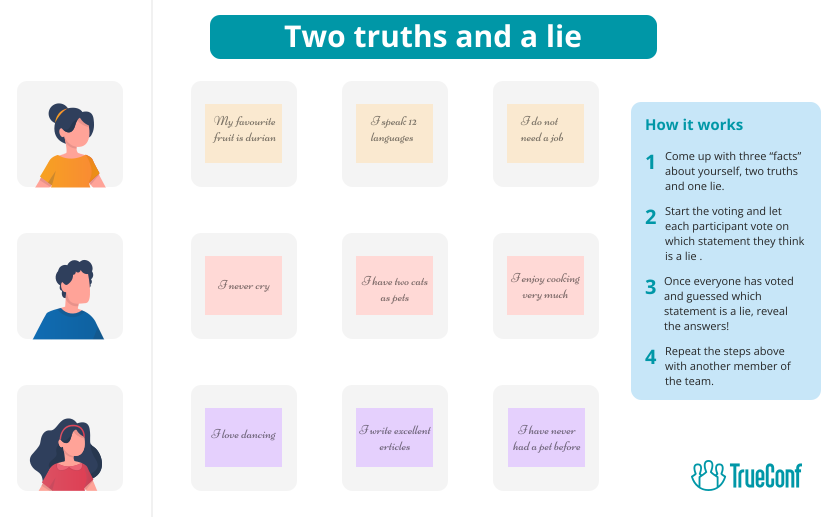
2. Two Truths and a Lie
Each person shares two facts and one lie about themselves and the others try to guess a lie. It’s always fun to learn some interesting facts about your colleagues.
3. Virtual Office Tour
Getting a tour of someone’s workplace is always interesting because it’s usually a reflection of their personality. If you are really attentive you might even be able to figure out whether that person is a perfectionist who organizes everything with a military-like precision.
For example, some participants may showcase books, framed travel photos, or quirky decorations, sparking fun conversations about their interests. Others might have corporate memorabilia or collectibles that hint at their industry passions.
Just like people often wonder “who owns McDonald’s?” when discussing corporate giants, workplace tours can uncover surprising details about how colleagues work, what motivates them, and what inspires them daily. Whether it’s a carefully curated minimalist desk or a cluttered creative space filled with brainstorming notes, every workspace tells a story—making this icebreaker a great way to foster deeper team connections in virtual meetings.
4. Bucket List Challenge
Ask people to share a dream from their bucket list to create a deeper connection and learn more about them. Someone might mention a goal to learn Japanese online before visiting Tokyo or go bungee jumping, which can lead to fun, inspiring conversations.
5. Photo Caption Contest
Share some photos from your gallery and ask everyone to come up with a funny caption. To make it even more fun, participants can create unusual visuals with an AI image editor and challenge others to caption them.
Platform Feature Matrix: Enabling Icebreakers at Scale
|
Feature |
TrueConf |
Microsoft Teams |
Zoom |
Why It Matters for Icebreakers |
|---|---|---|---|---|
|
Breakout Rooms |
✓ (admin-controlled) |
✓ (host-managed) |
✓ (auto/manual) |
Enables small-group icebreakers without losing main room context |
|
Persistent Chat |
✓ (on-prem messaging) |
✓ (Teams channels) |
✓ (with license) |
Allows async continuation of icebreaker threads post-meeting |
|
Reaction Emojis |
✓ |
✓ |
✓ |
Low-friction participation for shy team members |
|
Screen Share Annotation |
✓ |
✓ |
✓ |
Critical for collaborative icebreakers like Pictionary or whiteboard games |
|
Recording + Transcription |
✓ (AI Server add-on) |
✓ (Premium) |
✓ (Cloud) |
Captures icebreaker insights for onboarding or culture documentation |
|
SSO/MFA Integration |
✓ (enterprise-grade) |
✓ (Azure AD) |
✓ (SAML) |
Ensures only authorized participants join icebreaker sessions in regulated environments |
5 Icebreaker Games for Virtual Meetings
1. Online Trivia
Host a competitive, engaging and fun trivia game with some challenging questions. Check out some great trivia questions to get your game started!
2. Pictionary
Participants draw a word or phrase while others try to guess it.
3. Virtual Bingo
Playing bingo is always fun. Just create bingo cards with work-related tasks and wait for the first person to complete a line.
4. Charades
One player silently acts out a word or a phrase and the others try to guess it. This game helps to energize people.
5. Scavenger Hunt
Participants have lists of items they have to find in a room they are in and bring it to the camera to show their colleagues. The activity makes everyone move and is very exciting.

Tips on Virtual Icebreakers’ Proper Use
1. Keep It Short
Icebreakers shouldn’t last longer than 5–10 minutes. Otherwise people can become tired, bored and anxious about not having enough time for their speech.
2. Consider Time Zones
This shows respect for people’s schedule and ensures maximum participation. It also helps participants feel more included, especially if they already struggle with the hardships of remote work.
3. Choose Activities That Fit Everyone
Pick something appropriate for everybody and consider cultural differences to help people feel included and create better interactions.
4. Don’t Force Participation, Encourage It
Icebreakers should always be voluntary. Try not to pressure people into doing something they are not comfortable with and let everybody observe or participate at their own pace.
5. Use Virtual Tools
A number of video conferencing platforms have built-in features that can help you bring people together. They include chats, screen sharing, reaction buttons, virtual whiteboards, polls and more.
Take your team communication to the next level with TrueConf!
A powerful self-hosted video conferencing solution for up to 1,000 users, available on desktop, mobile, and room systems.
6. Always Have a Backup Plan
Make sure to prepare a few different icebreaker options. This will help you quickly adapt to the group’s mood and the amount of time you have.
Icebreaker Selection Matrix: Match Activity to Context
|
Team Context |
Recommended Icebreaker |
Why It Works |
Platform Tip |
|---|---|---|---|
|
New team onboarding |
Virtual Office Tour + Two Truths |
Builds personal context quickly |
Use breakout rooms for small-group sharing before main room recap |
|
Cross-functional project kick-off |
Bucket List Challenge + Productivity Hack swap |
Aligns on goals while revealing working styles |
Pin shared notes in persistent chat for ongoing reference |
|
Low-engagement recurring meeting |
Quick Question + Reaction Poll |
Low effort, high inclusion |
Pre-load questions in meeting description to reduce facilitator load |
|
Large all-hands (>50 people) |
Trivia + Bingo with team scoring |
Scales engagement without chaos |
Use polling features to auto-score; display leaderboard via screen share |
|
Sensitive/regulated environment |
Reflection Prompt + Anonymous Chat |
Respects privacy while encouraging input |
Leverage on-prem deployment (TrueConf) or compliance policies (Microsoft Teams) to control data flow |
Conclusion
Icebreakers are very helpful when it comes to bringing online meeting participants closer together. Whether you ask an interesting question, play a game or share a photo, these activities can easily change the team’s mood for the better and stimulate cooperation. Try starting your digital gathering with one of the previously mentioned icebreakers and experience a great change in your team’s interaction.
FAQ
Which icebreakers work best for highly regulated industries like finance or healthcare?
Prioritize text-based prompts or anonymous polling that avoid capturing sensitive visual data. Platforms with on-premises deployment like TrueConf give IT teams full control over data residency, while Microsoft Teams offers compliance templates for regulated workflows. Always pre-approve icebreaker content with your governance team.
How do I measure if icebreakers actually improve meeting outcomes?
Track participation rates (who speaks first), agenda start time (do meetings begin faster?), and post-meeting survey scores. Both TrueConf Monitor and Microsoft Teams usage analytics can correlate icebreaker frequency with engagement metrics. Focus on trends over 4-6 weeks, not single-session results.
Can icebreakers work for teams across 5+ time zones?
Yes, but shift to async-first approaches. Use persistent chat features in TrueConf or Microsoft Teams to post a daily prompt, then reference responses at meeting start. Avoid live games requiring simultaneous participation; favor reflection questions that accommodate flexible response windows.
What if team members refuse to participate in icebreakers?
Respect opt-outs while gently encouraging low-barrier alternatives. Offer text-chat responses instead of video, or let participants “pass” without comment. Platforms with granular permission controls—like TrueConf’s role-based access or Microsoft Teams’ meeting policies—let facilitators customize participation requirements without forcing engagement.
How do I choose between TrueConf and Microsoft Teams for icebreaker-friendly meetings?
If data sovereignty and on-premises control are non-negotiable (e.g., government, defense), TrueConf’s self-hosted architecture is purpose-built for this. If your organization already uses Microsoft 365 and prioritizes feature velocity, Microsoft Teams integrates icebreaker tools with existing workflows. Evaluate based on your governance requirements first, engagement features second.
Are AI-generated icebreaker prompts effective?
AI can diversify question banks and reduce facilitator prep time, but human curation remains essential for cultural relevance. Use AI features in TrueConf AI Server or Microsoft Teams Copilot to draft prompts, then have team leads review for appropriateness. Never auto-deploy AI content without human oversight in enterprise settings.
What’s the biggest mistake teams make with virtual icebreakers?
Treating them as one-size-fits-all. A scavenger hunt that energizes a marketing team may frustrate a legal department. Match icebreaker style to team culture and meeting purpose. Platforms with flexible deployment—like TrueConf’s customizable server or Microsoft Teams’ policy templates—let you tailor engagement tools to specific departmental needs without compromising security.
About the Author
Olga Afonina is a technology writer and industry expert specializing in video conferencing solutions and collaboration software. At TrueConf, she focuses on exploring the latest trends in collaboration technologies and providing businesses with practical insights into effective workplace communication. Drawing on her background in content development and industry research, Olga writes articles and reviews that help readers better understand the benefits of enterprise-grade communication.


Follow us on social networks