
Video Conferencing Cameras
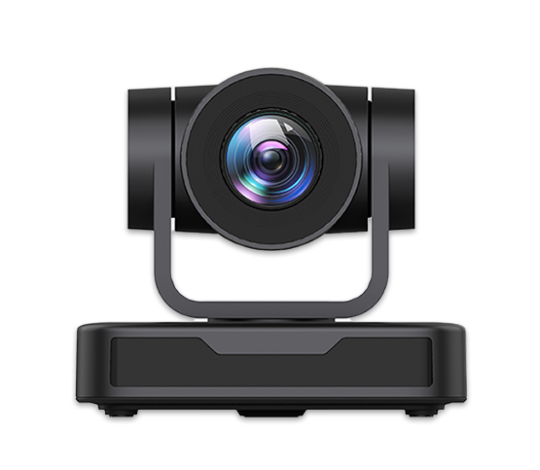
Video conferencing cameras are specialized devices designed for use in video conferencing sessions. There are two main categories of video cameras: consumer and professional.
The former are designed for non-professional recording and include webcams. The latter are used in video conferencing, television, and filmmaking.
Resolution and Quality
There are four main resolutions in hardware video conferencing systems: CIF (352×288), 4CIF (704×576), HD (High Definition – 1280×720), and Full HD (1920×1080)
Software-based video conferencing solutions often use QVGA (320×240) and VGA (640×480) resolutions. QVGA and CIF, as well as VGA and 4CIF, can be considered relatively similar resolutions. The former originated from the resolution of digital matrices (as in webcams), while the latter are historically based on television video standards (PAL and NTSC).
In recent years, video conferencing equipment supporting high-definition resolution and transmitting a more realistic picture — HD and later Full HD — has appeared on the market. However, HD quality requires much faster data transmission. Only devices with a screen resolution of at least 1280×720 pixels can display HD video.
HD Video Conferencing Cameras
There are several types of video conferencing cameras, including professional PTZ cameras (with three degrees of freedom), webcams, and IP cameras. All types of cameras can function as standalone devices or be integrated into other equipment (e.g., cell phones, laptops, smartphones, videophones, or video conferencing endpoints).
PTZ Cameras
PTZ cameras (Pan-Tilt-Zoom) are considered the most versatile option for video conferencing in conference rooms or in situations requiring high image quality under any conditions. These cameras do not compress the image and transmit it directly to a capture card or video conferencing endpoint without delay. They feature a rotary mechanism that allows you to aim the camera at the speaker during a conference.
The main disadvantage of PTZ cameras is their high cost, which is justified by their versatility. Almost all PTZ cameras can be controlled via remote control or a special control panel with a joystick. They can also store pre-programmed positions and quickly switch to them, or automatically zoom in on the active speaker using directional microphones.
Webcams
Webcams are devices primarily designed to capture images in real time and transmit them over the Internet. Such cameras may be connected to a computer via a USB port or integrated into the device’s body. They are suitable for personal video conferencing.
The main advantages of webcams are their low cost, small size, and pre-digitized output signal. However, unlike PTZ cameras, webcams digitize and compress the image, which introduces a slight delay in recording and transmitting video. Compression artifacts may also be visible.
IP Cameras
An IP camera (Internet Protocol camera) is a network device that transmits video data in digital format over a computer network. Each IP camera has its own IP address. To view the image captured by such a camera, it is often sufficient to enter its IP address into a browser’s address bar.
IP cameras are rarely used in video conferencing because of signal delays caused by digitization and compression. These delays are further increased by the camera’s network module, which must buffer the image for stable transmission over Ethernet-based networks. This creates additional load on network equipment and slows down video transmission.
Empower your video conferencing experience with TrueConf!
FAQ
Can I use a standard USB webcam for a large conference room meeting?
While standard webcams are affordable and great for personal use, they lack the wide coverage, optical zoom, and high-quality sensors needed for large groups. For professional conference rooms, it is highly recommended to use a PTZ camera to ensure everyone is clearly visible. TrueConf fully supports both basic webcams for huddle spaces and advanced PTZ cameras for larger enterprise meeting rooms.
Why are IP cameras generally not recommended for interactive video conferencing?
IP cameras are designed primarily for surveillance and introduce significant latency because they must digitize, compress, and buffer video for network transmission. This delay makes real-time, interactive communication feel unnatural and out of sync. When using TrueConf, connecting a direct USB or HDMI PTZ camera bypasses these network delays, ensuring smooth, real-time interaction without lag.
What video resolution is necessary for a professional video conferencing setup?
For modern business meetings, Full HD (1920×1080) is the standard to ensure facial expressions and shared details are clearly visible to remote participants. While older systems relied on lower resolutions like CIF or VGA, today’s networks and displays easily support high-definition video. TrueConf optimizes HD and Full HD video streams using advanced codecs, delivering crystal-clear visuals even on bandwidth-constrained connections.
How can I easily control a PTZ camera’s movements and presets during a live meeting?
PTZ cameras can be controlled using physical joysticks, IR remotes, or directly through the video conferencing software interface. TrueConf provides intuitive on-screen controls and supports standard control protocols, allowing the meeting host to seamlessly pan, tilt, zoom, or recall saved camera presets without leaving the meeting window.
Does TrueConf support automatic speaker tracking with PTZ cameras?
Yes, many modern PTZ cameras feature built-in auto-tracking capabilities that automatically pan and tilt to keep the active speaker in the frame. When integrated with TrueConf, these hardware features work seamlessly with the platform’s active speaker detection to ensure remote participants always have the best view of whoever is talking. This creates a highly dynamic, broadcast-quality experience without requiring manual camera operation.
Can I mix different types of cameras, like a PTZ and a webcam, in a single TrueConf conference?
Absolutely, TrueConf allows you to connect and switch between multiple video sources simultaneously during a meeting. You can use a high-end PTZ camera for the main room view and a secondary webcam or IP camera to show a specific product or whiteboard angle. This flexibility ensures you can build a customized, multi-angle video setup tailored to your specific meeting needs.

Follow us on social networks