
PTZ Camera
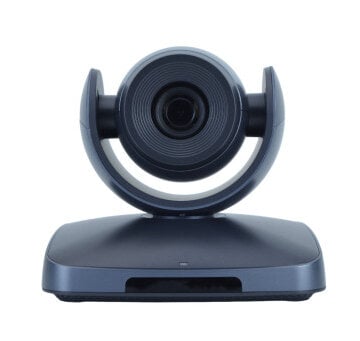
PTZ (Pan-Tilt-Zoom) camera is a type of camera that can automatically turn toward the speaker, following preset positions with the help of a rotary mechanism. PTZ cameras are capable of rotating, tilting, and zooming thanks to specialized mechanical and electronic drives. They are equipped with variable focal length lenses and provide a wide field of view through their built-in rotation mechanism.
A controlled 4K PTZ camera is an integral part of modern surveillance systems and is used for both indoor and outdoor monitoring. In video conferencing, PTZ cameras play a crucial role, serving as an essential element of any conference or meeting room.
The Key Features of a PTZ Camera
-
The image quality of a PTZ camera is ensured by a CCD sensor, while color reproduction largely depends on the size and quality of that sensor.
Some PTZ cameras are capable of delivering high-quality recordings even in low-light environments: a feature especially valuable for video conferencing, as many meeting rooms are poorly equipped in terms of lighting.
- PTZ cameras support a varying number of preset positions, ranging from just a few to more than one hundred. The greater the number of presets, the more flexibility and convenience the camera provides.
- A PTZ camera should offer a wide tilt and rotation range at maximum speed to capture every angle of the room efficiently.
- PTZ cameras can be mounted on the ceiling, wall, or placed on a desktop using dedicated mounting brackets, allowing for versatile placement in any meeting space.
- PTZ functions (panning, tilting, and zooming) can be operated via various interfaces such as IR remotes, hardware controllers, or integrated touch panels.
- Most PTZ cameras support an alarm feature that is triggered by changes in illumination within a monitored area, adding an extra layer of security.
A PTZ camera can be directed toward an individual speaker during a video conference or used to capture the entire meeting room with the help of optical zoom and servo control.
Empower your video conferencing experience with TrueConf!
FAQ
How do I connect and control a PTZ camera within my video conferencing software?
Most modern PTZ cameras connect via USB, IP, or standard video interfaces, making them highly compatible with professional communication platforms. TrueConf natively supports a wide range of PTZ cameras and allows you to control their pan, tilt, and zoom functions directly through the software interface or via integrated hardware controllers. This ensures seamless integration into your existing conference room setup without needing complex third-party drivers.
Can the meeting host adjust the camera’s framing and zoom in real time during a live call?
Yes, you can easily manage the camera’s movements in real time using the software interface, a dedicated physical joystick, or a touch panel. TrueConf provides intuitive on-screen controls that allow the host or a designated operator to smoothly adjust the framing, zoom in on a presenter, or switch between preset angles without leaving the meeting window. This keeps the technical management of the room simple and unobtrusive.
How do preset positions actually improve the flow of a professional video conference?
Preset positions allow you to save specific camera angles—such as a wide shot of the whole room or a tight close-up of the whiteboard—for instant recall. With TrueConf, you can map these presets to specific keyboard shortcuts or hardware buttons, enabling the operator to switch views instantly during the meeting. This eliminates the distraction of manually panning the camera and keeps the focus entirely on the discussion.
Will a PTZ camera still deliver high-quality video if our meeting room has poor or uneven lighting?
Yes, high-quality PTZ cameras are equipped with advanced sensors and low-light compensation technologies to maintain clear video even in dimly lit environments. When paired with TrueConf’s adaptive video processing and smart image enhancement algorithms, the software further optimizes the visual feed in real time. This combination ensures that remote participants always see a bright, clear, and professional image, regardless of the room’s lighting conditions.
Are PTZ cameras only useful for large auditoriums, or can they be used in smaller meeting rooms?
While PTZ cameras are famous for covering large spaces, their optical zoom and precise framing capabilities make them incredibly valuable in small to medium-sized meeting rooms as well. In smaller spaces, a TrueConf-integrated PTZ camera can be positioned on a desktop or wall to capture the entire team, and then smoothly zoom in on the active speaker without losing image quality. This versatility makes them a highly effective upgrade for any meeting environment.
Can the camera automatically follow the person who is speaking without a dedicated operator?
Many advanced PTZ cameras feature auto-tracking or voice-activation capabilities that automatically pan and tilt to keep the active speaker in the center of the frame. When integrated with TrueConf, these hardware features work seamlessly with the platform’s active speaker detection to ensure the remote audience always has the best view of whoever is talking. This creates a highly dynamic, broadcast-quality experience without requiring manual camera operation.

Follow us on social networks