
The Advantages of Remote Working
Updated April 2026
What is Remote Working?
Remote work is a flexible work model that allows employees to perform their day-to-day job functions in a location outside of the traditional office, often at home or in a coworking space. Remote employees use online tools and video conferencing to connect with coworkers and complete work. This model provides greater freedom and can improve work-life balance.
For companies, remote work has gone from a business continuity solution to a strategic imperative. Today, with the right collaboration tools in place, remote teams drive higher productivity, improve employee satisfaction, and lower operational costs while maintaining or improving security and delivering a quality collaborative experience.
Remote work provides flexibility, cost savings, and access to a broader talent pool, with each of these benefits being heavily dependent on the video conferencing solution you select based on the needs of your organization, compliance requirements, and ability to scale.
|
Key Takeaway |
Practical Implication |
|---|---|
|
Flexibility drives productivity |
Employees who have control over their work hours experience a 22-35% increase in productivity, especially when video conferencing is used to manage directly related workloads. |
|
Infrastructure choice determines security posture |
On-premises video conferencing eliminates third-party data exposure, essential for government, finance, and healthcare |
|
Cost savings compound over time |
Reduced office overhead + lower absenteeism + higher retention = measurable ROI within 6-12 months |
|
Employee well-being improves retention |
Remote-friendly policies paired with ergonomic support reduce burnout and increase loyalty |
|
Environmental impact matters |
Fewer commutes and lower facility energy use support corporate sustainability goals |
Insight #1: Deployment Model Dictates Long-Term Viability
Many remote work reviews overlook a critical decision point: cloud-hosted versus on-premises infrastructure. While SaaS platforms offer quick setup, organizations in regulated sectors (finance, defense, healthcare) often require full data sovereignty.
Self-hosted solutions like TrueConf Server operate entirely within your network perimeter, ensuring compliance with GDPR, HIPAA, or industry-specific mandates without sacrificing video quality or collaboration features.
Self-Hosted Team Messenger with Video Conferencing
A cutting-edge team collaboration server with personal and group chats, UltraHD video conferences, and advanced AI-powered features — free for up to 1,000 users!
10 Key Benefits of Working from Home
1. Flexible Schedule
Working remotely empowers individuals to adjust daily routines in ways that match unique habits and lifestyle needs. Morning people often start tasks earlier, whereas late workers may remain efficient well into evening hours. Such adaptability helps lower tension and boosts overall morale in professional settings. It further enables moments of rest during the day when appropriate, aiding focus and emotional well-being. Consequently, a significant number of professionals discover they maintain sharper attention and produce stronger results. Smart employers can take advantage of this by outsourcing parts of their business overseas and saving quite a bit. This article detailing outsourcing pros and cons might help you decide.
2. Better Work-Life Balance
Life Balance Remote work helps individuals better manage family obligations, including parenting, senior support, or daily chores, alongside career duties. Workers often avoid deciding whether to attend important home occasions or fulfill professional goals. Maintaining this harmony contributes to enhanced emotional well-being and a deeper feeling of ownership over daily schedules. It additionally lowers exhaustion levels, a frequent issue in structured office settings. As domestic and occupational pressures ease, general contentment tends to grow steadily. Remote work helps individuals better manage family obligations, including parenting, senior support, or daily chores, alongside career duties.
3. No Commuting
Removing the routine travel preserves valuable energy, occasionally adding multiple productive hours every week. It significantly lowers expenses related to gasoline, transit fares, and vehicle repairs. Freed from congestion stress or packed subways and coaches, workers often begin mornings with improved mental clarity. The reclaimed minutes may support sleep, workouts, or spending quality time with loved ones. Over extended periods, skipping commutes supports healthier bodies and more balanced emotional states.
4. Increased Productivity
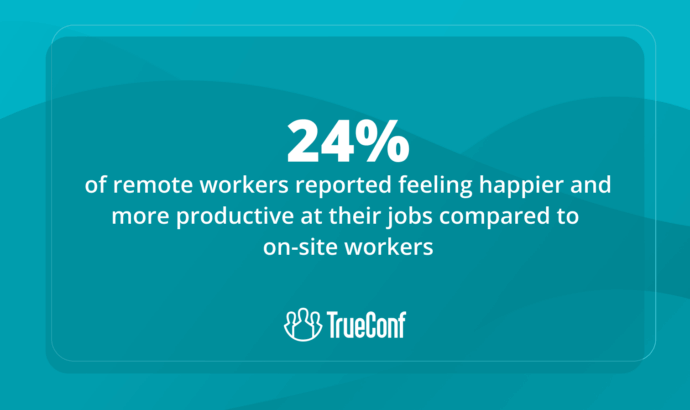
Increased Productivity Home environments often prove more peaceful compared to shared office layouts. Free from frequent disruptions, numerous professionals maintain sharper attention and accomplish work faster. Individuals enjoy the ability to design their own environment in a manner that encourages strong mental focus. Various reports indicate that virtual employees frequently outperform those stationed at corporate locations. Sustained performance improvements may foster increased employer confidence and open doors to future promotion paths.
5. Cost Savings
Operating remotely often helps dramatically cut regular costs. Staff members typically avoid paying for transport, meals outside, or formal attire. Gradually, these reductions accumulate, enhancing household budgets. Moreover, organizations might lower spending on building rentals, billing and payments, and energy consumption. Such monetary advantages contribute to greater security and ease across work and home environments.
6. Improved Health
Remote work allows more time for cooking nutritious meals, exercising, and getting enough sleep. Reduced exposure to germs in shared office spaces also means fewer sick days. Mental health often improves due to lower stress levels and a more relaxed pace. Employees can take short breaks to stretch or meditate, contributing to overall wellness. In the long run, this can lead to fewer health-related absences and increased energy.
7. Custom Workspace
From home, professionals may establish a workstation customized around specific tastes and requirements. Individuals are free to select furniture, equipment, lighting conditions, and ambient temperature that match their comfort. Such a tailored environment often enhances ease and minimizes bodily tension. With limited interruptions and increased authority over the setting, maintaining attention becomes more achievable. An intentionally arranged home office may further support greater enthusiasm and overall workplace fulfillment. Setting up a functional workspace with ergonomic furniture like height-adjustable L-shaped desks can further enhance focus and efficiency. Besides, with modern technology, employers can streamline different business operations. They can use any web app and deploy it in AWS, harnessing the power of cloud computing to enhance scalability, security, and accessibility.
8. Reduced Absenteeism
While operating remotely, staff members often tend to maintain productivity during mild sickness or unfavorable conditions. They’re also able to respond swiftly to urgent matters at home without requiring complete time away. Leveraging tools like an AI executive assistant can further streamline tasks and communication, enhancing overall efficiency. Such adaptability supports ongoing progress and lessens pressure on fellow colleagues. It further promotes an environment built on accountability and mutual confidence. Gradually, reduced time off results in steadier work outcomes.
9. Greater Job Satisfaction
Satisfaction Independence in planning and task execution provides workers with a deeper feeling of control. Having confidence placed in their ability to organize personal schedules often boosts drive and active participation. Incorporating tools like 361-degree feedback can further enhance communication, offering well-rounded insights from peers, managers, and self-assessments. Steering clear of workplace drama and unnecessary disruptions may enhance the overall job atmosphere. Numerous professionals mention feeling more valued and experiencing reduced oversight while working offsite. Collectively, such elements foster stronger team spirit and increased dedication to the organization.
10. Environmental Benefits
Reduced daily travel leads to decreased traffic volume and lowers vehicle-related pollution. This shift assists in addressing environmental issues and enhances air conditions in cities. Traditional workplaces typically use electricity for illumination, temperature control, and equipment — usage that declines when staff operate remotely. Businesses adopting flexible arrangements can play a role in meeting wider ecological objectives. Therefore, working from home benefits personal health and strengthens international sustainability initiatives.
Remote Work Deployment Models: Choosing the Right Foundation
|
Deployment Type |
Best For |
Key Advantages |
Considerations |
|---|---|---|---|
|
On-Premises (Self-Hosted) |
Enterprises, government, regulated industries |
Full data control, compliance readiness, no third-party access, customizable integration |
Requires internal IT resources for setup and maintenance |
|
Cloud-Hosted (SaaS) |
SMBs, startups, fast-scaling teams |
Quick deployment, minimal IT overhead, automatic updates |
Limited customization, data resides with vendor, recurring subscription costs |
|
Hybrid Architecture |
Organizations with mixed security needs |
Flexibility to route sensitive traffic internally while using cloud for general collaboration |
More complex configuration, requires clear governance policies |
Insight #2: Administrative Control Is a Hidden Selection Criterion
Beyond features and pricing, enterprise buyers should evaluate who controls user provisioning, audit logs, and encryption keys. Platforms that delegate these functions to the vendor create compliance blind spots.
TrueConf’s architecture keeps governance tools in-house, allowing IT teams to enforce role-based access, monitor session metadata, and integrate with existing identity providers—critical for organizations managing thousands of remote users across jurisdictions.
The Benefits of Remote Working for Employers and Employees
There are many benefits of remote working for employers and employees.
|
Advantages for Employers: |
Advantages for Employees: |
|---|---|
|
1. Increased Productivity – When employees are able to work from home, they are often able to be more productive because they are not interrupted by office distractions. 2. Reduced Office Costs – By allowing employees to work from home, employers can save money on office space and equipment. 3. Increased Flexibility – Employees who work remotely have more flexibility in terms of hours and can often work from anywhere in the world. 4. Greater Employee Engagement – Employees who work remotely are often more engaged in their work because they feel more in control of their own schedule and work environment. Employee engagement surveys help track and enhance this engagement, supporting overall team goals. 5. Greater Employee Retention – Employees who are given the opportunity to work remotely are more likely to stay with their employer for a longer period of time. |
1. Increased Flexibility – Employees who work remotely have more flexibility in terms of hours and can often work from anywhere in the world. 2. Greater Engagement – Employees who work remotely are often more engaged in their work because they feel more in control of their own schedule and work environment. This also helps the team to meet employee engagement goals. 3. Greater Job Satisfaction – Employees who work remotely often report higher levels of job satisfaction because they are able to balance work and personal responsibilities more easily. 4. Increased Productivity – When employees are able to work from home, they are often able to be more productive because they are not interrupted by office distractions. 5. Reduced Stress – Employees who work remotely often report lower levels of stress because they are not dealing with the distractions and noise of an office environment. |
Essential Video Conferencing Capabilities for Remote Teams
|
Feature Category |
Why It Matters |
Enterprise-Grade Expectation |
|---|---|---|
|
Video Quality |
Clear visuals reduce miscommunication and fatigue |
UltraHD support, adaptive bitrate, low-light optimization |
|
Security & Compliance |
Protects sensitive discussions and data |
End-to-end encryption, on-premises deployment, audit trails |
|
Scalability |
Supports team growth without re-architecture |
Modular licensing, load balancing, MCU support for large calls |
|
Integration |
Fits into existing workflows without disruption |
API/SDK availability, calendar sync, CRM and HRIS connectors |
|
User Experience |
Adoption depends on ease of use |
Intuitive interface, cross-platform consistency, minimal training |
Insight #3: Integration Depth Outweighs Feature Count
A platform with 50 minor features but poor API coverage creates more friction than a focused solution with robust developer tools.
For enterprises, the ability to embed video into internal portals, automate user provisioning via SCIM, or trigger workflows from meeting events delivers more strategic value than novelty features.
TrueConf’s API suite and SDKs enable IT teams to tailor the collaboration experience to precise business processes.
Try TrueConf Server Free!
- 1,000 online users with the ability to chats and mske one-on-one video calls.
- 10 PRO users with the ability to participate in group video conferences.
- One SIP/H.323/RTSP connection for interoperability with corporate PBX and SIP/H.323 endpoints.
- One guest connection to invite a non-authenticated user via link to your meetings.

What to Consider before Embracing Remote Work?
There are a few things to consider before embracing remote work, especially if you’ve never done it before.
1. How will remote work affect your team’s communication?
If your team is used to having all of their communication happen in person, they may struggle to adapt to remote work. Make sure to set up some guidelines for communication, such as using an office instant messenger and establishing regular video check-ins.
2. How will you stay productive when working from home?
Remote work can blur the boundaries between personal and professional time, making it harder to focus. Create a dedicated workspace, minimize distractions, and stick to a structured schedule. Use productivity tools like task managers or time trackers to stay on target. It’s also helpful to set daily goals and take regular breaks to maintain energy levels.
3. How will remote work affect your team’s culture?
Without a shared physical space, it can be difficult to maintain a strong team spirit and company culture. Find ways to foster connection through virtual team-building activities, casual check-ins, and recognition of achievements. Encourage open communication and inclusivity to make everyone feel part of the group, even when working apart.
4. How will you stay connected with your team?
Maintaining connection goes beyond scheduled meetings. Encourage ongoing conversations through chat channels or shared platforms, and make space for informal interaction—like virtual coffee breaks or team challenges. Transparency, accessibility, and responsiveness are key to helping your team feel supported and connected in a remote environment.
FAQ
What are the disadvantages of working from home?
Downsides of working from home can be social isolation, home-based interruptions, lack of proper communication, unavailability of office resources, and the separation between work and personal life. Weaker boundaries may make employees feel like they are required to be online all the time or make it difficult for them to unwind. Most of these challenges can be managed with a structured timetable, frequent team interactions, a separate workplace, and efficient collaboration software.
What makes a video conferencing solution suitable for enterprise remote work?
Enterprise-grade solutions prioritize security controls, scalability, and integration capabilities over consumer-friendly features. TrueConf delivers on-premises deployment options, role-based access management, and API-driven customization—critical for organizations managing sensitive data or complex IT environments.
How does on-premises video conferencing improve data security for remote teams?
On-premises solutions like TrueConf keep all media streams and metadata within your network perimeter, eliminating exposure to third-party cloud infrastructure. This architecture supports compliance with strict regulations and gives IT teams full visibility into access logs and encryption settings.
Can remote collaboration tools integrate with existing enterprise systems?
Yes—platforms designed for enterprise adoption provide APIs, SDKs, and pre-built connectors for identity providers, calendar systems, and workflow tools. TrueConf’s integration suite enables seamless embedding into internal portals and automation of user provisioning via standard protocols.
What should IT teams evaluate when selecting a remote work platform?
Beyond feature lists, assess deployment flexibility, administrative control, and total cost of ownership. TrueConf supports hybrid scaling, granular governance policies, and predictable licensing—helping teams avoid vendor lock-in and unexpected usage fees common in cloud-first alternatives.
Is it possible to maintain team culture with remote-first communication tools?
Absolutely—when the platform supports rich interaction. TrueConf combines persistent chat, HD video, screen sharing, and AI-powered transcription to recreate the nuance of in-person collaboration, helping teams sustain engagement and psychological connection regardless of location.
Take your team communication to the next level with TrueConf!
A powerful self-hosted video conferencing solution for up to 1,000 users, available on desktop, mobile, and room systems.
About the Author
Nikita Dymenko is a technology writer and business development professional with more than six years of experience in the unified communications industry. Drawing on his background in product management, strategic growth, and business development at TrueConf, Nikita creates insightful articles and reviews about video conferencing platforms, collaboration tools, and enterprise messaging solutions.


Follow us on social networks