
The Importance of Teams Within a Business
Updated April 2026
Executive Summary
Effective team structures are the backbone of organizational productivity. This guide breaks down the four primary team types—functional, cross-functional, project-based, and virtual—and explains how each drives specific business outcomes.
For enterprises prioritizing data sovereignty, compliance, and seamless collaboration, self-hosted platforms like TrueConf provide a secure foundation for team communication without compromising on UltraHD video quality or integration flexibility.
|
Team Type |
Best For |
Key Challenge |
Ideal Tool Features |
|---|---|---|---|
|
Functional |
Department-specific workflows, specialized tasks |
Siloed knowledge, limited cross-department visibility |
Role-based access, department channels, file sharing |
|
Cross-functional |
Innovation projects, product launches, complex problem-solving |
Coordination overhead, conflicting priorities |
Unified messaging, screen sharing, calendar integration |
|
Project-based |
Time-bound initiatives, agile sprints, client deliverables |
Knowledge loss after disbanding, resource allocation |
Task tracking, recording/archiving, guest access |
|
Virtual/Remote |
Distributed talent, global operations, flexible work |
Time zone friction, engagement gaps, security risks |
End-to-end encryption, VDI support, low-bandwidth mode |
Key Takeaway: The right team structure amplifies output, but only when paired with collaboration tools that match your deployment model, security requirements, and integration ecosystem. On-premises solutions like TrueConf Server eliminate cloud dependency while delivering enterprise-grade video conferencing, corporate messaging, and AI-powered transcription—critical for regulated industries and organizations with strict data governance policies.
On average, office workers spend around 42% of their time working together. But poor communication can still cause problems and slow things down. For example, 66% of customers have gone to competitors because companies didn’t communicate well enough.
Insight #1: Deployment Model Dictates Long-Term Viability
Many teams select collaboration tools based on features alone, overlooking how deployment architecture impacts scalability and compliance.
Cloud-native platforms offer quick setup but may conflict with data residency laws.
Self-hosted solutions like TrueConf Server give IT teams full control over encryption keys, audit logs, and user provisioning—essential for government, finance, and healthcare sectors where “who accesses what” is as critical as “what is shared.”
Try TrueConf Server Free!
- 1,000 online users with the ability to chats and mske one-on-one video calls.
- 10 PRO users with the ability to participate in group video conferences.
- One SIP/H.323/RTSP connection for interoperability with corporate PBX and SIP/H.323 endpoints.
- One guest connection to invite a non-authenticated user via link to your meetings.

Types of Teams within a Business
Functional teams
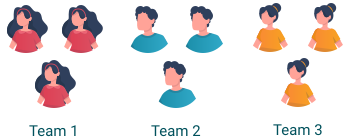
Functional teams are made up of people from the same department who focus on specific goals. Take a finance team – they deal with things like budgeting and forecasting. Their job is to keep the company’s finances on track. Most companies (about 90%) use teams like this because they’re good at handling specialised tasks. Everyone knows their role and this keeps things running smoothly.
Cross-functional teams
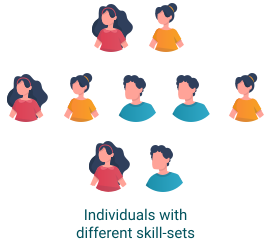
Now imagine a team where people from different departments work together. Apple is a good example – they brought together engineers, marketers and designers to create the iPhone. By pooling their ideas and skills, they were able to create something groundbreaking. Companies that use such teams often see greater profits because they get fresh ideas from different perspectives. In ecommerce projects, decisions like magento 2 to shopify migration, choosing a free commerce platform for a new store, or undergoing a dedicated woocommerce development overhaul often depend on this kind of cross-functional input, where developers, marketers, and operations teams align to ensure a smooth transition.
But if teams from different departments don’t communicate well, it can be a mess. If you’ve ever called a company and been passed from one person to another without getting an answer, you know what I mean. Teams need to work together, not against each other, to make sure customers get the help they need.
Project Teams
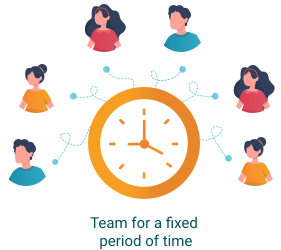
Project teams are like pop-up shops – they come together for a specific purpose and disband when the job is done. SpaceX does this all the time. They build project teams for every rocket they design, like the Starship or Falcon Heavy. These teams are completely focused on their task, which helps them meet tight deadlines and push the boundaries of what’s possible. Research shows that such teams are more likely to complete projects on time and within budget. Many organizations use frameworks like Agile to track projects, and if multiple teams are involved, the Scaled Agile Framework (SAFe) helps coordinate between them.
Virtual teams
Then there are virtual teams, which are essentially groups of people working together from different locations. Imagine your influencer agency in New York, a developer in London, and a manager in Tokyo all working on the same project.
Virtual teams are extremely flexible and allow businesses to work with talented people from all over the world. They’re also easier on the budget because not everyone has to be in the same place. To support this model, companies often turn to hiring platforms for remote talent, to ensure remote teams are built with the right expertise and long-term fit. But for these teams to work, there need to be clear rules about when people are available and how they communicate.
Done right, virtual teams can be just as productive as face-to-face teams – sometimes more so. To streamline management and ensure compliance across borders, many businesses turn to an employer of record and automated approval workflows, which together help handle legal, administrative, and approval tasks, allowing teams to focus on what they do best.

|
Feature Priority |
Functional Teams |
Cross-functional Teams |
Virtual Teams |
|---|---|---|---|
|
Access Control |
Department-level permissions |
Project-based roles |
Geo-fenced logins, MFA |
|
Content Sharing |
File repositories, versioning |
Real-time co-editing, whiteboards |
Low-bandwidth optimization |
|
Meeting Needs |
Scheduled stand-ups |
Ad-hoc huddles, screen sharing |
Recorded sessions, async playback |
|
Integration Depth |
ERP/CRM connectors |
Design tools, task managers |
Calendar sync, SSO/LDAP |
Insight #2: Integration Ecosystem Is a Silent Decision Driver
Teams rarely fail because of missing features—they fail because tools don’t connect cleanly to existing systems.
Before selecting a collaboration platform, audit your current stack: Does it support SIP/H.323 for legacy endpoints? Can it push meeting data to your SIEM?
TrueConf’s API-first architecture and pre-built connectors for Microsoft Exchange, Active Directory, and monitoring systems reduce integration friction, ensuring team tools amplify—not disrupt—established workflows.
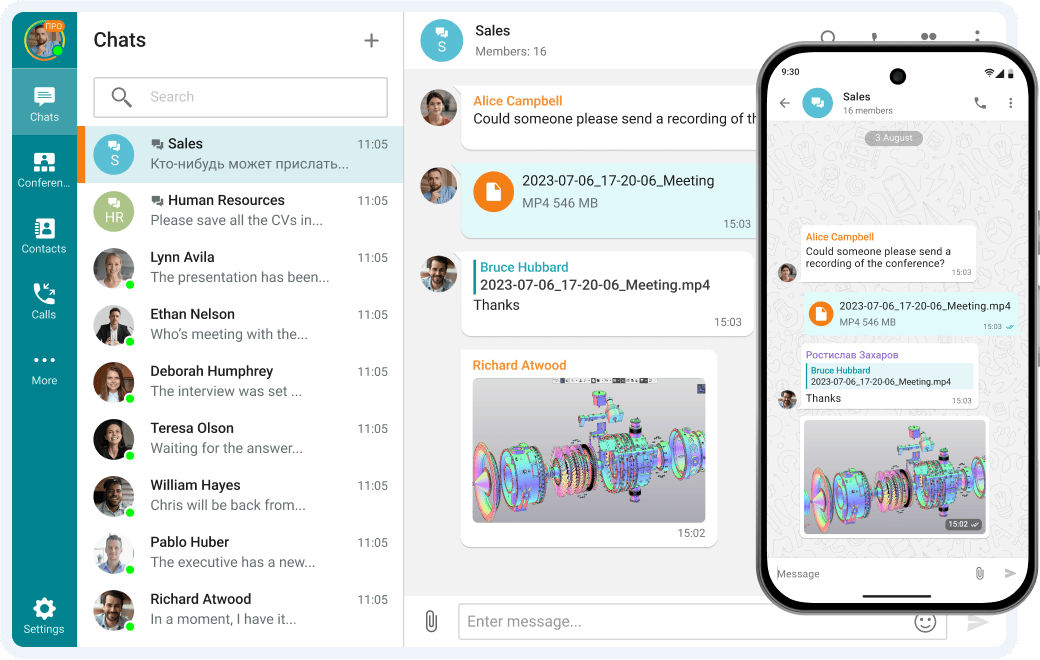
TrueConf for virtual teams
Unlock seamless communication and collaboration for your virtual teams with TrueConf’s secure and high-quality video conferencing platform. Empower remote work with features designed to keep your team connected, productive, and engaged—no matter where they are.
Benefits of Team within a Business
- Better communication. Communication is the foundation of every successful team project. Imagine a group of people working on a big project. Someone sketches out an idea, someone else adds their thoughts, and soon everyone’s contributing. This is how good communication works – open, clear and simple. Simple activities like icebreakers or team-building games can help people feel more relaxed and build trust. When there’s trust, sharing ideas becomes second nature and the team works better together.
- More creativity. Think about the last time you had a great idea. Chances are you weren’t alone – someone else’s suggestion or feedback probably helped spark it. Teamwork encourages creativity by allowing people to bounce ideas off each other. When everyone feels comfortable sharing, the possibilities grow, especially when it comes to improving website content or using reverse image search to generate new insights. Without this collaboration, brainstorming can fall flat and some of the best ideas may never come to fruition.
- A happier workplace. Imagine a workplace where people actually want to come to work. It’s not because of the free snacks or cool perks – it’s because they feel valued and connected. When a workplace values teamwork, people build strong relationships and feel that their work matters.
- Higher motivation. Being part of a good team can inspire people to do their best. When employees bond over common goals – or even a coffee break – they feel more energized and excited about what they’re working on. These connections keep people motivated, even when the work gets tough.
- Personal growth. Think of a time when a colleague showed you a faster way to do something, or gave you a new perspective on a problem. Teamwork creates moments like this all the time. Sharing knowledge and helping each other grows everyone. These little lessons add up over time, making the whole team stronger and ready to take on new challenges.
Take your team communication to the next level with TrueConf!
A powerful self-hosted video conferencing solution for up to 1,000 users, available on desktop, mobile, and room systems.
How to Build an Effective Team
- Good leadership. A good leader is like a coach – someone who guides, motivates and keeps the team on track. But even leaders need to grow. A leader who struggles with communication could learn a lot from workshops or coaches, while someone who is good at planning but less confident with people could benefit from practice through role-playing. Feedback from the team will also help leaders identify where they need to improve.
- Clear goals. Imagine going on a trip without knowing your destination. You wouldn’t know which direction to take, how much time you need, or what to pack. Teams face the same confusion without clear goals—they’re left guessing what to prioritize and how to measure progress. The SMART method—Specific, Measurable, Achievable, Relevant, and Time-Bound—turns vague ideas into actionable plans. Instead of saying, “We need to increase sales,” try, “We want to grow sales by 15% in three months by targeting new customers.” This clarity helps team members focus their efforts and stay aligned.
- Define roles. A great team is like a relay race—everyone knows their role and how it fits into the bigger picture. Celebrating milestones along the way keeps the team motivated and focused. It also reminds everyone that progress is being made, even during long or challenging projects. Recognizing individual efforts within the team fosters a sense of pride and encourages continued commitment.
- Let the team help you hire. Imagine starting a new job and feeling welcomed right away because your teammates helped select you. When team members are involved in hiring – whether through interviews or referrals – they help find people who are a good fit.
- Keep communication open. Imagine a team meeting where everyone feels comfortable speaking up. A good manager makes space for quieter team members to share their thoughts and helps others build on them. Regular check-ins, such as weekly calls or quick updates, help keep everyone connected. Giving clear feedback – such as “Try breaking your report into sections for greater clarity” – keeps things on track. Sharing QR code business card created using The QR Code Generator (TQRCG) simplifies networking, making it easy to exchange contact details instantly. In collaborative workplaces, a QR code sticker generator for coworking space environments can further streamline communication by providing quick access to member directories, booking information, or shared resources.
- Build trust. Think about someone you trust completely. Working with them probably feels easy and productive. Building that level of trust in a team takes effort – through team-building activities, one-on-one conversations and celebrating successes together. Trust makes working together easier and helps the team perform better.
- Encourage growth. Imagine being part of a team that’s always learning and improving. A sales team might attend a negotiation workshop, while an engineering team might try out new tools or software. Entrepreneurs exploring small business ideas 2026 should also prioritize building adaptable teams through cross-training, which gives people the chance to learn new skills. Helping your team grow keeps them motivated and helps your business thrive.
Selection Criteria
|
Selection Criteria |
Cloud-First Platforms |
Self-Hosted (TrueConf) |
Hybrid Approach |
|---|---|---|---|
|
Time to Deploy |
Hours |
Days to weeks |
Flexible phasing |
|
Data Control |
Vendor-managed |
Full customer ownership |
Split by workload |
|
Customization |
Limited to API scope |
Deep server/client mods |
Best of both worlds |
|
Cost Structure |
Per-user/month subscription |
Upfront license + maintenance |
Mixed CAPEX/OPEX |
|
Compliance Fit |
Depends on vendor certs |
Configurable to any standard |
Policy-based routing |
Conclusion
Imagine a team in a busy office faced with a sudden challenge – a major client changes its priorities and the project needs a quick pivot. Instead of freezing, the team springs into action. The designer suggests updates, the marketing lead offers a new angle, and the project manager organises the plan. In no time, they adapt and impress the client. That’s what strong teams do – they don’t just manage change, they take control and turn it into something positive.
FAQ
What team structure works best for regulated industries?
Functional and project-based teams with strict access controls perform best in regulated environments. TrueConf supports this through granular user roles, on-premises deployment, and audit-ready logging—ensuring collaboration never compromises compliance with standards like GDPR, HIPAA, or FSTEC.
How do virtual teams maintain security without sacrificing usability?
Virtual teams need encryption, MFA, and device management without complex workflows. TrueConf delivers end-to-end encrypted video and messaging with single sign-on and VDI support, letting remote staff collaborate securely while IT retains centralized policy control via TrueConf Monitor.
Can cross-functional teams use the same platform as departmental teams?
Yes—if the platform supports flexible permission models. TrueConf allows creating project-specific workspaces with custom access rules while maintaining a global directory, so cross-functional groups collaborate freely without exposing sensitive departmental channels.
What if our organization requires air-gapped networks?
Teams in defense, critical infrastructure, or classified projects need tools that operate without internet dependency. TrueConf Server runs entirely within your closed network, supporting video conferences, messaging, and file sharing across air-gapped segments with no external connectivity required.
How do we scale collaboration tools as teams grow or restructure?
Scalability requires modular licensing and centralized management. TrueConf Enterprise supports dynamic user provisioning, load balancing across servers, and global directory sync—allowing teams to expand, merge, or reorganize without re-architecting the communication backbone.
Does self-hosted mean we lose AI-powered features?
Not with modern architectures. TrueConf AI Server adds transcription, speaker diarization, and meeting analytics as an optional on-premises module, giving teams intelligent insights while keeping all processed data within your security perimeter—unlike cloud AI services that transmit content externally.
What integration capabilities should we prioritize for team tools?
Focus on directory sync (LDAP/AD), calendar interoperability (Exchange), and API access for custom workflows. TrueConf provides native connectors for these enterprise systems plus a REST API and Video SDK, enabling teams to embed collaboration into existing portals, CRMs, or ticketing systems without vendor lock-in.
About the Author
Olga Afonina is a technology writer and industry expert specializing in video conferencing solutions and collaboration software. At TrueConf, she focuses on exploring the latest trends in collaboration technologies and providing businesses with practical insights into effective workplace communication. Drawing on her background in content development and industry research, Olga writes articles and reviews that help readers better understand the benefits of enterprise-grade communication.


Follow us on social networks