
Digital Communication: Channels & Guidelines
Updated April 2026
Executive Summary
Digital communication is the backbone of modern business operations, enabling teams to collaborate, share information, and make decisions regardless of location. This guide explains what digital communication is, breaks down its core components, compares major channels, and provides actionable guidelines for implementation in enterprise environments.
Key takeaways at a glance:
|
Aspect |
Core Insight |
Practical Application |
|---|---|---|
|
Definition |
Electronic transmission of data via internet-connected devices using discrete signal encoding |
Enables scalable, multimedia-rich interactions across global teams |
|
Critical Components |
Sender, encoder, channel, decoder, receiver form a complete communication loop |
Understanding each element helps troubleshoot delivery issues and optimize tool selection |
|
Top Channels |
Email, instant messaging, social media, video conferencing, surveys, SMS, blogs |
Match channel to message urgency, audience, and compliance requirements |
|
Enterprise Priority |
Security, integration, governance, and user adoption outweigh feature count |
Choose platforms like TrueConf that support on-premises deployment, SSO, and centralized admin control |
|
Implementation Success |
Clear protocols + training + feedback loops = sustainable adoption |
Document guidelines, set response expectations, and review effectiveness quarterly |
Insight #1: The Integration Overhead Trap
Many organizations underestimate the hidden cost of using multiple disconnected communication tools. Each additional platform introduces integration complexity, training overhead, and data silos.
A unified platform that consolidates messaging, video, file sharing, and calendar sync—like TrueConf—reduces total cost of ownership and improves user compliance by minimizing context switching.
Take your team communication to the next level with TrueConf!
A powerful self-hosted video conferencing solution for up to 1,000 users, available on desktop, mobile, and room systems.
What is Digital Communication?
Digital communication involves transmitting information electronically through various devices utilizing the Internet. Unlike analog communication, which relies on continuous signals, digital communication divides data into distinct segments for transmission, enhancing speed and reliability. Additionally, digital communication facilitates seamless integration of multimedia elements, enriching information exchanges with greater dynamism.
Externally, digital communication serves as an essential tool for businesses to establish connections with customers, suppliers, and partners on a global scale. Various platforms provide a process flow slide for businesses with multiple avenues to engage with their audience, collect feedback, and foster brand loyalty.
According to Statista, the global number of active social media users exceeds 4.2 billion, highlighting the crucial role of social media in facilitating businesses’ connections with their target demographic. Professionals looking to build expertise in these areas often enroll in a digital marketing institute in Kerala, where they gain practical experience in SEO, social media marketing, content strategy, and digital communication.
Key Elements of Digital Communication
- Sender. The sender initiates the message. It may be an individual, a device, or a system that generates the information for transmission.
- Encoder. The encoder converts the sender’s message into a digital format suitable for transmission through a communication channel. This process involves transforming the information into binary code, composed of 0s and 1s, which digital systems can interpret.
- Channel. The channel acts as the route for the encoded message to move from the sender to the receiver. In digital communication, channels may be wired, such as Ethernet cables, or wireless, like Wi-Fi and cellular networks.
- Decoder. The decoder is essential for converting the received digital signal into a format comprehensible to the receiver. This involves reversing the encoding process by converting binary code into text, audio, video, or other data formats.
- Receiver. The receiver marks the conclusion of the communication process, accountable for obtaining and deciphering the message. It might be an individual, a device, or a system capable of comprehending and utilizing the information.
Find the right solution for your team
Loading comparison…
Expand a category to select additional features. No solutions match these requirements. Remove some features and try again.Add more requirements
Benefits of Digital Communication
- Convenience: Information disperses rapidly on a global scale, enabling smooth connections across geographical boundaries. This seamless flow of information is a crucial piece of the digital transformation puzzle, allowing businesses to operate more efficiently and reach a wider audience.
- Cost-effectiveness: Minimizes the requirement for face-to-face meetings and travel, resulting in both time and financial savings.
- Improved Efficiency: Simplifies work processes using tools such as email, project management systems, and instant messaging, thereby boosting overall productivity.
- Storage and Management: Digital data can be effortlessly stored, searched, and retrieved, ensuring a dependable record of communications.
- Collaboration Enhancement: Facilitates immediate collaboration with the customers, vendors, and team members video conferencing, shared files, and online platforms. It fosters teamwork and innovation in the long run.
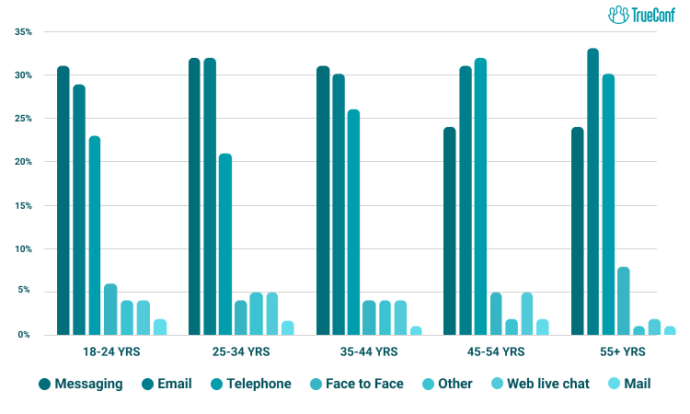
Face-to-Face Communication vs. Digital Communication
Although digital platforms provide convenience and connectivity, face-to-face interactions are essential due to their depth and authenticity. Analyzing both communication methods using statistical data and real-life examples helps comprehend their distinct advantages and limitations.
Face-to-face communication includes verbal and non-verbal cues like body language, eye contact, and tone of voice, which significantly contribute to understanding and empathy.
An investigation by Forbes in 2017 discovered that 84% of individuals prefer in-person meetings for cultivating stronger, more meaningful relationships.
Digital communication, encompassing emails, social media, and video conferencing, has transformed the way we interact by offering unparalleled convenience and connectivity. Numerous businesses are presently embracing a hybrid approach, blending face-to-face and digital communication to optimize the advantages of both. They commence with in-person meetings to establish rapport, followed by digital platforms for ongoing collaboration.
Insight #2: Governance Over Features
When selecting enterprise communication tools, decision-makers often prioritize feature lists. However, long-term success depends more on governance capabilities: user provisioning, audit logs, data residency controls, and policy enforcement.
Platforms designed for enterprise deployment—such as TrueConf with its on-premises architecture and centralized admin console—enable IT teams to maintain compliance without sacrificing usability.
Types of Digital Communication Channels
Digital communication channels are the platforms, tools, and mediums through which individuals, teams, and organizations exchange information in the digital environment. With the rapid evolution of technology, these channels have grown in diversity and sophistication — each serving distinct purposes, audiences, and communication styles. Choosing the right channel is critical to ensuring messages are received, understood, and acted upon effectively.
Email is one of the oldest and most enduring digital communication channels. It functions as a formal, asynchronous medium that supports structured, documented exchanges between one or many recipients.
Key Characteristics:
- Asynchronous — sender and receiver do not need to be online simultaneously
- Supports attachments (documents, images, spreadsheets)
- Creates a searchable, time-stamped written record
- Accessible across devices and platforms
Best Used For:
- Formal business correspondence
- Sending reports, proposals, and official documents
- Communication across different time zones
- Announcements to large groups
|
Advantage |
Limitation |
|---|---|
|
Formal and professional tone |
Can lead to inbox overload |
|
Permanent, searchable record |
Slow response time |
|
Supports rich formatting and attachments |
Risk of phishing and spam |
|
Wide reach across organizations |
Lacks real-time interaction |
Best Practice: Keep subject lines clear and actionable. Use email for messages that require a record or detailed explanation — not for urgent, time-sensitive communication.

Instant Messaging & Chat Platforms
Instant messaging (IM) platforms enable real-time, text-based communication, primarily used for quick, informal exchanges within teams or between individuals. Popular tools include Slack, Microsoft Teams, WhatsApp, Telegram, and TrueConf.
Key Characteristics:
- Synchronous or near-synchronous communication
- Organized into channels, threads, or group chats
- Supports emoji reactions, file sharing, and integrations
- Mobile and desktop friendly
Common Use Cases:
- Daily team check-ins and quick updates
- Project-specific collaboration channels
- Internal announcements and informal discussions
- Customer support chat (live chat widgets)
|
Platform |
Primary Use |
Best For |
|---|---|---|
|
Slack |
Team collaboration |
Workplace and project teams |
|
Microsoft Teams |
Enterprise communication |
Corporate and Office 365 users |
|
|
Personal & business messaging via WhatsApp team inbox |
Small teams, client communication |
|
Telegram |
Broadcast & group chats |
Communities and large groups |
|
TrueConf |
Secure enterprise messaging |
Security-sensitive organizations, regulated industries |
Best Practice: Use threads to keep conversations organized. Avoid using IM for sensitive, complex, or formally documented discussions. For organizations in regulated industries, TrueConf’s on-premises deployment offers an added layer of data control unavailable on cloud-only platforms.
Your Messages Are Secure with TrueConf!
A powerful self-hosted video conferencing solution for up to 1,000 users, available on desktop, mobile, and room systems. Your confidential information is protected by 12 levels of security.
Video Conferencing
Video conferencing tools simulate face-to-face communication digitally, offering the richest form of remote interaction through live audio, video, and screen sharing. Leading platforms include Zoom, Google Meet, Microsoft Teams, Webex, and TrueConf.
Key Characteristics:
- Real-time, synchronous communication
- Supports visual cues, facial expressions, and body language
- Enables screen sharing, whiteboards, and live collaboration
- Recordings can be saved for future reference
Best Used For:
- Team meetings and project kick-offs
- Job interviews and HR discussions
- Client presentations and demos
- Training sessions and workshops
Features Comparison:
|
Feature |
Zoom |
Google Meet |
Microsoft Teams |
TrueConf |
|---|---|---|---|---|
|
Max Participants (Free) |
100 |
100 |
100 |
1,000 |
|
Recording |
Yes |
Yes |
Yes |
Yes |
|
Breakout Rooms |
Yes |
Yes |
Yes |
Yes |
|
Video Quality |
HD |
HD |
HD |
4K UltraHD |
|
Deployment |
Cloud |
Cloud |
Cloud |
Cloud / On-Premises / Hybrid |
|
Native Integration |
Slack, Calendar |
Google Workspace |
Microsoft 365 |
LDAP, AD, SIP/H.323 |
Best Practice: Always test audio and video before joining. Use an agenda to keep meetings focused and time-efficient. For organizations requiring maximum security and offline capability — such as government, defense, or healthcare — TrueConf Server’s on-premises deployment offers an enterprise-grade alternative to cloud-only platforms.
Try TrueConf Server Free!
- 1,000 online users with the ability to chat and make one-on-one video calls.
- 10 PRO users with the ability to participate in group video conferences.
- One SIP/H.323/RTSP connection for interoperability with corporate PBX and SIP/H.323 endpoints.
- One guest connection to invite a non-authenticated user via link to your meetings.

Social Media Platforms
Social media channels allow individuals and organizations to broadcast content, engage with audiences, and participate in public conversation. They span a wide range of formats, from short-form text to video, imagery, and live streaming. Maintaining a consistent visual identity across social channels is one of the biggest operational challenges for communication teams. Using a graphic design subscription service can help teams create branded social assets, infographics, and presentation visuals at scale without the overhead of hiring an in-house designer.
Key Characteristics:
- One-to-many and many-to-many communication
- Public or semi-public by default
- Driven by algorithms and engagement metrics
- Supports multimedia content (images, video, reels, stories)
Platform Overview:
|
Platform |
Primary Format |
Best For |
|---|---|---|
|
|
Professional content, articles |
B2B marketing, recruitment, networking |
|
X (Twitter) |
Short-form text, threads |
News, real-time discussion, brand voice |
|
|
Images, Reels, Stories |
Visual branding, lifestyle, B2C marketing |
|
|
Mixed media, groups |
Community building, events, advertising |
|
YouTube |
Long-form video |
Education, tutorials, brand storytelling |
|
TikTok |
Short-form video |
Entertainment, youth audiences, viral content |
Best Practice: Match content format to platform culture. LinkedIn demands professional tone; TikTok rewards authenticity and creativity. Consistency and audience understanding are key.
Blogs & Content Publishing Platforms
Blogs and digital publishing platforms provide a channel for long-form, in-depth communication. They are central to content marketing strategies and thought leadership efforts.
Key Characteristics:
- Asynchronous, one-to-many communication
- SEO-friendly, indexed in Google search results, driving organic traffic over time
- Supports rich media — text, images, embedded video, infographics, and even keyword generator outputs.
- Builds brand authority and audience trust
Best Used For:
- Sharing expertise and industry insights
- Educating potential customers (inbound marketing)
- Announcing products, updates, or company news
- Building a long-term content library
Popular Platforms:
- WordPress — most widely used CMS for blogs and websites
- Medium — public publishing for writers and thought leaders
- Substack — newsletter and long-form content with subscription model
- LinkedIn Articles — professional publishing within a business network
SMS & Push Notifications
SMS (Short Message Service) and push notifications are direct, device-level communication channels designed for brevity and immediacy. They boast some of the highest open rates of any digital channel. When paired with a White-Label Live Chat Platform, businesses can create a seamless customer communication experience by combining instant alerts with real-time conversations across multiple touchpoints.
Key Characteristics:
- Delivered directly to a user’s phone or device
- Very short format — typically under 160 characters for SMS
- High visibility and open rates (SMS open rate: ~98%)
- Ideal for time-sensitive, action-driven messages
|
Channel |
Avg. Open Rate |
Best Use Case |
|---|---|---|
|
SMS |
~98% |
Alerts, OTPs, appointment reminders |
|
Push Notifications |
~50–90% |
App updates, promotions, breaking news |
|
|
~20–30% |
Detailed communication, newsletters |
Best Practice: Always obtain user consent before sending SMS or push notifications. Keep messages concise, valuable, and infrequent to avoid opt-outs.
Podcasts & Webinars
Podcasts and webinars are audio and video-based channels that support long-form, one-to-many communication. They are especially effective for education, thought leadership, and community engagement.
Podcasts
- Pre-recorded, on-demand audio content
- Consumed passively (during commutes, workouts, etc.)
- Builds loyal, recurring audiences
- Popular platforms: Spotify, Apple Podcasts, Google Podcasts
Webinars
- Live or recorded video presentations with interactive elements (Q&A, polls)
- Used for lead generation, training, and product demos
- Platforms: Zoom Webinars, GoToWebinar, Hopin
|
Feature |
Podcast |
Webinar |
|---|---|---|
|
Format |
Audio (pre-recorded) |
Video (live or recorded) |
|
Interaction |
None (passive) |
High (Q&A, polls, chat) |
|
Primary Goal |
Brand awareness, education |
Lead gen, training, demos |
|
Audience Size |
Unlimited (on-demand) |
Hundreds to thousands (live) |
Online Forums & Communities
Online forums and community platforms support asynchronous, peer-driven conversation around shared topics, interests, or industries. They enable many-to-many communication at scale.
Key Characteristics:
- Thread-based, community-moderated discussions
- Users ask questions, share expertise, and vote on content
- Builds long-lasting, searchable knowledge bases
- Strong sense of community and peer trust
Popular Platforms:
- Reddit — vast network of topic-specific communities (subreddits)
- Quora — question-and-answer platform with expert contributions
- Stack Overflow — technical Q&A for developers and engineers
- Discord — real-time community servers for gaming, tech, and niche groups
- Industry Forums — niche communities (e.g., legal, medical, marketing)
Best Practice: Provide genuine value before promoting anything. Community trust is earned through consistent, helpful contribution — not broadcasting.
Choosing the Right Channel
Selecting the most appropriate digital communication channel depends on several factors:
|
Factor |
Questions to Ask |
|---|---|
|
Urgency |
Does this need an immediate response? |
|
Formality |
Is this official or conversational? |
|
Audience |
Who is the recipient — internal team, client, or public? |
|
Complexity |
Is this a simple update or a detailed discussion? |
|
Record-Keeping |
Does this need to be documented? |
|
Reach |
Are you communicating with one person or thousands? |
Effective digital communicators do not rely on a single channel. Instead, they build a multi-channel strategy — leveraging each platform’s strengths to deliver the right message, to the right audience, at the right time.
Digital Communication Guidelines
Developing precise protocols like SPF, DKIM and DMARC for digital communication within the workplace is essential to promote productivity, collaboration, and a harmonious work atmosphere. Below are several fundamental principles to contemplate while formulating these guidelines:
- Purpose and Context: Determine which tools are best used for urgent tasks and which are better suited to support the overall workflow.
- Clarity and Conciseness: Encourage employees to communicate clearly and concisely, being mindful of the recipient’s time and attention. Consider working with an Offshore Software Development Company to help you create software for internal corporate communications, as it will not only boost employee productivity but also improve overall morale.
- Timeliness and Responsiveness: Set expectations for timely responses to digital communications based on the urgency and importance of the message. Make sure your team has a clear crisis communication plan to handle urgent situations and keep messaging consistent.
- Privacy and Security: Educate employees about the importance of safeguarding sensitive information and respecting the privacy of colleagues when communicating digitally. Remind them to use secure channels for sharing confidential or proprietary information and to avoid discussing sensitive topics in public forums.
- Etiquette for Virtual Meetings: Provide guidelines for conducting virtual meetings, including muting microphones when not speaking, and using features like chat and hand-raising respectfully.
- Managing Digital Overload: Encourage employees to be mindful of digital overload and to establish boundaries for when they will be available and responsive to digital communications outside of regular working hours, using listening tools social media to track relevant communications while minimizing distractions.
- Feedback and Continuous Improvement: Regularly solicit feedback from employees about the effectiveness of the digital communication guidelines and be open to making adjustments as needed.
Evaluation Criteria for Enterprise Communication Platforms
|
Criterion |
Key Questions |
Why It Matters |
TrueConf Alignment |
|---|---|---|---|
|
Security & Compliance |
Does it support encryption, audit logs, data residency controls? |
Prevents breaches and ensures regulatory adherence |
On-premises architecture, MFA, SSO, granular access controls |
|
Integration Capability |
Can it connect with existing directories, calendars, CRM? |
Reduces silos and manual work |
API/SDK support, Exchange connector, SIP/H.323 interoperability |
|
Scalability |
How does performance hold at 100, 1,000, 10,000 users? |
Avoids costly re-platforming later |
Modular licensing, MCU support, load balancing |
|
User Experience |
Is the interface intuitive across desktop, mobile, room systems? |
Drives adoption and reduces training costs |
Consistent UI, low-bandwidth optimization, offline messaging |
|
Total Cost of Ownership |
What are upfront, ongoing, and hidden costs? |
Budget predictability and ROI clarity |
Perpetual licensing option, no per-minute fees, self-hosted control |
Digital Communication and Data Transformation
Digital communication plays a pivotal role in data transformation by enabling the seamless exchange of information across platforms. By integrating this communication with effective data management strategies, businesses can optimize workflows, foster innovation, and stay competitive in an increasingly digital world.
Security and Privacy Considerations in Digital Communication
As digital communication becomes increasingly central to both personal and professional life, the risks associated with it have grown in parallel. Organizations and individuals must understand the security vulnerabilities inherent in each channel and take deliberate steps to protect the integrity, confidentiality, and availability of their communications.
Why Security Matters in Digital Communication
Every message sent, file shared, or video call held represents a potential point of exposure. Data breaches, unauthorized access, and interception of communications can result in financial loss, reputational damage, legal liability, and loss of customer trust. Security is not merely an IT concern — it is a foundational requirement of responsible digital communication. Integrating continuous account takeover prevention reduces credential exploitation across enterprise communication endpoints.
Common Threats:
|
Threat |
Description |
Channels Most at Risk |
|---|---|---|
|
Phishing |
Deceptive messages designed to steal credentials or install malware |
Email, SMS, Instant Messaging |
|
Man-in-the-Middle (MitM) |
Interception of communication between two parties |
Email, Video Calls, Unencrypted Chat |
|
Data Breaches |
Unauthorized access to stored messages or files |
Cloud-based platforms, Email servers |
|
Social Engineering |
Manipulating users into revealing sensitive information |
All channels |
|
Malware & Ransomware |
Malicious attachments or links embedded in messages |
Email, Chat Platforms |
|
Eavesdropping |
Listening in on unencrypted calls or meetings |
Video Conferencing, VoIP |
|
Account Hijacking |
Unauthorized takeover of user accounts via stolen credentials |
All channels |
Encryption Standards
Encryption is the first line of defense in securing digital communication. It ensures that messages can only be read by the intended recipient, even if intercepted in transit.
- End-to-End Encryption (E2EE) — messages are encrypted on the sender’s device and can only be decrypted by the recipient. No third party, including the platform provider, can access the content. Used by WhatsApp, Signal, and TrueConf.
- Transport Layer Security (TLS) — encrypts data in transit between the user and the server. Standard for email (SMTPS), web browsing (HTTPS), and most SaaS communication platforms.
- AES-256 Encryption — a symmetric encryption standard widely used for securing stored data and video conference recordings. Considered military-grade and used by enterprise platforms including TrueConf Server.
|
Encryption Type |
Protects |
Used In |
|---|---|---|
|
End-to-End (E2EE) |
Content from sender to recipient |
WhatsApp, Signal, TrueConf |
|
TLS/SSL |
Data in transit |
Email, web-based platforms |
|
AES-256 |
Stored data and recordings |
Enterprise platforms, cloud storage |
Data Privacy and Compliance
Organizations operating in regulated industries must ensure their communication platforms comply with applicable data protection laws and frameworks.
Key Regulations to Be Aware Of:
- GDPR (General Data Protection Regulation) — governs the collection, storage, and processing of personal data for EU citizens. Requires data minimization, user consent, and the right to erasure. For organizations handling large volumes of communication data, working with a RAG as a service provider can make stored information more accessible and contextually retrievable at scale.
- HIPAA (Health Insurance Portability and Accountability Act) — mandates strict controls on the handling of protected health information (PHI) in healthcare communication.
- ISO/IEC 27001 — an international standard for information security management systems (ISMS), relevant for organizations seeking certified security practices.
- CCPA (California Consumer Privacy Act) — grants California residents rights over their personal data, affecting how businesses manage communication data.
Best Practice: Always review the data processing agreements (DPAs) of any communication platform before adoption. Understand where your data is stored, who has access, and whether it crosses jurisdictions that may affect compliance obligations.
Privacy Best Practices by Channel
|
Channel |
Key Privacy Risks |
Best Practices |
|---|---|---|
|
|
Phishing, unencrypted attachments |
Use encrypted email (S/MIME, PGP); enable MFA |
|
Instant Messaging |
Message interception, data retention |
Use E2EE platforms; avoid sharing sensitive data in group chats |
|
Video Conferencing |
Unauthorized meeting access (“Zoom bombing”), recordings |
Use waiting rooms, passcodes; control recording permissions |
|
Social Media |
Data harvesting, oversharing |
Limit personal information; review app permissions regularly |
|
SMS |
SIM swapping, unencrypted by default |
Avoid sending sensitive data via SMS; use authenticator apps instead of SMS OTPs |
On-Premises vs. Cloud: A Security Perspective
One of the most significant security decisions for organizations is whether to deploy communication tools on-premises or in the cloud. Each model carries distinct security implications.
|
Factor |
Cloud-Based |
On-Premises (e.g., TrueConf Server) |
|---|---|---|
|
Data Control |
Managed by vendor |
Full organizational control |
|
Internet Dependency |
Required |
Can operate fully offline (LAN/VPN) |
|
Security Responsibility |
Shared with vendor |
Managed entirely in-house |
|
Compliance Suitability |
General use |
High — healthcare, government, defense |
|
Customization |
Limited |
Highly customizable |
|
Update Management |
Automatic (vendor-controlled) |
Manual (IT-controlled) |
Best Practice: Organizations handling classified, healthcare, or government data should strongly consider self-hosted solutions with offline capability and full audit control. This is especially important for EHR systems, where maintaining patient privacy, regulatory compliance, and complete control over sensitive medical records is critical.
General Security Recommendations
- Enable Multi-Factor Authentication (MFA) on all communication accounts
- Implement role-based access controls (RBAC) to limit who can access sensitive communication channels
- Conduct regular security awareness training to help staff recognize phishing and social engineering
- Establish a data retention policy — not all communications need to be stored indefinitely
- Audit platform permissions regularly, removing inactive users and reviewing third-party integrations
- Use a Virtual Private Network (VPN) when accessing communication tools on public networks
- Prefer platforms that offer end-to-end encryption and transparent privacy policies
Digital Communication in the Workplace
The workplace has undergone a profound transformation in how communication flows between individuals, teams, and organizations. Digital channels have replaced much of the traditional in-person and paper-based communication, enabling remote work, global collaboration, and always-on connectivity. However, this shift also introduces challenges around productivity, culture, overload, and professional conduct.
The Role of Digital Communication in Modern Work
Effective workplace communication is directly tied to organizational performance. When communication breaks down — whether due to wrong channels, poor clarity, or information overload — the consequences include missed deadlines, reduced morale, misaligned priorities, and increased employee turnover.
Digital communication in the workplace serves several core functions:
- Operational coordination — scheduling, task assignment, project updates
- Decision-making — sharing data, gathering input, reaching consensus
- Relationship building — maintaining team cohesion and culture, especially in remote settings
- Knowledge management — documenting processes, storing institutional knowledge
- External communication — engaging clients, vendors, and partners
Common Workplace Communication Channels and Their Roles
|
Channel |
Typical Workplace Use |
Formality Level |
|---|---|---|
|
|
Official correspondence, external communication, documentation |
High |
|
Instant Messaging (Slack, Teams, TrueConf) |
Internal team chat, quick updates, informal collaboration |
Low–Medium |
|
Video Conferencing (Zoom, Teams, TrueConf) |
Meetings, presentations, remote interviews, training |
Medium–High |
|
Intranet / Internal Portals |
Company announcements, HR documents, knowledge bases |
High |
|
Project Management Tools (Asana, Jira, Trello) |
Task tracking, progress updates, team workflows |
Medium |
|
SMS / Push Notifications |
Urgent alerts, shift reminders, time-sensitive updates |
Low |
Synchronous vs. Asynchronous Communication at Work
A core principle of effective workplace communication is understanding when to communicate in real time versus when asynchronous communication is sufficient or preferable.
Synchronous Communication (real-time):
- Requires all parties to be present simultaneously
- Best for complex discussions, sensitive topics, brainstorming, and urgent decisions
- Examples: video calls, phone calls, in-person meetings
Asynchronous Communication (time-shifted):
- Allows parties to respond at their own pace
- Best for updates, documentation, non-urgent requests, and cross-time-zone collaboration
- Examples: email, recorded video messages, project management comments
|
Situation |
Recommended Approach |
|---|---|
|
Sensitive feedback or difficult conversation |
Synchronous (video call or in person) |
|
Sharing a detailed project update |
Asynchronous (email or document) |
|
Quick clarification from a colleague |
Synchronous (instant message) |
|
Distributing a company-wide policy |
Asynchronous (email or intranet post) |
|
Collaborative problem-solving with a team |
Synchronous (video conference) |
|
Documenting a completed process |
Asynchronous (wiki or shared document) |
Communication Overload and Productivity
One of the most significant challenges of digital workplace communication is overload — the experience of receiving more messages, notifications, and meeting requests than one can meaningfully process. Studies consistently show that excessive communication demands reduce focus, increase stress, and lower overall productivity.
Signs of Communication Overload:
- Constantly switching between email, chat, and meetings with little deep work time
- Messages going unanswered due to volume
- Employees feeling pressure to respond immediately outside of working hours
- Important information being lost in high-volume channels
Strategies to Reduce Overload:
- Set communication norms — establish which channels are used for what, and what response times are expected
- Protect focus time — encourage the use of “do not disturb” statuses and calendar blocking for deep work
- Reduce unnecessary meetings — apply a “could this be an email?” test before scheduling calls
- Consolidate tools — limit the number of active platforms to reduce context-switching fatigue
- Use asynchronous-first defaults — especially in remote and distributed teams across time zones
Workplace Communication Etiquette
Professional digital communication demands attention to tone, timing, and context. Poor etiquette can damage professional relationships, create misunderstandings, and undermine organizational culture.
Core Etiquette Principles:
- Match the channel to the message — do not share sensitive feedback over group chat, and do not send urgent requests by email
- Respect working hours — avoid sending messages outside of colleagues’ working hours unless genuinely urgent
- Be concise and clear — especially in written channels where tone is harder to convey
- Use subject lines and message titles effectively — make it easy for recipients to understand the purpose before opening
- Avoid overcommunicating — unnecessary reply-all emails and low-value notifications erode trust and attention
- Acknowledge receipt — a brief confirmation that a message has been received prevents follow-up anxiety
- Proofread before sending — spelling and grammatical errors in professional communication affect credibility
Remote and Hybrid Work Communication
The rise of remote and hybrid work models has placed greater pressure on digital communication channels to carry the full weight of workplace interaction — including the informal, relationship-building conversations that naturally occur in physical office settings.
Challenges in Remote Communication:
- Lack of non-verbal cues in text-based channels
- Reduced spontaneous interaction and watercooler conversations
- Unequal visibility between in-office and remote employees
- Risk of siloed teams and reduced cross-functional collaboration
Strategies for Effective Remote Communication:
|
Challenge |
Solution |
|---|---|
|
Isolation and disconnection |
Schedule regular one-on-ones and virtual social events |
|
Over-reliance on email |
Shift routine communication to chat platforms |
|
Meeting fatigue |
Apply async-first principles; record meetings for those who can’t attend |
|
Information asymmetry |
Use shared documentation and intranet tools to centralize knowledge |
|
Misaligned expectations |
Define clear communication protocols and response time norms |
Building a Workplace Communication Strategy
Organizations benefit most from digital communication when it is governed by a clear, intentional strategy rather than adopted reactively. A workplace communication strategy defines the channels used, the norms that govern them, and the tools that support them.
Key Elements of a Strong Workplace Communication Strategy:
- Channel mapping — a defined purpose for each platform (e.g., Slack for internal chat, email for external correspondence, TrueConf for video meetings)
- Governance and policies — acceptable use guidelines, data retention rules, and confidentiality expectations
- Onboarding — ensuring new employees understand how and where communication happens
- Feedback loops — regular reviews of whether current tools and norms are working
- Inclusivity — ensuring all employees, including those with disabilities or in different time zones, have equal access to communication
Best Practice: Treat internal communication as seriously as external communication. A well-communicated organization is a well-functioning one — clarity, consistency, and the right tools are not luxuries but operational necessities.
Conclusion
Digital communication plays a crucial role in modern businesses, enhancing efficiency, fostering innovation, and facilitating growth. As companies undergo digital transformation, the integration of digital communication tools becomes essential to maintain competitiveness. AI-powered chatbots streamline customer support services, VR and AR technologies revolutionize product demonstrations and virtual meetings, while improvements in internet infrastructure ensure seamless connectivity and data transmission.
FAQ
What makes a digital communication tool suitable for enterprise use?
Enterprise-ready tools prioritize security controls, integration capabilities, and administrative governance over consumer-style features. TrueConf, for example, offers on-premises deployment, SSO/MFA support, and centralized user management—critical for compliance and scalability in regulated environments.
How do I decide between cloud and on-premises communication platforms?
Choose cloud for rapid deployment and lower upfront cost; choose on-premises like TrueConf Server when data sovereignty, customization, or long-term cost control are priorities. Hybrid models offer a middle ground for organizations in transition.
Can a single platform replace multiple communication tools?
Yes—unified platforms reduce tool sprawl and improve adoption. TrueConf consolidates messaging, HD video conferencing, file sharing, and calendar integration in one interface, minimizing context switching and simplifying IT management.
What should I prioritize when rolling out a new communication system?
Focus on change management: involve end-users early, provide clear usage guidelines, and start with a pilot group. TrueConf supports phased deployment and offers admin tools to monitor adoption and gather feedback without disrupting operations.
How does video conferencing fit into a broader digital communication strategy?
Video is essential for complex discussions and relationship building but should complement—not replace—async channels. TrueConf enables seamless switching between chat, voice, and UltraHD video within the same session, supporting flexible workflows.
What role does AI play in modern digital communication platforms?
AI enhances productivity through features like automatic transcription, meeting summaries, and noise suppression. TrueConf integrates AI capabilities on-premises, ensuring sensitive content never leaves your infrastructure while still delivering intelligent assistance.
How can I measure the success of our digital communication implementation?
Track adoption rates, user satisfaction, meeting efficiency, and support ticket volume. TrueConf Monitor provides analytics on usage patterns and system performance, helping teams iterate on guidelines and optimize the communication stack over time.
About the Author
Nikita Dymenko is a technology writer and business development professional with more than six years of experience in the unified communications industry. Drawing on his background in product management, strategic growth, and business development at TrueConf, Nikita creates insightful articles and reviews about video conferencing platforms, collaboration tools, and enterprise messaging solutions.


Follow us on social networks