
The Evolution of Telecommuting: A Paradigm Shift in Work Culture
Updated April 2026
Key Takeaways (What You Need to Know First)
Before diving deeper, here is what the latest data tells us — the clearest picture of where telecommuting stands right now.
|
Metric |
Figure |
|---|---|
|
US employees working remotely (at least partially) |
22.5% (~36.9M people) |
|
Global workers who want remote work at least part-time |
98% |
|
Workers who prefer hybrid arrangements |
83% |
|
Productivity increase reported by remote workers |
35–40% |
|
Companies still offering some flexibility (hybrid) |
67% |
|
Gen Z/Millennials who’d leave if forced fully back to office |
65% |
|
Remote workers reporting better mental health with flexibility |
82% |
|
Employer savings per part-time remote employee (per year) |
~$11,000 |
Bottom line: Telecommuting is not a perk or a pandemic relic — it is a permanent structural shift. Hybrid work has emerged as the dominant model, and organizations that fail to offer flexibility now face measurable talent and retention risks.
Self-Hosted Team Messenger with Video Conferencing
A cutting-edge team collaboration server with personal and group chats, UltraHD video conferences, and advanced AI-powered features — free for up to 1,000 users!
What is Telecommuting?
Telecommuting is the practice where employees complete their work at locations other than in traditional offices, often in their homes. Such an arrangement is enabled by a range of technology tools, enabling employees to communicate, collaborate, and manage tasks efficiently without being in an office.
A report released by the U.S. Bureau of Labor Statistics in 2020 indicated that about 24% of the workforce engaged in some form of remote work during 2019. However, there has been a major increase in this trend since the Covid-19 outbreak.
Insight #1: Deployment Model Dictates Telecommuting Viability
Many evaluations focus on features alone, overlooking how deployment architecture impacts long-term telecommuting success.
Cloud-hosted tools offer quick setup but may conflict with data residency policies. On-premises solutions like TrueConf Server provide full control over infrastructure, critical for government, finance, and healthcare sectors where compliance isn’t optional—it’s foundational.
Always align your telecommuting stack with your organization’s governance model before scaling.
Types of Telecommuting
Full-Time
The employees typically report to a central office, but they also work remotely daily and this is common with virtual organizations. Full-time telecommuters make use of digital communication tools heavily to keep in touch with their teams. To maintain high uptime and secure connectivity across locations, organizations often partner with a telecom software consultancy to build custom communication infrastructure. This is mainly because they are largely found in technology fields, customer support representatives, and other jobs that do not require physical presence.

Part-Time
Employees split their workload between off-site and on-site locations. For instance, two days per week could be spent working from home, and then the rest of the days one must report to the office.
Flex-Time
They are given flexible schedules as well as the choice to work remotely when necessary. Employees might opt to work from their homes or other far-off places during certain periods that are convenient for them, thereby helping them to manage personal commitments or even to be more productive during times when they can best deliver.
Freelance
These freelancers on Upwork or Fiverr operate remotely for one client or several different clients at the same time. Such type of telecommunication generally involves task-based assignments which allow a lot of freedom when it comes to working hours and location. Freelancers may come from any part of the globe while choosing projects and adjusting their own timetables.
|
Telecommuting Type |
Best For |
Key Tool Requirements |
Governance Consideration |
|---|---|---|---|
|
Full-Time |
Distributed teams, digital-native roles |
Persistent chat, HD video, file sync |
Clear SLAs for response times and availability windows |
|
Part-Time |
Hybrid offices, client-facing roles |
Seamless switch between office/remote modes |
Calendar integration to avoid scheduling conflicts |
|
Flex-Time |
Creative roles, global teams |
Asynchronous collaboration features |
Outcome-based performance metrics vs. hour tracking |
|
Freelance |
Project-based work, specialized skills |
Guest access, external participant support |
Data segmentation to protect internal systems |
Benefits of Telecommuting
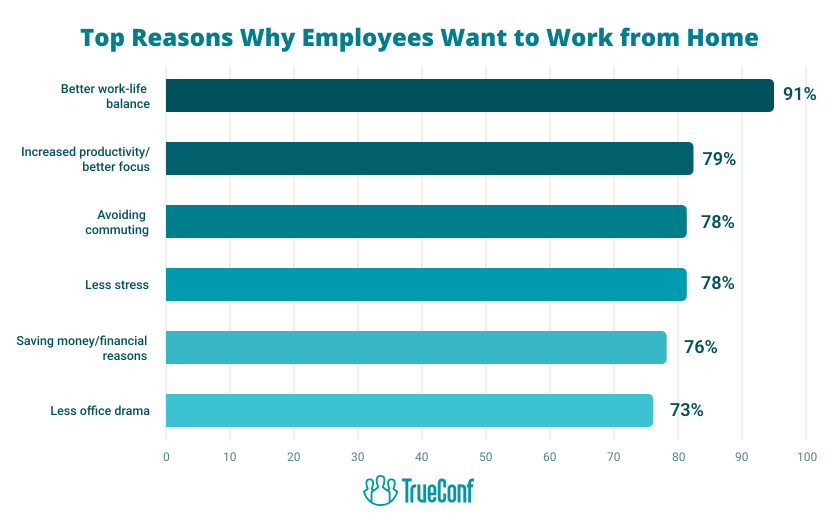
- Flexibility: Telecommuting assists workers in effectively organizing their work schedules. An illustration of this is when parents modify their work hours to coincide with their children’s school timetables.
- Cost Savings: Telecommuting provides employees with an opportunity to save money by decreasing or eliminating different expenses connected to conventional office arrangements. One notable area where savings occur is in commuting costs. With no requirement to commute to a central office daily, employees can reduce expenses related to fuel, public transportation fares, parking fees, etc.
- Diverse Talent Access: Telecommuting enables recruiters to reach candidates from a wider range of places that may have lower cost of living. This also means that companies will have more flexibility in salary and potentially reduce payroll costs associated with location-based salary adjustments.
- Better Employee Retention: Establishing telecommuting choices enhances business continuity in case of crises like natural disasters or pandemics. For instance, according to the study by Gartner, 74% of CFOs would permanently move some employees into remote work after COVID-19 for purposes of business continuity plan improvement.
Insight #2: Retention Gains Depend on Tool Consistency, Not Just Policy
Offering telecommuting is table stakes; retaining talent requires that remote employees experience the same collaboration quality as in-office peers.
Fragmented toolchains (e.g., separate apps for chat, video, files) create friction that erodes satisfaction.
Unified platforms that consolidate messaging, conferencing, and content sharing—like TrueConf’s integrated suite—reduce context-switching and signal organizational commitment to equitable remote experience.
Challenges of Telecommuting
- Communication Barriers: Ensuring effective communication among dispersed teams can be challenging. Emails or text messages may lead to more confusion compared to face-to-face interactions. Additionally, technical issues and varying time zones can impact the effectiveness of video calls. However, establishing clear communication protocols can aid in overcoming these obstacles.
- Data Security and Privacy: Data security is a huge drawback of telecommuting that should not be underestimated with regard to corporate information system safety measures. Employees’ accessing company systems when dispersed increase the likelihoods of data breaches or cyber-attacks happening on the company’s premises. Thus, companies must take extensive measures like VPNs, encryption and regular security training; all this because of handling sensitive data models which in essence involves the vulnerability associated with cybercrime through teleworking mechanism.
- Performance Accountability: When managers are unable to supervise their team members directly, monitoring productivity becomes a challenge. However, employing metrics, conducting check-ins, and utilizing project management tools can effectively tackle this issue.
|
Challenge |
Mitigation Strategy |
Tool Capability to Prioritize |
|---|---|---|
|
Communication Gaps |
Define channel purpose (urgent vs. async) + response SLAs |
Presence indicators, message threading, @mentions |
|
Security Exposure |
Zero-trust access + device compliance checks |
End-to-end encryption, MFA, audit logs, on-prem deployment |
|
Productivity Visibility |
Outcome-focused OKRs + lightweight status updates |
Integrated task tracking, meeting analytics, optional activity reports |
Working Remotely vs. Telecommuting
The terms “working remotely” and “telecommuting” are often used interchangeably, but they have distinct meanings. Working remotely is a broad concept that covers various arrangements where the work location is not tied to a single central office. The main idea is the flexibility to work from any place, which is beneficial for people who travel frequently or live far from the company’s main office. If you’re a remote worker, you need to learn about local labor compliance laws and regulations.
Telecommuting usually involves a structured schedule where employees split their time between home and the office. This arrangement ensures that employees remain connected to the headquarters, allowing for regular in-person meetings and fostering team cohesion. Telecommuting combines the flexibility of remote work with the benefits of being physically present in the office, balancing autonomy with team integration.
Tips for Managing Telecommuting Teams
-
- Develop Communication Channels: Use different tools such as email (backed with a professionally designed email signature), instant messaging, and video conferencing to ensure that team communication remains smooth. Indicate the preferred ways of communicating for various situations and ensure consistent use by all members.
- Goals Setting: Make known explicitly work hours, availability and deliverables expected of. Precise individual projects’ or tasks’ goals with specific deadlines provide a sense of clarity and direction. Regularly review goals to fit in changing priorities or situations.
- Regular Check-ins: Arrange planned check-in meetings or stand-ups where you can touch base with team members, track progress, address difficulties and receive feedbacks. These meetings maintain accountability while supporting alignment with team objectives.
- Trust and Autonomy: Have faith in your team members to handle their workload independently without control from above. Instead of micromanaging, offer necessary assistance and guidance only where necessary. Grant them power so that they take full responsibility for how they accomplish their tasks, while using tools like digital signage systems to keep everyone aligned with goals and priorities in a transparent way.
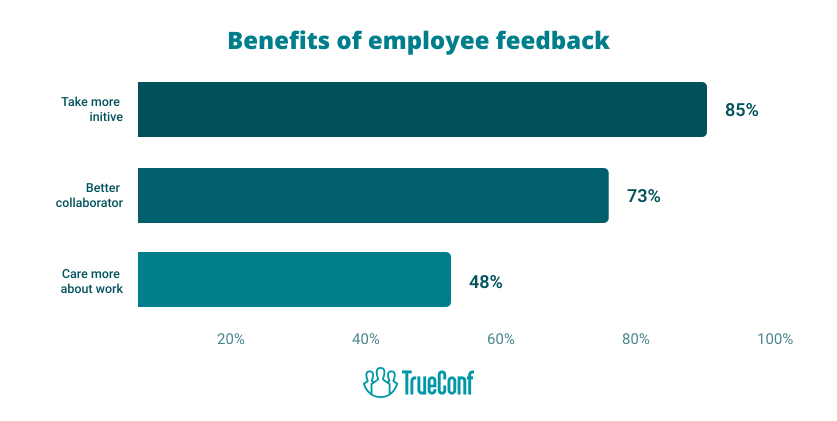
- Regular Feedback: Obtaining feedback from remote individuals to understand their challenges, concerns as well as new ideas is highly suggested. This will help shape the way we work remotely.
- Prioritize Goals, Not Hours: Stress the importance of achieving targets instead of counting hours worked. This strategy encourages flexibility while ensuring objectives are met.
- Encourage Learning: Provide online courses, webinars, and workshops to aid team members in developing their skills and knowledge. Create online community platforms where team members can collaborate, share resources, ask questions, and support each other’s growth.
Insight #3: Integration Depth Determines Adoption Speed
The hidden bottleneck in telecommuting rollout isn’t user training—it’s backend integration.
Solutions that require extensive custom development to connect with existing directories, calendars, or security systems delay time-to-value.
Platforms offering native SSO, LDAP/AD sync, and API-first architecture (like TrueConf) accelerate deployment and reduce IT overhead, making them preferable for enterprises scaling hybrid work.
Take your team communication to the next level with TrueConf!
A powerful self-hosted video conferencing solution for up to 1,000 users, available on desktop, mobile, and room systems.
Conclusion
Telecommuting signifies a significant shift in our work approach. This change lets employees customize their workspaces to fit their unique needs, leading to greater job satisfaction and higher productivity. Rather than being limited to a traditional office, employees can select a workspace that suits them best, whether it’s a quiet home office, a bustling café, or a tranquil outdoor setting. This flexibility can enhance comfort and efficiency, improving their performance and satisfaction.
FAQ
What infrastructure is required to launch a secure telecommuting program?
A secure telecommuting setup needs reliable video conferencing, encrypted messaging, and centralized user management. TrueConf provides a self-hosted platform that keeps communications within your network, meeting strict data protection requirements while supporting HD collaboration for distributed teams.
How do I choose between cloud and on-premises telecommuting tools?
Choose cloud for rapid deployment with minimal IT overhead; choose on-premises like TrueConf Server when compliance, data residency, or full infrastructure control are non-negotiable. Regulated sectors often prefer on-prem to maintain auditability and reduce third-party data exposure.
Can telecommuting tools integrate with existing enterprise systems?
Yes—prioritize platforms offering native SSO, LDAP/Active Directory sync, and API access. TrueConf supports seamless integration with common identity providers and calendar systems, reducing setup complexity and ensuring consistent access policies across remote and office users.
How do I maintain team cohesion with hybrid telecommuting schedules?
Use unified communication tools that preserve context across channels. TrueConf combines persistent chat, HD video, and content sharing in one interface, helping hybrid teams stay aligned regardless of location, while admin tools let managers monitor engagement without invasive surveillance. This consistency also helps employees separate work from home distractions, including shared devices like a game console for family use.
What security features should I require in a telecommuting platform?
Essential features include end-to-end encryption, multi-factor authentication, role-based access controls, and audit logging. TrueConf embeds these capabilities by design, with on-premises deployment ensuring sensitive communications never traverse public infrastructure.
How can I scale telecommuting without overwhelming IT support?
Select a platform with centralized administration, automated license management, and monitoring dashboards, as well as support for mobile connectivity solutions like eSIM for the UK. TrueConf’s enterprise architecture allows IT teams to provision users, enforce policies, and troubleshoot remotely—enabling scalable telecommuting with predictable operational overhead.
Does telecommuting software support external participants like clients or contractors?
Yes, but guest access must be controlled. TrueConf enables secure guest connections with configurable permissions, allowing external collaborators to join meetings or chats without compromising internal network security or requiring full user accounts.
About the Author
Nikita Dymenko is a technology writer and business development professional with more than six years of experience in the unified communications industry. Drawing on his background in product management, strategic growth, and business development at TrueConf, Nikita creates insightful articles and reviews about video conferencing platforms, collaboration tools, and enterprise messaging solutions.


Follow us on social networks