
Capture Card
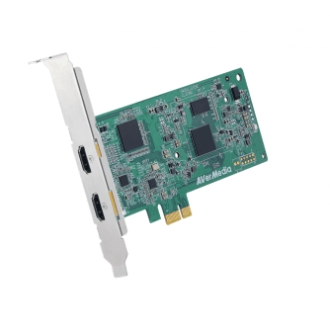
Capture card or digitizing card is a device that is capable of digitizing video signals through certain interfaces (e.g., HDMI, USB, S-Video, or other analog input) and storing the results on a computer using various compression algorithms (typically MPEG1, MPEG2 or MPEG4). Modern capture cards often use several algorithms for video compression at once. Such devices make it possible not only to convert analog video signals to digital, but vice versa too.
Working Principles of Capture Card
If the PC does not have an HDMI-input (do not confuse with HDMI-output), it is necessary to connect the camera to a capture card in order to convert analog signal into digital (or vice versa). It will serve as an interface between the devices. To digitize an image, a capture card has to be connected both to a computer and a camera in order to transfer the signal. The result will be stored on a computer.
Types of Capture Cards:
- Capture cards with hardware video compression. They digitize analog video and compress it into formats such as DV and MPEG-2 “on the fly”. Such cards are the most expensive, because they can quickly digitize video data without using the CPU. It is possible to relieve a computer’s CPU by using hardware compression cards.
- Capture cards without hardware video compression. Digitize video without any compression. Most of them are equipped with a TV receiver. This type of card is much cheaper than the first and performs conversion by using the CPU’s capabilities.
In video conferencing it is very important for a signal from the camera to be transmitted and digitized without any delay and in real time. Therefore, it is preferable to use high-quality professional hardware capture cards capable of digitizing video streams even in Full HD quality.
Empower your video conferencing experience with TrueConf!
FAQ
Do I need a capture card if I already have a standard USB webcam for my meetings?
If you are using a standard USB webcam, you do not need a capture card, as the device already digitizes the signal internally. However, if you want to use a professional DSLR, camcorder, or legacy analog camera for higher-quality broadcasts, a capture card is required to feed that signal into TrueConf or any other video conferencing software.
Will using a basic capture card overload my computer’s CPU during a long video conference?
Capture cards without hardware compression rely on your computer’s CPU to process the uncompressed video, which can cause performance issues during heavy multitasking. To ensure smooth, high-quality video in TrueConf without lagging your system, it is highly recommended to use a professional capture card with built-in hardware compression.
How can I prevent video delay or latency when using a capture card for live meetings?
To avoid noticeable lag during live broadcasts, you must use a high-quality capture card that supports real-time digitization and low-latency interfaces like USB 3.0 or PCIe. When paired with TrueConf’s optimized media processing engine, a professional capture card ensures your video stream remains perfectly synchronized with the audio in real time.
How do I connect my professional HDMI camera to my computer for a video call?
Since most computers only have HDMI outputs for displays, you need an HDMI capture card to act as a bridge and convert the camera’s signal into a digital input your PC can read. Once connected, TrueConf will instantly recognize the capture card as a standard webcam input, allowing you to use your professional camera for crystal-clear video conferences.
Can a capture card be used to send my computer’s video to a large conference room display?
Yes, many modern capture cards and specialized video converters can work in reverse, taking a digital signal from your PC and outputting it to an external HDMI or analog display. This is highly useful in hybrid meeting rooms where you want to show the TrueConf interface or remote participants on a large physical screen without complex AV routing.
Can I use a capture card to record my video conferences locally?
While capture cards can technically pass video to third-party recording software, it is much more efficient to use the built-in recording features of your communication platform. TrueConf allows you to easily record high-quality audio and video directly to your local server or PC without needing external capture hardware, ensuring your meeting archives are secure and perfectly synchronized.

Follow us on social networks