
Twist vs. Slack: Finding the Right Communication Platform for Your Team
Pick any startup or tech company, and chances are they’re using Slack. It’s become so ubiquitous that “Slack me” has entered the workplace vocabulary alongside “email me” and “call me.” But there’s a growing counter-movement led by Twist, a platform that questions whether constant real-time messaging is actually making us more productive or just more distracted.
This isn’t about comparing feature lists or counting integrations. It’s about deciding what kind of workplace you want to create. Should your team be always available, responding within minutes? Or should people have the space to think deeply without constant interruptions? Let’s explore what these platforms actually offer and which one aligns with how your team genuinely operates.
Take your team communication to the next level with TrueConf!
A powerful self-hosted video conferencing solution for up to 1,000 users, available on desktop, mobile, and room systems.
Understanding Slack’s Approach
Slack burst onto the scene in 2013 with a simple promise: kill email and bring all your team conversations into one place. The platform centers around channels – dedicated spaces where teams can discuss projects, share updates, or just chat about last night’s game. Messages appear instantly in a flowing stream, mimicking the feel of being in the same room.
The experience is designed for immediacy. You see green dots showing who’s online. Typing indicators appear when someone is crafting a response. Read receipts confirm your message was seen. Everything pushes toward quick exchanges and rapid-fire conversations that keep the team connected throughout the workday.
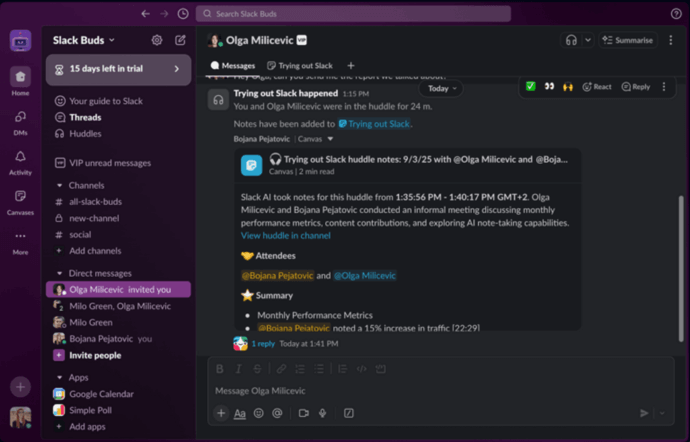
What Slack brings to the table:
- Instant messaging across channels and direct conversations
- Thousands of app integrations pulling data from your entire tech stack
- Built-in voice and video calling for impromptu discussions
- Robust search to dig through message history and shared files
- Customizable notifications and workflow automation
- Mobile apps that keep you connected wherever you are
- Shared channels for collaborating with external partners
For teams handling time-sensitive work like customer support or managing live systems, Slack’s real-time nature fits perfectly. When a server goes down at 2 AM, you need instant coordination, not thoughtful discussion threads. The platform delivers exactly that urgency.
How Twist Reimagines Team Communication
Twist emerged from Doist, the team behind Todoist, after they experienced firsthand how Slack’s constant pings were fragmenting their focus. They built Twist around a radical idea: what if most workplace communication didn’t need to happen in real time?
Unlike Slack’s flowing message streams, Twist organizes everything into discrete threads. Each discussion gets its own space with a clear subject line. There are no status indicators showing who’s online because it fundamentally doesn’t matter. Someone posts a question at 9 AM in Berlin, and their colleague in San Francisco responds at 2 PM their time. That’s not a communication failure – it’s how the system is designed to work.
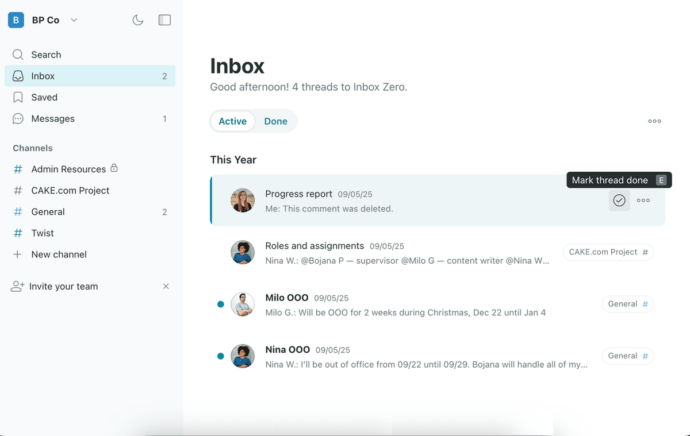
What defines Twist:
- Every conversation lives in a labeled thread within organized channels
- Zero pressure for immediate responses (no typing indicators or online status)
- Clean separation between different discussion topics
- Selective integrations focused on essential productivity tools
- Video calling when face-to-face communication becomes necessary
- Inbox system tracking only conversations relevant to you
- Interface designed for checking in a few times daily, not constant monitoring
This approach fundamentally changes team dynamics. Instead of feeling obligated to respond within minutes, people can actually close the app and concentrate. A developer can spend four hours in deep coding flow without guilt. A writer can craft an article without interruptions. The work comes first, and communication fits around it.
Need an app that bridges the gap between Twist and Slack?
TrueConf is the perfect middle ground, offering instant connectivity and asynchronous communication.!
Breaking Down the Key Differences
How Messages Flow (or Don’t)
Slack operates like a live conversation happening in front of you. Open a channel and you see messages appearing in real time, one after another. Someone asks about the budget, another person shares a meme made with a meme creator, someone else posts a customer question – all flowing together in one continuous stream. You can thread replies off specific messages, but most teams don’t consistently use threads. The default experience is chronological chaos that you need to stay on top of constantly.
Twist flips this completely. You can’t just toss a message into a channel. You must either create a new thread with a topic or respond within an existing thread. Discussing budget planning? That’s one thread. Sharing memes? Different thread. Customer question? Another thread entirely. Each conversation maintains its own clear narrative from start to finish.
Why this matters in practice:
- Miss a morning in Slack and you’re scrolling through hundreds of mixed messages
- Miss a morning in Twist and you review maybe 10-15 thread titles, jumping into relevant ones
- In Slack, finding that pricing discussion from last month means searching through unrelated chatter
- In Twist, you locate the “Pricing Strategy” thread and the entire conversation is there, organized
- Slack feels like eavesdropping on multiple simultaneous conversations
- Twist feels like reading a well-organized email archive, but without email’s mess
Some people love Slack’s spontaneous flow. Others find it exhausting and distracting. Similarly, some appreciate Twist’s structure while others find it too rigid for casual team interaction. Neither is objectively superior – they serve different work styles.
The Notification Battle
Here’s where many teams run into trouble with Slack. Out of the box, it notifies you about nearly everything. New channel messages, direct messages, mentions, thread replies, reactions to your messages – the badges and alerts pile up relentlessly. You can tame this through notification schedules, keyword filters, and channel-specific settings, but managing Slack notifications becomes a job in itself.
The platform fundamentally expects you to be present and responsive. Leave for a lunch break and return to dozens of unread messages creating that anxious feeling of being behind. Slack works best when you’re there, engaged, ready to jump into conversations as they unfold.
Twist treats notifications completely differently. The default state is quiet. You might get an alert when someone directly mentions you or responds in a thread you’re following, but that’s about it. The platform assumes you’ll check in when it fits your schedule – maybe three times daily instead of thirty. This drastically cuts interruptions but requires your entire team to accept delayed responses as normal and acceptable.
Integration Ecosystems
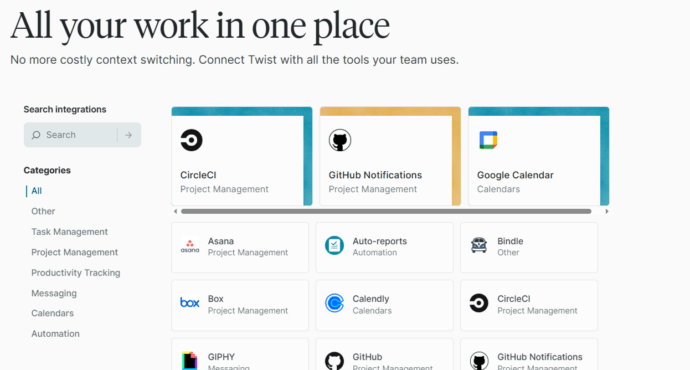
Slack‘s integration marketplace is genuinely impressive. Browse it and you’ll find connections to virtually every business tool: project management (Asana, Monday, Jira), development (GitHub, GitLab, Bitbucket), sales (Salesforce, HubSpot), support (Zendesk, Intercom), analytics, marketing tools, calendars – the list goes on for pages. This transforms Slack into a command center where updates from your entire software stack converge.
Sounds great, right? The catch is that each integration adds more noise. Your team discussion about Q4 strategy gets interrupted by automated messages about deployed code, closed tickets, scheduled meetings, and LinkedIn mentions. You end up spending as much time filtering signal from noise as you save from having everything in one place.
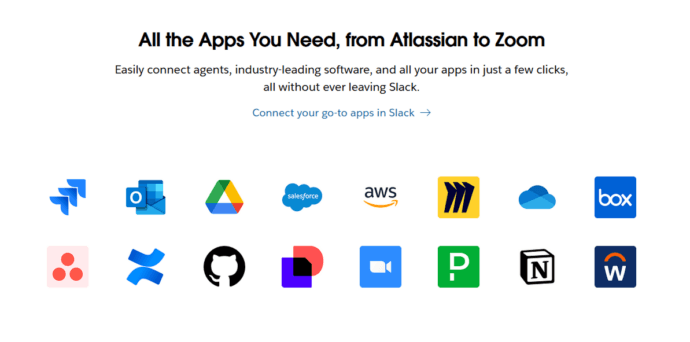
Twist maintains a minimal integration catalog by choice. You’ll find Google Drive for file collaboration, GitHub for code repositories, Todoist for task management, and a handful of others. That’s intentional – Twist refuses to become another notification firehose. But if your workflow depends on connecting fifteen different tools, Twist’s limited options will frustrate you quickly.
Finding Information Later
Slack invested heavily in search capabilities because in a platform where thousands of messages flow daily, you need powerful search. You can filter by sender, date range, channel, file type, or specific phrases. For busy workspaces, this search functionality is essential for surfacing buried information.
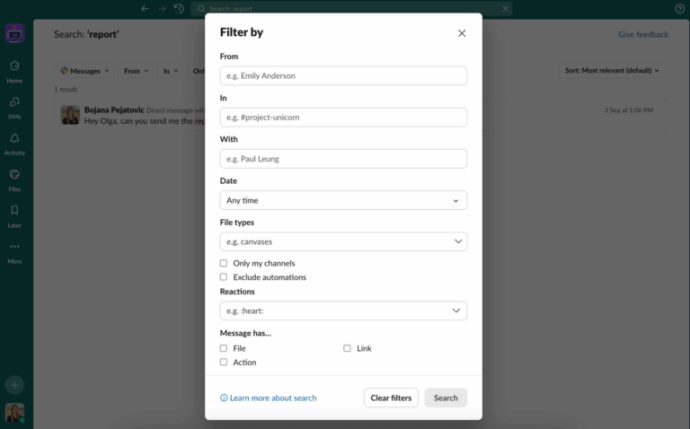
Twist‘s search works adequately but isn’t its strength. The platform doesn’t need exceptional search because its structure keeps information organized naturally. Looking for the discussion about hiring a designer? Go to the relevant channel and scan for the “Designer Hiring” thread. The organization reduces reliance on search as a primary discovery method.
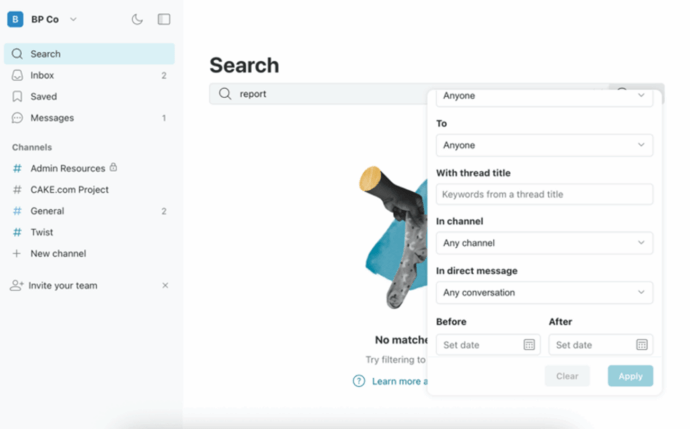
Both approaches work, but they reward different behaviors. Slack rewards active searching and browsing. Twist rewards creating well-titled threads that make information self-organizing.
Video Communication Capabilities
Slack includes voice and video calling that works fine for most internal team needs. Start a quick call with a colleague or launch a huddle for group discussion. Paid plans support meetings up to 50 participants, handling most team scenarios. The quality suffices for daily standups and project check-ins, though many companies still use dedicated tools like Zoom for critical client presentations or large company meetings.
Twist added video functionality later in its development, and that shows. The feature exists and functions, but it feels like something they included because teams expect it, not because it’s a core strength. You can gather up to 20 people on a call, which covers typical team meetings, but advanced features are limited.
Neither platform positions itself primarily as a video solution. If video meetings form the backbone of your team’s collaboration, you might want specialized tools designed specifically for that purpose.
Read also:
Team Collaboration on Files
Both platforms handle basic file sharing without issues. Drag documents, images, or spreadsheets into conversations and they become searchable and accessible to the team. Slack offers more generous storage on paid tiers (10GB per person versus 5GB in Twist’s free plan), though both connect smoothly with Google Drive, Dropbox, and similar services when you need additional space.
Slack‘s advantage comes from its real-time nature – drop a design mockup in a channel and watch feedback roll in immediately through messages and emoji reactions. Twist‘s threaded structure means feedback might arrive more slowly, but files never get lost in scrolling conversation streams. Six months later, you’ll find that mockup exactly where you left it in the design review thread.
Self-Hosted Team Messenger with Video Conferencing
A cutting-edge team collaboration server with personal and group chats, UltraHD video conferences, and advanced AI-powered features — free for up to 1,000 users!
Using These Tools on Mobile
Slack‘s mobile apps are polished and feature-rich, essentially bringing the full desktop experience to your phone. This is excellent for flexibility but contributes to the always-on culture that burns people out. You can participate in conversations just as easily from a coffee shop as from your desk, which sounds convenient until you realize you’re never truly disconnected from work.
Twist‘s mobile apps work well for periodic check-ins but deliberately avoid being addictive. They’re built for reviewing threads and responding thoughtfully when you have time, not for maintaining constant availability. This fits Twist’s async philosophy but means you can’t use it effectively for urgent, time-sensitive coordination on the go.
What You’ll Pay
Budget matters for any tool decision, so let’s examine the actual costs and what you receive at each level.
|
Feature |
Slack Free |
Slack Pro |
Twist Free |
Twist Unlimited |
|---|---|---|---|---|
|
Monthly Cost |
$0 |
$7.25 per person |
$0 |
$6 per person |
|
Message Archive |
90 days only |
Complete history |
Complete history |
Complete history |
|
App Connections |
10 maximum |
No limits |
All available |
All available |
|
File Storage |
5GB for whole team |
10GB per person |
5GB per person |
No limits |
|
Video Meetings |
Two people only |
Up to 50 people |
Up to 20 people |
Up to 20 people |
|
Customer Support |
Community forums |
Standard response |
Email support |
Priority access |
Slack’s no-cost version works initially but shows its limitations quickly. The 90-day message cutoff is particularly painful – imagine losing access to important decisions and context after three months. The 10-integration cap forces you to choose between connecting your project tracker or your code repository. Most serious teams find themselves upgrading within months.
Slack Pro at $7.25 monthly per person (annual billing) eliminates the major restrictions. Full message history preserves institutional knowledge, unlimited integrations connect your entire workflow, expanded storage handles team files, and proper video calling supports larger meetings. For teams needing Slack’s immediacy and integration depth, the cost is justifiable.
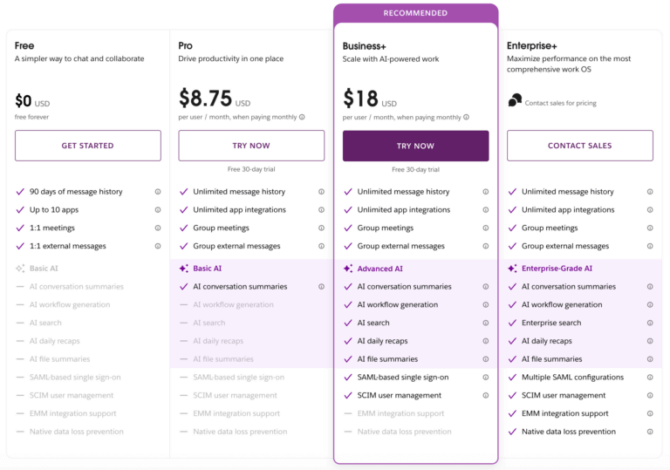
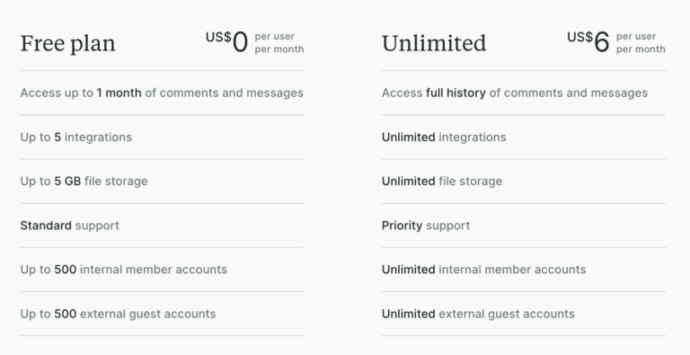
Twist’s no-cost tier is surprisingly complete for long-term use. Full message history from day one means you never lose important conversations. Access to all integrations (though the catalog is smaller) removes arbitrary limitations. Small teams often use Twist free indefinitely without hitting frustrating walls.
Twist Unlimited at $6 monthly per person adds unlimited file storage and priority support. The price gap versus Slack Pro is minimal, so your decision should hinge on features and philosophy rather than budget constraints.
Strengths and Weaknesses Summarized
Where Slack Excels
- Speed matters: When quick coordination is essential, Slack delivers immediate back-and-forth communication
- Tool connectivity: The massive integration marketplace centralizes your entire software ecosystem
- Familiar interface: Most professionals already understand how Slack works from previous companies
- Video built-in: Adequate calling features without requiring separate conferencing tools
- Information retrieval: Powerful search cuts through large message volumes effectively
- Constant updates: Active development regularly adds features and improvements
- Time-critical work: Perfect for support teams, operations, or any role requiring rapid response
- Mobile flexibility: Comprehensive apps keep teams connected across devices
Where Slack Falls Short
- Focus destruction: Constant pings fragment concentration and make deep work nearly impossible
- Alert fatigue: Managing notification settings becomes an ongoing battle against overload
- Lost discussions: Important conversations disappear into fast-moving channel streams
- Response pressure: Always-on culture creates stress around immediate availability
- Scaling costs: Expenses grow substantially as team size increases
- Restrictive free tier: Core limitations force upgrades quickly for growing teams
- Overwhelming complexity: New users face steep learning curves with channels, threads, and settings
- Underused threading: Optional threads lead to messy, intermingled conversations
Where Twist Excels
- Concentration protection: Async design preserves focus blocks for deep, meaningful work
- Clear organization: Mandatory threading keeps every discussion neatly separated and followable
- Viable free plan: Unlimited history and full features work for small teams indefinitely
- Global team support: Perfect for distributed teams spanning multiple time zones
- Reduced anxiety: No pressure for instant responses lowers workplace stress significantly
- Lasting accessibility: Thread structure ensures information stays findable months later
- Intentional communication: Platform design encourages complete, thoughtful messages
- Better value: Lower pricing than competitors at the paid tier
Where Twist Falls Short
- Response delays: Getting quick answers to unblock work takes longer than real-time chat
- Limited connections: Integration options pale compared to Slack’s extensive marketplace
- Smaller community: Fewer users means less external support, guides, and resources
- Basic video: Calling features lag significantly behind Slack and dedicated platforms
- Rigid structure: Mandatory threading feels constraining for casual, spontaneous chat
- Less spontaneity: Water cooler moments and random interactions happen less naturally
- Cultural shift required: Entire team must embrace async communication for it to work
- Newer enterprise presence: Less proven track record at very large organizational scales
Consider a Video-First Alternative
Both Slack and Twist treat video as a supporting feature rather than a central capability. If your team’s collaboration heavily involves face-to-face meetings, screen sharing for collaborative sessions, or presenting to clients and stakeholders, you might find both platforms insufficient for your video needs.
TrueConf builds everything around professional video collaboration first. Rather than adding video calls as an afterthought to messaging, it provides enterprise-grade video conferencing with messaging and collaboration features integrated alongside.
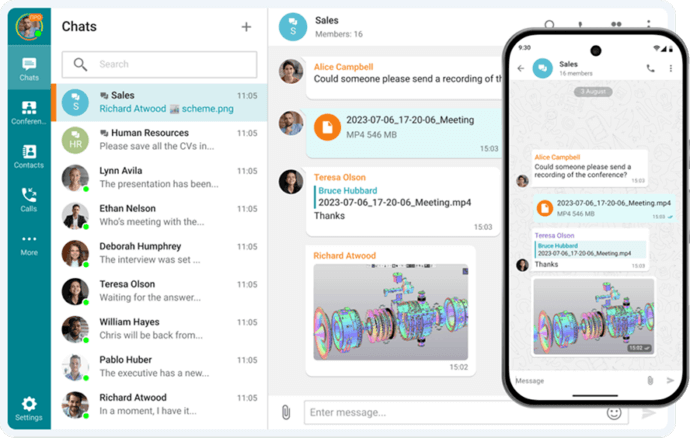
What sets TrueConf apart:
- Enterprise video quality supporting smooth, reliable large meetings without hiccups
- Sophisticated screen sharing optimized for presentations and collaborative work sessions
- Native recording features capturing meetings without external integrations or subscriptions
- Unified messaging system so communication doesn’t fragment across multiple tools
- Flexible scaling from intimate one-on-one calls up to large company webinars
- Security-focused deployment including on-premise options for regulated industries
- Cost efficiency compared to subscribing to multiple separate collaboration tools
Try TrueConf Server Free!
- 1,000 online users with the ability to chat and make one-on-one video calls.
- 10 PRO users with the ability to participate in group video conferences.
- One SIP/H.323/RTSP connection for interoperability with corporate PBX and SIP/H.323 endpoints.
- One guest connection to invite a non-authenticated user via link to your meetings.

For remote and hybrid organizations where video meetings drive meaningful collaboration, a platform purpose-built around video often delivers better results than forcing messaging apps to handle everything. The messaging capabilities you need are still present, but integrated within a system designed around how distributed teams genuinely work together face-to-face.
Making the Right Choice for Your Team
Forget the hype cycles, feature comparisons, and case studies from companies nothing like yours. The right communication platform reveals itself when you honestly answer these questions about your actual work:
- How frequently does your work truly require instant answers versus considered responses?
- What percentage of the workday involves concentrated focus versus rapid coordination?
- Do team members share office space, time zones, or are they distributed globally?
- Are notifications helping people collaborate or destroying their ability to think deeply?
- Is your work inherently reactive (responding to customer needs, incidents) or proactive (building, creating, analyzing)?
- How much value does your team place on spontaneous interaction versus organized discussion?
- What’s your honest assessment of current “always available” culture and its impact?
Base your decision on truthful answers to these questions, not aspirational thinking about how you wish your team operated. Slack and Twist embody fundamentally different philosophies about workplace communication and collaboration. Select the platform aligning with how you genuinely want your team to function, not the one with more impressive features or larger market share.
Your choice will influence team culture more profoundly than you might expect. Real-time platforms like Slack naturally create expectations around quick responses and constant availability. Asynchronous platforms like Twist protect concentration time but demand patience and advanced planning. Neither approach is universally superior – they optimize for different work types and organizational values.
Make your choice deliberately, commit to it completely, and establish explicit cultural expectations around how your team will leverage whichever tool you select. The specific platform matters less than how intentionally and consistently you use it to support the work that actually matters.
FAQ
Can we use Slack or Twist for large-scale corporate video meetings and webinars?
Slack and Twist treat video as a secondary feature, capping meetings at 50 and 20 participants respectively, which limits their use for large events. If your organization needs to host massive town halls or webinars, TrueConf is specifically engineered for this, supporting up to 1,500 participants in a single conference with Ultra HD 4K video quality. This makes it the ideal choice for enterprises that require professional, large-scale video collaboration alongside their daily messaging.
How do these platforms handle strict data privacy and on-premise deployment requirements?
Both Slack and Twist are strictly cloud-based platforms, meaning your sensitive corporate data and chat histories are stored on their external servers. For organizations in regulated industries that require absolute data sovereignty, TrueConf offers full on-premise deployment to keep all communications entirely within your private network. This ensures that your confidential information never leaves your controlled infrastructure, easily satisfying strict compliance mandates like HIPAA or GDPR.
Can we integrate our existing physical conference room hardware with these communication tools?
Integrating legacy hardware with cloud-only chat apps like Slack or Twist is generally not supported, often forcing companies to buy new proprietary equipment. In contrast, TrueConf natively supports standard SIP and H.323 protocols, allowing seamless interoperability with your existing Cisco, Polycom, or other AV room systems. This means you can upgrade your team’s digital collaboration capabilities without having to rip and replace your expensive physical hardware investments.
How do the pricing models compare for a growing enterprise with hundreds of employees?
Slack and Twist both charge per-user monthly subscription fees, which can lead to rapidly scaling and unpredictable costs as your headcount grows. TrueConf offers a highly competitive free tier that supports up to 1,000 users, alongside flexible enterprise licensing models like perpetual lifetime licenses. This predictable pricing structure eliminates hidden per-seat fees and often results in significant long-term savings for medium to large organizations.
Is it possible to conduct secure internal video meetings if our external internet connection goes down?
Cloud-dependent services like Slack and Twist become completely inaccessible during an internet outage, which can halt critical business operations for distributed teams. However, because TrueConf can be deployed entirely on-premises, it operates seamlessly within your local corporate LAN or air-gapped network. This guarantees uninterrupted, highly secure communication for your internal teams regardless of external internet status.
Do external clients or partners need to download a dedicated application to join our video meetings?
Requiring external guests to register and download specific software can create friction and delay the start of important business discussions. To eliminate this barrier, TrueConf allows unauthenticated participants to join video conferences directly through a standard web browser without any downloads. This ensures a smooth, professional collaboration experience for external stakeholders while keeping your core self-hosted infrastructure completely secure.
About the Author
Olga Afonina is a technology writer and industry expert specializing in video conferencing solutions and collaboration software. At TrueConf, she focuses on exploring the latest trends in collaboration technologies and providing businesses with practical insights into effective workplace communication. Drawing on her background in content development and industry research, Olga writes articles and reviews that help readers better understand the benefits of enterprise-grade communication.


Follow us on social networks