
Pumble vs Slack: Which Team Chat Tool Actually Fits Your Team?
If your company is still running on a mix of email chains, WhatsApp groups, and the occasional “just call me,” you already know the pain point. Team messaging platforms exist to fix exactly that friction. But once you start shopping around, the choice quickly narrows to a handful of well-known names, and Slack tends to dominate the conversation.
The problem? Slack is expensive, and not every team needs everything it offers. That is where Pumble steps in as a credible challenger. And for teams that want video-first communication baked into the same platform, there is a third option worth knowing about: TrueConf.
This article breaks down what each tool actually does well, where each one falls short, and how to figure out which one fits how your team works day to day.
Why This Comparison Matters Right Now
Slack has been the default choice for tech-savvy teams since its mainstream explosion around 2015. But “default” and “best for your situation” are two different things. A 12-person marketing agency and a 2,000-person logistics company have wildly different needs, and paying for features you will never use is a quiet budget leak.
Pumble launched as a direct alternative to Slack, deliberately targeting cost-conscious teams that want familiar chat functionality without the price tag. It gained traction fast, particularly among startups and mid-size businesses.
TrueConf occupies a slightly different lane. It is less about replacing Slack feature-for-feature and more about giving organizations, particularly those in regulated industries or with on-premise requirements, a unified communications platform where messaging and video meetings live together by design.
Take your team communication to the next level with TrueConf!
A powerful self-hosted video conferencing solution for up to 1,000 users, available on desktop, mobile, and room systems.
Pumble: The Case for Going Lean
Pumble is built by CAKE.com, the same company behind productivity tools like Clockify and Pumble. Its pitch is simple: most of what teams actually use in Slack is available in Pumble for free, without the seat-based pricing cliff.
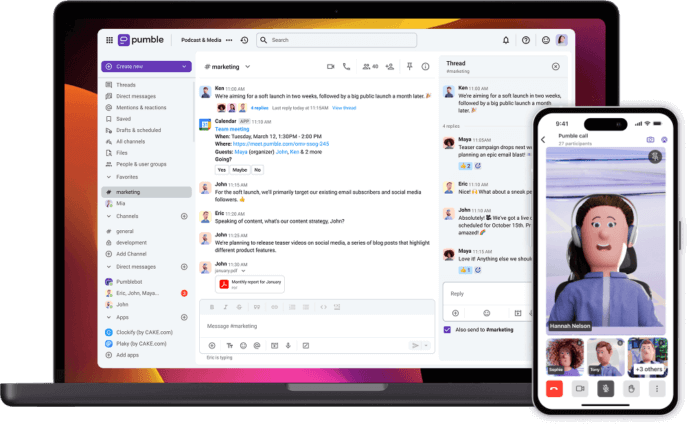
What Pumble Does Well
- Unlimited message history on the free plan. This is the headline feature and it genuinely matters. Slack’s free plan caps your searchable message history at 90 days. For a small team onboarding a new hire six months in, that limitation is immediately felt. Pumble removes that ceiling entirely on the free tier.
- Channel-based organization that feels familiar. If your team has ever used Slack, the learning curve in Pumble is almost flat. Channels, direct messages, threads, @mentions, it all works the way you expect. A design studio switching from Slack reported getting the whole team up and running in an afternoon with zero training sessions.
- Guest access without complexity. Bringing a freelance developer or a client into a specific channel is straightforward and does not eat into your seat count in a punishing way.
- File sharing and search. Pumble handles file uploads well, and its search function covers both messages and files. Not as fast or as smart as Slack’s search, but functional for most everyday needs.
Where Pumble Falls Short
Pumble’s limitations become visible once you need to connect it to the rest of your work stack. Its integration library is modest compared to Slack’s. If your team lives inside tools like Salesforce, Jira, PagerDuty, or dozens of other niche apps, Pumble may not have the native integration you need. You can work around some of this with Zapier or Make, but that adds another layer of setup and maintenance.
The mobile app has also received mixed reviews for reliability. Teams that are heavily remote and phone-dependent have reported occasional notification delays, which is a non-trivial issue in time-sensitive environments like customer support.
Slack: The Benchmark (and the Bill)
Slack set the standard for modern workplace messaging, and it still holds that title on raw feature count. But the conversation around Slack in 2024 and beyond is increasingly about whether those features justify the cost for teams that are not deeply invested in the broader Salesforce ecosystem.
What Slack Does Best
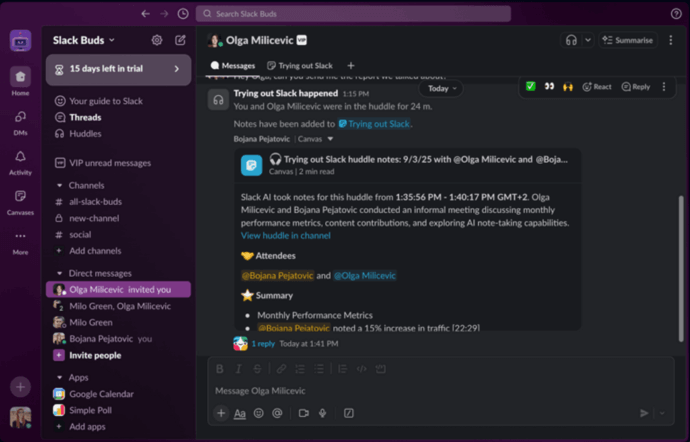
- Integrations. With over 2,600 apps in its directory, Slack connects to almost everything. A product team that uses GitHub for code, Notion for docs, Figma for design, and Google Calendar for scheduling can pipe relevant notifications directly into themed channels. This turns Slack from a chat tool into something closer to a command center.
- Huddles and clips. Slack Huddles (lightweight audio and video calls) and video/audio clip sharing are genuinely useful for async teams. A developer can record a 90-second screen capture explaining a bug rather than writing a three-paragraph message.
- Workflow Builder. Non-technical users can automate repetitive tasks inside Slack without touching code. Automatically posting a standup prompt in a channel every morning, routing new form submissions to the right person, collecting feedback after a project closes, these are real time-savers.
- Search quality. Slack’s search is fast and contextually intelligent. You can filter by person, channel, date range, or file type, and it rarely returns irrelevant noise.
Where Slack Gets Complicated
Pricing is the obvious friction point. The Pro plan runs around $7.25 per user per month when billed annually. For a team of 50, that is roughly $4,350 per year just for messaging. Add the Business+ tier for compliance features and you are approaching $12.50 per user. For organizations where every budget line is scrutinized, this adds up fast.
There is also the question of noise. Slack’s flexibility means it is easy to end up with 60 active channels, a stream of bot notifications, and a team that spends more time managing Slack than doing actual work. This is a cultural and organizational problem as much as a product one, but Slack’s design does not do much to discourage channel sprawl.
TrueConf: When Video and Messaging Need to Live Together
TrueConf is a different kind of product. It is a unified communications platform built around video conferencing first, with team messaging, file sharing, and presence indicators layered on top. The company has been building video infrastructure since 2003, which gives it a depth in that area that neither Pumble nor Slack can match.
Who TrueConf Is Built For
TrueConf’s strongest appeal is to organizations that:
- Need to run video meetings with dozens or hundreds of participants reliably
- Operate in industries where data residency and on-premise deployment are required (healthcare, government, finance, defense)
- Want to avoid paying for a separate video conferencing tool on top of a messaging tool
- Have remote offices or distributed teams where video presence matters more than text chat
A regional bank that cannot legally store communication data on third-party cloud servers, for example, would find TrueConf’s self-hosted deployment option far more practical than Slack’s cloud-only model.

What TrueConf Offers
- On-premise and private cloud deployment. This is TrueConf’s defining advantage over both Slack and Pumble. Organizations with strict IT policies can run the entire platform on their own infrastructure, with no data leaving their network.
- High-quality video conferencing at scale. TrueConf supports 4K video and can handle large-scale video calls. For all-hands meetings, town halls, or multi-site video collaboration, this is noticeably more capable than Slack Huddles or Pumble’s lighter video features.
- Integrated team messaging. Channels, direct messages, and group chats are all present. The experience is less polished than Slack’s, but it covers the core use cases without requiring a separate app.
- Room systems support. TrueConf integrates with dedicated video conferencing hardware in meeting rooms, which matters for companies with physical office infrastructure.
Try TrueConf Server Free!
- 1,000 online users with the ability to chat and make one-on-one video calls.
- 10 PRO users with the ability to participate in group video conferences.
- One SIP/H.323/RTSP connection for interoperability with corporate PBX and SIP/H.323 endpoints.
- One guest connection to invite a non-authenticated user via link to your meetings.

TrueConf’s Trade-offs
The integration ecosystem is not Slack’s. If your team relies heavily on third-party app connections, TrueConf will feel limiting. Its messaging features, while functional, are secondary to its video capabilities, and teams that are primarily text-first may find the interface less intuitive than Pumble or Slack.
The onboarding process can also be more involved, particularly for the on-premise version, which typically requires IT involvement.
Side-by-Side: Key Features at a Glance
|
Feature |
Pumble |
Slack |
TrueConf |
|---|---|---|---|
|
Free plan |
Yes, with unlimited history |
Yes, 90-day message limit |
1,000 chat users, 10 group meeting participants, unlimited 1-1 calls |
|
Pricing (paid) |
From $2.49/user/month |
From $7.25/user/month |
Contact for pricing |
|
On-premise deployment |
No |
No |
Yes |
|
Native video calls |
Basic |
Huddles (lightweight) |
Full-featured, 4K |
|
App integrations |
Limited |
2,600+ apps |
External devices, services, and platforms |
|
Guest access |
Yes |
Yes |
Yes |
|
End-to-end encryption |
Partial |
Partial |
Yes |
|
Best for |
Budget-conscious teams |
Integration-heavy workflows |
Video-first or regulated industries |
Choosing the Right Tool: Three Scenarios
Rather than giving a one-size-fits-all recommendation, it is more useful to match the tool to the actual situation.
Scenario 1: A 20-person startup watching burn rate closely.
Pumble is the obvious starting point. Unlimited message history, solid core chat features, and a free plan that does not expire means zero communication costs until you hit a scaling threshold that genuinely justifies upgrading.
Scenario 2: A 150-person product company deep in the SaaS ecosystem.
Slack earns its price here. If your team’s workflow involves GitHub PRs triggering channel alerts, Jira tickets being created from messages, and on-call engineers getting paged through PagerDuty, the integration layer is not a nice-to-have, it is the product. Pumble cannot replicate that depth.
Scenario 3: A government agency or financial institution managing distributed offices.
TrueConf is the only option in this comparison that offers on-premise deployment with enterprise-grade video conferencing. If compliance, data sovereignty, and the ability to hold large video meetings are all requirements, TrueConf is worth a serious evaluation even if its messaging features are not as refined.
Kudremukh Iron Ore Limited (KIOCL)|Case Study
KIOCL provided their employees with secure tools for collaboration, video calls, and team messaging by implementing TrueConf Server. An autonomous system unified more than 1,000 employees allowing to facilitate work meetings in hybrid and online modes from any location.

What Most Comparison Articles Miss
These tools are not static. Slack has been shifting its identity since Salesforce acquired it in 2021, leaning more heavily into workflow automation and AI features. Pumble has been consistently adding functionality. TrueConf continues to push on video quality and enterprise features.
The more honest question to ask when evaluating any of these platforms is not “which one has the most features” but “which one will my team actually use consistently?” A tool that gets abandoned because it is too complex or too noisy is worse than a simpler tool that becomes genuinely embedded in daily work.
Before signing any contract, run a real pilot. Put 10 people on the platform for two weeks with actual projects, not a test sandbox. The friction points that matter will surface faster than any feature comparison chart can predict.
Final Thoughts
Pumble is a genuine, practical alternative to Slack for teams where cost matters and deep integrations are not critical. Slack is still the best choice for integration-heavy, large-scale teams that can absorb the cost. TrueConf fills a specific but important niche: organizations where video quality, on-premise control, and security requirements take priority over the breadth of the messaging feature set.
None of these is universally the best. The right answer depends on your team size, your budget, your industry, and honestly, how your people prefer to communicate. Start there.
FAQ
How does TrueConf handle data privacy and compliance compared to cloud-only tools like Slack and Pumble?
Unlike Slack and Pumble, which store your data on external cloud servers, TrueConf offers full on-premise deployment to keep all communications within your private network. This complete data sovereignty makes it the ideal choice for government, healthcare, and financial institutions that must comply with strict regulatory frameworks. You maintain absolute control over who accesses your data, how it is encrypted, and where it is archived.
Does TrueConf support the same extensive third-party app integrations as Slack?
While Slack boasts thousands of native app integrations, TrueConf focuses on deep enterprise interoperability rather than a massive consumer app marketplace. Instead of connecting to hundreds of SaaS tools, TrueConf natively integrates with core corporate infrastructure like LDAP/Active Directory, PBX systems, and standard SIP/H.323 conference room hardware. This makes it perfect for organizations prioritizing internal IT control and hardware reuse over external SaaS workflows.
Can external clients or guests join our video meetings without downloading a dedicated application?
Yes, requiring external partners to install software can create friction, but TrueConf solves this by allowing guests to join meetings directly through a standard web browser. This ensures a seamless, professional experience for external collaborators while keeping your core self-hosted infrastructure completely secure. You can easily generate a secure link to invite non-authenticated users without compromising your network perimeter.
How does TrueConf’s video conferencing quality compare to Slack Huddles or Pumble’s built-in video?
Slack Huddles and Pumble’s video features are designed for lightweight, casual check-ins, whereas TrueConf is engineered for enterprise-grade, high-definition collaboration. TrueConf supports UltraHD 4K video and can handle massive conferences with up to 1,500 participants simultaneously without sacrificing visual clarity. This makes it the superior choice for large town halls, complex training sessions, and critical multi-site business meetings.
Is TrueConf a good fit for a small startup that primarily needs basic text messaging?
If your small startup only needs basic text chat and has zero budget, a free tier of Pumble might be more text-centric and cost-effective for your immediate needs. However, if your team frequently relies on face-to-face communication, TrueConf offers a generous free tier that includes unlimited 1-on-1 video calls and chat for up to 1,000 users. This allows small teams to access premium, secure video collaboration without paying per-seat subscription fees.
Can we use TrueConf for internal communications if our external internet connection goes down?
Cloud-dependent platforms like Slack and Pumble become completely inaccessible during an internet outage, which can halt your team’s productivity. Because TrueConf can be deployed entirely on-premises, it operates seamlessly within your local corporate LAN or air-gapped network. This guarantees that your internal team messaging and video meetings continue uninterrupted, regardless of external internet status.
About the Author
Olga Afonina is a technology writer and industry expert specializing in video conferencing solutions and collaboration software. At TrueConf, she focuses on exploring the latest trends in collaboration technologies and providing businesses with practical insights into effective workplace communication. Drawing on her background in content development and industry research, Olga writes articles and reviews that help readers better understand the benefits of enterprise-grade communication.


Follow us on social networks