
We’ve Tried Slack vs. Flock: Which Chat Solution is Right for Your Team?
Choosing the right team communication platform can make or break your workflow. After months of testing both Slack and Flock with real teams, we’re breaking down what actually matters when you’re making this decision. And yes, we’ll show you where TrueConf fits into this equation, especially if you’re looking for something that goes beyond basic messaging.
Let’s get straight to what these platforms offer and what they’ll cost you.
Take your team communication to the next level with TrueConf!
A powerful self-hosted video conferencing solution for up to 1,000 users, available on desktop, mobile, and room systems.
Pricing Breakdown
Before diving into features and user experience, it’s important to understand the financial commitment behind each platform. Pricing structures not only affect your monthly budget but also determine scalability, long-term costs, and overall return on investment.
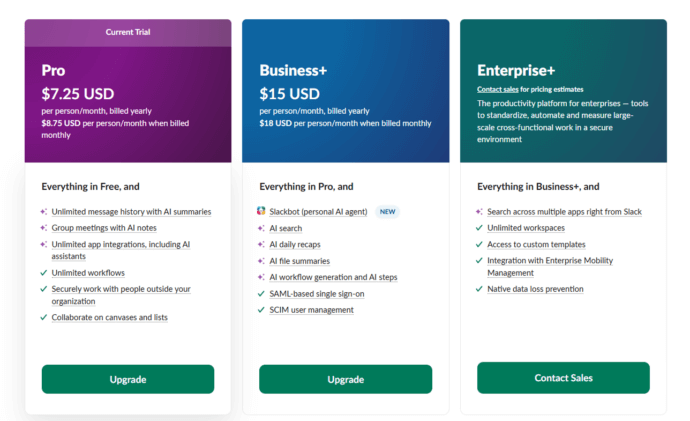
Slack Pricing:
- Free: Limited message history (90 days), 10 integrations, 1:1 video calls
- Pro: $8.75/user/month (billed annually) – Full message history, unlimited integrations, group video calls up to 50 participants
- Business+: $15/user/month (billed annually) – Advanced security, compliance features, 99.99% uptime SLA
- Enterprise Grid: Custom pricing – For large organizations requiring enterprise-grade controls
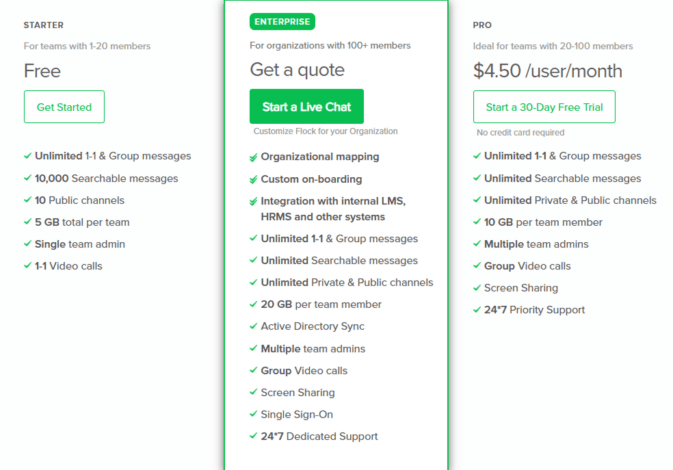
Flock Pricing:
- Free: Basic features with limitations on searchable messages and storage
- Pro: $4.50/user/month (billed annually) – Unlimited search, screen sharing, guest access
- Enterprise: Custom pricing – Advanced admin controls, dedicated support
TrueConf Pricing: TrueConf offers a different approach with on-premise and cloud solutions starting at competitive rates. Unlike subscription models that scale costs with every new team member, TrueConf provides perpetual licenses and flexible deployment options.
The price gap is obvious: Flock appears cheaper on paper. But here’s what we learned: cheaper doesn’t always mean better value. A team of 50 users would pay $4,380/year for Flock Pro versus $5,250/year for Slack Pro. That $870 difference might seem significant until you realize what you’re getting (or not getting) for that money.
The Real Decision: What Actually Matters?
At the end of the day, the right platform depends less on feature lists and more on how your team actually works. Different organizations prioritize integrations, budget efficiency, video performance, or infrastructure control. Based on practical evaluation and hands-on usage, here’s how the choice breaks down:
Choose Slack if: Your team lives in integrations and needs connections to dozens of specific tools You have budget flexibility and want the most popular platform with extensive community support Your primary need is channel-based text communication with video as a secondary feature You’re comfortable with data hosted on third-party servers.
⠀
Choose Flock if: Budget is your primary constraint and you need basic features at lower cost Your team is small to medium-sized (under 100 people) You want simpler interface with less feature overload Built-in productivity tools (polls, to-dos) appeal to your workflow.
⠀
Choose TrueConf if: Video communication quality actually matters to your business outcomes Security and data privacy aren’t negotiable (healthcare, finance, legal, government) You need to support large meetings (50+ participants) regularly You want control over your infrastructure rather than depending entirely on cloud services You’re tired of stitching together multiple platforms for chat, video, and collaboration.
Interface Showdown
The interface is where daily productivity either accelerates or quietly slows down. No matter how powerful a platform is on paper, if navigation feels cluttered, search is inefficient, or key actions require too many clicks, teams lose time every single day.
Slack’s Interface: Slack feels familiar if you’ve used any modern chat app. The three-panel layout, sidebar for channels, main chat area, and thread panel, works well once you adjust to it. However, with dozens of channels, the sidebar becomes cluttered fast. We found ourselves constantly searching for the right channel, even with the star-favorite feature.
The threading system is both a blessing and a curse. It keeps conversations organized, but important replies buried in threads often get missed. One project manager on our test team said she spent 20 minutes looking for a file someone shared in a thread three days prior.
Flock’s Interface: Flock takes a cleaner approach. The interface feels less overwhelming, with better visual hierarchy. The integrated to-do lists and polls live right in the sidebar, which our teams actually used (unlike Slack’s many unused features).
But here’s the catch: simpler sometimes means less powerful. The search function in Flock isn’t as robust. When we needed to find a specific conversation from two months back, Slack found it in seconds while Flock required more precise keywords.
TrueConf Interface: TrueConf Server is designed primarily around professional video communication, and that focus shapes the interface. Instead of centering everything around endless text channels, the platform emphasizes scheduled meetings, contact lists, and conference management. The layout feels more structured and purpose-driven, especially for organizations that rely heavily on video collaboration.
Navigation is straightforward: users can quickly access personal chats, group conferences, and meeting rooms without juggling dozens of channels. For administrators, the control panel provides clear visibility into users, endpoints, and system performance, something IT teams particularly appreciated during testing.
While it may feel less “social” than chat-first platforms, TrueConf’s interface avoids the clutter that often builds up in large Slack workspaces. For teams prioritizing structured communication and video-driven workflows, this clarity becomes a practical advantage rather than a limitation.
Chat Features Head-to-Head
Messaging is still the foundation of daily team collaboration. Quick questions, file sharing, approvals, and infomal updates all flow through chat long before a meeting is scheduled. But not all chat systems are built with the same priorities. Some focus on customization and ecosystem depth, others on simplicity and built-in tools, and some treat messaging as a secure extension of a broader communication platform.
Slack Chat: The messaging experience is solid. Reactions, mentions, reminders: everything you’d expect works well. The real strength shows up in custom emoji and advanced formatting. Our marketing team created dozens of custom reactions that became part of their workflow culture.
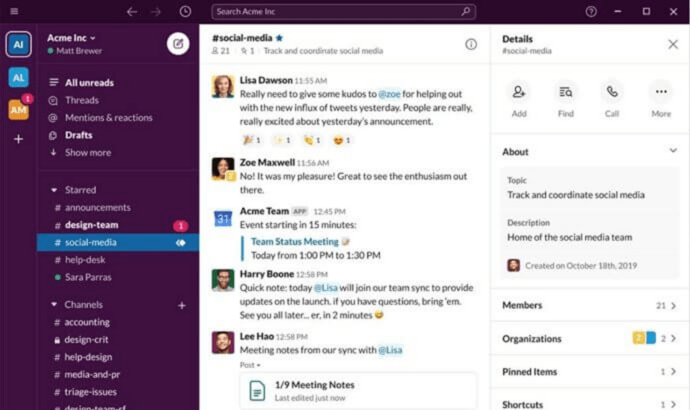
Slack’s “All Unreads” view sounds great theoretically. In practice, it became overwhelming for our sales team managing multiple client channels. One rep told us he started ignoring it entirely because it stressed him out.
Message editing and deletion work smoothly, with clear edit histories. The scheduled send feature proved useful for managers working across time zones.
Flock Chat: Flock’s chat does the basics right. Messages send quickly, notifications work reliably, and the mobile experience matches the desktop version. The built-in video messages are genuinely useful – our remote teams used them for quick updates that felt more personal than text.
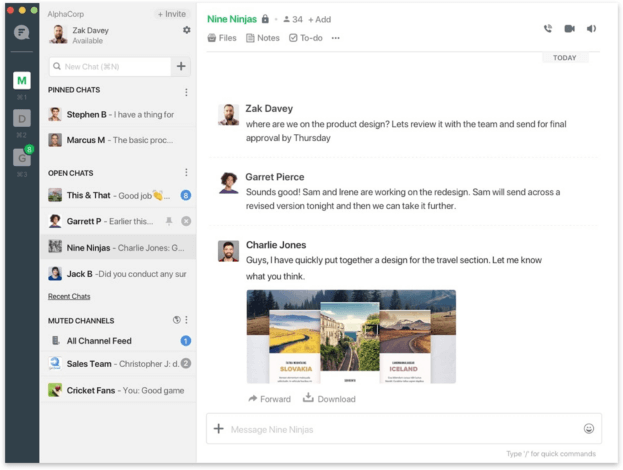
Where Flock stumbles: the lack of advanced search filters. Slack lets you search by person, channel, date range, and file type. Flock’s search is more basic, which became frustrating when trying to locate specific information.
The polling feature integrated directly into chat is brilliant. Instead of using external tools, teams ran quick decision polls right in their project channels. This small feature drove more engagement than we expected.
TrueConf Chat: TrueConf approaches chat as a complement to video communication rather than the main event. The messaging includes end-to-end encryption by default, not as an enterprise add-on. Explore TrueConf’s secure chat features that keep your sensitive business conversations protected without complicated setup processes.
Your Messages Are Secure with TrueConf!
A powerful self-hosted video conferencing solution for up to 1,000 users, available on desktop, mobile, and room systems. Your confidential information is protected by 12 levels of security.
Video Call Comparison
In today’s hybrid and remote-first workplaces, video meetings are no longer a secondary feature, they are the backbone of collaboration. The quality, stability, and scalability of your video calls directly affect productivity, engagement, and even decision-making speed. Let’s examine how Slack, Flock, and TrueConf Server perform when video communication becomes mission-critical.
Slack Video Calls: On the free plan, you’re limited to 1:1 calls. That’s a dealbreaker for most teams. The Pro plan supports up to 50 participants, which handled our needs.
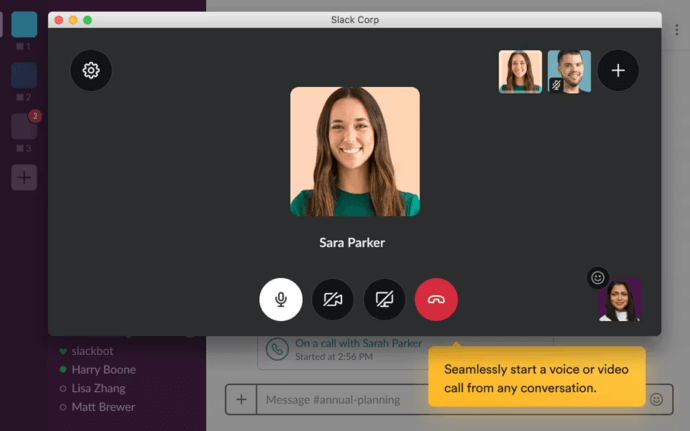
Video quality was good on stable connections but degraded noticeably when bandwidth got tight. Screen sharing worked fine, though the interface takes up considerable screen real estate.
The biggest issue: Slack video feels tacked on. It works, but it’s clearly not the platform’s strength. Calls start from channels or DMs, but there’s no dedicated meeting space or waiting room feature. Everyone just pops in, which can be chaotic for larger calls.
Flock Video Calls: Flock includes screen sharing and video calls even on the free tier, which is generous. Quality-wise, it’s comparable to Slack, functional but not exceptional.

The interface is cleaner during calls, with better controls for muting and video toggling. We appreciated the “knock to join” feature that prevents people from barging into ongoing meetings.
However, Flock maxes out at 20 participants on Pro plans. If you’re running all-hands meetings with 30+ people, you’ll need additional tools.
TrueConf Video Calls: This is where TrueConf distinguishes itself completely. Built specifically for professional video conferencing, TrueConf supports up to 1,500 participants in a single meeting with 4K video quality.
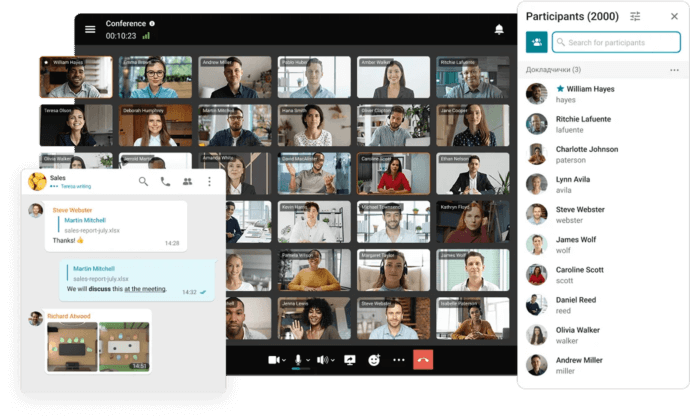
Our test team noticed the difference immediately. Where Slack and Flock compressed video to maintain connection, TrueConf maintained crystal-clear quality even with multiple participants. The platform includes features that chat-first apps don’t consider: moderation tools, virtual backgrounds that actually look professional, real-time translation for international teams, and recording with accurate transcription.
See TrueConf’s video capabilities that handle everything from small team huddles to company-wide broadcasts without requiring multiple platforms.
File Sharing Capabilities
File sharing is more than just sending attachments, it’s about how quickly teams can find documents later, how securely those files are stored, and whether collaboration around them feels smooth or fragmented. Storage limits, search capabilities, version visibility, and infrastructure control all play a role in long-term efficiency.
Slack File Sharing: Drag and drop works flawlessly. Slack’s search can find files by name, type, or even text within documents (on paid plans). The 10GB storage limit on the Pro plan filled up faster than expected for our design team sharing mockups and assets.
Google Drive and Dropbox integrations make file sharing seamless if you’re already using those services. But here’s an annoyance: files shared in threads are harder to find later. Our content team created a dedicated “Assets” channel just for file storage because trying to locate files in conversation threads was maddening.
Flock File Sharing: Flock provides 10GB per user on Pro plans, which adds up better for larger teams. The dedicated “Shared Files” section in each channel makes finding attachments easier than Slack’s approach.
The file preview works well for common formats. However, version control is limited. If someone uploads a revised version of a document, there’s no clear way to see the history or compare versions. This caused confusion when our legal team was reviewing contracts.
TrueConf File Sharing: TrueConf approaches file sharing as part of a secure communication ecosystem rather than a standalone cloud repository. Files can be exchanged directly within personal and group chats, as well as during video conferences, ensuring that documents stay within the organization’s controlled environment, especially in on-premise deployments.
Because TrueConf Server can be deployed on your own infrastructure, file storage and transfer remain inside your network rather than on third-party cloud servers. For organizations with strict data governance requirements, this level of control is critical.
TrueConf Server integrates file exchange seamlessly into secure messaging and conferencing workflows, prioritizing privacy and infrastructure control over massive cloud storage quotas.
Integration Ecosystem
Integrations often determine how well a communication platform fits into your existing tech stack. For some teams, the ability to connect dozens of SaaS tools is critical. For others, seamless interoperability with internal systems and enterprise infrastructure matters more than marketplace volume.
Slack Integrations: This is Slack’s superpower. Over 2,600 apps connect to Slack, from project management (Asana, Trello, Jira) to CRM (Salesforce, HubSpot) to development tools (GitHub, Bitbucket).
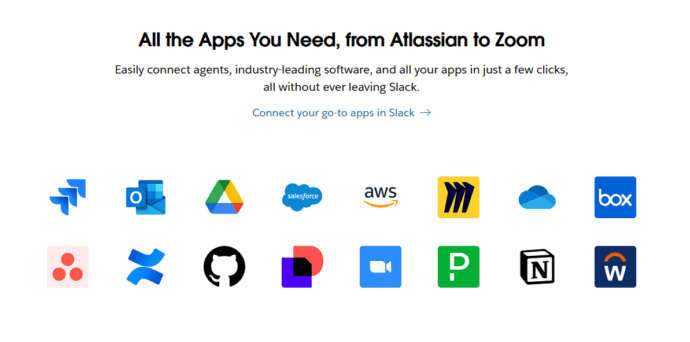
The Slack API is robust, allowing custom integrations for specific workflows. Our engineering team built a bot that posted deployment notifications directly to relevant channels, a genuine time-saver.
But here’s the reality check: most teams use 5-10 integrations regularly. Having access to 2,600 sounds impressive until you realize it’s overwhelming. We spent two weeks evaluating and testing different apps before settling on our core set.
Flock Integrations: Flock offers around 50 pre-built integrations covering major services like Google Calendar, Trello, Mailchimp, and Twitter. It’s not 2,600, but for many teams, it’s sufficient.
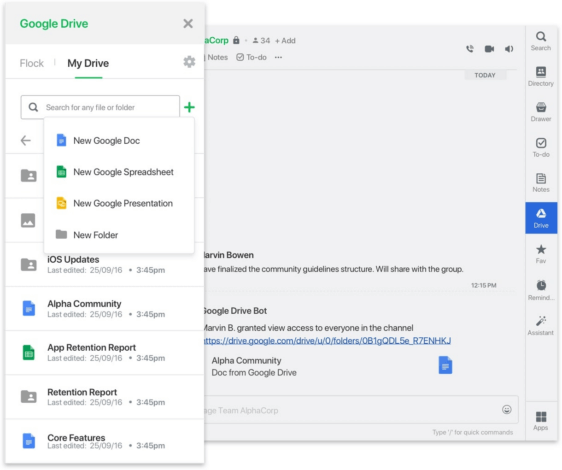
The integration setup is simpler than Slack’s. Less choice means less decision paralysis. Our operations team had their essential integrations running in under an hour.
The limitation appears when you need something specific. If your workflow depends on a niche tool, Flock probably won’t have a pre-built integration, and the API isn’t as extensively documented for custom development.
TrueConf Integrations: TrueConf Server takes a different approach to integrations. Instead of focusing on thousands of marketplace apps, it emphasizes interoperability and enterprise connectivity. The platform supports SIP and H.323 protocols, enabling integration with corporate PBX systems, room endpoints, and existing video conferencing infrastructure.
TrueConf also provides APIs and SDKs that allow organizations to embed video communication directly into their own applications and workflows. For enterprises building internal systems or requiring tight infrastructure control, this level of integration can be more valuable than access to hundreds of third-party productivity apps.
Rather than acting as an integration hub for external SaaS tools, TrueConf focuses on deep integration within secure, enterprise IT environments.
Security & Privacy Analysis
Security rarely grabs attention during day-to-day operations, but it becomes mission-critical the moment something goes wrong. For businesses handling sensitive conversations, client data, and internal strategy, understanding how a platform protects information is just as important as its features. Below, we break down how Slack and Flock approach security and privacy.
Slack Security: Slack offers encryption in transit for all data. Encryption at rest is available but requires the Business+ plan or higher. Two-factor authentication works smoothly, and we had no issues implementing it across our test teams.
Enterprise Key Management (EKM) lets larger organizations control their own encryption keys, but this costs extra. Data residency options exist for organizations that need data stored in specific geographic regions, again, on premium plans.
Slack is compliant with SOC 2, SOC 3, ISO/IEC 27001, and other standards. For most businesses, this checks the boxes. However, Slack stores all your data on their servers. You’re trusting their security, their backup systems, their disaster recovery plans.
One concern: deleted messages remain in Slack’s backup systems. Even if you delete something, it’s still technically recoverable in their systems.
Flock Security: Flock provides SSL encryption and complies with SOC 2 Type II, ISO 27001, and GDPR requirements. The security documentation is less detailed than Slack’s, which made our IT team slightly uncomfortable during evaluation.
Admin controls are solid on Enterprise plans. You can manage user permissions, enforce password policies, and monitor activity logs. But like Slack, your data lives on Flock’s infrastructure with limited control over exactly where and how it’s stored.
The privacy policy is clear: Flock doesn’t sell your data to third parties. That’s baseline expectation rather than impressive feature, but it’s good to see stated explicitly.
TrueConf Security & Privacy: Here’s where TrueConf takes a fundamentally different approach. You can deploy TrueConf on-premise, meaning your video calls and messages never leave your infrastructure. For healthcare, financial services, government, or any organization with strict data governance requirements, this is critical.
The Department of Health of Ho Chi Minh City|Case Study
TrueConf video collaboration solution connected more than 100 hospitals in Ho Chi Minh and allowed converting quarterly medical examination and treatment briefings between the Department of Health and hospitals into online mode. 660 employees of the City Oncology Hospital can now collaborate with one another without any barriers, increasing both speed and efficiency of communications.

End-to-end encryption comes standard, not as a premium add-on. Your IT team controls the encryption keys, backup systems, and data retention policies. If regulations require that data never crosses certain borders, you simply don’t send it there.
Learn about TrueConf’s security features designed for organizations that can’t compromise on data protection, without the complexity of managing entirely separate communication systems.
Final Verdict: Which Platform Wins?
After evaluating pricing, interface design, messaging features, video performance, file sharing, security, and integrations, one thing becomes clear: there is no universal winner, only the right fit for your team’s priorities.
If your workflow revolves around SaaS integrations and channel-based collaboration, Slack remains a powerful and mature ecosystem. If you’re looking for a budget-friendly solution with solid core functionality and less complexity, Flock delivers strong value for small to mid-sized teams.
But if video quality, security, infrastructure control, and enterprise-grade scalability are central to your operations, TrueConf Server operates in a different category. It isn’t simply a chat tool with added video, it’s a professional video collaboration platform with secure messaging built in. For industries where compliance, data residency, and large-scale conferencing matter, that architectural difference is significant.
The real question isn’t which platform is more popular. It’s which one aligns with how your organization communicates, collaborates, and protects its data. Choose the tool that supports your long-term workflow, not just your current habits.
Try TrueConf Server Free!
- 1,000 online users with the ability to chat and make one-on-one video calls.
- 10 PRO users with the ability to participate in group video conferences.
- One SIP/H.323/RTSP connection for interoperability with corporate PBX and SIP/H.323 endpoints.
- One guest connection to invite a non-authenticated user via link to your meetings.

⠀
The uncomfortable truth: Slack and Flock are chat apps with video features bolted on. TrueConf is a professional video platform with messaging support. Which architecture serves your team better depends on whether communication means endless text channels or face-to-face conversations.
FAQ
Can we host massive company-wide meetings with hundreds of participants without upgrading to expensive enterprise tiers?
While Slack and Flock cap their standard video calls at 50 and 20 participants respectively, TrueConf is specifically engineered for large-scale enterprise broadcasting. TrueConf supports up to 2,000 participants in a single video conference with crystal-clear 4K Ultra HD quality. This makes it the ideal choice for global town halls, large educational lectures, and major corporate events without needing multiple bolted-on tools.
How does TrueConf handle data privacy and compliance compared to cloud-only platforms like Slack?
Cloud platforms store your sensitive corporate data on their external servers, which can complicate compliance for highly regulated industries. TrueConf solves this by offering full on-premise deployment, ensuring that all video traffic, chat logs, and files never leave your private network. This complete data sovereignty makes it the perfect fit for government, healthcare, and financial institutions with strict regulatory requirements.
Can we integrate our existing physical conference room hardware with TrueConf?
Unlike chat-first apps that rely on proprietary software ecosystems, TrueConf is built to seamlessly integrate with your existing enterprise infrastructure. It natively supports standard SIP and H.323 protocols, allowing you to connect the platform directly to your legacy Cisco, Polycom, or other AV room systems. This means you can upgrade your team’s digital collaboration capabilities without having to rip and replace your expensive physical hardware investments.
How does TrueConf’s pricing model compare to the per-user subscriptions of Slack and Flock?
Traditional cloud messengers charge a monthly fee for every single registered user, leading to rapidly scaling and unpredictable costs as your team grows. TrueConf utilizes a much more cost-effective licensing model based on concurrent connections or server capacity, alongside options for perpetual lifetime licenses. This predictable pricing structure eliminates hidden per-seat fees and often results in significant long-term savings for medium to large enterprises.
Do external clients or partners need to download a dedicated application to join our TrueConf meetings?
Requiring external guests to register and install specific software can create friction and delay the start of important business discussions. To eliminate this barrier, TrueConf allows unauthenticated participants to join video conferences directly through a standard web browser using a secure link. This ensures a smooth, professional collaboration experience for external stakeholders while keeping your core self-hosted infrastructure completely secure.
Is it possible to conduct secure internal video meetings if our external internet connection goes down?
Cloud-dependent services like Slack and Flock become completely inaccessible during an internet outage, which can halt critical business operations for distributed teams. However, because TrueConf can be deployed entirely on-premises, it operates seamlessly within your local corporate LAN or air-gapped network. This guarantees uninterrupted, highly secure communication for your internal teams regardless of external internet status.
About the Author
Olga Afonina is a technology writer and industry expert specializing in video conferencing solutions and collaboration software. At TrueConf, she focuses on exploring the latest trends in collaboration technologies and providing businesses with practical insights into effective workplace communication. Drawing on her background in content development and industry research, Olga writes articles and reviews that help readers better understand the benefits of enterprise-grade communication.


Follow us on social networks