
What is Hybrid Work and Why is it Needed?
Updated April 2026
Executive Summary: Hybrid Work Essentials
|
Key Aspect |
What It Means for Your Organization |
|---|---|
|
Core Definition |
Flexible arrangement blending remote and in-office work based on role, task, and preference |
|
Primary Goal |
Balance flexibility with collaboration, maintaining productivity and employee satisfaction |
|
Critical Success Factor |
Unified communication infrastructure that works equally well for remote and in-office participants |
|
Common Deployment Models |
At-will, split-week, shift-based, week-by-week rotation |
|
Top Implementation Challenge |
Ensuring equitable experience and recognition for all employees regardless of location |
|
Technology Requirement |
Secure, scalable video conferencing with screen sharing, chat, recording, and integration capabilities |
|
Best-Fit Organizations |
Knowledge workers, tech companies, financial services, healthcare, education, government |
Take your team communication to the next level with TrueConf!
A powerful self-hosted video conferencing solution for up to 1,000 users, available on desktop, mobile, and room systems.
What is a Hybrid Work Model?
A hybrid work model is a flexible work arrangement that combines both remote work and in-person work at a physical office location. It allows employees to have the freedom to work from different locations, such as their homes or the office, based on their individual preferences and the nature of their tasks.
This model typically involves a mix of remote work days and designated days for in-person collaboration and team meetings. The goal of a hybrid work model is to provide a balance between the benefits of remote work, such as increased flexibility and reduced commuting time, and the advantages of in-person work, such as face-to-face interactions, teamwork, and fostering a sense of belonging within the organization.
Hybrid Work Model Comparison Table
|
Model Type |
Best For |
Key Advantage |
Potential Limitation |
|---|---|---|---|
|
At-will |
Creative teams, flexible cultures |
Maximum employee autonomy |
Requires strong self-management |
|
Split-week |
Departments with scheduled collaboration |
Predictable in-person coordination |
Less flexibility for individual preferences |
|
Shift-based |
Customer-facing roles, global teams |
Extended coverage hours |
Complex scheduling, potential burnout |
|
Week-by-week |
Large organizations, project-based work |
Deep focus periods + collaboration blocks |
Longer gaps between in-person interaction |
Insight #1: Deployment Architecture Shapes Hybrid Success
Many organizations overlook how their collaboration platform’s deployment model impacts hybrid work effectiveness. Cloud-only solutions offer quick setup but may conflict with data residency requirements or create dependency on external infrastructure.
On-premises or self-hosted platforms like TrueConf provide greater control over data governance, compliance, and integration with existing enterprise systems—critical factors for regulated industries and organizations with strict security policies.
The choice between cloud and on-premises isn’t just technical; it directly influences employee trust, administrative overhead, and long-term scalability of your hybrid strategy.
Try TrueConf Server Free!
- 1,000 online users with the ability to chat and make one-on-one video calls.
- 10 PRO users with the ability to participate in group video conferences.
- One SIP/H.323/RTSP connection for interoperability with corporate PBX and SIP/H.323 endpoints.
- One guest connection to invite a non-authenticated user via link to your meetings.

How is the Hybrid Work Model Implemented?
This model has been implemented in many businesses for a couple of years now. Technological advances, for example, smartphones and cloud data archiving storage, have made it available for people to work and interact from any place. The world pandemic has led to new types of business schemes, technology decisions, and operating procedures. Their convenience and efficiency have become so obvious that many companies no longer want to follow obsolete algorithms. Therefore, today the following hybrid model is an important condition for competitiveness and future success.
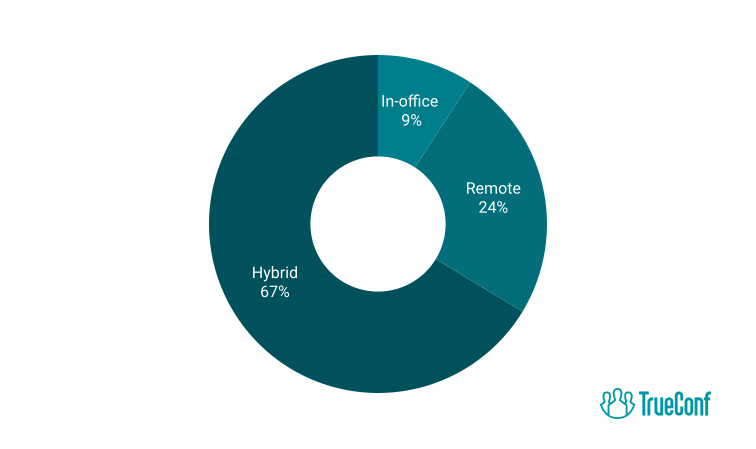
Another important plus of this type of work is a higher chance of retaining valuable specialists. It’s evidenced by survey data, according to which no more than 9% of employees want to be back to office work. Therefore, neglecting the hybrid model can cause the business to be unable to engage and retain real professionals.
What are the Benefits of a Hybrid Work Environment?
The main privilege of this model is the versatility of work processes for both staff and employers, which has become familiar to them in a pandemic. Other benefits include increased employee productivity and job satisfaction, more opportunities for continuous learning, improved quality of cooperation and more favorable relations between employees, and also improved psychological health of the staff.
1. Increased Productivity & Employee Satisfaction
The hybrid model is more versatile, offering employees the flexibility to leverage their strengths effectively, thereby boosting productivity. With the option to work remotely, individuals can tailor their workspace to maximize comfort and efficiency. Some may thrive in a home setting, while others prefer the focused atmosphere of an office.
Autonomous work from home or office and their combination help not only to improve overall employee satisfaction, as seen through employee satisfaction surveys, and the staff’s contentment with the working proces.
Also, this approach allows one to achieve the necessary balance between job and personal life.
UltraHD Video Conferences
Create conferences on the fly gathering up to 2,000 participants in a meeting. Enjoy realistic communications with cutting-edge AI algorithms. Take an active part in online meetings without being distracted by taking notes! Record video conferences and share recordings with colleagues.

2. More Opportunities For Continuous Learning
This aspect is not so obvious, but still very valuable. The staff gets rid of the constant office bustle and gets more chances for continuous learning and self-education. Even a partial exemption from the must-visit office leads to the fact that the staff gets more free time for self-development and achieving personal goals, which means their personal growth and growing job contentment.
3. Improved Collaboration & Relationships
The privilege of a hybrid work compared to a fully remote model is that it leaves a chance for personal communication and helps the staff to interact face-to-face to create a healthy team climate and to raise the quality of work. And this applies to departments, divisions, and the entire business. Today, when all communication moves beyond the monitor screens, this is especially important. Each conversation in person at a specific time during remote work is quite beneficial for mentoring and knowledge sharing, as well as improving professional relationships.
In fact, this model is being adopted by a multitude of industries, including tech-focused companies. For instance, a reputed company may use hybrid work to bridge the gap between remote collaboration and hands-on teamwork, enhancing the quality of their digital solutions while fostering a strong community within the team.
4. Better Outcomes For Mental Health
Working from home turned out to be extremely beneficial for the psychological condition of the staff because it relieved a huge amount of stress. For example, people mustn’t commute to the office every day or stay late there to finish the task on time. This versatility also helped the staff to improve their health and well-being. However, there was another side. People who realized themselves in the office in the best way felt devastation and loneliness. The hybrid model is excellent because it helps the staff to work remotely and in the office, and also to combine these approaches. So people can reach a good balance between job and personal life and ultimately refine both of these important aspects of life.
Insight #2: The Hidden Cost of Collaboration Fragmentation
Organizations often underestimate how tool sprawl undermines hybrid work effectiveness. When teams use separate apps for video calls, chat, file sharing, and scheduling, context switches increase, information silos form, and onboarding becomes harder.
A unified platform that consolidates messaging, HD video conferencing, screen sharing, and integrations reduces cognitive load and ensures all participants—remote or in-office—have equal access to discussions and resources.
This consolidation is especially valuable for enterprises managing compliance, audit trails, and consistent user experience across departments.
Self-Hosted Team Messenger with Video Conferencing
A cutting-edge team collaboration server with personal and group chats, UltraHD video conferences, and advanced AI-powered features — free for up to 1,000 users!
How to Adopt a Hybrid Work Model?
In order for the hybrid model to be used quickly in work and get the maximum benefit from it, we advise you to perform 5 steps sequentially.
1. Do an employee survey to find out what they need
The first and most important thing is to talk to employees and learn as much as possible about their wants and needs. Here are some possible questions:
- Can you stay focused when working from home?
- How many days a week would you like to work in person?
- If you had access to an office close to home, would you prefer to work there instead of at the company headquarters?
It is the consideration of employees’ opinions that helps you to understand what model of hybrid work for them is most acceptable and convenient.
2. Implement the infrastructure that will support flexible working
Effective work of employees is impossible without investments in the technological development of the company. Communication facilities, video conferencing equipment, collaboration tools – all this is important both for those who work remotely and for those who stay in the office.
During the working day, pay special attention to traffic management and make sure that the working conditions of employees are truly flexible. For example, if employees stay in the office only on certain days of the week, then planning can be transferred to the heads of departments.
Technology Requirements for Hybrid Work Success
|
Capability |
Why It Matters |
Implementation Consideration |
|---|---|---|
|
HD Video Conferencing |
Ensures clear communication and non-verbal cue recognition |
Support for varying bandwidth conditions; mobile and desktop compatibility |
|
Secure Messaging |
Enables quick questions and asynchronous updates without email overload |
End-to-end encryption; integration with existing identity providers |
|
Screen Sharing & Co-editing |
Facilitates real-time collaboration on documents and presentations |
Low-latency sharing; annotation tools; version control |
|
Recording & Transcription |
Supports asynchronous participation and knowledge retention |
Automated captions; searchable archives; access controls |
|
Calendar & Scheduling Integration |
Reduces friction in coordinating hybrid meetings |
Sync with Exchange, Google Calendar; room booking automation |
|
Admin Controls & Analytics |
Enables governance, usage tracking, and policy enforcement |
Role-based permissions; audit logs; usage reporting |

3. Invest in corporate culture
Corporate culture is one of the cornerstones of a hybrid work system. Invest in team building activities and build camaraderie among team members outside of just work tasks. In addition to these, you can also reward your staff for their good performance, which can increase their desire and motivation to continue working within your culture. The investment doesn’t have to be big, but it does require consistency and interaction from upper-level management.
4. Improve the workplace experience
Make the office convenient and attractive for work, so where you want to be, spend time, and communicate with colleagues. A comfortable office greatly increases the productivity of staff and allows you to justify the financial costs of it. Other than the basic amenities, you can add a social wall to your workspace to keep your employees entertained and invested during work hours. Social walls function in real time, so you can showcase engaging social media content or even host interactive sessions for your employees.
5. Collect ongoing feedback
Introduce innovations only after you talk to your staff. Be sure to find out their opinion about the work and what is happening in the company in general. Without collecting feedback, it is simply impossible to build a successful hybrid model of work. Utilize multiple channels to gauge employee voice, such as anonymous employee surveys, and focus groups. This will provide you with a well-rounded perspective on employee sentiment and concerns.
What are the Challenges When Switching to Hybrid Work?
Next, we will look at the main difficulties associated with the transition to a hybrid working model, and analyze exactly what management can do to overcome them.
1. Inequality between hybrid and non-hybrid employees
Remote work is not suitable for all employees, and some of them are simply deprived of the chance to take advantage of it. This is especially true for employees who, in their opinion, perform the key, most difficult work in the office and think that their colleagues are just resting at home. Remote employees have other difficulties: they may feel like a kind of outcasts who, due to their physical absence from the office, cannot fully participate in the work process and influence decisions made.
What to do? By all means, ensure equal conditions for all types of employees. Every person should feel their value and see the recognition of their work. It is necessary to create a healthy environment within the team, and although it largely depends on the people themselves, technology also has a very pronounced impact on it.
Do not ignore the need to ensure constant quality interaction between all employees and investment in it. Video calls and all other means of communication should be as accessible as possible, and every employee should be able to easily get involved in the work of the team and share their opinions.
2. Getting collaboration right
The old work model assumed that all employees were always in the same room, but now everything has changed. Employees are the main resource and capital of the company, so management must do everything to ensure that the sense of unity and the possibility of productive communication does not disappear.
What to do? Now synchronous collaboration is being replaced by asynchronous one. That is, a disparate contribution of employees to the overall result from different places and at different time intervals comes to the place of collective work in real time. And again, the need to provide employees with access to modern means of communication, such as hybrid workplace software, comes to the fore—they must be able to quickly exchange opinions in a chat, co-browse and co-edit documents, and carry out any other interaction.
3. Managing split teams
Coordinating teams located in different places can be difficult, especially if it is necessary to fulfill the task of ensuring equal opportunities and rights for all its members. 20% of British workers say that in their opinion the recognition of their merits has decreased after switching to remote work. And this opinion takes place because according to statistics for 7 years (from 2013 to 2020), people working remotely had a 40% percent lower chance of receiving a bonus compared to those who continued to work in the office.
What to do? Goals and assignments should be the same for everyone, and management should more often engage in communication with employees not only to evaluate their work but also to share collaboration tools, and give tips or advice on professional development and self-improvement.
4. Communication glitches
Communication problems reduce the quality of the workflow and lead to the fact that important data is missed, but correcting them in the case of remote work may not be an easy task. This is because we all mostly communicate non-verbally, that is, through gestures, body language, intonation, and even glances. Therefore, if we do not see a person with our own eyes, then it may be much more difficult for us to understand him correctly.
What to do? Create communication channels that will allow employees to understand each other as clearly and fully as possible. It can be video communication and instant messaging.
5. Effective onboarding
The introduction of a hybrid work system may be fully justified and effective in the future, but here and now it often causes significant problems, especially for new team members to have a smooth onboarding process. The adaptation of newcomers can already be a difficult process, and it becomes even more complicated if the new employee is not in the office and does not communicate with colleagues on a regular basis.
What to do? Managers should look for new effective ways to introduce newcomers to the team without their constant personal presence. These can be personal individual acquaintances with colleagues, and the participation of newcomers in general chats that are not directly related to work. At the same time, it is worth remembering that it is desirable to involve the whole team in adaptation, only in this way the foundation of personal communication will become really strong.
What are Various Hybrid Model Types?
There are 4 models in total: at-will, split weeks, shift work, and week-by-week.
1. The at-will model
According to it, the staff can select the most suitable working scheme for them every day. This is especially effective when it’s needed to hold an important meeting in the office today and work calmly in a relaxed atmosphere tomorrow. Some businesses made a “work from office (WFO)” request to maintain social distance.
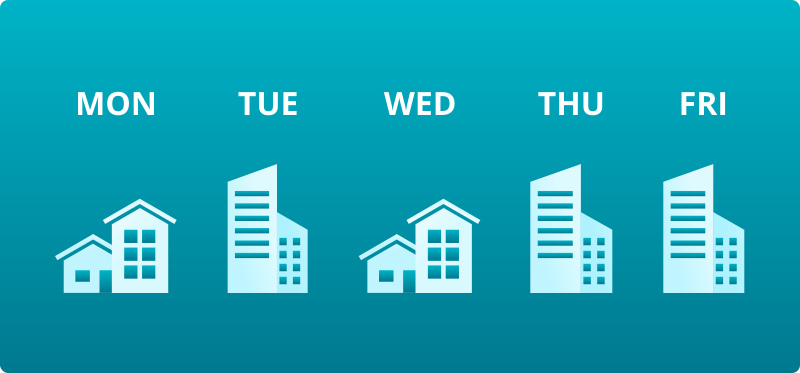
2. The split-week model
It involves 2-3 days of office work and 2-3 days of work from home and is currently the most popular among employees. As a rule, the division of office work occurs between all departments. So when the sales department is in the office, the technical team stays at home. And vice versa. This helps managers to keep in touch with the entire staff and communicate with each of the departments personally.
3. Shift work
In this case, employees alternate between remote work and office shifts (in the morning or in the evening). This scheme is more complicated to implement because lots of employees are not happy with arriving at the office very early in the morning or very late in the evening. And this is especially inconvenient for people with children who must additionally organize their care and supervision (beyond using devices fitted with a parental control app).
4. Week-by-week
In this case the staff alternate between a week of remote work and a week of work in the office. It is appropriate for large teams, which can simultaneously use limited office space and meet in person to communicate, exchange experience, check work, and meet deadlines. In this case, you may need tracking employee hours solutions to stay profitable, productive, and legally compliant. Utilizing coworking management software or coworking space app can further optimize the use of office space and resources, ensuring smooth operations and effective collaboration.
Deployment Options Comparison for Hybrid Collaboration Platforms
|
Deployment Type |
Data Control |
Setup Complexity |
Scalability |
Best For |
|---|---|---|---|---|
|
Cloud/SaaS |
Vendor-managed; depends on provider policies |
Low; quick provisioning |
High; elastic resources |
Startups, teams needing rapid deployment |
|
Hybrid Cloud |
Mixed; sensitive data on-prem, other workloads in cloud |
Medium; requires integration planning |
High; flexible architecture |
Organizations with partial compliance needs |
|
On-Premises / Self-Hosted |
Full control; data stays within organizational infrastructure |
Higher; requires IT resources |
Scales with hardware investment |
Enterprises, government, regulated industries |
|
Private Cloud |
Dedicated infrastructure; isolated from public cloud |
Medium-High; managed internally or by partner |
Predictable; capacity planning required |
Organizations needing isolation with cloud-like management |
What is the Best Solution for Collaborative Hybrid Work?
If you do decide to implement a hybrid work model in your business, the first thing you need is the right communication and collaboration software. When choosing such a solution, you should consider the needs of your team, so it’s a good idea to ask your employees the following questions:
- Are you equipped enough to work from home?
- Can you collaborate from home as productively as you do at the office?
- Do you feel sufficiently engaged in the discussion during the meeting?
- Is the collaboration solution you use secure?
At TrueConf, we’re continuously innovating to make working from home and in the office an inclusive, secure, and connected experience for everyone. This self-hosted video communication and collaboration solution lets you hold secure and time-unlimited meetings for up to 1,000 participants and use multiple collaboration tools, such as team messaging, screen sharing, slideshow, recording, polling, reactions, and more to boost engagement.
The solution deploys locally and implements server data storage, which eliminates the possibility of unauthorized access to your confidential communications. Plus, TrueConf incorporates end-to-end encryption and strong GDPR compliance to ensure reliable communication privacy.
What infrastructure is essential for successful hybrid work implementation? Successful hybrid work requires a unified communication platform that supports HD video, secure messaging, screen sharing, and calendar integration. TrueConf provides a self-hosted solution that ensures data stays within your infrastructure while delivering enterprise-grade collaboration tools for distributed teams. How do I ensure equitable participation between remote and in-office employees? Equitable participation depends on technology that gives all participants equal visibility and voice. TrueConf’s UltraHD video conferencing, screen sharing, and real-time reactions ensure remote attendees aren’t “second-class” participants, while features like meeting recording support asynchronous engagement. Can hybrid work platforms integrate with existing enterprise systems? Yes, enterprise-grade solutions like TrueConf offer APIs and SDKs for integration with identity providers, calendar systems, CRM platforms, and custom workflows. This enables single sign-on, automated room booking, and seamless data flow without disrupting existing IT investments. What security features should I prioritize for hybrid collaboration? Prioritize end-to-end encryption, on-premises or private cloud deployment options, role-based access controls, and compliance certifications. TrueConf implements server-side data storage with encryption and GDPR-aligned policies, giving organizations full control over sensitive communications. How does TrueConf support large or geographically distributed teams? TrueConf Server scales to support up to 1,000 concurrent participants with load balancing, redundancy, and global user directory features. Its architecture is designed for enterprises with multiple offices or remote workers, ensuring consistent performance regardless of location. Is on-premises deployment still relevant for modern hybrid work? Absolutely. For organizations in regulated industries or with strict data sovereignty requirements, on-premises deployment remains essential. TrueConf’s self-hosted model delivers modern collaboration features while keeping all data within your controlled infrastructure—critical for banks, government agencies, and healthcare providers. How can I measure the effectiveness of our hybrid work setup? Track metrics like meeting participation equity, tool adoption rates, employee satisfaction scores, and collaboration latency. TrueConf Monitor provides analytics on usage patterns and system performance, helping administrators optimize the hybrid experience based on real data rather than assumptions.FAQ
About the Author
Nikita Dymenko is a technology writer and business development professional with more than six years of experience in the unified communications industry. Drawing on his background in product management, strategic growth, and business development at TrueConf, Nikita creates insightful articles and reviews about video conferencing platforms, collaboration tools, and enterprise messaging solutions.


Follow us on social networks