
GoToMeeting vs Zoom: Which Video Conferencing Platform Fits Your Needs?
When your team needs to connect remotely, choosing the right video conferencing tool can make the difference between smooth collaboration and frustrating technical headaches. GoToMeeting and Zoom have both carved out significant positions in the market, but they serve different purposes and excel in different scenarios.
Let me walk you through what actually matters when you’re deciding between these two platforms.
Understanding the DNA of Each Platform
GoToMeeting emerged from LogMeIn’s suite of business tools, and you can feel that heritage in every feature. It’s built like a corporate workhorse – reliable, professional, and focused on enterprise needs. When you join a GoToMeeting session, you’re entering a space that prioritizes stability and business-grade security over flashy features.
Zoom took a different path. It exploded during the pandemic partly because it was genuinely easy to use, even for people who’d never used video conferencing before. Your grandmother could figure out Zoom. That accessibility became its superpower, but it also shaped how the platform evolved.
Take your team communication to the next level with TrueConf!
A powerful self-hosted video conferencing solution for up to 1,000 users, available on desktop, mobile, and room systems.
Where They Actually Differ
The Meeting Experience
Picture this: You’re hosting a quarterly review with 50 people. In GoToMeeting, you’ll find the interface stays consistent and predictable. The controls don’t change much between meetings, which matters when you’re presenting quarterly results and can’t afford to fumble with settings.
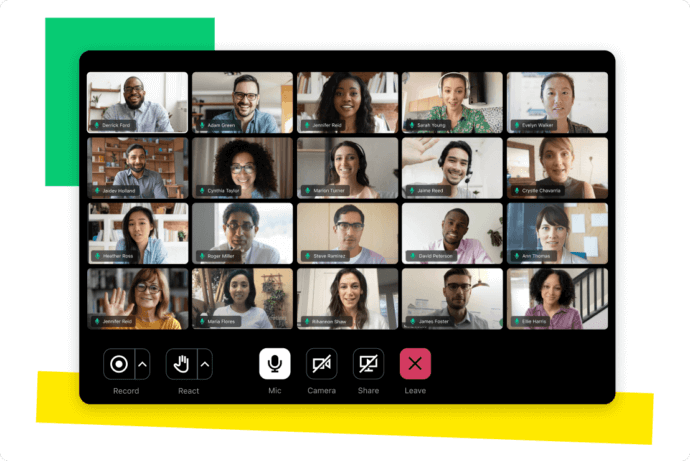
Zoom gives you more flexibility during the meeting itself. Want to create breakout rooms on the fly? Zoom handles that smoothly. Need to let someone else share their screen while you’re still presenting? The handoff is seamless. For training sessions where you’re constantly switching between formats, this flexibility becomes invaluable.

Participant Limits and Real-World Impact
|
Feature |
GoToMeeting |
Zoom |
|---|---|---|
|
Standard Plan Participants |
150 |
100 |
|
Maximum Participants |
250 (enterprise) |
1,000 (enterprise) |
|
Webinar Capacity |
Up to 2,000 |
Up to 50,000 |
|
Meeting Duration (Free) |
N/A (no free tier) |
40 minutes |
If you’re running a company-wide town hall with 500 employees, Zoom’s higher ceiling makes sense. But for a consulting firm that rarely exceeds 150 participants, GoToMeeting’s standard tier might actually be more cost-effective.
Security Approaches
Both platforms learned hard lessons about security. Zoom faced the “Zoombombing” crisis in 2020, which led them to completely overhaul their security infrastructure. They added end-to-end encryption, waiting rooms became default, and they introduced more granular host controls.
GoToMeeting always leaned harder into enterprise security from the start. They offer more detailed compliance certifications out of the box – HIPAA, GDPR, SOC 2. If you’re a healthcare provider discussing patient cases or a law firm reviewing confidential documents, these certifications aren’t just checkboxes. They’re requirements.
Daily Usage: The Details That Matter
Recording and Storage
GoToMeeting stores your recordings locally by default. This sounds old-fashioned until you realize it means you’re not eating into cloud storage limits or worrying about recordings expiring. For companies with strict data residency requirements, this local-first approach solves problems before they start.
Zoom’s cloud recording system is more convenient for quick sharing. Record a meeting, get a link, send it to your team. But you’re working within storage limits, and those recordings live on Zoom’s servers. Some organizations can’t accept that trade-off.
Mobile Experience
Both apps work on phones, but there’s a quality difference. Zoom’s mobile app feels like it was designed for mobile first, then adapted for desktop. Screen sharing from your phone actually works well. The gallery view displays more participants clearly on smaller screens.
GoToMeeting’s mobile app works, but it feels like a desktop app squeezed into mobile form. For quick check-ins, it’s fine. For running an entire meeting from your phone while you’re traveling? You’ll notice the limitations.
Integration Ecosystems
Zoom integrates with seemingly everything. Slack, Microsoft Teams, Google Workspace, Salesforce, HubSpot – the list goes on. This matters more than it sounds. When your calendar automatically generates Zoom links and your CRM logs meeting attendance without manual input, you save hours every week.
GoToMeeting connects with major business tools but has a smaller integration marketplace. If your company runs on standard Microsoft or Google tools, you’re covered. If you use specialized industry software, check integration availability before committing.
Pricing Reality Check
|
Plan Type |
GoToMeeting |
Zoom |
|---|---|---|
|
Entry Level |
Professional: $12/organizer/month |
Pro: $15.99/host/month |
|
Mid Tier |
Business: $16/organizer/month |
Business: $19.99/host/month |
|
Enterprise |
Custom pricing |
Custom pricing |
|
Free Tier |
None |
Yes (40-minute limit) |
Try TrueConf Server Free!
- 1,000 online users with the ability to chat and make one-on-one video calls.
- 10 PRO users with the ability to participate in group video conferences.
- One SIP/H.323/RTSP connection for interoperability with corporate PBX and SIP/H.323 endpoints.
- One guest connection to invite a non-authenticated user via link to your meetings.

Real Scenarios, Real Choices
Scenario 1: Small Marketing Agency (12 people)
You run daily standups, client presentations, and creative brainstorming sessions. Zoom probably fits better. The free tier covers internal meetings, breakout rooms help with brainstorming, and clients already recognize the Zoom interface.
Scenario 2: Financial Services Firm (200 employees)
You need HIPAA compliance, detailed audit logs, and reliable service for client meetings. GoToMeeting’s enterprise focus, included compliance certifications, and consistent enterprise support make more sense here.
Scenario 3: Educational Institution
You’re running lectures for 300 students with regular breakout sessions. Zoom’s education pricing, larger participant capacity, and superior breakout room functionality align better with academic needs.

The Third Option: Why Some Companies Choose TrueConf Instead
While GoToMeeting and Zoom dominate conversations, they’re not your only options. TrueConf offers something fundamentally different – a platform you can host entirely on your own servers.
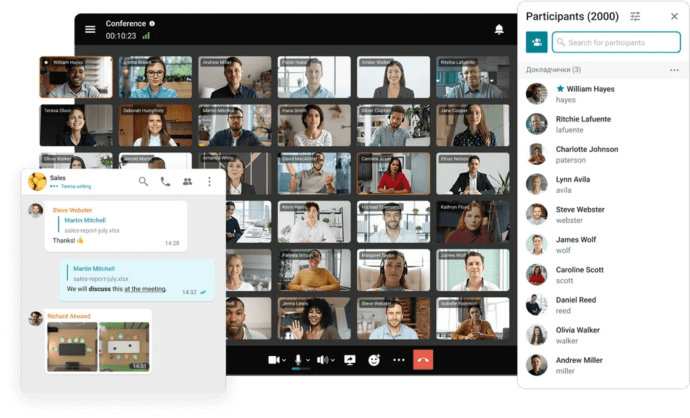
This matters if you work in regulated industries or regions with strict data sovereignty laws. Unlike Zoom or GoToMeeting where your data flows through their servers, TrueConf can operate completely within your infrastructure. You control where recordings live, who has access, and how data moves.
TrueConf also supports up to 1,500 participants in a single video conference on their enterprise plan, with 4K video quality that neither GoToMeeting nor Zoom currently matches. For organizations that need crystal-clear video – think telemedicine consultations or remote equipment inspections – this quality difference is tangible.
The platform works across every device and operating system without requiring participants to install anything. They can join through a web browser, which eliminates the “can you download Zoom?” conversation that eats up the first five minutes of many meetings.
Self-Hosted Team Messenger with Video Conferencing
A cutting-edge team collaboration server with personal and group chats, UltraHD video conferences, and advanced AI-powered features — free for up to 1,000 users!
Making Your Decision
Don’t choose based on what everyone else uses. Choose based on what your organization actually needs.
Pick GoToMeeting if you value consistency, need built-in compliance, and run structured business meetings with predictable formats. It’s the reliable sedan of video conferencing – not exciting, but it gets you where you need to go without drama.
Pick Zoom if you need flexibility, want extensive integrations, and value ease of use across technical skill levels. It’s become the default for good reasons, especially if you’re collaborating with external partners who already use it.
Or consider TrueConf if data sovereignty, on-premise hosting, or exceptional video quality matter more to your organization than following the crowd.
The best video conferencing platform isn’t the most popular one. It’s the one that solves your specific problems without creating new ones.
All Zoom Alternatives: Detailed Comparison
If you are still comparing options, read the full overview of 10 platforms with pricing, security models, and deployment scenarios: Best Zoom Alternatives for Business: Top 10 Options. For a self-hosted alternative without public internet dependency, see TrueConf vs Zoom.
FAQ
What if our organization has strict data residency requirements and cannot use public cloud platforms?
If your company operates in a highly regulated industry, relying on cloud-based services like Zoom or GoToMeeting might violate local data sovereignty laws. In this case, TrueConf is the ideal solution because it can be deployed entirely on your own on-premise servers, ensuring that all meeting data, recordings, and traffic remain strictly within your private network.
Can we integrate our existing legacy conference room hardware with these video platforms?
Connecting older SIP or H.323 hardware endpoints to purely cloud-based apps often requires purchasing expensive third-party gateways or additional subscriptions. However, enterprise-focused platforms like TrueConf natively support these standard protocols, allowing you to seamlessly connect your existing physical room systems without having to replace your expensive hardware investments.
Which platform is best for hosting massive corporate events with the highest possible video quality?
While Zoom and GoToMeeting cap standard interactive meetings at a few hundred participants, larger enterprises often need more capacity and better visual clarity. TrueConf is engineered for massive scale, supporting up to 1,500 concurrent participants in a single conference while delivering crystal-clear UltraHD 4K video quality for large global broadcasts and town halls.
Do external clients or partners need to download a specific application to join our meetings?
Requiring external guests to install software can create friction and delay the start of important business discussions. To eliminate this barrier, TrueConf allows participants to join conferences directly through a standard web browser without any downloads or plugin installations, ensuring a seamless experience for both internal teams and external collaborators.
Is it possible to conduct secure internal video meetings if our external internet connection goes down?
When relying on cloud-only services, an internet outage means your distributed team cannot connect for internal meetings or daily standups. However, deploying a self-hosted solution like TrueConf allows your video conferencing system to operate entirely within your local corporate LAN or air-gapped network, guaranteeing uninterrupted communication regardless of external internet status.
How do the pricing models compare when scaling our video conferencing to hundreds of users?
Cloud platforms like Zoom and GoToMeeting typically charge per-user monthly fees, which can lead to rapidly scaling and unpredictable expenses as your headcount grows. Alternatively, TrueConf offers a more predictable enterprise licensing model based on concurrent connections or server capacity rather than total registered accounts, often resulting in significant long-term savings for medium to large organizations.
About the Author
Olga Afonina is a technology writer and industry expert specializing in video conferencing solutions and collaboration software. At TrueConf, she focuses on exploring the latest trends in collaboration technologies and providing businesses with practical insights into effective workplace communication. Drawing on her background in content development and industry research, Olga writes articles and reviews that help readers better understand the benefits of enterprise-grade communication.


Follow us on social networks