
Group Chat for Work: Secure Team Communication Built for Business
According to ProofHub research, effective communication is no longer optional in modern business: poor collaboration costs employees significant time and productivity: 64% of employees lose at least three hours per week due to inefficient collaboration practices, with miscommunication and coordination breakdowns cited as key factors.
Conventional communication methods, email correspondence, telephone conversations, and scheduled meetings, increasingly fall short in facilitating agile teamwork. Email chains grow convoluted and difficult to navigate, meeting coordination consumes valuable time, and critical insights often vanish amid disconnected dialogue streams.
Workplace group chat delivers a unified, instantaneous communication environment where colleagues can brainstorm ideas, synchronize assignments, and maintain alignment continuously throughout the business day. Rather than juggling disparate tools, personnel can consolidate discussions within purpose-built digital spaces directly associated with relevant projects and teams. This centralized approach accelerates routine operations: team members can pose rapid queries, validate priorities, broadcast progress milestones, and eliminate workflow impediments, all without disrupting colleagues’ focus or demanding synchronous availability.
Distinct from consumer-grade messaging applications engineered for social interaction, professional group chat platforms are architected around organizational imperatives. They minimize cognitive overload through systematic information architecture, enhance operational visibility by offering collective insight into active initiatives, and empower enterprises with granular control over user permissions, data handling, and regulatory compliance.
Within remote and hybrid work models, these platforms have evolved into indispensable infrastructure for sustaining team cohesion, information flow, and consistent output, particularly where spontaneous office interactions are no longer viable.
What Is a Group Chat for Work?
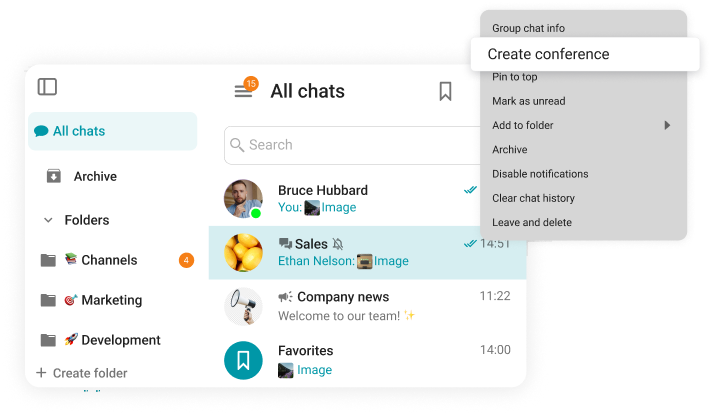
A workplace group chat represents a purpose-built digital messaging ecosystem enabling professionals to interact within shared virtual environments. These environments are commonly structured around functional units such as project teams, organizational divisions, client accounts, or specialized business operations, thereby introducing order and scalability to collaborative efforts. Instead of channeling all discourse into a single unstructured feed, teams compartmentalize conversations into dedicated spaces where both subject matter and participant roles remain explicitly defined.
Unlike generic instant messaging services or social platforms, enterprise chat solutions prioritize workflow integration and contextual preservation over casual exchange. They facilitate business continuity by capturing essential context: pivotal decisions, referenced documentation, task progression markers, and formal authorizations. Contemporary workplace chat systems typically incorporate robust capabilities including comprehensive message archives, intelligent search functionality, hierarchical access controls, and seamless interoperability with adjacent productivity applications.
Organizations adopt specialized group chat infrastructure to safeguard confidential data, maintain auditable communication trails, and ensure uniform practices across distributed teams. Consumer messaging tools fundamentally lack these enterprise-grade attributes and remain ill-equipped to satisfy stringent security protocols, regulatory mandates, or large-scale deployment requirements.
Professional contexts frequently demand precisely defined permission frameworks, comprehensive audit capabilities, and centralized administrative oversight, particularly within heavily regulated sectors and complex organizational structures.
Why Teams Use Group Chat at Work?
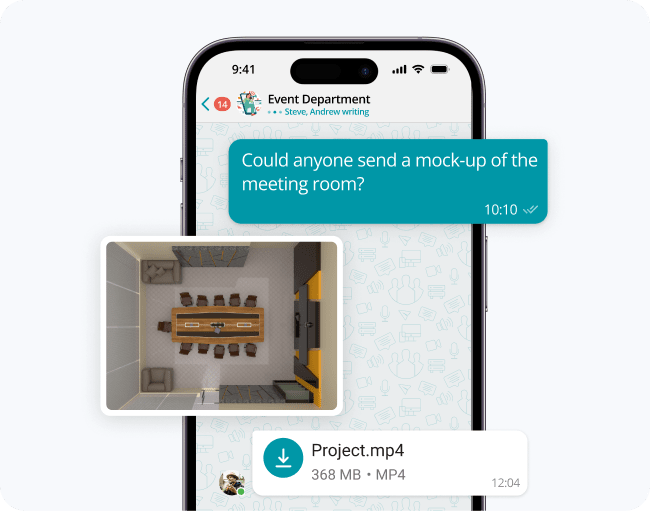
Real-Time Team Communication
Group chat facilitates immediate information exchange, empowering team members to seek clarification, verify assignments, and disseminate updates without awaiting scheduled meetings or delayed email replies. This immediacy proves especially critical for time-sensitive domains including operational management, client support, crisis management, and project execution, situations where latency directly compromises outcomes.
Brief validations, rapid confirmations, and concise determinations become effortlessly achievable, enabling teams to adapt swiftly as circumstances evolve.
Organized Conversations by Topics and Teams
Segmenting conversations into thematic channels or dedicated workspaces prevents communication chaos and minimizes the likelihood of overlooking crucial information. Discussions retain focus, relevance, and logical progression, even as initiatives expand in scope and stakeholder count multiplies.
Well-organized chat environments additionally establish authoritative reference points for each subject area, enabling personnel to instantly locate appropriate forums for inquiries, updates, or historical decision retrieval.
Faster Decision-Making
Rapid dialogue exchanges and responsive feedback mechanisms enable teams to converge on decisions with greater speed. Rather than navigating protracted email chains, awaiting delayed sign-offs, or convening additional meetings, stakeholders can evaluate alternatives within chat interfaces, weigh diverse perspectives, and formalize action plans in real time.
These determinations benefit from inherent documentation, as surrounding context remains preserved within conversational archives, thereby minimizing redundant deliberations and enhancing organizational transparency.
Remote and Hybrid Collaboration
Group chat effectively dissolves barriers between colocated and distributed workforce segments. Irrespective of physical location or working hours, all participants gain equal access to shared information and ongoing discussions, strengthening coordination and dismantling information silos.
For hybrid arrangements specifically, chat ensures continuity: conversations persist beyond office hours and remain perpetually accessible to authorized individuals regardless of their current work setting.
Reduced Email Overload
Shifting routine internal dialogue into group chat environments substantially diminishes organizational email traffic. Teams reclaim time previously devoted to inbox management and redirect it toward value-creating activities.
Operational updates, rapid-fire inquiries, and coordination messages naturally migrate to chat channels, while email retains its appropriate role for external outreach, formal declarations, and comprehensive documentation. This strategic division enhances organizational responsiveness while mitigating the pervasive phenomenon of email exhaustion.
Key Features of an Effective Work Group Chat
Public and Private Group Chats
Open channels foster organizational transparency and cross-functional discovery by making relevant information readily accessible across teams. Conversely, restricted channels provide secure environments for sensitive dialogues involving human resources matters, security protocols, or confidential project details. Sophisticated platforms support both paradigms, empowering teams to calibrate visibility levels according to specific communication requirements.
1-on-1 and Team Messaging
Direct messaging enables private, focused exchanges between individuals, while group channels facilitate multi-participant coordination. This dual capability ensures teams can address both discrete interpersonal needs and broader collaborative requirements without context switching or unnecessary meeting creation.
File and Document Sharing
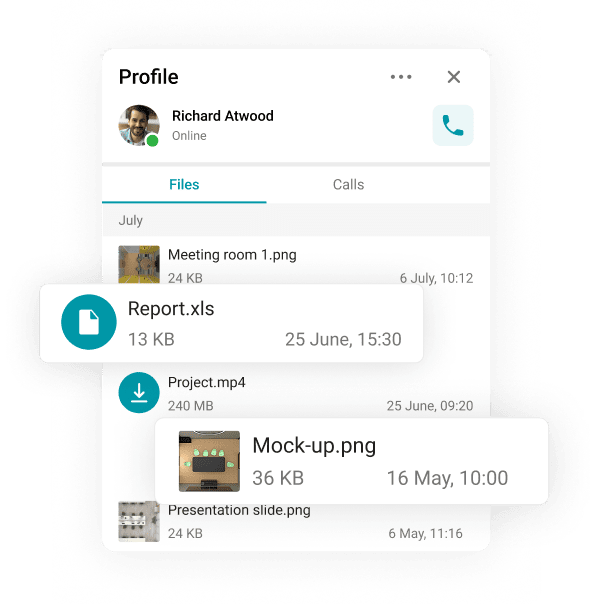
Documents, spreadsheets, presentations, and multimedia assets can be transmitted directly within conversation threads, preserving contextual relevance. Team members avoid inefficient searches across email attachments and disparate cloud repositories by accessing shared resources precisely where related discussions occur, particularly advantageous for collaborative drafting, proposal development, meeting documentation, and internal knowledge sharing.
Message History and Search
Searchable historical records empower teams to reconstruct past decisions, retrieve pivotal messages, and recover distributed files with minimal effort. This functionality also streamlines onboarding processes: new hires can independently absorb project background by reviewing archived dialogues rather than consuming colleagues’ time with repetitive explanations. Within enterprise contexts, this accumulated history effectively functions as an organic, evolving knowledge repository.
Mentions, Reactions, and Read Status
@Mentions ensure critical messages reach intended recipients and clarify ownership of action items. Emoji reactions enable lightweight acknowledgments, approvals, and feedback without generating additional message volume. Read receipts and delivery confirmations eliminate ambiguity regarding message visibility, thereby improving communication reliability.
Mobile and Desktop Access
Synchronized access across desktop workstations and mobile devices guarantees continuous connectivity regardless of physical location or work arrangement. Mobile optimization proves especially vital for frontline staff, leadership personnel, and globally distributed contributors requiring real-time updates beyond traditional office environments. Seamless synchronization between devices further enhances productivity by enabling effortless transitions between work contexts.
Choose the Communication Style That Works for Your Team
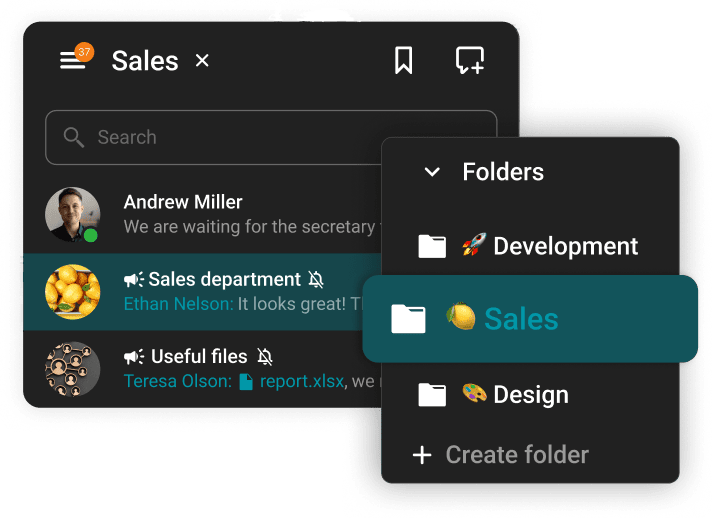
Organizational communication patterns inherently vary based on team composition, strategic objectives, and operational rhythms. Certain groups thrive on continuous dialogue throughout the workday, while others prefer concise, purpose-driven exchanges initiated only when necessary. Sophisticated workplace chat platforms accommodate this diversity by supporting multiple interaction styles within a single cohesive environment.
Persistent chat channels prove optimal for extended initiatives, cross-departmental partnerships, and ongoing programs requiring long-term contextual preservation. These spaces evolve into collective memory repositories where updates, resolutions, and deliberations remain perpetually available to current and future participants.
Temporary or ad-hoc channels excel in scenarios demanding rapid problem resolution, brief coordination windows, or spontaneous brainstorming sessions. They enable teams to address discrete challenges efficiently without introducing unnecessary noise into established communication channels.
Professional chat environments also gracefully accommodate both formal and informal communication tones. Teams can maintain polished discourse for official matters while permitting relaxed interaction styles for internal collaboration, striking a balance that enhances engagement without sacrificing professionalism or clarity.
Asynchronous messaging has become foundational for contemporary distributed workforces. Team members contribute according to their personal schedules without expectation of instantaneous response, respecting focus time while maintaining momentum. Simultaneously, synchronous chat capabilities remain essential for urgent scenarios demanding immediate collective attention.
In numerous contexts, group chat supersedes traditional meetings for efficiency. Routine status reporting, clarification requests, task handoffs, and straightforward approvals frequently resolve more effectively through written dialogue, conserving collective time and reducing meeting saturation.
Bring Context into Team Conversations
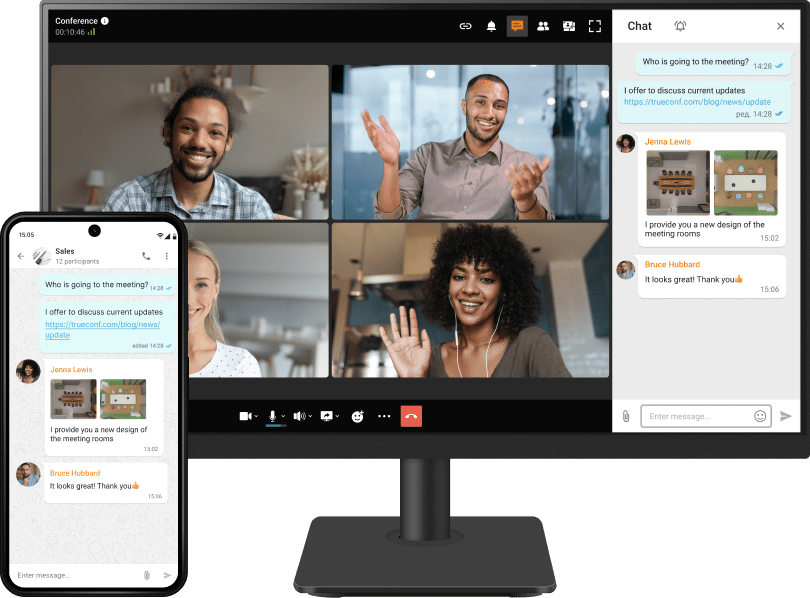
File Sharing and Message Threads
Hierarchical reply structures maintain conversational coherence by anchoring responses to original messages, preventing fragmentation within active channels. Integrating file attachments directly within thread hierarchies ensures documentation remains contextually linked to relevant dialogue.
Links, Images, and Screen Sharing
Embedding hyperlinks, annotated images, and screen captures directly within chat interfaces accelerates comprehension and alignment. Visual aids minimize misinterpretation risks and enable participants to grasp complex concepts without extensive textual explanation.
Chat Integrated with Video Meetings
When chat functionality integrates natively with video conferencing systems, communication flows become inherently fluid. Teams can draft meeting agendas within chat channels, share supporting materials during calls, and extend post-meeting follow-ups within the same environment, eliminating disruptive context switches.
From Message to Call in One Click
Text-based dialogue possesses inherent limitations for nuanced or sensitive topics. Platforms enabling one-click escalation from chat to voice or video interaction empower teams to resolve complex matters more effectively, switching communication formats without losing conversational context or requiring participant re-invitation.
Group Chat for Remote and Distributed Teams

For geographically dispersed teams, group chat forms the backbone of daily operational cohesion. It establishes a consistent communication fabric connecting professionals across time zones, locations, and flexible schedules.
Asynchronous messaging capabilities ensure work progression continues uninterrupted despite non-overlapping availability windows. Mobile-optimized interfaces guarantee accessibility regardless of physical workspace, whether home office, corporate headquarters, or remote location.
Persistent chat environments foster inclusion and transparency for remote participants by providing equal visibility into team dynamics and decision processes. This shared awareness mitigates isolation risks and reinforces collective purpose across distributed arrangements.
Private and Encrypted Communication
Enterprise-grade cryptographic protocols ensure message integrity and confidentiality, shielding sensitive business discussions from unauthorized interception or access. Robust encryption standards form the foundation for trustworthy professional dialogue.
Access Control and User Roles
Administrative controls enable precise definition of user roles, permission tiers, and access boundaries for specific channels or data repositories. This structured governance model prevents information leakage and maintains organizational order.
Deployment Flexibility: Cloud and On-Premises
Organizations may select cloud-hosted solutions for rapid implementation and managed infrastructure, or opt for self-hosted deployments demanding absolute control over data residency and system architecture. Mature platforms accommodate both strategic approaches.
Compliance and Data Ownership
Professional chat systems must support compliance with industry-specific regulations (GDPR, HIPAA, SOX, etc.) and internal governance policies. Maintaining organizational ownership of communication data remains paramount for long-term security posture and audit readiness.
How Group Chat Fits into a Unified Communications Platform
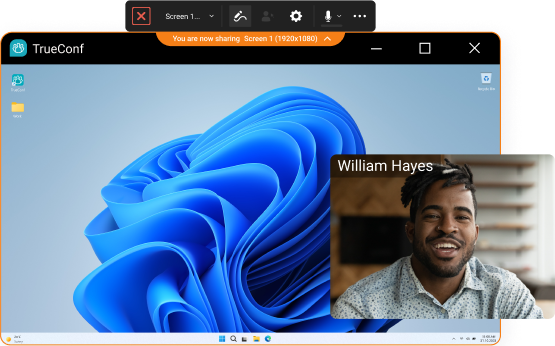
When group chat functions as an integrated component within broader unified communications platforms, its strategic value multiplies substantially. Messaging transforms from an isolated utility into a natural extension of the complete collaboration lifecycle, seamlessly connecting planning, execution, and review phases.
Teams leverage chat pre-meeting to establish agendas, gather preliminary input, and align expectations, resulting in more productive, focused sessions. During video conferences, parallel chat channels enable real-time resource sharing, discreet questions, and live note-taking without disrupting primary discussion flow. Post-meeting, the same chat environment serves as a persistent repository for decisions, action items, and follow-up dialogue, maintaining momentum without context loss.
Unified platforms additionally support enduring project workspaces where messages, shared assets, and meeting artifacts accumulate over time. This continuity proves invaluable for extended initiatives, matrixed teams, and organizations experiencing personnel transitions, enabling new contributors to rapidly assimilate context through historical review rather than repetitive briefings.
The ability to transition fluidly between communication modalities, escalating text discussions to voice or video with minimal friction, further enhances collaboration efficiency. Complex conversations evolve naturally across formats while preserving contextual continuity within a single cohesive workspace.
Consolidating communication tools into an integrated platform reduces organizational complexity for both end users and IT departments. Employees experience reduced application-switching fatigue and simplified information retrieval, while technical teams benefit from centralized administration, consistent security enforcement, and streamlined support workflows.
This unified approach fosters higher adoption rates, minimizes communication fragmentation, and delivers a cohesive experience that scales with organizational growth.
How to Use Group Chat Effectively at Work?
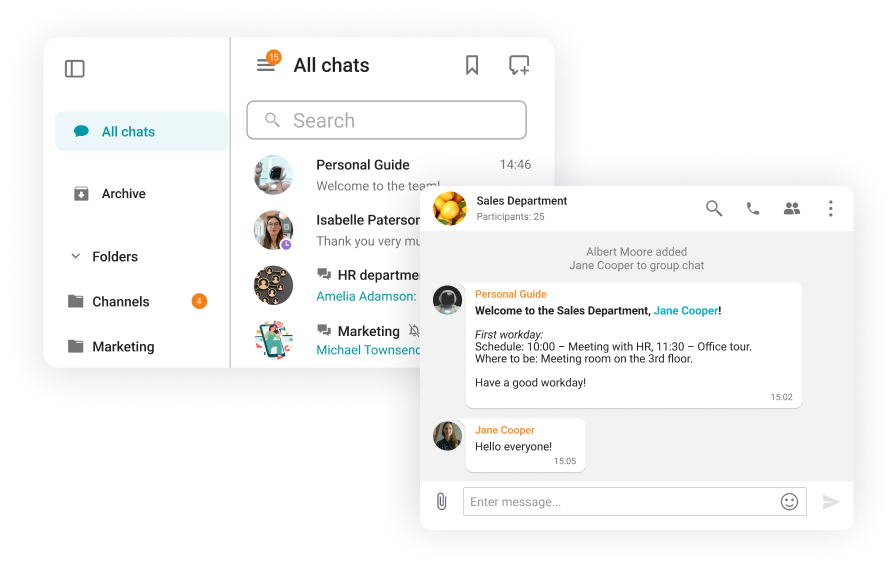
Best Practices for Team Communication
Clear guidelines regarding channel purposes, naming conventions, and interaction norms prevent chaos and maintain channel utility. Teams benefit from explicit expectations around thread usage, decision documentation practices, and appropriate content placement.
When to Use Group Chat vs Email or Meetings
Group chat excels for collaborative ideation, rapid inquiries, operational coordination, and continuous project dialogue. Email retains relevance for external communications, formal documentation, and messages requiring structured presentation. Meetings should be reserved for complex alignment needs, sensitive discussions, or scenarios demanding real-time interactive deliberation.
Keeping Workplace Chat Productive
Teams preserve chat effectiveness through disciplined practices: utilizing threads for extended discussions, customizing notification preferences, promoting concise messaging with explicit calls to action, and periodically archiving inactive channels. Establishing norms around @mention usage and announcement protocols further reduces noise while ensuring critical information visibility.
Group Chat for Work in TrueConf Server
TrueConf Server delivers secure corporate messaging infrastructure engineered for environments where data sovereignty, administrative control, and system reliability are non-negotiable. Organizations may deploy chat functionality on-premises or within private cloud environments, retaining complete authority over data residency, infrastructure management, and security policy enforcement. This deployment flexibility proves essential for enterprises and regulated sectors requiring stringent governance frameworks.
Native integration of video conferencing and voice calling eliminates dependency on external applications, enabling effortless transitions between messaging and live interaction. Combined with enterprise-grade security architecture and flexible deployment models, TrueConf serves businesses, academic institutions, and public sector entities demanding scalability, administrative predictability, and uncompromising data protection.
Boost your team’s productivity with TrueConf Server Free!
Conclusion: A Smarter Way to Communicate at Work

Workplace group chat fundamentally transforms team interaction by enabling accelerated information exchange, deepening collaborative engagement, and strengthening cross-functional alignment, particularly within distributed and hybrid work models. By harmonizing operational efficiency with robust security frameworks and unified communication experiences, organizations gain a scalable foundation for modern teamwork.
This strategic approach reduces procedural friction, preserves institutional knowledge, and ultimately reinforces sustainable business performance in an increasingly connected professional landscape.
FAQ
What is the best group chat app for work?
Optimal selection depends on organizational scale, security prerequisites, preferred deployment architecture (cloud versus on-premises), and integration ecosystem requirements. Teams should also evaluate how effectively chat functionality interconnects with video conferencing and administrative tooling.
Is group chat secure for business communication?
Absolutely, when implemented via professional platforms featuring robust encryption, granular access controls, and comprehensive governance capabilities. Security posture further depends on deployment configuration and alignment with organizational compliance obligations.
Can group chat replace email at work?
Group chat effectively replaces most internal operational communication including updates, coordination messages, and routine inquiries. Email typically retains utility for external correspondence, formal documentation, and communications requiring structured formatting or legal permanence.
Can I use group chat for external communication?
Many enterprise platforms support controlled external participation through guest access mechanisms. Critical success factors include maintaining administrative oversight, enforcing appropriate access boundaries, and preserving organizational visibility into external interactions.
About the Author
Diana Shtapova is a product specialist and technology writer with three years of experience in the unified communications industry. At TrueConf, she leverages her deep product expertise to create clear and practical content on video conferencing platforms, collaboration tools, and enterprise communication solutions. With a strong background in product research and user-focused content development, Diana helps professionals and businesses understand core product features, adopt new technologies, and unlock the full potential of modern collaboration software.


Follow us on social networks