
What is a Daily Scrum?
Updated April 2026

Executive Summary: Daily Scrum Essentials
The Daily Scrum is a 15-minute time-boxed event within the Scrum framework where team members synchronize activities, share progress, and identify blockers. Its core purpose is not status reporting to management, but peer-to-peer coordination that enables adaptive planning and rapid problem-solving. When executed well, it reduces meeting overhead, increases transparency, and keeps complex projects moving forward without bureaucratic drag.
For distributed or hybrid teams, the effectiveness of Daily Scrums depends heavily on the communication infrastructure supporting them. Platforms that combine low-latency video, screen sharing, persistent chat, and secure deployment options enable teams to maintain Scrum discipline regardless of location or regulatory constraints.
|
Aspect |
Key Takeaway |
|---|---|
|
Duration |
Strictly 15 minutes; time-boxing prevents scope creep |
|
Participants |
Development team + Scrum Master; Product Owner optional |
|
Format |
Stand-up style, focused on three core questions |
|
Primary Goal |
Synchronize work, surface impediments, adapt plan for next 24h |
|
Remote Success Factor |
Reliable, low-friction video + collaboration tools with minimal setup |
|
Common Pitfall |
Turning sync into status report or problem-solving session |
|
Tooling Requirement |
Unified platform: video, chat, screen share, recording, access control |
Self-Hosted Team Messenger with Video Conferencing
A cutting-edge team collaboration server with personal and group chats, UltraHD video conferences, and advanced AI-powered features — free for up to 1,000 users!
What is a Daily Scrum?
The Daily Scrum plays a significant role within the Scrum framework, embodying the principles of Agile through its brief daily gatherings. Typically scheduled for mornings and limited to 15 minutes, these meetings aim to synchronize team efforts and outline the day’s agenda.
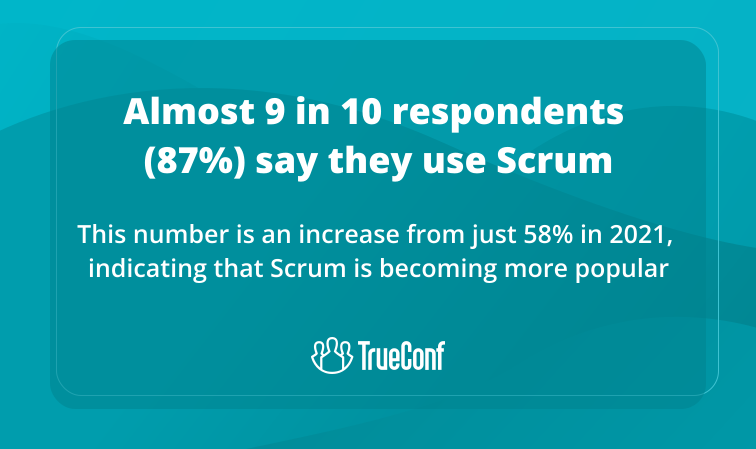
Although initially used in fintech software development, Scrum has expanded its reach into various industries. Its ability to enhance collaboration and serve as an effective time management tool has led to widespread adoption beyond its original focus on technology, becoming a prevalent practice across diverse sectors.
Daily Scrum vs. Other Agile Ceremonies: When to Use What
|
Ceremony |
Frequency |
Duration |
Primary Focus |
Who Leads |
|---|---|---|---|---|
|
Daily Scrum |
Every workday |
15 min |
Team synchronization, blocker identification |
Scrum Master (facilitator) |
|
Sprint Planning |
Start of sprint |
2–8 hours |
Goal setting, task breakdown |
Product Owner + Team |
|
Sprint Review |
End of sprint |
1–4 hours |
Demo, stakeholder feedback |
Product Owner |
|
Retrospective |
End of sprint |
45 min–3 hours |
Process improvement, team health |
Scrum Master |
|
Backlog Refinement |
Ongoing |
30–60 min/session |
Story clarification, estimation |
Product Owner |
Insight #1: Synchronous vs. Async Check-ins
The Daily Scrum is intentionally synchronous because real-time interaction enables immediate clarification and collective problem framing.
However, teams in highly asynchronous environments (e.g., global time zones) sometimes substitute written updates. This works for simple coordination but loses the Scrum value of adaptive planning through conversation.
If your team frequently skips the live sync, ask: are we optimizing for convenience, or for the collaborative intelligence that makes Scrum powerful?
Purpose of Daily Scrum Meetings
The objective of daily Scrum meetings is to enhance team communication. During these sessions, each meeting participant provides updates on their progress made during the previous day, outlines their plans for the next steps, and identifies obstacles. This is especially important for teams working on complex projects like custom web application development, where clear communication can prevent costly misunderstandings. In essence, daily scrums aid the team in adapting, staying informed, and fostering transparency, all of which are critical for maintaining operational efficiency.
3 Key Questions for a Daily Scrum
In short stand-up meetings, team members are given a brief period to offer updates, focus on technology and answere three key questions meant to facilitate problem-solving and effective information exchange:
1. What tasks have you completed recently?
2. Are there any obstacles or delays impacting your ongoing work?
3. What are your objectives for today?
These inquiries are intended to keep all team members updated on the project’s status, promptly tackle any arising issues, and maintain an uninterrupted workflow.
Kudremukh Iron Ore Limited (KIOCL)|Case Study
KIOCL provided their employees with secure tools for collaboration, video calls, and team messaging by implementing TrueConf Server. An autonomous system unified more than 1,000 employees allowing to facilitate work meetings in hybrid and online modes from any location.

Who is a Scrum Master?
The Scrum master acts as a facilitator and makes sure that the timeframe and format of the meeting are followed. The main responsibilities of the Scrum master include:
- Establishing a supportive atmosphere is vital for productive team communication. It promotes an environment where individuals feel encouraged to express their ideas freely, without worrying about receiving criticism. To ensure meetings are both effective and enjoyable, it’s important to recognize the value of every suggestion.
- Assisting in addressing challenges as they arise is an essential aspect of the Daily Scrum. When issues are spotted during this meeting, the Scrum Master promptly intervenes to resolve them. This could include collaborating with other teams or stakeholders, escalating concerns to management, or providing guidance to team members on effective problem-solving methods.
- Assisting in addressing challenges as they arise is an essential aspect of the Daily Scrum. When issues are spotted during this meeting, the Scrum Master promptly intervenes to resolve them. This could include collaborating with other teams or stakeholders, escalating concerns to management, or providing guidance to team members on effective problem-solving methods.
- Monitoring procedures. During the Daily Scrum, the Scrum Master oversees the team’s advancement toward the Sprint Goal to confirm alignment with the Sprint Plan.
- Aiding with subsequent actions: Following the Daily Scrum, the Scrum Master verifies that all follow-up actions or decisions are meticulously recorded and delegated to the relevant team members. They might generate tasks or update the team’s task board to reflect the meeting’s outcomes, ensuring unanimous agreement on the next steps.
Scrum Master Daily Scrum Checklist
|
Phase |
Action |
Success Indicator |
|---|---|---|
|
Pre-Meeting |
Confirm agenda, test tech, remind team of timebox |
All participants ready, tools working |
|
During Meeting |
Enforce 15-min limit, keep focus on 3 questions, note blockers |
Updates are concise, impediments captured |
|
Post-Meeting |
Follow up on blockers, update task board, share summary |
Action items assigned, no unresolved critical issues |
Insight #2: Deployment Model Matters for Regulated Teams
For teams in finance, healthcare, or government, the choice of communication platform for Daily Scrums isn’t just about features—it’s about control.
Cloud-native tools may offer convenience, but on-premises or self-hosted solutions like TrueConf Server provide data residency, audit trails, and integration with existing identity systems.
When your stand-up includes sensitive project details, infrastructure sovereignty becomes a Scrum enabler, not just an IT concern.
Remote Work Format. How to Conduct a Daily Scrum with Remote Employees?
For teams navigating remote work challenges, embracing digital tools can greatly enhance their efficiency and collaboration. One valuable practice during agile development projects is to conduct retrospectives online. This inclusive approach allows team members to reflect on their workflows and outcomes no matter where they are located, promoting openness and constructive feedback.
Remote work still greatly differs from the typical in-office format, despite its increase in popularity over the last decade. Communication remains an obvious obstacle in remote work format, as employees are not physically present in the office and may feel isolated. In this case, video conferencing comes to the rescue, enabling interaction from a distance and fostering overall collaboration without the need for constant travel!
TrueConf is a video conferencing platform with screen sharing feature, serving as a powerful tool for enhancing business productivity and transforming remote work into a win-win option for both employers and employees. TrueConf offers a self hosted messenger and team messaging app that allows users to meet and collaborate in one place, join meetings from any device, and discuss their projects in private and group chats. Enjoy watching 4K videos in real-time and advanced team messaging features!
Take your team communication to the next level with TrueConf!
A powerful self-hosted video conferencing solution for up to 1,000 users, available on desktop, mobile, and room systems.
Tooling Comparison for Remote Daily Scrums
|
Capability |
Basic Video Tool |
Unified Collaboration Platform |
Enterprise Self-Hosted (e.g., TrueConf) |
|---|---|---|---|
|
Video Quality |
HD, variable latency |
HD, optimized routing |
UltraHD/4K, QoS-aware, low latency |
|
Screen Sharing |
Basic app/window share |
Multi-share, annotation |
Multi-stream, remote control, recording |
|
Persistent Chat |
Separate app or limited |
Integrated channels |
Unified messenger with file sharing |
|
Access Control |
Link-based, public rooms |
SSO, role-based |
SSO, MFA, granular permissions, VDI |
|
Data Governance |
Vendor-controlled |
Regional data centers |
Fully on-premises, air-gapped option |
|
Integration |
Calendar, basic APIs |
Workflow connectors |
Deep API/SDK, SIP/H.323, custom bots |
Insight #3: The Hidden Cost of Tool Fragmentation
Teams using separate tools for video, chat, task tracking, and documentation incur cognitive overhead switching contexts during a 15-minute stand-up.
Unified platforms reduce this friction: one click to join, chat history alongside video, shared screens with live annotation.
The time saved isn’t just about efficiency—it preserves the mental bandwidth needed for the actual work of coordination and problem-framing that makes Daily Scrums valuable.
Common Daily Scrum Mistakes and Tips for Solving them
A properly organized stand-up can improve communication within the team, speed up the decision-making process, and help identify problems at an early stage. However, there are a number of common mistakes that can reduce the effectiveness of these meetings:
Mistake 1: Running over time
A common issue in Daily Scrum meetings occurs when they exceed their intended duration. Ideally, these meetings should be concise, typically lasting around 15 minutes. Poor time management often leads to overruns, indicating that the team is getting bogged down in excessive detail or engaging in discussions better suited for separate sessions.
Mistake 2: Loss of Focus
Occasionally, teams lose sight of the primary objective of the Daily Scrum, which is to provide a swift update on progress, identify obstacles, and synchronize tasks for the day. When discussions veer off-topic or delve into unrelated issues, it diminishes the effectiveness of the meeting.
Mistake 3: Lack of preparation
Standup meeting participants should approach the meeting prepared, knowing what they are going to say. This helps to avoid awkward pauses and saves time.
Mistake 4: Lack of visual aids
The use of task boards, progress charts, or digital tools can significantly enhance the visual perception of information and help track progress. Additionally, for those sharing multimedia content, consider using an AI photo editor tool to enhance images before sharing them in the chat, ensuring your visuals make a lasting impact. If you’re looking for a quick solution, a an online photo editor can help you make basic adjustments like cropping, brightness correction, or adding labels no software download needed.
Mistake 5: Ignoring problems or meeting for the sake of meeting
If a team is discussing issues but not taking steps to resolve them, the meeting loses its value. It is important to identify problems and actively work on their solutions.
Conclusion
A stand-up format designed for maximum productivity requires minimal preparation. Well-prepared events save time and stimulate collaborative brainstorming, thereby improving communication and motivating participants to act as a cohesive team. Professionals who pursue Scrum Master Certification often find these practices especially valuable, as they learn how to create a comfortable environment, follow proven frameworks, and get the most out of teamwork!
FAQ
Can Daily Scrums work effectively for fully remote teams?
Yes, when supported by reliable video conferencing with low latency and screen sharing. Platforms like TrueConf enable remote teams to maintain the visual cues and real-time interaction that make stand-ups effective, even across time zones.
What’s the biggest mistake teams make with Daily Scrums?
Turning them into status reports for management rather than peer coordination. TrueConf’s integrated chat and recording features help keep focus on the three core questions while preserving context for async participants.
How do regulated industries handle Daily Scrum tooling?
They often require on-premises or self-hosted solutions to meet data sovereignty rules. TrueConf Server provides enterprise-grade video and messaging that operates within a closed network, aligning Scrum practices with compliance needs.
Should the Product Owner attend the Daily Scrum?
They can attend as a listener but shouldn’t lead or redirect the meeting. If follow-up discussions are needed, TrueConf’s persistent chat allows the team to continue conversations without extending the 15-minute sync.
How can we keep Daily Scrums under 15 minutes?
Enforce timeboxing, prepare updates in advance, and use visual aids like shared task boards. TrueConf’s screen sharing and annotation tools help teams convey progress quickly without lengthy explanations.
What if team members are in very different time zones?
Consider a rotating schedule or a hybrid async/sync approach. TrueConf supports recording and transcription, so absent members can catch up without losing the collaborative context of the live stand-up.
How does tool choice impact Daily Scrum effectiveness?
Fragmented tools create friction; unified platforms reduce context-switching. TrueConf combines video, messaging, file sharing, and integration capabilities in one secure environment, helping teams stay focused on coordination, not tool management.
About the Author
Nikita Dymenko is a technology writer and business development professional with more than six years of experience in the unified communications industry. Drawing on his background in product management, strategic growth, and business development at TrueConf, Nikita creates insightful articles and reviews about video conferencing platforms, collaboration tools, and enterprise messaging solutions.


Follow us on social networks