
7 Tips to Secure Your Conference Calls
Updated April 2026
Remote and hybrid work models have made conference calls a daily necessity—but unsecured calls remain a critical vulnerability. This guide delivers seven actionable, enterprise-grade practices to protect your meetings from eavesdropping, data leaks, and unauthorized access. Whether you use cloud or on-premises infrastructure, these recommendations help you balance usability with robust security.
|
Priority |
Security Practice |
Core Benefit |
Implementation Complexity |
TrueConf Alignment |
|---|---|---|---|---|
|
High |
End-to-end call encryption |
Prevents interception of audio/video/data |
Medium |
Native support with configurable encryption types |
|
High |
Per-meeting IDs + strong passwords |
Blocks “meeting bombing” and credential reuse |
Low |
Auto-generated IDs, password policies enforced |
|
High |
Participant verification (waiting room, lock meeting) |
Controls real-time access during sessions |
Low |
Host controls with one-click participant management |
|
Medium |
Team security training |
Reduces human-error breaches |
Ongoing |
Integrated with admin governance tools |
|
Medium |
Regular software updates |
Closes known CVE vulnerabilities |
Low |
Centralized update management for on-prem deployments |
|
Low-Medium |
Meeting recording with consent |
Creates audit trail; deters bad actors |
Low |
Local recording with access controls |
|
Low |
Virtual waiting room activation |
Adds pre-entry verification layer |
Low |
Optional host-controlled feature |
As more companies worldwide lean towards remote and hybrid work models, there has been an increase in the need for practical communication tools to stay connected with employees and clients.
According to statistics, about 36.2 million American employees are expected to work remotely by 2025; these hints that even more companies are bound to adopt these VoIP channels for seamless communication.
As we know, teleconferencing involves using telecommunications to connect two or more people in different locations, either via audio or video. While it has its benefits, sadly, many companies have breached business security by participating in and sharing critical information through unsecured conference calls.
Take your team communication to the next level with TrueConf!
TrueConf Server is deployed within your corporate network, ensuring secure interaction even without an internet connection. Mandatory authorization, 12 levels of security, various encryption types, and much more!
Why is Conference Call Security Important?
As a business owner currently using or planning to integrate teleconferencing into your communications strategy, it is paramount to adhere to the best conference call practices to avoid falling victim to cyber threats, including deceptive social engineering attacks.
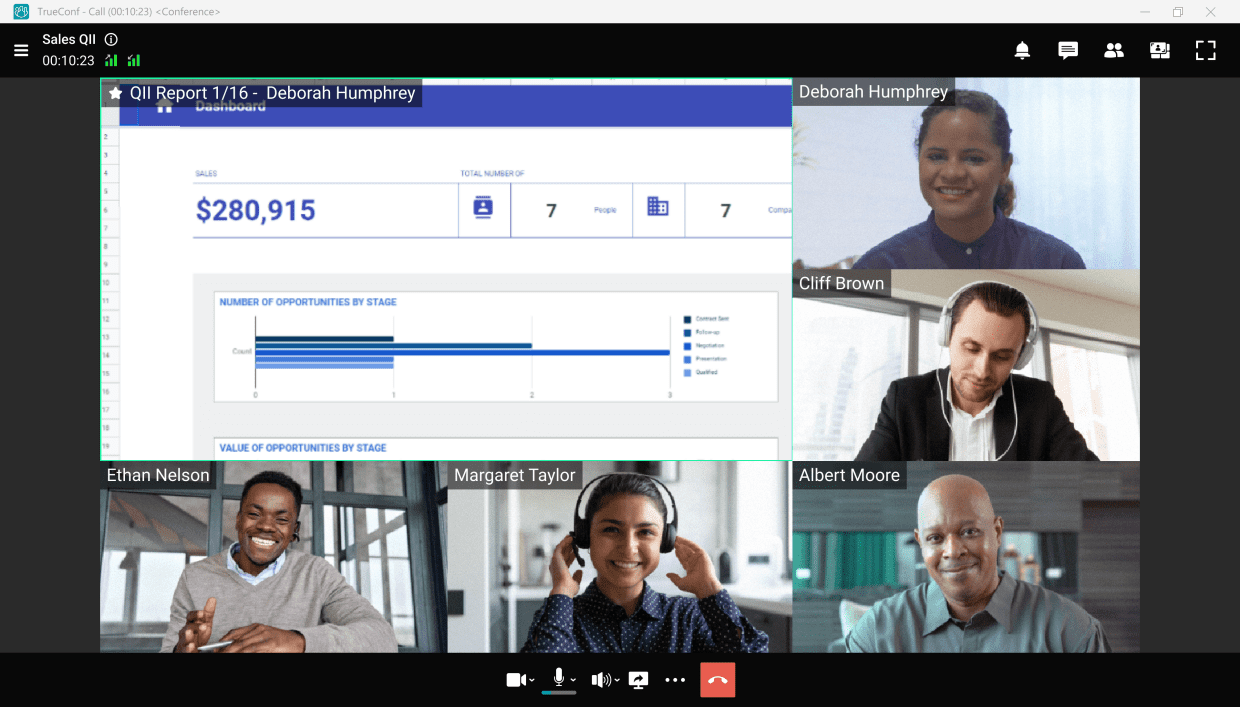
Conference calls can improve different areas of your business when done right and securely.
Let’s see what you gain when securing conference calls for your business.
Keep your Business Data and Information Safe
Small businesses often overlook cybersecurity measures because they feel only larger corporations should be worried about them. Ironically, cybersecurity statistics reveal that one cyberattack occurs every 39 seconds and 43% of all cyberattacks target small businesses.
Kudremukh Iron Ore Limited (KIOCL)|Case Study
KIOCL provided their employees with secure tools for collaboration, video calls, and team messaging by implementing TrueConf Server. An autonomous system unified more than 1,000 employees allowing to facilitate work meetings in hybrid and online modes from any location.

Save Costs
71% of data breaches are financially motivated, and the average cost of a data breach, according to the IBM Cost of a Data Breach Report 2021, is $4.24 million. You’d agree that the cost of implementing the proper teleconference security measures is nothing compared to the millions of dollars you’d otherwise spend when your data is compromised.
So, regardless of your business size, taking cybersecurity seriously and adhering to the best teleconferencing practices will save your business more money and prevent potential expenses on ransomware attacks.
Insight #1: Encryption Alone Isn’t Enough—Deployment Model Determines Actual Data Control
Many platforms advertise “end-to-end encryption,” but if the infrastructure is cloud-hosted by a third party, metadata, routing logs, and temporary buffers may still reside outside your jurisdiction.
For regulated industries (finance, healthcare, government), on-premises or private-cloud deployment—like TrueConf Server—ensures that encryption keys, media streams, and administrative logs never leave your controlled environment.
This distinction between cryptographic capability and data sovereignty is frequently overlooked in generic security checklists.
Try TrueConf Server Free!
- 1,000 online users with the ability to chats and mske one-on-one video calls.
- 10 PRO users with the ability to participate in group video conferences.
- One SIP/H.323/RTSP connection for interoperability with corporate PBX and SIP/H.323 endpoints.
- One guest connection to invite a non-authenticated user via link to your meetings.

7 Recommendations for Securing a Conference Call
Now that you know why teleconference call security is essential, you may wonder how to secure your calls from cyberattacks. Not to worry, we will tell you everything you need to know, so read on.
1. Call encryption
Maintaining data privacy is key to any business, so most VoIP platforms implement end-to-end call encryption to ensure secure communications. Call encryption is a VoIP security measure that blocks third parties from accessing the data exchanged during calls to guarantee safe communication and user privacy.
With call encryption in place, your VoIP software converts shared data or content into a code and transfers it safely from one endpoint to another (i.e., from sender to intended receiver). Even when unauthorized parties intercept your data in transit, they won’t be able to decrypt it or listen in because the encryption guarantees that information stays between you and the person (or people) on the call. Depending on your VoIP provider, you can easily set up this feature from the “security” section in settings, and you’re good to go.
Ensure to only use a VoIP providerthat implements end-to-end encryption and other security measures like:
- Two-factor authentication
- Enabled Secure Real-time Transport Protocol (SRTP), etc.
2. Train your team to prevent cyberattacks
Contrary to popular belief, cybersecurity is not a one-person job; it is an all-hands-on-deck situation and requires everyone to play their part in ensuring a solid security culture. There are many ways to achieve a secure digital environment, including the implementation of multi-factor authentication and regular security audits.
“Even the bravest cyber defense will experience defeat when weaknesses are neglected”
Stephane Nappo
When employees know the consequences of overlooked careless actions like sharing conference call links, passcodes, or toll numbers indiscriminately and how it can pose a tremendous threat to the company, they will develop a stronger sense of security, especially when sensitive tools like a customer data platform are integrated into communication systems.
3. Always keep meeting ID in mind
Using the same meeting ID for every call session is not advisable, as it can be detrimental. Uninvited intruders can get access to previously used meeting IDs and join conference calls to either create a nuisance or steal sensitive information.
Therefore, try to generate or use a per-meeting ID for every meeting rather than a personal ID.
4. Add a meeting password
In real life, we sometimes need verification to access certain buildings, meetings, or events; the same rule can be applied to online conference meetings. Passwords play a critical role in providing an additional layer of security against unauthorized access.
Creating a password for critical meetings ensures uninvited attendees don’t have access to them, making it a safe space for free communication. Always create strong passwords, and never share your passwords indiscriminately. Using a reliable password management is highly recommended to generate and store complex, unique passwords for all your accounts.
5. Lock the meeting from your participant’s list once all attendees are “ready to go”
Thankfully, many teleconferencing tools enable you to virtually lock a meeting space once everyone you invite has joined. Enabling this feature will block any meeting bomber from entering or listening in without being invited and curb data breaching. Additionally, consider using data privacy management to further enhance your data security efforts.
6. Record your teleconference meetings
Most VoIP tools have a call recordingfeature that enables meeting hosts to record conference calls.
People record teleconference meetings for different reasons; while some record for training, others record for reference sake. Regardless of your reason, it’s vital to record critical meetings to ensure a safe communication space.
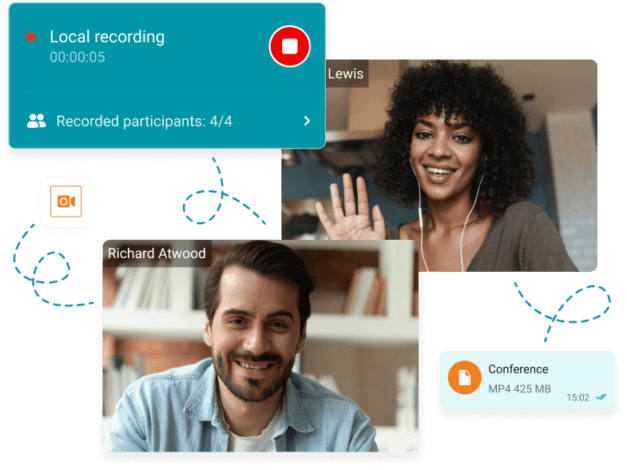
Usually, once you begin, it will notify every participant that the meeting is being recorded. For most tools, this is indicated by a blinking red circle at the top or bottom of the screen.
Not only does this feature help you keep track of meeting activities and participants, but it can also scare away uninvited attendees with malicious intentions. Out of courtesy, always remember to notify all participants before you record.
7. Keep your calling software top-notch and up-to-date
Regardless of your need for conference calling software, you owe it to yourself and your business to choose the best.
Developing excellent cyber hygiene or best practices doesn’t just end with choosing the best tool because hackers get more creative with their strategies by the day. So, it would be best if you also carried out frequent software updates and regularly tested your tool’s security limits. Doing this prepares you to catch threats as early as possible before they become full-blown attacks.
Take your team communication to the next level with TrueConf!
A powerful self-hosted video conferencing solution for up to 1,000 users, available on desktop, mobile, and room systems.
Bonus point: enable a virtual waiting room
Having a virtual waiting room that requires the meeting host to verify participants before adding them to a teleconference call adds an extra layer of protection. It is ideal for meetings with many attendees, as it helps you to deny access to the people that may have randomly stumbled on the meeting link.
One crucial element of securing your business’s teleconference calls is understanding and monitoring potential vulnerabilities within your systems. Implementing consistent CVE threat monitoring can identify risks and protect against known exploits targeting telecommunication software.
Doing this also gives your invited participants a sense of security, knowing that no unwanted person lurks in the shadows to steal personal information or leak data.
Conclusion
Cybercriminals are not relenting in their quest to cause havoc. The first half of 2022 saw about 236.1 million ransomware attacks globally; therefore, cybersecurity should be at the top of your list, regardless of your business size.
As you have seen, disregarding the importance of cybersecurity measures for your teleconference calls can lead to information misuse and cost you more than you can imagine.
Your team and customers deserve the best teleconferencing experience, so stand out from your competitors by leveraging these tips for safe conference calls, and you’ll be glad you did.
FAQ
What’s the single most important step to secure a conference call?
Use unique meeting IDs combined with strong passwords for every session. This simple practice blocks most “meeting bombing” attempts. TrueConf automates ID generation and enforces password policies at the organizational level, reducing human error.
Does end-to-end encryption guarantee complete security?
Encryption protects data in transit, but true security also depends on where keys are stored and who controls the infrastructure. TrueConf’s on-premises deployment ensures encryption keys and media streams stay within your network, adding a critical layer of data sovereignty.
How can I prevent unauthorized participants from joining mid-meeting?
Enable the virtual waiting room and lock the meeting once all expected attendees have joined. TrueConf provides one-click host controls to manage participant access in real time, with optional integration into your existing identity provider for pre-verification.
Are recorded meetings a security risk?
Recordings can become sensitive assets if not properly protected. Always store recordings in access-controlled locations and notify participants beforehand. TrueConf allows local recording with granular permission settings, ensuring only authorized users can retrieve or share meeting archives.
What if my team forgets to apply security settings for each call?
Relying on manual steps is error-prone at scale. TrueConf addresses this by letting administrators define security policies (MFA, password rules, auto-lock) that apply automatically to all meetings, ensuring consistent protection without depending on individual host discipline.
How does TrueConf handle compliance requirements like GDPR or HIPAA?
TrueConf Server’s on-premises architecture gives organizations full control over data residency, retention policies, and audit logs—key prerequisites for GDPR, HIPAA, and other frameworks. The platform supports detailed logging and export capabilities to streamline compliance reporting.
Can I use TrueConf securely without an internet connection?
Yes. TrueConf Server operates entirely within your corporate network, enabling secure video conferencing, messaging, and collaboration even in air-gapped environments. This makes it suitable for defense, critical infrastructure, and other high-security sectors where internet access is restricted or monitored.
About the Author
Nikita Dymenko is a technology writer and business development professional with more than six years of experience in the unified communications industry. Drawing on his background in product management, strategic growth, and business development at TrueConf, Nikita creates insightful articles and reviews about video conferencing platforms, collaboration tools, and enterprise messaging solutions.


Follow us on social networks