
The Best Team Chat Software for Business in 2026
Team messaging has evolved beyond mere conversation to become the operational nervous system of modern organizations, where initiatives gain momentum, critical incidents find resolution, and institutional decisions acquire permanent records. This comprehensive analysis examines team chat software — specialized workplace communication platforms engineered for organizational complexity, featuring structured channels, granular administrative governance, and ecosystem interoperability, while deliberately excluding consumer-grade messaging applications.
Crafted specifically for small-to-medium businesses, global enterprises, hybrid or remote workforces, and compliance-driven sectors requiring ironclad data governance, this evaluation synthesizes vendor technical documentation, real-world deployment patterns, and industry best practices. We strongly recommend validating any finalist platform through controlled pilot testing within your specific operational environment before enterprise adoption.
Keep Communication Productive With These Team Chat Software

Modern collaboration platforms promise accelerated workflows, yet poorly implemented chat ecosystems frequently produce counterproductive outcomes: routine inquiries fragment into untraceable direct messages, employees become trapped in tangential conversations, and notification cacophony becomes the daily norm highlighting the need for a structured business communication tool that centralizes conversations, improves visibility, and keeps teams aligned on priorities. Gradually, teams compensate through escalating meeting culture (“Let’s schedule a quick sync”), transforming communication tools from productivity accelerators into relentless interruption engines.
This “collaboration saturation” manifests through critical operational symptoms:
- Priority erosion: Uniform notification patterns eliminate urgency distinctions, rendering everything equally critical.
- Knowledge fragmentation: Strategic decisions remain imprisoned within inaccessible private exchanges, invisible to new team members.
- Context annihilation: Mission-critical updates vanish beneath emoji reactions, internet memes, and perfunctory acknowledgments.
- Institutional memory loss: Teams repeatedly ask identical questions due to inaccessible information archives.
- Hybrid collaboration breakdown: Remote contributors miss real-time contextual cues shared organically in physical environments.
Enterprise-grade chat platforms counteract this through architectural discipline absent in consumer applications: topic-based channels or spaces for workflow organization, threaded conversations preserving decision context, genuinely functional search capabilities, and scalable administrative governance. The objective transcends message volume: it’s about creating predictable, discoverable, and minimally disruptive communication ecosystems that advance actual work.
What Makes the Best Team Chat Software?
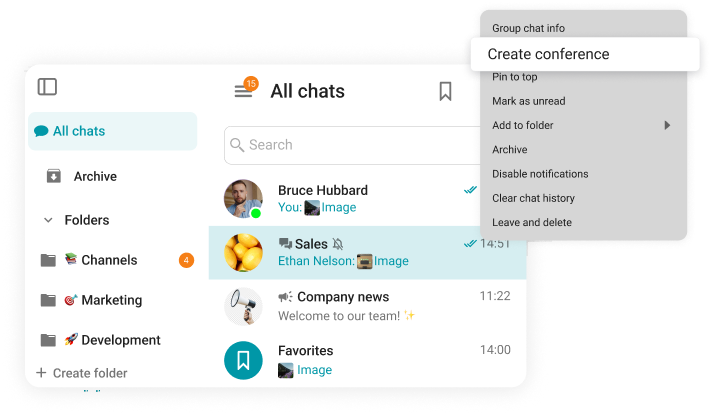
Cross-Functional Project Execution
Contemporary initiatives inherently span product, engineering, legal, marketing, and sales domains. Premium platforms centralize project dialogue within dedicated shared spaces rather than fragmenting discussions across private messages and email threads.
High-performing implementations consistently feature:
- Purpose-defined project channels with pinned essentials (objectives documentation, resource links, owner assignments, milestone timelines)
- Decision-focused threaded discussions that preserve main channel readability
- Concise progress updates eliminating unnecessary synchronization meetings (“Changes implemented/Next actions/Current blockers”)
- Searchable historical archives enabling rapid onboarding for new contributors
When properly configured, this architecture dramatically reduces alignment meetings by maintaining perpetual contextual visibility for all relevant stakeholders.
Operational Incident Management
Response velocity and communication clarity hold equal importance during crisis scenarios. Effective incident resolution requires:
- Predefined escalation pathways for rapid specialist mobilization;
- Dedicated incident channels isolating urgent workflows from routine operational chatter;
- Searchable incident archives preventing recurring failures through historical pattern recognition;
- Explicit ownership protocols (“Primary responder,” “External communications owner,” “Real-time status visibility”).
Platforms enabling structured channels, disciplined threading, and dependable notifications demonstrably shrink mean-time-to-resolution, particularly when incident protocols become standardized practice across the organization.
Enterprise-Wide Communications
Broadcast communications demand fundamentally different architecture than team collaboration. Effective systems enable:
- Targeted organization-wide announcements without contaminating daily operational channels
- Policy documentation with authoritative canonical sources and moderated discussion threads
- Executive communications permanently archived for future reference (never lost in general feed scrolls)
High-performing organizations curate company channels like professional newsrooms: minimal post frequency, maximum informational value, rigorous content moderation, and clearly defined action pathways.
Frontline Workforce Enablement
Deskless teams require specialized communication paradigms fundamentally different from knowledge workers:
- Mobile-optimized interfaces with frictionless onboarding experiences
- Predictable notification cadences avoiding disruption during critical shift periods
- Real-world workflow integration (field photo uploads, shift handoff confirmations, dynamic location tagging)
Purpose-built frontline tools transform into trusted operational infrastructure rather than ignored software applications.
Global Timezone Collaboration
Distributed teams cannot depend on synchronous availability. Essential async-enabling features include:
- Context-preserving threaded conversations reducing repetitive clarification queries
- Strategic pinning of mission-critical messages preventing information loss in high-volume feeds
- Advanced semantic search capabilities for retrieving historical decisions and contextual background
- Optional digest summaries accelerating cross-timezone catch-up during overlapping hours
Optimal platforms empower contributors to deliver meaningful work during their local business hours while maintaining comprehensive situational awareness of global operations.
Defining Characteristics of Premium Team Chat Software
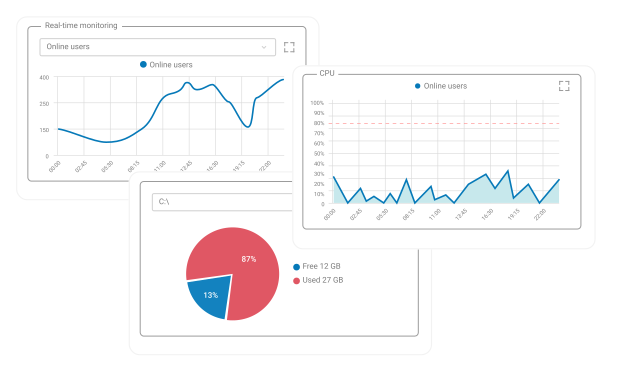
Enterprise-grade tools must deliver core functionality without inducing operational chaos. Leading solutions transform communication into structured, searchable, and organizationally scalable workflows.
Non-Negotiable Core Capabilities
-
- Organizational Architecture
Channels or spaces function as foundational units separating topics, projects, or departments. Threaded conversations prevent scroll fatigue by anchoring discussions to source messages. Strategic mentions and reaction systems convey signals efficiently without notification pollution.
-
- Knowledge Retrieval
Search functionality distinguishes knowledge-preserving systems from confusion generators. Teams must instantly locate “final approved contracts,” “architectural decision records,” or “post-incident reports” without colleague dependency.
-
- Asset Management
Modern work involves constant file exchange (presentations, screenshots, technical documentation). Robust handling, featuring inline previews, version tracking, and frictionless resharing, accelerates collaboration velocity.
-
- Access Governance
External collaboration with partners, contractors, or clients demands granular permission controls. Internal governance equally matters: e.g., restricting posting rights in executive announcement channels to designated personnel.
-
- Notification Intelligence
Most underestimated yet critical capability. Without granular controls, users either suffer notification overwhelm or silence all alerts. Elite platforms provide surgical notification tuning balancing responsiveness with focus preservation.
Essential System Attributes
-
- Enterprise-Grade Reliability
Workplace chat functions as daily mission-critical infrastructure. Client performance degradation, message delivery failures, or flaky push notifications drive users back to legacy email and meetings. Stability, performance consistency, and guaranteed delivery outweigh novelty features.
-
- Frictionless Adoption Pathways
User acceptance evolves through stages. Optimal platforms feature:
-
-
- Intuitive onboarding experiences with minimal learning curves
- Pre-built channel templates and proven workspace organizational pattern
- Migration tooling from legacy systems or email-centric workflows
- Non-technical interfaces requiring zero specialized training sessions
- IT Manageability
-
Beyond small teams, platforms require genuine administrative control: automated user lifecycle management, comprehensive audit trails, customizable policy enforcement, usage analytics, and predictable operational overhead. Without this, chat becomes an ungoverned shadow IT infrastructure.
-
- Universal Accessibility
True workplace tools serve all roles and regions through robust mobile experiences, multilingual interfaces, and WCAG-compliant accessibility features.
Strategic Enhancement Features
Chatbots and workflow triggers transform platforms into operational hubs, processing support ticket updates, build notifications, approval chains, and recurring reminders. Particularly valuable for engineering, customer support, and operations teams.
-
- Institutional Memory Preservation
Channel wikis, curated knowledge bases, pinned decision records, and “best of” thread compilations combat knowledge attrition. This slashes repetitive queries and compresses new hire onboarding timelines.
-
- Seamless Unified Communications
While chat seldom operates in isolation, deeply integrated voice/video capabilities eliminate disruptive context-switching. Teams transition fluidly from messages to calls only when genuinely necessary.
-
- Compliance Safeguards
Regulated industries require non-negotiable governance: customizable retention policies, eDiscovery-ready exports, immutable audit trails, and administrative controls meeting industry-specific mandates (FINRA, HIPAA, GDPR).
Validation Methodology for Software Selection
Selecting 2026’s optimal chat solution demands real-world validation beyond marketing feature checklists:
Scenario-Based Piloting
Replicate authentic workflows through controlled pilots:
- Project channel simulating complex cross-functional collaboration (file sharing, threaded decisions, stakeholder alignment)
- Incident response simulation testing escalation paths and status tracking during simulated crises
- Company announcement channel evaluating broadcast reach and discussion containment capabilities
Administrative Capability Audit
Verify IT operational requirements:
- Granular permission frameworks (channel access tiers, guest privileges, external sharing controls)
- Automated user lifecycle management (provisioning/deprovisioning workflows integrated with HR systems)
- Device compliance policies and endpoint management integration (MDM/UEM systems)
Ecosystem Integration Testing
Validate connections with mission-critical tools:
- Calendar systems and meeting schedulers (preventing double-booking)
- Task management and project tracking platforms (Jira, Asana, monday.com)
- CRM and customer support ticketing systems (Salesforce, ServiceNow, Zendesk)
- Identity providers (SAML, OIDC, SCIM provisioning)
Security & Compliance Verification
Confirm foundational requirements early:
- Data residency guarantees and deployment models (cloud regions, on-premises, hybrid)
- Retention policy enforcement and legal export capabilities (native eDiscovery tools)
- Encryption standards (in-transit TLS 1.3+, at-rest AES-256) meeting regulatory thresholds
- Audit trail comprehensiveness and administrative oversight visibility (real-time monitoring)
Software Deep Dives: The 2026 Enterprise Communication Landscape

Team chat applications represent purpose-built workplace communication systems centered on organized discussions (channels/spaces), searchable knowledge archives, and administrative governance. Unlike consumer messengers, enterprise variants incorporate organizational directories, guest management frameworks, third-party integrations, and compliance tooling to maintain work visibility and institutional control.
Core Software Definition
- Architectural Pillars:
- Channel or thread-based conversation organization preserving context
- Organizational directory with real-time presence indicators
- Centralized administrative consoles with policy enforcement engines
- Integration frameworks and workflow automation hooks
- Operational Mechanics:
- Workspaces/Tenants: Digital representations of organizational entities with boundary controls
- Permission Hierarchies: Define channel access rights, guest invitation privileges, and policy management scopes
- Attention Management: Notification tuning via mentions, keyword alerts, and channel-specific settings
- Ecosystem Connectivity: Deep integrations with calendars, task managers, CRM systems, and identity providers
- Deployment Flexibility:
- Cloud-Hosted: Vendor-managed infrastructure enabling rapid deployment with minimal client-side overhead (AWS/Azure/GCP regions)
- Self-Hosted/On-Premises: Organization-controlled server infrastructure offering maximum data sovereignty at increased operational cost
- Hybrid Models: Strategic combinations accommodating regulatory constraints and diverse user group requirements (e.g., executives cloud-based, engineers on-prem)
Tangible Business Value
-
- Accelerated Decision Velocity
Chat platforms compress alignment cycles from hours to minutes by enabling instant expert consultation. This proves critical for time-sensitive projects, customer escalations, and incident response where delays cascade into significant financial impacts. High-quality setups further enhance decisions through contextual thread preservation and stakeholder visibility.
-
- Frictionless Knowledge Exchange
Sharing links, files, and updates occurs without formal documentation overhead. Channel-based communication creates discoverable institutional knowledge, searching for “Q3 budget template” retrieves both document and discussion context. This “single source of truth” approach eliminates redundant work and repeated queries.
-
- Structured Dialogue Systems
Topic-separated channels prevent conversational chaos while threaded discussions contain tangents. This architecture maintains focus on critical updates and dramatically simplifies onboarding: new members independently access pinned resources and historical context without tribal knowledge dependency.
-
- Asynchronous Global Collaboration
Distributed teams leverage chat as persistent shared workspaces. Async-friendly practices, clear channel naming conventions, thread-first discussions, standardized handoff protocols, enable seamless cross-timezone productivity without mandatory real-time availability.
-
- Mobile-First Field Enablement
Beyond remote desk workers, frontline staff (field technicians, warehouse personnel, healthcare providers, retail teams) depend on mobile-optimized experiences for real-time coordination. Effective platforms support photo documentation with metadata, shift handovers with confirmation workflows, location-based alerts, and instant approvals directly from smartphones.
-
- Cultural Connectivity
Intentionally managed social channels foster belonging in hybrid environments. Recognition posts, celebration threads, and casual interactions build relational capital that translates to smoother high-stakes collaboration. Critical success factors include strict channel purpose guidelines, dedicated non-work spaces, and notification hygiene preventing culture from becoming noise.
Economic Considerations
Pricing structures follow consistent patterns despite vendor variations:
- Tiered per-user monthly subscriptions (business/enterprise bundles with progressive feature unlocks)
- Premium add-ons for advanced security modules, compliance tooling, expanded storage quotas, or AI capabilities
- Custom enterprise agreements for global deployments with volume discounts
Hidden cost factors frequently overlooked:
- Migration labor and user retraining expenses (often 15-20% of license costs)
- Ongoing governance overhead (policy management, moderator time, compliance audits)
- Specialized compliance tooling investments (legal hold systems, audit trail archiving)
- Long-term data storage scaling costs (message history, file attachments growing 30-40% annually)
Free tiers serve evaluation purposes but typically lack governance controls, historical depth beyond 90 days, and enterprise administration required for production environments.
Premier Team Chat Software
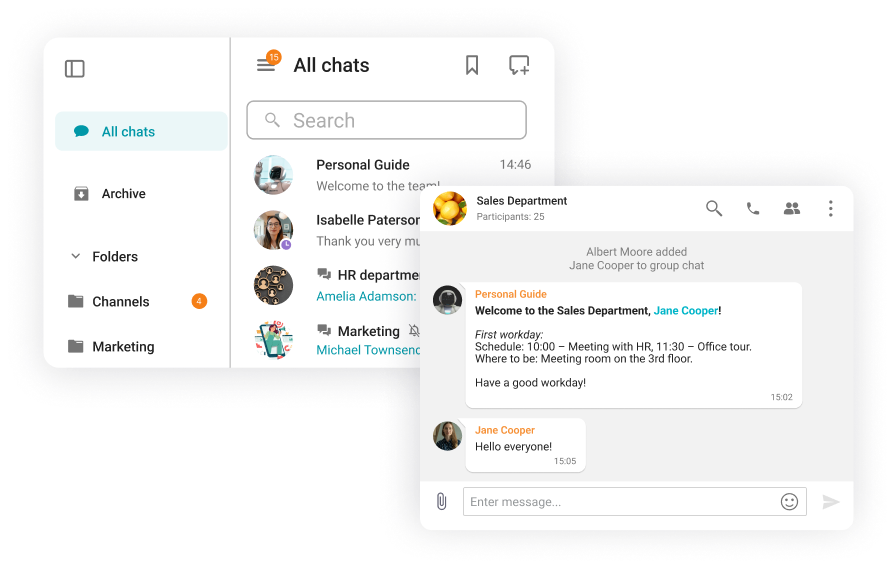
TrueConf Server
TrueConf Server targets infrastructure-controlled environments where data must never leave corporate boundaries: defense contractors, healthcare systems under HIPAA, and financial institutions with air-gapped requirements. Its integrated messaging/video architecture solves tool fragmentation while maintaining auditable on-premises control, appealing to organizations where cloud vendors cannot satisfy regulatory attestations.
Converged Communication Workflow Architecture
TrueConf Server’s core innovation lies in its unified communications fabric that seamlessly integrates previously siloed modalities:
- Persistent team messaging with end-to-end encryption and threaded discussions
- Secure document exchange featuring automated DLP scanning and version-controlled repositories
- Enterprise-grade video infrastructure supporting up to 1,000 participants with adaptive bandwidth management and hardware-accelerated encryption
- Context-preserving escalation pathways enabling seamless transitions from text discussions to audio/video engagements without workflow disruption
Organizations realize measurable operational benefits through this consolidation: compliance teams conducting audits maintain complete conversation histories across modalities; incident response units eliminate dangerous delays when escalating from chat alerts to video war rooms; field technicians share real-time visual diagnostics without switching between disconnected applications. This unified approach eliminates the security gaps and productivity penalties inherent in juggling multiple communication vendors while maintaining comprehensive audit trails across all interaction types.
Enterprise Governance Framework
TrueConf’s on-premises deployment model delivers concrete compliance advantages through:
- Absolute data residency control: All communication content, metadata, and cryptographic keys remain exclusively within customer-managed infrastructure
- Granular access architecture: Role-based permissions extending to message retention policies, recording capabilities, and external participant restrictions
- Enterprise identity integration: Robust SSO support (SAML 2.0, OpenID Connect) with conditional access policies synchronized to Active Directory/LDAP hierarchies
- Audit-ready infrastructure: Immutable activity logs with tamper-evident storage and configurable eDiscovery export formats compliant with regulatory requirements
Infrastructure Stewardship Requirements
Since TrueConf Server is deployed on-premises (or in a hybrid model), rollout is an infrastructure project, not just a signup. The available system requirements and deployment documentation make it easier for IT to estimate resources and organize ongoing support.
Strategic Recommendation
TrueConf Server emerges as the optimal communications solution when three critical requirements converge: absolute data sovereignty, regulatory compliance mandating on-premises infrastructure, and operational necessity for seamless chat-to-video workflow transitions. Its value proposition proves particularly compelling for environments where the potential cost of a single compliance violation or data breach far exceeds infrastructure investments, defense contractors handling classified projects, and healthcare systems managing PHI under HIPAA.
For these organizations, TrueConf transforms from a communication tool into a strategic risk mitigation asset that delivers measurable ROI through reduced regulatory exposure, eliminated tool fragmentation costs, and accelerated response workflows during critical incidents. Proceed with implementation only after thorough technical validation, dedicated resource allocation for ongoing administration, and explicit alignment between platform capabilities and regulatory obligations.
Slack
Organizations embracing chat-first workflows with extensive toolchain integration needs. Excels when daily operations span multiple systems (Jira, Jenkins pipelines, Salesforce CRM, Zendesk support) requiring chat as a unifying command center. Particularly effective for cross-departmental collaboration where Slack’s channel architecture maintains work visibility without direct message dependency.
Differentiating Architectural Strengths
Slack’s core advantage lies in operationalizing communication velocity. Channels enforce organizational discipline, threads preserve decision context through complete lifecycles, and the interface seamlessly supports:
- Synchronous collaboration (rapid troubleshooting sessions, live coordination during incidents)
- Asynchronous workflows (threaded project updates, historical catch-up reading, knowledge base searches)
Maximum organizational value emerges when teams adopt lightweight operational protocols: standardized channel naming conventions (project-*, dept-*), thread-centric decision documentation, and strategic resource pinning to transform tribal knowledge into searchable institutional assets.
Integration & Automation Leadership
Slack’s App Directory (2,400+ integrations) and Workflow Builder represent industry-leading differentiators. For toolchain-dependent operations, it consolidates critical signals, support ticket alerts from ServiceNow, deployment notifications from GitHub Actions, CRM opportunity updates, into contextual channels, drastically reducing status meetings. Workflow automation standardizes cross-functional handoffs, multi-tier approvals, and recurring reminders accelerating execution velocity while reducing manual coordination overhead.
Governance & Security Profile
Enterprise-grade controls exist but depth varies significantly by subscription tier and organizational configuration strictness. Practical advantage: Slack’s clear client deprecation policies (90-day sunset cycles) maintain endpoint security hygiene across organizations, critical since outdated clients frequently become attack vectors and reliability liabilities in large deployments.
Implementation Constraints
Not universally suitable:
- Organizations requiring full on-premises data residency should evaluate self-hosted alternatives
- Cost structures escalate rapidly with seat growth and advanced security/governance tier requirements (Enterprise Grid pricing)
Strategic Verdict
For mature chat-centric workplaces demanding deep ecosystem integration and refined channel or thread workflows, Slack remains the benchmark solution, particularly for toolchain-intensive engineering and product teams.
Microsoft Teams
Organizations deeply embedded in Microsoft 365 ecosystems require tightly integrated chat, meetings, calendar, identity management, and tenant-wide governance. Ideal when existing administrative controls, compliance frameworks, and user workflows already align with Microsoft infrastructure through Entra ID and Purview compliance suites.
Architectural Advantages
Teams functions as organizational connective tissue rather than isolated communication tools. Its Microsoft 365 integration creates unified experiences where conversations, meetings, files, and collaboration coexist contextually within SharePoint and OneDrive ecosystems. This proves invaluable in complex enterprises where communication spans departments, regions, and governance boundaries requiring policy-based access controls and data loss prevention.
Ecosystem Synergy
Maximum value emerges in Microsoft-centric environments. Pre-integrated identity management (Entra ID SSO), intelligent storage (SharePoint retention policies), and workflow automation (Power Automate) simplify deployment and daily operations. For many enterprises, this cohesion reduces tool fragmentation by making Teams the default hub for both messaging and conferencing, eliminating context-switching between applications.
Governance Maturity
Leverages Microsoft’s enterprise administration framework (Microsoft Intune, Purview compliance) for centralized control. This matters critically because workplace chat seldom operates in isolation, it integrates with mobile device management, conditional access policies, and regulatory compliance centers. Teams becomes the natural choice when organizations require consistent governance scaling across 10,000+ user deployments.
Adoption Considerations
In practice, the main adoption trade-offs are:
- Non-Microsoft environments may find Teams heavier than chat-optimized alternatives due to feature density
- Teams preferring minimalist daily messaging interfaces may resist broader Microsoft collaboration features despite integration benefits
Strategic Verdict
For large Microsoft-centric organizations, Teams delivers the most straightforward path to governed, scalable communication infrastructure with minimal workflow disruption and maximum compliance alignment.
Google Chat
Teams fully operational within Google Workspace seeking messaging that naturally extends Gmail, Calendar, Drive, and Meet experiences. Ideal when standardization should minimize workflow disruption for existing Google ecosystem users through consistent interaction patterns and unified search.
Contextual Integration Value
Chat functions as Workspace’s native messaging layer, enabling “communication where work lives” through deep Gmail integration (chat tabs alongside inbox), Calendar event creation from conversations, and Drive file sharing without context switching. Rather than adopting separate platforms with distinct administration models, Chat feels like an organic Workspace extension, particularly valuable for organizations comfortable with Google’s material design language and interaction paradigms.
Ecosystem Cohesion Benefits
Workspace-native integrations deliver primary value: heavy Drive collaborators experience seamless document co-authoring within chat windows, Calendar schedulers launch meetings directly from conversations, and Meet users transition to video with single-click escalation. The principal advantage is consolidation simplicity, fewer logins, unified search across Gmail/Drive/Chat, and connected communication histories across modes.
Administrative Alignment
Workspace administrators manage Chat through familiar Admin Console controls, standardizing access policies and security settings across the entire Workspace suite. This unified environment approach strongly benefits organizations prioritizing administrative simplicity over specialized chat features, with policy enforcement flowing naturally from existing Workspace configurations.
Functional Limitations
Common gaps to consider include:
- Teams requiring extensive third-party integrations may find Slack’s ecosystem (2,400+ apps) more comprehensive than Chat’s focused Workspace-native approach
- Organizations demanding dedicated chat-optimized UIs with advanced notification controls may seek specialized alternatives despite integration benefits
Discord
Discord excels for teams embracing persistent voice environments: virtual workspaces where contributors fluidly enter audio channels, collaborate while working, and exit without calendar friction. This paradigm proves transformative for creative collectives (design studios, game development teams), open-source communities, and rapid-response units where ambient audio presence fuels spontaneous coordination. Its architecture treats “always-on connectivity” as a productivity accelerator rather than a distraction vector.
Architecture of Immediacy
Discord’s voice infrastructure eliminates traditional meeting barriers: zero ringing protocols, no scheduling dependencies, and frictionless room transitions. This enables authentic digital co-presence: teams maintain dedicated audio spaces (“Deep Work Zone,” “Daily Sync Hub,” “Client War Room”) that replicate organic office dynamics. The platform’s spatial audio capabilities and noise suppression algorithms create psychologically comfortable environments for extended collaboration.
Enterprise Integration Reality
Discord supports bots and automation patterns, but it’s not primarily designed as an enterprise productivity suite. In many workplace scenarios, it’s adopted because of the voice experience and community structure, not because it provides deep compliance tooling.
Governance Considerations
Discord supports channel permissions, moderation tools, and server verification levels, yet lacks native capabilities for:
- FINRA/HIPAA-compliant message retention
- Enterprise-wide policy enforcement
- eDiscovery-ready data exports
- SSO integration at scale
Organizations in regulated sectors typically restrict its use to non-sensitive workflows or implement third-party compliance wrappers.
Operational Constraints
Key trade-offs to account for include:
- Governance gaps: Absence of built-in legal hold mechanisms and granular data residency controls
- Cultural friction: Community-style interaction models (emoji-heavy, informal) may clash with formal corporate communication standards
- Security perimeter challenges: Default end-to-end encryption isn’t enterprise-managed; file sharing lacks DLP scanning
Empower your video conferencing experience with TrueConf!
FAQ
What is the best communication app for work?
There isn’t one universal “best” app for every company: the right choice depends on your existing ecosystem and requirements. If your organization is built around Microsoft 365, Microsoft Teams is usually the most natural fit because chat, meetings, identity, and collaboration tools are designed to work together. If you’re a Google Workspace company, Google Chat is often the simplest option since it sits inside the same environment as Gmail, Drive, and Calendar.
For teams that want a chat-first workflow with a large ecosystem of integrations and automation, Slack is commonly preferred. If your daily work benefits from always-on voice rooms and drop-in discussions, Discord can be a strong choice. And if your priority is on-premises control with chat plus built-in video collaboration, TrueConf Server is designed specifically for that scenario.
For a closer look at TrueConf’s messaging layer, see the business chat page.
What is the best free team chat app?
“Best free” depends on what you expect from the tool. Slack has a free tier that can work for small teams evaluating a chat-first workflow. Discord is free for core chat and voice, with optional Nitro upgrades that add extra perks.
TrueConf Server also offers a free server edition, which can be useful if you want to evaluate an on-premises collaboration approach before committing to a commercial license. The practical tip: free plans are great for testing and small teams, but they may become limiting when you need longer history, advanced admin controls, compliance tooling, or enterprise-grade governance.
Are work chats monitored?
In many organizations, workplace chat is treated as official business communication and governed by internal policy. Whether chats can be monitored depends on the product, the subscription plan, and how the organization configured compliance features, such as retention policies, audit logs, export tools, and administrative access.
If privacy and governance are important for your use case, don’t guess. Check your company’s policy and ask IT/security how chat data is stored, retained, and accessed in your environment.
Is self-hosting worth it?
Self-hosting can be worth it when you need data residency, sovereign control, or strict separation from public cloud services. It can also make sense for regulated organizations or companies with strong internal security requirements.
The tradeoff is operational responsibility: you’ll need to manage updates, monitoring, backups, capacity planning, and user support. TrueConf Server is one option for organizations that value control, positioned around on-prem collaboration with messaging plus video.
Can I integrate chat with video conferencing?
Yes, most cloud chat apps can connect to video conferencing through built-in features or integrations with third-party meeting tools. The alternative is choosing a platform that combines chat and video in one environment, which can simplify the user experience and reduce tool sprawl. For example, TrueConf Server is positioned as an on-premises solution that includes a messenger and video collaboration tools in a single platform.
About the Author
Diana Shtapova is a product specialist and technology writer with three years of experience in the unified communications industry. At TrueConf, she leverages her deep product expertise to create clear and practical content on video conferencing platforms, collaboration tools, and enterprise communication solutions. With a strong background in product research and user-focused content development, Diana helps professionals and businesses understand core product features, adopt new technologies, and unlock the full potential of modern collaboration software.


Follow us on social networks