
Collaboration Software for Business: How to Choose?
Collaboration software for business brings communication, meetings, file exchange, coordination, and shared work into a common environment. Businesses use these platforms to reduce fragmented communication, make information easier to find, support distributed teams, and establish consistent rules for access, data handling, and administration.
As organizations expand, workflows become more geographically dispersed, and hybrid or fully remote arrangements become standard practice, the demand for reliable solutions supporting real-time communication, virtual meetings, document exchange, and teamwork continues to grow. Collaboration software can provide a centralized digital workspace that supports daily operations while scaling alongside the business.
The main choice is not simply between products with different feature lists. Organizations should first decide whether they need a cloud service managed primarily by the vendor or a collaboration platform that can operate within infrastructure controlled by the business. That decision affects data location, administration, integrations, network dependencies, and long-term operating requirements. TrueConf Server represents the server-based approach by combining video conferencing, corporate messaging, file exchange, user management, and integration with business infrastructure within an environment managed by the organization.
|
Question |
Key Answer |
|---|---|
|
What is collaboration software for business? |
A platform that combines communication, meetings, content exchange, coordination, and team workflows |
|
Who needs it? |
Small businesses, growing teams, distributed companies, regulated organizations, and enterprises |
|
What problems does it solve? |
Fragmented communication, lost context, disconnected tools, inconsistent access control, and coordination delays |
|
Main deployment models |
Cloud, company-controlled server deployment, and hybrid architectures |
|
What should buyers compare? |
Communication features, deployment, administration, integrations, data governance, scalability, and total operating cost |
|
Role of TrueConf Server |
A server-based collaboration platform combining messaging, meetings, file exchange, and infrastructure integrations |
The Communication Challenge for Teams Using Collaboration Software for Business

Small and mid-sized organizations frequently encounter communication breakdowns that directly impact productivity. As teams spread across locations and time zones, maintaining alignment and enabling swift decision-making becomes increasingly difficult. The shift toward hybrid and remote work introduces additional complexity: without shared physical spaces, spontaneous clarifications and informal coordination diminish, leading to frequent instances of “Where was this discussed?” or “Who has the latest version?”
Compounding these challenges is the reality that many small businesses operate with constrained IT resources. Dedicated specialists to manage complex software ecosystems, configure permissions across multiple platforms, or troubleshoot technical issues are often unavailable. Yet security expectations continue to rise: organizations of all sizes now face growing pressure to comply with internal policies, client-mandated safeguards, contractual obligations, or industry-specific requirements governing data handling and confidentiality.
This tension frequently results in tool fragmentation: one application for instant messaging, another for video conferencing, a third for document storage, plus additional services for task management, notifications, and status updates. When communication scatters across disconnected platforms, critical context is lost. Key discussions become siloed within email threads, chat channels, and unrecorded video calls, making it difficult to reconstruct decisions, locate relevant materials, or trace a project’s complete history. Over time, this fragmentation slows collaboration, leads to missed information, and reduces organizational transparency.
A unified collaboration platform directly addresses these pain points by consolidating communication and teamwork capabilities into a single governed environment, simplifying daily workflows while making administration, information retrieval, and policy enforcement more consistent.
Insight 1.
Tool consolidation is not valuable simply because it reduces the number of applications. Its larger benefit is reducing the number of disconnected places where business context, permissions, files, and decisions have to be managed.
What Is Collaboration Software for Business?

Business collaboration software represents a category of digital solutions designed to facilitate teamwork regardless of physical location. Rather than relying on fragmented channels, lengthy email chains, consumer-grade messengers, or ad hoc video calls, these platforms unify communication, coordination, and shared resources within a structured digital workspace where information is easier to discover, trace, and reuse.
Functionally, collaboration software delivers dual value. First, it accelerates everyday communication by providing employees with efficient channels to ask questions, share updates, and discuss tasks within relevant context.
Second, it introduces organizational structure to teamwork: conversations can be anchored to specific projects, departments, teams, or workflows, reducing the likelihood that critical decisions disappear into private messages or disconnected meeting notes. This structured approach becomes especially valuable during growth, when informal “everyone knows everything” communication models become harder to maintain and teams require more systematic ways to stay aligned.
Contemporary collaboration platforms typically integrate several core capabilities. Messaging functionality supports both direct conversations and organized group channels for ongoing topics. Integrated audio and video conferencing enables teams to conduct internal meetings, client calls, or quick discussions without repeatedly switching between applications.
File sharing capabilities help keep documents connected to relevant discussions rather than buried in email attachments. Coordination mechanisms such as mentions, notifications, presence statuses, and activity feeds help team members track changes, identify pending actions, and understand recent decision history.
Many platforms also provide connectors to external business systems, including project management suites, CRM platforms, calendars, corporate directories, and development environments, enabling communication to remain connected with operational workflows.
When these components operate cohesively within one environment, teams experience fewer application switches, less information repetition, and faster context retrieval. Communication becomes more transparent, accountability can improve, and cross-functional coordination becomes easier to manage.
Core Collaboration Software Functions
- personal and group messaging;
- team channels and persistent discussions;
- audio and video calls;
- video conferences and online meetings;
- screen and content sharing;
- file exchange and shared materials;
- presence information and notifications;
- user and access management;
- integration with calendars, directories, CRM systems, and other business applications.
Collaboration Software vs. Messaging, Project Management, and Intranet Tools
Collaboration software overlaps with several adjacent software categories, but these categories are not identical. The main difference is the primary problem each type of product is designed to solve.
|
Category |
Primary Purpose |
Typical Capabilities |
|---|---|---|
|
Collaboration software |
Support communication and shared teamwork across multiple workflows |
Messaging, meetings, files, coordination, integrations, user management |
|
Corporate messenger |
Support direct and group communication |
Chats, channels, files, presence, calls |
|
Video conferencing software |
Support real-time audio and video meetings |
Video calls, conferences, screen sharing, recording, participant controls |
|
Project management software |
Plan and track work |
Tasks, deadlines, boards, workflows, dependencies, reports |
|
Intranet software |
Centralize internal information and organizational knowledge |
News, policies, knowledge bases, employee spaces, internal resources |
|
Combine enterprise communication channels into one managed environment |
Messaging, voice, video, presence, telephony, conferencing |
These categories frequently overlap in practice. A collaboration platform may include messaging and meetings, while a project management system may add comments and file sharing. The distinction becomes useful when determining which function should form the core of the organization’s collaboration environment and which functions can remain in specialized tools.
The Distinct Value of Intranet Collaboration Software

Intranet collaboration software refers specifically to platforms designed to operate within an organization’s private network infrastructure or another controlled environment. Unlike public cloud services that route messages, meeting streams, and files through infrastructure operated by an external provider, intranet solutions allow communication and data flows to remain within boundaries defined and managed by the business.
This architecture can be important for organizations requiring granular control over data residency, access permissions, retention periods, internal network rules, and integration with existing infrastructure.
The fundamental distinction between intranet collaboration platforms and standard cloud tools lies in governance philosophy. Cloud services emphasize convenience, rapid deployment, and provider-managed infrastructure. Intranet collaboration platforms place more operational responsibility with the organization, allowing businesses to enforce their own security rules, integrate with existing identity systems, and determine how collaboration services are connected to the corporate network.
This model holds particular relevance for businesses handling sensitive information subject to client mandates, contractual obligations, or internal risk frameworks. Intranet platforms can support server-based or private infrastructure deployment, enabling organizations to host collaboration services on their own systems or within another environment they control.
Such arrangements can make it easier to align collaboration infrastructure with internal security standards, audit requirements, and access policies. Integration with corporate directory services such as LDAP or Active Directory can further simplify identity management, user provisioning, deprovisioning, authentication, and consistent policy enforcement across the organization.
Another strategic advantage involves operational resilience in restricted network environments. Organizations operating in locations with unreliable internet connectivity, isolated networks, or policies limiting external cloud access may benefit from collaboration platforms that can continue operating inside the corporate network without depending on third-party service availability for internal communication.
For businesses engaged in legal, financial, healthcare, engineering, public sector, manufacturing, or other environments with specific infrastructure requirements, investing in intranet collaboration software can provide a controllable foundation for teamwork that scales alongside the organization without separating communication governance from infrastructure governance.
Insight 2.
Collaboration software is also an infrastructure decision. Two products may offer chat, meetings, and file exchange while placing data, administration, identity, and operational responsibility in completely different environments.
Cloud vs. Intranet Collaboration: A Strategic Comparison
When evaluating collaboration solutions, organizations often weigh cloud-native platforms against intranet-focused alternatives. The critical differentiator extends beyond feature checklists to underlying architecture and control models.
Cloud-based tools emphasize rapid deployment, minimal setup requirements, and accessibility from locations with internet connectivity. Most infrastructure maintenance, platform updates, and service-side operations remain with the provider.
At the same time, cloud services inherently rely on external infrastructure and provider-managed service architecture. Organizations therefore need to evaluate available data locations, identity integrations, retention controls, administrative policies, and dependencies on external service availability.
Intranet collaboration platforms prioritize organizational control over infrastructure, network access, customization, and integration with existing enterprise systems. Typically deployed on company infrastructure or within selected private environments, these solutions allow businesses to define their own access controls, network boundaries, update schedules, and data lifecycle policies.
For small enterprises anticipating growth or organizations operating within regulated or restricted environments, this architectural distinction can gain strategic importance over time, transforming from a technical consideration into a factor affecting governance, operating responsibility, and long-term infrastructure planning.
|
Criterion |
Cloud Collaboration |
Intranet or Server-Based Collaboration |
|---|---|---|
|
Infrastructure |
Primarily operated by the provider |
Operated by the organization or its selected infrastructure provider |
|
Initial setup |
Usually faster |
Requires installation and infrastructure preparation |
|
Administration |
Shared between customer and provider |
Greater responsibility remains with internal administrators |
|
Data placement |
Defined largely by provider architecture and available regions |
Defined by the organization and chosen hosting environment |
|
Internet dependency |
Normally required for core service access |
Can support internal communication without public internet when designed for local networks |
|
Updates |
Primarily managed by provider |
Usually planned and controlled by the organization |
|
Best fit |
Teams prioritizing quick deployment and provider-managed infrastructure |
Organizations prioritizing infrastructure control, internal integration, or restricted network operation |
How to Choose Collaboration Software for Business?
The right collaboration platform depends on how employees communicate, which systems the platform must connect to, who will administer it, and where the organization wants the service to operate. Feature count alone does not answer these questions.
|
Evaluation Area |
What to Check |
Why It Matters |
|---|---|---|
|
Communication |
Chats, channels, calls, conferences, screen sharing, files |
Determines whether employees can complete daily communication in one environment |
|
Deployment |
Cloud, server deployment, private infrastructure |
Defines infrastructure responsibility and network dependencies |
|
User management |
Directories, authentication, roles, provisioning |
Affects administration as the organization grows |
|
Integrations |
Calendars, CRM, telephony, project tools, APIs |
Determines whether collaboration fits existing business processes |
|
Governance |
Access control, retention, logging, administrative policies |
Helps align collaboration with internal requirements |
|
Scalability |
Users, concurrent meetings, branch offices, server resources |
Shows whether the platform can support future growth |
|
Operating model |
Licensing, infrastructure, administration, support |
Provides a more useful cost picture than subscription price alone |
A practical selection process can follow these steps:
- Define which communication channels employees actually need.
- Decide whether the organization prefers provider-managed cloud infrastructure or company-controlled deployment.
- List the directories, calendars, telephony systems, CRM tools, and other services that must integrate with the platform.
- Estimate the number of users, meetings, branch offices, and simultaneous sessions.
- Define administrative, access, retention, and infrastructure requirements.
- Test the platform with real employee workflows instead of evaluating only a demonstration environment.
- Compare the full operating model, including licenses, infrastructure, administration, integrations, and support.
Insight 3.
A platform can be inexpensive for the first ten users and expensive to operate at scale, while another may require more infrastructure initially but simplify administration later. Collaboration software should therefore be evaluated through total operating requirements rather than license price alone.
Business Collaboration Software Platforms to Consider
TrueConf Server

TrueConf Server delivers a server-based collaboration environment designed for organizations requiring internal communication with direct infrastructure oversight. The platform unifies corporate video conferencing with team messaging and file exchange within a single controlled environment, enabling businesses to reduce reliance on separate external communication services while keeping core collaboration functions within infrastructure they manage.
A defining strength of TrueConf Server lies in its deployment model. Organizations can install the platform within their corporate network or another selected server environment, giving IT teams authority over access management, system configuration, network architecture, storage policies, and integration with existing business systems.
This architecture can also support environments with limited external connectivity or intentionally isolated networks, where cloud-dependent communication platforms may not match operational requirements.
TrueConf Server combines personal and group chats, channels, audio and video calls, video conferences, file exchange, screen sharing, corporate address books, and centralized administration. Integration with LDAP and Active Directory supports connection with existing identity infrastructure, while SIP and H.323 interoperability can help organizations connect collaboration software with telephony and meeting room systems.
For businesses prioritizing predictable internal communication, infrastructure governance, and integration with corporate systems, TrueConf Server can function as more than a conferencing tool. It can serve as a central collaboration layer combining synchronous and asynchronous communication within one managed environment.
Best for: organizations that need video conferencing and corporate messaging within infrastructure controlled by the business, including environments with local network or integration requirements.
Strengths:
- server deployment within company-controlled infrastructure;
- video conferencing, calls, messaging, channels, and file exchange in one environment;
- operation in local networks without mandatory access to a public cloud;
- LDAP and Active Directory integration;
- SIP and H.323 interoperability;
- centralized administration of users and communication services.
Limitations: server deployment requires the organization to plan installation, infrastructure resources, administration, backups, and updates. Businesses without internal IT resources may prefer a service where more infrastructure responsibilities remain with the provider.
Boost your team’s productivity with TrueConf Server Free!
Slack

Slack has established itself as a cloud-native collaboration platform built around channel-based conversations and a broad third-party integration ecosystem. Teams frequently adopt Slack for its familiar communication model and its ability to organize discussions around projects, departments, products, or functional workflows.
Its automation capabilities and connectivity with development, support, project, and business tools make it relevant to teams that want communication to sit close to operational systems. Slack also provides direct messaging, group conversations, file sharing, calls, search, workflows, and structured channels.
However, Slack’s cloud-first architecture can be a consideration for organizations requiring internal-only infrastructure, specific data placement rules, or greater authority over the service environment. Such businesses may use Slack as one component within a broader technology stack rather than as the only collaboration layer.
Microsoft Teams
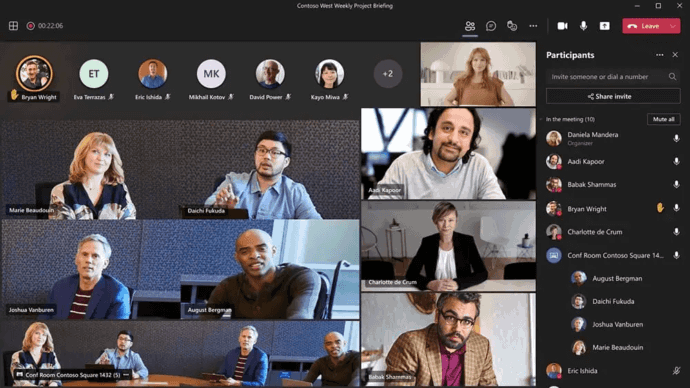
Microsoft Teams operates as a collaboration hub deeply connected with the Microsoft 365 ecosystem, combining chat, meetings, channels, document collaboration, and calendar-based workflows alongside familiar productivity applications.
Organizations already invested in Microsoft’s productivity environment can connect Teams with Outlook, SharePoint, OneDrive, Office applications, and Microsoft identity services, creating a common environment for communication and content creation.
Teams delivers particular value when unified identity management and standardized Microsoft tooling are already part of the organization’s infrastructure. At the same time, many workflows assume integration with Microsoft’s broader cloud services, which should be considered when evaluating architecture and operating dependencies.
Trello
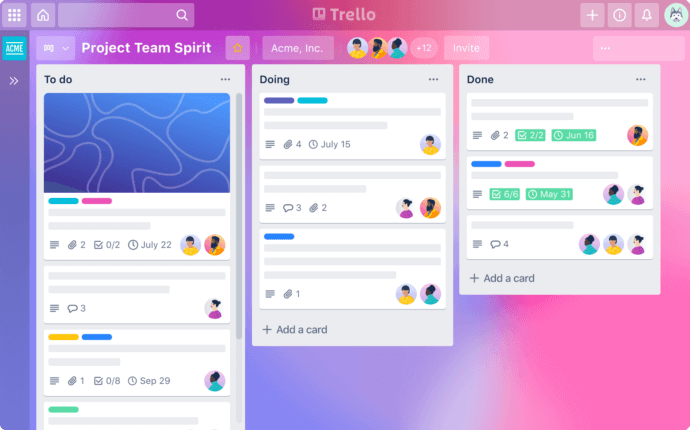
Trello provides a visual task and project management system built around boards, lists, and cards, enabling teams to map workflows with clarity and relatively little configuration. Its interface is well suited to content calendars, project stages, product planning, sprint workflows, and operational checklists where visual progress tracking is useful.
While Trello supports collaboration features such as comments, mentions, attachments, and automation, it functions primarily as a workflow coordination tool rather than a complete real-time communication platform. Teams often combine it with dedicated messaging and conferencing systems.
Zoho Connect
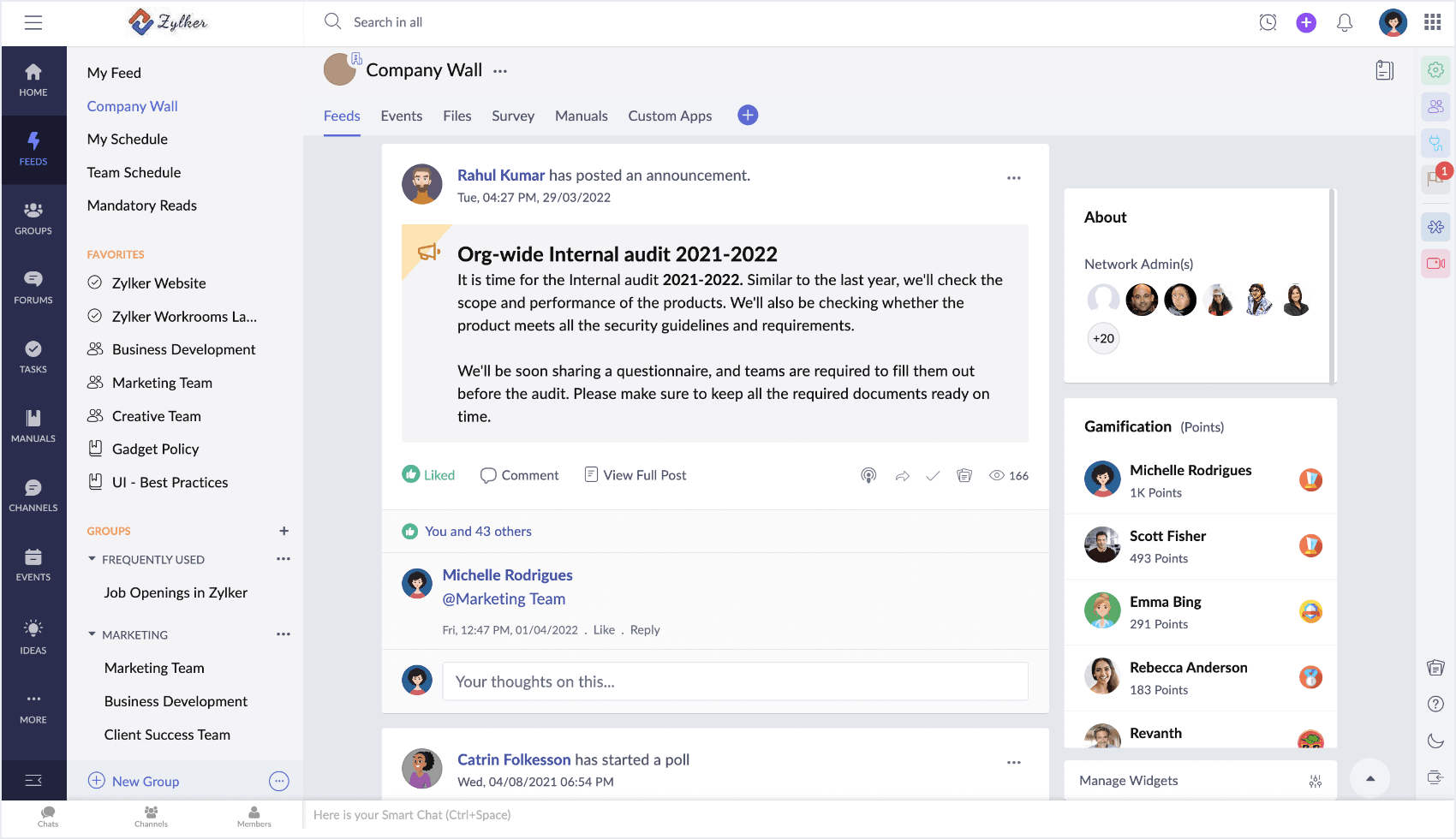
Zoho Connect is an employee collaboration and internal communication platform built around groups, feeds, forums, manuals, tasks, events, and shared files. It is designed to provide teams with a centralized environment for discussions, company updates, knowledge sharing, and coordination.
Its structure is closer to a private company network or digital workplace than to a standalone project board. Organizations can use groups to separate departments or projects, feeds for ongoing communication, manuals for internal knowledge, and tasks for lightweight coordination.
Zoho Connect can be relevant to businesses already using other Zoho products because collaboration can sit alongside the broader set of business applications. Organizations that require advanced video conferencing or company-controlled server infrastructure may still need additional communication systems.
Bitrix24
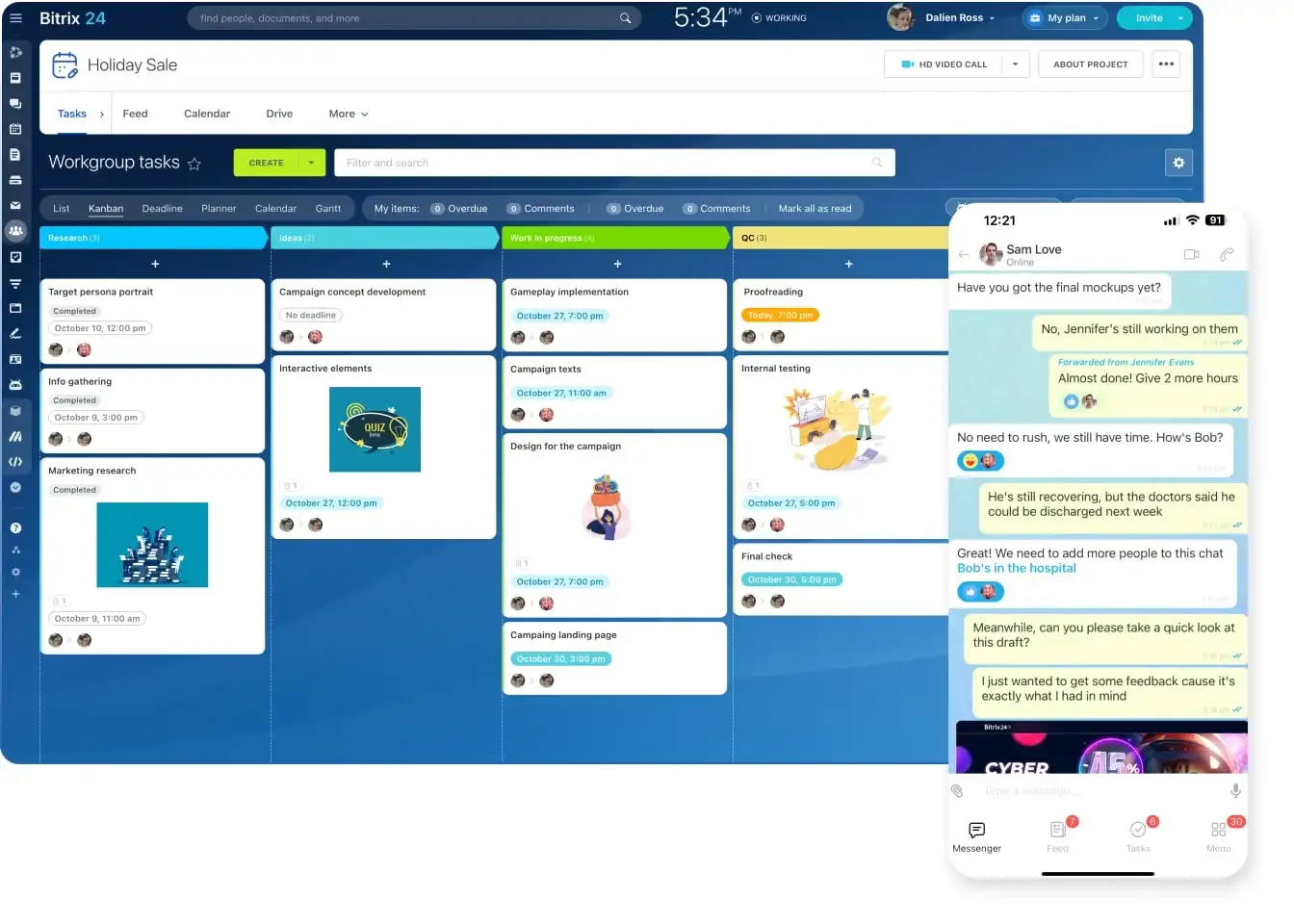
Bitrix24 positions itself as a multifunctional business platform combining collaboration tools, CRM functionality, project management, task coordination, calendars, and workflow automation within a single environment. Organizations may adopt it to reduce tool fragmentation by connecting internal communication, customer relationship management, and operational processes through one interface.
The platform supports chats, workgroups, shared calendars, task tracking, and customer-facing workflows, making it relevant to teams seeking a broader business workspace rather than a dedicated messaging application.
Because Bitrix24 spans numerous business functions, successful implementation often depends on thoughtful process alignment, deliberate configuration, and structured workflows similar to those supported by Jira issue templates.
Happeo
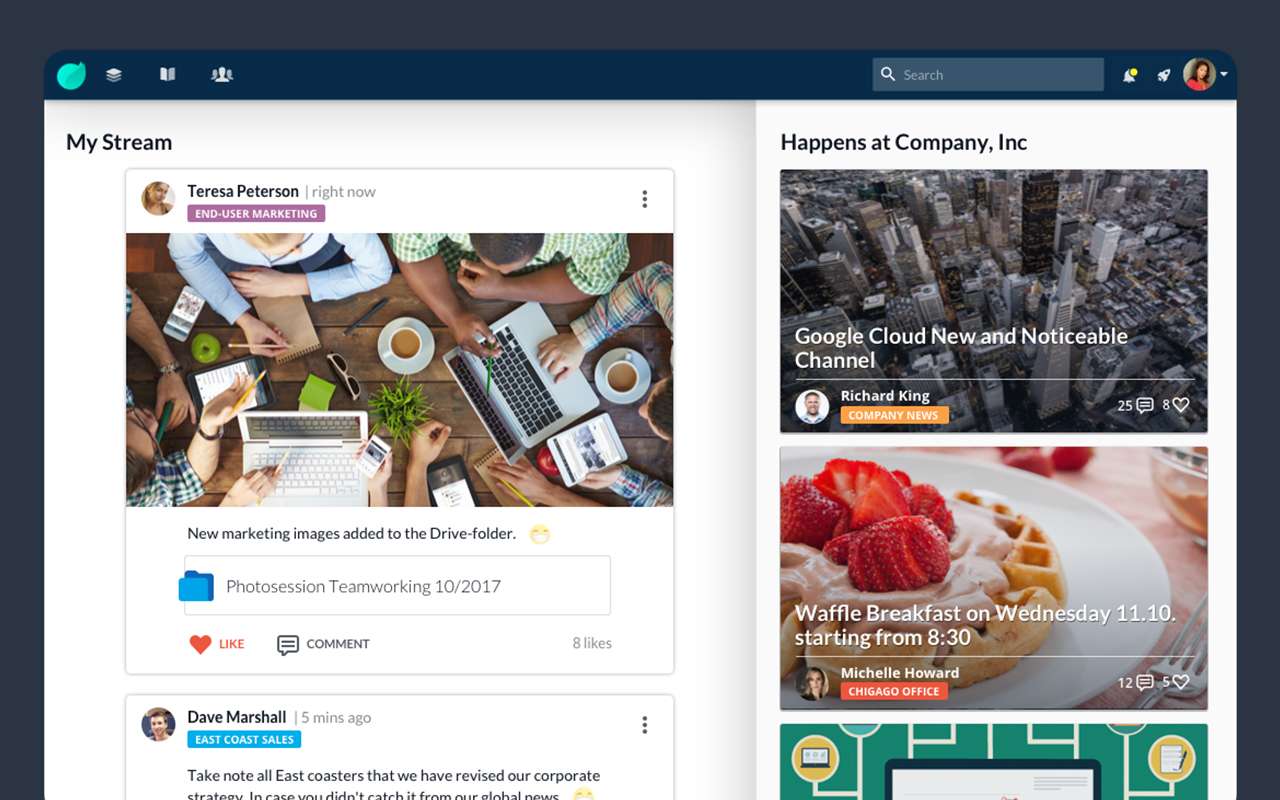
Happeo focuses on internal communication, knowledge management, and employee engagement, functioning as a digital workplace for distributed organizations. It is designed to centralize company announcements, policy documentation, onboarding resources, internal knowledge, and team-specific spaces.
For geographically dispersed teams, this structured information layer can reduce repetitive questions and make persistent company information easier to discover and maintain.
Happeo typically operates as an intranet layer complementing existing collaboration tools rather than replacing real-time communication platforms entirely. Organizations may use it as a persistent information and knowledge environment while relying on dedicated messaging and conferencing systems for synchronous interaction.
Collaboration Platform Comparison
|
Platform |
Primary Focus |
Communication |
Deployment Approach |
Typical Role |
|---|---|---|---|---|
|
TrueConf Server |
Corporate communication and video collaboration |
Chats, channels, calls, conferences, files |
Company-controlled server environment |
Core communication platform |
|
Slack |
Team messaging and integrations |
Channels, messages, calls, files |
Cloud |
Team communication hub |
|
Microsoft Teams |
Microsoft 365 collaboration |
Chats, channels, meetings, files |
Cloud |
Communication and productivity hub |
|
Trello |
Visual task management |
Comments and mentions |
Cloud |
Workflow coordination |
|
Zoho Connect |
Internal communication and employee collaboration |
Feeds, groups, forums, files |
Cloud |
Digital workplace and internal network |
|
Bitrix24 |
Business management and collaboration |
Chats, workgroups, tasks, calls |
Cloud and server options |
Combined business workspace |
|
Happeo |
Internal communication and knowledge |
Communities, posts, shared information |
Cloud |
Intranet and knowledge layer |
Insight 4.
These products are not interchangeable even when they are all described as collaboration software. A messaging platform, project board, digital workplace, and server-based unified communication system can solve different parts of the collaboration problem.
Conclusion: Building a Foundation for Sustainable Collaboration
Selecting collaboration software for business requires careful alignment with communication needs, deployment preferences, administration, integrations, infrastructure, security policies, and long-term technology strategy. The most useful comparison therefore starts with the role the platform will play: messaging layer, project coordination tool, digital workplace, or central communication environment.
For organizations prioritizing company-controlled infrastructure, local network operation, corporate messaging, and video conferencing within one system, TrueConf Server provides a server-based collaboration model that can integrate communication with existing corporate IT systems.
By establishing an appropriate collaboration foundation early, businesses can create more consistent communication practices, reduce information fragmentation, strengthen control over collaboration workflows, and build an environment capable of supporting future organizational growth.
Empower your video conferencing experience with TrueConf!
FAQ
What Is Collaboration Software for Business?
Collaboration software for business combines tools that help employees communicate, meet, exchange files, coordinate work, and find shared information. TrueConf addresses this category through a server-based environment that combines messaging, video conferencing, file exchange, and centralized administration.
What Is the Difference Between Collaboration Software and a Corporate Messenger?
A corporate messenger focuses primarily on chats and related communication, while collaboration software can also include meetings, shared files, workflows, knowledge tools, task coordination, and integrations. TrueConf extends messaging with video conferencing, file exchange, user management, and integration with corporate communication infrastructure.
Should a Business Choose Cloud or Server-Based Collaboration Software?
Cloud platforms are typically easier to start because the provider operates most of the infrastructure, while server-based systems give the organization more responsibility and control over deployment. TrueConf Server is designed for businesses that want to operate collaboration services within infrastructure they manage or select.
Can Collaboration Software Work Without Public Internet Access?
Some server-based collaboration systems can operate inside a corporate network without depending on a public cloud service. TrueConf Server can support communication within local or isolated networks when the required server and client infrastructure is available.
What Integrations Matter Most for Business Collaboration Software?
Important integrations often include corporate directories, calendars, telephony, meeting room systems, CRM tools, and business applications. TrueConf supports LDAP and Active Directory integration as well as SIP and H.323 interoperability for organizations connecting collaboration with existing communication infrastructure.
How Should a Small Business Evaluate Collaboration Software?
A small business should compare the communication functions it actually needs, administrative workload, deployment model, integrations, scalability, and total operating requirements. TrueConf can be considered when the organization expects video meetings, corporate messaging, and company-controlled deployment to form part of the same communication environment.
Can TrueConf Replace Several Separate Collaboration Tools?
TrueConf can consolidate several communication functions, including chats, channels, calls, video conferences, screen sharing, and file exchange. It does not replace every category of business software, such as full project management or CRM systems, so organizations should determine which workflows should remain in specialized applications.
About the Author
Diana Shtapova is a product specialist and technology writer with three years of experience in the unified communications industry. At TrueConf, she leverages her deep product expertise to create clear and practical content on video conferencing platforms, collaboration tools, and enterprise communication solutions. With a strong background in product research and user-focused content development, Diana helps professionals and businesses understand core product features, adopt new technologies, and unlock the full potential of modern collaboration software.


Follow us on social networks