
TCP vs UDP – What’s The Difference?
Updated April 2026
Executive Summary:
TCP and UDP are foundational transport protocols that power modern digital communication, including video conferencing, messaging, and file transfers. TCP guarantees reliable, ordered delivery through connection establishment and error correction—ideal for critical data where accuracy matters. UDP prioritizes speed and low latency by sending datagrams without connection overhead—optimal for real-time media where occasional packet loss is acceptable. For enterprise video conferencing, the choice isn’t binary: modern platforms like TrueConf intelligently leverage both protocols depending on network conditions, security policies, and deployment architecture.
|
Feature |
TCP |
UDP |
Best For |
|---|---|---|---|
|
Connection Model |
Connection-oriented (3-way handshake) |
Connectionless |
TCP: secure transactions; UDP: live media |
|
Reliability |
Guaranteed delivery, retransmission |
No delivery guarantee, no retransmission |
TCP: file transfers; UDP: streaming |
|
Ordering |
Packets delivered in sequence |
No ordering guarantee |
TCP: documents; UDP: voice/video |
|
Overhead |
High (headers, acknowledgments) |
Low (minimal headers) |
TCP: controlled networks; UDP: bandwidth-constrained |
|
Latency |
Higher due to error checking |
Lower, minimal processing |
TCP: non-real-time; UDP: real-time comms |
|
Error Handling |
Automatic correction & retransmission |
Errors passed to application |
TCP: data integrity; UDP: application-level control |
What is TCP?
TCP (Transmission Control Protocol) is a protocol that ensures reliable transmission of data packets: it establishes a connection between two hosts, after which they can exchange the necessary data.
However, this protocol is not as simple as it might seem at first glance. The TCP mechanism establishes a connection before transmitting the data stream and makes a repeat request in case of data loss. When receiving two copies of the same package, the protocol independently eliminates duplication, ensuring reliable and high-quality file transfers.
When the transmission is complete, the session closes: the recipient is notified that there will be no more data, and the sender is informed that the recipient has been notified. In case of data loss during transmission, the system automatically requests confirmation more frequently. In this way, the sliding window mechanism is implemented, allowing them to work even with unreliable networks.
TCP implementations are usually built into the OS kernel, but some also work in user space.
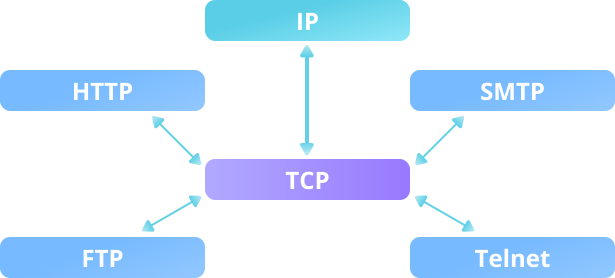
The most common practice is to use TCP when implementing authorization mechanisms and transmitting encrypted data.
Insight #1: Deployment Model Matters
In on-premises enterprise deployments, network administrators have greater control over traffic shaping and QoS policies.
This allows TCP-based video solutions to perform reliably even under load.
In contrast, cloud-first or hybrid deployments may benefit from UDP’s lower overhead when traversing unpredictable public internet paths.
Platform architecture should align with your deployment strategy.
TCP: Strengths & Limitations
Strengths
- Guaranteed packet delivery and ordering
- Built-in congestion control and flow management
- Ideal for authentication, file transfers, and encrypted payloads
- Widely supported across firewalls and security appliances
Limitations
- Higher latency due to handshake and acknowledgment overhead
- Retransmissions can cause jitter in real-time media
- Less efficient for broadcast/multicast scenarios
Best for: Secure messaging, document sharing, login flows, API calls, and scenarios where data integrity outweighs speed requirements.
What is UDP?
UDP (User Datagram Protocol) is a protocol that allows the transmission of data (datagrams) without establishing a connection between hosts. Thus, the technology employs a simple data transfer model to ensure integrity.
The main disadvantage of UDP is the inconsistency in receiving: datagrams may be duplicated or not arrive at all. UDP is used in systems where error checking and correction are either unnecessary or must be performed by the application.
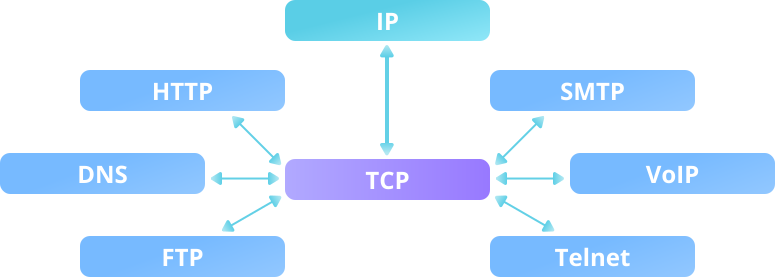
As a rule, solutions using this protocol are not sensitive to data loss or disruption of order, or they focus on real-time content transmission.
UDP: Strengths & Limitations
Strengths
- Minimal latency—no handshake or acknowledgment delays
- Lower bandwidth overhead due to smaller headers
- Supports multicast/broadcast for efficient group communication
- Application-layer flexibility for custom error handling
Limitations
- No guarantee of delivery, ordering, or duplication control
- Requires application-level logic for reliability (if needed)
- May be restricted by strict firewall or security policies
Best for: Live video/audio streaming, VoIP, real-time collaboration, gaming, and scenarios where timeliness matters more than perfect accuracy.
Insight #2: Governance Can Override Performance
Even when UDP offers technical advantages for media delivery, enterprise security policies may mandate TCP for all external communications.
Compliance requirements, audit trails, and deep packet inspection tools often integrate more seamlessly with TCP’s predictable flow.
Always evaluate protocol choice through the lens of your organization’s governance framework—not just raw performance metrics.
Take your team communication to the next level with TrueConf!
A powerful self-hosted video conferencing solution for up to 1,000 users, available on desktop, mobile, and room systems.
TCP vs UDP: Basic Theory
To understand the differences between TCP and UDP more thoroughly, it is necessary to grasp the basic theory.
What do we know about IP networks? The data stream that you send is divided into packets, then delivered to the client. Thus, IP unites individual network segments into a single network, transmitting data packets between them. In this case, the transmission occurs through an arbitrary number of intermediate nodes, or routers.
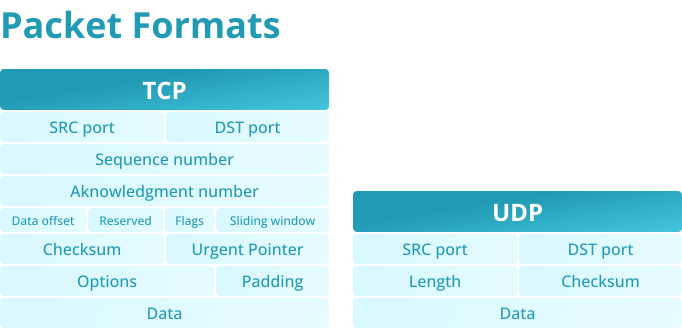
Returning to the TCP and UDP protocols, the diagram allows you to see their stack with IP.
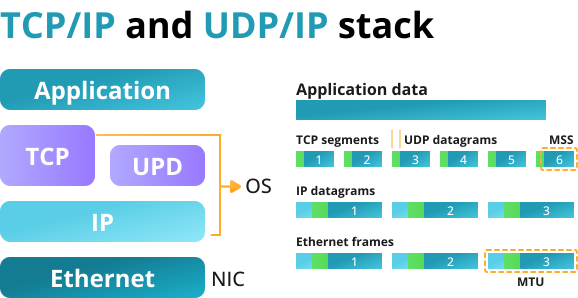
It is important to note that both protocols have ports, but UDP only has a checksum for the length of the packet. In the case of TCP, a large amount of additional information is required, including confirmation, sequence, and packet numbers.
Decision Framework: Choosing TCP or UDP
Follow this numbered checklist when evaluating protocol strategy for your communication platform:
- 1. Identify your primary use case: Is it real-time media or transactional data?
- 2. Assess network environment: Controlled corporate LAN or unpredictable public internet?
- 3. Review security and compliance requirements: Does policy mandate connection tracking?
- 4. Evaluate endpoint capabilities: Do clients support application-layer error correction?
- 5. Consider scalability needs: Will multicast or broadcast reduce server load?
|
Scenario |
Recommended Protocol |
Rationale |
|---|---|---|
|
Secure login & authentication |
TCP |
Requires guaranteed delivery and session integrity |
|
HD video conference (internal network) |
UDP |
Low latency prioritized; packet loss tolerable |
|
File sharing in team chat |
TCP |
Data must arrive complete and in order |
|
Large-scale webinar broadcast |
UDP + application logic |
Multicast efficiency outweighs occasional loss |
|
Hybrid meeting with external guests |
Adaptive (TCP fallback) |
Balance reachability and quality dynamically |
What is the Difference Between TCP and UDP?
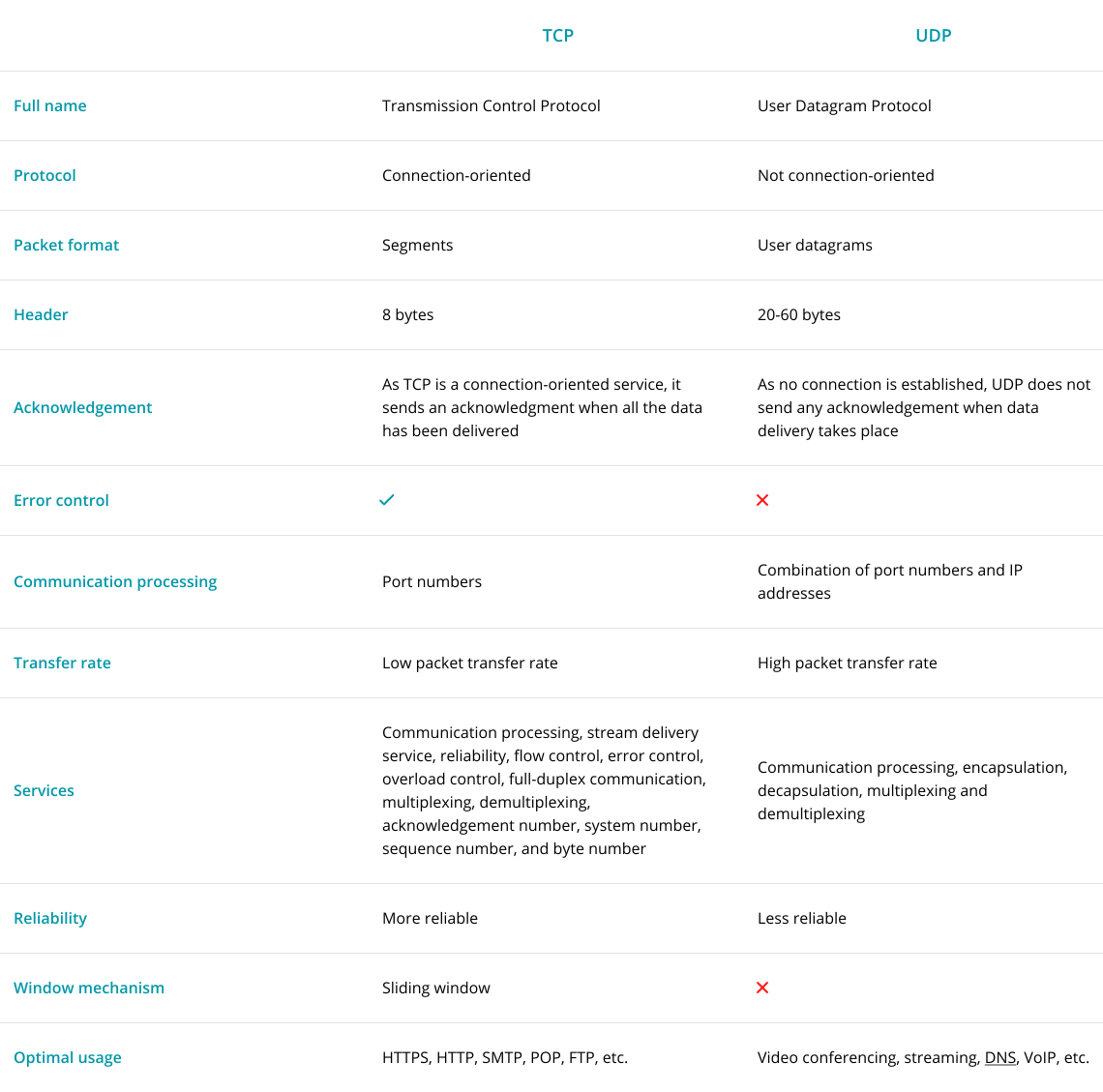
Although both UDP and TCP are data-oriented, several fundamental differences between them directly affect the scope of the protocols. In addition to the features already outlined, several features radically distinguish one from the other.
Let’s identify the main points:
- Only the TCP protocol supports the ability to reassemble and segment packets.
- Accessibility verification is a mandatory procedure for the TCP protocol, while UDP generally does not support it.
- The TCP protocol cannot preserve the boundaries of transmitted messages, but it guarantees their integrity.
It should be understood that the differences between the protocols do not reveal which is best: the purposes of TCP and UDP are initially different, meaning the necessary characteristics for performing various tasks will differ.
That is why it is essential to note the following:
- UDP does not require connection setup, whereas TCP requires a mandatory three-step process flow to start a session.
- Unlike the UDP protocol, TCP provides comprehensive control and management of information flow.
- If overloads occur during data transmission, TCP will send an appropriate notification, whereas the UDP protocol does not offer protection.
- Unlike the UDP protocol, TCP cannot preserve the boundaries of transmitted messages, but it guarantees their integrity.
- TCP is never synchronized again, whereas the UDP protocol establishes a connection by resending the request to the end user.
Insight #3: Intelligent Protocol Switching Is the Enterprise Standard
Leading unified communications platforms don’t force a binary TCP/UDP choice.
Instead, they monitor network conditions in real time and switch protocols dynamically—using UDP for media when possible, falling back to TCP when firewalls or instability intervene.
This adaptive approach, implemented in solutions like TrueConf, ensures consistent user experience without manual configuration.
Which is Better for Video Conferencing?
When creating a video conferencing solution, developers often use TCP, which provides serial transmission and prevents packet loss. This protocol is the most suitable for working with video and audio, as well as for transferring images, documents, and files.
As mentioned above, TCP packets have a built-in feedback system to ensure that all data is received and sent exactly as intended.
The use of UDP significantly reduces the load on the server, because audio and video streams are transmitted within the Multicast domain, which can be used in the local network or VPN (e.g. TrueConf UTM Multicast mode). In cases where a custom software solution is required, this approach is particularly effective. Simply put, it allows users to exchange data directly with each other during a group conference, bypassing the server.
By default, UDP Multicast data transmission is available only within your corporate closed network, eliminating the risk of losing sensitive data. If you’re interested in UDP Multicast, you can read more about it in our article.
Protocol Impact on Video Conferencing Performance
|
Metric |
TCP Impact |
UDP Impact |
Enterprise Consideration |
|---|---|---|---|
|
Startup Time |
Slower (handshake required) |
Faster (send immediately) |
UDP preferred for quick join experiences |
|
Packet Loss Recovery |
Automatic retransmission |
Application must handle or ignore |
TCP better for screen sharing; UDP for voice |
|
Bandwidth Efficiency |
Lower (overhead + retransmits) |
Higher (minimal headers) |
UDP scales better for large participant counts |
|
Firewall Traversal |
Widely allowed |
Sometimes blocked |
TCP ensures connectivity in restricted environments |
|
Quality Consistency |
Stable but potentially laggy |
Smooth but potentially artifacted |
Adaptive platforms balance both dynamically |
Which protocol should I prioritize for internal corporate video meetings? For controlled internal networks, UDP typically delivers lower latency and smoother media. However, if your organization enforces strict traffic inspection or uses complex proxy chains, TCP may offer more reliable connectivity. Platforms like TrueConf support both and auto-select based on real-time network assessment. Can UDP be secure enough for enterprise communications? Yes—when implemented within a trusted network perimeter or combined with application-layer encryption. TrueConf ensures UDP-based media streams remain secure through end-to-end encryption and on-premises deployment options, meeting enterprise governance requirements without sacrificing performance. What happens if UDP packets are lost during a video call? Minor packet loss in UDP is often imperceptible in audio/video due to codec resilience and jitter buffers. For critical data like chat messages or shared documents, TrueConf routes those payloads over TCP automatically, ensuring integrity where it matters most. Does choosing UDP mean I can’t use firewalls or security tools? Not at all. Modern enterprise firewalls can inspect and policy-control UDP traffic. TrueConf’s architecture allows administrators to define granular rules for both TCP and UDP flows, maintaining security posture while enabling optimal media performance. How do hybrid or remote workers affect protocol choice? Remote users often traverse unpredictable networks where UDP may be throttled or blocked. TrueConf’s client intelligently detects connectivity constraints and switches to TCP fallback when needed, ensuring consistent meeting access regardless of location. Can I force TrueConf to use only TCP or only UDP? Yes—administrators can configure protocol preferences via TrueConf Server policies to align with organizational network strategy. However, the default adaptive mode is recommended for balancing quality, compatibility, and user experience across diverse environments. Why not just use WebRTC, which handles protocols automatically? WebRTC does abstract protocol selection, but enterprise deployments often require deeper control over media routing, recording, and compliance. TrueConf provides on-premises infrastructure with configurable transport layers, giving IT teams the governance needed for regulated industries while still leveraging UDP/TCP intelligence.FAQ
About the Author
Nikita Dymenko is a technology writer and business development professional with more than six years of experience in the unified communications industry. Drawing on his background in product management, strategic growth, and business development at TrueConf, Nikita creates insightful articles and reviews about video conferencing platforms, collaboration tools, and enterprise messaging solutions.


Follow us on social networks