
What is Teleconferencing?
Updated April 2026
Teleconference is a type of remote meeting through specialized telecommunication means. Teleconferencing primarily means communication between numerous users at a distance, united by a common topic or an issue. There are several ways to join a teleconference. The most common way is to dial a phone number and then enter a passcode. You may also be able to join a teleconference from your computer by using a web browser.
Individuals participating in a teleconference can typically see and hear one another as if they were in the same room, allowing for real-time interaction. This technology is often used in business video conferencing settings, as well as in classrooms for online learning.
At a Glance: Everything You Need to Know
One-sentence answer: Teleconferencing is real-time communication between two or more geographically separated participants using audio, video, or data transmission over a network — ranging from a simple phone bridge to a fully immersive video collaboration session.
Key Facts (2024–2025)
|
Stat |
Value |
|---|---|
|
Global video conferencing market size (2024) |
$8.88–$12.5 billion |
|
Projected market size by 2032–2034 |
$24–$60.5 billion |
|
CAGR |
7.1–13.5% |
|
North America’s market share |
~30–39% |
|
Remote workers who consider video conferencing essential |
76% |
|
Companies using video conferencing for remote hiring |
40% |
|
North American market growth (2024–2028) |
+40% |
|
Enterprise share of the video conferencing market |
80% |
Types of Teleconferencing — Quick Reference
|
Type |
Medium |
Best For |
Typical Participants |
|---|---|---|---|
|
Audio |
Voice only (VoIP / PSTN) |
Quick updates, briefings |
Up to 100+ |
|
Video |
Audio + HD video + screen share |
Formal meetings, collaboration |
Up to 1,500+ |
|
Web Conference |
Browser-based, audio/video/docs |
Presentations, webinars |
Hundreds |
|
Computer / Data |
Text, file sharing, async tools |
Asynchronous workflows |
Unlimited |
Types of Teleconference
Audio Conferencing
Audio conferencing is the process of using communication channels to organize a conference. Choose the right type of audio conference system for your business. The most important thing to know about setting up an audio conference system is that there are three basic types — distributed, local and integrated. Choosing the right one is dependent on who you want to talk to, where they’re located and how many people you want in the room.
Distributed (remote) audio conferencing brings together several participants in different locations. Local audio conferencing unites several participants in one location (conference or corporate meeting rooms). Integrated audio conferencing connects remote and on-site participants.
It’s no secret that video conferencing has transformed the way we work. However, there are times when video isn’t always the best option for your business. When you aren’t able to attend a meeting in person or don’t have access to video conferencing options, audio conferencing could be a great alternative. To get more value from meetings, consider using audio file transcription. It helps capture key points, supports follow-ups, and ensures clear records for those who couldn’t attend.
Video Conferencing
Video conferencing is more than just a visual communication session. It is a vital tool that bridges geographical gaps, allowing two or more users to connect, communicate, and collaborate in real time, regardless of their location. This isn’t just about transmitting audio and video content in real time, it’s about fostering human connections in a digital landscape. A well-established IT infrastructure is crucial to support the demands of modern video conferencing tools, ensuring reliable and efficient communication across diverse locations.
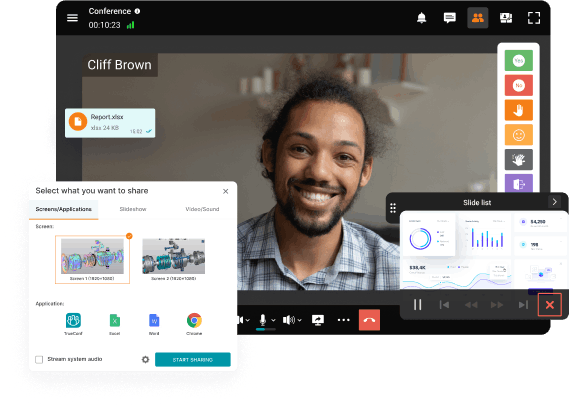
In broad terms, video conferencing software is a solution that allows two or more persons to talk and see each other remotely. Initially, video conferencing software only enabled users to make video calls or hold group video conferences. However, as technology advanced, video conferencing software acquired plenty of helpful tools and features for remote communication and learning.
Today, video conferencing is a tool integrated into video collaboration and unified communications platforms that also offers screen sharing, slideshows, screen recording, self hosted chat, project management tools, telephony, and even productivity-enhancing features. As increasing number of companies switch to remote work, video conferencing is gradually becoming the new normal, shaping the way we communicate, learn and work.
Web Conference
Web teleconferencing (or webinars) is an interactive teleconference platform that delivers visual information video, audio, and documents. Modern webinar software enables organizations to host these sessions efficiently while managing participants, presentations, and communication in one place. Webinar differs from traditional web-conferences because it involves a single speaker and numerous listeners. Therefore, in contrast to solutions for web conferencing, where participants usually have equal rights and tools, webinar services allow the speaker to fully manage online meeting and participants. Usually by default they can only watch, listen and write messages in the chat.

Expanding your network, learning new skills, and growing your company are constant goals. Web conferences can be an affordable and impactful way to foster these goals. Whether you’re a digital marketer, technology expert, or business coach, attending these digital gatherings can open up a world of opportunities, leading to new clients or valuable partnerships. According to PGI 56% of executives say they will invest more in video conferencing.
Computer / Data Conferencing
A fourth type often omitted from introductory articles: computer (data) conferencing enables written and file-based collaboration between two or more computers using keyboard input, shared applications, electronic whiteboards, and collaborative documents. It’s the backbone of tools like Google Docs co-editing, shared Kanban boards, or async video messaging — making it ideal for globally distributed teams where synchronous meetings are impractical due to time zone differences.
Unique Insight — “Teleconferencing” Is Becoming a Legacy Term — And That Matters
In everyday usage, “teleconferencing” has largely been replaced by “video conferencing” or “virtual meetings.”
But in regulated industries — healthcare, legal, government, defense — the term still carries specific contractual and compliance weight.
Many government contracts, court systems, and medical reimbursement frameworks, including telemedicine billing codes, explicitly reference “teleconferencing” as a defined modality.
Why it matters: Organizations in these sectors should not discard the term, because it may determine what equipment qualifies, which security standards apply, and whether a meeting format is reimbursable or legally admissible.
How does Teleconferencing Work?
|
Audio conferencing |
Video conferencing |
Web Conference |
|---|---|---|
|
In an audioconference, the people once connected, as the audioconference participants can chat with one another as if they were in the same room. |
Video conferences use VoIP for real-time communication over the internet. A VoIP system sends voice data in digital form over the internet, instead of using traditional telephone lines. |
Usually, at least one participant must have a web browser and internet connection, and a web conference software application. |
How a modern session is initiated:
- The host sets up a meeting in their platform (TrueConf, Zoom, Teams, etc.) and generates a conference ID or link.
- Participants receive an invitation with a dial-in number or URL.
- On connection, a conference bridge merges all incoming streams into a unified session.
- The platform manages bandwidth, video layout, recording, and access control in real time.
Try TrueConf Server Free!
- 1,000 online users with the ability to chats and mske one-on-one video calls.
- 10 PRO users with the ability to participate in group video conferences.
- One SIP/H.323/RTSP connection for interoperability with corporate PBX and SIP/H.323 endpoints.
- One guest connection to invite a non-authenticated user via link to your meetings.

Advantages and Disadvantages of Teleconferencing
Over the past few years, teleconferencing technology has made tremendous strides. Today, it is possible to hold video conferences on different platforms and devices without any restrictions. However, there are always certain disadvantages associated with this technology.
Advantages and Disadvantages of Teleconferencing
|
Advantages of Teleconferencing |
Disadvantages of Teleconferencing |
|---|---|
|
Enhanced Collaboration – Quick resolution of work issues via screen sharing, messaging, and real-time co-editing from anywhere in the world. |
Lack of Personal Interaction – Non-verbal cues, trust-building handshakes, and informal corridor conversations are hard to replicate digitally. |
|
Security – Modern platforms offer end-to-end encryption, MFA, and on-premises deployment options for sensitive sectors. |
Technical Challenges – Unstable internet, hardware failures, or software incompatibilities can disrupt a critical meeting without warning. |
|
Lower Costs – Travel, venue rental, and hardware investment are dramatically reduced. All you need is a microphone, webcam, and speakers. |
Ease of Losing Focus – Working from home environments introduce distractions that in-office meeting rooms eliminate by design. |
|
Environmental Benefit – Fewer business trips mean a measurably smaller carbon footprint, supporting ESG and sustainability goals. |
Time Zone Coordination – Scheduling global teams across multiple time zones requires careful planning and often involves someone meeting at an inconvenient hour. |
|
Scalability – From a 2-person call to a 1,500-participant event — the same platform scales without additional infrastructure. |
Security Risks on Public Networks – Using personal or public Wi-Fi without a VPN can expose sensitive discussions to interception. |
Advantages of Teleconferencing in Business
Teleconferencing is a cost-effective way to communicate with people in different locations. This is because it eliminates the need for people to travel to different locations in order to participate in a meeting when doing project planning or goal setting. This can save companies money on travel costs. Used well, it becomes one pillar of a wider business communication strategy that also spans phone, email, and messaging. There are other benefits of using teleconferencing:
- Increased efficiency – Teleconference meetings allow participants to share information and ideas more quickly and easily than in person meetings. This can save time and lead to better decision-making.
- Increased flexibility – Teleconference meetings can be scheduled at any time that is convenient for participants, regardless of their location. This flexibility can help to reduce travel costs and time.
- Increased collaboration – Teleconference meetings allow participants to see and hear each other.
- Increased productivity – Teleconference meetings can help participants to stay focused and productive, as they do not have to travel and can work from their own location.
Unique Insight — The Conference Bridge Is Not Dead (and Here’s Why It Matters)
Most people think of teleconferencing as a purely software-driven experience — you click a link and you are in. But underneath every enterprise-grade meeting is a conference bridge: a server that mixes and routes audio and video streams from all participants in real time.
For cloud-based platforms, this bridge is managed by the vendor. For on-premises solutions like TrueConf, the bridge runs inside your own network.
Why it matters: This distinction is critical for organizations in banking, healthcare, or government. If your bridge is in the cloud, your voice and video data leave your perimeter. If it is on-premises, they do not.
Key takeaway: The architecture of the bridge — not just the UI of the app — is what determines your real data sovereignty and compliance posture.
Use Cases for Teleconferencing
There are many different use cases for teleconference software. Some of the most common ones include:
Business meetings
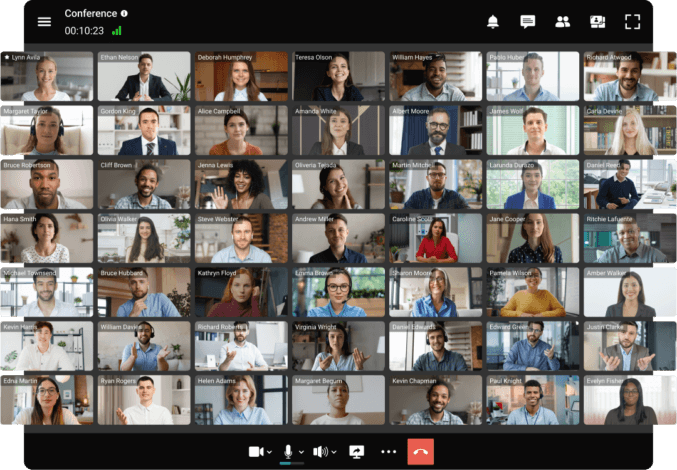 Teleconference software can be used to hold meetings with colleagues, clients, or partners from anywhere in the world. This can be especially useful for businesses that have employees or clients located in different parts of the globe.
Training sessions
Teleconference software can be used to conduct training sessions for employees or students. This can be especially useful for organizations that have employees or students located in different parts of the world.
Online conferences
Teleconference software can be used to hold online conferences with colleagues, clients, or partners. This can be especially useful for businesses that want to host online events and increase brand awareness.
Connecting with friends and family
Teleconference software can be used to connect with friends and family members who live in different parts of the world. This can be especially useful for people who want to stay in touch with loved ones who live far away.
Tips for teleconferencing
Here are some straightforward guidelines to enhance your teleconferencing experience:
- 1. Inspect your gear: Prior to the meeting, ensure your internet, camera, and microphone are in good working order. Resolve any technical issues ahead of time to prevent delays.
- 2. Choose a professional setting: Ideally, a neat, professional setting is preferred. Use features such as background blur if this is not possible.
- 3. Arrive ahead of time: Make it a point to join the meeting slightly early. This gives you a buffer to sort out any last-minute technical glitches and prevents rushing.
- 4. Silence your mic when not speaking: Keep your microphone muted when you’re not contributing verbally. This helps reduce background noise.
- 5. Utilize video: If your internet bandwidth permits, go for video. It lends a more interactive and personal touch to the meeting. However, be mindful of others’ preferences and their internet limitations.
- 6. Maintain concentration: Avoid multitasking during the meeting. Keep your focus on the discussion at hand. If your company is undergoing rebranding, ensure to communicate the new brand guidelines to your team during these meetings to maintain consistency.
How to Set Up a Teleconference?
STEP 1. Install and deploy TrueConf Server Free (takes less than 15 minutes)

STEP 2. Add user accounts
Your IT admin can create TrueConf IDs and passwords for all users in the group. Send them to your users: these credentials are needed to log into the TrueConf client application.
STEP 3. Download client applications
Ask users to download the TrueConf client application for their operating system from your guest page or from our official website and sign in with their account.
STEP 4. Enjoy video conferencing!
Take your team communication to the next level with TrueConf!
Interested in making a teleconference a game changer in your business? Try TrueConf Server and enjoy secure video collaboration that will definitely make a difference for your team.
What is teleconferencing, and how is it different from a regular phone call? Teleconferencing connects three or more participants in real time using audio, video, or both — going far beyond a standard two-person phone call. It relies on a conference bridge or server to merge multiple incoming streams, and modern platforms add screen sharing, recording, AI transcription, and file collaboration. The key difference from a phone call is scale, interactivity, and the ability to transmit visual information alongside voice. What are the main types of teleconferencing? There are four main types: audio conferencing (voice only, via VoIP or phone lines), video conferencing (audio + HD video + screen sharing), web conferencing (browser-based sessions including webinars), and computer/data conferencing (text, file sharing, and collaborative tools for asynchronous workflows). Most modern enterprise platforms support all four modes within a single application. What is the difference between teleconferencing and video conferencing? Video conferencing is a subset of teleconferencing. “Teleconferencing” is the broader term that covers all remote multi-party communication — including audio-only calls. “Video conferencing” specifically refers to sessions that include live video streams. In practice, the two terms are often used interchangeably today, but in regulated industries (healthcare, legal, government), “teleconferencing” may carry specific compliance meaning that “video conferencing” does not. What equipment do you need to participate in a teleconference? At minimum: a device (laptop, desktop, smartphone, or tablet), a microphone, and a stable internet connection. For video teleconferences, add a webcam — most laptops have one built in. For larger meeting rooms, dedicated hardware endpoints (like TrueConf Group) provide professional-grade audio and 4K video. A VPN is recommended when joining from public networks, especially for sensitive discussions. Is teleconferencing secure enough for confidential business discussions? Security depends entirely on the platform and its deployment model. Cloud-based tools send your audio and video through third-party servers, which introduces data residency and compliance risks. On-premises platforms like TrueConf Server operate entirely within your own corporate network — meaning sensitive data never leaves your infrastructure. For industries with strict data regulations (finance, healthcare, government), on-premises deployment with end-to-end encryption and multi-factor authentication is the appropriate standard.FAQ
About the Author
Nikita Dymenko is a technology writer and business development professional with more than six years of experience in the unified communications industry. Drawing on his background in product management, strategic growth, and business development at TrueConf, Nikita creates insightful articles and reviews about video conferencing platforms, collaboration tools, and enterprise messaging solutions.


Follow us on social networks