
Tips for Taking Better Meeting Notes At Work in 2026
Corporate schedules have become increasingly dominated by meetings. Senior executives now allocate at least 12 hours each week to various meetings, while middle management dedicates approximately 13 hours weekly to the same purpose. The concerning reality? Research reveals that 48% of employees view their latest meeting as having been pointless, with 53% labeling it an outright time-waster.
What distinguishes a valuable meeting from a schedule-clogging waste? More often than not, it comes down to documentation quality. Around 75% of organizational leaders regularly document discussions and distribute action items to colleagues multiple times weekly. Despite this, merely 37% of workplace gatherings operate with a defined agenda, leaving teams scrambling to piece together what actually transpired.
Today’s workers sit through roughly 11.3 hours of meetings per week on average. A striking 90% report experiencing what researchers call a productivity “meeting hangover” following days packed with back-to-back sessions. The case for better documentation practices has never been more compelling. Proper meeting notes go far beyond simple record-keeping. They establish clear ownership, head off miscommunication before it starts, and convert conversation into concrete steps forward.
Self-Hosted Team Messenger with Video Conferencing
A cutting-edge team collaboration server with personal and group chats, UltraHD video conferences, and advanced AI-powered features — free for up to 1,000 users!
What Are Meeting Notes?
Meeting notes represent a curated record of the essential information exchanged during a business discussion. An AI notetaker for meeting sessions can help capture key points automatically, ensuring important details are not missed. In addition, once notes are taken, a reliable pdf converter tool can help you quickly turn your meeting summaries into professional, easily shareable documents. Rather than attempting to capture every spoken word verbatim, effective notes zero in on results: final determinations, assigned responsibilities, and completion timeframes.
Consider meeting notes as your conversion mechanism between talk and implementation. They preserve:
- Core discussion elements and the reasoning behind major choices
- Final determinations and approval sources
- Assigned tasks with designated owners and due dates
- References to supporting materials or necessary follow-through
Meeting notes operate differently from official meeting minutes. Minutes adhere to rigid formatting standards and typically need formal approval. Notes maintain flexibility and adopt a conversational approach, built to keep teams moving without administrative overhead. A product development team might quickly jot down feature rankings and obstacles during sprint planning, whereas a board session demands official minutes complete with voting documentation.
The ultimate aim remains straightforward: build collective clarity around upcoming requirements. Properly executed notes make follow-up messages asking “What did we actually decide?” or “Whose job was that?” completely unnecessary.

Benefits Of Taking Good Meeting Notes
Quality meeting documentation produces measurable advantages that ripple well beyond the conference room walls. Here’s what organizations gain when they document discussions properly:
- Stronger ownership and task completion
Documenting tasks with explicit owners and deadlines leaves zero wiggle room. One development team slashed their post-meeting clarification emails by half simply by adopting a standardized notes template that identified responsible parties and deadlines. Everyone understands their commitments, and supervisors can monitor advancement without hovering.
- Superior information recall
Human memory buckles under workplace pressure. Studies demonstrate that interruptions cost employees 23 minutes to regain full concentration. Without documentation, critical details evaporate. Recorded decisions transform into organizational memory that newcomers can access, breaking the cycle of repeatedly explaining the same context.
- Decreased meeting exhaustion
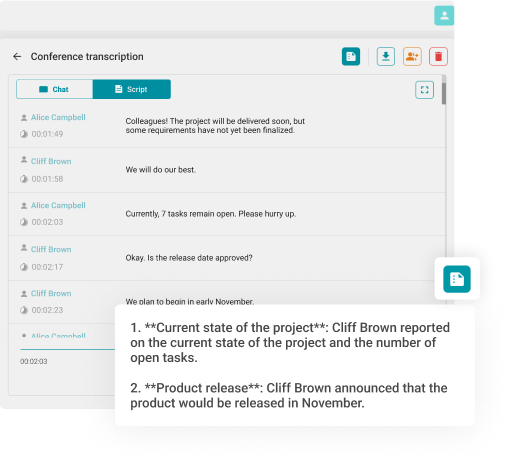
Organizations establishing meeting-free days observe 22% productivity jumps. When gatherings prove unavoidable, solid documentation makes them more effective. Teams waste less time in additional sessions clarifying previously covered ground. One distributed team using automated transcription reclaimed 2 weekly hours previously lost to manual follow-up while guaranteeing no decisions slipped through the cracks. When leveraging AI transcription tools, an AI checker helps verify output quality before distribution, ensuring summaries read naturally and maintain professional credibility. Likewise, converting physical scribbles into digital text using OCR based image to text technologies can further streamline documentation for teams.
- Support for async work patterns
With 86% of meetings now including at least one remote participant, live attendance isn’t always feasible. Thorough documentation lets absent teammates stay current without demanding separate briefing sessions. This becomes especially critical for globally distributed teams working across time zones, where synchronous scheduling becomes practically impossible.
- Legal protection and regulatory adherence
Regulated sectors including banking, medicine, and government can’t treat meeting records as optional. Well-maintained documentation functions as legal evidence, proving due diligence and shielding organizations during audits or legal challenges.
- Improved strategic choices
Historical meeting records build a decision timeline. When teams encounter comparable obstacles months down the line, they can examine previous discussions and skip rehashing old debates. This contextual documentation speeds up strategic planning and enables leaders to make educated choices grounded in past results.
How to Take Meeting Notes
Creating useful meeting documentation demands tactical thinking rather than rapid typing. Here’s your approach to capturing what matters while avoiding information overload:
1. Get ready before the session begins
Study the agenda and meeting objectives beforehand. Establish your documentation format in advance to maintain focus on listening rather than layout during the actual discussion. Advance preparation sharpens your ability to identify truly significant information. When you’re running the meeting and managing conversation flow, delegate documentation duties to someone else. For standing meetings, pass the note-taking role around to spread experience and sustain engagement.
2. Prioritize results over word-for-word capture
Skip recording every statement people make. Zero in on determinations, conflicting viewpoints, risk factors, and subsequent actions. When someone delivers a five-minute technical explanation, your note should read: “Database performance problem identified – server upgrade required by Q2.” You’re after executable summaries, not minute-by-minute narration.
3. Stick with uniform formatting
Whether documenting a rapid team huddle or an official board review, maintaining consistent structure prevents omitting elements like subsequent steps or time limits. Standard templates make your documentation predictable and simple for others to scan quickly. Always capture date, participants, and agenda topics. In sectors like healthcare or banking, these seemingly minor details become your compliance safety net.
4. Record assignments with precision
Each assigned task requires three components: the specific work needed, the person accountable, and the completion deadline. Inadequate: “Talk to team.” Effective: “Sarah: Organize customer feedback meeting by Jan 30, include product team.” This exactness removes ambiguity and builds responsibility. To prevent scheduling conflicts and ensure documented action items automatically reflect on shared calendars, teams can integrate tools to align meeting notes with real-time availability and follow-up timelines.
5. Open with a brief overview
Rather than forcing colleagues to parse through detailed points, launch your documentation with the core message: meeting purpose and final decisions. This enables time-pressed readers to grasp essential information in seconds. Consider: “Reviewed Q1 spending allocations. Greenlit $50K for engineering recruitment, postponed marketing expenditure to Q2.”
6. Deploy recording technology as a safety net
Employ recording and transcription technology to supplement your documentation, never substitute for it. Transcriptions simplify verification and recovery of overlooked details. Just notify participants about recording, and maintain recordings in a shared team location. Keep in mind: transcriptions capture language, but notes capture significance.
7. Distribute quickly and appropriately
Circulate documentation immediately following the session. Rapid distribution maintains assignment relevance and reminds people of their obligations. For optimal results, share documentation through your team’s primary collaboration platform, whether that’s your project tracking system, shared storage, or team messaging application.
8. Maintain brevity and neutrality
Write with impartial language, steering clear of personal leanings or viewpoints. Concentrate on primary points and reached agreements. When debates emerged, document the main perspectives and ultimate resolution instead of every exchanged argument. With meeting documentation, less delivers more.
8 Meeting Notes Templates
Various meeting types demand distinct documentation strategies. Here are eight templates built for typical business situations:
1. Regular Team Sync Template
Ideal for weekly check-ins, division updates, and standing sessions.
- Session Info: Date, duration, participants, session category
- Discussion Topics: Sequential list of covered subjects
- Conversation Highlights: Main points raised per topic
- Reached Conclusions: Final agreements
- Follow-up Tasks: Assignment, responsible party, target date
- Upcoming Session: Scheduled date and tentative topics
2. Customer Engagement Template
Built for advisors, creative shops, revenue teams, and relationship managers.
- Customer Details: Organization name, contact information
- Session Objective: Reason for this interaction
- Customer Requirements/Challenges: Problems they’re addressing
- Explored Solutions: Recommended strategies
- Subsequent Actions: Our committed deliverables
- Reconnection Schedule: When and how we’ll continue
3. Initiative Launch Template
Apply this when starting fresh programs or projects.
- Initiative Summary: Boundaries and targets
- Team Assignments: Individual accountability areas
- Schedule & Checkpoints: Critical delivery dates
- Required Assetss: Funding, instruments, staff
- Hazards & Limitations: Possible obstacles
- Coordination Strategy: Team alignment approach
4. Individual Check-in Template
For standard supervisor-employee touchpoints and development discussions.
- Achievement Updates: Completed work since previous session
- Obstacles/Barriers: Current impediments
- Objectives & Focus Areas: Upcoming concentration points
- Growth Conversation: Capabilities, advancement possibilities
- Input Exchange: Reciprocal performance observations
- Follow-up Items: Required support or mutual agreements
5. Ideation Workshop Template
For inventive problem-solving and concept generation sessions.
- Problem Definition:: Issue we’re addressing
- Concepts Produced: Complete suggestion list (unfiltered)
- Promising Options: Concepts showing strongest potential
- Assessment Standards: Our concept evaluation method
- Subsequent Moves: Build prototype, conduct research, or test chosen concepts
6. Iteration Planning Template
For agile development teams organizing their upcoming cycle.
- Iteration Target:: Our delivery commitment
- Chosen Stories: User stories entering iteration
- Effort Estimates: Projected work per story
- Prerequisites: Obstacles or requirements
- Available Capacity: Accessible hours/resources
- Completion Standards: Story completion criteria
7. Governance Session Template
Official documentation for oversight and regulatory requirements.
- Session Details:: Date, duration, venue, attendees, absences
- Prior Record Approval: Verified or modified
- Status Reports: Leadership, financial, operational briefings
- Formal Decisions: Proposals presented, vote results
- Strategic Deliberations: Major choices and justifications
- Closing: Time and subsequent session date
8. Post-Project Review Template
For initiative debriefs and ongoing enhancement.
- Positive Outcomes: Achievements and favorable results
- Problem Areas: Difficulties and setbacks
- Gained Knowledge: Primary insights from experience
- Implementation Steps: Process enhancements to execute
- Recognition: Major choices and justifications
- Closing: Acknowledgment for team contributors
Common Mistakes to Avoid When Taking Meeting Notes
Even seasoned professionals stumble into these documentation pitfalls. Watch for these common errors:
Excessive documentation
The reverse issue proves equally problematic as taking nothing at all. You captured every utterance from every speaker but failed to engage meaningfully in crucial discussions during the session. This generates text mountains that nobody bothers reading. Remember: documentation means summarizing, not transcribing. When reading your notes consumes more time than the original meeting, you’ve missed the point entirely.
Unclear assignments
“Follow up on this,” “Circle back next week,” or “Review options” communicate nothing without precision. These expressions are productivity killers. Every assignment demands explicit ownership and a completion date, or it simply won’t get done.
Variable structures
When each session employs different documentation organization, teams burn time hunting for information. This week your assignments appear at the top, next week they’re hidden at the bottom. Select one template and maintain it consistently.
Postponed sharing
Documentation shared three days post-meeting forfeits its immediacy. People lose contextual memory, overlook deadlines, or advance with mistaken assumptions. Share within 24 hours, ideally the same day.
Absent background information
Documentation referencing “the proposal” or “that issue” without specification generates confusion. Always provide sufficient context for someone who skipped the meeting to comprehend. Connect to pertinent documents or earlier discussions.
Omitting conflicting viewpoints
Sanitizing documentation to conceal disagreement backfires when teams need to grasp why particular choices were made. Record differing perspectives respectfully, then note the ultimate resolution. This builds valuable decision context for future consultation.
Neglecting advancement tracking
Meeting documentation shouldn’t remain frozen. For standing sessions, reference earlier assignments and designate them as finished or ongoing. This demonstrates responsibility and prevents abandoned commitments.
Disregarding absent members
Write documentation for people who couldn’t participate, not exclusively for attendees. Presume your reader possesses zero background regarding discussed topics. This compels you toward clarity and thoroughness.
Meeting Notes with TrueConf
Turn every meeting into a secure, searchable record with TrueConf. Get video meetings, team chat, file sharing, screen sharing, whiteboard, and recording in one unified platform, so notes, decisions, and follow-ups stay organized in a single workspace instead of scattered across tools.
Try TrueConf Server Free!
- 1,000 online users with the ability to chat and make one-on-one video calls.
- 10 PRO users with the ability to participate in group video conferences.
- One SIP/H.323/RTSP connection for interoperability with corporate PBX and SIP/H.323 endpoints.
- One guest connection to invite a non-authenticated user via link to your meetings.

Want meeting notes that stay private and professional? Try TrueConf and keep your meeting documentation fully under your control.
Conclusion
Improving meeting documentation isn’t about faster typing or recording more language. It’s about extracting clarity from dialogue, converting discussions into determinations, and guaranteeing those determinations transform into concrete action.
With workers dedicating over 11 hours weekly to sessions and 90% reporting productivity hangovers from overwhelming meeting schedules, documentation quality directly influences accomplishment levels. Strong documentation reduces additional sessions, removes confusion about obligations, and provides absent team members the background they require to stay synchronized.
The templates and methods presented here establish a foundation, but genuine progress comes from establishing consistent practices. Select a structure matching your team’s requirements. Apply it universally. Circulate documentation quickly. Examine assignments in your subsequent session. Make documentation a fundamental element of your meeting culture, not something tackled afterward.
For organizations managing sensitive information or demanding absolute authority over their meeting materials, platforms like TrueConf supply the security and foundation to maintain professional documentation standards without sacrificing information sovereignty.
FAQ
How can I automatically generate and store meeting notes without switching between different apps?
You can streamline this process by using a unified collaboration platform that combines video conferencing, chat, and recording in a single workspace. TrueConf allows you to record meetings and keep all related notes, decisions, and follow-ups securely organized in one place. This eliminates the need to juggle multiple tools and ensures your documentation is always linked to the original session.
Are meeting recordings and notes secure enough for handling sensitive corporate information?
Standard cloud-based tools often store your data on external servers, which can pose compliance and privacy risks for regulated industries. TrueConf solves this by offering a self-hosted, on-premises architecture that keeps all meeting recordings and documentation entirely within your corporate network. This ensures absolute data sovereignty and protects sensitive business discussions from unauthorized access.
What is the most effective way to share meeting notes with remote team members across different time zones?
The best approach is to distribute your documentation immediately through a centralized team messaging or collaboration hub rather than relying on fragmented email threads. TrueConf provides built-in team chat and file-sharing features, allowing absent colleagues to instantly access meeting summaries, recordings, and action items in one dedicated workspace. This keeps remote and asynchronous workers fully aligned without requiring separate briefing sessions.
How can I ensure that action items and deadlines assigned during a meeting are actually tracked and completed?
To prevent tasks from falling through the cracks, you must assign explicit ownership and deadlines, then store them in a shared, easily accessible location. By integrating your documentation with TrueConf’s collaborative workspace, teams can review past action items directly within their ongoing team chats and video meeting hubs. This continuous visibility holds team members accountable and makes it easy to track progress during your next sync.
Where should we store our meeting notes so employees can easily search and retrieve them months later?
Meeting notes should be kept in a centralized, searchable digital repository rather than scattered across personal devices or isolated email inboxes. TrueConf keeps all your meeting histories, chat logs, and shared files organized within a single, secure server environment. This allows team members to quickly search for past decisions and context without wasting time digging through old emails.
What is the primary difference between informal meeting notes and official meeting minutes?
Meeting notes are flexible, conversational summaries focused on key decisions, action items, and moving the project forward without strict formatting. In contrast, official meeting minutes are highly structured, formal records that often require legal compliance and formal approval, such as in board meetings. Tools like TrueConf support both workflows by providing secure recording and documentation features that can be adapted to either informal team syncs or formal governance sessions.
About the Author
Olga Afonina is a technology writer and industry expert specializing in video conferencing solutions and collaboration software. At TrueConf, she focuses on exploring the latest trends in collaboration technologies and providing businesses with practical insights into effective workplace communication. Drawing on her background in content development and industry research, Olga writes articles and reviews that help readers better understand the benefits of enterprise-grade communication.


Follow us on social networks