
Collaboration Technologies: The Complete Guide for Modern Teams
The way we work has fundamentally changed. About half of remote-capable employees now work in hybrid arrangements, and employees using more than 10 apps report communication issues at a higher rate (54%) than those using fewer than five apps (34%). The problem isn’t a lack of tools—it’s choosing the right ones and using them effectively.
Key Takeaways
Before diving deep, here’s what you need to know about collaboration technologies in 2026:
- Market Reality: The global collaboration tools market is expected to expand from USD 48.9 billion in 2025 to USD 143.9 billion by 2035, driven by hybrid work demands.
- The Productivity Promise: Improving internal collaboration through social tools can raise the productivity of interaction workers by 20 to 25%, but only when implemented correctly.
- The Hidden Problem: Workers toggle between apps 1,200 times a day to collaborate—a phenomenon that drains focus and wastes up to an hour daily hunting for information.
- What Actually Works: Organizations with clear hybrid team charters report better collaboration and higher engagement. The teams that win keep their tools simple, their norms clear, and their live time focused on work that truly benefits from being together.
What Are Collaboration Technologies?
Collaboration technologies are digital tools that enable teams to work together regardless of location or time zone. Think of them as the infrastructure that connects distributed teams—from video conferencing platforms to shared workspaces, project management tools to instant messaging apps.
Beyond general collaboration platforms, many industries rely on specialized software tailored to their workflows. For example, pharmaceutical companies use MR Reporting Software to streamline communication between medical representatives and managers through centralized reporting, doctor visit tracking, and field activity management.
But here’s what most articles won’t tell you: having these tools doesn’t automatically create collaboration. 86% of employees and executives cite lack of collaboration or ineffective communication for workplace failures, despite most companies already having multiple collaboration tools in place. To make collaboration more effective, some teams are now turning to a personal AI agent to help organize tasks, coordinate workflows, and reduce inefficiencies, allowing tools to actually support productive teamwork. Teams can also improve their digital workflows by using AI-powered content workflows that help organize ideas, streamline content processes, and support more efficient collaboration.
The difference between success and failure isn’t the technology itself—it’s how intentionally you deploy it.
Types of Collaboration Technologies
Communication Tools
|
Type |
Purpose |
Best For |
Examples |
|---|---|---|---|
|
Video Conferencing |
Real-time face-to-face interaction |
Team meetings, client calls, presentations |
TrueConf, Zoom, Microsoft Teams |
|
Instant Messaging |
Quick exchanges and questions |
Daily check-ins, informal updates |
Slack, Microsoft Teams, Discord |
|
|
Formal communication and documentation |
Official announcements, external communication |
Gmail, Outlook |
Take your team communication to the next level with TrueConf!
A powerful self-hosted video conferencing solution for up to 1,000 users, available on desktop, mobile, and room systems.
Project Management Platforms
These tools help teams organize tasks, track progress, and visualize workflows. They answer the question “who’s doing what by when?” and create transparency around workload distribution.
Popular options include Asana, Monday.com, Trello, and Jira—each with different strengths depending on team size and project complexity.
Document Collaboration
Cloud-based document platforms allow multiple people to work on the same file simultaneously. Google Workspace, Microsoft 365, and Notion dominate this space, each offering different approaches to shared knowledge management. Teams can use document scanning tools to capture documents, create dynamic QR codes, and access shared resources quickly, keeping collaboration workflows moving without unnecessary delays. In clinical settings, practices streamline care notes and treatment plans using specialized software like TheraNest by Ensora Health. To move beyond simple editing and into execution, many organizations now integrate a digital signature API to automate the approval process and legally finalize documents directly within their custom workflows.
Specialized Tools
Different teams need different solutions:
- Design teams: Figma, Miro
- Development teams: GitHub, GitLab
- Sales teams: CRM platforms with built-in collaboration
- Customer service: Unified contact center platforms like CloudTalk
The Collaboration Paradox: Why More Tools Create More Problems
Here’s an insight most vendors won’t share with you: adding more collaboration tools often makes collaboration worse, not better.
69% of workers waste up to an hour a day navigating between collaborative apps. Every new tool adds cognitive overhead—another login to remember, another interface to learn, another notification stream to monitor.
The companies seeing real results follow a different playbook. They consolidate rather than accumulate. They choose platforms that integrate well together rather than buying best-of-breed tools that create data silos. Many also incorporate corporate innovation tools to connect ideation, project tracking, and team collaboration in a unified system. They set clear norms about which tool gets used for what purpose.
What this means for you:
Before adding another tool to your stack, audit what you already have. Are people actually using the tools you’ve already paid for? Do they know when to use Slack versus email versus a video call? Sometimes the answer isn’t a new tool—it’s better training on existing ones.
Self-Hosted Team Messenger with Video Conferencing
A cutting-edge team collaboration server with personal and group chats, UltraHD video conferences, and advanced AI-powered features — free for up to 1,000 users!
Synchronous vs. Asynchronous: Rethinking Real-Time
Collaboration technologies fall into two fundamental categories based on timing:
Synchronous tools require everyone to be present at the same time—video calls, phone conversations, live chat. These work well for:
- Complex discussions requiring immediate back-and-forth
- Relationship building and team bonding
- Time-sensitive decisions
- Creative brainstorming sessions
Asynchronous tools allow people to contribute on their own schedule—email, project management comments, recorded video messages, shared documents. These excel at:
- Deep work that requires focus
- Teams spanning multiple time zones
- Documentation that others can reference later
- Reducing meeting fatigue
AI is moving from helper to teammate, with 75% of global knowledge workers using AI by mid-2024. This shift enables better asynchronous collaboration—AI can summarize long threads, draft follow-ups, and turn meeting notes into next steps. AI team members can extend that support beyond meetings by helping teams handle recurring coordination tasks such as follow-ups, internal updates, summaries, task organization, and day-to-day communication. To make documentation even more efficient, you can use speech to text tools to quickly convert conversations and meetings into accurate written records.
The most effective teams use both, but they’re moving toward asynchronous-first thinking. About 30% of meetings now span multiple time zones, making synchronous collaboration increasingly challenging. This evolution is also driving demand for generative ai development services, as organizations look to build customized tools that enhance collaboration and streamline communication workflows.
Core Benefits of Collaboration Technologies
1. Productivity Gains Through Better Information Access
The average knowledge worker spends 2.5 hours daily gathering information instead of analyzing it. Collaboration platforms centralize information, making it searchable and accessible to everyone who needs it.
When implemented well, this translates directly to bottom-line results. A 2024 analysis by B2B Reviews links stronger collaboration to roughly a 21 percent lift in profitability.
2. Enabling Hybrid and Remote Work
By early 2025, about four in ten new U.S. job postings offered some remote option. Collaboration technologies make this possible by creating virtual workspaces that function as well as (or better than) physical offices.
For companies competing for talent, this matters enormously. For companies competing for talent, this matters enormously. Although modern browsers offer a seamless experience, Internet Explorer still holds a place in legacy systems, often requiring specific compatibility adjustments. Younger employees are notably less willing to accept the “commute leash”, and companies that insist on five days in the office find it harder to attract top performers.
3. Cost Reduction
Half-day training can quickly be conducted remotely, eliminating travel expenses. Video interviews save money on candidate travel costs. Team meetings no longer require flying people across the country.
4. Better Decision-Making Through Documentation
Written communication creates a record. When decisions get documented in shared platforms rather than hallway conversations, new team members can understand context, and teams avoid rehashing the same discussions repeatedly.
5. Access to Global Talent
Geography no longer limits who you can hire. Collaboration technologies let you build teams comprising people from different locations, cultures, and backgrounds—diversity that drives innovation. When you’re hiring from that wider pool, a pre-hire aptitude test benchmarks candidates consistently, so strong problem-solvers stand out regardless of location. A new report from RemoFirst suggests that international hiring trends are shifting, with companies increasingly tapping into global talent pools to access specialized skills and address local shortages.
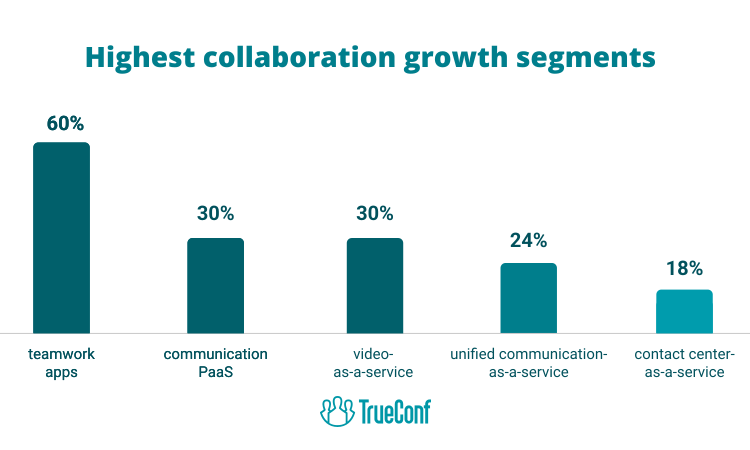
Current Trends Shaping Collaboration Technology
AI Integration Is No Longer Optional
Leaders using AI report strong results: 85% complete tasks faster, 84% are more productive, and 81% deliver higher quality work.
The companies gaining the most from AI aren’t just adding chatbots—they’re rethinking entire workflows. Investing in AI learning can also help teams build the practical skills needed to integrate these technologies into their daily work. Teams that want custom-built automation tailored to their specific processes often invest in AI agent development to create systems that handle routine coordination, flag bottlenecks, and route tasks without human input. Microsoft highlights “Frontier Firms,” early adopters that organize work around people plus AI, whose employees are far more likely to say their company is thriving (71% vs. ~37% globally).
Expect to see:
- AI meeting assistants that summarize discussions and extract action items
- Automated transcription and translation for global teams
- Intelligent routing of questions to the right experts
- Predictive analytics showing collaboration patterns
- AI development services getting more in demand
The Rise of Asynchronous-First Culture
Asynchronous collaboration tool usage is expected to rise by 50% in the next five years. Teams are discovering that not everything needs a meeting.
This shift matters for productivity. 15% of total work time is spent taking part in collaborative meetings on platforms like Zoom—time that could often be better spent on focused work with asynchronous updates.
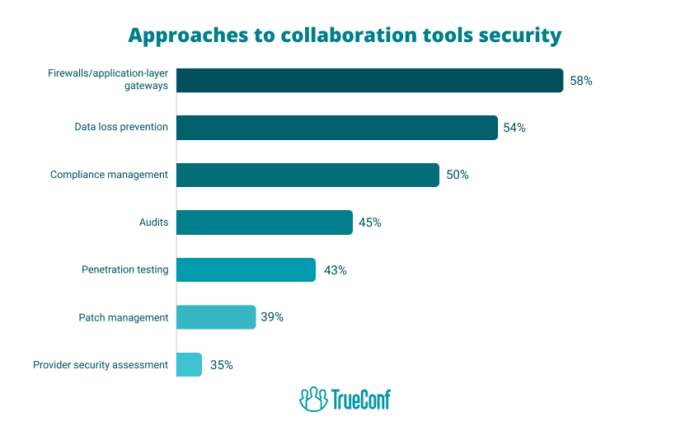
Security Becomes a Competitive Differentiator
The number of organizations reporting attacks on their workplace collaboration platforms has increased by more than 300% since 2021. As collaboration platforms become central to business operations, they become attractive targets.
Look for platforms offering:
- End-to-end encryption
- Granular access controls
- Compliance certifications for your industry
- Regular security audits and transparency
Platform Consolidation
Imagine that your sales team is using Teams, marketing has Slack, and development is using Discord—the very tools designed to reduce siloing are now supporting it.
Implementation: What Actually Works
Start With Clear Objectives
Don’t buy tools and hope they solve problems. Define the problem first: What specific collaboration challenges are you trying to solve? Where are the bottlenecks? What behavior change do you want to enable?
Top-performing companies are up to 5.5 times more likely to prioritize collaboration than lower-performing ones—but prioritization means intentional strategy, not just tool purchasing.
Create a Team Charter
The best hybrid teams write down a simple “team charter” that says how they work together, covering basics like when to use chat versus a meeting, how decisions are documented, and how to include remote colleagues.
Your charter should answer:
- Which tool do we use for what purpose?
- What’s our expected response time for different channels?
- When do we meet synchronously versus work asynchronously?
- How do we make decisions and document them?
- What are our working hours and overlap expectations?
Invest in Training, Not Just Tools
A global Zoom survey found 75% of employees say their remote or hybrid work software needs improvement, and 72% want new tech investment. But often the problem isn’t the software—it’s that people don’t know how to use it effectively.
Budget time for:
- Onboarding sessions for new tools
- Regular training on advanced features
- Documentation of best practices
- Champions who help others troubleshoot
Measure What Matters
Track metrics that reveal actual collaboration health, not just tool usage:
- Time to get answers to questions
- Meeting load per person
- Document findability
- Cross-team project velocity
- Employee satisfaction with collaboration
The Hidden Cost of Always-On Collaboration
Here’s an uncomfortable truth about collaboration technologies: they’ve created an expectation of constant availability that burns people out.
60% of employees experience increased stress due to the expectation of immediate response on collaboration tools. When everyone can reach you instantly through multiple channels, work never really ends.
The companies getting collaboration right are setting boundaries:
- Designated “focus time” when notifications are muted
- Clear expectations that not everything requires an immediate response
- Respect for working hours across time zones
- Asynchronous-first communication that doesn’t demand real-time participation
Without clearer communication norms, smarter tooling, and protected focus time, collaboration turns into an always-on grind.
Choosing the Right Collaboration Platform
When evaluating collaboration technologies, consider:
- Integration capabilities: Does it work with the tools you already use? Can you avoid yet another login?
- User experience: 90% of C-suite executives are satisfied with the technology their company provides for critical work, but only 68% of employees feel the same way. If the tool is painful to use, people won’t use it.
- Scalability: Will it grow with your team? What happens when you add 50 more people?
- Security and compliance: Does it meet your industry requirements? Where is data stored?
- Support and reliability: What happens when something breaks? Is there documentation and responsive support?
- Total cost of ownership: Look beyond the subscription fee—factor in training time, integration costs, and potential productivity loss during transition.
Try TrueConf Server Free!
- 1,000 online users with the ability to chat and make one-on-one video calls.
- 10 PRO users with the ability to participate in group video conferences.
- One SIP/H.323/RTSP connection for interoperability with corporate PBX and SIP/H.323 endpoints.
- One guest connection to invite a non-authenticated user via link to your meetings.

Industry-Specific Considerations
Different sectors have different collaboration needs:
- Healthcare: HIPAA compliance, secure patient data sharing, integration with electronic health records such as in direct primary care EHR software
- Finance: Regulatory compliance, audit trails, secure file transfer, client communication protocols often supported by a Finance Software Company specializing in secure financial systems
- Education: Accessibility features, large-scale video capabilities, assignment management, student engagement tools, and digital signage for schools to keep students and staff informed across campuses
- Manufacturing: Integration with ERP systems, supply chain coordination, cross-functional project management
- Professional services: Client collaboration, time tracking, project profitability, document version control
The Department of Health of Ho Chi Minh City|Case Study
TrueConf video collaboration solution connected more than 100 hospitals in Ho Chi Minh and allowed converting quarterly medical examination and treatment briefings between the Department of Health and hospitals into online mode. 660 employees of the City Oncology Hospital can now collaborate with one another without any barriers, increasing both speed and efficiency of communications.

Ready to Transform Your Team Communication?
TrueConf offers enterprise-grade video conferencing and collaboration solutions designed for teams that demand security without sacrificing usability. With on-premise deployment options, end-to-end encryption, and seamless integration with existing infrastructure, TrueConf helps organizations maintain control over their communications while enabling productive collaboration.
FAQ
What’s the difference between collaboration software and communication tools?
Communication tools (like email or chat) focus on exchanging messages, while collaboration software provides a broader workspace for teams to work together on shared goals. That said, many modern platforms combine both—TrueConf, for example, offers video conferencing plus screen sharing, file transfer, and meeting recording all in one secure platform.
How much does collaboration technology typically cost per user?
Costs vary widely from free basic plans to $50+ per user monthly for enterprise solutions. The total cost includes not just subscriptions but also implementation, training, integration, and ongoing support. Solutions like TrueConf offer flexible licensing models including on-premise deployment, which can reduce long-term costs while increasing security and control.
Can small teams benefit from collaboration technologies, or are they only for large enterprises?
Small teams often benefit even more because they lack the resources to manage complex coordination manually. The key is choosing appropriately sized solutions—a five-person startup doesn’t need enterprise-grade project management with advanced analytics. Start simple and add complexity as you grow.
How do I get my team to actually use new collaboration tools?
Three steps work best: First, involve the team in selection so they feel ownership. Second, provide hands-on training, not just documentation. Third, lead by example—if managers don’t use the tools, nobody else will. Consider platforms like TrueConf that prioritize intuitive interfaces, reducing the learning curve and increasing adoption rates.
What security features should I look for in collaboration platforms?
Essential features include end-to-end encryption, granular access controls, audit logs, compliance certifications relevant to your industry, and data residency options. For highly regulated industries, consider platforms like TrueConf that offer on-premise deployment, giving you complete control over where your data lives and who can access it.
How many collaboration tools should a team use?
Fewer is better. Research shows teams using 10+ apps experience significantly more communication problems than those using fewer than five. Aim for one primary platform that handles most needs, plus a few specialized tools for specific workflows. Consolidation reduces cognitive load and improves information flow.
What’s the ROI of investing in better collaboration technology?
Studies link effective collaboration to 20-25% productivity gains and roughly 21% higher profitability. But ROI depends on implementation quality—simply buying tools without changing processes rarely delivers results. The real value comes from reducing meeting time, faster decision-making, better information access, and enabling remote work that expands your talent pool.
Should we choose cloud-based or on-premise collaboration tools?
Cloud tools offer easier setup and automatic updates but send your data to third-party servers. On-premise solutions like TrueConf Server give you complete control and enhanced security but require more IT resources. Choose based on your security requirements, technical capabilities, and regulatory constraints. Many organizations use hybrid approaches—cloud for general collaboration, on-premise for sensitive communications.
How do collaboration technologies support hybrid work models?
They create a level playing field where remote and in-office workers have equal access to information and participation. Key features include high-quality video conferencing, asynchronous communication options, shared document workspaces, and meeting recording. Platforms like TrueConf enable this through features like gallery view, screen sharing, and recording capabilities that keep distributed teams connected.
What collaboration trends should I watch for in 2026 and beyond?
Three major shifts: AI agents that autonomously handle routine collaboration tasks, increased emphasis on asynchronous-first workflows to combat meeting fatigue, and tighter integration between collaboration and business intelligence platforms. Security will become even more important as attacks on collaboration platforms continue rising. Watch for solutions that balance innovation with data protection.
About the Author
Olga Afonina is a technology writer and industry expert specializing in video conferencing solutions and collaboration software. At TrueConf, she focuses on exploring the latest trends in collaboration technologies and providing businesses with practical insights into effective workplace communication. Drawing on her background in content development and industry research, Olga writes articles and reviews that help readers better understand the benefits of enterprise-grade communication.


Follow us on social networks