Video Conferencing Software » Products » On Premises Server » About TrueConf Server

Video Conferencing Server Software

Software Video Conferencing Server TrueConf Server 3.3
  • Works in LAN/VPN and through the Internet
  • HD group video conferences with up to 250 users
  • LDAP and H.323/SIP integration
  • Excellent VP8 SVC video quality
  • Cross-platform deployment in 15 minutes!
Download Video Conferencing Server
I already have server installed and need a trial key

TrueConf Server is a powerful, high-quality and highly secured video conferencing software server specially designed to work with up to 250 participants in a multipoint conference within LAN or VPN. TrueConf Server requires no hardware and has client applications for all popular platforms.

TrueConf Server utilizes SVC technology based on VP8 video codec, which guarantees the best possible video quality on every device and channel. Built-in into TrueConf system AEC (acoustic echo cancellation), AGC (automatic gain control) and noise cancellation algorithms provide great wide-band audio quality for all participants.

Compatible Endpoints

For computers

Any PC or Apple computer with TrueConf client application installed can be connected to TrueConf Server.

Download
Windows XP/7/8
Download
OS X 10.7.5+

For mobile devices

Use TrueConf mobile applications to keep in touch with your colleagues and make video calls on the go.


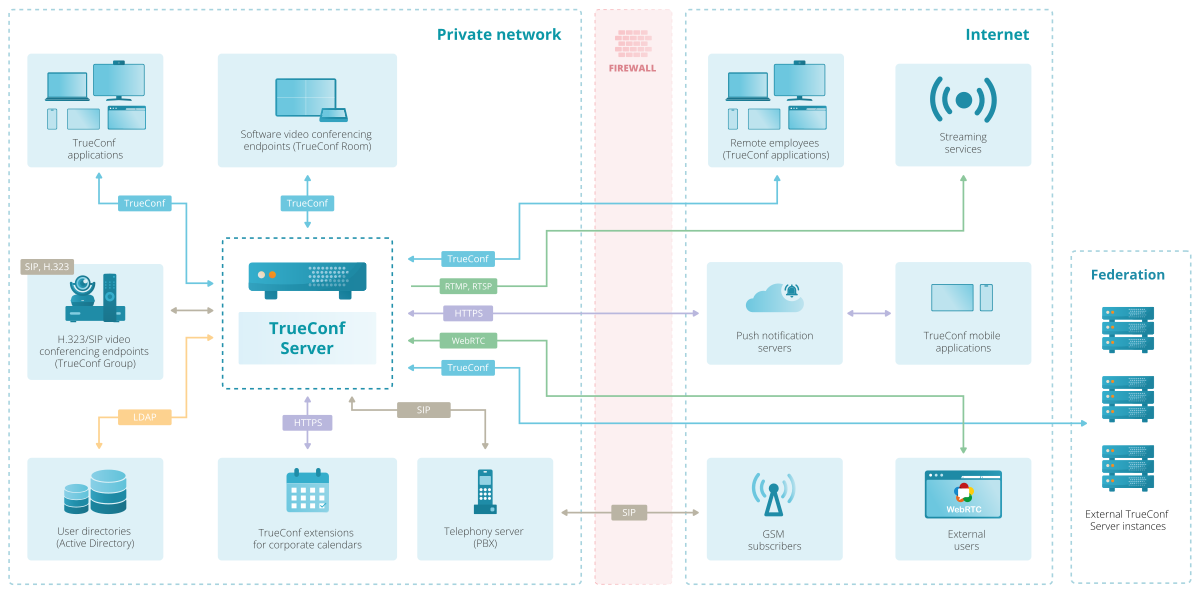
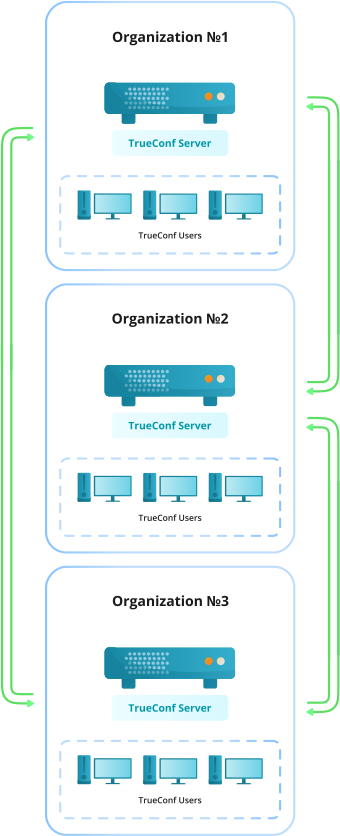
TrueConf Server Flowchart

TrueConf Server Video Conferencing Network

TrueConf Server Advantages:

  • High quality of connection even on slow and unstable channels.
  • Compatible with third party H.323/SIP equipment.
  • Network server architecture enables visual communication not only through the LAN, but also through the Internet, Firewall and Proxy without disturbing the network security.
  • Software-based video conferencing server TrueConf Server doesn’t decode video streams, that is why there is no need to mount expensive equipment in your corporate network.
  • Integration with service that works via LDAP network protocol, and ability to group users allows network administrators manage the list of users easily.
  • Any up-to-date computer with CPU Intel Pentium IV under Microsoft Windows Server 2003/2008 can be used as video conferencing server.
  • TrueConf Server is available in English, Russian and Portuguese (Brazil) languages.
  • TrueConf Client is available in English, German, French, Dutch, Portuguese (Brazil), Vietnamese, Russian and Ukrainian languages.

TrueConf Server Manager

TrueConf Server Manager

User Accounts Management

User Accounts Management

Video Conferences Scheduling

Video Conferences Scheduling

TrueConf Client application

TrueConf Client is a client application for TrueConf Server that can be generated after the server is configured. TrueConf Client contains settings needed for connection with this server.

Functionality

Point-to-Point Video Call HD – call between two users where both participants are able to see and hear each other.

Video Call HD

Multipoint Video Conference – allows up to 16 participants to all see and hear each other at the same time. Also known as multi-user video conference.

Multipoint Video Conference

Video Lecture - allows 16 participants to see and hear only the lecture owner while the owner can see and hear all of the participants simultaneously.

Video Lecture

Virtual Meeting – role-based multipoint video conference which can bring up to 120 participants together in a single video conference where up to 4 persons selected in real-time by the conference owner can be seen and heard by everyone. This type of conference is very useful for meetings and allows every participant to play an active role while maintaining low bandwidth and minimizing screen-estate usage.

Virtual Meeting


Slide show helps to easily broadcast images and PowerPoint presentations to every participant in your conference.

Screen sharing enables a live video broadcast of your desktop screen to your participants.

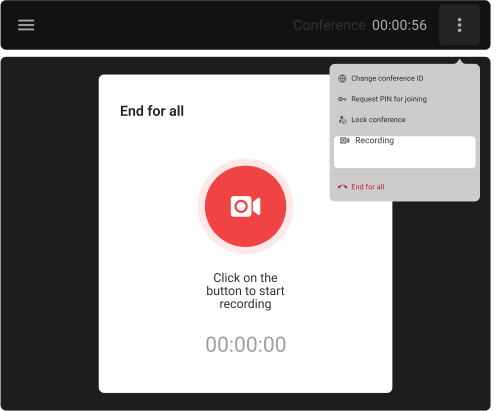
Video call recording option allows recording video and audio streams from all participants to a single file for future reference or editing.

Whiteboard is a dedicated paint window in which you and your participants can simultaneously draw and manage basic shapes and objects, type and edit text, insert pictures and snapshots from your screen with the help of various graphic tools.

Text messaging, or chat, via instant messaging.

File transfer enables sending different types of files directly to participants without third-party solutions or equipment.

And lots of other advantages.

For further information, please contact us:
Phone: +1 347 TRUECNF (878-3263)
E-mail: sales@trueconf.com.


Authorization

TrueConf ID 
Password
Continue Forgot your password?

Registration

If you are not yet signed up, you can do it here

Sign Up


Or sign in using: