
Everything You Need to Know About Daily Stand-up Meetings in Agile
Updated April 2026
Executive Summary: Daily Stand-ups in Agile — Key Takeaways at a Glance
Daily stand-up meetings are short, focused syncs that keep Agile teams aligned, transparent, and adaptive. Held every day for no more than 15 minutes, they center on three questions: What did you do yesterday? What will you do today? What’s blocking you? When executed well, stand-ups accelerate problem detection, strengthen team cohesion, and maintain momentum across sprints or Kanban flows.
For distributed or hybrid teams, the choice of collaboration platform directly impacts stand-up effectiveness. Solutions that combine ultra-reliable video, low-latency audio, screen sharing, and on-premises deployment options—like TrueConf—enable secure, high-quality daily syncs without compromising data governance or user experience.
|
Aspect |
Key Guidance |
|---|---|
|
Purpose |
Align team, surface blockers, plan next 24 hours |
|
Duration |
Strictly 15 minutes; time-boxed |
|
Core Questions |
Yesterday’s progress / Today’s plan / Current obstacles |
|
Format Flexibility |
In-person, video call, or async text/video update |
|
Tool Requirements |
Stable video/audio, screen share, chat, recording (optional), admin controls |
|
Remote Success Factor |
Time-zone aware scheduling + reliable unified communications platform |
|
Common Pitfalls |
Overrunning time, vague updates, problem-solving during stand-up |
|
Best For |
Agile/Scrum teams, distributed squads, compliance-sensitive organizations |
Self-Hosted Team Messenger with Video Conferencing
A cutting-edge team collaboration server with personal and group chats, UltraHD video conferences, and advanced AI-powered features — free for up to 1,000 users!
Why is it Necessary to Have Stand-Up Meetings in Agile?
Agile methodologies prioritize adaptability, teamwork, and productivity, with stand-up meetings serving as a pivotal means to uphold these principles. They’re not merely a formality, but rather an indispensable instrument for maintaining dynamics in Agile projects, often facilitated by agile project management software to ensure seamless collaboration and tracking. In some organizations, these stand-ups are further supported by EOS software, which helps teams align daily priorities with long-term objectives and maintain accountability across departments.
Here are the primary advantages of stand-up meetings:
Team Synchronization
In the dynamic world of Agile development, where tasks are quickly accomplished, and new ones arise, team cohesion can easily break down. The stand-up acts as a daily meeting point that provides insight into the current status of the project, clarifies the current tasks of team members and facilitates workflow adjustments.
Chris Masanto, the CEO and co-founder of PetLab Co., says, “In our journey, daily stand-up meetings have been pivotal for achieving team synchronization. By adopting this Agile practice, we’ve created a rhythm of clear, concise communication where each team member aligns on priorities and roadblocks are addressed promptly.”
This ritual fosters a culture of transparency, where everyone is up-to-date with the workflow, contributing to a shared understanding of our goals. The impact? A significant leap in team efficiency, with smoother collaboration and faster problem resolution, ensuring we move forward together, efficiently tackling challenges and capitalizing on opportunities.
Try TrueConf Server Free!
- 1,000 online users with the ability to chat and make one-on-one video calls.
- 10 PRO users with the ability to participate in group video conferences.
- One SIP/H.323/RTSP connection for interoperability with corporate PBX and SIP/H.323 endpoints.
- One guest connection to invite a non-authenticated user via link to your meetings.

Accelerating Problem Detection and Resolution
Stand-ups accelerate problem discovery by providing a platform for daily information sharing. When team members share their concerns, the collective intelligence of the group can be used to identify potential problems before they escalate. This early detection, combined with the collaborative nature of Agile, allows problems to be resolved quickly, often within a single day, preventing minor setbacks from becoming major obstacles.
Maintaining Transparency and Openness
By encouraging team members to talk openly about their work and challenges, stand-ups build trust within the team. This transparency applies not only to progress but also to difficulties and obstacles, leading to a supportive atmosphere.
Insight #1: Deployment Model Matters More Than You Think
When selecting a platform for daily stand-ups, don’t evaluate features alone. Consider deployment architecture: cloud-only solutions may simplify setup but limit data control, while on-premises or hybrid options,like TrueConf Server, give enterprises full sovereignty over meeting data, user authentication, and integration with internal identity providers.
For regulated industries or teams handling sensitive IP, this governance layer is often the decisive factor.
Common Stand-Up Mistakes and How to Avoid Them
Effective stand-up meetings are essential to Agile success, but they often fall victim to a few common mistakes.
Excessive Meeting Length
To avoid lengthy meetings, limit the meeting time to 15 minutes and focus on updates that directly affect the team. Address complex issues in separate, ad hoc sessions.
Lack of Team Engagement
Maximize engagement by interchanging the role of the presenter and asking open-ended questions. Mark all inputs and encourage active dialog to keep the team engaged.
Lack of Clear Purpose or Structure
Make sure each meeting has a clear purpose and follows a structured format, such as discussing yesterday’s accomplishments, today’s goals, and current obstacles. This approach keeps you focused and increases productivity.
Stand-up Formats Compared — Which Fits Your Team?
|
Format |
Best For |
Pros |
Cons |
Tool Recommendations |
|---|---|---|---|---|
|
In-person circle |
Co-located teams |
High engagement, non-verbal cues |
Requires physical space, not scalable |
None needed |
|
Video call (sync) |
Hybrid/distributed teams |
Face-to-face interaction, screen share |
Time-zone coordination, bandwidth needs |
TrueConf, Zoom, Teams |
|
Async text/video update |
Global teams, deep-work cultures |
Flexible timing, reduces meeting fatigue |
Less spontaneous collaboration |
Slack + Loom, TrueConf async mode |
|
Kanban board + voice |
Visual workflow teams |
Context-rich, ties to tasks |
Requires disciplined board hygiene |
TrueConf + Jira/Trello integration |
Take your team communication to the next level with TrueConf!
A powerful self-hosted video conferencing solution for up to 1,000 users, available on desktop, mobile, and room systems.
Stand-Up Meetings for Distributed Teams
In the era of remote working, distributed teams need effective ways to stay connected and align their projects. In the Agile world, daily stand-ups have become the primary way to have a quick, synchronized meeting to discuss progress and obstacles. However, for globally dispersed teams, conducting effective stand-ups requires careful selection of tools and timing. This is especially useful when working with a weekly schedule template, allowing for consistent meeting structure across recurring events.
Use Tools and Technologies
The right tools can bridge the gap between time zones and physical distances. Video conferencing platforms such as TrueConf, Zoom, or Microsoft Teams allow face-to-face communication, which increases team collaboration.
For asynchronous meetings, tools like Slack or Trello allow team members to post updates at their convenience, ensuring everyone is informed without having to be online at the same time.
Interactive features such as screen sharing or digital whiteboards can replicate the collaborative atmosphere of in-person meetings, making remote stand-ups more interesting. It is important to choose reliable and easy-to-use tools to avoid technical difficulties that can disrupt the flow of information, such as TrueConf.
Consider Time Zones
Scheduling meetings for a distributed team is a task that requires a thoughtful approach to accommodate the peculiarities of different time zones. Leveraging nearshore software development can help mitigate these challenges, offering a balance of proximity and cost-effectiveness, which enhances collaboration and efficiency.
Another approach is to record stand-up sessions for those who cannot attend in real-time so that they have time to contribute when they can. This method ensures that no one is left out.
3 Key Questions of a Daily Stand-Up Meeting
At the heart of daily stand-up meetings are three key questions that drive productivity and team collaboration:
- What have you achieved so far?
- Have you encountered any challenges?
- What’s on your agenda for today?
By answering these three questions together, Agile teams can effectively improve their agility and achieve their goals with greater synergy.
6 Steps on How to Conduct an Effective Stand-Up Meeting
Stand-up meetings can be an ineffective waste of time without proper preparation. Here’s how to make sure your stand-up meetings increase productivity:
Step 1: But still – standing literally?
In a standard stand-up arrangement, team members gather in the center of the meeting space to solve problems together. A variety of locations and methods are recommended to create a supportive atmosphere. To enhance creativity and encourage the open exchange of ideas, emulate Steve Jobs and conduct meetings standing while walking.
Step 2: Stay on track – keep approach in mind
As each team operates as a unique mosaic, it’s important to accept the fact that there is no one-size-fits-all format for conducting meetings. However, we recommend the “circle-around” method, where each team member takes a turn to contribute their thoughts and comments. This method fosters motivation, inspiring all individuals to excel in what is expected of them.
Kudremukh Iron Ore Limited (KIOCL)|Case Study
KIOCL provided their employees with secure tools for collaboration, video calls, and team messaging by implementing TrueConf Server. An autonomous system unified more than 1,000 employees allowing to facilitate work meetings in hybrid and online modes from any location.

Step 3: The core of effective stand-up meetings
The best way to make a meeting efficient and enjoyable is to establish a simple rule: “Everything matters.” Even a short brainstorming session can lead to spontaneous ideas if inhibitions are removed. Write them down without criticism and evaluate them after the meeting. Remember that people tend to express their ideas and views more honestly when all participants are working as equals. Even if stand-up sessions are designed to discuss certain topics, don’t penalize employees if they start to come up with brilliant solutions – suggest that they continue the discussion online or during a coffee break.
Step 4: Don’t stray from the main purpose of the meeting
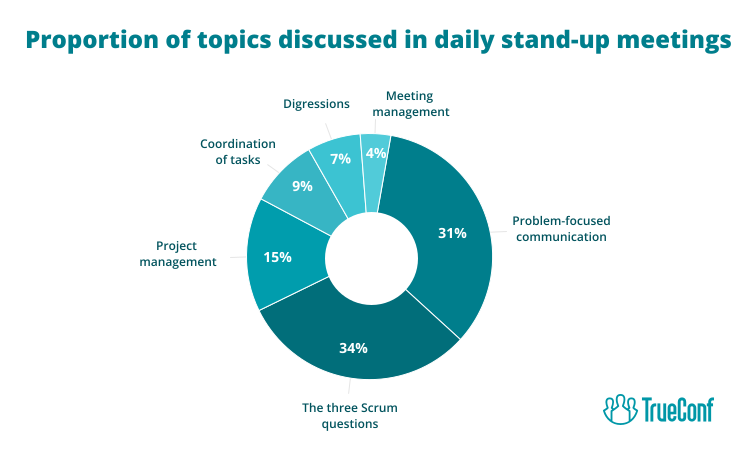
In a professional setting, adhering to the main agenda during a stand-up meeting is paramount for maintaining productivity and achieving objectives efficiently. Straying from the main agenda can lead to tangential discussions that consume valuable time, diverting focus away from critical priorities. By staying disciplined and sticking to the agenda, teams can ensure that everyone remains on track, maximizing the effectiveness of the meeting and enabling swift decision-making. Whether you’re discussing payment options for small businesses or planning the upcoming week you must ensure that everyone follows the set agenda.
Step 5: Choose a leader
Imagining an energetic stand-up meeting without someone who comprehends its significance and promotes team-building efforts is challenging. A common error in stand-up planning is placing executive and corporate matters as top priorities. The leader of the meeting should attentively monitor ongoing discussions and the atmosphere of the participants, assisting them in maintaining focus on their tasks without excessive interference.
Step 6: Unite remote teammates
Despite the growing acceptance of remote work in recent times, it is still significantly different from the traditional office environment. Communication becomes a notable hurdle due to the physical separation of employees, potentially leading to feelings of isolation. Group scheduling tools like WhenAvailable can help teams efficiently coordinate group meetings, making scheduling less of a hassle. Alongside this, video conferencing remains essential for facilitating distant interaction and encouraging remote collaboration.
Incorporating Stand-Up Meetings within Agile and Scrum Frameworks
Agile methodologies emphasize communication and collaboration to create high-quality results. Scrum, a subtype of Agile, incorporates rituals known as “sprints” to create a disciplined project management environment. Within these sprints, “stand-ups” play a key role.
The Role of Stand-Ups in Scrum Sprints
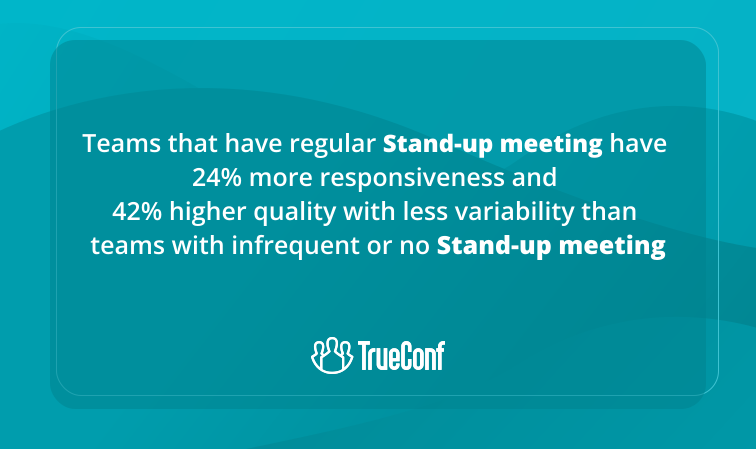
Standups, or daily scrum meetings, are quick, time-boxed events where team members synchronize their work and plan for the next 24 hours. These meetings are integral to the Scrum framework, providing a platform for team members to share progress, discuss obstacles, and align on objectives. Conducted at the same time and place every day, Standups maintain the sprint cycle’s rhythm and momentum, ensuring that each member is aware of the project’s pulse. By addressing what was accomplished yesterday, what will be done today, and identifying any impediments, Standups facilitate immediate responses to issues and foster a culture of transparency and accountability.
Integrating Stand-Ups with Kanban Practices
Kanban, another Agile methodology, is known for its visual workflow management. It uses a Kanban board to track and display tasks at various stages of the workflow. While Kanban does not prescribe daily meetings like Scrum, integrating standups can greatly increase efficiency. These meetings can serve as a verbal complement to the Kanban board’s visual cues. By verbally articulating work status and challenges, team members can collaborate more effectively, providing support and insight that may not be as obvious through the Kanban board alone. Regular standups in the context of Kanban promote continuous improvement and help identify workflow inefficiencies, making the process more dynamic and receptive to change.
Insight #2: Async Stand-ups Aren’t a Drop-in Replacement — They Shift Team Dynamics
Asynchronous updates (text or short video) offer flexibility for global teams but reduce spontaneous problem-solving and non-verbal feedback.
Use async stand-ups for status reporting, but reserve synchronous video sessions—powered by a low-latency platform like TrueConf—for complex coordination, retrospectives, or when psychological safety and team bonding are priorities.
Final Thoughts
In conclusion, whether within the time-constrained Sprints of Scrum or the continuous flow of Kanban, stand-up meetings are a vital practice for Agile teams. They encourage open communication, enable problem-solving, and align team efforts toward common goals, thus driving projects to successful completion.
FAQ
What is the ideal duration for a daily stand-up meeting?
Keep stand-ups strictly to 15 minutes. This time-box forces focus on the three core questions and prevents problem-solving drift. Platforms like TrueConf support time-aware scheduling and quick-launch meetings to help teams start and end on time.
Can stand-ups work effectively for fully remote teams?
Yes—if supported by a reliable video platform with low-latency audio, screen sharing, and stable connections. TrueConf enables high-quality remote stand-ups with on-premises deployment options, ensuring security and performance regardless of location.
How do I choose between sync and async stand-ups?
Use sync video stand-ups for complex coordination, team bonding, and rapid blocker resolution. Choose async updates for status reporting across time zones. TrueConf supports both modes, letting teams switch context without changing tools.
What features matter most in a stand-up collaboration tool?
Prioritize stable UltraHD video, one-click meeting start, screen sharing, chat, and admin controls for user management and compliance. TrueConf bundles these capabilities with on-premises architecture, making it a strong fit for enterprise Agile teams.
How can we prevent stand-ups from becoming status-report monologues?
Enforce the three-question format, rotate facilitators, and park deep-dive topics for later. TrueConf’s screen sharing and annotation tools help keep updates visual and interactive, reducing passive listening.
Is on-premises deployment necessary for stand-up tools?
Not always—but for organizations with strict data governance, audit requirements, or air-gapped networks, on-premises options like TrueConf Server provide essential control over meeting data, authentication, and infrastructure integration.
How do we integrate stand-ups with existing Agile tooling?
Look for platforms with open APIs and calendar connectors. TrueConf offers API/SDK access and integrations with Microsoft Exchange and third-party systems, enabling seamless workflow embedding without disrupting existing Agile practices.
About the Author
Nikita Dymenko is a technology writer and business development professional with more than six years of experience in the unified communications industry. Drawing on his background in product management, strategic growth, and business development at TrueConf, Nikita creates insightful articles and reviews about video conferencing platforms, collaboration tools, and enterprise messaging solutions.


Follow us on social networks