
Unified Communications and Collaboration Solutions: Features, Benefits & Use Cases
Unified Communications and Collaboration (UC&C) brings business calling, team messaging, video meetings, and collaboration tools together in one platform. Instead of switching between separate apps for calls, chats, meetings, files, and team coordination, employees use one connected environment for daily work.
A UC&C platform helps organizations reduce context switching, simplify IT management, and keep communication history in one searchable place. For businesses, this means faster decisions, clearer internal communication, and better control over security, user access, and system administration.
This guide explains what UC&C means, what features a UC&C platform usually includes, how UCaaS differs from on-premises deployment, and how to choose the right solution for your organization.
What Is Unified Communications and Collaboration (UC&C)?
Unified Communications and Collaboration (UC&C) is a category of business software that combines communication channels and teamwork tools in one system. A UC&C platform usually includes voice calls, team messaging, video conferencing, user presence, file sharing, and integrations with other business applications.
The main goal of UC&C is simple: give employees one place to communicate and work together. When a company uses separate tools for calls, chats, meetings, and files, employees lose time moving between systems and repeating information. A UC&C platform solves that problem by connecting those channels in one workflow.
UC&C Definition in Plain English
In plain English, UC&C means your team can message, call, meet, share files, and continue work without jumping between disconnected apps. For example, an employee can start with a chat message, escalate the discussion to a voice or video call, share a screen, and continue the conversation afterward in the same workspace.
What UC&C Typically Includes
Most UC&C platforms package features differently, but the core building blocks are usually the same. These capabilities determine whether a platform can replace multiple point solutions and support daily communication at scale.
Business Calling (VoIP and PBX Features)
A UC&C platform often includes business telephony based on VoIP or PBX functionality. This typically covers internal and external calling, company numbers, extensions, call routing, IVR, call queues, auto attendants, and ring groups.
Many platforms also provide voicemail, call forwarding, call transfer, shared lines, and call recording with retention controls. In a mature deployment, these features work across desktop apps, mobile clients, desk phones, and meeting room systems under one user identity.
Video Meetings
Video meetings are a core part of any modern UC&C solution. A platform should support scheduled meetings, instant meetings, calendar integration, participant management, screen sharing, and in-meeting chat.
More advanced platforms also support webinars, virtual events, recording controls, moderator roles, audience management, and integrations with conference room hardware such as PTZ cameras, controllers, and speakerphones.
Team Messaging
A UC&C platform usually includes one-to-one messaging, group chats, and persistent team channels or spaces. These spaces help teams keep discussions, files, mentions, and shared decisions in one place.
The strongest messaging environments also include searchable history, permission controls, retention settings, and support for compliance requirements in regulated industries.
Presence and Status
Presence shows whether a user is available, busy, in a meeting, away, or in do-not-disturb mode. Presence matters because it helps employees choose the right time and the right channel for communication.
Advanced UC&C platforms sync presence across devices and calendars. Some platforms also support custom statuses and smart do-not-disturb rules for high-priority contacts.
Contacts and Directories
A centralized directory helps users quickly find colleagues, teams, departments, and rooms. Directories are important for internal communication, group messaging, routing logic, and role-based collaboration.
In enterprise environments, directories are often synchronized with identity systems such as Azure AD, Okta, or Google Workspace. This reduces manual administration and keeps access rights consistent.
Collaboration Features
Beyond calling and messaging, many UC&C platforms include collaboration features such as file sharing, whiteboards, meeting notes, content sharing, and integrations with document tools.
Some vendors focus on an all-in-one workspace, while others focus on integrating deeply with existing productivity ecosystems. The right choice depends on whether your organization wants one platform for everything or a platform that connects well with current tools.
Integrations
Integrations turn a UC&C platform into part of the company workflow. A strong integration layer can connect communication tools with CRM systems, help desks, project management platforms, calendars, and identity providers.
These integrations help users work faster. For example, a sales or support team can see customer context during a call, log an interaction automatically, or send updates from business systems directly into team channels.
Why Do You Need a Unified Communications Solution?
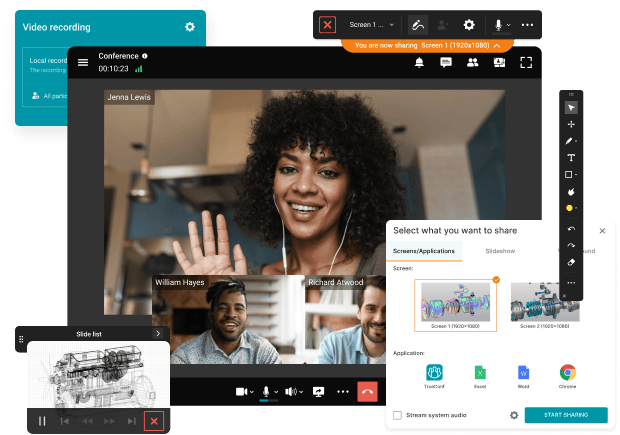
Organizations adopt UC&C because disconnected communication tools create daily friction. When calls, chats, meetings, file sharing, and customer communication all happen in different systems, employees spend too much time switching tools and too little time completing work.
A unified communications solution creates one communication layer across the organization. Employees can choose the right channel, move from chat to call to meeting without losing context, and keep communication history visible for the people who need it.
Communications Are Fragmented Across Too Many Tools
When teams use separate tools for calling, messaging, meetings, and file sharing, important context gets lost. Decisions stay buried in private chats, files live in different repositories, and meeting outcomes are hard to trace.
A UC&C platform brings chat history, call records, meeting notes, recordings, and files into one searchable environment. That makes communication easier to follow and work easier to resume.
Teams Need Faster Escalation and Less Context Switching
In many organizations, a simple conversation becomes inefficient because employees must switch from chat to email to phone to video meeting using separate tools. Every transition adds friction.
UC&C reduces that friction by supporting a natural communication flow. A user can move from a message to a call to a meeting without restarting the discussion or losing the previous context.
Remote and Hybrid Work Require a Consistent Experience
Remote and hybrid teams need the same communication experience across office, home, and mobile environments. If one tool works on desktop but not on mobile, or if conversation history is not synchronized, collaboration slows down.
A UC&C platform helps by providing a consistent user experience across desktop, mobile, web, and room systems. Presence, identity, and communication history stay connected across locations and time zones.
IT Needs Centralized Management, Security, and Compliance
Every extra communication tool creates extra administrative work. IT teams must manage separate users, policies, logs, retention rules, and support processes across multiple systems.
A UC&C platform centralizes administration. IT teams can manage users, permissions, monitoring, retention, and security controls in one place. Many platforms also integrate with SSO, MFA, and enterprise identity systems.
Customer-Facing Teams Need Better Routing and Responsiveness
Customer-facing teams often struggle when communication is scattered across channels and systems. Calls get missed, transfers are delayed, and customers have to repeat the same issue during handoffs.
UC&C improves service by combining routing, queues, availability indicators, and integrations with CRM or help desk systems. This helps teams respond faster and keep customer context during each interaction.
Unified Communications and Collaboration Benefits
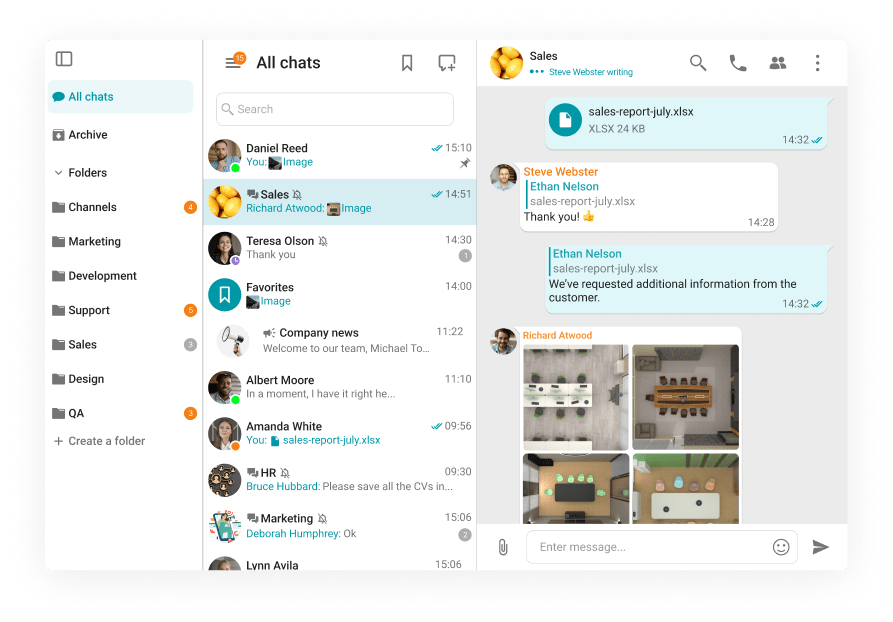
The value of UCC is not just a longer feature list. The real value comes from better workflows, less friction, and more consistent communication across the business.
Most organizations adopt UC&C to improve three areas: operational efficiency, employee productivity, and customer experience.
Productivity
UC&C improves productivity by reducing the number of apps employees use every day. When chat, calls, meetings, and files are connected, users spend less time switching windows, searching for messages, and repeating information.
Employees can also escalate conversations faster. A discussion can start in chat, move to a call or meeting, and continue afterward in the same thread or workspace.
Flexibility and Responsiveness
A UC&C platform gives users the same identity and communication tools across devices and locations. This makes it easier to respond quickly whether an employee is at a desk, working remotely, using a mobile phone, or joining from a meeting room.
For distributed organizations, this consistency supports faster communication and better continuity across teams and time zones.
Cost Reduction
UC&C can reduce costs by replacing several overlapping tools with one platform. This can lower licensing overhead, reduce vendor sprawl, and simplify support.
Cloud-based UCaaS models can also reduce infrastructure maintenance costs. At the same time, companies often save internal IT effort because fewer systems need patching, integration support, and user administration.
Customer Satisfaction
Customer satisfaction improves when teams can respond with better context and fewer delays. Modern cloud telephony systems enable features like intelligent routing, transfers, presence, and CRM integration help employees handle customer interactions more smoothly.
When agents can see relevant information during a live interaction and continue the conversation without losing history, customers spend less time repeating themselves and get faster resolution.
Better Collaboration
UC&C supports collaboration by giving teams persistent spaces for ongoing work. Shared chats, searchable message history, file sharing, and meeting follow-up all stay connected.
This is especially useful for distributed teams working across time zones. Team members can review decisions, add input asynchronously, and join live sessions when necessary without losing visibility into the larger discussion.
Unified Communications and Collaboration Examples
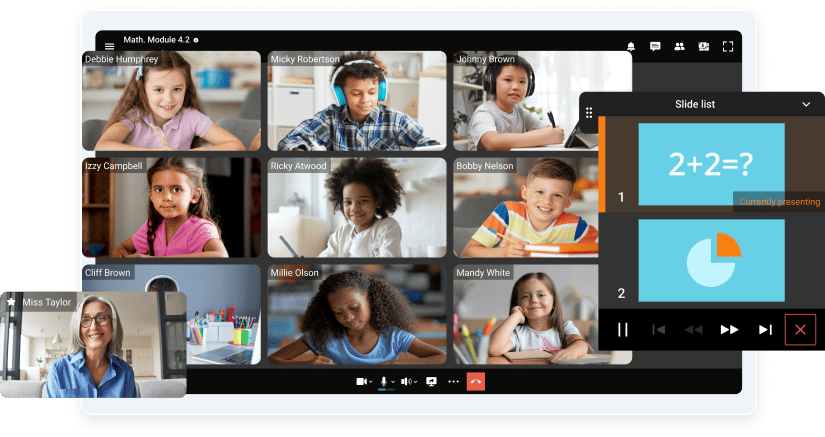
UC&C supports many industries and workflows, but the core idea stays the same: connect people, communication channels, and business processes in one environment.
Business
In business environments, UC&C supports internal coordination, sales communication, project work, and customer interactions. Teams can use channels for ongoing projects, schedule meetings from the same platform, and store communication history for future reference.
For sales and service teams, UC&C can also connect with CRM systems and AI agents to support click-to-call, meeting escalation, and automatic logging.
Education
Educational organizations use UC&C for remote and hybrid classes, student support, staff communication, and academic coordination. Video meetings, content sharing, scheduling, moderation, and messaging all support a consistent learning experience.
Centralized administration also helps schools and universities manage users, permissions, and communication across large groups.
Healthcare
Healthcare organizations use UC&C for telehealth, internal coordination, specialist consultations, and operational communication. In healthcare, reliability, privacy, and access control are especially important.
A suitable UC&C platform can help clinical teams communicate faster while keeping internal workflows and patient-related coordination organized.
UCaaS Solutions Overview
UCaaS stands for Unified Communications as a Service. UCaaS delivers UC&C capabilities through a subscription-based service model, usually in the cloud or as part of a hybrid deployment.
For many organizations, UCaaS reduces the need to maintain communication infrastructure internally. At the same time, businesses still need to evaluate architecture, security, integrations, and long-term fit.
Architecture and Core Components
A UCaaS platform typically includes desktop, mobile, and web applications connected to a central communication layer. That layer manages user identity, meetings, messaging, administrative policies, and often telephony services.
Many platforms also include directory synchronization, analytics, logging, recording management, retention controls, and policy enforcement for enterprise administration.
Integrations and Ecosystem
The ecosystem around a UCaaS platform matters almost as much as the core features. A communication platform becomes more valuable when it connects to the tools employees already use.
Common integration areas include:
- productivity suites for calendars and document collaboration, such as Microsoft 365 or Google Workspace;
- CRM systems for click-to-call and activity logging, such as Salesforce or HubSpot;
- service platforms for tickets and support workflows, such as Zendesk or Jira;
- identity systems for SSO, MFA, and user lifecycle management, such as Azure AD or Okta.
Platforms with APIs and webhooks can also support custom workflows and automation.
How to Choose a Unified Communications Solution for Your Business

Choosing a UC&C or UCaaS solution should follow a structured process. The best platform is not always the one with the longest feature list. The best platform is the one that matches your business requirements, security model, user workflows, and IT resources.
Step 1: Define Requirements and Use Cases
Start by identifying who will use the platform and how they will use it. Different user groups may include office staff, executives, frontline teams, support agents, sales teams, remote employees, or external partners.
Then define the workflows that matter most. These may include internal messaging, business telephony, video meetings, webinars, customer communication, project spaces, or contact center functions. You should also estimate user volume, call volume, meeting concurrency, and geographic coverage requirements.
Step 2: Review Security and Compliance
Security should be part of the evaluation from the beginning. Review how each platform handles encryption, data storage, external access, guest permissions, retention rules, and auditability.
For regulated environments, also check support for role-based access, administrative separation, SSO, MFA, legal hold, eDiscovery, and alignment with frameworks such as HIPAA, GDPR, or other regional requirements that apply to your business.
Step 3: Verify Reliability and Quality
A UC platform becomes critical infrastructure once employees depend on it every day. That is why you should evaluate uptime commitments, redundancy options, fallback scenarios, and the quality-monitoring tools available to administrators.
For larger or distributed organizations, pilot testing is important. Real-world testing across offices, homes, and mobile networks gives a more accurate picture than a feature sheet.
Step 4: Check Integrations and Migration Path
A communication platform must fit into your current environment. Check compatibility with identity systems, productivity tools, CRM platforms, help desks, room hardware, and telephony components.
Migration planning also matters. Review number porting options, country coverage, support for legacy systems, and any network prerequisites. A phased rollout with pilot groups, training, and change management usually leads to better adoption.
Step 5: Calculate Total Cost of Ownership
Do not evaluate price only by the per-user subscription. Total cost of ownership includes add-on modules, calling plans, hardware, deployment services, training, support, and integration maintenance.
You should also look for hidden costs. These may include complex licensing, expensive premium features, or extra administration caused by fragmented tool design.
Top 5 UCaaS Providers

The provider landscape includes cloud-first platforms, telephony-first platforms, and self-hosted or private-cloud solutions. The right choice depends on how much control, flexibility, and infrastructure ownership your organization needs.
TrueConf Server
Best for: organizations that need a self-hosted communication platform with strong control over deployment, data storage, and security settings.
Strengths: TrueConf Server is designed for on-premises or private-cloud deployment. This makes it suitable for organizations with strict security requirements, segmented networks, or cloud restrictions. The platform supports enterprise messaging, video conferencing, webinars, centralized administration, and interoperability in complex environments.
Things to consider: A self-hosted platform usually requires internal IT resources for deployment, upgrades, monitoring, and support.
Boost your team’s productivity with TrueConf Server Free!
Microsoft Teams
Best for: organizations that already rely on Microsoft 365 for email, calendars, files, and document collaboration.
Strengths: Microsoft Teams combines chat, meetings, channels, and collaboration with deep Microsoft 365 integration. It works especially well when Outlook, SharePoint, OneDrive, and Microsoft identity services are already central to the business.
Things to consider: Telephony, policy management, and licensing can become complex in large deployments, especially across multiple regions.
Zoom Workplace
Best for: teams that prioritize ease of use and a strong meeting experience.
Strengths: Zoom Workplace is known for video meetings, room support, webinars, and a broad hybrid work ecosystem. It also includes team messaging and telephony options in selected configurations.
Things to consider: Some advanced governance, telephony, and analytics features depend on subscription tier and regional availability.
RingCentral
Best for: organizations that want telephony to be the foundation of the communication stack.
Strengths: RingCentral offers mature cloud PBX capabilities, routing, IVR, queues, messaging, and meetings. It is often a strong fit for distributed organizations with multiple offices and complex voice requirements.
Things to consider: Bundling, regional telephony coverage, and configuration choices can affect user experience and pricing clarity.
Cisco Webex Suite
Best for: large enterprises that need secure collaboration, room system support, and strong governance controls.
Strengths: Cisco Webex Suite offers meetings, messaging, telephony options, webinar support, device ecosystem compatibility, and enterprise-grade administrative controls.
Things to consider: Setup, architecture planning, and licensing can be complex, especially in large global environments.
Key Insights
The unified communications market continues to move in three clear directions: stronger demand for secure private deployments, more attention to governance and compliance, and higher expectations for interoperability with existing infrastructure.
Secure On-Premises and Private-Cloud Collaboration
Many organizations want modern communication tools without moving sensitive communication into the public cloud. This is especially important in regulated industries, restricted environments, and organizations with strict internal policies.
As a result, self-hosted and private-cloud collaboration platforms remain important for businesses that need direct control over data location, network routing, and system administration.
Governance, Compliance, and Managed Access
Enterprise buyers increasingly evaluate communication platforms as part of the security stack. They want clear access rules, recording policies, retention controls, audit trails, and identity integration.
For that reason, governance is no longer an optional extra. It is a core requirement for enterprise communication platforms.
Interoperability and Infrastructure Readiness
Many organizations cannot replace everything at once. They need a platform that works with legacy telephony, existing room systems, current network architecture, and staged migration plans.
That is why interoperability, deployment design, and operational predictability matter so much during platform selection.
Empower your video conferencing experience with TrueConf!
FAQ
What Is the Difference Between UC and UCaaS?
UC describes the communication model and feature set. It refers to the combination of calling, messaging, meetings, and collaboration tools in one environment.
UCaaS describes how those capabilities are delivered. In most cases, UCaaS means a subscription-based service delivered through the cloud or through a hybrid architecture.
What Is an Example of Unified Communications?
A simple example of unified communications is this: an employee starts a conversation in a team chat, escalates it to a video meeting, shares a screen to review a document, and continues the discussion afterward in the same workspace with files and searchable history.
What Types of UC Solutions Exist?
Most UC solutions fall into three categories:
- Cloud-first UCaaS: fully managed communication services delivered mainly from the cloud;
- On-premises UC: self-hosted platforms deployed inside the organization’s own infrastructure;
- Hybrid UC: a mix of cloud and on-premises components used to balance flexibility and control.
Different vendors also have different priorities. Some focus more on meetings and collaboration, some focus on telephony, and some emphasize deployment control, governance, or industry-specific requirements.
About the Author
Diana Shtapova is a product specialist and technology writer with three years of experience in the unified communications industry. At TrueConf, she leverages her deep product expertise to create clear and practical content on video conferencing platforms, collaboration tools, and enterprise communication solutions. With a strong background in product research and user-focused content development, Diana helps professionals and businesses understand core product features, adopt new technologies, and unlock the full potential of modern collaboration software.


Follow us on social networks