
Slack vs. Zoom vs. TrueConf: A Comprehensive Comparison for Modern Teams
Your choice of collaboration platform shapes how your entire organization communicates. Slack built its reputation on team messaging, Zoom became the household name for video conferencing, while TrueConf delivers a comprehensive solution that deserves more attention. These three tools emerged from distinct philosophies: Slack set out to eliminate email overload, Zoom wanted everyone to access quality video meetings, and TrueConf built secure communications that companies could host themselves.
What makes this decision complex is how much these platforms have grown beyond their roots. Slack added video functionality, Zoom incorporated chat features, and TrueConf assembled messaging and conferencing into one deployable package. Your decision depends less on raw features and more on matching the right tool to your workflow, security needs, and financial planning.
Slack vs Zoom vs TrueConf: Key Differences
The core distinction among these platforms comes down to where your data lives and who controls it. TrueConf Server runs inside LAN or VPN networks, putting total infrastructure control in your hands. Deploy TrueConf and your information stays on your property. The server operates on your hardware, communications remain within your network boundaries, and you manage every security and access element.
Slack and Zoom built their services for the cloud from day one. Using Slack means your messages, files, and workspace content pass through Salesforce infrastructure. Zoom processes meetings through its worldwide cloud network. The benefit is rapid deployment without server overhead, but the tradeoff involves entrusting these vendors with your data and accepting their security frameworks.
This architectural split creates ripple effects everywhere. TrueConf can run video conferences when the internet goes down, which matters enormously for military bases, research labs, or organizations in areas with spotty connectivity. Try the same with Slack or Zoom and you will immediately understand why infrastructure choices matter. A hospital network administrator shared that they selected TrueConf because patient consultations never touch external networks, transforming HIPAA compliance from an ongoing headache into a straightforward checkbox.
The Department of Health of Ho Chi Minh City|Case Study
TrueConf video collaboration solution connected more than 100 hospitals in Ho Chi Minh and allowed converting quarterly medical examination and treatment briefings between the Department of Health and hospitals into online mode. 660 employees of the City Oncology Hospital can now collaborate with one another without any barriers, increasing both speed and efficiency of communications.

Slack vs Zoom vs TrueConf: Feature Comparison
Communication Capabilities
Slack shines in asynchronous conversation management. Channels sort discussions by project, team, or theme, letting you review missed conversations at your own pace. The search function helps you locate that spreadsheet someone posted months ago or review decisions made before you joined a channel. The catch with the Free tier is message history limited to just 90 days, which creates problems for teams needing to reference older context.
Zoom sets the bar for dependable real time video. The Pro plan allows 24 hour meetings with 100 participants maximum, while Business accommodates 300 people. The interface requires minimal technical knowledge, allowing anyone to host meetings without calling IT. Slack’s video functions pale in comparison, capping even Business+ plan meetings at 50 people.
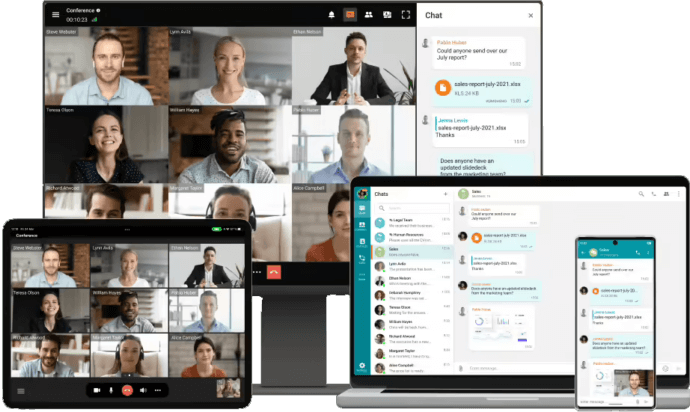
TrueConf provides 4K Ultra HD video conferencing supporting up to 1,500 active participants and displaying 49 simultaneous video feeds onscreen. This capacity suits large gatherings, company wide meetings, or conferences where visibility matters for all attendees. The integrated messenger handles group conversations, file transfers, and complete chat history, matching what Slack offers for asynchronous work while adding enterprise quality video conferencing.
Collaboration Tools
Screen sharing exists in all three platforms but execution varies significantly. Zoom delivers smooth, reliable screen sharing with options to display specific applications or your full desktop. Annotation features let meeting participants mark up shared screens during sessions. Slack handles screen sharing adequately for quick demos but lacks the refinement and performance of dedicated video solutions.
TrueConf bundles slideshows, annotations, remote desktop access, and live polling into the same workspace where you manage messaging and calls. Less tool switching means smoother workflows. Picture a design review where you share your screen, grant a remote colleague control to make live edits, poll attendees for their preferences, and continue the conversation in the same chat thread without leaving the platform.
Self-Hosted Team Messenger with Video Conferencing
A cutting-edge team collaboration server with personal and group chats, UltraHD video conferences, and advanced AI-powered features — free for up to 1,000 users!
File sharing philosophies differ considerably. Slack stores files in the cloud with connections to Google Drive, Dropbox, and similar services. Zoom enables file transfers during meetings but was never designed as a storage system. TrueConf includes file storage with search across channels and message histories, keeping everything in your controlled space.
Integration Ecosystem
Slack connects with over 2,600 applications, creating remarkable flexibility. Link your project management software like Asana, support systems like Zendesk, and development platforms like GitHub. This extensibility represents both Slack’s biggest asset and a security consideration since each integration grants another service access to workspace information.
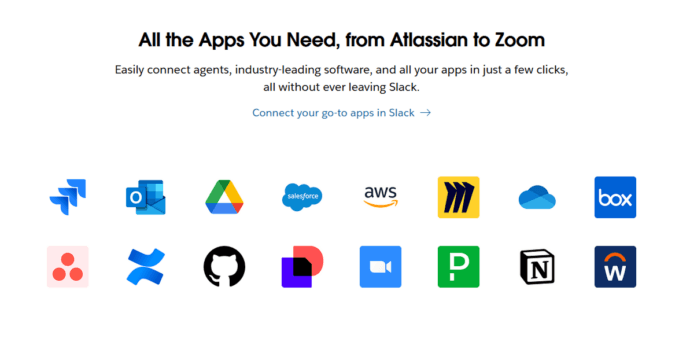
Zoom provides fewer built in connections but concentrates on calendar integration (Google Calendar, Microsoft Outlook) and office productivity suites. The Zoom App Marketplace features industry specific tools, though nowhere near Slack’s selection.
TrueConf works with VoIP systems, PBX, and conference room equipment via SIP and H.323 protocols. It connects with Zoom, Microsoft Outlook, and other platforms, enabling compatibility with current infrastructure. The SDK and API support custom development, though implementing these requires technical expertise.
AI and Advanced Features
Slack introduced conversation and thread summaries along with huddle notes for all paying customers. The AI recaps lengthy threads or generates meeting notes, saving time when you need to catch up on active channels.
Zoom’s AI Companion creates meeting summaries, delivers live captions, and composes followup emails based on meeting discussions. These capabilities improve accessibility and documentation without extra charges for most subscription levels.
TrueConf delivers on premises AI including meeting transcription and summary generation, noise reduction, and virtual backgrounds. The critical difference is that these AI models run on your own infrastructure instead of transmitting data to external services. For companies with rigid data residency rules, this distinction becomes essential.
Mobile and Cross Platform Support
iOS and Android receive full featured mobile apps from all three vendors. Slack’s mobile application stands out for polish, keeping you connected away from your computer. Zoom’s mobile interface simplifies meeting management without overwhelming users. TrueConf runs on Windows, macOS, Linux, iOS, Android, Android TV, and web browsers, matching competitors for platform reach while adding smart TV capability for conference rooms.
Slack vs Zoom vs TrueConf: Pricing
Real costs extend beyond the monthly bill. Slack Pro runs $8.75 per user monthly with annual billing or $7.25 per user monthly billed each month. A 100 person company pays $10,500 yearly with annual commitment. The Business+ tier, adding advanced security and compliance tools, costs $18 per user monthly on annual terms, totaling $21,600 annually for the same headcount.
Zoom prices start at $15.99 monthly or $159.90 yearly per license for Pro, supporting 100 participants maximum. The Business Plan charges €17.49 monthly per user with annual billing and accommodates up to 300 participants. A 100 person organization would spend $19,188 yearly for Zoom Pro or roughly $20,988 for Business.
TrueConf uses a different model entirely. The free license allows unlimited duration and supports groups, though you renew annually through their website. The paid version uses perpetual licenses, meaning you purchase once and own indefinitely.
The math becomes revealing over time. Consider a 100 person organization planning five years ahead:
Slack Business+ totals $108,000 (messaging with basic video) Zoom Business reaches $104,940 (strong video, simple chat) TrueConf involves a one time perpetual license plus optional yearly support.
Try TrueConf Server Free!
- 1,000 online users with the ability to chat and make one-on-one video calls.
- 10 PRO users with the ability to participate in group video conferences.
- One SIP/H.323/RTSP connection for interoperability with corporate PBX and SIP/H.323 endpoints.
- One guest connection to invite a non-authenticated user via link to your meetings.

Organizations planning extended deployments may find TrueConf’s perpetual licensing delivers major savings. However, cloud services eliminate server maintenance, backup management, and update handling, which are costs that stay off invoices but consume IT resources.
Slack vs Zoom vs TrueConf: Privacy
Privacy worries have pushed numerous organizations to reconsider their collaboration choices. Let’s examine what each platform handles well.
Data Encryption and Protection
Slack encrypts customer information at rest and during transmission by default. The service maintains multiple certifications including ISO 27001, SOC 2, and SOC 3. Slack provides Enterprise Key Management for full encryption key control, though only Enterprise Grid subscribers access this feature. Most organizations on Pro or Business+ plans accept Slack controlled encryption keys.
Zoom employs TLS 1.2 or higher, Advanced Encryption Standard 256 bit AES GCM encryption, and SRTP for data moving between systems. When activated, Zoom’s end to end encryption protects communication between participants, though this restricts certain capabilities like cloud recording and third party connections. E2EE requires manual activation rather than being default.
TrueConf Server installs on your company’s hardware and functions independently inside a closed corporate network, ensuring personal data protection from outside parties. Traffic uses TLS and AES 256 encryption, requiring only TCP port 4307 for media stream transmission. More significantly, TrueConf supports end to end encryption with corporate VPN gateway integration.

The infrastructure difference matters enormously. Cloud platforms route your data through vendor servers even with encryption enabled. TrueConf’s on premises setup keeps data inside your network boundaries. Organizations in finance, healthcare, government, or defense often find this distinction determines which platform they can legally deploy.
GDPR and Compliance
Slack commits to GDPR compliance and holds ISO 27001, ISO 27017, and ISO 27018 certifications. The company provides Standard Contractual Clauses and participates in the EU U.S. Data Privacy Framework. Creating GDPR compliant workflows requires configuration work rather than automatic implementation. Organizations must establish data retention rules, set up access controls, and handle data subject requests properly.
Zoom registered as an active participant in the EU US Data Privacy Framework and collaborated with organizations like SURF in the Netherlands to strengthen compliance. Recent updates let enterprise and education customers store information on European servers and offer improved tools for data subject access requests. Questions persist about data transfers to the United States and whether cloud processing fully meets GDPR’s demanding standards.
TrueConf maintains GDPR compliance, HIPAA readiness, and ISO 27001 certification. The platform’s on premises operation simplifies data residency since your information stays exactly where you install the server. All sensitive content receives encryption and storage on company internal servers, blocking leaks to outside parties. This approach simplifies compliance with data localization mandates in the EU, Russia, China, and other regions with tough data sovereignty regulations.
Read also: TrueConf HIPAA-Compliance Statement
Third Party Access and Data Usage
Cloud platforms present uncomfortable realities here. Slack encrypts data during transmission and at rest using TLS 1.2 protocols and AES256 encryption but does not provide end to end encryption. This structure means Slack could theoretically view message content, though their privacy policy states they access customer data only for legal, safety, security, or support purposes.
Zoom’s privacy statement clarifies the company avoids using meeting, webinar, or messaging content for marketing or AI model training. Zoom staff may access content when authorized by the account owner or required for legal, safety, security, or support reasons. The telemetry information Zoom gathers for product enhancement represents another factor for privacy focused organizations.
TrueConf’s system installs on customers’ own IT infrastructure with zero third party access and can function completely independently in the local network. Nobody at TrueConf can view your conversations because they bypass TrueConf’s servers entirely. When Hindustan Aeronautics Limited, among Asia’s largest aerospace manufacturers, needed secure communications for 30,000 employees across multiple locations, they selected TrueConf specifically for this zero access design.
Kudremukh Iron Ore Limited (KIOCL)|Case Study
KIOCL provided their employees with secure tools for collaboration, video calls, and team messaging by implementing TrueConf Server. An autonomous system unified more than 1,000 employees allowing to facilitate work meetings in hybrid and online modes from any location.

Practical Security Considerations
Beyond certifications and encryption protocols, real world security depends on setup and usage habits. Slack’s extensive integration library means each connected application creates a potential security risk. One poorly configured integration could expose sensitive information. Zoom’s waiting rooms, meeting passwords, and host controls deliver solid security when implemented correctly, but human mistakes remain the biggest vulnerability. Forgotten passwords, circulated meeting links, or disabled security features undermine even the strongest encryption.
TrueConf’s on premises model transfers security responsibility to your IT staff. This creates both advantages and challenges. Administrators configure multi factor authentication, password requirements, and access permissions for every user. Your team must maintain the infrastructure, apply security patches, and monitor for threats. Organizations lacking dedicated IT resources might find cloud platforms’ managed security more practical despite reduced control.
Conclusion
Selecting among Slack, Zoom, and TrueConf involves matching capabilities to your organization’s specific circumstances and limitations rather than identifying an objectively superior platform.
Slack performs best for organizations prioritizing asynchronous communication and requiring extensive third party connections. If your team already operates in Google Workspace or Microsoft 365 and you accept cloud deployment, Slack’s messaging first design with sufficient video capabilities covers most scenarios. Monthly expenses remain predictable and server maintenance never becomes your concern.
Zoom dominates when video quality and dependability matter most. Hosting frequent webinars, requiring rock solid performance for customer meetings, or wanting the simplest possible user experience makes Zoom the clear winner. The separate chat functionality lacks Slack’s sophistication, but for organizations focused primarily on meetings rather than ongoing conversations, this compromise makes sense.
TrueConf stands apart for organizations with particular requirements that cloud platforms struggle to address. Strict data residency needs, operations in low bandwidth or no internet environments, very large meeting capacities with numerous on screen participants, or long term cost concerns all favor TrueConf. The perpetual licensing model and on premises deployment provide complete communications infrastructure control. This control brings IT responsibilities, but for government agencies, healthcare providers, financial institutions, or manufacturers protecting sensitive intellectual property, complete control becomes a requirement rather than a preference.
Take your team communication to the next level with TrueConf!
A powerful self-hosted video conferencing solution for up to 1,000 users, available on desktop, mobile, and room systems.
Consider the hybrid approach too. Some organizations employ Slack for daily communication, Zoom for external meetings and webinars, and TrueConf for confidential internal conferences. Managing multiple platforms adds complexity but lets you optimize for different scenarios rather than accepting compromises on features that matter most.
Evaluate your priorities before deciding. What matters more: ease of use or data control? Cloud convenience or on premises security? Low upfront cost or long term savings? Your responses to these questions will guide you toward the right platform for your organization’s unique circumstances.
All Zoom Alternatives: Detailed Comparison
If you are still comparing options, read the full overview of 10 platforms with pricing, security models, and deployment scenarios: Best Zoom Alternatives for Business: Top 10 Options. For a self-hosted alternative without public internet dependency, see TrueConf vs Zoom.
FAQ
Can we use the platform for internal meetings if our internet connection goes down?
Cloud-based platforms like Slack and Zoom become completely inaccessible during an internet outage, halting internal communications. However, because TrueConf can be deployed entirely on-premises, it operates seamlessly within your local corporate LAN or air-gapped network. This guarantees uninterrupted, highly secure collaboration regardless of external internet status.
How does the pricing model of TrueConf compare to the per-user subscriptions of Slack and Zoom?
While Slack and Zoom charge monthly fees for every single registered user, leading to rapidly scaling costs as your headcount grows, TrueConf offers perpetual licenses with a one-time payment. This means you own the software indefinitely and avoid the recurring per-seat tax that burdens growing enterprises. For medium to large organizations, this predictable pricing structure often results in significant long-term savings.
Can we integrate our existing legacy conference room hardware with these platforms?
Integrating older hardware with purely cloud-based apps often requires expensive third-party gateways or additional subscriptions. In contrast, TrueConf natively supports standard SIP and H.323 protocols, allowing seamless interoperability with your existing Cisco, Polycom, or other AV room systems. This lets you upgrade your software collaboration capabilities without having to rip and replace your physical hardware investments.
Do on-premise platforms lack the advanced AI features found in cloud solutions?
Historically, self-hosted software lagged in AI capabilities, but modern platforms have bridged this gap by processing machine learning tasks locally. TrueConf includes advanced on-premises AI features such as automated transcription, meeting summaries, and ambient noise elimination directly on your own servers. This allows you to enjoy cutting-edge productivity tools without sending sensitive audio and video data to external cloud processors.
What is the maximum number of participants we can host in a single video conference?
While Slack caps its native video calls at 50 participants and Zoom’s standard plans typically max out at 100 or 300, enterprise events often require much larger capacities. TrueConf is specifically engineered for massive scale, supporting up to 1,500 active participants in a single conference while displaying 49 simultaneous video feeds in Ultra HD 4K. This makes it the ideal choice for global town halls and large-scale corporate broadcasts.
How do these platforms handle strict data residency and compliance requirements like HIPAA or GDPR?
Cloud platforms route your data through their external servers, which can complicate compliance for highly regulated industries, even with encryption enabled. TrueConf solves this by offering full on-premise deployment, ensuring that all video traffic, chat logs, and files never leave your private corporate network. This complete data sovereignty makes it the perfect fit for government, healthcare, and financial institutions with strict regulatory mandates.
About the Author
Olga Afonina is a technology writer and industry expert specializing in video conferencing solutions and collaboration software. At TrueConf, she focuses on exploring the latest trends in collaboration technologies and providing businesses with practical insights into effective workplace communication. Drawing on her background in content development and industry research, Olga writes articles and reviews that help readers better understand the benefits of enterprise-grade communication.


Follow us on social networks