
Rocket.Chat vs. Slack vs. TrueConf: Choosing the Right Fit for Your Team
Selecting a team communication platform is more than checking off feature boxes. The tool you choose becomes the backbone of how your people share ideas, solve problems, and move projects forward. Rocket.Chat and Slack offer different visions for workplace collaboration, each with unique trade-offs around hosting, cost structure, and capability depth.
This guide explores what makes these platforms different and introduces TrueConf as an alternative: a self-contained system that unites professional messaging with broadcast-quality video conferencing under one roof.
Rocket.Chat vs Slack: Main Features Comparison
While both handle everyday team communication, their architectural foundations diverge considerably in deployment flexibility, privacy controls, and expansion possibilities.
|
Feature |
Rocket.Chat |
Slack |
TrueConf |
|---|---|---|---|
|
Hosting Options |
Cloud, on-premises, isolated networks |
Cloud only |
On-premises (LAN/VPN) |
|
Video Meetings |
Standard audio/video |
Huddles (participant caps apply) |
Ultra HD video, 1,500 people max |
|
Chat Archive |
No limits (self-hosted) |
90 days free, paid for full history |
No limits |
|
Privacy Encryption |
Full end-to-end |
Partial coverage |
Full end-to-end |
|
Developer Access |
Complete REST API, webhooks |
REST API (subscription required) |
REST API, software SDK |
|
External Participants |
Supported |
Paid tiers only |
Supported |
|
Mobile Platforms |
iOS, Android |
iOS, Android |
iOS, Android, Android TV |
|
External Tool Links |
5,000+ through Zapier, custom builds |
2,600+ app store options |
LDAP, AD, phone systems |
Rocket.Chat’s open codebase delivers complete infrastructure ownership. Deploy on your hardware, modify the source, and retain absolute control over communications. This appeals strongly to organizations facing strict regulatory oversight or operating in heavily controlled sectors.
Slack commits entirely to cloud hosting. Your IT team avoids server management, but your data resides on Slack’s infrastructure. Companies comfortable with cloud dependencies and seeking minimal technical overhead find this model attractive.
TrueConf combines protected messaging with enterprise-grade video in a locally-hosted package. When discussions need face-to-face interaction with up to 1,500 people in ultra-high definition, the switch happens instantly. IT retains full infrastructure authority, keeping all exchanges inside your network boundaries.
Take your team communication to the next level with TrueConf!
A powerful self-hosted video conferencing solution for up to 1,000 users, available on desktop, mobile, and room systems.
Rocket.Chat vs Slack Pricing
True platform costs extend beyond advertised rates. Here’s what different team sizes actually spend.
Rocket.Chat Cost Structure:
- Starter Tier: No cost for 50 users with advanced features (self-hosting required)
- Pro Tier: $4 monthly per user (caps at 500 users, 15,000 monthly contacts for omnichannel)
- Enterprise Tier: Negotiated rates (flexible user counts, advanced infrastructure, microservices support)
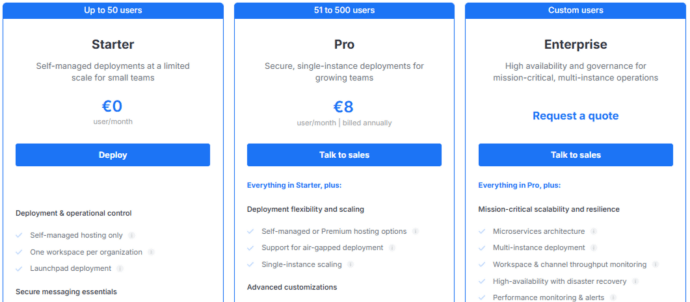
Rocket.Chat bills for active users rather than total accounts. With 100 registered accounts but 50 monthly active people, you’re charged for 50. Self-hosted setups involve upfront licensing with annual renewals, eliminating per-minute video charges.
Slack Cost Structure:
- Free Tier: Basic capabilities, 90-day message retention, 10 integration limit, two-person video
- Pro Tier: $7.25 monthly per user (yearly commitment) – full message history, multi-person video
- Business+ Tier: $15 monthly per user (yearly commitment) – security upgrades, compliance tools, guaranteed 99.99% availability
- Enterprise Grid: Custom quotes (500+ users, advanced administration, unlimited workspace creation)
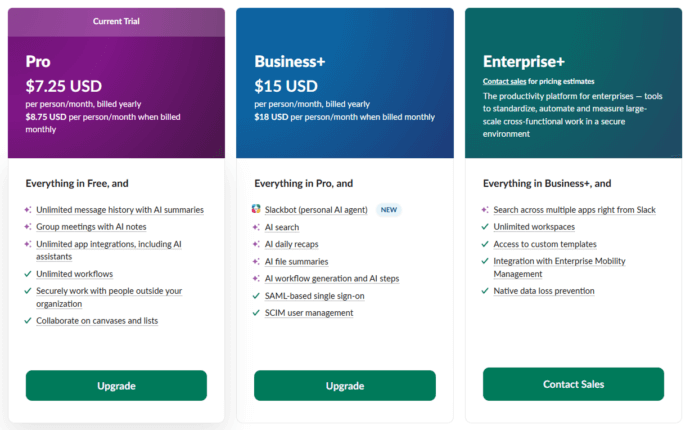
Slack requires minimum three-user billing even for smaller teams. Two-person operations pay for three licenses. Costs jump substantially moving from Pro to Business+ when accessing features like SAML authentication and uptime guarantees. Monthly payment adds roughly 17% compared to annual plans.
Try TrueConf Server Free!
- 1,000 online users with the ability to chat and make one-on-one video calls.
- 10 PRO users with the ability to participate in group video conferences.
- One SIP/H.323/RTSP connection for interoperability with corporate PBX and SIP/H.323 endpoints.
- One guest connection to invite a non-authenticated user via link to your meetings.

Rocket.Chat vs Slack Messaging Features
Both platforms cover messaging fundamentals competently, but distinctions emerge under closer examination.
Rocket.Chat Messaging Advantages:
- Discussion threading maintains organization without channel clutter
- Live translation across 50+ languages bridges international teams
- Markdown formatting support (though some prefer visual editors)
- Room customization through CSS and JavaScript for specialized needs
- Omnichannel consolidation: WhatsApp, SMS, email, web chat in one place
- Message retention controls enable admin-defined lifecycle policies
Rocket.Chat excels where complex channel management matters. Government departments create announcement-only broadcast channels, access-restricted private spaces for sensitive material, and open channels for general teamwork. The audit system records every message, modification, and removal for compliance tracking.
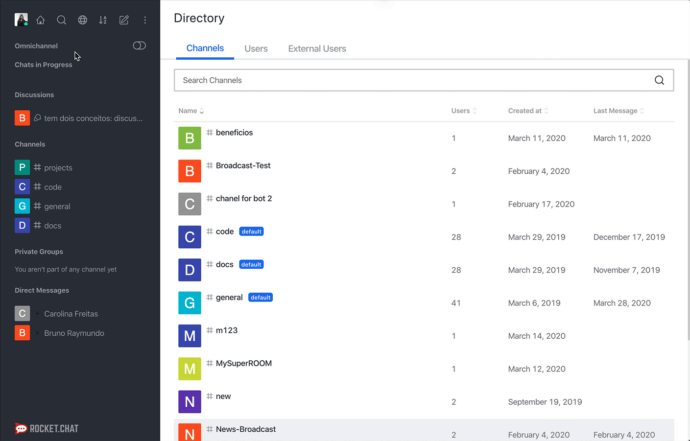
Some users note inconsistent notifications – new message alerts don’t always trigger reliably. Search works but occasionally delivers unexpected matches rather than precise keyword results.
Slack Messaging Advantages:
- Clear channel structure with hashtag naming and simple navigation
- Visual formatting editor requiring no markup language knowledge
- Robust search indexing messages, files, conversations with detailed filters
- Huddles enable quick audio/video without formal meeting scheduling
- Clips support asynchronous video when synchronous meetings fail
- Workflow Builder automates repetitive tasks without coding
Slack’s interface appears polished and intuitive to most people, shortening learning curves. Starring key messages, setting personalized reminders, and embedding bots into conversations smooths daily operations.
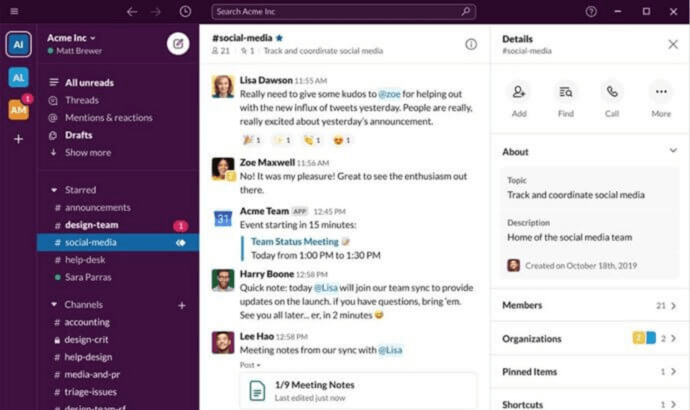
The catch? Slack’s free version limits searchable history to 90 days, with older content vanishing entirely (since August 2024, year-old content deletes permanently on rolling schedules). Teams referencing historical decisions or requiring long-term archives face quick pushes toward paid subscriptions.
Looking for More Than Just Chat? Discover TrueConf
While Rocket.Chat and Slack handle text collaboration well, teams often discover they need powerful video integrated with their messaging. Jumping between a chat application and separate video software breaks conversation flow and burns time.
TrueConf provides unified operations:
- Launch ultra HD video conferences from any group conversation instantly
- Skip separate meeting software or link sharing
- Support 1,500 people with 49 concurrent video streams visible
- Integrated AI: automated transcripts, meeting digests, background noise removal, virtual environments
- Your infrastructure houses everything – zero external cloud dependencies
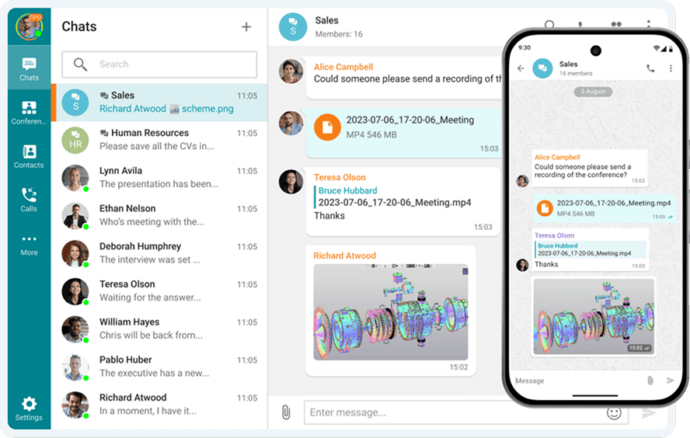
Picture this: Your engineering team debugs a tricky issue in a channel. As complexity grows, someone recognizes a brief video discussion would clarify faster than endless typing. With TrueConf, one click transitions the entire group into video – identical interface, continuous conversation thread, complete simplicity.
When the meeting wraps, discussion resumes in the same chat space. AI-produced meeting summaries post automatically, keeping everyone synchronized regardless of attendance. No application switching, no disconnected tools, no missing context.
Self-Hosted Team Messenger with Video Conferencing
A cutting-edge team collaboration server with personal and group chats, UltraHD video conferences, and advanced AI-powered features — free for up to 1,000 users!
Rocket.Chat vs Slack Integrations
Contemporary teams depend on numerous specialized tools, requiring messaging platforms to connect with broader ecosystems. Here’s how Rocket.Chat and Slack approach integrations.
Rocket.Chat Integration Approach:
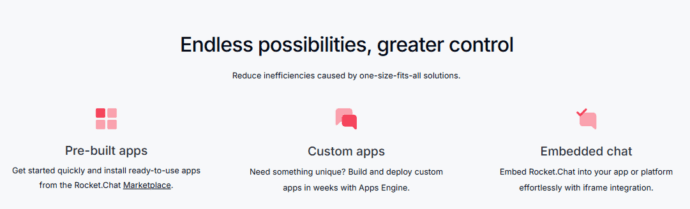
Rocket.Chat embraces open integration philosophy, providing multiple connection pathways for external services:
Built-in Connections: The Rocket.Chat Marketplace provides ready-made applications for common services like Jira, GitHub, Trello, Google Calendar, and Bitbucket. Setup generally requires minutes through administrative controls with minimal configuration.
Webhook Mechanisms: Incoming webhooks enable external services posting messages to channels automatically. When your continuous integration pipeline finishes builds, it notifies development channels directly. Outgoing webhooks activate actions in external systems when Rocket.Chat events occur, like ticket creation when someone mentions “@support.”
Automation Platform Bridges: Through Zapier, Integrately, Albato, and n8n, Rocket.Chat links to 5,000+ applications. Sales departments automatically post Salesforce opportunity updates to channels, marketing shares new HubSpot leads, and HR announces new BambooHR hires.
APIs and Development Kits: Comprehensive REST APIs and websocket support enable custom connections. Development teams have created everything from conversational bots to sophisticated workflow automation. The Apps Engine framework supplies pre-built components for Rocket.Chat application development using standard programming languages.
The flexibility carries a consideration – advanced integrations might demand technical knowledge. While basic webhook configurations are straightforward, complex scenarios often need developer participation.
Slack Integration Approach:
Slack’s integration marketplace represents a major competitive strength:
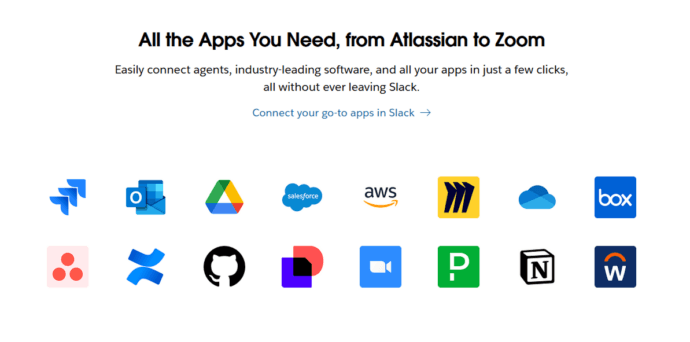
Extensive Application Library: With 2,600+ applications in Slack’s Marketplace, integrations exist for practically any mainstream business tool. Project management (Asana, Monday.com, ClickUp), customer service (Zendesk, Freshdesk), sales systems (Salesforce, HubSpot), development platforms (GitHub, GitLab, Jenkins), and numerous others connect smoothly.
No-Code Workflow Creation: For teams lacking developers, Workflow Builder offers automation without programming. Build multi-step processes triggered by channel activities, scheduled timing, or webhook events. Simple illustration: when someone posts in #feature-requests, Workflow Builder sends them a form, gathers their feedback, and routes it to product teams automatically.
Development Platform and Bot Framework: Slack’s platform delivers robust capabilities for custom application and bot creation. The Bolt framework (supporting Python, JavaScript, and Java) manages authentication, event processing, and API communication. Large organizations frequently build internal applications tailored to proprietary processes.
AI-Enhanced Capabilities: Recent Slack releases integrate AI more thoroughly. Slack AI summarizes extended conversations, produces meeting recaps, and translates messages. Agentforce and partner AI applications deploy into Slack channels, powering automated common question responses.
The constraint? Integration availability depends on subscription tier. Free plans restrict you to 10 total application integrations – reaching that limit requires removing existing integrations before adding new ones. Pro and Business+ tiers eliminate this cap, meaning increased monthly expenses for growing organizations.
Making Your Decision: Which Platform Fits Your Team?
Pick Rocket.Chat when:
- You require complete source code and deployment environment control
- Your team possesses technical skills managing self-hosted infrastructure
- Regulatory compliance demands data sovereignty and network-isolated deployments
- You want extensive customization freedom without vendor limitations
- Budget considerations favor one-time licensing over continuous subscriptions
Pick Slack when:
- You want fully managed cloud solutions with zero infrastructure responsibilities
- Your team prizes polish, usability, and established user experience
- You depend heavily on third-party application integrations from extensive marketplaces
- You accept subscription pricing scaling with team growth
- Your data location requirements permit cloud-based storage
Pick TrueConf when:
- You need professional video conferencing smoothly integrated with messaging
- Security and data control represent non-negotiable requirements
- Your organization wants self-hosted infrastructure avoiding cloud dependencies
- You prefer concurrent user licensing scaling more affordably than per-seat models
- Your team needs supporting 100+ participants in high-quality video meetings regularly
- You want lifetime licensing alternatives to perpetual subscriptions
Your Messages Are Secure with TrueConf!
A powerful self-hosted video conferencing solution for up to 1,000 users, available on desktop, mobile, and room systems. Your confidential information is protected by 12 levels of security.
Reality shows many organizations discover evolving needs over time. What begins as simple team messaging eventually requires robust video capabilities, tighter security controls, and improved cost management. Rather than stacking multiple tools together, TrueConf provides an integrated foundation growing with your organization.
FAQ
Can we host our team messaging and video meetings entirely on a private network without using the cloud?
Yes, if data sovereignty is a priority, you can deploy a self-hosted solution that keeps all communications within your own infrastructure. TrueConf allows you to run both your team messenger and video conferencing entirely on-premises or within an isolated LAN/VPN. This ensures that no sensitive corporate data or chat archives ever leave your secure network perimeter.
How does the video calling experience in TrueConf compare to Slack Huddles or Rocket.Chat’s standard audio/video?
While Slack Huddles are designed for quick, lightweight audio chats and Rocket.Chat offers standard video, TrueConf provides broadcast-quality, Ultra HD video conferencing directly integrated into the chat interface. You can instantly transition a group conversation into a high-definition video meeting with up to 1,500 participants without switching applications. This makes TrueConf ideal for organizations that need professional, large-scale video collaboration alongside their daily messaging.
Do we have to pay extra for unlimited message history and chat archives?
Many cloud-based platforms restrict message history on their free or lower tiers, forcing you to pay more as your archives grow. With a self-hosted platform like TrueConf, you maintain complete ownership of your data with no limits on chat archives or message retention. You can store and search your entire communication history indefinitely without worrying about per-user storage fees or data deletion policies.
Can we integrate our existing physical conference room hardware with our new team communication platform?
Unlike cloud-only messengers that often require proprietary hardware ecosystems, enterprise platforms prioritize interoperability with your existing IT infrastructure. TrueConf natively supports standard SIP and H.323 protocols, allowing you to seamlessly connect your software to legacy Polycom, Cisco, or other AV room systems. This means you can upgrade your team’s digital collaboration without having to rip and replace your expensive physical hardware investments.
How does TrueConf’s pricing model help reduce costs as our company scales to hundreds of users?
Traditional cloud platforms charge a monthly subscription for every single registered user, which leads to rapidly scaling expenses as your headcount grows. TrueConf utilizes a more cost-effective concurrent user licensing model, meaning you only pay for the maximum number of simultaneous participants rather than total accounts. Additionally, TrueConf offers perpetual lifetime licensing options, providing predictable long-term savings compared to endless monthly subscriptions.
Do external clients or partners need to download a specific app to join our video meetings?
Requiring external guests to register and download software can create friction and delay important business discussions. To eliminate this barrier, TrueConf allows unauthenticated participants to join video conferences directly through a standard web browser using a secure link. This ensures a smooth, professional collaboration experience for external stakeholders while keeping your core self-hosted infrastructure completely secure.
About the Author
Olga Afonina is a technology writer and industry expert specializing in video conferencing solutions and collaboration software. At TrueConf, she focuses on exploring the latest trends in collaboration technologies and providing businesses with practical insights into effective workplace communication. Drawing on her background in content development and industry research, Olga writes articles and reviews that help readers better understand the benefits of enterprise-grade communication.


Follow us on social networks