
Best Free Instant Messaging Apps for Business

Updated July 2026
What Are Instant Messaging Apps for Business?
Business messaging (or instant messaging) is a text-based or real-time messaging service that is specifically designed for business and workplace communication. Ideal for remote, hybrid, or in-office work environments, a business messaging app allows an organization to easily interact with colleagues in a chat message or a group message, share files, and communicate face-to-face.
Business messaging tools are more secure than consumer-grade apps and provide the control and flexibility required by enterprise IT teams. The level of functionality varies among platforms, but even free business messaging apps offer features like video conferencing, virtual meeting rooms, and screen sharing. They are also usually easy to set up, as in the case of Slack and Teams, and require no special equipment or software installation.
Most business messaging apps are free to use, though premium versions offer additional features and storage space. The best business messaging apps provide all the features of a unified communications system combined with the real-time communication capacities of a business messaging tool. This size typically delivers the simplest management of all messaging services in the organization.
Self-Hosted Team Messenger with Video Conferencing
A cutting-edge team collaboration server with personal and group chats, UltraHD video conferences, and advanced AI-powered features — free for up to 1,000 users!
Overview: 10 best instant messaging apps for business in 2026
|
Tool |
Best For |
Free Plan |
Paid |
Deployment |
Standout Feature |
|---|---|---|---|---|---|
|
TrueConf |
Enterprises, government, air-gapped |
Free forever; unlimited accounts; up to 10 participants/conference |
Quote-based |
On-premises / Cloud |
Self-hosted control + 4K video |
|
Slack |
Integrations-heavy tech teams |
Yes (90-day history limit) |
$8.75/user/mo |
Cloud |
2,600+ app integrations |
|
Microsoft Teams |
Microsoft 365 organizations |
Yes |
$4/user/mo |
Cloud / Hybrid |
Deep Office 365 integration |
|
Google Chat |
Google Workspace users |
Yes |
$7/user/mo |
Cloud |
Seamless Workspace embedding |
|
Mattermost |
DevOps, defense, regulated sectors |
Yes (self-hosted) |
$10/user/mo |
On-premises / Cloud |
Open-source, air-gapped support |
|
Rocket.Chat |
Security-first teams |
Yes (50-user limit) |
Custom |
On-premises / Cloud |
Granular encryption controls |
|
Chanty |
Small teams, task management |
Yes (5-user limit) |
$3/user/mo |
Cloud |
Built-in Kanban task board |
|
Twist |
Async-first distributed teams |
Yes |
$6/user/mo |
Cloud |
Thread-based, no real-time pressure |
|
Zoho Cliq |
Teams within the Zoho ecosystem |
Yes |
Custom |
Cloud |
Deep Zoho CRM/Projects integration |
|
Cisco Webex |
Enterprises with telephony needs |
Yes |
Custom |
Cloud / On-premises |
Unified messaging + calling + AI |
1. TrueConf — best for self-hosted, secure enterprise communication

TrueConf is a self-hosted unified communications platform designed for organizations where IT security is the main constraint. It comes with video conferencing, team messaging, and collaboration tools in one single solution that sits physically on your premises and can be isolated from the internet if required.
When I set up the trial of TrueConf Server, it was immediately clear that this is a completely different experience to cloud-first applications. There is no sign-up form, no vendor account, and no data leaving your network. It’s all within your on-prem admin console and you have control right out of the gate. With most team messaging apps, secure deployment is when you reach the relevant settings page, but for TrueConf, the deployment is the definition of security.
Security isn’t a feature here, it’s the whole product. I could kill the network connection and everything carried on working — messaging, video, file sharing — because all that data stays inside your network. That kind of resilience is unusual in this marketplace. Most similar solutions would crumble without the cloud as their crutch.
The platform supports personal and group chats with message editing, replies, forwarding, mentions, and emoji reactions. The paid plan scales video conferencing to 2,000 participants with 4K UltraHD quality, screen sharing, remote desktop control, whiteboard collaboration, and meeting recording included. The server is licensed according to active users without any cap on registered accounts.
TrueConf Server Free is permanently free — no trial expiration, no credit card required. The free tier allows unlimited registered accounts, supports up to 1,000 users for calls and team messaging, and hosts group conferences with up to 10 participants per session. It includes 1 SIP/H.323 connection and 1 guest slot for public web conferences. The license renews annually through TrueConf’s website at no cost. For organizations in education, healthcare, or non-profits, TrueConf also offers up to 50% off paid server licenses.
Try TrueConf Server Free!
- 1,000 online users with the ability to chat and make one-on-one video calls.
- 10 PRO users with the ability to participate in group video conferences.
- One SIP/H.323/RTSP connection for interoperability with corporate PBX and SIP/H.323 endpoints.
- One guest connection to invite a non-authenticated user via link to your meetings.

Cross-platform coverage is complete: Windows, macOS, Linux, Android, iOS, Android TV, and web browser clients are all native and consistent. LDAP/Active Directory integration, SIP/H.323 compatibility, and a comprehensive API layer make TrueConf fit naturally into existing enterprise IT environments without requiring parallel infrastructure.
Strengths:
- Full on-premises and air-gapped deployment — works offline with zero internet dependency
- 4K UltraHD video conferencing for up to 2,000 participants on paid plans
- Free forever plan: unlimited accounts, up to 1,000 users for calls and messaging, up to 10 participants/conference
- End-to-end encryption with granular admin controls and full audit logging
- Native clients on every major OS including Linux and Android TV
- SIP/H.323 compatibility with existing hardware video endpoints
- Up to 50% discount for education, healthcare, and non-profit organizations
Limitations:
- Free plan caps group conferences at 10 participants — sufficient for small teams, limiting for larger ones
- Requires dedicated IT resources for initial setup and ongoing server maintenance
- Offline activation is only available on the paid version; the free license requires an internet connection for initial activation
Best For:
Government agencies, defense organizations, and public-sector institutions. Healthcare, legal, and financial firms with strict compliance and data residency obligations. Enterprises requiring complete control over communications infrastructure. Teams operating in secure, offline, or air-gapped environments. Small teams that want a self-hosted, permanently free solution with room to grow.
Kudremukh Iron Ore Limited (KIOCL)|Case Study
KIOCL provided their employees with secure tools for collaboration, video calls, and team messaging by implementing TrueConf Server. An autonomous system unified more than 1,000 employees allowing to facilitate work meetings in hybrid and online modes from any location.

2. Slack — best for extensive integrations
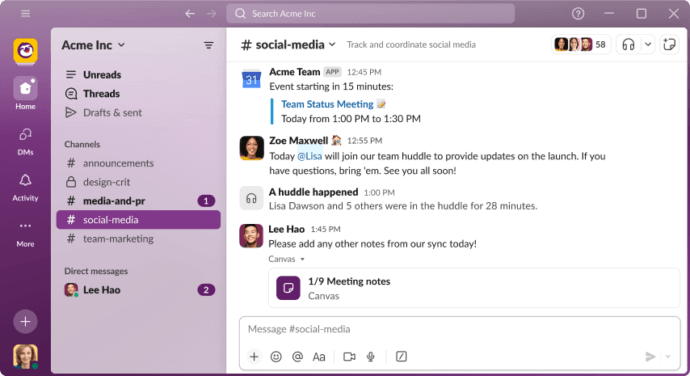
Slack remains the most recognized name in business messaging and has earned that position through relentless product iteration. It standardized channel-based communication for modern teams and built an ecosystem of over 2,600 third-party integrations that no competitor has matched in breadth.
When we tested Slack in a project-heavy team context, the integration marketplace was the most obvious differentiator. We were set up, integrated with GitHub, Jira, Salesforce, and Google Calendar in less than 20 minutes — though how well your messaging tool connects with a CRM depends heavily on which platform you choose, since not all CRMs offer the same depth of native Slack integration. Automated notifications from the various integrated tools flowed directly into the appropriate channels, and I found my exposure to their respective dashboards decreased to almost nothing; I was simply reading Slack. Information overload was reduced.
The integration marketplace is Slack’s strongest differentiator, but it comes with a real noise problem. Left unmanaged, the same integrations that reduce context switching can turn channels into alert dumps. I found that Slack almost requires a deliberate notification management strategy from day one — which not every team is ready for.
Slack organizes communication through public and private channels, direct messages, and Slack Connect for external communication with partners and clients. Huddles enable lightweight audio and video calls. Clips support asynchronous video messaging. Workflow Builder adds no-code automation — I used it to build a daily standup prompt that posted to a channel and collected responses without a single meeting.
The free plan carries a significant constraint: message history is limited to 90 days. When I hit that wall during testing, I had lost three months of documented decisions and had no way to recover them. For teams that rely on searchable archives as institutional knowledge, this becomes a forcing function toward paid plans sooner than expected.
Strengths:
- Industry-leading integration ecosystem with 2,600+ apps
- Organized communication via channels, threads, and direct messages
- Huddles for quick audio/video calls; Clips for async video messaging
- No-code Workflow Builder for process automation
- Slack Connect enables structured external collaboration
- Consistent, polished interface across all major platforms
Limitations:
- 90-day message history limit on the free plan — a critical and often underestimated constraint
- Can become notification-heavy without deliberate channel and alert management
- Advanced features require onboarding investment to use effectively at scale
Best For:
Remote and hybrid teams that rely heavily on integrating multiple tools daily. Technology companies with complex developer toolchain requirements. Project teams that benefit from workflow automation built around structured channels.
3. Microsoft Teams — best for Microsoft 365 users
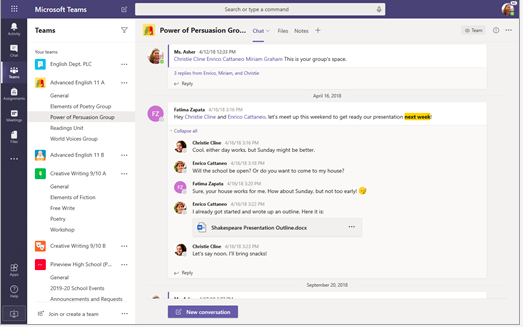
Microsoft Teams is the go-to team collaboration platform for organizations that have standardized on Microsoft 365. By integrating closely with the Office suite, it provides access to Word, Excel, SharePoint, and OneNote within a single environment, creating a connected workflow for organizations already using Microsoft products.
From our perspective as the owner of a simulated mid-sized enterprise team, working with files in SharePoint was simple. Project files were available directly through the Files tab in each team channel and were automatically updated and versioned in the SharePoint library. The SAML-based SSO configuration through Azure also worked without requiring additional adjustments.
For people who have used Office applications throughout most of their professional lives, interacting with Microsoft Teams feels familiar. Microsoft brings files, applications, meetings, and conversations into one interface. The trade-off is that these benefits are most apparent when the organization relies almost exclusively on Microsoft software.
With AI-driven meeting summaries and real-time transcription, Microsoft Copilot remains an important part of the Teams feature set. However, because Teams serves as the primary interface for many Microsoft 365 services, the application becomes busy quickly. In large organizations with years of conversations, files, applications, and activity, the reverse-chronological stream can become difficult to navigate.
With multiple menus and chat panels reducing the available workspace, Teams can feel crowded on a 1366 × 768 display. During testing, we sometimes had to move between the workspace navigation, chat or channel view, and conversation history repeatedly to locate the correct discussion.
Strengths:
- Extensive feature set covering most enterprise collaboration requirements
- High-quality video and audio conferencing with AI-assisted presentation tools
- End-to-end document and task workflows through SharePoint
- AI-driven meeting summaries and transcription through Copilot
- Live video transcription and translation
Limitations:
- Pricing has increased since the rapid adoption period that began in 2020, and Teams may be priced separately from Microsoft 365 in some cases
- The interface can be overwhelming for organizations that do not need the complete feature set
- Some individual features are less refined than equivalent functions in specialized products
Best For:
Organizations where Microsoft 365 is the central software environment. Companies using Word, Excel, SharePoint, OneDrive, and other Microsoft business applications. Large enterprises with dedicated IT departments and organizations that consider Microsoft a key strategic technology supplier.
Organizations fully standardized on Microsoft 365. Enterprises requiring integrated telephony, video, and document collaboration. Large IT departments managing centralized user provisioning via Azure Active Directory.
4. Google Chat — best for Google Workspace users
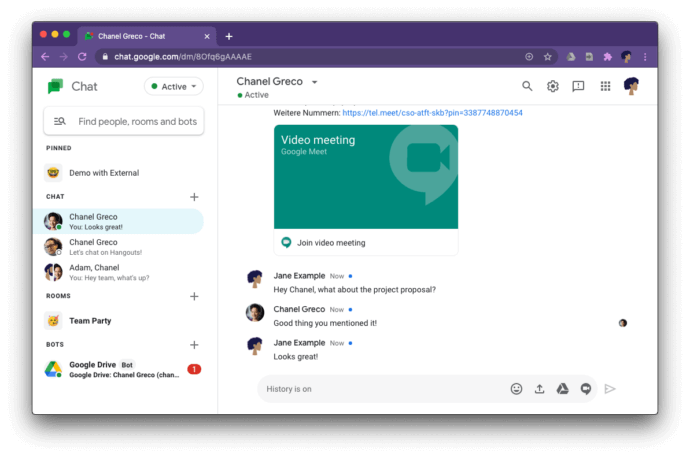
Google Chat is the messaging layer of Google Workspace — functional, well-integrated, and deliberately unobtrusive. It shares the familiar Gmail interface pattern and is built for teams that already live inside Google’s productivity suite.
My honest first impression was: this tool gets out of the way. There is very little to configure, very little to explain to new users, and very little friction if your team is already in Gmail, Drive, and Docs. I set up a workspace, created a few Spaces, and pinned relevant Google Docs to them — the whole thing took about ten minutes and felt natural rather than forced.
Google Chat’s greatest strength is also its most honest limitation: it is excellent inside Google, and noticeably average outside it. When I tried to use it as a standalone messenger for a mixed-stack team — some members on Microsoft tools, others on Atlassian — the experience was thin. The integrations for non-Google tools are basic, and the interface offers little to draw users in if they are not already motivated by Workspace access.
Gemini AI integration brings smart replies, conversation summaries, and missed message recaps — features I found genuinely useful for catching up after time away. Spaces can be organized by topic or project with threaded replies keeping conversations focused.
Strengths:
- Seamless embedding within Google Workspace — Docs, Drive, Meet, and Calendar all connect natively
- Gemini AI for smart replies, conversation summaries, and catch-up recaps
- Organized Spaces with threaded conversations and solid message search
- Included at no extra cost with Google Workspace subscriptions
- Clean, familiar interface with minimal onboarding required
Limitations:
- Limited utility and integration depth outside the Google Workspace ecosystem
- Third-party integrations are basic compared to Slack or Microsoft Teams
- As a standalone messenger for mixed-stack teams, it underperforms
Best For:
Organizations fully committed to Google Workspace. Teams needing lightweight, low-overhead messaging tightly integrated with Google tools. Companies seeking AI-augmented communication within a familiar, low-friction environment.
5. Mattermost — best for open-source and air-gapped deployment
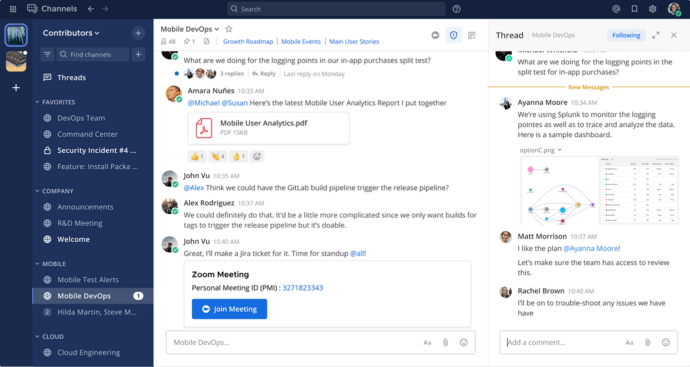
Mattermost is an open-source, self-managed collaboration platform built for teams that refuse to compromise on privacy, security, or extensibility. It is the platform of choice for DevOps teams, defense contractors, and government agencies that need full infrastructure ownership combined with developer-friendly customization.
When I set up Mattermost on a local server, the first thing I noticed was how much control the admin console offered — user provisioning, permission tiers, custom roles, webhook configuration, and plugin management all from a single interface. For a technical team comfortable with infrastructure, this level of configurability is genuinely powerful. For a non-technical administrator, it is a steep climb.
Open-source is not a positioning statement for Mattermost — it is the product philosophy, and you feel it in every interaction. I could inspect exactly what the server was doing with my data, which is not something you can say about any SaaS tool regardless of their privacy claims.
Playbooks add structured workflow automation: runbooks for incident response, compliance checklists, and repeatable project templates. GitHub, GitLab, and Jira integrations are native and deep — I connected a GitLab instance and had merge request notifications flowing into channels within minutes. Air-gapped deployment means Mattermost can operate on a fully isolated network with no internet dependency whatsoever. The interface can feel dense compared to polished SaaS alternatives — that is the inherent trade-off: maximum control in exchange for maximum polish.
Strengths:
- Fully open-source with auditable codebase — no trust-me-it’s-secure black boxes
- Air-gapped and on-premises deployment for maximum data sovereignty
- Playbooks for structured incident response and repeatable workflow automation
- Deep DevOps integrations: GitHub, GitLab, Jenkins, Jira
- Enterprise-grade E2EE, MFA, and full audit logging
- Self-hosted free community edition with no user cap
Limitations:
- Requires technical expertise for setup, maintenance, and customization
- Native video calling is not available — requires a third-party plugin
- Interface is functional but noticeably less polished than consumer-grade SaaS alternatives
Best For:
DevOps, engineering, and security operations teams. Defense, intelligence, and government organizations requiring air-gapped deployment. Enterprises that need open-source transparency and full code auditability.
💡 Insight — Free Plan Math: What “Free” Actually Costs You
The messaging platforms on this list all offer free tiers, but their constraints differ dramatically. Slack limits message history to 90 days — your searchable archive disappears on a rolling basis. Chanty caps the free plan at 5 users. Rocket.Chat’s free tier tops out at 50 users. TrueConf Server Free, by contrast, allows unlimited registered accounts and supports up to 1,000 users for calls and messaging — permanently free, renewed annually at no cost — though group video conferences are capped at 10 participants per session on the free tier. Mattermost’s community edition imposes no user cap and retains full history, but requires you to run your own server. Before committing to any free plan, calculate the realistic cost of the first paid tier you’d hit — and how quickly based on your team’s actual growth rate.
6. Rocket.Chat — best for teams with high data protection standards
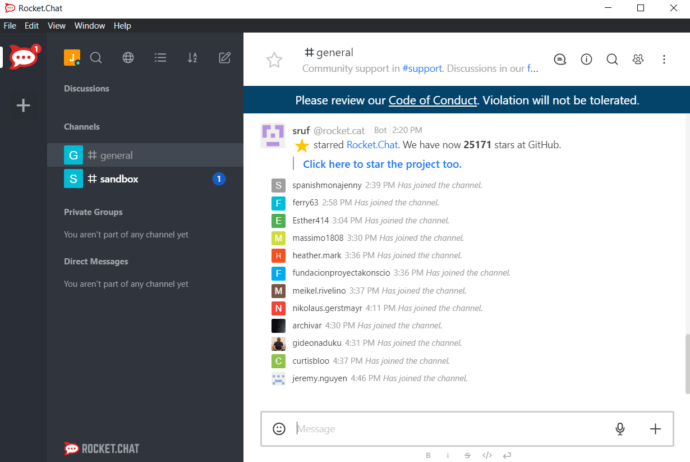
Rocket.Chat is an open-source team communication platform engineered for organizations that handle sensitive data and require total control over how it is stored, accessed, and encrypted. It is purpose-built for security-first environments in finance, healthcare, government, and defense.
The first thing I tested when setting up Rocket.Chat was its encryption controls — specifically, whether granular role-based encryption was actually configurable or just documented in theory. It was real. I set different encryption policies for different user groups, applied room-level encryption passwords, and verified that the audit log captured each change. That kind of administrative depth is genuinely hard to find in mainstream messaging tools.
Rocket.Chat’s security architecture is the product, not just a feature set. During testing, I was more impressed by the security controls than by the communication features themselves — which is exactly the right priority ordering for its target audience.
The platform covers real-time messaging, native voice calls, file sharing, screen sharing, and video calls via integrations. Omnichannel capabilities allow external customer communication through the same interface as internal team messaging — a unique feature I found compelling for customer-facing teams that need to keep external/internal communication in one governed environment. Setup is significantly more involved than any SaaS tool on this list. The free plan is limited to 50 users.
Strengths:
- Robust self-hosted, private cloud, and air-gapped deployment options
- Granular encryption: role-based policies, room-level encryption passwords, centralized identity management
- Fully open-source with an active and security-focused developer community
- Omnichannel support — internal team chat and external customer messaging on one platform
- AI-powered workflow automation and a growing integration marketplace
Limitations:
- Setup is complex — meaningfully more involved than any SaaS alternative I tested
- Free plan capped at 50 users
- Native video conferencing requires a third-party integration
Best For:
Security-first organizations in finance, healthcare, and government. Teams handling confidential client data that cannot be stored on third-party cloud infrastructure. Companies needing both internal team messaging and external customer communication in one governed platform.
7. Chanty — best for teams prioritizing task management
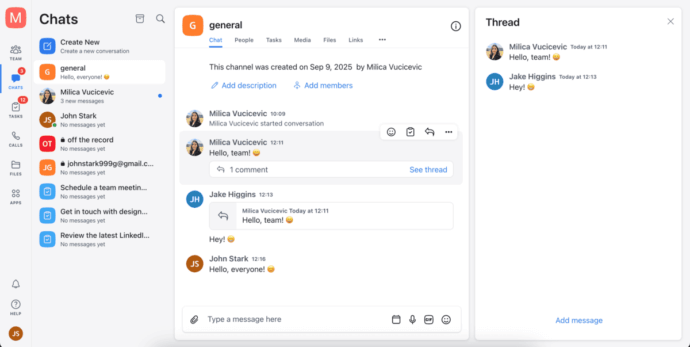
Chanty is a team messaging and task management platform aimed squarely at small and mid-sized teams that want to consolidate communication and project tracking without managing multiple tools. Its Kanban-style task board, built directly into the interface, is the feature that genuinely sets it apart from pure-play messaging apps.
I tried an experiment when testing Chanty: I ran a full week of project coordination using only Chanty — no Trello, no Asana, no separate task tracker. The built-in task management held up better than I expected. Converting a message to a task was a single click, assigning it to a team member took two more, and the Kanban board gave a clean visual overview of what was in progress. For a five-to-ten-person team, that is genuinely enough.
The “Teambook” is Chanty’s most underrated feature. It functions as a central hub for all team content — conversations, tasks, members, and shared files — organized in one navigable space. I used it as a daily dashboard and found it faster to orient myself than in either Slack or Teams, where the same information is scattered across multiple navigation areas.
Audio messages are a surprisingly useful touch — I recorded quick updates instead of typing them out, which saved time in async situations. The free plan includes unlimited message history, which puts it ahead of Slack on a critical metric. The ceiling, however, is the five-user cap on the free plan — a hard limit that most teams outgrow within months.
Strengths:
- Built-in Kanban task management with one-click message-to-task conversion
- Unlimited message history on the free plan
- Teambook hub centralizes conversations, tasks, members, and files
- Audio messaging and voice/video calls included
- Clean interface with fast, low-friction onboarding
- Affordable paid plans at $3/user/month
Limitations:
- Free plan capped at 5 users — most teams hit this ceiling quickly
- Integration ecosystem is limited compared to Slack or Microsoft Teams
- Advanced video calling and permission controls require a paid plan
Best For:
Small teams and startups wanting messaging plus task tracking in one tool. Agile teams running sprints who want to track work without adopting a separate project management platform.
8. Twist — best for async-first distributed teams
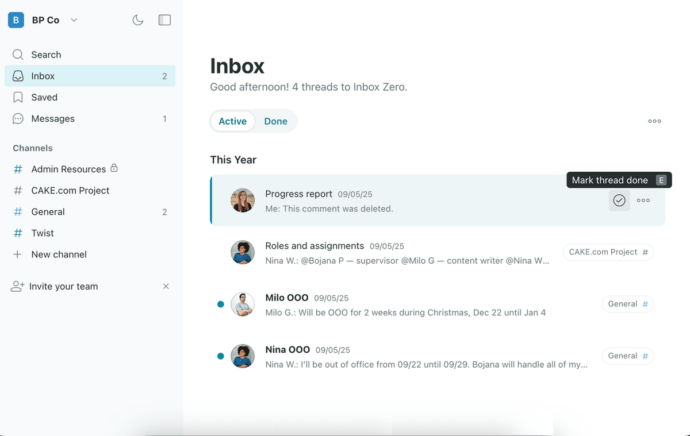
Twist is an async-first team communication platform built by Doist — the makers of Todoist. Its core philosophy is a direct rejection of the always-on notification culture that defines Slack and Teams. In Twist, there is no expectation of immediate reply. That is not a limitation — it is intentional product design.
I have to be honest about how I approached testing Twist: I went in skeptical. My default assumption was that removing real-time urgency from messaging would just mean things took longer. After two weeks of using it as my primary communication tool, I changed my mind. The shift in mental load was real and measurable — I was not checking the app compulsively because the app was not designed to trigger that behavior.
What Twist gets right is something almost no other group chat for work attempts: it makes communication feel like writing, not like reacting. Because each thread is organized around a single topic with no implied urgency, I found myself composing more considered messages — and receiving the same in return. The conversation quality went up. The message volume went down.
All communication is organized into threads within channels, each focused on a single topic. This prevents the conversational sprawl that buries important information in high-volume messaging apps. Integrations with Todoist, GitHub, and Zapier connect Twist to existing workflows without requiring you to rebuild around it.
Strengths:
- Thread-first design eliminates notification noise and preserves conversation context
- Explicitly async — no implied urgency, no always-on expectation
- Clean, distraction-free interface that rewards considered communication
- Strong channel and thread organization — nothing gets lost in scroll
- Available on web, desktop, and mobile with consistent cross-platform performance
Limitations:
- Not designed for real-time communication, urgent decisions, or quick back-and-forth
- No native video conferencing — calls require external tools
- Requires genuine cultural buy-in — teams that cling to instant-reply norms will find it frustrating
Best For:
Distributed teams across multiple time zones where async communication is a strategic choice. Organizations actively trying to reduce meeting frequency and protect deep-work time. Knowledge workers who need clean, searchable communication archives without real-time pressure.
9. Zoho Cliq — best for teams within the Zoho ecosystem

Zoho Cliq is the messaging component of the Zoho business suite — a comprehensive platform covering CRM, project management, email, HR, accounting, and more. For organizations already running on Zoho, Cliq is the natural internal communications layer.
When I tested Cliq alongside Zoho CRM and Zoho Projects simultaneously, the integration depth was immediately apparent. CRM deal updates surfaced in a dedicated channel without any configuration, and task status changes in Projects triggered automatic notifications to the relevant team space. If you are already in the Zoho ecosystem, this kind of cross-product visibility is a real operational advantage that takes real effort to replicate with any other combination of tools.
The Zoho ecosystem is Cliq’s greatest asset and its most significant constraint. Outside of it, Cliq is a competent but unremarkable messaging tool. Inside it, Cliq becomes a genuine communication hub that ties CRM data, project timelines, and team conversations into one navigable surface. The value scales directly with how much of Zoho your organization uses.
Configurable bots and custom commands automate repetitive actions across Zoho tools, reducing context switching for embedded teams. Enterprise-grade encryption protects all communications. The interface is clean and responsive across web, desktop, and mobile.
Strengths:
- Deep integration with Zoho CRM, Projects, Mail, and the broader Zoho One suite
- Configurable bots and custom commands for workflow automation across Zoho products
- Enterprise-grade encryption and access controls
- Task assignment and tracking within conversations without switching to a separate tool
- Cross-platform: web, desktop, and mobile with consistent performance
Limitations:
- Limited differentiation and integration depth outside the Zoho ecosystem
- Third-party integration marketplace is smaller than Slack or Microsoft Teams
- Some external integrations require manual configuration rather than one-click setup
Best For:
Organizations running Zoho One or multiple Zoho products as their core business stack. Teams wanting messaging tightly coupled with CRM pipeline data and project status. Companies seeking a cost-effective unified suite without adopting multiple competing vendors.
10. Cisco Webex — best for enterprises needing unified communications
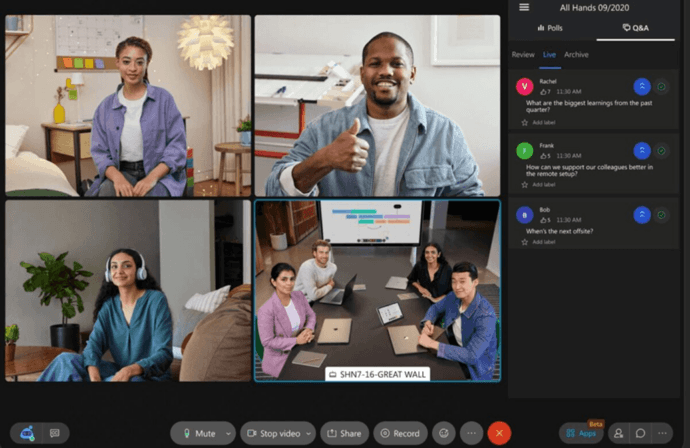
Cisco Webex is a full-stack enterprise collaboration and communication platform combining messaging, video conferencing, telephony, and AI-enhanced productivity features in a single interface. It is built for large organizations that need unified communications infrastructure, not just a chat tool.
Setting up Webex for an enterprise scenario took more time than any other tool I tested — but the depth of what I found inside justified it. The real-time AI translation feature was the most impressive: I ran a simulated multilingual meeting with participants in different language settings and the translation held up well enough to be operationally useful. The noise cancellation during calls was among the best I experienced across all ten platforms.
Webex is the only tool on this list where telephony feels like a first-class citizen rather than an afterthought. The calling infrastructure, call routing, and voicemail capabilities reflect decades of enterprise telephony experience. For organizations that genuinely need voice alongside team messaging and video, that depth is not replicated by any pure-play messaging app.
Webex organizes collaboration into Teams and Spaces — persistent environments where project groups communicate, share files, hold meetings, and co-create on digital whiteboards. AI video conferencing features include automated transcription, smart meeting summaries, and real-time translation. Native integration with Microsoft Teams enables cross-platform interoperability for enterprises running mixed communication environments — a practical feature that I tested and confirmed works reliably for meeting joins and basic messaging federation.
Strengths:
- Unified messaging, video conferencing, and telephony on a single platform
- AI translation, transcription, noise cancellation, and automated meeting summaries
- Structured Teams and Spaces with digital whiteboarding and co-annotation
- Native Microsoft Teams interoperability for mixed-platform enterprise environments
- Strong enterprise compliance certifications and encryption standards
Limitations:
- Setup and administration are significantly more complex than consumer-grade alternatives
- Cost can be substantial for organizations not already in the Cisco ecosystem
- Feature breadth can overwhelm smaller teams that only need messaging
Best For:
Large enterprises requiring unified communications across messaging, video, and telephony. Organizations in regulated industries needing certified compliance and encryption. Companies running hybrid Microsoft and Cisco environments who need cross-platform federation.
Instant Messaging vs SMS vs Texting
Although “instant messaging” and “texting” are often used interchangeably by people, the differences are important for a business decision-maker.
- Channel. SMS, more commonly known as texting, rides on a mobile carrier’s cellular network, requiring no internet or app, just a telephone number. Instant messaging uses the internet and a dedicated app, so you need internet access or mobile data, but, contrary to SMS, you don’t need a phone number, carrier service, or even a mobile phone. Many business IM applications rely on email or a corporate user account to sign in.
- Capabilities. SMS is limited to short text messages, traditionally 160 characters per message, and basic integrated multimedia via MMS, including images, audio, and video. IM typically has all this plus threaded conversations, group channels, non-image and non-audio file attachments, read receipts, typing and presence indicators, voice and video calls, and business tool integrations.
- Business case. SMS is still widely used for appointment reminders, two-factor authentication codes, and timely customer alerts from an app you cannot assume they have installed. It also remains the lowest common marketing denominator. For most internal business communications, including team chat rooms, project or task-based messages, or reaching a colleague on their phone, instant messaging has been the superior choice for years. SMS is unsuited to inter-company interactions, continuing conversations, and processes that require a company directory but do not need a phone to ring.
In summary: SMS works well for shorter casual communications with external contacts, while internal IM is collaborative and more structured.
Where the Line Is Drawn Between Consumer and Business Apps
Transitioning from personal messaging to corporate communication shifts the focus toward administrative control, compliance, and continuity.
Consumer apps aim for maximum use. Business apps aim for maximum control, compliance, and availability. Move a department to Telegram, Viber, or WhatsApp and the gaps quickly become visible: there may be no SSO, no centralized and searchable message archive, no company-appointed administrator with appropriate oversight, and no guarantee that data remains inside the required country.
If a company using a consumer app goes through a merger, it may need to migrate five to ten years of messages sent informally by employees. Alternatively, it may have to abandon its communication history. This scenario has become common among smaller companies, including legal technology firms that outgrow consumer messaging tools as their internal communication requirements become more complex.
What Requirements Drive Use?
The main selection criterion for organizations in healthcare, government, defense, or any jurisdiction with strict data residency laws is the deployment model, not the interface or the app store rating. A cloud-only tool with strong features is not an option for an air-gapped military network or a HIPAA-covered entity that contractually prohibits storing data outside the United States.
Pros and Cons of Using Instant Messaging in the Workplace
Pros
- Encourages faster decisions. Simple, quick questions get immediate answers rather than waiting in an inbox for hours.
- Reduces email overload. Low-stakes, routine communication can be moved from email to chat, allowing email to be reserved for more important matters.
- Increases visibility. Presence indicators and channel activity provide an understanding of who is available and what a team is working on.
- Supports remote and hybrid teams. IM gives co-located and distributed teams a shared, always-on space that can recreate some of the spontaneity of face-to-face conversations.
- Preserves conversation history. Unlike a phone call, chat messages often provide a searchable record that can be referenced later.
Cons
- Information fragmentation. Valuable context can be spread across dozens of channels and direct messages, making it difficult to recover later.
- Interruptions. Notifications can demand attention and break focus, potentially reducing the quality of work and workflow efficiency.
- Blurred boundaries. Continuous messaging can pressure employees to remain reachable and create an expectation of responses outside working hours.
- Compliance and archiving. Not all chat applications archive logs in a way that meets legal or regulatory standards, especially when employees use the same app for personal and work conversations.
The bottom line: Instant messaging can improve productivity when it is supported by clear guidelines about which channel to use, when a response is expected, and which conversations do not belong in chat. This is where workplace etiquette and internal policy become important.
Integration and Automation
A thriving marketplace of ready-to-use integrations, bots, webhooks, and APIs lowers the learning curve for existing workflows and tools. Ask vendors how much of their publicly documented, productized, or customer-requested automation is available through a public API or webhooks.
Several platforms I tested advertised broad integration and automation capabilities but offered limited programmability outside the functions already supported by the product. Be cautious when a vendor presents a product preview as an existing integration.
Look for native integrations with the tools your team genuinely uses every day. The number of available integrations is not the same as their quality or practical usefulness.
Self-Hosted
If your organization has stringent compliance requirements and is unwilling or unable to store data in a third-party cloud, TrueConf provides a broad on-premises deployment model that can operate in a fully air-gapped environment. This is not an edge case. Regulated industries and defense organizations regularly specify this requirement, while most SaaS-only solutions cannot support it.
Instant Messaging Etiquette for Employees
A good tool does not automatically correct poor communication habits. The following guidelines help keep business messaging useful rather than disruptive:
- Select the right channel. Use a public team channel for information the wider group should see or search later. Reserve direct messages for one-to-one matters.
- Avoid excessive @mentions. Tagging someone should mean that their attention is needed, not serve as a reflex. Overused mentions train people to ignore them.
- Reply in a timely manner, not instantly. Instant messaging can create the expectation that employees must stop working and respond immediately. Agree on typical response times as a team and respect them.
- Respect presence indicators. Status indicators show whether a person is likely to be available. An away or do-not-disturb status should be treated as a reason to wait, not to escalate through another channel.
- Keep it short. Business chat works best when messages are concise and easy to scan. Keep each message focused on one topic and move to a call when an issue is too complex to resolve efficiently in writing.
- Adapt your style. Communication between colleagues may be more informal than messages sent to managers, clients, or external partners.
- Do not write anything you would avoid putting in an email. Chat messages may be stored and searchable, so treat them with the same care as email records.
Instant Messaging in the Workplace: Major Challenges
- Using personal tools for business. When employees rely on personal WhatsApp, Telegram, or consumer accounts instead of an approved business platform, administrators lose control over the systems used to protect, govern, and archive that information. This creates unmanaged shadow IT.
- Sharing the wrong information. Employees can accidentally paste a password, share a sensitive document, or send confidential information in the wrong conversation. Even systems offering end-to-end encryption may expose metadata that would be better kept inside a controlled environment.
- Information overload. The more messaging tools, channels, and rooms employees use, the more difficult it becomes to distinguish important communication from routine notifications.
- Insisting on an immediate response. Read receipts do not mean that a person can respond immediately. Repeated messages increase pressure and interrupt focused work. Urgent matters should follow a clearly defined escalation process.
Conclusion
Business instant messaging has become a segmented market. The most consistent differentiating factor among the platforms reviewed here is their fit with specific constraints and working scenarios. This is particularly important for the technical and strategic requirements created by an organization’s existing technology landscape, governance model, and communication practices.
Cloud-first teams often already have, or plan to adopt, the infrastructure that makes Slack, Microsoft Teams, or Google Chat convenient default choices. Because the entry-level capabilities of these tools are similar, the decision should largely depend on how well each platform integrates with the organization’s external software ecosystem, APIs, internal network infrastructure, and identity system.
Organizations should also consider how the platform will scale, the degree of vendor lock-in, the pace of product and pricing changes, and the provider’s long-term commercial policies.
FAQ
What is the best free instant messaging app for businesses with fewer than 50 users?
For self-hosted deployments, TrueConf Server Free is permanently free — no expiration, no credit card — with unlimited registered accounts, support for up to 1,000 users on calls and messaging, and group video conferences for up to 10 participants per session. For cloud-based teams, Google Chat and Microsoft Teams offer functional free plans with no strict user cap. Chanty’s free plan is clean and easy to use but caps at 5 users, making it better suited for very small teams only.
Which business messaging app is best for on-premises or air-gapped deployment?
TrueConf is the strongest all-around option for on-premises deployment — it combines a permanently free Server edition, 4K video conferencing for up to 2,000 participants on paid plans, LDAP integration, SIP/H.323 compatibility, and full offline operation in a single product. Mattermost and Rocket.Chat are strong open-source alternatives with auditable codebases. All three support air-gapped environments where internet access is either unavailable or prohibited.
What is the most secure instant messaging app for business?
Security is multidimensional — encryption standards, deployment model, and compliance certifications each address different threat vectors. For encryption depth combined with on-premises control, TrueConf and Mattermost are the strongest options. For open-source transparency with granular per-room encryption controls, Rocket.Chat goes furthest. For EU-regulated environments prioritizing GDPR compliance by design, Cisco Webex offers certified compliance certifications and full audit logging. The “most secure” tool is ultimately the one whose deployment model and encryption architecture align with your specific threat model.
Can business messaging apps replace email entirely for internal communication?
For internal communication, yes — many organizations report reducing internal email volume by 70–90% after adopting a structured messaging platform. Most business messaging tools, including TrueConf, Slack, and Google Chat, are not designed to handle external email. The switch works best when leadership models the behavior and channel structures are established intentionally from the start. Without that governance, you end up with email plus a messaging app — more communication channels, not fewer.
How do I choose between a cloud messaging tool and a self-hosted one?
Start with your regulatory environment. If your organization operates under HIPAA, strict GDPR data residency requirements, government security mandates, or works in classified environments, cloud-only tools are not viable regardless of their feature quality. Self-hosted options — TrueConf, Mattermost, Rocket.Chat — give you full control but require IT resources to deploy and maintain. If you have no data residency constraints and a small IT team, a cloud SaaS tool will deploy faster and require less ongoing maintenance. That decision should always start with governance requirements, not with the messaging app’s UI or integration count.
What is the best business messaging app for a distributed team across multiple time zones?
Twist is the only platform on this list explicitly designed for async-first distributed teams — its thread-based model eliminates real-time urgency and protects deep work time across time zones. For teams that need both async capability and real-time video when needed, TrueConf Server Free combines persistent messaging with video conferencing — up to 10 participants per conference on the free plan, scaling to 2,000 on paid — in a single self-hosted product. Google Chat works well for distributed Google Workspace teams, particularly after Gemini AI added missed message recaps and conversation summaries that reduce the burden of catching up after offline hours.
About the Author
Olga Afonina is a technology writer and industry expert specializing in video conferencing solutions and collaboration software. At TrueConf, she focuses on exploring the latest trends in collaboration technologies and providing businesses with practical insights into effective workplace communication. Drawing on her background in content development and industry research, Olga writes articles and reviews that help readers better understand the benefits of enterprise-grade communication.


Follow us on social networks