
How Artificial Intelligence and Data Science Work for an Online Conference?
Updated April 2026
Executive Summary
Artificial Intelligence transforms online conferences from simple video calls into intelligent collaboration environments. AI-powered features like voice enhancement, real-time transcription, speaker recognition, and computer vision directly improve meeting productivity, accessibility, and decision-making quality. For organizations evaluating video conferencing platforms, the key differentiator is not just which AI features are available, but how they are deployed, integrated, and governed within your existing infrastructure.
|
Capability |
Business Impact |
Technical Requirement |
Ideal Use Case |
|---|---|---|---|
|
NLP Voice Enhancement |
Clear communication in noisy environments |
Local audio processing |
Field teams, mobile workers |
|
Voice-to-Text Transcription |
Searchable meeting records, compliance |
Speech recognition engine + storage |
Legal, healthcare, education |
|
Smart Layout & Autofocus |
Professional presentation, engagement |
Computer vision + face detection |
Executive meetings, client calls |
|
Noise Suppression |
Focus preservation, reduced fatigue |
Real-time audio filtering |
Open offices, remote work |
|
Background Privacy |
Professional appearance, data protection |
Segmentation algorithm |
Public spaces, hybrid work |
Try TrueConf Server Free!
- 1,000 online users with the ability to chat and make one-on-one video calls.
- 10 PRO users with the ability to participate in group video conferences.
- One SIP/H.323/RTSP connection for interoperability with corporate PBX and SIP/H.323 endpoints.
- One guest connection to invite a non-authenticated user via link to your meetings.

Key takeaway: AI in video conferencing delivers measurable value when aligned with specific workflow needs—not as a checklist of features, but as integrated capabilities that reduce friction, enhance clarity, and support compliance.
Insight #1: Deployment Model Determines AI Governance
Many organizations overlook that AI features processed in the cloud introduce data residency and compliance considerations.
For regulated sectors—finance, healthcare, government—on-premises AI processing (like TrueConf AI Server) ensures that voice data, transcription logs, and video analytics never leave the corporate perimeter.
This architectural choice is not just technical; it is a governance requirement.
Exploring Video Conferencing Capabilities with AI
Artificial Intelligence (AI) is a self-learning program that helps to implement creative tasks that were previously considered exclusively the prerogative of a person. This system is one of the most important scientific achievements of recent decades, as it has opened access to a variety of technological solutions that previously seemed like fantasy writing brought to life.
The field of video conferencing, which is closely linked to data science, has also been affected by this phenomenon of our time. Thanks to modern technologies, online meeting solutions have added many new features, drastically improving the quality of communication. In this article, we have gathered the most useful AI-based solutions offered by video conferencing providers that may be of interest to you and help you with your work.
AI opens up great opportunities not only for ordinary users, but also for business representatives. Both small companies and large organizations can take advantage of the benefits of video conferencing offered by the latest technological advances. AI-based capabilities not only include background replacement, which is already quite common among vendors, but also tools that enhance the productivity of collaboration.

Let’s take a closer look at the issue to gain an accurate understanding:
1. NLP to sharpen speaker’s voice
Natural Language Processing (NLP) is a branch of Al and mathematical linguistics that studies the problems of computer analysis and synthesis of texts in natural languages. This includes not only text generation, but also voice recognition, which are now actively being used in various fields, including video conferencing. This opportunity has led to the involvement of AI and AI Agent in various sound enhancement systems during online communication. In particular, many vendors are now actively adding, or have already added, the ability to sharpen the speaker’s voice.
The NLP feature is especially important for users who often use video conferencing during business trips. Increasing the sharpness of the speaker’s voice significantly improves the quality of communication, even in noisy or crowded environments, which is very important for elevating customer service.
2. Voice-to-text transcription
Voice-to-text transcription has become one of the features that have significantly improved and simplified companies’ collaboration through video conferencing. Users no longer need to be distracted during online meetings by taking notes or endlessly rewinding the recording to find the most important parts of the discussion. It is enough to transcribe the active speakers’ speech and select the necessary fragments of the discussion into a ready-made text file. With the help of AI audio transcription and advanced LLM development services, organizations can now automate this process, increasing meeting accuracy and productivity across teams.
The fact is that regular meetings, which are necessary for productive activities, are typical not only for commercial organizations. Judicial authorities, law enforcement agencies, the navy, and rapid response services are just a few of the state spheres that use video conferencing to simplify and accelerate important decision-making. Because every word is important here, transcription allows employees to not miss a single important detail, which could potentially have a life-altering impact.
Transcription Approach
|
Transcription Approach |
Pros |
Cons |
Best For |
|---|---|---|---|
|
Real-time (live) |
Immediate notes, accessibility support |
Higher compute load, potential latency |
Live captions, multilingual meetings |
|
Post-meeting batch |
Higher accuracy, editable output |
Delayed availability |
Compliance records, action item extraction |
|
On-premises processing |
Data sovereignty, no third-party exposure |
Requires local GPU/CPU resources |
Regulated industries, confidential discussions |
|
Cloud-based API |
Easy setup, scalable |
Data leaves corporate network |
Startups, non-sensitive internal meetings |
3. Analyzing meeting room
The ability of AI to recognize speakers’ voices makes online meetings even more convenient, thereby improving the quality of communication. With the help of special machine learning algorithms, users can automatically translate the words of their interlocutor, which is extremely important for international discussions.
Insight #2: Feature ROI Is Use-Case Dependent
Not all AI capabilities deliver equal value across organizations.
A sales team benefits most from real-time transcription and sentiment cues; an engineering team prioritizes noise suppression and screen-sharing clarity; a legal department requires immutable, searchable transcripts.
Evaluate AI features through the lens of your top three meeting workflows—not vendor marketing materials.
4. Computer vision for utmost video experience
Computer vision is a field of science that deals with creating and studying computer systems that have a high-level understanding of digital images or videos. Thus, not only scientists but also programmers are able to realize the tasks that the human visual system performs. In the case of AI, this function is implemented through convolutional neural networks (CNN), which are part of deep machine learning. As AI applications become more sophisticated, techniques like prompt versioning are crucial for optimizing AI performance, allowing continuous improvement and adaptation to user needs in real-time.
Computer vision is now being used to improve images and videos by studying and identifying areas that require improvement: noise reduction, contrast enhancement, brightness adjustment, and color balance. These capabilities are reflected in video conferencing, for which image quality is one of the most important factors. This isn’t just for video conferences but can also be applied to images.
The TrueConf AI Suite
Keeping up with the times, TrueConf solutions are equipped with advanced AI-based features that take communication to a qualitatively new level. Cutting-edge machine learning allows the solution to not only automatically generate a layout depending on the active speakers, but also to provide intelligent focusing if there are multiple users in the frame. Another convenient feature of TrueConf is the transcription of virtual meetings, which allows you to convert a conference recording into a detailed text. In the case of typical problems, a special AI-powered assistant will come to the rescue and provide useful tips on how to resolve the situation. Teams evaluating broader AI support workflows may also look at tools such as Salesforce Agent Builder to create AI agents and automate processes.
TrueConf!
When choosing a solution for online meetings, you can opt for TrueConf, which offers a completely novel experience of virtual interaction. Keep up with the times and enjoy the technologies of the future!
However, this is not the limit of TrueConf’s capabilities, as it offers a number of advanced features:
Smart Noise Suppression
TrueConf solutions are equipped with a noise reduction system that allows users to host video conferences even in an unfavorable environment, be it a crowded street or an industrial workshop. The built-in AI-based algorithm recognizes the source of interfering sounds and reduces its volume, leaving only the speaker’s voice audible. At the same time, the user does not need to worry about the details of the meeting: the system will take care of everything automatically.
Background blurring
Thanks to the technology of smart background blurring, the participants of the virtual discussion need not worry about their environment, no matter what happens. The AI-powered system ensures privacy of communication regardless of the background, even if you are in a public place. The participants of the video conference can only see you, helping to focus on the conversation and not be distracted by what is happening behind you.
AI Autofocus for Smarter Video Conferencing
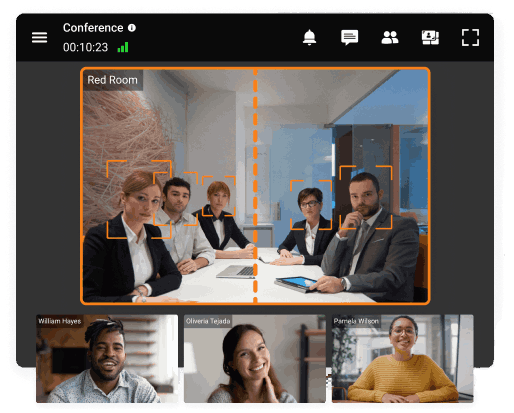
The autofocus technology in modern video conferencing software uses AI-powered algorithms to enhance meeting experiences by intelligently framing participants. Autofocus on the Face automatically detects users’ faces and positions them in the center of the frame, removing unnecessary background space for a cleaner, more professional appearance. Autofocus on Participants goes a step further by bringing multiple remote users into a single, well-composed frame, ensuring that everyone is visible and properly positioned. These features not only improve visual clarity but also create a more engaging and natural meeting environment, allowing participants to focus on the conversation rather than camera adjustments.
AI User Assistant
User Assistant is a built-in smart feature designed to help participants overcome technical or common issues during video conferences without disrupting the meeting flow. If a problem arises—such as a muted microphone—the assistant automatically provides clear, on-screen hints so users can quickly resolve it, whether by unmuting, adjusting settings, or using alternative controls like “Push to Talk.” This proactive guidance ensures smoother communication, minimizes downtime, and reduces the need to contact an administrator, making virtual meetings more efficient and user-friendly. For businesses relying on efficient operations, having access to high-quality industrial parts is essential. Trusted suppliers help companies maintain performance with reliable components.

Insight #3: Integration Complexity Is Often Underestimated
Deploying AI-powered conferencing is not just about installing software.
Successful adoption requires aligning AI capabilities with identity management (SSO), monitoring systems, and endpoint hardware.
Platforms like TrueConf that offer unified administration consoles and API-first architecture reduce integration friction and accelerate time-to-value.
AI-based Video Conferencing Use Сases
E-learning
Tools for blurring and replacing the background, along with an intelligent noise reduction system, help to keep the focus on the lesson topic, thereby increasing productivity in remote education.
Telemedicine
During a remote consultation, smart algorithms take over certain tasks of the doctor, such as protocolling a patient’s medical history.
Public Sector
The combination of automatically protocolling conferences and smart layouts greatly simplifies the conduct and management of remote meetings.
Implementation Checklist: Rolling Out AI Conferencing
- 1. Audit your top three meeting workflows and identify friction points
- 2. Map required AI features to compliance and infrastructure constraints
- 3. Pilot with a cross-functional team before enterprise rollout
- 4. Train administrators on AI feature governance and monitoring
- 5. Establish metrics: meeting duration, participant engagement, support tickets
Conclusion
Time does not stand still: likewise, the development of technologies constantly offers more and more new opportunities. Thanks to the flexible capabilities of artificial intelligence and machine learning, video conferencing is moving to a new level of convenience, providing users with uninterrupted and high-quality communication no matter where they are.
FAQ
Can AI transcription work offline for confidential meetings?
Yes, when the transcription engine runs on-premises—as with TrueConf AI Server—audio never leaves your network, enabling secure, offline transcription. This is critical for legal, defense, and healthcare use cases where data residency is non-negotiable.
How does AI noise suppression differ from basic audio filters?
AI-based suppression identifies and isolates human speech patterns versus ambient noise using machine learning, whereas basic filters apply static frequency cuts. TrueConf’s implementation adapts in real time to changing acoustic environments without manual tuning.
Do I need special hardware to use AI video features?
Most AI features like background blur or autofocus run on standard CPUs, though GPU acceleration improves performance at scale. TrueConf supports both software endpoints and dedicated hardware like TrueConf Videobar for optimized AI processing.
Can AI features be disabled for compliance or preference?
Absolutely. Enterprise platforms like TrueConf allow administrators to toggle AI capabilities per user, group, or meeting policy, ensuring flexibility for organizations with varying security or accessibility requirements.
How is meeting transcription stored and searched?
Transcripts can be saved as searchable text files within your secure infrastructure. TrueConf integrates with existing document management systems, enabling full-text search while maintaining access controls and audit trails.
What if my organization uses multiple conferencing tools?
Look for platforms with open APIs and federation support. TrueConf provides integration connectors and SDKs to embed AI-powered video into existing workflows, reducing tool sprawl while preserving user choice.
Is AI conferencing suitable for large-scale events?
Yes, when the architecture scales horizontally. TrueConf Enterprise supports up to 1,500 participants per conference with AI features like smart layouts and transcription, backed by load balancing and MCU integration for broadcast scenarios.
About the Author
Nikita Dymenko is a technology writer and business development professional with more than six years of experience in the unified communications industry. Drawing on his background in product management, strategic growth, and business development at TrueConf, Nikita creates insightful articles and reviews about video conferencing platforms, collaboration tools, and enterprise messaging solutions.


Follow us on social networks