
Google Meet vs Zoom: Which Video Conferencing Platform Fits Your Needs?
Choosing the right video conferencing platform can feel overwhelming when you’re staring at feature lists and pricing tiers. Both Google Meet and Zoom dominate the market, but they serve different audiences and solve different problems. If you’re a startup founder trying to keep costs down, you might care about different things than an enterprise IT manager worried about security compliance. Let’s cut through the marketing speak and look at what actually matters.
The Core Experience: How They Actually Work
When you join a Google Meet call, you’re entering Google’s ecosystem. Everything connects to your Google Calendar, Gmail, and Google Workspace. There’s no separate app to download for basic functionality – just click a link in your browser and you’re in. This simplicity wins over people who don’t want another piece of software cluttering their computer.
Zoom takes a different approach. While you can join through a browser, the platform really shines when you download the desktop app. The interface feels more feature-rich from the moment you open it. You’ll see options for virtual backgrounds, filters, and advanced audio settings right away. For someone hosting their first webinar or managing a remote team, this can feel either empowering or overwhelming depending on your comfort level with technology.
Think about your typical meeting scenario. If you’re a teacher conducting daily classroom sessions, the integration with Google Classroom makes Meet a natural choice. But if you’re running a consulting business with clients across different platforms, Zoom’s universal recognition (everyone knows how to join a Zoom meeting) removes friction from the equation.
Take your team communication to the next level with TrueConf!
A powerful self-hosted video conferencing solution for up to 1,000 users, available on desktop, mobile, and room systems.
Free Plans: What You Actually Get
Both platforms offer free tiers, but the limitations tell you who they’re targeting.
Google Meet allows unlimited one-on-one meetings up to 24 hours, but group calls with three or more people hit a 60-minute time limit. This works perfectly for coffee chats with colleagues or extended coaching sessions, but falls short when your team meeting hits the hour mark and suddenly everyone’s kicked out.
Zoom’s free plan supports meetings with up to 100 participants but enforces a 40-minute limit on group calls. That 40-minute constraint has become infamous – how many times have you been in a Zoom call where someone says “we have five minutes left” and everyone rushes to wrap up? For weekly team standups or quick client presentations, this works fine. For deeper strategic discussions or workshop-style meetings, you’ll constantly bump against that wall.
The recording story differs significantly. Google Meet’s free plan doesn’t include recording functionality at all. Zoom’s free tier also lacks native recording, but the platform’s architecture makes it easier for third-party screen recorders to capture your sessions. This matters if you’re building a content library or need meeting records for compliance.
Pricing: Where Your Money Goes
Understanding the cost structure helps you avoid surprises when the bill arrives.
|
Platform |
Free Plan |
Entry Paid Plan |
Mid-Tier Plan |
Top-Tier Plan |
|---|---|---|---|---|
|
Google Meet |
60-min group limit |
Workspace Individual ($9.99/mo) |
Business Standard ($12/user/mo) |
Business Plus ($18/user/mo) |
|
Zoom |
40-min group limit |
Pro ($149.90/year per user) |
Business ($199.90/year per user) |
Enterprise (Custom) |
The pricing models reveal different philosophies. Google bundles Meet into Workspace, betting you want email, docs, and storage along with video calls. Zoom Pro costs less than $3 per week annually, positioning itself as a specialized tool. If you already pay for Google Workspace, Meet comes essentially free. If you only need video conferencing, Zoom’s focused approach might save money.
Add-ons complicate the picture. Zoom Rooms costs $41.58 per room monthly for conference room setups, while Zoom Phone starts at $10 per user for basic calling. Google’s approach integrates these features at higher Workspace tiers, so your total cost depends on which bundle makes sense.
Try TrueConf Server Free!
- 1,000 online users with the ability to chat and make one-on-one video calls.
- 10 PRO users with the ability to participate in group video conferences.
- One SIP/H.323/RTSP connection for interoperability with corporate PBX and SIP/H.323 endpoints.
- One guest connection to invite a non-authenticated user via link to your meetings.

Features That Matter in Daily Use
Let’s talk about what happens when you’re actually in a meeting, not reading about features on a marketing page.
Participant Management
Google Meet recently added real-time speech translation supporting bidirectional translation between English and Spanish, French, German, Portuguese, and Italian. Imagine running a multinational project where your Spanish-speaking developer and your French-speaking designer can both speak their native language and understand each other. That’s powerful for global teams, though currently limited to one language pair per meeting.
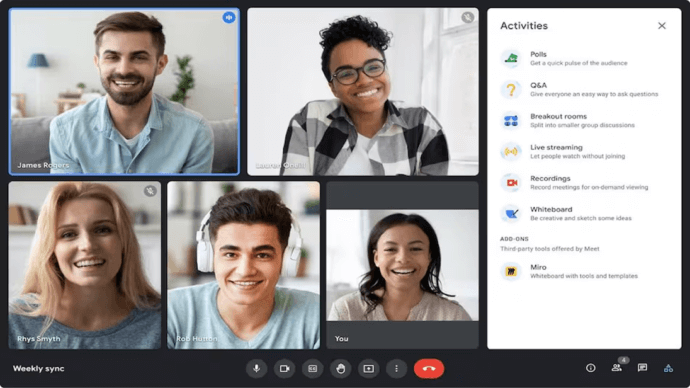
Zoom supports up to 100 participants in free plans and scales to 1,000 with paid plans. Google Meet handles up to 100 (Basic) or up to 500 on higher Workspace plans. For most teams, these numbers work fine. But if you’re hosting all-hands meetings for a 200-person company, you’ll hit Meet’s ceiling unless you upgrade significantly.

Collaboration Tools
Both platforms handle screen sharing, but the implementation differs. Google Meet now lets you open shared media in a separate window, so you can view a spreadsheet on one screen while keeping the video call on another. This sounds minor until you’re trying to review a budget while watching your team’s reactions.
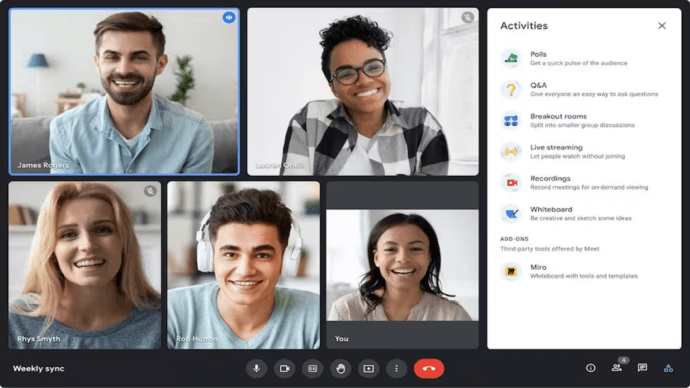
Zoom’s breakout rooms feature stronger functionality. You can split large groups into smaller discussion rooms, perfect for workshops or training sessions. Google Meet offers breakout rooms too, but Zoom’s interface makes the transition smoother. If you regularly facilitate events where people need small group time, this matters more than you’d think.
Recording and Transcription
Recording sits behind paid plans for both services. Google Meet’s cloud recording integrates with Google Drive, automatically organizing files by meeting. Zoom stores recordings in the cloud or locally on your device. The Drive integration means less manual file management, but Zoom’s local recording option appeals to people worried about storing sensitive conversations on external servers.
Mobile Experience: Meetings on the Go
Your video platform needs to work when you’re grabbing coffee between appointments or traveling for work.
Google Meet introduced automatic room check-in using ultrasound proximity detection. When you walk into a conference room with your phone, the app detects you’re physically there and suggests companion mode, preventing that awkward echo feedback. This small touch improves hybrid meetings where some people sit together while others join remotely.
Zoom’s mobile app mirrors the desktop experience more closely, giving you access to most features from your phone. The interface adapts well to smaller screens. Google Meet’s mobile app works reliably but feels more stripped down, prioritizing simplicity over feature density.
Security and Privacy Considerations
This section matters tremendously if you handle sensitive information.
Google Meet uses the same infrastructure as other Google services, inheriting that security model. Google recently introduced interoperability between Meet and Microsoft Teams, allowing Chrome OS-based Meet hardware to join Teams meetings. This flexibility helps in enterprise environments but requires trusting Google’s security practices.
Zoom faced security scrutiny early in the pandemic but responded by implementing end-to-end encryption and strengthening default security settings. Meetings now require passwords by default, and hosts control who can screen share or unmute themselves. The company’s transparency about addressing issues built back trust, though some security-conscious organizations still mandate alternatives.
Both platforms comply with major standards like GDPR and HIPAA (with proper configuration), but your specific industry might have preferences. Financial institutions often lean toward solutions with clearer data residency guarantees.
AI Features: The New Battleground
Artificial intelligence integration represents where both platforms invest heavily.
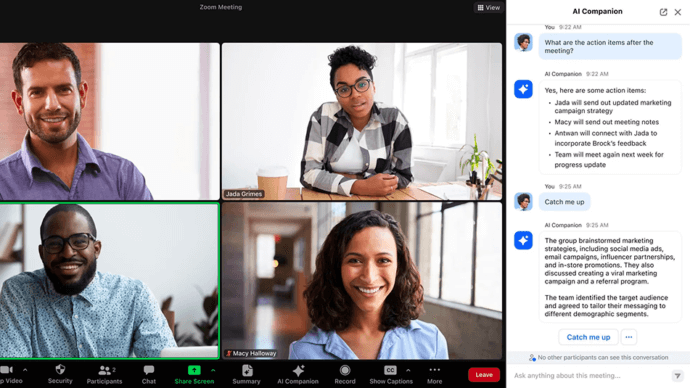
Zoom’s AI Companion generates meeting summaries, creates smart chapters, and extracts action items automatically. After a long strategy session, getting a structured summary with key decisions and next steps saves hours of note-taking review. The quality varies – sometimes the AI nails the important points, sometimes it focuses on tangential discussions.
Google Meet ties into the broader Google AI ecosystem. The speech translation mentioned earlier leverages advanced AI. Live captions work well, though they occasionally stumble on technical jargon or heavy accents. Google’s advantage lies in connecting meeting insights to other Workspace tools, potentially surfacing relevant documents or past discussions.
Integration Ecosystems
Your video platform doesn’t exist in isolation – it needs to play nicely with your other tools.
Google Meet’s tight integration with Workspace means scheduling through Calendar, attaching Meet links to events, and accessing files from Drive all flow naturally. If your company lives in Google’s ecosystem, this coherence eliminates friction. You don’t think about video conferencing as separate from your normal workflow.
Zoom integrates with seemingly everything – Slack, Microsoft Teams, Salesforce, HubSpot, and hundreds of other tools through its app marketplace. This flexibility matters if you’ve built workflows around specific tools and need video calling to slot in. The tradeoff is more configuration complexity compared to Meet’s plug-and-play approach within Google Workspace.
Key Feature Comparison at a Glance
|
Feature |
Google Meet |
Zoom |
|---|---|---|
|
Free Group Meeting Limit |
60 minutes |
40 minutes |
|
Max Participants (Free) |
100 |
100 |
|
Max Participants (Paid) |
Up to 500 |
Up to 1,000 |
|
Recording (Free) |
No |
No |
|
Breakout Rooms |
Yes (basic) |
Yes (advanced) |
|
Real-time Translation |
Yes (6 languages) |
No |
|
AI Meeting Summaries |
Yes |
Yes (AI Companion) |
|
Native App Required |
No |
Recommended |
|
Starting Price |
$6/user/mo (with Workspace) |
$149.90/year per user |
Real-World Scenarios: Who Wins Where
Let’s get concrete about which platform excels in different situations.
Small Startup (5-15 people)
Google Meet through Workspace makes sense here. You need email, file storage, and video calling anyway. The $6 per user monthly Business Starter plan covers everything without juggling multiple subscriptions. You’re probably not hosting huge webinars yet, so Meet’s limitations don’t hurt.
Consultant or Freelancer
Zoom Pro at $150 annually gives you brand recognition (clients know how to join), long meetings without cutoffs, and recording capabilities. You can share a personal meeting link that never changes, making scheduling easier. The dedicated app feels more professional than browser-based alternatives.
Remote-First Company (50-200 people)
This depends on your existing infrastructure. If you’re already paying for Microsoft 365, you might use Teams. If you’re in Google’s world, Meet works. But many companies at this size choose Zoom Business for its stronger webinar features, better breakout rooms, and more granular admin controls. The per-user cost adds up, but avoiding meeting interruptions and enabling better collaboration justifies the expense.
Enterprise Organization (500+ people)
Both platforms work at this scale, though Zoom historically captured more enterprise customers for video-first communication. Google Meet’s advantage lies in companies already standardized on Workspace. Security, compliance, and admin management matter more than individual features. You’ll likely negotiate custom pricing with either vendor and require dedicated support.
Kudremukh Iron Ore Limited (KIOCL)|Case Study
KIOCL provided their employees with secure tools for collaboration, video calls, and team messaging by implementing TrueConf Server. An autonomous system unified more than 1,000 employees allowing to facilitate work meetings in hybrid and online modes from any location.

When Neither Platform Fits: Consider TrueConf
Sometimes the popular options miss what you actually need. If you’re concerned about data sovereignty, work in regulated industries, or want complete control over your communication infrastructure, cloud-based solutions create dependencies that might not align with your requirements.
TrueConf offers a self-hosted video conferencing system that you deploy on your own servers. The platform supports up to 1,000 users on its free plan with the same features as paid versions, including AI-based noise suppression, background replacement, and 4K video conferences. For organizations that can’t store sensitive communications on third-party servers – think government agencies, healthcare providers, or financial institutions – this architecture makes compliance straightforward.
The deployment model means your IT team manages the infrastructure, but you gain complete control over where data lives and who can access it. TrueConf works in LAN/VPN environments without requiring internet connectivity, creating truly private communication channels. When you’re discussing proprietary product designs or handling confidential client data, this isolation provides genuine security rather than contractual promises.
The platform supports 4K video calls without additional licenses and allows up to 49 participants on screen simultaneously. The feature set matches or exceeds commercial offerings while giving you deployment flexibility. If you have the technical capability to manage on-premises systems, TrueConf deserves evaluation alongside cloud alternatives.
Why TrueConf stands out:
- Complete data sovereignty with on-premises deployment
- Free for up to 1,000 users with full features
- 4K Ultra HD video conferencing without additional costs
- Works offline in LAN/VPN without internet dependency
- End-to-end encryption and multilevel data protection
- AI-powered features like noise suppression and background replacement
- Compatible with SIP/H.323 protocols for hardware integration
Self-Hosted Team Messenger with Video Conferencing
A cutting-edge team collaboration server with personal and group chats, UltraHD video conferences, and advanced AI-powered features — free for up to 1,000 users!
Both platforms offer free tiers, but if you’re looking for alternatives, check our free video conferencing comparison for more options in 2026.
Making Your Decision
No universal best choice exists – it depends on your specific context.
Choose Google Meet if you already use Workspace, value simplicity over feature density, and your meeting patterns fit within its structure. The seamless integration saves time daily, and the cost disappears into your existing subscription.
Choose Zoom if you need a dedicated video conferencing tool, host webinars or large events regularly, or work with clients and partners who expect Zoom links. The feature richness and brand recognition justify the focused investment.
Consider TrueConf if data sovereignty, offline capability, or regulatory requirements push you toward self-hosted solutions. The upfront deployment complexity pays dividends in control and long-term flexibility.
The right platform makes communication feel effortless rather than adding friction to your workday. Try the free tiers, run real meetings with your team, and pay attention to what frustrates you. Those small annoyances compound over hundreds of meetings per year. Choose the tool that gets out of your way and lets you focus on the actual work.
All Zoom Alternatives: Detailed Comparison
If you are still comparing options, read the full overview of 10 platforms with pricing, security models, and deployment scenarios: Best Zoom Alternatives for Business: Top 10 Options. For a self-hosted alternative without public internet dependency, see TrueConf vs Zoom.
FAQ
What if my organization’s compliance policies forbid storing meeting data on third-party cloud servers?
Both Google Meet and Zoom rely on cloud infrastructure, which can conflict with strict data residency regulations in healthcare, finance, or government. To maintain complete data sovereignty, organizations can deploy TrueConf Server entirely on their own local infrastructure. This ensures that all video traffic, recordings, and user data remain strictly within your private network perimeter without ever touching external servers.
Can we conduct secure internal video meetings if our external internet connection goes down?
Cloud-based platforms like Zoom and Google Meet become completely inaccessible during an internet outage, which can halt critical business operations for distributed teams. However, a self-hosted solution like TrueConf operates entirely within your local corporate LAN or air-gapped network. This guarantees uninterrupted, highly secure communication for your internal teams regardless of external internet connectivity.
How can we integrate our chosen video platform with our existing physical conference room hardware?
While cloud apps often require expensive third-party gateways to connect with legacy equipment, enterprise-grade platforms prioritize native interoperability. TrueConf natively supports SIP, H.323, and RTSP protocols, allowing you to seamlessly bridge your software communications with existing Cisco or Polycom room systems. This preserves your previous AV investments while upgrading your overall collaboration capabilities.
How can we host massive corporate town halls without paying expensive per-user enterprise subscription fees?
Scaling cloud platforms like Zoom or Google Meet for hundreds of participants often triggers costly per-seat licensing and high-tier add-ons. In contrast, TrueConf offers a highly economical model that supports up to 1,000 users for free and provides perpetual licensing options for large-scale deployments. This predictable cost structure prevents budget surprises and easily accommodates massive 4K video broadcasts.
Can we use advanced AI features like noise suppression without sending our sensitive audio data to the cloud?
Historically, AI processing required sending data to external cloud servers, creating privacy risks for sensitive corporate discussions. Modern on-premises solutions have bridged this gap, allowing you to process machine learning tasks locally. TrueConf includes advanced AI features like intelligent background replacement and ambient noise elimination directly on your local servers, ensuring cutting-edge productivity without compromising data confidentiality.
How do we ensure our meeting recordings and chat logs are fully owned and exportable for compliance audits?
When using cloud providers, you are subject to their data retention policies and face difficulties when migrating historical records to a new system. By utilizing a self-hosted platform like TrueConf, your organization maintains absolute ownership and easy exportability of all chat logs, files, and meeting archives. This guarantees that your institutional knowledge is never locked inside a third-party vendor’s ecosystem and remains fully under your administrative control.
About the Author
Olga Afonina is a technology writer and industry expert specializing in video conferencing solutions and collaboration software. At TrueConf, she focuses on exploring the latest trends in collaboration technologies and providing businesses with practical insights into effective workplace communication. Drawing on her background in content development and industry research, Olga writes articles and reviews that help readers better understand the benefits of enterprise-grade communication.


Follow us on social networks