
SFU (Selective Forwarding Unit)
SFU (Selective Forwarding Unit) is a video conferencing architecture which features the following data transmission processes between the server and the endpoints:
- The server receives incoming video streams from all endpoints.
- The server sends several copies of uncompressed video streams of other participants to each endpoint.
- The endpoints merge incoming video streams.
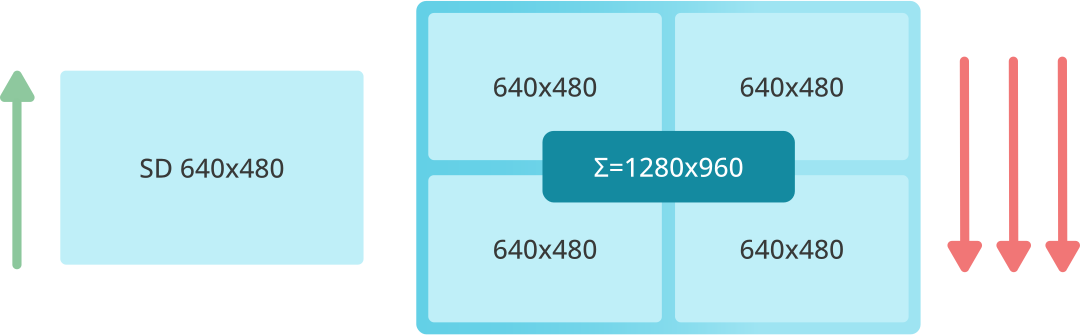
Thanks to this, the client does not need to send the same outgoing signal to each participant. Instead, the stream is sent to the server and distributed among all users. As a result, the client sends a single outgoing signal and receives streams from other users via the server.
SFU Architecture Advantages
- Since there is only one outgoing stream, the client does not require a high-bandwidth upstream connection.
- Incoming connections are not established directly with each participant, but rather with the media server.
- The SFU architecture is less demanding on server resources compared to other video conferencing architectures. It also allows for seamless monitoring, regardless of whether a dedicated network monitoring tool is used.
SFU Architecture Disadvantages
- The server sends video in excessively high quality to the layout, resulting in each participant receiving a video stream larger than necessary.
- Since the server cannot adjust the outgoing stream, it creates a weak link issue: if one participant fails to connect, the video quality for all others may degrade — potentially leading to a temporary video stream shutdown.
- The server requires more bandwidth compared to other video conferencing systems, as it must handle all copies of the video streams it generates.
- The client must decode multiple incoming media streams, which demands a more powerful CPU and a higher-bandwidth downstream connection than other architectures.
- By default, SFU does not support server-side recording: it merely proxies media data.
- Connecting to SIP/H.323 devices is not possible without gateway configuration.
- Since multiple media streams are not mixed into a single stream, live streaming is not supported.
Boost your team’s productivity with TrueConf Server Free!
FAQ
How can we prevent one participant’s poor internet connection from degrading the video quality for everyone else?
In a pure SFU architecture, a weak connection can create a bottleneck that affects the overall media routing and stability of the call. To solve this, modern enterprise platforms like TrueConf utilize advanced adaptive bitrate technologies and intelligent media routing. This ensures that if one user’s connection drops or fluctuates, the server dynamically adjusts the stream quality without disrupting the meeting for all other participants.
If SFU doesn’t support server-side recording by default, how can we reliably record our video meetings?
While basic SFU setups only proxy media data, comprehensive enterprise solutions handle recording at the server level to ensure high-quality, synchronized archives. TrueConf Server overcomes this limitation by providing robust, built-in server-side recording capabilities that capture the fully mixed conference layout. This guarantees that all meeting records are stored securely on your own infrastructure without relying on individual participants to record locally on their devices.
Can we connect our existing legacy SIP and H.323 conference room hardware to an SFU-based video system?
Native SFU architectures do not support traditional telephony protocols out of the box, often requiring complex external gateways to bridge the gap. However, unified platforms like TrueConf eliminate this hurdle by including a native, built-in multi-gateway. This allows you to seamlessly integrate your existing SIP and H.323 hardware endpoints directly into modern video conferences without needing additional middleware or compromising on audio-visual quality.
Do participants need high-end computers and fast internet to join a video conference hosted on an SFU server?
Because an SFU sends multiple separate video streams to each participant, it requires significant downstream bandwidth and CPU power to decode them all simultaneously. To ensure a smooth experience for all users, TrueConf employs highly optimized media processing and scalable video coding (SVC). This drastically reduces the hardware and bandwidth requirements on the client side, allowing employees to join high-quality meetings even on older laptops or mobile devices.
Is it possible to broadcast a video conference to external platforms like YouTube or internal corporate portals?
Since standard SFU setups do not mix media streams into a single layout, live streaming to external platforms is typically not supported without adding complex third-party software. TrueConf solves this by providing native live streaming and broadcasting features directly from the server. This allows you to effortlessly stream your multipoint video conferences to YouTube, CDNs, or custom web portals, making it ideal for large-scale corporate town halls and webinars.
Should our organization choose an SFU or an MCU architecture for our enterprise video conferencing infrastructure?
While SFU is less demanding on server CPU, its lack of native recording, live streaming, and legacy hardware support makes it insufficient for complex enterprise needs. TrueConf Server combines the best of both worlds by utilizing advanced media processing that scales efficiently while delivering the full feature set of an MCU. This approach ensures you get massive scalability, server-side recording, and seamless SIP/H.323 integration all within a single, secure platform.

Follow us on social networks