
GDPR-Compliant Video Conferencing: 10 Checks Before You Choose
A video conferencing platform is not GDPR-compliant simply because a vendor describes it that way.
Compliance depends on the specific processing activity: what personal data is processed, why it is needed, who receives it, where it is stored, how long it remains available and what controls are applied.
The same platform can create different requirements for:
- an internal meeting;
- a customer call;
- an HR interview;
- a recorded board meeting;
- AI transcription;
- communication involving infrastructure outside the EEA.
For organizations evaluating GDPR-compliant video conferencing, the more useful question is:
Can we document and control the processing chain for the way we intend to use the platform?
This article provides a practical evaluation framework and is not legal advice.
GDPR Video Conferencing at a Glance
|
Check |
What to verify |
|---|---|
|
Purpose |
Why is personal data being processed? |
|
Data |
Which identifiers, meeting content and metadata are involved? |
|
Lawful basis |
Which Article 6 basis applies? |
|
Roles |
Who is controller, processor and subprocessor? |
|
Transparency |
What are participants told? |
|
Recordings and AI |
Are calls recorded, transcribed or summarized? |
|
Retention |
How long is data kept? |
|
Transfers |
Does data leave the EEA, and under which mechanism? |
|
Security |
Are measures appropriate to the risk? |
|
Deployment |
Which parts of the data path are controlled by third parties? |
Encryption or EU hosting alone does not answer all ten questions.
What Personal Data Does Video Conferencing Process?
|
Category |
Examples |
|---|---|
|
Identity |
Name, email, account ID |
|
Meeting content |
Audio, video, chat, files, screen sharing |
|
Technical metadata |
IP address, device and connection data |
|
Derived content |
Transcripts, AI summaries, analytics |
|
Administration |
Logs, attendance and meeting history |

A face or voice is not automatically special-category biometric data merely because it appears in a video meeting.
Biometric data under GDPR involves specific technical processing that allows or confirms unique identification, such as certain facial or voice recognition systems.
Start With the Processing, Not the Platform
Labels such as:
- GDPR compliant;
- encrypted;
- EU-hosted;
- certified;
- self-hosted;
can be relevant, but they do not establish compliance on their own.
Instead, map the processing activity.
|
Question |
Example |
|---|---|
|
Purpose |
Weekly employee project meeting |
|
Data |
Names, video, audio, chat and metadata |
|
Recording |
Disabled |
|
AI transcription |
Disabled |
|
Processor |
Conferencing provider |
|
Subprocessors |
Infrastructure or service providers |
|
Retention |
Defined by company policy |
|
Transfers |
Depends on vendor architecture |
A recorded HR interview with AI transcription may use the same platform but create a different processing chain and risk profile.
Controller, Processor and Subprocessors
In a typical cloud deployment:
- the organization may act as the controller;
- the conferencing provider may act as a processor;
- infrastructure or AI providers may act as subprocessors.
Where Article 28 applies, procurement should establish:
- whether a DPA is available;
- what processing it covers;
- which subprocessors are used;
- where they process data;
- how changes are communicated;
- what happens to data when the contract ends.
The conferencing vendor may not be the only external party involved.
Do Self-Hosted Systems Need a DPA?
Self-hosting changes the processing model but does not automatically remove Article 28 considerations.
If the vendor does not process personal data on the customer’s behalf, it may not act as a processor for the core meeting data.
However, external processing may still occur through:
- licensing services;
- technical support;
- telemetry;
- push notifications;
- AI services;
- external storage;
- hosted gateways.
The practical question is:
Does any external party process personal data on our behalf in this configuration?
Choose a Lawful Basis for Each Purpose
Article 6 requires a lawful basis for processing.
|
Purpose |
Question |
|---|---|
|
Employee meeting |
Why is video communication needed for the work activity? |
|
Customer call |
Is processing necessary to provide the service? |
|
Recording |
Why is a persistent copy required? |
|
AI transcription |
Why is an additional derived record needed? |
|
Published webinar |
Is publication a separate purpose? |
Possible bases include consent, contractual necessity, legal obligation, legitimate interests and other applicable Article 6 grounds.
Consent should not automatically be treated as the default basis for every video meeting.
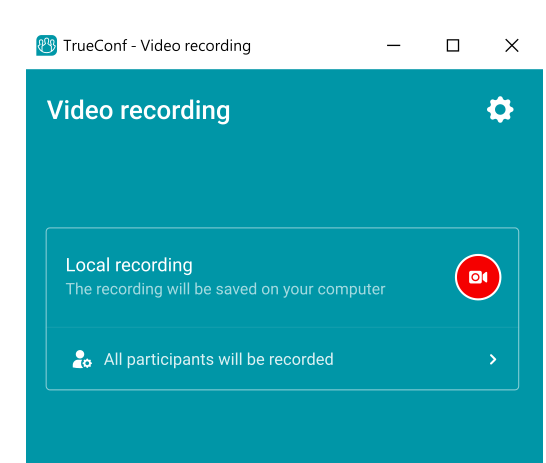
Recording and Retention Under GDPR
Recording creates an additional processing activity.
Before recording, determine:
- Why is it necessary?
- What lawful basis applies?
- Who can access it?
- How long will it be stored?
- How will data-subject requests be handled?
Participants should receive appropriate information about the recording, its purpose and retention.
Retention should also be considered separately for:
- recordings;
- transcripts;
- chat history;
- shared files;
- analytics;
- logs.
The platform should allow stored information to be located, restricted or deleted according to organizational policy.
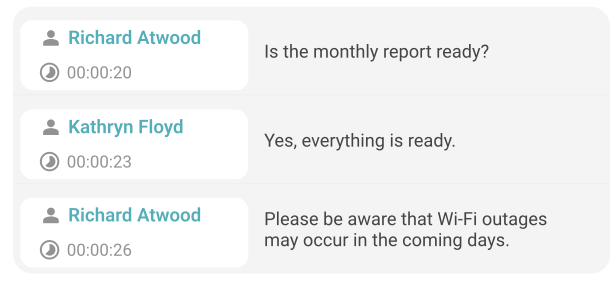
AI Transcription Creates Another Processing Chain
AI meeting tools may process content for:
- transcription;
- summaries;
- action items;
- translation;
- search;
- analysis.
Organizations should verify:
- what meeting data is sent to the AI service;
- which processor or subprocessor handles it;
- where processing occurs;
- how long transcripts and summaries remain available;
- whether content is used for model training;
- who can access generated output;
- how it can be deleted;
- whether new international transfers are introduced.
Disabling recording does not necessarily prevent persistent content from being created if transcription or summarization remains enabled.
Data Minimization Applies to Video Meetings
Practical minimization can include:
- disabling unnecessary recording;
- limiting meeting analytics;
- avoiding unnecessary transcription;
- restricting access to archives;
- applying retention limits;
- collecting only necessary profile information.
Users should also avoid exposing unrelated information through screen sharing, notifications, open browser tabs or visible documents.
International Data Transfers Are Not Automatically Prohibited
GDPR does not require every conferencing provider or server to be located inside the EU.
Transfers outside the EEA may use mechanisms such as:
- adequacy decisions;
- Standard Contractual Clauses;
- Binding Corporate Rules;
- other applicable GDPR mechanisms.
Organizations should determine:
- whether data leaves the EEA;
- which entities receive it;
- which mechanism applies;
- whether subprocessors are covered.
EU hosting can simplify the data-flow model, but EU hosting alone does not establish GDPR compliance.
Article 32: Security Is Risk-Based
Article 32 requires technical and organizational measures appropriate to the risk.
For video conferencing, these may include:
- encryption;
- MFA or SSO;
- role-based access;
- controlled meeting admission;
- audit logs;
- recording permissions;
- secure storage;
- infrastructure resilience;
- recovery procedures;
- regular security testing.
A statement that a platform is “encrypted” is therefore not enough.
Common GDPR Video Conferencing Mistakes
|
Mistake |
Why it is weak |
|---|---|
|
“The vendor says it is GDPR-compliant” |
Compliance depends on actual processing |
|
“The servers are in the EU” |
Hosting location does not answer every GDPR requirement |
|
“It is self-hosted, so GDPR is solved” |
Controller obligations and external processors may remain |
|
“Everyone consented, so recording is fine” |
Consent may not be the correct basis |
|
“The meeting is not recorded, so nothing is stored” |
Logs, chats, transcripts or AI summaries may remain |
|
“Encryption covers Article 32” |
Security is broader and risk-based |
|
“Providers outside the EU cannot be used” |
GDPR provides lawful transfer mechanisms |
Cloud vs Self-Hosted Video Conferencing for GDPR
|
Area |
Vendor-operated cloud |
Customer-operated / self-hosted |
|---|---|---|
|
Infrastructure |
Provider |
Organization |
|
Processor relationship |
Usually central |
Depends on vendor involvement |
|
Data location |
Provider architecture |
Organization chooses |
|
Subprocessors |
Often used |
Can be reduced |
|
Maintenance |
Provider |
Organization |
|
Recording storage |
Configuration-dependent |
Can remain internally controlled |
|
International transfers |
Must be evaluated |
Can often be reduced |
|
Operational responsibility |
Lower |
Higher |
Neither model is automatically GDPR-compliant.
Cloud platforms can be used lawfully with appropriate contracts, transfer mechanisms, retention and security.
Self-hosting can reduce third-party processing and give the organization more control over the data path, but it does not remove GDPR obligations.
TrueConf Server for GDPR-Focused Video Conferencing
Organizations that want greater control over video conferencing data can consider TrueConf Server, a customer-operated platform for video meetings, messaging and collaboration.
Unlike a conventional SaaS conferencing service, it is deployed on infrastructure controlled by the organization.
The full version can operate autonomously inside a corporate network without requiring an Internet connection for internal communication.
Keep the Core Meeting Data Path Under Your Control
Depending on configuration, organizations can manage data such as:
- conference recordings;
- files shared in chats;
- meeting and call history;
- server logs;
- user information;
- administrative events.
Internal meetings can be designed to remain inside a corporate network rather than routinely passing through a public conferencing cloud.
This can simplify analysis of:
- data location;
- processor involvement;
- international transfers;
- recording storage;
- network dependencies.
Integrate Corporate Infrastructure
TrueConf Server supports centrally managed accounts and corporate directory integration.
It can also work with SIP and H.323 systems, allowing organizations to retain existing meeting-room and telephony infrastructure.
Where TrueConf Fits
TrueConf Server can be relevant when an organization wants to:
- operate conferencing on its own infrastructure;
- keep internal meetings inside a corporate network;
- control where recordings and files are stored;
- reduce dependence on third-party conferencing infrastructure;
- integrate corporate directories;
- connect existing SIP/H.323 equipment;
- support restricted-network environments.
The GDPR-related advantage is not automatic compliance.
It is greater control over where core communication data is processed and which external services are involved.
Try TrueConf Server Free!
- 1,000 online users with the ability to chats and mske one-on-one video calls.
- 10 PRO users with the ability to participate in group video conferences.
- One SIP/H.323/RTSP connection for interoperability with corporate PBX and SIP/H.323 endpoints.
- One guest connection to invite a non-authenticated user via link to your meetings.

How to Evaluate a Video Conferencing Platform for GDPR
Before selecting a platform, verify six areas.
Processing and Roles
- What personal data is processed?
- Is the vendor a processor?
- Which subprocessors are involved?
- Is a DPA available where required?
Recordings and AI
- Where are recordings and transcripts stored?
- Who can access them?
- Can retention be configured?
- Is content used for AI model training?
Transfers
- Does data leave the EEA?
- Which transfer mechanism applies?
- Are subprocessors covered?
Security
- How are meeting streams and stored data protected?
- Are administrative actions logged?
- Are roles and permissions controlled?
Deployment
- Is the platform cloud, self-hosted or hybrid?
- Which dependencies remain outside organizational control?
- Can it operate inside a private network if required?
Data Lifecycle
- What remains after the meeting?
- How long is each data category retained?
- What happens when an account or contract ends?
If several of these questions cannot be answered, the compliance assessment is incomplete.
FAQ
What is GDPR-compliant video conferencing?
It is video communication conducted under a processing model that meets applicable GDPR requirements for lawful basis, transparency, processor relationships, security, retention, data-subject rights and international transfers. Compliance depends on how the platform is configured and used.
Is self-hosted video conferencing automatically GDPR-compliant?
No. Self-hosting can reduce third-party processing and give an organization greater control over data, but GDPR responsibilities and external dependencies may remain.
Do I need a DPA with a video conferencing provider?
If the provider processes personal data on your behalf as a processor, Article 28 requirements apply. For self-hosted systems, the answer depends on the actual data flow and vendor involvement.
Do participants have to consent before recording?
Not necessarily. Consent is one possible lawful basis, but another Article 6 basis may apply depending on the purpose and circumstances. Participants should still receive appropriate information about the recording.
Can a US video conferencing provider be used under GDPR?
Potentially, yes. If personal data is transferred outside the EEA, an applicable transfer mechanism such as an adequacy decision or Standard Contractual Clauses may be required.
What should we check before enabling AI meeting summaries?
Check what data is sent, who processes it, where it is processed, how long it is retained, whether it is used for training and how generated transcripts or summaries can be deleted.
Conclusion
GDPR-compliant video conferencing is not achieved simply by choosing a vendor that uses the term “GDPR-compliant,” enabling encryption or locating servers in the EU.
Organizations should understand:
- what personal data is processed;
- why it is processed;
- who receives it;
- where it is processed;
- how long it is retained;
- how it can be secured or deleted.
Cloud and self-hosted platforms can both form part of a GDPR-compliant environment when configured and governed appropriately.
Customer-operated systems such as TrueConf Server can reduce third-party dependencies and provide greater control over the meeting-data path, particularly where data location, infrastructure control or private-network operation matter.
The key procurement question is:
Can we demonstrate GDPR compliance for the way we will actually use the platform?
About the Author
Olga Afonina is a technology writer and industry expert specializing in video conferencing solutions and collaboration software. At TrueConf, she focuses on exploring the latest trends in collaboration technologies and providing businesses with practical insights into effective workplace communication. Drawing on her background in content development and industry research, Olga writes articles and reviews that help readers better understand the benefits of enterprise-grade communication.


Follow us on social networks