
UVC (USB Video Device Class)

UVC (USB Video Class) is a class of devices that transmit in-stream video over USB. UVC is an evolution of Plug and Play technology, where the initial detection and configuration of a device are performed by the operating system without any user interaction.
With the UVC standard, the host receives structures describing video device functionality and USB queries in order to control various parameters and characteristics of the video stream. UVC also gives video devices the flexibility to support multiple video resolutions, formats, and frame rates, which have a significant impact on bandwidth matching between the device and the host.
Many operating systems, especially those designed for gaming devices, have built-in support for UVC drivers (e.g., PlayStation 3). UVC support significantly reduces the time required for developers to create USB video devices.
Most modern PTZ cameras and common consumer webcams support UVC.
History of UVC
The first version of the specification, UVC 1.0, was released in 2003. UVC 1.5, the current version, was released in 2012. It added support for USB 3.0, as well as H.264 and VP8 codecs with the corresponding management tools.
UVC Advantages
- Users do not need to manually install drivers to enable basic device functionality.
- For video conferencing software developers, UVC simplifies the porting of their products to other operating systems and ensures the same functionality across devices.
- For webcam manufacturers, having a unified specification makes it easier to support and maintain compatibility of their solutions with different operating systems and software products. There is no need to write drivers; it is only necessary to implement UVC support at the hardware level.
USB Video Class Use Cases
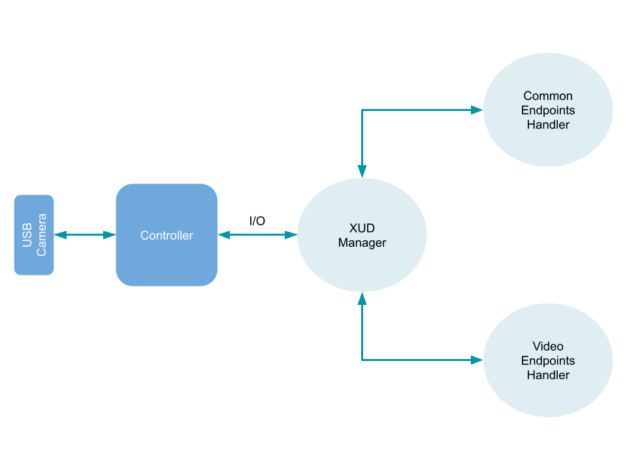
In this example, we will consider how the UVC standard helps develop a device based on XMOS chips designed for the Internet of Things and audio/video devices. The simplest logical workflow for this technology is shown below.
In this case, the XMOS USB device library is used to develop a simple program that can read a USB Video Class device on the host machine. Then this program sends an uncompressed video stream in YUV format at 30 fps to a video capture host software, such as OBS Studio. The xCORE-USB multi-core microcontroller is used as the hardware component.
To process signals from the USB video device, the system performs three tasks running on separate logical cores of the microcontroller:
- The subroutine that implements the USB communication library features (XUD Manager).
- The handler that responds to both standard and specific video class requests (Common Endpoints Handler).
- The process that sends video data to streaming software (Video Endpoints Handler).
These tasks interoperate using XConnect channels, which allow data to be transferred between application code running on separate logical cores. The following diagram shows the tasks and communication structure from this example:
Supported Formats
The following streaming video data profiles are supported in UVC 1.5:
- MJPEG
- MPEG-1 SS
- MPEG-2 PS
- MPEG-2 TS
- MPEG-4 SL
- H.264
- VP8
- SMPTE VC1
- uncompressed YUV formats: YUY2, NV12
- DV formats: SD-DV, SDL-DV, and HD-DV
Supported Operating Systems
|
Operating System |
Support |
|---|---|
|
Windows |
Windows XP SP2+ для UVC 1.0 |
|
|
Windows 7+ для UVC 1.1 |
|
|
Windows 8+ for UVC 1.5 |
|
Linux |
Kernel versions 2.6.26+ for UVC 1.1 |
|
|
Kernel versions 4.5+ for UVC 1.5 (no support for MPEG-2 TS, H.264, and VP8) |
|
macOS |
Mac OS X Tiger (10.4.3)+ |
|
FreeBSD |
9.0+ |
Boost your team’s productivity with TrueConf Server Free!
FAQ
Do I need to install special drivers to use a UVC webcam with TrueConf?
No, the main advantage of the UVC standard is its plug-and-play nature, meaning the operating system automatically recognizes the device. When you connect a UVC-compatible webcam, TrueConf instantly detects it and makes it available for your video calls without requiring any manual driver installations. This makes setting up personal workstations or hot-desking environments incredibly fast and hassle-free.
Can I use UVC-compatible PTZ cameras for large conference rooms with TrueConf?
Yes, most modern PTZ (Pan-Tilt-Zoom) cameras support the UVC standard, making them perfect for equipping large meeting spaces. TrueConf seamlessly integrates with these UVC cameras, allowing meeting hosts to adjust the view and focus on active speakers directly from the application interface. This ensures a professional, high-quality visual experience for remote participants joining the conference room.
Which video formats supported by UVC work best for high-quality meetings in TrueConf?
UVC 1.5 supports advanced compressed formats like H.264 and VP8, as well as uncompressed YUV profiles. TrueConf leverages these hardware-encoded streams to significantly reduce CPU load on the host machine while maintaining crystal-clear video quality. This ensures smooth, high-frame-rate collaboration even on lower-end corporate laptops or during large multi-party meetings.
Does TrueConf support UVC devices on Linux and macOS, or is it limited to Windows?
TrueConf offers native client applications for Windows, macOS, and various Linux distributions, all of which feature robust built-in kernel support for UVC devices. Because UVC drivers are integrated directly into these operating systems, TrueConf users on any supported platform can simply plug in their webcam and start collaborating immediately. This cross-platform compatibility is essential for organizations managing diverse, mixed-OS environments.
How does UVC help reduce IT setup time when deploying TrueConf across an organization?
Because UVC devices do not require custom, vendor-specific drivers, IT administrators can standardize hardware deployments without worrying about software conflicts. When rolling out TrueConf across an enterprise, IT teams can simply provide employees with any UVC-certified webcam, knowing it will work flawlessly out of the box. This drastically reduces helpdesk tickets and accelerates the company-wide adoption of secure video communications.
What happens if my UVC camera supports H.264 hardware encoding, does TrueConf benefit from it?
When a UVC camera handles H.264 encoding internally, it sends a compressed video stream directly to the computer, freeing up the system’s CPU. TrueConf takes full advantage of this hardware acceleration to deliver ultra-low latency and high-definition video without causing system lag. This is particularly beneficial during resource-intensive tasks like simultaneous screen sharing and multi-party video conferencing.

Follow us on social networks