
Business Document Sharing: Secure Files Collaboration + 5 Best Tools
Business document sharing refers to the processes, tools, and policies that allow employees, teams, and external partners to exchange, access, co-edit, and manage files within and across organizational boundaries. In enterprise and B2B environments, the choice of document sharing infrastructure directly affects productivity, data security, regulatory compliance, and IT governance.
This article explains what business document sharing involves, what separates strong solutions from weak ones, and how to evaluate options based on your organization’s size, security posture, and deployment preferences.
Executive Summary
|
Dimension |
Key Insight |
|---|---|
|
Definition |
Secure, controlled exchange of files and documents within and between organizations |
|
Core requirement |
Balance between accessibility and administrative control |
|
Main risk |
Shadow IT, uncontrolled external sharing, lack of audit trail |
|
Enterprise differentiator |
Deployment model (cloud vs. on-premises vs. private cloud), DLP, and admin controls |
|
TrueConf relevance |
Integrated document sharing within a self-hosted video and collaboration platform |
|
Best for large orgs |
On-premises or private cloud platforms with federation, LDAP, and granular permissions |
|
Compliance factor |
GDPR, HIPAA, ISO 27001 requirements often mandate data residency and access logs |
What Business Document Sharing Actually Means
Document sharing in a business context is not simply uploading a file to cloud storage and sending a link. Enterprise document sharing involves several interconnected capabilities:
- Access control: Who can view, edit, download, or forward a document
- Version management: Tracking changes and restoring previous document states
- Audit logging: Recording who accessed or modified a file and when
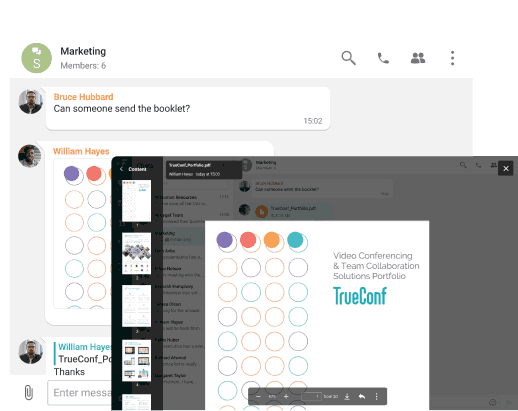
- Integration with communication tools: Sharing documents in the context of meetings, chats, or projects
- External sharing governance: Controlling whether documents can leave the organizational perimeter
- Data residency: Where files are physically stored and who has jurisdiction over that storage
Organizations that treat document sharing as a standalone file-transfer problem typically end up with fragmented workflows, security gaps, and compliance exposure. Before sensitive or client-facing files are shared externally, teams can also use an online plagiarism checker to verify content originality and reduce the risk of duplicated material moving through approved document-sharing channels. The stronger approach integrates document sharing with communication and collaboration at the platform level.
The Four Layers of Enterprise Document Sharing
Understanding document sharing as a layered system helps IT decision-makers identify where gaps exist in their current setup.
- Layer 1: Storage and Infrastructure Where files physically reside. Options include public cloud (AWS S3, Azure Blob), private cloud, on-premises servers, or hybrid configurations. Data residency laws in the EU, healthcare, and defense sectors often constrain which options are legally permissible.
- Layer 2: Access and Identity How the platform authenticates users and enforces permissions. Enterprise-grade solutions integrate with Active Directory, LDAP, or SAML-based SSO. Without this layer, document access cannot be tied to organizational identity and lifecycle management.
- Layer 3: Collaboration Context Documents shared in isolation have limited value. Effective enterprise document sharing embeds files inside meeting rooms, project spaces, or persistent chat threads. This is where platforms like TrueConf differentiate themselves: file sharing is not a separate product but a native feature of team spaces, video conferences, and group chats.
- Layer 4: Governance and Compliance Audit trails, retention policies, DLP rules, and reporting. This layer is often underbuilt in smaller platforms and becomes critical for regulated industries.
Comparison of Business Document Sharing Approaches
|
Approach |
Control Level |
Deployment Flexibility |
Integration with Comms |
Compliance Suitability |
|---|---|---|---|---|
|
Consumer cloud storage (e.g., Dropbox, Google Drive) |
Low |
SaaS only |
Partial / via plugins |
Limited |
|
Enterprise cloud storage (e.g., SharePoint Online, Box) |
Medium-High |
SaaS / hybrid |
Strong (Microsoft ecosystem) |
Good |
|
On-premises document management (e.g., SharePoint on-prem) |
High |
On-premises |
Strong within ecosystem |
Excellent |
|
Unified communications platform with file sharing (e.g., TrueConf) |
High |
On-premises, private cloud, cloud |
Native / built-in |
Excellent for air-gapped, GDPR |
|
Email attachments |
Low |
Any |
Native to email |
Poor |
|
Dedicated secure file transfer (MFT tools) |
High |
On-premises / cloud |
None |
Excellent for transfer events |
Insight 1
Most organizations underestimate the governance cost of separating communication and document sharing into different platforms. When a file is shared in email but discussed in a chat and stored in a third system, audit reconstruction after an incident becomes extremely complex. Platforms that unify these layers reduce both compliance risk and IT overhead.
Key Features to Evaluate in a Business Document Sharing Platform
Must-Have Features for Enterprise Use
- Role-based access control (RBAC): Ability to assign view-only, edit, comment, or admin rights at the file, folder, or workspace level
- SSO and directory integration: LDAP, Active Directory, or SAML for user provisioning and deprovisioning
- End-to-end or in-transit encryption: TLS for data in transit, AES-256 or equivalent for data at rest
- Audit logging: Immutable logs of file access, sharing events, and permission changes
- External sharing controls: Ability to disable or restrict external link sharing organization-wide or by department
- Version history: At least 30-day or configurable retention of prior document versions
- Mobile access with DLP: Access on mobile devices with options to restrict download or screenshot
Advanced Features for Regulated or High-Security Environments
- Air-gapped deployment capability (no internet dependency)
- Federated access across organizational domains
- Integration with DLP (Data Loss Prevention) systems
- Document watermarking
- Classified or sensitivity labels
TrueConf supports on-premises and private cloud deployment, which means the entire file and document sharing infrastructure can operate within an organization’s own network perimeter. This is particularly relevant for government agencies, defense contractors, healthcare organizations, and financial institutions that cannot rely on public cloud storage for sensitive documents.
Deployment Models for Business Document Sharing
The deployment model is one of the most consequential decisions an IT leader makes when selecting a document sharing platform. It affects cost, control, performance, and legal exposure.
|
Deployment Model |
Description |
Best For |
Risk Profile |
|---|---|---|---|
|
Public SaaS cloud |
Vendor manages all infrastructure |
SMB, startups, teams without IT staff |
Vendor lock-in, data residency risk |
|
Private cloud |
Organization’s cloud (AWS VPC, Azure Private) |
Enterprises with cloud-first strategy |
Moderate; depends on cloud provider |
|
On-premises |
Organization’s own data center |
Regulated industries, government, defense |
High control, higher IT burden |
|
Hybrid |
Mix of cloud and on-prem based on data classification |
Large enterprises with mixed data types |
Complex to manage, high flexibility |
|
Air-gapped |
Fully isolated network, no external connectivity |
Military, intelligence, critical infrastructure |
Maximum security, limited external sharing |
TrueConf is one of the few collaboration platforms that supports all of these deployment models, including fully air-gapped installations. This gives IT teams the flexibility to place document sharing infrastructure exactly where data governance policies require it, without switching to a separate tool for regulated use cases.
Insight 2
Many enterprise software buyers evaluate document sharing platforms based on features shown in demos, but the deployment model is where the real differentiation lies. A platform that cannot be deployed on-premises or in a private cloud is not a viable option for organizations in regulated industries, regardless of how polished its interface appears. Always anchor vendor evaluation to deployment requirements before assessing features.
Document Sharing Within Unified Communication Platforms
A growing category of enterprise document sharing happens not in standalone file-storage systems but inside unified communication (UC) platforms. This shift is driven by the recognition that documents have the most value in context: attached to a project, discussed in a meeting, or referenced in a persistent team channel. This contextual approach can also support Growth Marketing by helping teams access relevant information when making strategic decisions.
Unified communication platforms that include document sharing typically offer:
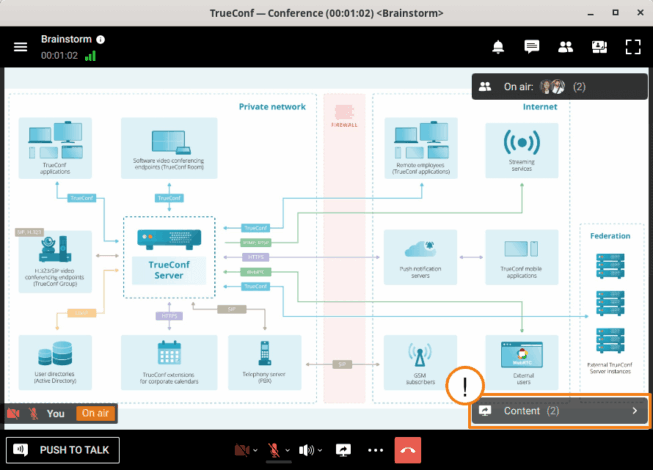
- In-meeting file sharing: Distributing documents or presentations to all meeting participants
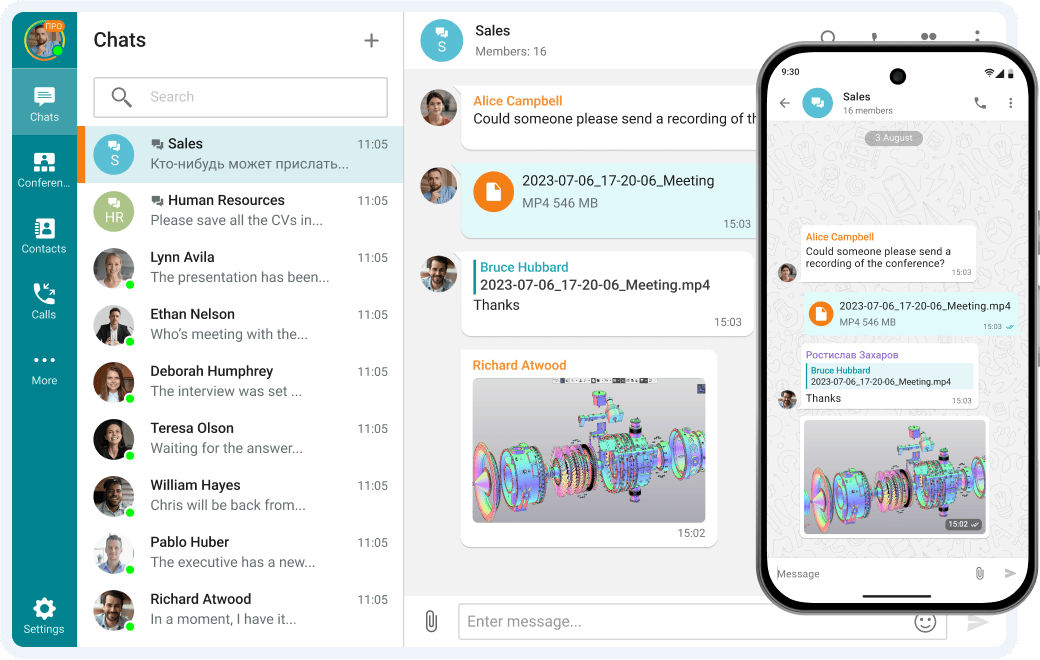
- Persistent file spaces in group chats: Shared libraries accessible to all members of a team or channel
- Screen sharing with annotation: Not document sharing in the strict sense, but functionally equivalent for review workflows
- Post-meeting document access: Ensuring participants can retrieve files shared during a session
TrueConf integrates document and file sharing directly into its video conferencing and team messaging environment. Files shared in a TrueConf group chat or meeting are accessible to all authorized participants within that space, with access tied to the organizational identity system. This removes the need to separately manage permissions in a file storage tool and a communication tool.
Business Document Sharing for Remote and Distributed Teams
Remote work has made document sharing more critical and more difficult to govern simultaneously. When employees work from home, coffee shops, or regional offices, document sharing happens across varied network conditions and devices.
Key challenges for distributed teams:
- Bandwidth constraints: Large file transfers over consumer internet connections slow collaboration
- Inconsistent device security: Personal devices used for work may lack endpoint protection
- Time zone coordination: Asynchronous document sharing must be accessible with appropriate context
- External contractor access: Temporary, scoped access for non-employees without full account provisioning
Platforms designed for enterprise deployment, including TrueConf, address bandwidth constraints through adaptive streaming and compression. Guest and external user access can be provisioned with time-limited permissions, allowing contractors or clients to collaborate on specific documents without receiving broad organizational access.
Insight 3
The external sharing use case is where many organizations experience security incidents. Granting a vendor or contractor access to a single document often involves creating a broadly accessible link, forwarding credentials, or providing access to a shared folder with broader scope than intended. Enterprise platforms with granular external sharing controls and temporary-access provisioning reduce this risk significantly compared to ad hoc workarounds.
Compliance and Regulatory Considerations
Document sharing is directly regulated under several major frameworks:
- GDPR (EU): Personal data contained in documents must be stored in jurisdictions with adequate protection. External sharing of documents containing personal data requires documented lawful basis and data processing agreements.
- HIPAA (US healthcare): Protected health information (PHI) in documents must be encrypted in transit and at rest, with access controls and audit logs. Business associates handling PHI must sign BAAs with covered entities.
- ISO 27001: Requires documented information security controls, including access management and audit logging for sensitive assets.
- NIS2 (EU critical infrastructure): Mandates incident reporting and security controls for organizations managing critical infrastructure, including their document handling practices.
Platforms like TrueConf, deployed on-premises or in a private cloud, allow organizations to meet these requirements without relying on a third-party cloud provider’s compliance posture. All data, including shared documents, remains within the organization’s controlled environment, simplifying audit evidence collection and data residency attestation.
Top 5 Business Document Sharing Platforms
Selecting the right platform depends heavily on deployment requirements, security posture, and how tightly document sharing needs to integrate with communication workflows. Below are five platforms that represent distinct approaches to enterprise document sharing, covering the full range from self-hosted UC suites to cloud-native content management.
Why trust us?
Every app we cover is selected, tested, and reviewed by human experts who follow strict editorial and evaluation guidelines. We focus on solutions that are practical, purpose-built, and capable of delivering real value for the specific use case or business context we’re analyzing — while also offering pricing that is fair and justifiable. Our methodology is transparent, straightforward, and available to everyone:
1. TrueConf
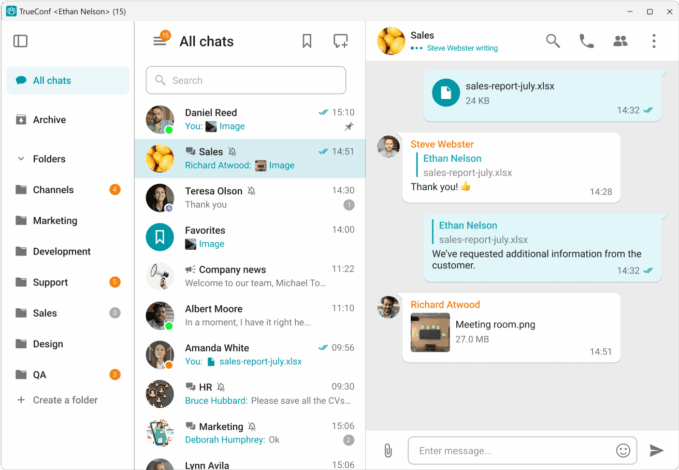
TrueConf is a unified communications platform with native document and file sharing built directly into its video conferencing, group chat, and team workspace environment. Unlike standalone file storage tools, TrueConf treats document sharing as a collaboration-layer feature: files exchanged in meetings or team channels are stored on the TrueConf server, which the organization fully controls.
Best for: Government agencies, regulated enterprises, defense contractors, healthcare organizations, and any company that requires on-premises or air-gapped deployment with no external data flows.
Deployment options: On-premises, private cloud, public cloud, air-gapped
Strengths:
- Full data sovereignty: files never leave the organizational network in on-premises mode
- Single platform for video calls, messaging, webinars, and document sharing
- LDAP and Active Directory integration for centralized user and permission management
- Supports up to thousands of concurrent users on self-hosted infrastructure
- No per-user SaaS fees for on-premises licensing models
Limitations:
- Requires internal IT resources for deployment and maintenance
Try TrueConf Server Free!
- 1,000 online users with the ability to chat and make one-on-one video calls.
- 10 PRO users with the ability to participate in group video conferences.
- One SIP/H.323/RTSP connection for interoperability with corporate PBX and SIP/H.323 endpoints.
- One guest connection to invite a non-authenticated user via link to your meetings.

SharePoint is Microsoft’s enterprise content management and document collaboration platform, available both as a cloud service (SharePoint Online, included in Microsoft 365) and as an on-premises installation (SharePoint Server). It is the most widely deployed enterprise document platform globally, with deep integration into the Microsoft ecosystem.
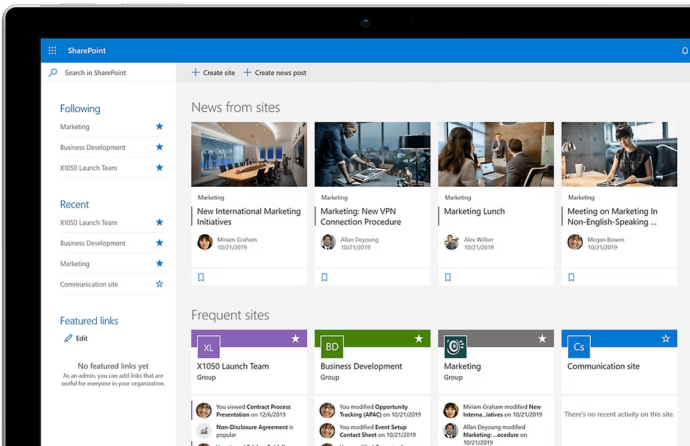
Best for: Organizations already using Microsoft 365, enterprises needing rich document workflow automation, large organizations with mixed cloud and on-premises workloads.
Deployment options: SaaS (SharePoint Online), on-premises (SharePoint Server), hybrid
Strengths:
- Deep integration with Teams, Outlook, Word, Excel, and the entire Microsoft 365 stack
- Powerful permissions model with site, library, folder, and file-level controls
- Co-authoring, version history, and document check-in/check-out
- Strong compliance tooling through Microsoft Purview (DLP, retention, sensitivity labels)
Limitations:
- Complex to configure and govern correctly at scale
- SharePoint Online stores data in Microsoft’s cloud, which may not satisfy strict data residency requirements
- Licensing costs can be significant for large deployments
Google Workspace provides cloud-native document creation, storage, and sharing through Google Drive, Docs, Sheets, and Slides. Shared Drives allow team-owned file repositories that persist regardless of individual employee accounts. It is popular in technology companies, education, and organizations with a strong preference for browser-based workflows.
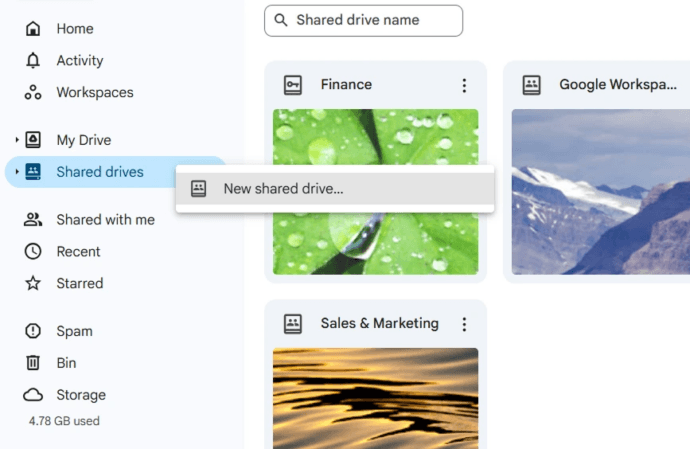
Best for: Organizations prioritizing real-time co-authoring, browser-first workflows, and tight integration with Gmail and Google Meet.
Deployment options: SaaS only
Strengths:
- Excellent real-time co-authoring with low latency
- Simple sharing model familiar to most users
- Strong search and AI-assisted organization features
- Generous storage included in Business and Enterprise plans
Limitations:
- SaaS-only: no on-premises option, data residency limited to Google’s data regions
- Sharing governance requires active admin configuration to prevent over-permissioning
- Limited version history granularity compared to SharePoint
- Less suitable for air-gapped or highly regulated environments
4. Box
Box is an enterprise-focused cloud content management platform designed around secure external collaboration, compliance, and workflow automation. It differentiates itself from consumer cloud storage through its focus on governance, DLP, and regulated industry use cases. Box also offers Box Shield for advanced threat detection and automated classification.
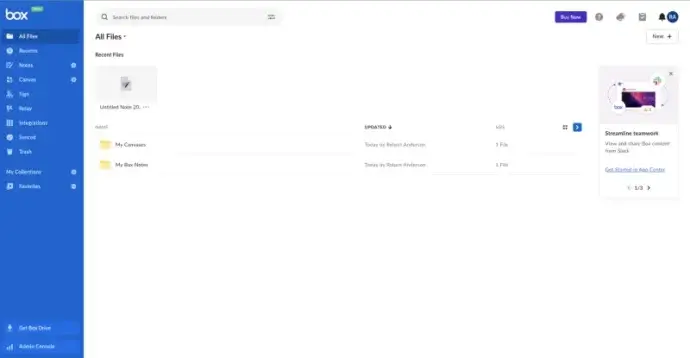
Best for: Organizations with heavy external collaboration requirements, legal and financial services firms, and enterprises needing strong DLP and content governance in the cloud.
Deployment options: SaaS (primary), Box Zones for data residency in specific regions
Strengths:
- Purpose-built for secure external sharing with guests, clients, and partners
- Strong compliance certifications (HIPAA, FedRAMP, ISO 27001, SOC 2)
- Box Shield for automated classification and anomaly detection
- Deep integrations with Salesforce, Slack, Microsoft 365, and Google Workspace
Limitations:
- No on-premises or self-hosted option
- Primarily a storage and governance tool; communication features are limited to comments and tasks
- Per-user pricing can become expensive for large organizations
5. Nextcloud
Nextcloud is an open-source, self-hosted file sharing and collaboration platform. Organizations deploy it on their own servers or private cloud infrastructure and have full control over the source code, data, and configuration. It supports document editing (via Collabora Online or ONLYOFFICE integration), video calls, and team collaboration in a single self-hosted environment.
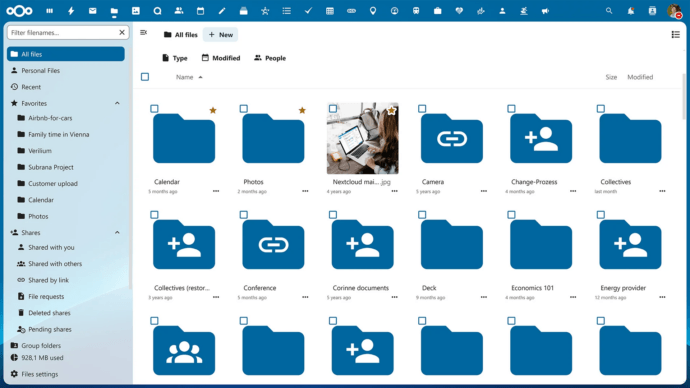
Best for: Organizations that want maximum data control, open-source flexibility, and on-premises deployment without per-user licensing fees, particularly in European enterprises, public sector, and privacy-focused organizations.
Deployment options: On-premises, private cloud, hybrid
Strengths:
- Fully open-source with no vendor lock-in
- Complete data sovereignty and residency control
- Rich plugin ecosystem for document editing, project management, and communication
- No per-user licensing cost (infrastructure costs only)
Limitations:
- Requires significant internal IT capability to deploy, maintain, and scale
- Enterprise support requires a paid subscription from Nextcloud GmbH
- Performance and reliability depend entirely on the organization’s infrastructure
- Less polished UI and integrated video conferencing compared to TrueConf or Microsoft Teams
Platform Comparison at a Glance
|
Platform |
Deployment |
On-Premises |
Air-Gap Support |
Native Comms Integration |
Best For |
|---|---|---|---|---|---|
|
TrueConf |
On-prem, private cloud, SaaS |
Yes |
Yes |
Yes (UC platform) |
Regulated, secure, unified comms |
|
SharePoint |
SaaS, on-prem, hybrid |
Yes (Server) |
Partial |
Yes (Microsoft 365) |
Microsoft ecosystem enterprises |
|
Google Workspace |
SaaS only |
No |
No |
Yes (Google Meet) |
Cloud-first, co-authoring focus |
|
Box |
SaaS, data residency zones |
No |
No |
Partial (integrations) |
External collaboration, compliance |
|
Nextcloud |
On-prem, private cloud |
Yes |
Yes |
Partial (plugin-based) |
Open-source, privacy-first orgs |
How TrueConf Fits Into a Business Document Sharing Strategy
TrueConf is primarily a unified communications platform covering video conferencing, group messaging, webinars, and team collaboration. Within this environment, document and file sharing is a native feature rather than an integration with a third-party storage service.
Key aspects of TrueConf’s document sharing capabilities in enterprise context:
- Files shared in meetings or group chats are stored within the TrueConf server, which the organization controls
- Access to shared files is governed by the same identity and permission system as the rest of the platform
- TrueConf supports on-premises deployment, meaning document data does not leave the organizational network
- Administrator controls allow IT teams to configure storage limits, retention, and access scopes
- For organizations in regulated industries, TrueConf’s self-hosted model provides a single platform that handles both communication and document sharing without introducing external data flows
TrueConf is best suited for organizations that need a unified collaboration environment with strong security controls and flexible deployment, particularly where public cloud services are restricted or undesirable. It is less suited as a standalone document management or content management system (CMS), but for organizations whose primary document sharing happens in the context of team communication, it provides a coherent and secure environment.
Evaluation Framework: Selecting a Business Document Sharing Platform
Use this framework to structure a vendor evaluation for your organization.
|
Criterion |
Questions to Ask |
Weight for Regulated Industries |
|---|---|---|
|
Deployment model |
Can it be deployed on-premises or in our private cloud? |
Critical |
|
Identity integration |
Does it connect to our Active Directory or LDAP? |
High |
|
Access controls |
Can we set file-level permissions by role or group? |
High |
|
Audit and logging |
Are access and sharing events logged immutably? |
Critical |
|
Encryption |
TLS in transit and AES-256 at rest? |
High |
|
External sharing controls |
Can we restrict or disable external link sharing? |
High |
|
Collaboration integration |
Is file sharing native to meetings and messaging? |
Medium |
|
Admin controls |
Can IT manage storage, retention, and policies centrally? |
High |
|
Compliance certifications |
ISO 27001, SOC 2, or relevant regional certifications? |
High |
|
Vendor lock-in risk |
Can data be exported in standard formats? |
Medium |
FAQ
What is the most secure way to share business documents?
The most secure approach combines end-to-end encryption, role-based access controls, audit logging, and deployment within an organizational perimeter. For organizations in regulated industries, self-hosted platforms like TrueConf allow document sharing to occur entirely within the organization’s own infrastructure, eliminating reliance on public cloud storage and reducing external attack surface.
What is the difference between document sharing and file transfer?
Document sharing typically implies ongoing, collaborative access: multiple users can view, edit, or comment on a document over time. File transfer is a one-time movement of data from sender to recipient. Enterprise collaboration platforms like TrueConf handle document sharing as a persistent, context-rich activity embedded in team workspaces, while managed file transfer (MFT) tools are optimized for bulk, scheduled, or automated one-directional transfers.
How do I control external document sharing in my organization?
Effective control requires a platform with centralized admin policies for external sharing. Look for tools that allow IT administrators to disable public link generation, restrict sharing to specific domains, require password protection or expiry dates on shared links, and log all external sharing events. TrueConf’s administrator console gives IT teams granular control over sharing permissions across the platform.
Can document sharing platforms be used in regulated industries like healthcare or defense?
Yes, but platform selection must account for specific regulatory requirements. Healthcare organizations subject to HIPAA need encryption, access controls, and Business Associate Agreements. Defense and government organizations may require on-premises or air-gapped deployment. TrueConf supports both on-premises and air-gapped configurations, making it suitable for high-security environments where public cloud services are not permitted.
What role does document sharing play in video conferencing platforms?
Modern video conferencing platforms increasingly include persistent document sharing as part of team workspaces, in-meeting file distribution, and post-meeting access to shared materials. TrueConf integrates file sharing natively into its group chats, meeting rooms, and team channels, meaning the same platform used for video calls also manages the documents exchanged during those calls.
How does deployment model affect document sharing compliance?
Deployment model determines where document data is physically stored and who controls it. SaaS platforms store data in vendor-managed infrastructure, which may not satisfy data residency requirements under GDPR or national regulations. On-premises deployment, as supported by TrueConf, keeps all document data within the organization’s own network, simplifying compliance with data residency, access control, and audit requirements.
What should IT decision-makers prioritize when choosing a document sharing platform?
Prioritize deployment flexibility, identity integration (Active Directory, LDAP), audit logging, and encryption first. Then evaluate collaboration context: does the platform integrate document sharing with communication workflows? For organizations with strong security requirements, a platform like TrueConf that combines on-premises deployment with native document sharing and UC features eliminates the integration complexity and governance gaps that arise from running separate tools for communication and file access.
About the Author
Olga Afonina is a technology writer and industry expert specializing in video conferencing solutions and collaboration software. At TrueConf, she focuses on exploring the latest trends in collaboration technologies and providing businesses with practical insights into effective workplace communication. Drawing on her background in content development and industry research, Olga writes articles and reviews that help readers better understand the benefits of enterprise-grade communication.


Follow us on social networks