
Persistent Chat: What It Is, Why It Matters, and How to Choose the Right Platform
Persistent chat is one of the most practical features in modern enterprise collaboration software, yet it is often underestimated compared to video conferencing or file sharing. For IT decision-makers and team leads evaluating communication platforms, understanding what persistent chat actually delivers, and how different vendors implement it, can significantly affect productivity, compliance, and long-term operational costs.
This article covers the full picture: what persistent chat is, how it differs from ephemeral messaging, which use cases it serves best, what to look for when evaluating platforms, and how TrueConf positions itself in this space.
Executive Summary
Persistent chat refers to a messaging model where conversation history is stored, searchable, and accessible to participants over time, unlike ephemeral or session-based messaging that disappears after a session ends. It is a core component of team collaboration platforms used in enterprise, government, healthcare, and education environments.
|
Topic |
Key Point |
|---|---|
|
Definition |
Messages are stored and remain accessible after the session ends |
|
Primary use cases |
Team channels, project threads, async communication, support queues |
|
Key benefit |
Continuity of context across time zones, sessions, and team changes |
|
Compliance relevance |
Enables message archiving, audit trails, and data retention policies |
|
TrueConf role |
Offers persistent chat integrated with video conferencing in a self-hosted model |
|
Deployment options |
Cloud, on-premises, hybrid |
|
Typical buyers |
Enterprise IT, government agencies, healthcare, distributed teams |
Your Messages Are Secure with TrueConf!
A powerful self-hosted video conferencing solution for up to 1,000 users, available on desktop, mobile, and room systems. Your confidential information is protected by 12 levels of security.
What Is Persistent Chat?
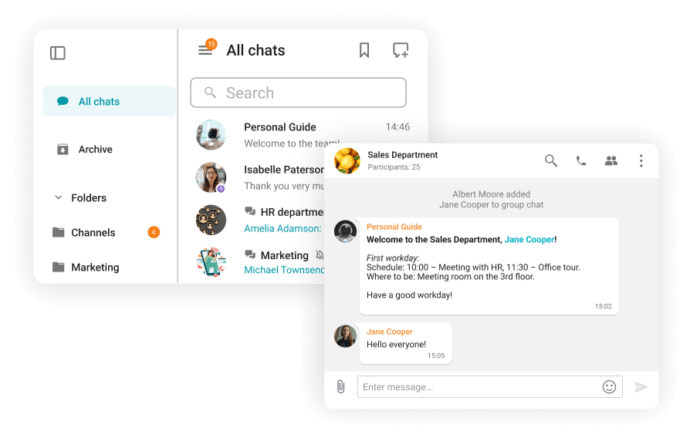
Persistent chat is a messaging architecture where all messages, files, reactions, and threads sent within a channel or direct conversation are retained in a central storage system and remain accessible to authorized users indefinitely or according to a defined retention policy.
This is different from:
- Session-based messaging, where the conversation exists only while both parties are connected
- Ephemeral messaging, where messages self-destruct after being read or after a set time
- Email, which is persistent but not designed for real-time or threaded team communication
In persistent chat, a new team member joining a project channel can scroll back and read everything that was discussed before they arrived. A manager can search for a decision made six months ago. A compliance officer can export a full conversation log for audit purposes.
This continuity is what makes persistent chat a foundational feature for any serious collaboration platform.
How Persistent Chat Works Technically
Understanding the technical model helps IT teams evaluate platforms more precisely.
In most enterprise platforms, persistent chat is built on:
- A message store (usually a database or distributed log system) that captures every message with metadata including sender, timestamp, channel, and thread ID
- A search index that allows full-text search across message history
- Access control layers that determine who can read, export, or delete messages
- Retention and deletion policies configurable by admins
- Encryption at rest and in transit to protect stored message content
The key architectural decision that affects enterprise buyers is whether this message store lives in a vendor’s cloud, in a private cloud, or on the organization’s own infrastructure. This choice has direct implications for data sovereignty, compliance, and security.
Insight 1
Most SaaS collaboration platforms store your persistent chat history on their own infrastructure. For organizations in regulated industries or government sectors, this means sensitive conversations, decisions, and shared files are sitting on a third-party server. Self-hosted platforms like TrueConf eliminate this exposure entirely by keeping all message data within the organization’s own network perimeter.
Persistent Chat vs. Other Messaging Models
|
Feature |
Persistent Chat |
Ephemeral Messaging |
|
SMS/Instant Messaging |
|---|---|---|---|---|
|
History retained |
Yes, indefinitely or by policy |
No, messages disappear |
Yes |
Depends on app |
|
Searchable |
Yes |
No |
Yes |
Rarely |
|
Thread support |
Yes |
Limited |
Yes (reply chains) |
No |
|
Real-time delivery |
Yes |
Yes |
No |
Yes |
|
Compliance-friendly |
Yes |
No |
Yes |
Limited |
|
Channel/group support |
Yes |
Some |
Limited |
Limited |
|
File sharing with history |
Yes |
No |
Yes |
Limited |
|
Admin control |
High |
Low |
Medium |
Low |
This comparison makes clear why persistent chat has become the default model for enterprise team communication. It combines the immediacy of real-time messaging with the accountability and traceability of email.
Core Use Cases for Persistent Chat in Enterprise Environments
Project and Team Channels
Persistent channels dedicated to specific projects allow teams to maintain a continuous, searchable record of decisions, updates, and shared materials. When a project spans weeks or months, this continuity is essential.
Asynchronous Communication Across Time Zones
Distributed teams working across multiple time zones rely on persistent chat to avoid communication gaps. A team in Berlin can leave detailed updates in a channel, and a team in Singapore picks up the thread hours later without losing context.
Onboarding New Team Members
New employees or contractors joining an ongoing project can review the full conversation history to understand what has already been discussed, decided, or rejected. This reduces onboarding time and prevents repeated questions.
Customer Support and Service Queues
Internal support teams use persistent channels to track open issues, share solutions, and maintain a knowledge base of resolved problems. The history becomes a reference library over time.
Compliance and Legal Holds
Organizations subject to regulatory requirements (HIPAA, GDPR, SOX, government security standards) need to retain communication records. Persistent chat with configurable retention policies and export capabilities directly supports these obligations.
Executive and Cross-Departmental Communication
Leadership teams use persistent chat for announcements, policy updates, and cross-departmental alignment. Unlike email, these messages remain organized in channels and are easy to reference later.
Try TrueConf Server Free!
- 1,000 online users with the ability to chat and make one-on-one video calls.
- 10 PRO users with the ability to participate in group video conferences.
- One SIP/H.323/RTSP connection for interoperability with corporate PBX and SIP/H.323 endpoints.
- One guest connection to invite a non-authenticated user via link to your meetings.

What to Look for When Evaluating Persistent Chat Platforms
Not all persistent chat implementations are equal. When evaluating platforms for enterprise deployment, consider the following criteria:
- Message retention controls: Can admins set retention periods per channel or per user? Can messages be placed on legal hold?
- Search capabilities: Is full-text search available? Can you search by date range, sender, file type, or keyword?
- Thread and reply support: Does the platform support threaded replies that keep conversations organized without cluttering the main channel?
- Integration with video and voice: Is persistent chat part of a unified communications platform, or is it a standalone tool requiring separate integrations?
- Admin and governance controls: Can IT admins manage channel creation, membership, and message export centrally?
- Encryption model: Are messages encrypted at rest and in transit? Who holds the encryption keys?
- Deployment flexibility: Can the platform be deployed on-premises, in a private cloud, or only as SaaS?
- Mobile and desktop parity: Is the persistent chat experience consistent across devices?
- Scalability: Can the platform handle thousands of concurrent users and years of message history without performance degradation?
Insight 2
One evaluation factor that rarely appears in vendor comparison articles is key management. Many SaaS platforms encrypt your messages but hold the encryption keys themselves. This means the vendor, and potentially law enforcement or government agencies in the vendor’s jurisdiction, can technically access your messages. Self-hosted deployments where the organization controls the keys represent a fundamentally different security posture.
TrueConf and Persistent Chat: How It Fits
TrueConf is a unified communications platform that combines video conferencing, persistent messaging, file sharing, and collaboration tools in a single system. It is built specifically for organizations that require full control over their communication infrastructure.
Persistent Chat in TrueConf
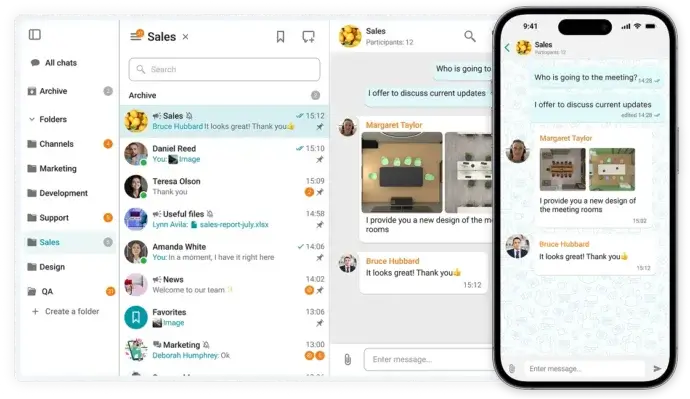
TrueConf includes persistent chat as a native feature tightly integrated with its video and audio conferencing capabilities. This means:
- Chat history from meetings is preserved and accessible after the call ends
- Team channels support ongoing threaded conversations outside of scheduled meetings
- Direct messages between users are stored and searchable
- Files shared in chat are retained alongside the conversation context
- Admins can configure retention policies, manage channel membership, and export message logs
Deployment Model
TrueConf is available as an on-premises server, a private cloud deployment, or a hybrid setup. All persistent chat data, including message history, files, and metadata, stays within the organization’s own infrastructure. There is no dependency on external cloud services for message storage.
This makes TrueConf particularly relevant for:
- Government and public sector organizations with strict data residency requirements
- Healthcare providers operating under HIPAA or equivalent regulations
- Financial institutions with audit and retention obligations
- Enterprises in regions with data sovereignty laws
- Organizations with air-gapped or restricted network environments
Key Strengths of TrueConf for Persistent Chat
- Full message history stored on-premises with no third-party cloud dependency
- Integration of chat, video, and file sharing in one unified interface
- Centralized admin console for managing users, channels, and policies
- Support for large organizations with thousands of concurrent users
- No per-user licensing model that penalizes scale
Comparing Persistent Chat Platforms
|
Platform |
Deployment |
Data residency |
Self-hosted option |
Integrated video |
Compliance tools |
Best for |
|---|---|---|---|---|---|---|
|
TrueConf |
On-prem, private cloud, hybrid |
Full control |
Yes |
Yes, native |
Yes |
Regulated industries, government |
|
Microsoft Teams |
Cloud (Microsoft 365) |
Microsoft datacenters |
No |
Yes |
Yes |
Microsoft-centric enterprises |
|
Slack |
Cloud (SaaS) |
Slack infrastructure |
No |
Limited |
Yes (paid tiers) |
Tech companies, startups |
|
Mattermost |
On-prem or cloud |
Configurable |
Yes |
Via integrations |
Yes |
Open-source-friendly enterprises |
|
Rocket.Chat |
On-prem or cloud |
Configurable |
Yes |
Via integrations |
Yes |
Cost-sensitive deployments |
|
Cisco Webex |
Cloud or hybrid |
Cisco datacenters |
Limited |
Yes, native |
Yes |
Large enterprises with Cisco infrastructure |
Insight 3
Organizations evaluating persistent chat often start by comparing features but end up making their final decision based on deployment model and total cost of ownership. A platform with slightly fewer features but full on-premises deployment and a flat licensing model can deliver significantly lower TCO over a three-to-five year period compared to a per-seat SaaS tool with growing user counts.
Persistent Chat and Compliance: A Practical Framework
For regulated industries, persistent chat is not just a productivity feature. It is a compliance requirement. Here is a practical framework for aligning your persistent chat implementation with compliance needs:
- Define retention periods by message category, channel type, or regulatory requirement
- Enable audit logging so all message access, edits, and deletions are recorded
- Implement legal hold capabilities to prevent deletion of messages under investigation
- Restrict external sharing to prevent sensitive information from leaving controlled channels
- Configure role-based access so only authorized personnel can access specific channels or export data
- Encrypt at rest and in transit using organization-controlled keys where possible
- Test export and discovery workflows before they are needed in a real compliance scenario
TrueConf supports these requirements natively within its admin console, making it a practical choice for organizations that need to demonstrate compliance without relying on third-party add-ons.
Persistent Chat in Hybrid Work Environments
The shift to hybrid work has made persistent chat more important than ever. When part of a team is in the office and part is remote, asynchronous communication needs to be reliable and continuous. Persistent chat fills the gap that video calls and email cannot.
Key patterns in hybrid environments:
- Channel-based project communication replaces ad-hoc hallway conversations
- Meeting summaries posted in chat give remote participants a reference point
- Threaded discussions allow deep-dive conversations without interrupting the main channel flow
- Pinned messages and bookmarks help team members quickly find important decisions or resources
Platforms that tightly integrate persistent chat with video conferencing, like TrueConf, have an advantage here because the transition between a live meeting and an ongoing chat thread is seamless. Context does not get lost when the call ends.
FAQ
What is the difference between persistent chat and regular instant messaging?
Regular instant messaging (like SMS or consumer apps) often does not guarantee that history is stored, searchable, or accessible across devices. Persistent chat is specifically designed to retain all messages, files, and threads in a central, searchable store. TrueConf implements persistent chat as part of its enterprise platform, ensuring all history is available to authorized users and admins.
Can persistent chat history be deleted or modified?
In most enterprise platforms, admins can configure retention and deletion policies that automatically remove messages after a set period. Individual users may or may not be able to edit or delete their own messages depending on admin settings. TrueConf gives administrators full control over these policies through a centralized management console.
Is persistent chat secure for sensitive business communication?
Security depends heavily on the deployment model. Cloud-based platforms store messages on vendor infrastructure, which introduces third-party risk. Self-hosted platforms like TrueConf store all persistent chat data within the organization’s own network, eliminating external exposure and giving IT teams full control over encryption and access.
How does persistent chat support compliance requirements like HIPAA or GDPR?
Persistent chat supports compliance through message retention, audit logging, legal hold, and export capabilities. Organizations subject to HIPAA, GDPR, or similar regulations need a platform that can enforce retention schedules, restrict access, and produce message records on demand. TrueConf provides these controls natively without requiring additional third-party compliance tools.
What happens to chat history when an employee leaves the organization?
In most enterprise platforms, message history in shared channels remains accessible to the team after an employee’s account is deactivated. Direct message history may be subject to admin access depending on policy. TrueConf allows administrators to manage this through role-based access controls and data governance settings.
Does persistent chat work offline or in low-connectivity environments?
Most persistent chat clients cache recent messages locally, allowing some offline access. Full history retrieval typically requires a connection to the server. For organizations with restricted or intermittent network access, TrueConf’s on-premises deployment means the chat server is accessible within the local network even without internet connectivity.
How does TrueConf compare to Slack or Microsoft Teams for persistent chat?
Slack and Microsoft Teams are strong cloud-based options with rich integrations and polished interfaces. TrueConf differentiates itself through its self-hosted deployment model, native video integration, and suitability for regulated or security-sensitive environments. For organizations that cannot or will not store communication data in a third-party cloud, TrueConf is a more appropriate choice than either Slack or Teams.
About the Author
Olga Afonina is a technology writer and industry expert specializing in video conferencing solutions and collaboration software. At TrueConf, she focuses on exploring the latest trends in collaboration technologies and providing businesses with practical insights into effective workplace communication. Drawing on her background in content development and industry research, Olga writes articles and reviews that help readers better understand the benefits of enterprise-grade communication.


Follow us on social networks