
Communication Tools for Companies: 8 Platforms for Different Workflows
Communication tools for companies are software platforms used for business messaging, video meetings, voice calls, file exchange, external collaboration, and day-to-day coordination. They range from cloud messengers and meeting services to unified communications platforms and self-hosted collaboration systems.
The right tool depends on the communication workflow rather than the longest feature list. A small company may need one platform for chat, meetings, and files. A larger enterprise may also require partner communication, corporate directories, telephony, centralized administration, APIs, retention policies, or locally controlled infrastructure.
|
Business need |
Communication model |
What matters most? |
|---|---|---|
|
Daily coordination |
Business messaging |
Channels, direct messages, threads, search |
|
Meetings and remote work |
Video conferencing |
Video, audio, screen sharing, recording |
|
Company-wide communications |
Unified communications |
Messaging, meetings, calls, files |
|
Partner collaboration |
External communication |
Guests, shared channels, federation |
|
Customer communication |
Business telephony or support tools |
Routing, queues, history, business numbers |
|
Long-term knowledge |
Collaborative workspace |
Search, documents, shared content |
|
Controlled infrastructure |
Self-hosted communication |
Local deployment, identity control, internal operation |
The main selection question is therefore: Which communication model matches the company’s users, workflows, external relationships, infrastructure, and security requirements?
The Short Version

Choose the communication model before comparing individual products.
Business messaging fits teams whose daily work is mainly asynchronous. Unified communications fits organizations that want messaging, meetings, and calling in one environment. Self-hosted communication becomes relevant when infrastructure control, internal network operation, or local integrations are requirements. Separate specialized tools make sense only when they solve clearly different communication jobs.
- Choose messaging-first tools when most work happens through persistent channels, threads, files, and searchable discussions.
- Choose meeting-first tools when live video, external participation, recording, moderation, and room workflows are central.
- Choose unified communications when messaging, meetings, calling, identity, and administration should share one operating model.
- Choose self-hosted or hybrid deployment when infrastructure control, private-network operation, or integration with existing communication systems is a requirement.
The buyer question is not “Which platform has the most features?” It is “Which communication jobs should one platform own, and which jobs require a separate system?”
How Company Communication Functions Fit Together?
A company communication stack can combine messaging, meetings, telephony, knowledge tools, external collaboration, and infrastructure services. The architectural question is how these functions share identity, context, policy, administration, and infrastructure. They may live in one integrated platform or in several specialized systems when separate control of a workflow creates a clear operational benefit.
Insight 1: The useful distinction is no longer “chat tool versus meeting tool.” The more important question is which communication workflows should live in one environment and which should remain separate.
Communication Governance and Ownership
|
Communication layer |
Primary business owner |
IT governance responsibility |
Key buyer question |
|---|---|---|---|
|
Messaging and channels |
Employees and team leads |
Identity, retention, search, access lifecycle |
Can conversations remain searchable and governed? |
|
Meetings and video |
Business teams and external-facing staff |
Capacity, recording, media routing, room systems |
Can the platform support real meeting scale and endpoint diversity? |
|
Business telephony |
Operations, sales, support |
PBX/PSTN integration, routing, numbers, emergency calling |
Is telephony native, integrated, or owned by another system? |
|
External collaboration |
Partners, suppliers, customers |
Guest policy, federation, trust boundaries, revocation |
Who owns the external identity and who can remove access? |
Why Companies Need Dedicated Communication Tools?
Email remains useful for formal communication, but many internal workflows require faster or more structured interaction.
Business communication software can organize conversations around teams, projects, customers, or departments instead of distributing operational information across individual inboxes.
The opposite problem also matters. Too many communication systems create fragmentation. Employees may need to monitor email, several messengers, meeting platforms, and project tools at the same time.
A communication platform therefore has two jobs:
make communication easier and prevent communication itself from becoming another source of fragmentation.
Main Types of Communication Tools
Business messaging
Business messengers support direct messages, group conversations, channels, threads, reactions, search, and file exchange.
They are best suited to questions and coordination that require faster interaction than email but do not justify a meeting.
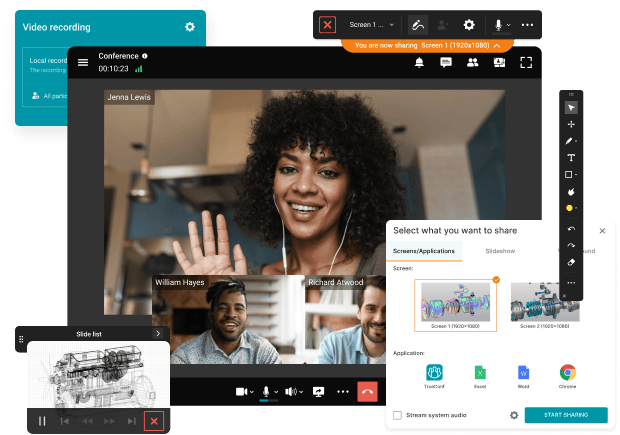
Video conferencing
Video platforms support real-time meetings with video, audio, screen sharing, and, depending on the product, recordings, transcripts, layouts, moderation, or webinars.
They are useful when a topic needs discussion, explanation, training, negotiation, or rapid feedback.
Unified communications
Unified communications platforms combine several communication channels:
messaging + meetings + telephony + files + directories + integrations
They reduce the need to switch between separate chat, conferencing, and calling systems.
Business telephony
Phone communication remains important for sales, customer support, reception, contact centers, and companies with existing PBX infrastructure.
Modern business telephony can include extensions, business numbers, call queues, routing, voicemail, and recording.
Collaborative workspaces
Some communication platforms also include documents, whiteboards, automation, tasks, or knowledge surfaces.
These features are valuable when they replace an existing workflow. They create unnecessary overlap when employees already use another system for the same task.
Internal vs External Communication Tools
Internal and external communication require different trust and access models.
|
Communication scope |
Typical tools |
Main requirement |
|---|---|---|
|
Internal team communication |
Chat, channels, meetings |
Fast coordination, search, identity |
|
Company-wide communication |
Announcements, town halls |
Reach, moderation, predictable access |
|
Partner communication |
Shared channels, guests, federation |
Controlled external access |
|
Customer communication |
Email, phone, support chat |
Routing, history, response management |
|
Federation, shared workspaces |
Administrative and identity boundaries |
A tool that works well for internal chat may be poorly suited to customer support or long-term collaboration between independent organizations.
Companies should therefore map communication by audience and trust boundary, not only by format.
Workplace Communication Statistics
Current workplace research shows why communication architecture matters.
Microsoft has reported that employees in its highest communication volume group could face approximately 275 interruptions per day from meetings, emails, and messages.
Research from Grammarly has also reported that more than half of workers struggle to keep up with notifications across multiple communication platforms. Atlassian has separately reported that employees use several digital tools to communicate with coworkers and often need to ask someone directly when information is difficult to locate.
The exact figures depend on the surveyed population and methodology, but the pattern is consistent: communication problems increasingly involve fragmentation and interruption rather than lack of communication.
Insight 2: The best communication tool does not maximize the number of conversations. It makes it easier to decide which conversations should be synchronous, asynchronous, urgent, searchable, or silent.
Synchronous vs Asynchronous Communication
Not every message deserves an immediate response.
|
Communication type |
Best for |
Typical format |
|---|---|---|
|
Synchronous |
Complex discussion, negotiation, incidents |
Video meeting, call |
|
Near-synchronous |
Quick coordination |
Direct message, team chat |
|
Asynchronous |
Updates without immediate response |
Channels, threads |
|
Persistent knowledge |
Information people must find later |
Documents, knowledge base |
|
Broadcast |
Company-wide announcements |
Announcement channels, town halls |
|
External |
Customers and partners |
Shared spaces, email, guest access |
A useful rule is:
Use the lowest interruption communication method that can still solve the problem.
A project update may not require a meeting. A difficult negotiation may not belong in a long message thread. A company policy should not exist only inside chat history.
Communication timing determines how people interact; workflow continuity determines whether identity, context, files, and permissions survive when users move between those communication modes.
Workflow Continuity Check
|
Transition |
What should remain connected? |
Fragmentation signal |
|---|---|---|
|
Message → call |
Participants, conversation context, identity |
Users must recreate the group or switch accounts |
|
Call → meeting |
Participants, files, permissions, meeting context |
Escalation requires a separate app and invitation workflow |
|
Meeting → follow-up |
Chat, recording, decisions, files |
Meeting context disappears when the session ends |
|
Internal → external collaboration |
Policy, identity ownership, access lifecycle |
External users receive unmanaged or permanent accounts |
Cloud, Self-Hosted, or Hybrid Communication?

Deployment model determines who operates the communication infrastructure and where dependencies exist.
Cloud communication tools
Cloud systems are operated by the vendor.
Microsoft Teams, Slack, Google Workspace, and Zoom Workplace primarily use this model. Cloud deployment reduces the amount of infrastructure the customer needs to operate directly.
Self-hosted communication tools
Self-hosted platforms run on infrastructure controlled or selected by the organization.
Mattermost supports self-hosted and air-gapped deployments. Its documentation describes operation inside isolated environments where required packages and resources are prepared locally.
TrueConf Server can operate autonomously inside a corporate network without continuous internet access.
Rocket.Chat supports self-managed and air-gapped deployments in addition to hosted environments.
Hybrid communication architecture
Some companies deliberately use more than one deployment model.
A cloud collaboration suite may handle ordinary office communication while a locally deployed system supports internal networks, protected projects, or existing telephony and video infrastructure.
Insight 3: Deployment model is not only an IT decision. It determines who operates the communication infrastructure, where external dependencies exist, and how much control the company has over identity, storage, integrations, and availability.
Four Levels of Company Communication Architecture
Company communication can be viewed as a progression from separate tools to a controlled communications environment. The levels are not a maturity ranking. They describe how much communication infrastructure is consolidated and centrally governed.
|
Level |
Model |
Typical setup |
Main tradeoff |
|---|---|---|---|
|
1 |
Separate communication tools |
Email + messenger + meeting app |
Easy to adopt, but information becomes fragmented |
|
2 |
Integrated collaboration |
Messaging + meetings + files |
Less switching, but telephony and identity may remain separate |
|
3 |
Unified communications |
Messaging + meetings + telephony + identity |
Centralized workflows, but stronger platform dependence |
|
4 |
Controlled communication infrastructure |
UC + directories + local deployment + interoperability |
Greater control, but more infrastructure responsibility |
Insight 4: Communication architecture becomes more valuable when consolidation follows a real governance or workflow need. Moving to a more integrated level is not automatically an improvement if it only creates a larger platform without removing fragmentation.
What Capabilities Matter Most?
This table answers a product question: What should the platform be able to do?
|
Capability |
Why it matters? |
What to check? |
|---|---|---|
|
Messaging |
Supports daily coordination |
Channels, threads, search, mentions, files |
|
Meetings |
Supports real-time work |
Recording, screen sharing, moderation |
|
External collaboration |
Connects partners |
Guests, shared spaces, federation |
|
Simplifies administration |
LDAP, corporate directories, SSO |
|
|
Search |
Preserves knowledge |
Messages, files, decisions |
|
Integrations |
Connects workflows |
APIs, bots, CRM, calendars |
|
Administration |
Supports larger deployments |
Policies, users, permissions, retention |
|
Deployment |
Defines infrastructure control |
Cloud, self-hosted, private, hybrid |
|
Connects existing systems |
Telephony, rooms, video endpoints |
|
|
Protects communication |
Identity, access, encryption, admin controls |
A capability matters only when it solves a real workflow, integration, or governance requirement.
Communication Tools for Companies: Platform Overview
The products below represent different communication models. The relevant difference is not simply which product has more features, but which architecture fits the organization and where the platform stops being a good fit.
1. Microsoft Teams

Microsoft Teams combines messaging, standard, private, and shared channels, meetings, calls, file collaboration, and Microsoft 365 integrations. Shared channels can be used with people outside the organization when administrators configure the required cross-organization access.
Communication model: Cloud unified collaboration
Deployment: Primarily Microsoft cloud
External collaboration: Guests, shared channels, meetings
Integrations: Microsoft 365 and third-party applications
Distinctive characteristic: Communication tightly integrated with Microsoft’s identity, file, and productivity ecosystem
Relevant scenario: Companies already standardized on Microsoft 365
May not fit when: The organization specifically requires a self operated primary collaboration platform outside the Microsoft cloud model
What to verify: Shared channel and guest policies, Microsoft Entra configuration, retention rules, meeting policies, required licensing, and the dependency on Microsoft cloud services.
2. Slack

Slack centers communication around channels, direct messages, Slack Connect, Huddles, Canvases, Lists, integrations, and Workflow Builder. Slack currently states that it connects with more than 2,600 applications and services.
Communication model: Cloud channel-based collaboration
Deployment: Vendor-operated cloud
External collaboration: Slack Connect
Integrations: Large app ecosystem and no-code workflows
Distinctive characteristic: Persistent channel communication connected to a large integration ecosystem
Relevant scenario: Teams that organize a large part of daily work around channels and connected applications
May not fit when: Self-hosting or operation inside an isolated organization-controlled network is a core requirement
What to verify: Slack Connect governance, retention settings, app permissions, workflow dependencies, guest access, and which capabilities require specific paid plans.
3. Google Chat and Google Meet
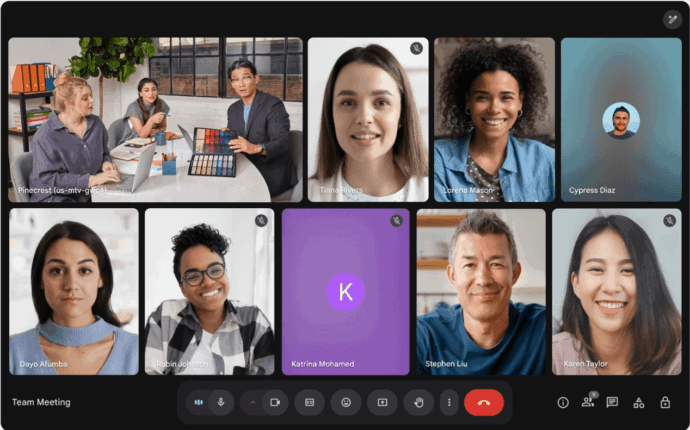
Google Chat provides direct messaging and Spaces, while Google Meet handles video meetings. Both are integrated with the wider Google Workspace environment, including Gmail, Drive, Calendar, and productivity applications.
Meet capabilities vary by Workspace edition, and Google notes that some meeting functions depend on subscription level, administrator settings, and encryption configuration.
Communication model: Cloud messaging and video collaboration
Deployment: Google Workspace cloud
External collaboration: External messaging and meetings according to policy
Integrations: Gmail, Drive, Calendar, Workspace applications
Distinctive characteristic: Communication embedded in the Google productivity ecosystem
Relevant scenario: Organizations already using Google Workspace
May not fit when: Local ownership of the collaboration server or isolated operation is required
What to verify: External access policies, Workspace edition limits, retention requirements, identity administration, meeting controls, and dependencies on the Google Workspace environment.
4. TrueConf Server

TrueConf Server combines messaging, channels, file exchange, video conferencing, webinars, screen sharing, recording, and centralized administration.
The full version can operate autonomously inside a corporate network without an internet connection. Current documentation states that a single conference can support up to 2,000 participants.
A built-in SIP 2.0, H.323, and RTSP gateway allows TrueConf Server to connect with compatible PBX systems, video endpoints, MCUs, and other communication infrastructure.
Communication model: Self-hosted unified communications
Deployment: Organization-controlled infrastructure
External collaboration: Meetings, messaging, guest participation, federation depending on configuration
Integrations: LDAP, Active Directory, SIP, H.323, RTSP
Distinctive characteristic: Locally operated communication combined with integration into existing video and telephony infrastructure
Best for: Enterprises that need self-hosted messaging and video communication, internal network operation, centralized administration, or integration with established SIP/H.323 infrastructure.
Strengths: Customer-controlled deployment, messaging, channels, video conferencing, webinars, recording, directory integration, and interoperability with existing communication systems.
Limitations: TrueConf is a communication platform rather than a broad office productivity suite centered on document editing, spreadsheets, or project management.
Relevant scenario: Enterprises that need internal network operation or integration with established communication systems
May not fit when: The requirement is primarily a broad office productivity suite with document editing, spreadsheets, and project management in the same product
What to verify: Directory integration, SIP and H.323 compatibility, recording and storage policies, external access, server sizing, federation requirements, and behavior in an isolated network.
Boost your team’s productivity with TrueConf Server Free!
5. Zoom Workplace

Zoom Workplace combines meetings, chat, and additional collaboration and productivity functions. Current Zoom features include AI assisted meeting summaries, recording analysis, meeting queries, and chat drafting.
Zoom continues to develop Workplace as a unified environment around communication before, during, and after meetings.
Communication model: Cloud communication and productivity
Deployment: Vendor-operated cloud
External collaboration: Meetings, chat, calling, guest participation
Integrations: Zoom ecosystem and business applications
Distinctive characteristic: Strong meeting-centered workflows extending into chat and follow-up work
Relevant scenario: Companies where video meetings are central to everyday collaboration
May not fit when: The primary requirement is an independently operated self-hosted collaboration server
What to verify: Meeting and chat retention, external participant policies, Zoom Phone requirements, identity integration, recording storage, and which AI or productivity functions depend on plan or cloud services.
6. Mattermost

Mattermost is a self-hosted communication and operational collaboration platform.
Its documentation covers messaging, Calls, Playbooks, Boards, user provisioning, SSO, ABAC, APIs, plugins, webhooks, audit functions, and security administration.
Mattermost also documents operation in air-gapped environments where installation resources, registries, client software, and dependencies must be prepared inside the isolated environment. Some cloud-dependent functions require alternative local configurations.
Communication model: Self-hosted messaging and operational collaboration
Deployment: Self-hosted, including isolated environments
External collaboration: Depends on deployment and configuration
Integrations: APIs, plugins, webhooks, commands
Distinctive characteristic: Infrastructure control combined with operational workflows
Relevant scenario: Organizations prioritizing self-hosting, controlled environments, or process coordination
May not fit when: The company wants a largely vendor managed service with minimal responsibility for server operations
What to verify: Identity provisioning, Calls architecture, plugin and integration dependencies, upgrade responsibility, external collaboration, and which functions require connectivity in an isolated deployment.
7. Secumeet
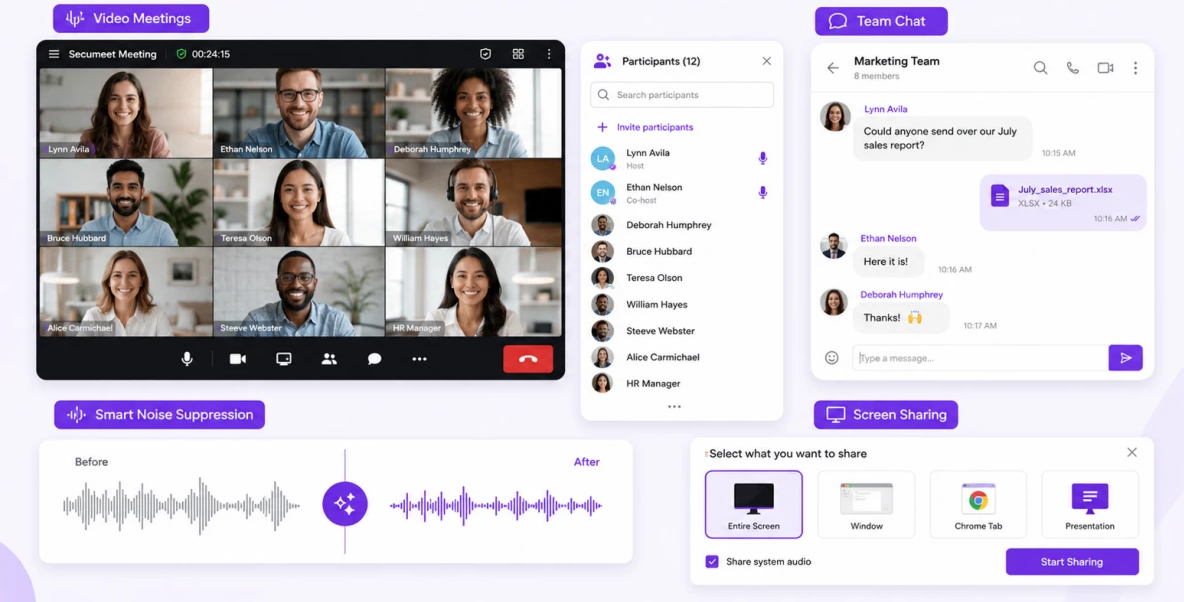
Secumeet combines persistent business messaging with video collaboration in a customer-operated communication environment.
Its current product materials describe personal and group chats that remain available before, during, and after meetings, together with shared file storage. Meeting functionality includes up to 1,500 participants, screen sharing with audio, presentations, remote computer control, configurable layouts, and meeting moderation.
Secumeet also includes AI-based functions such as noise suppression, background replacement, and meeting transcription.
Communication model: Customer-operated messaging and video collaboration
Deployment: Organization-controlled infrastructure
External collaboration: Meetings and team communication according to deployment configuration
Integrations: Compatible communication infrastructure, including SIP and H.323 where supported
Distinctive characteristic: Persistent team messaging combined with large-scale video communication in a customer-operated environment
Relevant scenario: Organizations that want messaging and video meetings in one controlled communication system
May not fit when: The primary requirement is a broad productivity suite centered on documents, spreadsheets, project management, or a large SaaS integration marketplace
What to verify: Deployment architecture, directory integration, supported clients, meeting capacity, recording and storage policy, external access, and which integrations are required in the target environment.
8. Rocket.Chat

Rocket.Chat supports hosted, self-managed, and air-gapped deployment models. Self-managed environments can be deployed using Docker, Kubernetes, or Podman, while air-gapped operation requires additional planning for cloud-dependent functions.
Its communication model centers on messaging and channels, with APIs, integrations, and cross-organization communication capabilities including Matrix-based federation in supported environments.
Communication model: Business messaging and collaboration
Deployment: Hosted, self-managed, or air-gapped
External collaboration: Federation and external communication
Integrations: APIs and connected applications
Distinctive characteristic: Flexible deployment combined with cross-server messaging options
Relevant scenario: Organizations that want self-managed messaging with extensibility and federation
May not fit when: The organization expects a communication platform to provide the same depth of native video conferencing as a video-first UC system
What to verify: Federation requirements, identity integration, deployment dependencies, air-gapped limitations, media and calling architecture, retention, and external collaboration policies.
Communication Platforms Compared by Architecture
|
Platform |
Main model |
Messaging |
Video |
Self-hosted |
External collaboration |
Main distinction |
|---|---|---|---|---|---|---|
|
Microsoft Teams |
Cloud unified collaboration |
Yes |
Yes |
Limited specialized models |
Yes |
Microsoft 365 ecosystem |
|
Slack |
Cloud channel collaboration |
Yes |
Yes |
No |
Yes |
Channels and integration ecosystem |
|
Google Workspace |
Cloud productivity collaboration |
Yes |
Yes |
No |
Yes |
Workspace integration |
|
TrueConf Server |
Self-hosted unified communications |
Yes |
Yes |
Yes |
Yes |
Local deployment plus SIP and H.323 |
|
Zoom Workplace |
Cloud communication platform |
Yes |
Yes |
No |
Yes |
Meeting-centered workflows |
|
Mattermost |
Self-hosted collaboration |
Yes |
Yes |
Yes |
Yes |
Infrastructure control and operational workflows |
|
Secumeet |
Customer-operated collaboration |
Yes |
Yes |
Yes |
Yes |
Persistent messaging plus large video meetings |
|
Rocket.Chat |
Flexible messaging platform |
Yes |
Yes |
Yes |
Yes |
Self management plus federation |
This is not a ranking. Several products cover similar communication functions but differ substantially in deployment, infrastructure control, interoperability, and surrounding productivity ecosystem.
How to Choose Communication Tools for a Company?
This section answers a different question from the feature table above: What sequence should a company follow when selecting a platform?
- Map users and audiences.
- Map the communication workflows they need.
- Separate synchronous from asynchronous work.
- Define the infrastructure and data boundary.
- Map integrations and existing systems.
- Remove unnecessary overlap before migration.
The six steps are expanded below so each requirement can be tested before comparing final vendors.
Step 1. Map users and audiences
Identify who communicates with whom.
Separate internal employees, executives, remote teams, subsidiaries, customers, suppliers, contractors, and other external participants.
Step 2. Map communication workflows
List the actual jobs the system must support.
Typical examples include daily coordination, project discussions, management announcements, training, customer calls, external meetings, incident communication, and partner collaboration.
Step 3. Separate synchronous and asynchronous work
Decide which workflows need immediate interaction.
Reserve calls and meetings for tasks that benefit from live discussion. Keep routine updates, status reporting, documentation, and many approvals asynchronous.
Step 4. Define the infrastructure boundary
Determine whether a vendor-operated cloud is acceptable or whether the company requires self-hosted infrastructure, internal network operation, private deployment, or an isolated environment.
Step 5. Map integrations and existing systems
Identify directories, PBX systems, video endpoints, calendars, CRM platforms, ticketing systems, and other services that the communication platform must connect to.
Step 6. Remove unnecessary overlap
Compare the proposed platform with tools employees already use.
If two systems solve the same communication job without a clear reason, adding both can increase rather than reduce complexity.
What each selection step should produce?
|
Step |
Required output |
Why it matters? |
|---|---|---|
|
Users and audiences |
List of internal and external user groups |
Defines identity and access boundaries |
|
Workflows |
Matrix of chat, meetings, phone, broadcast, and external collaboration |
Prevents feature-driven purchasing |
|
Communication timing |
Rules for synchronous and asynchronous work |
Reduces unnecessary meetings and alerts |
|
Infrastructure |
Cloud, self-hosted, or hybrid requirement |
Defines operational responsibility and dependencies |
|
Integrations |
Directory, PBX, CRM, calendar, room, and API map |
Exposes migration and interoperability requirements |
|
Overlap review |
List of tools to keep, replace, or retire |
Prevents communication sprawl |
Insight 5: A communication stack should be evaluated by the number of workflows it simplifies, not by the number of applications it contains.
Communication Platform Migration Risk Matrix
|
Migration area |
Typical risk |
What to validate before rollout |
|---|---|---|
|
Identity and directories |
Duplicate accounts, inconsistent groups, slow offboarding |
Directory mapping, SSO, provisioning, role migration |
|
Message and file history |
Loss of searchable context and audit history |
Export/import options, retention mapping, archive strategy |
|
Telephony and room systems |
Broken call routing or incompatible endpoints |
PBX, SIP/H.323, room-device, numbering, and routing tests |
|
External collaboration |
Partners lose access or retain access longer than intended |
Guest lifecycle, federation, shared-space ownership, revocation process |
When One Communication Platform Is Not Enough?

Consolidation reduces complexity, but one product does not need to handle every business interaction.
A separate communication platform can be justified when it serves a genuinely different environment. A company might use a cloud productivity suite for ordinary office work while keeping another system for internal communication, isolated networks, established video infrastructure, or customer support.
The useful distinction is between intentional specialization and accidental duplication.
Intentional specialization solves a requirement another platform cannot satisfy. Accidental duplication occurs when employees cannot tell which of several tools should be used for the same conversation.
Common Mistakes When Choosing Company Communication Software
Too many overlapping tools
Employees should not have to guess whether a routine conversation belongs in email, a messenger, project comments, or a meeting platform. If two tools solve the same communication job, the company should define a clear boundary or remove the duplication.
No external communication model
Guest accounts, shared channels, public meeting links, federation, and customer support channels create different trust relationships. Treating every external participant the same can make access harder to govern and offboarding harder to verify.
Important decisions remain only in chat
Chat is useful for discussion, but long-term decisions should move into a searchable and durable knowledge surface. Otherwise employees repeatedly ask for information that technically exists but is difficult to retrieve.
Deployment models are mixed without a clear boundary
A cloud service and a self-hosted platform can coexist, but users need to know which information and workflows belong in each environment. Without that boundary, a hybrid communication stack can create more confusion instead of more control.
Notification policies are left entirely to individual users
When every channel, mention, meeting update, and integration can generate an alert, communication volume becomes interruption volume. Teams should define which events are urgent, which can wait, and which should be summarized rather than pushed immediately.
Migration is treated as account creation
A platform change can affect message history, files, partner access, directories, telephony, meeting rooms, bots, workflows, and retention rules. A successful migration therefore needs a dependency map, not only a list of users.
Communication Architecture Checklist
Before selecting a communication platform, a company should be able to answer:
Who needs to communicate? Which conversations need to be real-time? Which information must remain searchable? Who is external? Where should messages, files, and recordings live? Is cloud deployment acceptable? Which directories, PBX systems, meeting rooms, and business applications need integration? Which notifications are actually necessary? What happens if one communication service becomes unavailable?
Clear answers to these questions make product comparison significantly more useful.
Conclusion
Communication tools for companies now cover much more than messaging. Modern platforms can combine channels, meetings, voice calls, files, external collaboration, automation, administration, and integrations. The right choice depends on communication workflows, internal and external audiences, deployment model, existing infrastructure, and the level of operational control the organization requires.
The most effective communication stack is not necessarily the one with the most products or features. It is the one that gives employees a clear answer to where they should communicate, when a meeting is necessary, where information can be found later, and which environment should be used for customers, partners, or controlled internal communication.
Empower your video conferencing experience with TrueConf!
FAQ
How many communication tools should a company use?
There is no ideal number. A company should use enough tools to cover distinct communication jobs without forcing employees to choose between several applications for the same task. TrueConf can consolidate messaging, meetings, files, and video communication when those workflows benefit from one customer-controlled environment, while specialist systems can remain separate where they solve a different job.
What communication tools does a small company need?
A small company usually needs messaging, video meetings, file sharing, and a reliable way to communicate with customers or partners. TrueConf can cover messaging and video communication in one environment when self-hosting or infrastructure control matters, while a cloud-first service may be simpler when the company does not want to operate its own communication infrastructure.
What is the difference between business messaging and unified communications?
Business messaging focuses mainly on direct messages, channels, threads, and asynchronous coordination. Unified communications connects messaging with additional functions such as video meetings, calling, directories, and administration. TrueConf fits the unified-communications model by combining enterprise messaging and video communication with directory and SIP/H.323 integration.
Are self-hosted communication tools better than cloud platforms?
Not automatically. Cloud platforms reduce infrastructure management, while self-hosted systems provide more direct control over deployment, dependencies, and data paths. TrueConf is relevant when that customer-controlled model is a requirement, but the better deployment choice still depends on IT resources, integrations, availability needs, and governance.
How can companies reduce communication overload?
Companies can reduce overload by defining the purpose of each channel, separating urgent from non-urgent communication, reducing unnecessary meetings, controlling notifications, and moving long-term knowledge out of transient chat streams. With TrueConf, organizations can keep messaging and live video communication in one environment, but they still need internal rules that define when to use chat, a call, a meeting, or persistent documentation.
What should a company check before switching communication tools?
Review users, message history, files, integrations, partner access, directories, meeting infrastructure, telephony, retention requirements, and migration capabilities. When evaluating TrueConf, also verify server sizing, directory integration, SIP/H.323 interoperability, recording storage, external access, federation requirements, and behavior in the target network environment.
When should a company use more than one communication platform?
Using more than one platform makes sense when each system serves a clearly different requirement, such as customer support, protected internal communication, or specialized telephony. TrueConf can serve the self-hosted messaging and video-communication layer while another system handles a distinct workflow. It becomes communication sprawl when employees cannot tell which tool should be used for the same type of conversation.
About the Author
Diana Shtapova is a product specialist and technology writer with three years of experience in the unified communications industry. At TrueConf, she leverages her deep product expertise to create clear and practical content on video conferencing platforms, collaboration tools, and enterprise communication solutions. With a strong background in product research and user-focused content development, Diana helps professionals and businesses understand core product features, adopt new technologies, and unlock the full potential of modern collaboration software.


Follow us on social networks