
Self-Hosted WhatsApp Alternative: 4 Private Messaging Platforms Compared
A self-hosted WhatsApp alternative is a messaging platform that organizations can install on their own servers or private infrastructure. It provides employees with personal and group chats, file sharing, and, in some cases, voice and video calls without requiring the company to rely entirely on an externally hosted messaging service.
For businesses, the primary difference is infrastructure control. WhatsApp offers a familiar interface and access to a large network of users, while self-hosted solutions let IT teams manage corporate identities, server-side communication data, access policies, and deployment environments.
TrueConf Server, Rocket.Chat, Element, and Mattermost are four options worth considering. However, they differ significantly in security architecture, mobile connectivity, administration, and collaboration capabilities.
This guide compares their strengths and limitations, explains the technical requirements of self-hosted messaging, and outlines how organizations can move internal communication away from WhatsApp.
What Is a Self-Hosted WhatsApp Alternative?
A self-hosted WhatsApp alternative is a messaging application connected to a server operated by the organization rather than relying exclusively on infrastructure maintained by a consumer messaging provider.
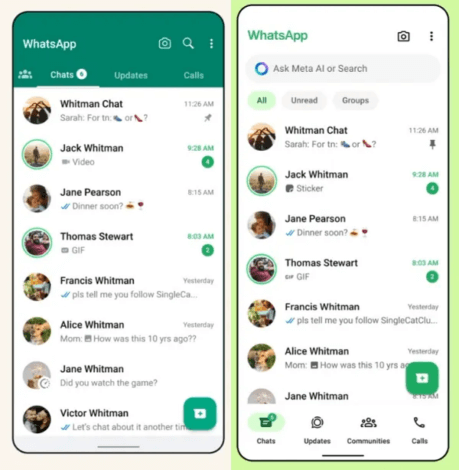
Depending on the platform, employees can exchange messages, create group conversations, share documents, search communication history, and participate in calls through desktop, mobile, or web clients.
Companies can deploy these systems on physical servers, virtual machines, or private cloud infrastructure. Some solutions also support communication entirely within local networks without public internet connectivity.
Self-hosting creates several distinctions:
- Infrastructure ownership: Organizations choose where the messaging server runs and who maintains it.
- Identity management: Corporate accounts can be administered independently of personal phone numbers.
- Data storage: Server-side messages and files can remain within company-managed infrastructure.
- Access policies: Administrators can restrict connections, manage permissions, and control accounts.
- Operational responsibility: The company must maintain the server, security updates, backups, and availability.
Self-hosting does not automatically mean open-source software, end-to-end encryption, or direct compatibility with WhatsApp. These characteristics must be evaluated separately.
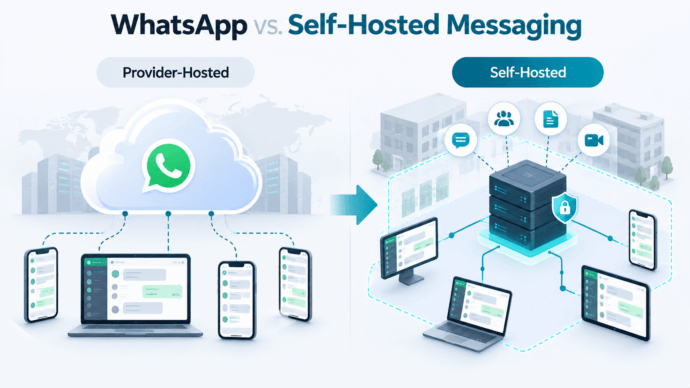
WhatsApp vs. Self-Hosted Messaging: Key Differences
Both approaches can support everyday communication, but their security models, infrastructure requirements, and administrative capabilities differ.
|
Feature |
|
Self-Hosted Messenger |
|---|---|---|
|
Server infrastructure |
Operated by Meta |
Managed by the organization or its provider |
|
Account management |
Primarily phone numbers |
Corporate identities or platform-specific accounts |
|
Group chats and file sharing |
Supported |
Commonly supported |
|
Voice and video calls |
Built in |
Depends on the platform |
|
End-to-end encryption |
Default for personal messages and calls |
Depends on the product and communication mode |
|
Data storage |
Provider infrastructure, devices, and optional backups |
Configurable company-managed storage |
|
LDAP/Active Directory |
Not a native consumer-app feature |
Available in some enterprise solutions |
|
Local network without internet |
No independent internal server deployment |
Possible with suitable platforms |
|
Mobile notifications |
Managed by WhatsApp and mobile operating systems |
May require external push services or other infrastructure |
|
Communication with WhatsApp contacts |
Native |
Usually not directly supported |
|
Server maintenance |
Managed by provider |
Managed by company or hosting partner |
Can a Self-Hosted Messenger Communicate with WhatsApp Users?
Usually, not directly.
Installing Rocket.Chat, Mattermost, Element, or TrueConf does not automatically allow users to exchange messages with arbitrary WhatsApp accounts.
Some products can connect to WhatsApp Business Platform through supported integrations, connectors, or customer-service systems. Such integrations have separate requirements and do not provide general interoperability between the two messaging networks.
If an organization mainly communicates with customers through WhatsApp, replacing that channel may be impractical. A self-hosted platform can instead handle internal employee communication while WhatsApp remains available for customer interactions.
Why Do Businesses Choose Self-Hosted Messaging?
Corporate Identity and Access Management
Consumer messaging accounts can complicate corporate administration when employees use personal phone numbers for business conversations.
Enterprise messengers can support centralized account provisioning, internal directories, group permissions, and authentication policies.
Some platforms integrate with Active Directory or LDAP, allowing IT administrators to use existing employee records.
For example, when an employee changes departments or leaves the organization, access to company-managed messaging accounts can be adjusted centrally.
Control Over Communication Data
Self-hosted platforms allow organizations to define where server-side messages, attachments, and other communication records are stored.
This can help businesses apply internal retention rules, backup procedures, and administrative access policies.
However, organizations must still consider what data is stored on employees’ devices, whether push notifications pass through external providers, and what information administrators can access.
Communication Within Restricted Networks
Some organizations require communication systems that operate without relying on public cloud services.
Factories, laboratories, public-sector environments, and other facilities may deploy self-hosted messengers within their own networks.
If the server and client devices remain connected to the corporate network, a suitable platform can continue operating without public internet access.
This is different from device-to-device offline messaging. A conventional self-hosted messenger still needs functioning network connectivity between the clients and its server.
Integration with Corporate Workflows
Self-hosted enterprise messengers may provide directory integration, APIs, bots, group permissions, and communication channels.
Some products also integrate messaging with meetings and collaboration features.
These capabilities can reduce the need to manage several separate business communication applications, although integrations and features vary by platform and edition.
4 Self-Hosted WhatsApp Alternatives for Business
The following solutions address different parts of the corporate messaging market. They should not be treated as functionally identical replacements for WhatsApp.
1. TrueConf Server — For Messaging and Video Conferencing
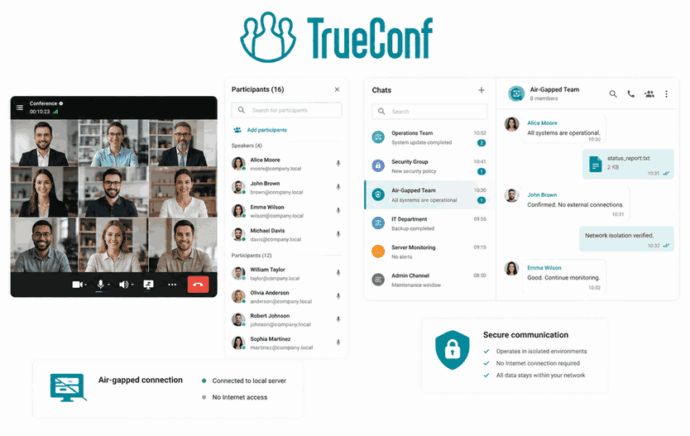
TrueConf Server combines corporate messaging, file sharing, voice and video calls, group conferencing, and centralized administration.
Organizations can deploy TrueConf Server on their own infrastructure and provide employees with applications for Windows, Linux, macOS, iOS, and Android.
The platform supports personal and group chats, message history synchronization, corporate directories, and Active Directory or LDAP integration.
Its distinguishing feature is the combination of enterprise messaging and video communication within a self-hosted environment. Companies can use the same platform for everyday text conversations, one-to-one video calls, and group meetings according to their license.
TrueConf Server can also operate within an isolated corporate network without public internet access.
Best for: Organizations that need centrally managed internal messaging, video conferencing, and control over their communication infrastructure.
Considerations: Organizations must review server requirements, mobile access, and conferencing license limits.
2. Rocket.Chat — For Customizable Team Messaging

Rocket.Chat provides organization-managed messaging through direct conversations, channels, file sharing, permissions, and integration capabilities.
It is relevant for organizations that need structured team collaboration or want to connect messaging with other business systems.
Rocket.Chat also offers capabilities for external communication workflows, although supported channels, features, and licensing depend on the chosen edition.
Best for: Organizations prioritizing configurable team messaging and application integrations.
Considerations: Review the current edition restrictions, administrative requirements, and connector capabilities before deployment.
3. Element (Matrix) — For Decentralized Communication

Element uses the Matrix open communication standard.
Organizations can deploy their own Matrix server and connect users through Element clients.
Matrix federation can allow communication between independently operated servers, provided federation is enabled and compatible policies permit it.
Element also supports end-to-end encrypted conversations in supported configurations, making it relevant for organizations seeking decentralized messaging architecture.
Best for: Organizations that prioritize federation, open protocols, and encrypted communication.
Considerations: Server administration, federation policies, encryption key management, and client configuration can require additional planning.
4. Mattermost — For IT and Operational Teams

Mattermost provides self-hosted communication focused on teams, workflows, and operational coordination.
It supports direct messages, channels, file exchange, integrations, and structured collaboration capabilities.
Mattermost is particularly relevant for technical departments and organizations that need messaging closely connected to operational processes.
Best for: IT teams, development departments, and organizations requiring workflow-oriented messaging.
Considerations: Its collaboration model differs from a consumer messenger, and available administrative features depend on the selected edition.
Which Self-Hosted WhatsApp Alternative Should You Choose?
The decision should begin with the communication tasks employees need to perform, not simply the number of features advertised.
|
Business requirement |
Platform to evaluate first |
Reason |
|---|---|---|
|
Messaging with integrated video meetings |
TrueConf |
Combines chats, calls, and conferences |
|
Customizable channels and integrations |
Rocket.Chat |
Focuses on configurable team communication |
|
Federation between independent servers |
Element / Matrix |
Supports decentralized communication |
|
Technical and operational workflows |
Mattermost |
Emphasizes structured team collaboration |
|
Messaging inside an isolated corporate network |
TrueConf or another verified offline-capable deployment |
Supports organization-controlled infrastructure |
|
Native communication with ordinary WhatsApp contacts |
WhatsApp itself |
Self-hosting does not provide automatic WhatsApp interoperability |
The table identifies suitable starting points, not guaranteed winners. Mobile access, deployment complexity, security requirements, and licensing should be verified before a final selection.
Security: Self-Hosting vs. End-to-End Encryption
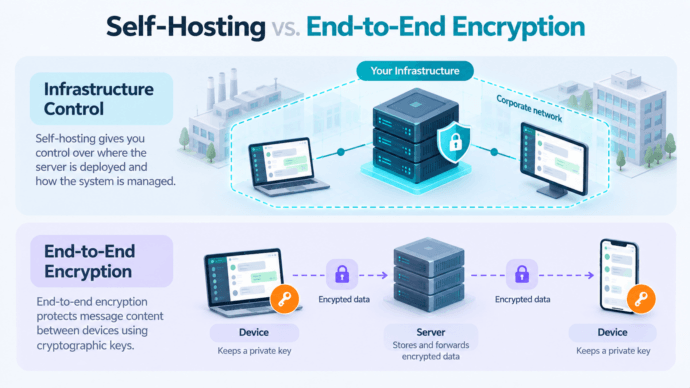
One of the most common misconceptions about private messaging is that storing messages on a company’s own server automatically provides stronger encryption than WhatsApp.
In practice, self-hosting and end-to-end encryption solve different problems.
Self-hosting determines who operates the communication infrastructure and controls server-side data. Encryption determines who can read messages while they are transmitted or stored.
Three security mechanisms should be distinguished.
Transport encryption protects data traveling between devices and servers. Technologies such as TLS help prevent unauthorized interception during transmission.
Encryption at rest protects stored information, such as database records, attachments, and backups, depending on the implementation and key management configuration.
End-to-end encryption (E2EE) protects message content so that only the communicating endpoints possess the keys needed to decrypt it. In a properly implemented E2EE system, the messaging server cannot independently read message content.
WhatsApp provides end-to-end encryption for personal messages and calls. Self-hosted products use different encryption architectures, and some permit authorized server-side processing or administrative access to communication data.
For example, TrueConf Server documents TLS 1.3 for control traffic and AES-256 encryption for media. These protections should not be described as equivalent to WhatsApp-style end-to-end message encryption without verification of the particular communication mode.
Security takeaway
For regulated organizations, the choice depends on whether their main requirement is control of infrastructure, confidentiality from server operators, administrative access to records, or some combination of these.
Mobile Messaging: Notifications and Connectivity Limitations
Replacing WhatsApp requires more than matching chat and file-sharing features. Employees also expect messages to arrive promptly when their phones are locked or the application is running in the background.
Mobile notifications are therefore one of the most important technical requirements in a self-hosted deployment.
How Mobile Push Notifications Work
Many messaging applications use Apple Push Notification service (APNs) on iOS and Firebase Cloud Messaging (FCM) on Android.
Even when the primary messaging server is self-hosted, the application may rely on these external services to notify devices of incoming messages.
For example, Rocket.Chat supports a managed push gateway or a separately configured gateway. Element’s standard mobile applications can use an Element-operated gateway connected to Apple or Google notification services. Mattermost also documents hosted and self-managed push proxy configurations.
This creates an important distinction between hosting a messaging server privately and operating every part of the mobile communication workflow without external connectivity.
What Happens in an Isolated Network?
A self-hosted messenger may continue exchanging messages within a private network while standard background push notifications are unavailable.
The exact behavior depends on the application, operating system, mobile management policies, and notification architecture.
Before deployment, test whether employees can receive notifications when:
- The mobile application is open.
- The application is running in the background.
- The device is locked.
- The device is connected only to the corporate network.
- The public internet connection is unavailable.
An organization should not assume that an application supporting offline server deployment will automatically deliver locked-screen notifications without public push infrastructure.
TrueConf as a Self-Hosted WhatsApp Alternative
For businesses that use WhatsApp primarily for internal communication, TrueConf Server provides a company-operated messaging platform that combines employee conversations, file sharing, and video conferencing.
Rather than positioning TrueConf as a direct replacement for the worldwide WhatsApp messaging network, it is more useful to evaluate how it can replace internal corporate workflows currently handled through personal messaging accounts.
Example: Moving Employee Communication to a Private Server
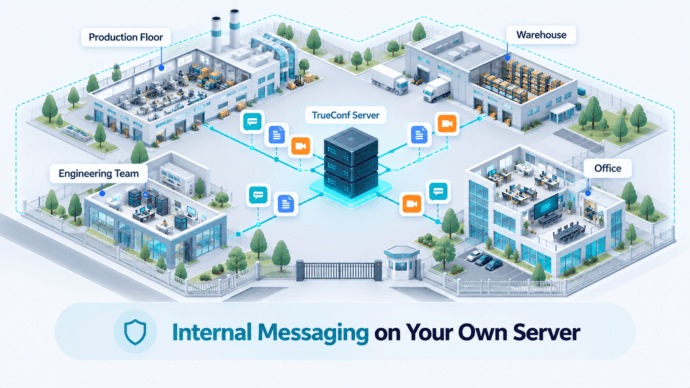
Consider a manufacturing company where employees use WhatsApp groups to coordinate work between production departments, warehouses, engineering teams, and administration.
The arrangement is convenient, but it creates several administrative challenges.
Some conversations depend on personal phone numbers, employee departures complicate account management, and the organization cannot host its internal WhatsApp communication infrastructure.
The company decides to implement a messaging platform within its corporate network.
With TrueConf Server, the IT department can deploy the communication server on organization-controlled infrastructure and create employee accounts connected to the corporate directory.
Employees can communicate through personal and group chats, exchange documents, and use video calls for discussions that cannot be resolved through messages.
The deployment can support communication inside a local network without public internet access.
UltraHD Video Conferences
Create conferences on the fly gathering up to 2,000 participants in a meeting. Enjoy realistic communications with cutting-edge AI algorithms. Take an active part in online meetings without being distracted by taking notes! Record video conferences and share recordings with colleagues.

Example workflow:
- A warehouse employee sends a message to an internal logistics group.
- An engineer shares a document with colleagues through the corporate messenger.
- Department managers initiate a video conference to discuss an operational issue.
- The IT department manages employee accounts and access from the corporate infrastructure.
- When an employee leaves the organization, their account can be disabled centrally.
This approach consolidates internal conversations and video communication within a platform managed by the company.
It does not automatically transfer historical WhatsApp messages or allow employees to contact external WhatsApp users through TrueConf.
Try TrueConf Server Free!
- 1,000 online users with the ability to chats and mske one-on-one video calls.
- 10 PRO users with the ability to participate in group video conferences.
- One SIP/H.323/RTSP connection for interoperability with corporate PBX and SIP/H.323 endpoints.
- One guest connection to invite a non-authenticated user via link to your meetings.

Self-Hosted Messaging Costs and Server Requirements
A self-hosted messenger may reduce dependence on recurring consumer or cloud services, but operating the platform is not necessarily free.
The total cost depends on deployment size, required availability, software licensing, internal IT resources, and security obligations.
Organizations should account for the following components:
|
Cost component |
What to evaluate |
|---|---|
|
Server infrastructure |
Physical or virtual machines, storage, and computing capacity |
|
Software licensing |
Free-edition limitations, user tiers, advanced features |
|
Installation |
Server configuration, directory integration, testing |
|
Network access |
DNS, certificates, routing, firewalls, remote connectivity |
|
Maintenance |
Updates, security patches, monitoring, troubleshooting |
|
Backups |
Backup storage, recovery procedures, restoration testing |
|
Mobile access |
App management, notification infrastructure, device policies |
|
Support |
Internal staff time or commercial support agreements |
There is no universal server configuration suitable for every messenger. Hardware requirements depend on concurrent connections, retained files, messaging activity, video workloads, and high-availability requirements.
For products that combine messaging with video conferencing, capacity planning must also account for concurrent meetings rather than relying solely on the number of registered users.
Free vs. Paid Self-Hosted Solutions
Free editions are useful for testing and smaller deployments, but limitations vary substantially between products.
Some restrict users or push notifications. Others reserve certain administrative, security, integration, or support functions for commercial editions.
Before selecting a free plan, verify its current licensing terms, feature availability, support policy, and production deployment conditions.
A platform’s open-source status also does not mean that every enterprise feature is included without charge.
How to Migrate from WhatsApp to a Self-Hosted Messenger
A successful migration starts by identifying which WhatsApp workflows the organization intends to replace.
Step 1. Separate Internal and External Communication
List the conversations currently handled through WhatsApp.
Identify employee groups, departmental coordination, customer conversations, supplier contacts, emergency announcements, and file-sharing workflows.
Internal discussions are usually the clearest candidates for replacement.
Customer communication may need to remain on WhatsApp or move to a separate supported business messaging channel.
Step 2. Define Functional Requirements
Document the features employees use regularly.
Consider message search, attachments, group administration, read receipts, mobile notifications, voice and video calls, and access from multiple devices.
Avoid assuming that every enterprise messenger reproduces WhatsApp’s interface or functionality exactly.
Step 3. Plan Hosting and Security
Choose the server environment and define storage, authentication, network, and access policies.
Confirm how messages are encrypted, whether server administrators can access stored content, and which services require external connectivity.
Establish backup and recovery procedures before inviting employees.
Step 4. Configure Employees and Groups
Deploy the platform, provision employee accounts, and organize internal communication groups.
Where supported, connect the messenger to Active Directory or LDAP.
Define group ownership and permissions so that administrators can manage departmental changes.
Step 5. Test Desktop and Mobile Applications
Run a controlled pilot with employees using different operating systems and network connections.
Test messaging, file transfers, notification delivery, voice or video communication, and recovery from temporary network interruptions.
For private-network deployments, explicitly test the intended environment without public internet access.
Step 6. Handle Existing Chat History
Do not assume WhatsApp messages can be imported directly into another messenger.
Export formats, attachments, encryption, and product-specific import capabilities may prevent automatic migration.
Organizations may need to preserve old conversations in a separate approved archive while beginning new discussions on the self-hosted platform.
Step 7. Roll Out in Stages
Start with one department or pilot team before deploying to the entire company.
Review feedback, adjust permissions, and provide clear instructions.
Once the essential workflows are confirmed, move additional departments to the platform.
Self-Hosted WhatsApp Replacement Checklist
Before committing to a messaging platform, use this checklist to verify whether it satisfies the organization’s actual communication requirements.
- Employees can exchange individual and group messages.
- File sharing and message history meet operational needs.
- Desktop and mobile clients support the required devices.
- Notifications have been tested on locked phones.
- Corporate accounts can be centrally managed.
- Server-side message storage and backups meet company policies.
- Encryption and administrator access are documented.
- External communication requirements are addressed.
- The platform works under the intended network restrictions.
- Licensing supports the expected user and meeting capacity.
- IT administrators have documented update and recovery procedures.
- Employees can complete their common communication workflows without relying on personal accounts.
Practical check
A product that meets every infrastructure requirement but fails a critical employee workflow may not be a suitable replacement.
When Is Self-Hosted Messaging Not the Best Choice?
Self-hosted messaging is not automatically the most practical approach for every business.
Companies without IT administration capacity may find server management, upgrades, security monitoring, and troubleshooting more expensive than using a managed service.
Organizations that primarily communicate with external WhatsApp users may not benefit from replacing the application entirely.
Mobile-first teams also need to verify background notification behavior carefully, particularly in environments with restricted network access.
Finally, organizations requiring end-to-end encrypted communication must evaluate the specific encryption architecture rather than assuming self-hosting provides the same confidentiality model as WhatsApp.
The decision should be based on required workflows, operational resources, and security policies.
Conclusion
A self-hosted WhatsApp alternative can help organizations move internal employee messaging to infrastructure they control.
TrueConf Server, Rocket.Chat, Element, and Mattermost address different needs, from integrated video conferencing and corporate administration to decentralized communication and technical workflows.
For organizations seeking a company-managed messenger with group chats, file sharing, directory integration, and video meetings, TrueConf Server offers a self-hosted option.
Before switching, however, businesses should evaluate mobile notifications, encryption, external contacts, licensing limits, and the practical effort required to migrate existing workflows.
The right replacement is the one that gives employees the communication features they need while satisfying the organization’s infrastructure and administration requirements.
FAQ
Can I self-host WhatsApp on my own server?
No. The consumer WhatsApp messaging network cannot be independently deployed as a company-operated server. Businesses requiring self-hosting need another messaging platform.
What is the best self-hosted alternative to WhatsApp?
The answer depends on the intended use. TrueConf combines corporate messaging and video conferencing, Rocket.Chat supports customizable team communication, Element offers Matrix-based federation, and Mattermost focuses on operational collaboration.
Can a self-hosted messenger work without internet access?
Yes, if the software supports isolated deployment and clients remain connected to the internal server. Mobile push notifications and external communication may have additional connectivity requirements.
Is self-hosted messaging more secure than WhatsApp?
Not necessarily. Self-hosting gives organizations infrastructure control, but security depends on encryption, access policies, software maintenance, endpoint protection, and key management.
Does self-hosted messaging support end-to-end encryption?
Some platforms support E2EE, while others use transport and server-side encryption. The availability and scope of end-to-end encryption depend on the selected product and communication mode.
Can a self-hosted messenger send messages to WhatsApp users?
Generally not through native internal messaging. Certain platforms support integrations with WhatsApp Business Platform for specific customer communication workflows, subject to applicable requirements.
Can WhatsApp chat history be transferred to a self-hosted messenger?
Not universally. Migration depends on the destination product’s supported import formats and the availability of exportable data. Organizations should verify compatibility before planning a full transfer.
Can TrueConf replace WhatsApp for internal business communication?
TrueConf Server can support internal employee messaging through personal and group chats, file sharing, managed accounts, and video communication. It does not automatically provide connectivity to WhatsApp contacts.
How many users does TrueConf Server Free support?
TrueConf Server Free supports up to 1,000 simultaneously connected users for messaging and one-to-one calls, with 10 PRO users for group video conferencing under the published free license conditions.
About the Author
Olga Afonina is a technology writer and industry expert specializing in video conferencing solutions and collaboration software. At TrueConf, she focuses on exploring the latest trends in collaboration technologies and providing businesses with practical insights into effective workplace communication. Drawing on her background in content development and industry research, Olga writes articles and reviews that help readers better understand the benefits of enterprise-grade communication.


Follow us on social networks