
Best Secure Communication Platforms for Enterprises in 2026
Choosing a secure communication platform for an enterprise is a decision about where data lives, who controls the encryption keys, and how the system behaves when the network is compromised, audited, or cut off entirely. It is not a decision about which app has the nicest interface. For a bank, a government agency, a hospital network, or an industrial operator, the wrong choice creates a compliance gap that shows up during the next audit or the next incident, not before.
This guide ranks and compares the platforms that enterprise IT leaders, CISOs, and procurement teams actually shortlist in 2026: on-premises and private cloud systems like TrueConf, Mattermost, and Troop Messenger, security-first messengers like Wire and NetSfere, and mainstream cloud suites like Microsoft Teams, Zoom, and Cisco Webex. Each vendor is evaluated on deployment model, encryption approach, compliance posture, and the type of organization it actually fits, not on marketing claims.
Best Secure Communication Platforms for Enterprises
|
Rank |
Platform |
Deployment model |
Best for |
Standout capability |
|---|---|---|---|---|
|
1 |
TrueConf |
On-premises/private cloud |
Banks, government, industrial and defense organizations needing full data control and offline operation |
Runs fully autonomously on a closed network, scales from 10 to 1,000,000 users |
|
2 |
Wire |
Cloud, hybrid, on-premises option |
Governments and security-critical organizations that need certified E2EE across every channel |
Messaging Layer Security (MLS) encryption on messaging, calls, and file sharing |
|
3 |
Troop Messenger |
On-premise, air-gapped, private cloud, or SaaS |
Government and defense organizations wanting cost-effective on-premise or air-gapped messaging, voice, and video |
End-to-end encryption with post-quantum cryptography on one-to-one and group chats |
|
4 |
Mattermost |
Self-hosted/private cloud |
DevSecOps, defense, and technical teams needing an auditable, code-transparent stack |
Open-core codebase, FIPS-aligned builds, air-gapped deployment support |
|
5 |
NetSfere |
Cloud, sovereign cloud, on-premises |
Healthcare, finance, and public sector needing certified regulatory compliance |
Post-quantum (ML-KEM 1024) encryption applied by default |
|
6 |
Cisco Webex |
Cloud (hybrid options for large enterprise) |
Large enterprises already invested in Cisco networking and calling infrastructure |
Deep integration with Cisco hardware, contact center, and calling stack |
|
7 |
Microsoft Teams |
Cloud (Microsoft 365) |
Organizations standardized on the Microsoft 365 ecosystem |
Native integration with SharePoint, Entra ID, and Microsoft compliance tooling |
|
8 |
Zoom |
Cloud |
Distributed teams prioritizing meeting quality and fast onboarding |
Low-friction video experience with broad third-party app ecosystem |
Who Should Choose Which Platform?

If your organization is legally required to keep data inside its own perimeter, or needs to keep operating when the internet connection drops, an on-premises platform is not optional: TrueConf, Mattermost, or Troop Messenger are the realistic candidates, and TrueConf is the strongest fit when video conferencing quality and SIP/H.323 hardware integration matter as much as messaging.
If your priority is certified end-to-end encryption with a proven track record among governments and regulated industries, and cloud deployment is acceptable, Wire and NetSfere are the stronger picks, with NetSfere better suited to organizations that need to demonstrate compliance against specific frameworks such as HIPAA or FINRA, and Wire better suited to organizations that want a security-first messaging and calling experience with an optional on-premises tier.
If your organization already runs on Microsoft 365 or Cisco infrastructure and your main requirement is baseline enterprise security rather than data sovereignty, Microsoft Teams or Cisco Webex will get you there with the least integration work, while Zoom remains the fastest way to stand up reliable video meetings for teams without strict data residency constraints.
Secure Communication Platform vs. Encrypted Messenger: What Is the Difference?

An encrypted messenger protects conversations. A secure enterprise communication platform has a broader job: it must protect communication while giving IT and security teams control over identities, devices, data location, retention, external access, administrative privileges, and incident response.
This distinction matters because an application can use strong encryption and still leave important enterprise questions unanswered. Security teams still need to know who owns the encryption keys, whether metadata is retained, whether former employees can be removed centrally, how guest accounts are governed, where files and recordings are stored, and whether activity can be reconstructed during an investigation.
|
Area |
Encrypted messenger |
Enterprise secure communication platform |
|---|---|---|
|
Primary goal |
Private communication |
Private communication plus governance and operational control |
|
Identity lifecycle |
Often user-managed |
Central provisioning, SSO, directory sync, deprovisioning |
|
Retention and legal hold |
Usually limited |
Policy-based retention, archive, export, and eDiscovery where required |
|
External collaboration |
Contact-level communication |
Guest policies, domain restrictions, expiration, file-sharing controls |
|
Auditability |
Limited or privacy-oriented |
Central audit logs, policy events, exports, admin activity |
|
Deployment control |
Usually vendor-defined |
Cloud, private cloud, hybrid, or on-premises depending on platform |
Why Enterprises Need More Than Encryption?

Encryption protects communication content, but many enterprise incidents start after a legitimate user has already gained access. A compromised account, an overprivileged contractor, an unmanaged mobile device, an unrestricted guest, or a poorly governed integration can expose sensitive data without breaking the encryption algorithm at all.
Account Compromise
If an attacker signs in as a valid employee, encryption does not distinguish the attacker from the legitimate user. MFA, conditional access, session controls, rapid deprovisioning, and device policies therefore belong in the same security evaluation as cryptography.
Insider Risk
Employees and contractors may expose information deliberately or accidentally. Least-privilege access, role separation, DLP, retention controls, file policies, and auditable administrative actions reduce the blast radius of an insider incident.
Shadow IT
When an approved platform is difficult to use or lacks a required workflow, employees often move discussions to consumer messengers, personal file-sharing accounts, or unsanctioned meeting tools. Security therefore depends partly on adoption: the authorized platform must be usable enough that employees do not create an unmanaged parallel communication layer.
Integration Sprawl
Bots, workflow tools, AI assistants, ticketing systems, CRM connectors, and file repositories can all receive communication data. Enterprises should maintain an approved integration inventory, define which data each integration can access, and revoke unused tokens and applications as part of the communication platform lifecycle.
What Makes a Communication Platform “Secure” for Enterprise Use?

A consumer chat app and an enterprise communication platform can share the same encryption algorithm and still not be comparable, because enterprise security is defined by governance, not just cryptography.
End-to-End Encryption (E2EE)
End-to-end encryption ensures that only the sending and receiving devices can read a message, call, or file, and that the platform operator itself cannot access the content. In 2026, the strongest implementations use the Messaging Layer Security (MLS) standard or comparable protocols, and increasingly layer in post-quantum key exchange to protect data that could be harvested today and decrypted once quantum computing matures.
Data Residency and Deployment Architecture
Encryption protects content in transit and at rest, but it does not answer where the data physically resides or under which jurisdiction it falls. On-premises and private cloud deployments keep that answer inside the organization’s own infrastructure. Cloud SaaS platforms keep it on the vendor’s servers, which is workable for most businesses but a compliance obstacle for banks, defense contractors, and healthcare providers operating under strict data residency rules.
Identity, Access, and Directory Integration
Enterprise-grade platforms plug directly into Active Directory, LDAP, and single sign-on systems, so access follows the same identity policies as the rest of the company’s IT stack rather than a separate login the platform vendor controls. When this integration sits at the server layer rather than behind an external connector, IT teams get a single point of audit instead of two systems to reconcile during a review.
Compliance and Auditability
A platform is enterprise-ready when it can produce evidence, not just claims, for HIPAA, GDPR, FINRA, SOC 2, ISO 27001, or FedRAMP-aligned reviews: tamper-resistant retention, role-based data loss prevention (DLP) policies, and exportable audit logs that satisfy a regulator rather than a marketing page.
Offline and Degraded-Network Operation
For industrial sites, military facilities, and government buildings with restricted or intermittent internet access, the ability to run entirely on a local network or VPN, without ever reaching an external server, is a hard requirement rather than a convenience feature.
Security Controls That Matter Beyond the Encryption Algorithm

Encryption Key Ownership and Key Management
Two platforms can both advertise encrypted communication while using very different trust models. Procurement teams should determine who generates the keys, where they are stored, whether the vendor can access them, how they are rotated, what happens when a device is lost, and whether customer-managed keys are available. Key ownership can materially affect both breach exposure and regulatory posture.
Metadata Protection
Content is only one part of enterprise communication. Platforms also generate metadata such as user identities, IP addresses, timestamps, meeting membership, call duration, device information, file names, and communication relationships. Even when message bodies are encrypted, metadata may reveal sensitive operational patterns, so buyers should ask what metadata is collected, where it is stored, how long it is retained, and who can query it.
Secure File Sharing and File Lifecycle
A communication platform should protect more than the moment a file is uploaded. Enterprise controls may need to cover malware scanning, DLP inspection, storage encryption, download permissions, guest access, link expiration, retention, deletion, and audit history. This is especially important because a confidential document can remain accessible long after the conversation that originally introduced it has ended.
Retention, Legal Hold, and eDiscovery
Security teams often want data removed quickly, while legal and compliance teams may be required to preserve it. The platform should therefore support deliberate lifecycle policies rather than a single universal retention period. Regulated organizations should verify whether messages, files, meeting records, and other required content can be preserved under legal hold, searched for investigations, exported, and deleted according to policy when retention obligations expire.
Managed Guest and External Access
External collaboration expands the security boundary beyond employees. Useful controls include approved domains, invitation restrictions, guest expiration, separate roles, limited history visibility, restricted file transfer, and the ability to terminate external access centrally. A platform that handles internal communication securely but leaves guest access unmanaged creates a predictable route around internal policy.
Device and Mobile Security
Enterprise messaging now follows users across desktops, phones, browsers, meeting rooms, and remote locations. Buyers should examine session revocation, device verification, mobile application management, managed-device requirements, local data caching, remote wipe options, and whether access policies can distinguish corporate devices from unmanaged endpoints.
Audit Trails and Administrative Oversight
Audit logs should record more than user sign-ins. For incident response and compliance, enterprises may need visibility into administrator role changes, policy edits, exports, integration creation, guest invitations, authentication changes, retention changes, and other high-impact actions. Logs should also be exportable to the organization’s existing SIEM or monitoring workflow where required.
Top Secure Communication Platforms for Enterprises: Detailed Comparison
1. TrueConf: Best for On-Premises Video Conferencing and Messaging Without Internet Dependency

TrueConf is a developer of on-premises and private cloud software for video conferencing, corporate messaging, and unified communications, built for organizations that cannot depend on external data centers for their communication infrastructure.
Deployment model. TrueConf Server and TrueConf Enterprise install inside the organization’s own data center or private cloud and keep working over a local network or VPN with no permanent internet connection required, which matters directly for industrial sites, defense facilities, and government buildings operating in closed network segments.
Security and compliance. TrueConf Enterprise adds multi-factor authentication, trusted zones, and integration with DLP systems, alongside built-in support for Active Directory, LDAP, and SSO across the whole product line rather than as a bolt-on connector.
Scale and product lineup. TrueConf Server Free supports up to 1,000 messenger users and 10 simultaneous video participants with AD/LDAP and basic SIP/H.323 already included. TrueConf Server (commercial) scales to 2,000 video conferencing users with webinars, streaming, server federation, and meeting transcription. TrueConf Enterprise scales to 1,000,000 users with load balancing, fault tolerance, and a global user directory, priced on request.
Best for: banks, government agencies, industrial and defense organizations, and any enterprise that needs video, messaging, and legacy conferencing hardware in one on-premises system rather than several disconnected tools.
Limitations: deploying and administering an on-premises system requires in-house IT resources, and organizations without a data residency requirement may find a cloud SaaS platform faster to launch.
Boost your team’s productivity with TrueConf Server Free!
2. Wire: Best for Certified End-to-End Encryption Across Messaging, Calls, and Files
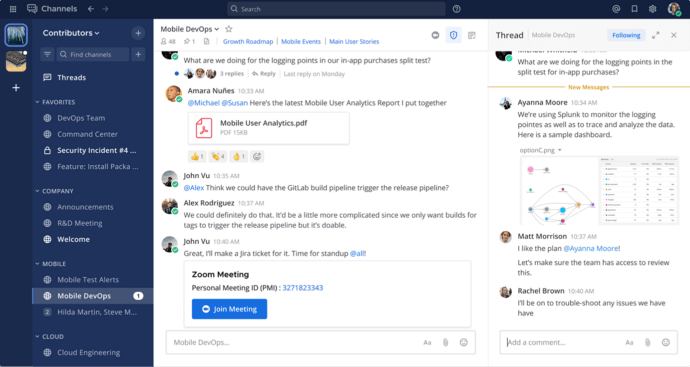
Wire, founded by former Skype engineers, is built around always-on Messaging Layer Security encryption applied to messaging, audio and video calls, file exchange, and external collaboration by default rather than as an optional setting.
Deployment model. Wire is primarily cloud-delivered with Wire Pro and Wire Enterprise tiers, and also offers a custom-priced on-premises option for organizations with stricter deployment requirements.
Security and compliance. Wire uses zero-trust architecture and role-based access control, and has positioned itself around government and critical infrastructure use cases, with adoption reported among G7 government bodies and other security-critical organizations.
Pricing. Wire Pro starts at roughly six dollars per user per month billed annually with video conferencing for small groups; Wire Enterprise runs close to ten dollars per user per month annually with additional security controls and deployment flexibility, and NGOs receive a standard discount.
Best for: governments, public sector bodies, and critical infrastructure operators that need certified E2EE across every communication channel and are comfortable with a primarily cloud-hosted architecture.
Limitations: Wire’s user base and third-party integration ecosystem are smaller than mainstream suites, and some reviewers note past ownership and trust concerns that security-conscious buyers should factor into procurement due diligence.
3. Troop Messenger: Best for Cost-Effective On-Premise Deployment in Defense and Government
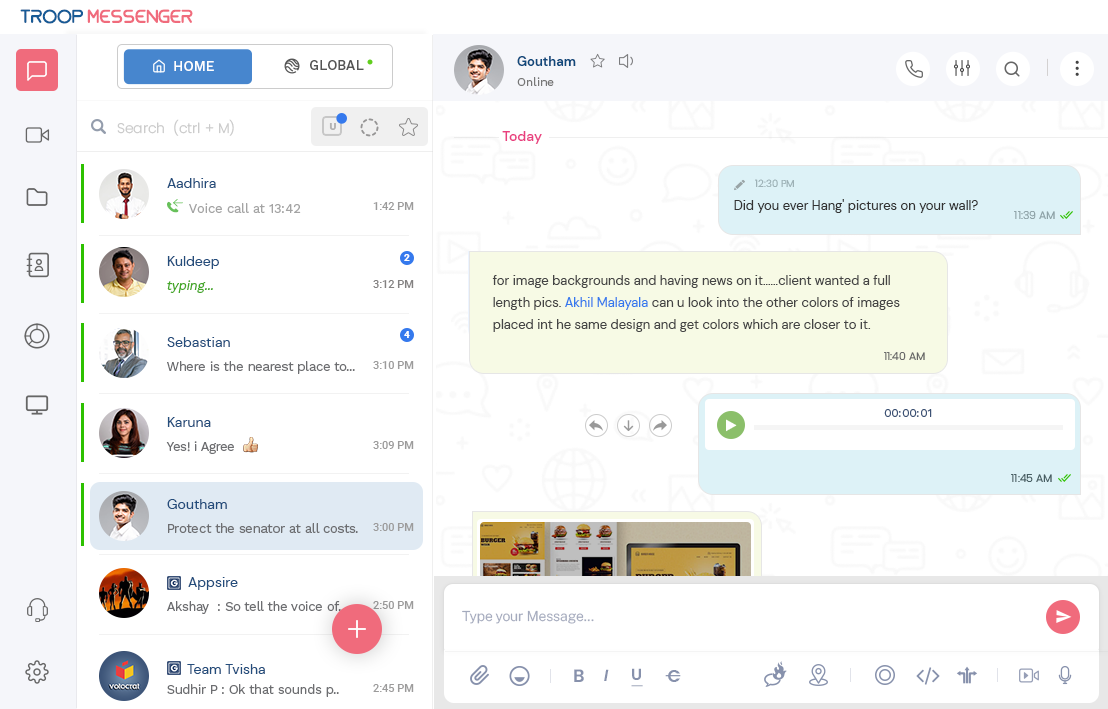
Troop Messenger is an enterprise messaging platform built to combine consumer-style ease of use with the deployment flexibility that regulated and security-sensitive organizations need.
Deployment model. Troop Messenger supports on-premise, air-gapped, and private cloud deployment alongside a standard SaaS option, delivering messaging, voice, video, and file sharing together under an organization’s own infrastructure. It is built to run without cloud dependency and integrates with LDAP for directory-based user management.
Security and compliance. The platform applies end-to-end encryption and post-quantum cryptography to one-to-one and group chats, alongside self-hosted and private cloud deployment options. Multi-factor authentication combining credentials, PINs, and fingerprint checks helps prevent unauthorized access. Role-based access controls let admins grant or restrict feature access according to each employee’s defined role, and organizations can run the platform on isolated, air-gapped networks for maximum data isolation. Active Directory or Open LDAP integration is available for secure user access, and an audit log module can export logs or connect to a Syslog server for further analysis.
Scale and product lineup. Troop Messenger offers three main plans: Premium, Enterprise, and Superior, along with a custom plan built around specific customer requirements. An optional add-on called TM Monitor is available for organizations that want to track users’ chat history.
Pricing. Listed SaaS pricing runs from Premium at roughly $2.50 per user per month up to Superior at around $9 per user per month, with Enterprise priced in between; a custom-priced plan is also available for larger deployments. On-premise and self-hosted pricing is quoted on request rather than listed publicly.
Best for: government, defense, and other regulated organizations that want on-premise or air-gapped messaging, voice, and video without the higher cost or heavier IT footprint of some competing platforms.
Limitations: its enterprise security-and-compliance ecosystem and third-party integration library are less established than longer-tenured players in this space, and organizations should independently verify any specific defense or government adoption claims made in vendor marketing before relying on them for procurement decisions.
4. Mattermost: Best for DevSecOps and Mission-Critical Technical Teams

Mattermost is an open-core, self-hosted collaboration platform originally built for engineering and operations teams, now extended to defense, intelligence, and critical infrastructure use cases that need a fully auditable software supply chain.
Deployment model. Mattermost deploys on fully self-hosted infrastructure or private cloud, including disconnected, denied, intermittent, and limited (DDIL) environments for air-gapped and edge deployments, and the codebase itself can be reviewed since it runs on an open-core license.
Security and compliance. Enterprise Edition adds SSO synchronized with SAML and AD/LDAP, granular access controls, FIPS-aligned builds, and compliance-oriented reporting suited to organizations that must demonstrate exactly how the software behaves rather than take a vendor’s word for it.
Pricing. Mattermost Entry is a free self-hosted tier for small teams, Professional runs around ten dollars per user per month annually, and Enterprise and Enterprise Advanced are custom priced for larger, mission-critical deployments.
Best for: DevSecOps teams, defense and intelligence organizations, and any technical enterprise that treats source-code transparency as part of its security requirement.
Limitations: native video conferencing has historically been more limited than dedicated video platforms, and smaller organizations may find the DevOps-oriented feature set heavier than what a general business team needs.
5. NetSfere: Best for Certified Regulatory Compliance in Healthcare and Financial Services
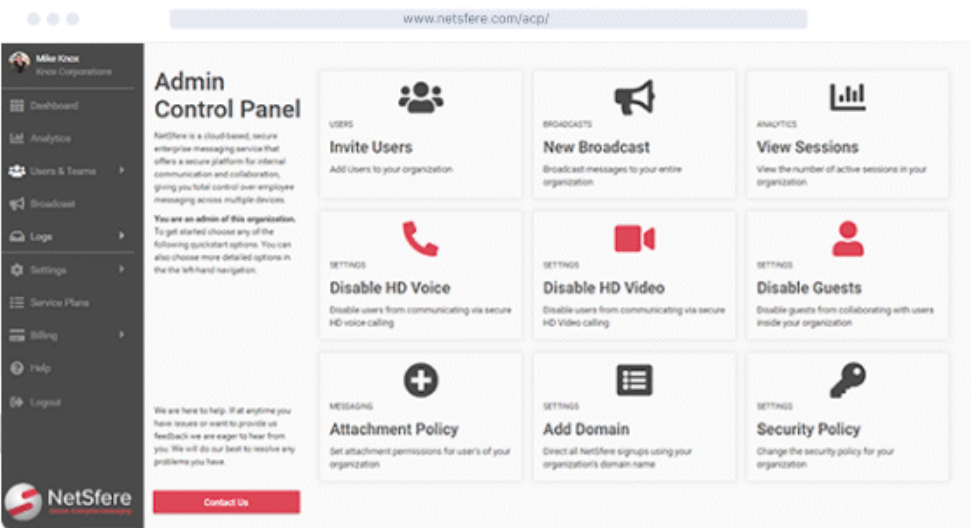
NetSfere, a product of Infinite Convergence Solutions backed by Deutsche Telekom and NTT, is built around always-on end-to-end encryption paired with a compliance framework aligned to specific regulatory regimes rather than generic security marketing.
Deployment model. NetSfere offers cloud, sovereign cloud, and on-premises deployment options, giving regulated buyers a choice of how much infrastructure control they retain.
Security and compliance. NetSfere applies ML-KEM 1024 post-quantum encryption by default across messaging, voice, and video, and aligns with HIPAA, GDPR, FINRA, SOX, SOC 2, ISO 27001, ISO 27701, and FedRAMP-aligned requirements, with audit-ready record retention built for regulators who need defensible evidence rather than a policy statement.
Best for: hospitals and health systems handling protected health information, financial services firms subject to FINRA recordkeeping rules, and federal agencies or contractors needing FedRAMP-aligned architecture.
Limitations: NetSfere is narrowly focused on secure messaging, voice, and video rather than the broader productivity suite features found in Microsoft Teams or Google Workspace, so most deployments run alongside, not instead of, existing office tools.
6. Cisco Webex: Best for Enterprises Already Invested in Cisco Infrastructure

Cisco Webex is a cloud-based video conferencing and calling platform that extends Cisco’s networking and unified communications hardware into a software collaboration layer.
Deployment model. Webex is delivered primarily as cloud SaaS, with hybrid options for large enterprises that want to keep call control or media processing on-premises alongside Cisco networking equipment they already operate.
Security and compliance. Webex includes end-to-end encryption for meetings, enterprise-grade compliance certifications, and centralized administration through Cisco’s control hub, which fits organizations that already manage security policy through Cisco’s ecosystem.
Best for: large enterprises with existing Cisco calling, networking, or contact center infrastructure that want a single vendor relationship across hardware and software.
Limitations: the deepest security and hybrid deployment options are tied to Cisco’s broader hardware ecosystem, so the value proposition weakens for organizations not already standardized on Cisco.
7. Microsoft Teams: Best for Organizations Standardized on Microsoft 365

Microsoft Teams combines chat, meetings, and calling directly inside the Microsoft 365 productivity suite, with compliance and identity controls inherited from Entra ID and Microsoft Purview.
Deployment model. Teams is cloud-delivered as part of Microsoft 365, with data residency options available at higher licensing tiers for enterprises with regional requirements.
Security and compliance. Teams benefits from Microsoft’s compliance certifications and DLP tooling across the wider 365 stack, making it a low-friction choice for enterprises that already manage identity, email, and file storage through Microsoft.
Best for: enterprises already running Microsoft 365 for email, file storage, and identity, where adding a separate security-focused platform would duplicate existing infrastructure.
Limitations: Teams does not offer a genuine on-premises or air-gapped deployment path, so organizations with strict data sovereignty requirements typically need a separate platform for their most sensitive communications.
8. Zoom: Best for Distributed Teams Prioritizing Meeting Quality and Speed of Adoption

Zoom is a cloud video conferencing platform known for consistent call quality, low setup friction, and a wide ecosystem of third-party app integrations.
Deployment model. Zoom is delivered as cloud SaaS, with enterprise tiers adding encryption, admin controls, and compliance features, though full on-premises deployment is limited compared to purpose-built on-premises vendors.
Best for: distributed teams and businesses without strict data residency requirements that prioritize fast onboarding and dependable video quality over deep infrastructure control.
Limitations: as with other cloud SaaS platforms, data resides on the vendor’s infrastructure, which limits fit for banks, defense contractors, and other organizations with hard data residency rules.
How Secure Communication Platforms Fit Into Existing Enterprise Workflows
A secure platform rarely operates alone. Its practical value depends on whether it can fit into the organization’s existing identity, network, compliance, meeting-room, monitoring, and business application architecture without forcing users to maintain parallel systems.
|
Enterprise system |
Why integration matters |
What to verify |
|---|---|---|
|
Identity provider / directory |
Central onboarding and offboarding |
LDAP/AD, SSO, SAML/OIDC, SCIM or equivalent provisioning |
|
DLP and information protection |
Detect restricted information before it leaves approved boundaries |
Messages, files, external recipients, policy actions, logging |
|
SIEM / SOC |
Correlate communication events with wider incidents |
Log export, API access, event detail, retention |
|
MDM / endpoint management |
Enforce controls on phones and laptops |
Managed-device access, session controls, remote revocation |
|
SIP/H.323 and room systems |
Preserve existing conferencing investments |
Gateway support, dial plan, media routing, device interoperability |
|
Business applications and bots |
Bring alerts and workflows into communication channels |
Permission scopes, API controls, data destinations, token lifecycle |
Secure Communication for Business Continuity and Cyber Incidents
Secure communication is also a continuity requirement. During ransomware, identity-provider outages, network segmentation, or a major compromise of the normal collaboration stack, the organization may need a trusted channel that does not depend on the affected system.
This is where deployment architecture becomes operationally important. An on-premises or isolated communication platform can remain available inside a surviving network segment even when public connectivity is unavailable, while an out-of-band system can provide a deliberately independent channel for incident coordination. Enterprises should define which users need emergency access, how those identities are maintained, and whether the backup communication route shares infrastructure with the primary environment.
Secure AI Features: Questions Enterprises Should Ask
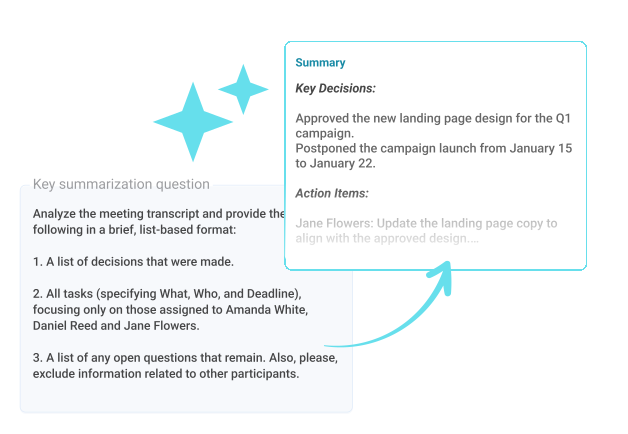
AI transcription, meeting summaries, assistants, search, and automated workflows create a new data-processing layer. Before enabling them for sensitive communication, enterprises should identify where prompts, transcripts, embeddings, generated summaries, and model logs are processed and retained.
The most important questions are practical: Can AI processing be disabled by policy? Does it require sending communication data to an external service? Is customer content used for model training? Can AI-generated artifacts follow the same retention and access policies as the original meeting or chat? Can an on-premises deployment keep AI processing inside the organization’s own environment? AI should be assessed as another communication data flow, not as a separate productivity feature.
Feature Comparison: On-Premises vs. Compliance-Focused vs. Mainstream Cloud
|
Capability |
TrueConf/Mattermost/Troop Messenger (on-premises) |
Wire/NetSfere (compliance-focused) |
Microsoft Teams/Zoom/Webex (mainstream cloud) |
|---|---|---|---|
|
Works fully offline from the internet |
Yes, over LAN/VPN |
Partial, cloud tiers require connectivity, on-prem options limit this |
No |
|
End-to-end encryption by default |
Depends on configuration |
Yes, always-on (MLS or post-quantum) |
Available in meeting-level encryption, not always default across all data |
|
Data stays inside the organization’s perimeter |
Yes |
Only with on-premises or sovereign cloud tier |
No, data resides with the vendor |
|
AD/LDAP and SSO built into the core product |
Yes |
Yes |
Yes, through the vendor’s own identity system |
|
Federation with other organizations’ own servers |
Yes (TrueConf); limited or unavailable for Mattermost and Troop Messenger |
Limited |
Limited or unavailable |
|
Regulatory alignment (HIPAA, FedRAMP, FINRA) |
Depends on internal configuration and audit |
Strong, purpose-built (especially NetSfere) |
Strong at higher licensing tiers |
|
Best suited scale |
Small teams to carrier-grade (up to 1,000,000 users on TrueConf Enterprise) |
Mid-size to large enterprise and government |
Small teams to global enterprise |
Implementation Tips for an Enterprise Rollout

The security architecture can be correct on paper and still fail if deployment is rushed. A controlled rollout makes policy gaps visible before thousands of employees begin creating messages, guest relationships, integrations, recordings, and files.
Start With a Representative Pilot
Use a pilot group that includes normal employees, administrators, security staff, remote users, and at least one team with external collaboration requirements. Test realistic workflows instead of limiting the pilot to basic messaging and a demonstration call.
Configure Governance Before Broad Adoption
Define retention, guest access, recording permissions, file-sharing rules, MFA, administrator roles, mobile access, integration approval, and incident logging before opening the platform to the full workforce. Retrofitting governance after users have already created large volumes of content is much harder.
Test Offboarding and Compromise Scenarios
Security teams should verify what happens when an employee leaves or an account is suspected of compromise. Disable the identity and confirm whether active sessions, mobile devices, API tokens, guest relationships, meeting access, and other persistent credentials are actually revoked.
Measure Adoption and Shadow IT
A secure platform only protects the communication that actually takes place inside it. Track adoption, identify workflows that still force employees into consumer tools or personal accounts, and resolve those gaps before treating the migration as complete.
Review the Platform Continuously
Communication security is not a one-time procurement exercise. New integrations, AI capabilities, external collaboration patterns, mobile operating systems, compliance requirements, and vendor features can change the risk model, so organizations should periodically review access, logs, retention, integrations, and deployment assumptions.
Secure Communication Platform Evaluation Scorecard
A practical way to prevent feature-heavy demos from dominating the buying process is to score each shortlisted platform against weighted security and operational requirements.
|
Evaluation category |
Example weight |
Evidence to request |
|---|---|---|
|
Deployment and data sovereignty |
20% |
Architecture diagram, data locations, external dependencies |
|
Encryption and key management |
20% |
Encryption design, key ownership, supported modes, security documentation |
|
Identity and access |
15% |
SSO/MFA integration, provisioning, admin roles, session controls |
|
Governance and compliance |
15% |
Retention, legal hold, DLP, audit, data export capabilities |
|
Communication coverage |
10% |
Messaging, voice, video, files, guest and mobile workflows |
|
Integration and interoperability |
10% |
APIs, SIEM/DLP integration, directory support, SIP/H.323 where required |
|
Operations and user adoption |
10% |
Pilot results, admin workload, client support, migration requirements |
How to Choose the Right Secure Communication Platform for Your Enterprise?

Start by determining whether the organization is legally required to keep communications data inside its own perimeter or a specific jurisdiction; if so, an on-premises or private cloud platform such as TrueConf, Mattermost, or Troop Messenger is the realistic shortlist, not a cloud SaaS product.
Confirm whether the communication system must keep working without internet access, since isolated networks in industrial, defense, or government facilities rule out any platform that depends on a permanent connection to a vendor’s cloud.
Check which corporate systems are already in place, particularly Active Directory, LDAP, and DLP, and how directly the platform integrates with them, since SSO built into the communication server itself gives IT a single point of control instead of a second identity system to audit.
Estimate the expected scale over the next one to three years and confirm the platform can grow without an architecture change; a product line where entry-level and enterprise editions share the same technology base, as with TrueConf’s Free, Server, and Enterprise tiers, reduces migration risk later.
Compare total cost of ownership rather than subscription price alone, factoring in administration, integration work, and staff training for self-hosted platforms against the recurring per-seat cost of cloud SaaS.
Verify integration with any legacy video conferencing hardware already installed, since SIP and H.323 gateway support determines whether existing meeting room equipment can join the new platform without full replacement.
Request a trial deployment or free edition before signing a long-term contract, since real-world performance on your own network and with your own compliance requirements is the only reliable test.
Empower your video conferencing experience with TrueConf!
FAQ
What is the most secure communication platform for a bank or government agency?
For organizations that must keep data inside their own perimeter, TrueConf and Mattermost are the strongest on-premises options, since both can run entirely on a local network without depending on a vendor’s cloud. If a cloud deployment is acceptable, Wire and NetSfere offer certified end-to-end encryption with compliance frameworks aligned specifically to government and financial services requirements.
Can a secure communication platform work without an internet connection?
Yes, TrueConf Server is specifically designed for fully autonomous operation over a local network or VPN, which matters for industrial sites and government facilities with restricted internet access. Cloud platforms like Microsoft Teams, Zoom, and NetSfere’s standard cloud tier generally require an active internet connection to function.
What is the difference between end-to-end encryption and an on-premises deployment?
End-to-end encryption protects the content of a message or call so only the sender and receiver can read it, while an on-premises deployment, such as TrueConf’s, determines where the data and infrastructure physically reside. A platform can offer strong encryption and still store data on a vendor’s servers in another jurisdiction, which is why regulated buyers usually need to evaluate both factors together rather than treating encryption alone as sufficient.
Which platforms integrate with Active Directory and LDAP out of the box?
TrueConf, Mattermost, Troop Messenger, Wire, and NetSfere all support Active Directory, LDAP, or SSO integration directly at the platform level rather than through a separate add-on. This matters because integration built into the core server gives IT a single point of audit, which simplifies passing internal and external security reviews compared to bolting identity management on afterward.
Is a self-hosted platform like Mattermost or TrueConf harder to maintain than a cloud service?
Yes, self-hosted platforms require in-house IT resources for deployment, patching, and administration, unlike ready-made cloud services such as Zoom or Microsoft Teams. Organizations that choose TrueConf or Mattermost typically do so because the compliance or data residency requirement outweighs the added administrative overhead.
How does post-quantum encryption factor into choosing a secure communication platform in 2026?
Post-quantum cryptography protects encrypted communications against future decryption once quantum computers become powerful enough to break current algorithms, and NetSfere has built its default encryption around the NIST-approved ML-KEM 1024 standard for exactly this reason. TrueConf and other on-premises platforms address the same long-term risk differently, by keeping data inside the organization’s perimeter so it is never transmitted through external infrastructure that could later be compromised.
Can legacy video conferencing hardware be integrated into a new secure communication platform?
Yes, TrueConf includes a built-in SIP and H.323 gateway, allowing existing meeting room hardware to connect to the new platform without a full infrastructure replacement. Cloud-first platforms like Zoom and Microsoft Teams support some legacy hardware integration as well, but on-premises platforms such as TrueConf generally offer deeper native compatibility since the gateway runs on the same server as the rest of the deployment.
About the Author
Diana Shtapova is a product specialist and technology writer with three years of experience in the unified communications industry. At TrueConf, she leverages her deep product expertise to create clear and practical content on video conferencing platforms, collaboration tools, and enterprise communication solutions. With a strong background in product research and user-focused content development, Diana helps professionals and businesses understand core product features, adopt new technologies, and unlock the full potential of modern collaboration software.


Follow us on social networks