
Enterprise Collaboration Software: The IT & Business Guide
Enterprise collaboration software is a category of tools that helps organizations communicate, coordinate work, share information, and run meetings across teams, departments, and locations. The category spans video conferencing platforms, team messaging systems, unified communications suites, and secure on-premises communication servers built specifically for regulated or security-conscious environments.
This guide covers what enterprise collaboration software actually does, how to evaluate it, and which deployment model fits your organization. It gives particular attention to on-premises and self-hosted options, including TrueConf, which takes a distinctly different approach from the dominant cloud-first vendors.
Executive Summary
|
Dimension |
What to Know |
|---|---|
|
Category scope |
Video conferencing, team messaging, file sharing, scheduling, presence, meeting rooms |
|
Key deployment models |
Cloud SaaS, on-premises server, private cloud, hybrid |
|
Who needs on-premises |
Government, defense, healthcare, finance, critical infrastructure, regulated industries |
|
Main selection factors |
Security posture, user count, admin control, integrations, compliance requirements |
|
TrueConf positioning |
On-premises and private cloud video conferencing and messaging for up to 5,000 users per server (enterprise scale via TrueConf Enterprise); includes a free tier for up to 1,000 users |
|
Pricing model |
TrueConf Server is licensed by active users, not total accounts; custom pricing via quote |
|
Free entry point |
TrueConf Server Free: up to 1,000 registered users, 10 participants per conference, unlimited time |
The Market Case: Why Enterprise Collaboration Software Is a Strategic Priority
Enterprise collaboration is no longer a productivity convenience, it is infrastructure. The numbers confirm the scale of the shift.
The global enterprise collaboration market was valued at approximately $54 billion in 2024 and is projected to reach $107–133 billion by 2030–2032, growing at a compound annual rate of 12–13.5% (Grand View Research; Fortune Business Insights). Within that figure, software and platform solutions account for over 78% of market revenue, with communication tools: video conferencing, instant messaging, and unified communications suites, representing the single largest category at roughly 40% of total software spend (Verified Market Research, 2025).
Several forces are converging to sustain this growth:
-
Remote and hybrid work have become permanent.
According to the U.S. Bureau of Labor Statistics, 38% of U.S. employees worked remotely in 2023, with projections indicating this will reach 45% by 2025. Distributed workforces require digital infrastructure to replace physical proximity, and collaboration platforms are that infrastructure.
-
The cost of poor collaboration is measurable.
A Forrester Consulting study found that ineffective internal collaboration had direct operational consequences: 49% of business leaders reported it damaged customer experience, 40% said it reduced employee productivity, and 38% said it cost them business outright.
-
Productivity impact is real when tools are implemented well.
Organizations that deploy comprehensive collaboration solutions report productivity improvements in the 20–30% range within the first year, primarily by eliminating administrative overhead and accelerating decision-making (monday.com, 2025). McKinsey research indicates that AI-assisted collaboration tools can push productivity gains to 40%.
-
Security is now a leading selection criterion, not an afterthought.
Roughly 45% of enterprises reported data breaches tied to cloud-based collaboration platforms in 2024 (Data Bridge Market Research). Meanwhile, 30% of mid-sized firms cited security concerns as a barrier to cloud adoption specifically. This dynamic directly drives demand for on-premises and private cloud alternatives, and explains why the on-premises deployment segment is expected to grow significantly through 2030, despite the overall dominance of cloud.
-
App fragmentation is reducing the value of individual tools.
In 2024, 54% of employees using more than ten apps reported communication issues, compared to 34% of those using fewer than five. The implication is clear: enterprises benefit more from consolidating into fewer, more capable platforms than from accumulating point solutions.
Large enterprises are the dominant buyers, holding over 60% of market revenue in 2024, driven by complex organizational structures, geographically dispersed teams, and significant compliance requirements. Regulated sectors (BFSI, healthcare, government, and defense) lead in adoption of on-premises platforms specifically.
What Enterprise Collaboration Software Actually Does

The term “enterprise collaboration software” covers a wide functional range. At minimum, a serious enterprise platform handles:
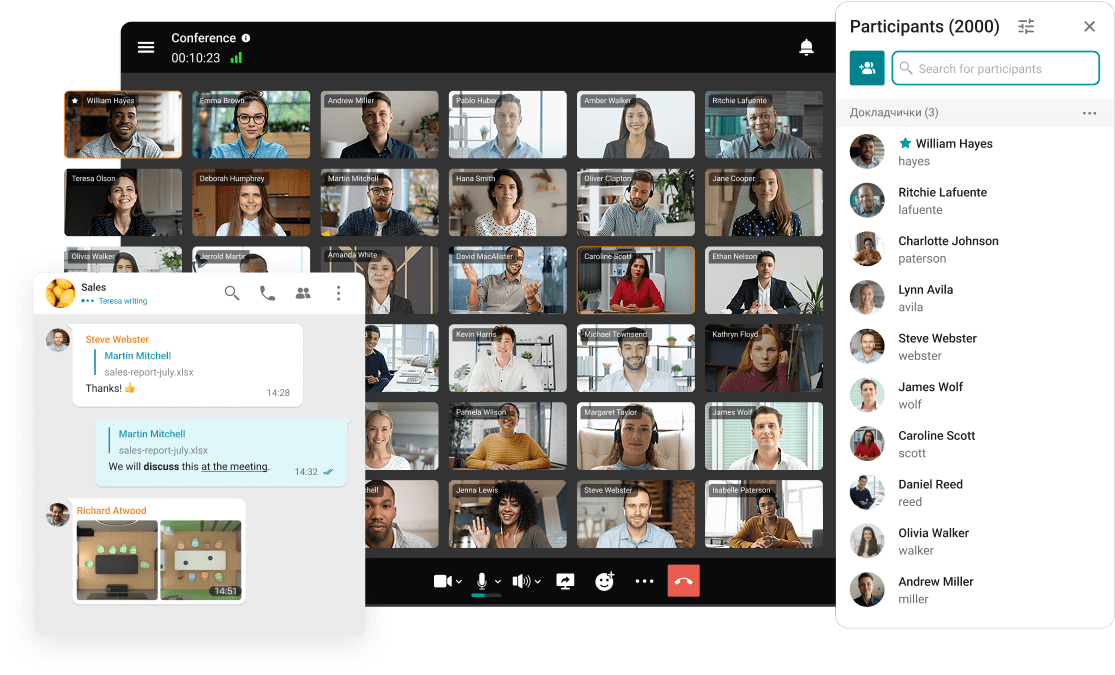
- Video and audio conferencing with support for large meetings (100 to 2,000+ participants)
- Persistent team messaging with threads, channels, and direct messages
- File sharing and document collaboration
- Presence and availability statuses
- Meeting scheduling with calendar integration
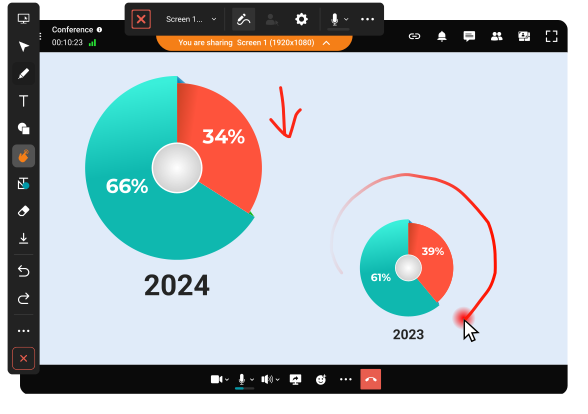
- Screen sharing and content presentation
- Recording and playback
- Admin control: user provisioning, access policies, role management, monitoring
More mature platforms add telephony integration (SIP/H.323, VoIP, PBX), hardware room system support, AI-assisted transcription, compliance logging, and SDK/API layers for custom integrations.
The key distinction between “collaboration software” and “enterprise collaboration software” is governance. Enterprise deployments require granular administrative control, audit trails, single sign-on (SSO), directory integration (Active Directory, LDAP), and often the ability to operate entirely within a private network with no dependence on external cloud infrastructure.
The Deployment Decision: Cloud vs. On-Premises vs. Hybrid

Insight 1: Deployment model is not a secondary IT decision. It is the primary one.
Most enterprise software buying conversations start with features. They should start with deployment architecture. A cloud-based platform and an on-premises server are fundamentally different products even when they offer the same surface-level features. The differences affect data residency, network dependency, compliance posture, total cost of ownership, and vendor lock-in in ways that cannot be undone after rollout.
|
Deployment Model |
How It Works |
Best For |
|---|---|---|
|
Cloud SaaS |
Vendor hosts everything; organization accesses via internet |
Fast deployment, small IT teams, no compliance restrictions |
|
On-premises server |
Software runs on organization’s own hardware inside its network |
Regulated industries, data sovereignty requirements, air-gapped environments |
|
Private cloud |
Organization-controlled infrastructure (own data center or private IaaS) |
Large enterprises wanting control without full on-premises overhead |
|
Hybrid |
Mix of on-premises core with cloud-connected endpoints |
Organizations bridging regulated internal users with external participants |
TrueConf Server is designed for the on-premises and private cloud models. It installs on Windows Server or Linux, runs without a permanent internet connection, and keeps all communications, recordings, and user data inside the organization’s own infrastructure. This makes it directly relevant for government agencies, defense contractors, healthcare networks, banks, courts, and industrial operations where data leaving the network is not acceptable.
Internal vs. External Collaboration: Two Different Problems
Enterprise collaboration encompasses two structurally different use cases that are often conflated but require different solutions, or at minimum, different policies within the same platform.
Internal collaboration is communication and coordination between employees, teams, and departments within a single organization. The defining characteristics: all participants are known and provisioned users; communication happens within a controlled perimeter; data governance and audit requirements apply uniformly; and the primary risks are information leakage and unauthorized access.
External collaboration is communication with people outside the organization: customers, vendors, contractors, partners, regulators, or the general public. The defining characteristics: participants are not provisioned in the organization’s directory; identity verification is less certain; data classification becomes more complex because external parties may retain or share what is exchanged; and the organization has less control over what happens to information after it leaves.
The two use cases create competing pressures on platform selection:
|
Dimension |
Internal Collaboration |
External Collaboration |
|---|---|---|
|
Identity |
Provisioned users (AD/LDAP) |
Guests or unauthenticated |
|
Data control |
Full, within your perimeter |
Partial, once shared, limited |
|
Security posture |
Perimeter-based, MFA, role-based access |
Guest policies, link expiry, access scoping |
|
Compliance |
All internal policies apply uniformly |
Must verify recipient rights and data classification |
|
Platform preference |
On-premises or private cloud viable |
Often requires cloud endpoint or guest link |
|
Risk |
Insider threat, data exfiltration |
Data leakage to third parties, impersonation |
Why this matters for platform selection:
Organizations with strict data sovereignty requirements (government agencies, healthcare networks, defense contractors, financial institutions) can address internal collaboration comprehensively with an on-premises platform like TrueConf Server. All user data, message history, recordings, and meeting content remain within the network perimeter. External collaboration is then handled through a defined interface: TrueConf supports WebRTC-based guest access for external participants joining public meetings without installing software, while keeping the internal infrastructure closed.
Cloud-first platforms like Microsoft Teams or Zoom handle both use cases under a single subscription, which is efficient for organizations without strict data residency requirements but creates risk for those with regulated data. A single cloud tenant means that guest interactions, file sharing, and chat history all reside on vendor-managed infrastructure.
Practical examples of the split:
-
A regional bank uses an on-premises video conferencing server (TrueConf Server) for internal meetings between branches, loan officers, and risk management, all data stays within the bank’s network. For client-facing video banking sessions, a separate web-based interface provides guest access via browser with session recording stored on internal infrastructure, not on a third-party cloud.
-
A manufacturing company uses an on-premises platform for engineering, operations, and management collaboration, keeping intellectual property and production data internal. External partner and supplier communication happens through a controlled guest invitation system with time-limited access links.
-
A government agency runs all internal collaboration through an air-gapped on-premises server. Any communication with the public happens through a separate, hardened portal, entirely isolated from internal systems.
The key principle: knowing which type of collaboration is primary for your organization, and what the data governance rules are for each, determines whether a single cloud platform, a hybrid architecture, or a fully self-hosted solution is the appropriate starting point.
Core Features to Evaluate
Video Conferencing Capabilities
Not all video platforms are equal at scale. The questions that matter:
- What is the maximum number of simultaneous participants in a single conference?
- What resolution is supported (HD, Full HD, 4K UltraHD)?
- Can the platform handle multiple simultaneous conferences without per-room licensing?
- How does quality adapt to variable network conditions?
- Is there built-in SIP/H.323 gateway support for hardware room systems?
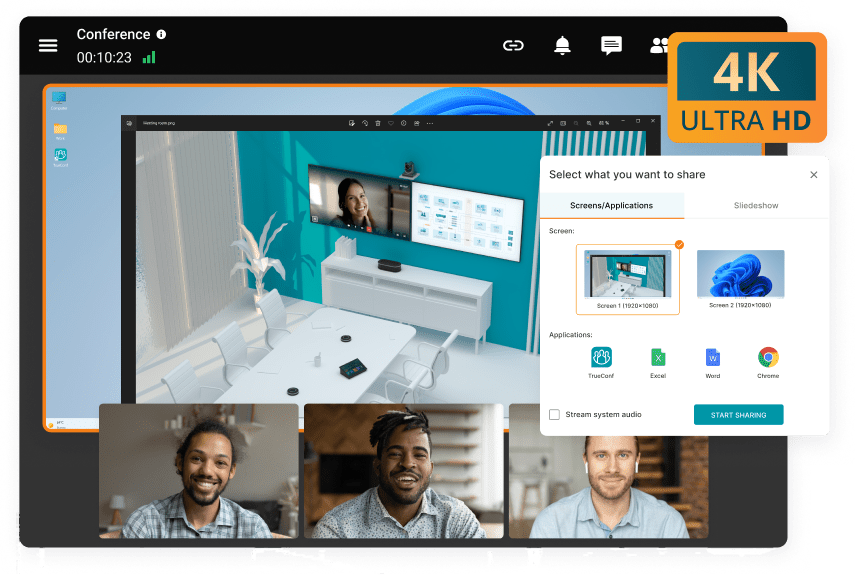
TrueConf Server supports video conferences in 4K UltraHD with up to 2,000 participants across one or more simultaneous conferences, depending on the license purchased. For organizations running hardware endpoints from legacy vendors, TrueConf includes a built-in SIP/H.323 gateway, eliminating the need for a separate transcoding appliance in many cases.
Team Messaging and Presence
Modern enterprise collaboration does not separate messaging from meetings. Users expect to move between a quick message, a voice call, and a video conference without switching applications or losing context.
Capabilities to assess:
- Personal and group chats with persistent history
- File sharing with secure storage
- Presence statuses with device-type awareness
- Search across message history
- Guest or external user access controls
TrueConf provides an integrated corporate messenger with personal and group chats, file sharing, and presence statuses that reflect what device a user is currently on (desktop, mobile, room system). This is delivered as part of the same on-premises server, not a separate product.
Administration and Governance
Insight 2: The admin control layer is where enterprise software earns or loses its value.
A collaboration platform used by 500 or 5,000 people requires serious administrative tooling. Features that matter more than most reviews acknowledge:
- Web-based control panel covering all functions (users, groups, policies, scheduling, monitoring, recording)
- Active Directory and LDAP integration for user sync and SSO
- Role-based access control, including the ability to define who can create conferences and who can only join
- Multi-factor authentication (MFA) enforcement
- Audit logging and monitoring dashboards
- The ability to operate behind NAT, firewall, and proxy without requiring additional ports or direct IP addresses
TrueConf Server is managed through a single web-based admin panel. It supports Active Directory and LDAP integration with single sign-on, MFA, granular role assignment, and operates via a single port through existing network perimeters without requiring firewall modifications.
Integration Ecosystem
|
Integration Type |
Why It Matters |
TrueConf Support |
|---|---|---|
|
Active Directory / LDAP |
User provisioning at scale, SSO |
Yes (native) |
|
Calendar systems |
Scheduled meeting workflow |
Microsoft Exchange integration via TrueConf Calendar Connector |
|
SIP / H.323 / VoIP / PBX |
Telephony and hardware room system compatibility |
Built-in gateway |
|
Third-party video platforms |
Cross-platform meeting access |
Zoom, Cisco Webex, GoToMeeting, Skype for Business |
|
Developer APIs |
Custom workflow integration and automation |
TrueConf Server API and TrueConf VideoSDK |
|
Streaming services |
Webinars and large-audience broadcasts |
YouTube, Wowza, and compatible RTMP services |
The API and SDK availability is significant for larger enterprises that need to embed video communication into custom applications or integrate with existing enterprise systems such as CRM, ERP, or case management software.
How to Evaluate Enterprise Collaboration Software: A Methodology
Most enterprise software comparisons list features side by side. A more useful approach is to structure evaluation around decision criteria weighted by organizational context. The methodology below mirrors how mature procurement teams approach this category.
Phase 1: Requirements Definition (Before Looking at Products)
Answer these questions with input from IT, legal, compliance, and the primary business stakeholders, not marketing or procurement alone:
-
Data classification and residency
What data will flow through this platform? Does any of it fall under regulatory regimes (HIPAA, GDPR, ITAR, FedRAMP, FIPS)? Where must data physically reside? Can it leave the country? -
Network and connectivity requirements
Must the platform operate without internet connectivity (air-gapped environments, manufacturing floors, remote operations)? What are your bandwidth constraints for remote users? -
Scale requirements
How many total registered users? How many are simultaneously active? How many participants in a typical meeting? What is the maximum anticipated conference size? -
Admin and IT capacity
Does your IT team have the capacity to manage on-premises server infrastructure? What is your patching cadence? Who handles user provisioning? -
Existing technology stack
What directory services are in use (Active Directory, LDAP, Azure AD)? What calendar system? What telephony infrastructure? What hardware conference room systems? -
Compliance and audit
What audit log retention is required? Is end-to-end encryption mandatory? Are there requirements for certified communication pathways?
Phase 2: Platform Evaluation Criteria
Once requirements are defined, evaluate platforms against these weighted criteria:
|
Criterion |
Weight |
What to Assess |
|---|---|---|
|
Security and data governance |
High |
Encryption in transit/at rest, deployment model, compliance certifications |
|
Administrative control |
High |
User provisioning, LDAP/AD integration, role-based access, audit logging |
|
Video and audio quality |
Medium-High |
Resolution support, adaptive bitrate, network resilience |
|
Messaging and presence |
Medium |
Persistent chat, threading, file sharing, presence fidelity |
|
Integration depth |
Medium |
Calendar, telephony, directory, API access |
|
Deployment flexibility |
Contextual |
Cloud, on-premises, hybrid; offline capability |
|
Client platform coverage |
Medium |
Windows, macOS, Linux, iOS, Android, browser |
|
Scalability |
Contextual |
Users, concurrent meetings, conference size |
|
Total cost of ownership |
High |
License model, infrastructure costs, support |
|
Vendor stability |
Medium |
Market position, roadmap, support SLAs |
Phase 3: Proof of Concept
For enterprise deployments above 200 users, a structured proof of concept is strongly recommended before committing to a platform. Key elements:
-
Deploy in a representative subset of the organization (a single department or regional office)
-
Test the top 3 failure scenarios identified in Phase 1 (e.g., operation during internet outage, guest access for external participants, room system integration)
-
Measure actual network load against estimates
-
Assess admin overhead for onboarding and user management
-
Collect end-user feedback on audio/video quality and ease of use across the client platforms in your environment
For on-premises deployments specifically, test the update process, understanding how the vendor delivers patches and how your IT team applies them is as important as the initial deployment.
TrueConf: Product Overview
TrueConf is an on-premises and private cloud communications platform. The product line centers on TrueConf Server, a self-hosted video conferencing and corporate messaging server, and scales up to TrueConf Enterprise for organizations requiring federation across multiple servers, load balancing, fault tolerance, and a global user list across distributed deployments.
For a complete overview of TrueConf for large teams, see the enterprise communication solution page.
Product Tiers
TrueConf Server Free: A fully functional free version with no time limit on the license (requires annual renewal via the TrueConf website). Supports up to 1,000 registered users, video calls in 4K, team messaging, file sharing, conference scheduling, recording, and one SIP/H.323/RTSP connection. Conferences are limited to 10 simultaneous participants. One guest connection for public web conferences. Suitable for small organizations or teams evaluating the platform before purchasing.
TrueConf Server: The full commercial version, licensed by the number of active users (the number of registered accounts is unlimited). Supports up to 5,000 users and video conferences with up to 2,000 participants. Includes all features: SIP/H.323 gateway (full connections as purchased), phone call integration with VoIP and PBX, federation support with other TrueConf Server instances, UDP Multicast for satellite networks, streaming, full API and SDK access, and guaranteed technical support. Pricing is available via quote at trueconf.com.
TrueConf Enterprise: Designed for very large organizations and telecom operators, supporting up to 1,000,000 users. Adds redundancy, load balancing, fault tolerance, global user directory across multiple servers, license distribution across nodes, and comprehensive monitoring.
TrueConf provides discounts for educational institutions, healthcare organizations, and non-profits that meet eligibility requirements.
Client Applications
TrueConf client applications are available for Windows, macOS, Linux, iOS, Android, and Android TV. Users can sign in on multiple devices simultaneously. Browser-based access is supported via WebRTC for both registered users and guests. The platform also supports thin client environments (VDI).
Strengths
- Complete on-premises architecture with no mandatory internet dependency
- Single administration panel covering all server functions
- 4K UltraHD video quality with automatic adaptation to network conditions
- Integrated corporate messenger within the same server deployment
- Native SIP/H.323 compatibility eliminating separate gateway hardware
- Cross-platform client coverage including Linux (rare among enterprise video platforms)
- Federation between separate TrueConf Server instances
- API and SDK for custom integrations
- Free tier with meaningful capacity for evaluation or small team use
Limitations
- Not a cloud-hosted SaaS option; requires server infrastructure managed by the organization
- Maximum per-server user count of 5,000 (TrueConf Server); larger scale requires TrueConf Enterprise
- Custom pricing model means no instant self-serve purchase for the full version
- Ecosystem is narrower than dominant platforms like Microsoft Teams or Zoom in terms of third-party app marketplace integrations
Best For
- Government bodies and public sector agencies requiring data sovereignty
- Defense and law enforcement organizations operating in closed networks
- Healthcare and financial services organizations with strict compliance mandates
- Industrial facilities and organizations that need offline or satellite-connected operation
- Enterprises replacing legacy unified communications infrastructure with a self-hosted alternative
- Organizations that need Linux client support across endpoints
How Enterprise Collaboration Software Is Priced
Insight 3: “Per user per month” SaaS pricing looks simple but often understates true cost for large, stable enterprise deployments.
The pricing structures across the enterprise collaboration market fall into a few patterns:
|
Pricing Model |
How It Works |
Typical Vendor Type |
|---|---|---|
|
Per user per month (SaaS) |
Subscription scales with users; cost rises linearly |
Zoom, Microsoft Teams, Google Meet |
|
Per active user (perpetual/annual) |
Licensed by active users, not accounts; one-time or annual |
TrueConf Server |
|
Concurrent connection |
Pay for simultaneous connections, not total users |
Some legacy UC vendors |
|
Capacity-based (rooms, hosts) |
License by number of meeting rooms or host seats |
Some room system vendors |
For an organization with 500 users who are all active, SaaS per-user pricing and an active-user perpetual license may be comparable. At 3,000 users with 500 regularly active at any given time, the gap can be significant. TrueConf Server’s model of licensing by active users with unlimited registered accounts is advantageous in organizations where a large pool of users exists but only a subset uses the platform daily.
The free TrueConf Server tier also provides a genuine entry point for evaluation or small-scale deployment with no time limit, which is structurally different from trial licenses that expire in 14 or 30 days.
Selection Framework: Choosing the Right Platform
When evaluating enterprise collaboration software, work through these questions before comparing feature lists:
- Data residency requirement: Can user data, message history, and recordings be stored on external cloud servers, or must everything remain on internal infrastructure?
- Network dependency: Does the platform need to function when internet connectivity is absent or intermittent?
- User scale: How many users need accounts? How many are concurrently active? Are licensing costs based on total accounts or active users?
- Compliance and audit requirements: Does your industry require end-to-end encryption, audit logs, access controls, or certified communication pathways?
- Existing infrastructure: What directory services (AD, LDAP), calendar systems, hardware room systems, or telephony infrastructure must the platform integrate with?
- Client platform diversity: Do users work on Windows, macOS, Linux, mobile, or room systems? Does the platform have native clients or browser-only access for some platforms?
- Admin team capacity: Is there an IT team capable of managing an on-premises server, or does the organization need vendor-managed infrastructure?
- External participant access: How often do users meet with people outside the organization? How will external participants join?
The Platform Landscape: Major Enterprise Collaboration Tools
The enterprise collaboration market is dominated by a handful of cloud-first platforms and a smaller set of on-premises and security-focused alternatives. Understanding where each platform fits its intended context helps clarify why TrueConf occupies a distinct position.
Microsoft Teams

Best for: Large enterprises already running Microsoft 365 and wanting a single, tightly integrated workspace.
Microsoft Teams is the most widely deployed enterprise collaboration platform globally, benefiting from its inclusion in Microsoft 365 licensing. It combines persistent chat, video meetings, file collaboration via SharePoint, and voice calling (Teams Phone) in a single application deeply embedded in the Microsoft ecosystem.
Strengths:
- Native integration with Word, Excel, PowerPoint, SharePoint, Exchange, and Azure AD
- Mature compliance and governance features (eDiscovery, retention policies, DLP, Legal Hold)
- Teams Phone for unified communications with PSTN connectivity
- Strong AI feature set (Copilot for Teams) for transcription, meeting summaries, and action items
- Broad third-party app marketplace (thousands of integrations)
Limitations:
- Heavy resource consumption; performance complaints are common on older hardware
- Interface complexity; onboarding curve steeper than simpler tools
- Channel limit of 200 public and 30 private channels per team
- File navigation via SharePoint can be confusing for non-Microsoft users
- Not a viable option for organizations that cannot use Microsoft’s cloud infrastructure
Pricing: Included in Microsoft 365 Business Basic ($6/user/month) through Microsoft 365 E5 ($57/user/month); Teams Essentials available standalone at $4/user/month.
G2 rating: 4.3/5 (15,000+ reviews)
Zoom

Best for: Organizations prioritizing video quality, external meeting reliability, and ease of use for participants across organizational boundaries.
Zoom became the dominant video platform during 2020–2021 and has since expanded into a broader collaboration suite including Zoom Team Chat, Zoom Phone, Zoom Webinars, and Zoom Rooms for hardware room systems. It remains the gold standard for video quality and participant experience simplicity.
Strengths:
- Superior video and audio quality, with robust adaptive bitrate handling
- Lowest friction for external participants (no account required to join most meetings)
- Zoom Phone for UCaaS voice calling
- Zoom Rooms for hardware-enabled meeting spaces
- 1,500+ integrations including Slack, Microsoft 365, Salesforce, and HubSpot
- AI Companion for meeting summaries, transcription, and follow-up drafting
- 300 million daily active users as of 2024
Limitations:
- Not designed for data sovereignty requirements; all data transits Zoom’s cloud infrastructure
- “Zoomboming” history raised security concerns, though the company has addressed most issues
- Team Chat is newer and less mature than Slack for messaging-first workflows
- Costs increase significantly at enterprise scale with add-ons
Pricing: Basic (free), Pro ($13.33/user/month), Business ($18.33/user/month), Business Plus and Enterprise via custom quote.
G2 rating: 4.5/5 (55,000+ reviews)
Cisco Webex

Best for: Large enterprises and regulated industries requiring proven governance, security certification, and integration with Cisco networking infrastructure.
Webex (formerly Cisco Webex) is the enterprise-grade suite from Cisco, offering video conferencing, persistent messaging, webinars, calling, and hardware room systems. It is the default choice for organizations already running Cisco infrastructure and for heavily regulated sectors where security credentials matter.
Strengths:
- Strong security posture; FedRAMP-authorized option available
- End-to-end encryption with zero-knowledge key management option
- Native real-time translation in 100+ languages
- Deep integration with Cisco networking, security, and telephony infrastructure
- Webex Hardware for room systems (Cisco Board, Desk, and Room Series)
- Comprehensive admin controls and compliance tooling
- Well-suited for training, webinars, and large presentations
Limitations:
- User experience improvements lag behind Slack and Zoom in perceived polish
- Higher cost than alternatives; enterprise plans require direct negotiation
- Complexity can be high for IT teams not already in the Cisco ecosystem
- Adoption resistance if workforce is accustomed to lighter tools
Pricing: Webex Free, Meet ($14.50/user/month), Call ($17/user/month), Suite ($25/user/month), Enterprise custom pricing.
G2 rating: 4.3/5 (4,200+ reviews)
Slack

Best for: Teams that prioritize messaging-first workflows, integration density, and developer-friendly environments.
Slack is the originator of the modern channel-based workplace messaging category. It is not primarily a video conferencing tool but a persistent messaging platform with Huddles (lightweight voice/video), Clips (async video messages), and over 2,400 app integrations including Salesforce (which acquired Slack in 2021).
Strengths:
- Best-in-class messaging UX; channels, threads, and search are mature and fast
- 2,400+ integrations covering virtually every enterprise tool category
- Workflow Builder for no-code process automation
- Slack Connect for cross-organizational channels with external partners
- Enterprise Grid for large organizations needing multi-workspace governance
- Strong developer API for custom bots and integrations
Limitations:
- Not a video conferencing platform; Huddles cover lightweight calls but not large meetings
- Can become “notification hell” without deliberate channel governance
- Slack Connect external channels require governance policies to avoid data leakage
- Cost escalates on paid tiers; Pro at $7.25/user/month, Business+ at $12.50/user/month
Pricing: Free (limited history), Pro ($7.25/user/month), Business+ ($12.50/user/month), Enterprise Grid (custom).
G2 rating: 4.5/5 (32,000+ reviews)
Google Workspace (Meet + Chat)

Best for: Organizations already running Google Workspace for email, documents, and storage who want a unified environment without additional subscriptions.
Google Meet handles video conferencing and Google Chat handles messaging, both tightly integrated with Gmail, Drive, Docs, Sheets, and Calendar. The combination is straightforward and requires no additional licensing for organizations already on Workspace.
Strengths:
- Already included in Google Workspace (no additional cost for most tiers)
- Deep integration with Gmail, Docs, Drive, and Calendar
- High-quality video with noise cancellation and background effects
- Simple guest access, participants need only a Google account or a link
- Gemini AI integration for meeting transcription and smart summaries
Limitations:
- Google Chat lacks the depth of Slack for messaging-centric workflows
- Limited admin controls compared to Teams or Webex for complex governance requirements
- Less suitable for organizations outside the Google ecosystem
- Data sovereignty concerns for regulated organizations (Google-managed infrastructure)
Pricing: Included in Google Workspace Business Starter ($6/user/month) through Enterprise (custom).
G2 rating: 4.6/5 (Meet); 4.4/5 (Chat)
Competitive Summary Table
|
Platform |
Primary Model |
Max Participants |
Messaging |
On-Premises Option |
Best For |
|---|---|---|---|---|---|
|
Microsoft Teams |
Cloud SaaS |
1,000 |
Yes |
Limited (Teams Rooms) |
Microsoft 365 organizations |
|
Zoom |
Cloud SaaS |
1,000 (Enterprise) |
Yes (Chat) |
No |
Video-first, external meetings |
|
Cisco Webex |
Cloud SaaS |
1,000 |
Yes |
Limited |
Cisco ecosystem, regulated |
|
Slack |
Cloud SaaS |
N/A (video limited) |
Yes (primary) |
No |
Messaging-first, dev teams |
|
Google Workspace |
Cloud SaaS |
1,000 |
Yes (Chat) |
No |
Google ecosystem |
|
TrueConf Server |
On-premises / Private cloud |
2,000 |
Yes |
Yes (core) |
Data sovereignty required |
Key differentiator: TrueConf is the only platform in this comparison built from the ground up for self-hosted deployment, with no cloud dependency required for operation. Every other platform in this table is designed primarily as a cloud service, with on-premises options (where they exist) as secondary configurations.
Selection Framework: Choosing the Right Platform
The following framework sequences the decision in the order that matters, starting with constraints that cannot be changed by feature comparisons.
Step 1: Determine Your Non-Negotiable Constraints
Before evaluating any platform, identify constraints that eliminate entire categories of solutions.
Data sovereignty test: Can your organization’s communications, user data, and recordings be stored on external cloud servers managed by a third party? If no, or if you’re unsure, start with on-premises platforms only. Cloud platforms should not be evaluated as the primary solution in this scenario.
Network dependency test: Must the platform operate when internet connectivity is absent or degraded (remote facilities, air-gapped networks, satellite-only connectivity)? If yes, cloud-first platforms are eliminated regardless of their other features.
Compliance certification test: Does your regulatory environment require specific certifications (FedRAMP, FIPS 140-2, HIPAA BAA, GDPR DPA)? Map these requirements to what each platform offers. Not all certifications apply to all deployment configurations.
Step 2: Define Scale and Infrastructure Parameters
|
Parameter |
Questions to Answer |
|---|---|
|
User count |
Total registered users vs. concurrently active users? |
|
Conference scale |
Typical meeting size? Maximum meeting size? |
|
Existing infrastructure |
Active Directory, Exchange, SIP/H.323 endpoints, PBX? |
|
Client diversity |
Windows, macOS, Linux, mobile, browser, room systems? |
|
IT capacity |
Can your team manage on-premises infrastructure? |
Step 3: Match Platform Type to Context
|
Organizational Profile |
Recommended Direction |
|---|---|
|
Microsoft 365 shop, no compliance restrictions |
Microsoft Teams |
|
Frequent external meetings, video quality priority |
Zoom (optionally paired with Slack) |
|
Developer culture, integration-heavy workflows |
Slack + video platform |
|
Cisco infrastructure, regulated sector (cloud acceptable) |
Cisco Webex |
|
Google Workspace organization |
Google Meet + Chat |
|
Data sovereignty required, regulated sector |
TrueConf Server (on-premises) |
|
Air-gapped or offline-capable requirement |
TrueConf Server |
|
Large-scale multi-site deployment with federation |
TrueConf Enterprise |
Step 4: Evaluate on Total Cost of Ownership
“Per user per month” SaaS pricing is often the most visible cost but not the only one.
For cloud platforms: factor in license cost × active users, storage overage costs, add-on modules (calling, rooms, compliance), and the cost of migrating away from the vendor if you switch.
For on-premises platforms: factor in server hardware, initial deployment, ongoing maintenance, and internal IT labor, but also consider that perpetual or annual licensing does not scale linearly with user count the way SaaS does.
TrueConf Server licenses by active users (not total registered accounts). For an organization with 2,000 registered users where 500 are regularly active, this model can be significantly more economical than SaaS pricing based on total accounts. The free TrueConf Server tier (up to 1,000 users, 10-participant conferences) also provides a genuine evaluation path without a time-limited trial.
Step 5: Pilot Before Committing
Run a structured pilot with 30–100 users covering your primary use cases: internal meetings, external guest access, admin provisioning, and your top compliance scenario. Test failure modes: what happens during an internet outage (for cloud platforms)? What happens during a server update (for on-premises)? Measure actual bandwidth consumption against network capacity.
FAQ
What is enterprise collaboration software and how is it different from consumer tools like Zoom or Google Meet?
Enterprise collaboration software is designed for organizational-scale use with administrative controls, security compliance features, directory integration, and governance tools that consumer products do not include. Enterprise platforms support user provisioning through Active Directory or LDAP, role-based access control, audit logging, and often on-premises or private cloud deployment. TrueConf, for example, operates entirely within an organization’s own infrastructure and requires no cloud dependency, which is not possible with consumer-oriented services.
Which enterprise collaboration platform is best for organizations that cannot use cloud services?
Organizations with strict data sovereignty requirements, air-gapped networks, or regulatory constraints typically need an on-premises platform. TrueConf Server installs directly on the organization’s own hardware, does not require a permanent internet connection to operate, and keeps all communications and recordings within the internal network. It is one of the few platforms in the enterprise collaboration category that was designed specifically for this use case rather than retrofitting cloud-first architecture with an on-premises option.
How many users can TrueConf Server support?
TrueConf Server Free supports up to 1,000 registered users and up to 10 participants per conference. The full commercial TrueConf Server supports up to 5,000 active users and conferences with up to 2,000 participants. For organizations requiring larger scale or multi-server federation across distributed offices, TrueConf Enterprise supports up to 1,000,000 users with load balancing, redundancy, and a global user directory.
Does enterprise collaboration software need to replace email, or does it complement it?
Enterprise collaboration software is designed to complement email, not replace it. Persistent messaging, video calls, and file sharing handle the real-time and near-real-time coordination that email handles poorly. Email remains the standard for formal communication, external correspondence, and audit-required records. TrueConf provides integrated corporate messaging and video conferencing within a single platform, which reduces the need for separate chat and meeting tools without eliminating email from the workflow.
What integrations should enterprise collaboration software have?
At minimum: Active Directory or LDAP for user management, calendar integration for meeting scheduling, and some form of telephony compatibility (SIP/H.323 or VoIP/PBX). For organizations with hardware room systems, a built-in SIP/H.323 gateway is important. TrueConf covers all of these natively and additionally provides a REST API and VideoSDK for custom integration with enterprise applications such as CRM, ERP, or industry-specific platforms.
How is TrueConf Server priced compared to SaaS collaboration tools?
TrueConf Server is licensed by the number of active users, with unlimited registered accounts, and pricing is obtained via quote from TrueConf directly. A free tier (TrueConf Server Free) is available indefinitely for teams up to 1,000 users with a 10-participant conference limit. Unlike SaaS platforms charged monthly per user, TrueConf’s model can be more economical for large organizations where the total user base is much larger than the number of concurrently active users. Special discounts of up to 50% are available for educational, healthcare, and non-profit organizations.
Can external participants join TrueConf conferences without installing software?
Yes. TrueConf supports browser-based access via WebRTC, allowing guests to join public web conferences or webinars without installing the client application. The free version allows one guest connection; the full version supports more depending on the license. Registered users within the organization can also sign in across multiple devices simultaneously, including mobile apps on iOS and Android.
What is the difference between internal and external enterprise collaboration?
Internal collaboration refers to communication between employees within a single organization, where all participants are provisioned users subject to the same governance and data policies. External collaboration involves communication with people outside the organization (clients, vendors, partners, or the public) who are not in the internal directory and may have different data handling rights. Many enterprise platforms treat both use cases under a single tenant, but organizations with strict data governance requirements often need to separate them: keeping internal communications on a controlled on-premises server (such as TrueConf) while providing a defined, scoped interface for external participants through guest access links or browser-based connections.
How does enterprise collaboration software handle security for regulated industries?
Regulated industries (healthcare, finance, government, defense) require more than encryption. Key requirements include: on-premises or private cloud deployment to maintain data residency, role-based access controls, audit logging with immutable records, integration with existing identity management systems (Active Directory, LDAP), multi-factor authentication, and often compliance with specific certifications (HIPAA, FedRAMP, FIPS). Cloud-first platforms may offer compliance tiers (Zoom’s FedRAMP environment, Microsoft’s Government Cloud), but these configurations add cost and constrain feature availability. TrueConf Server addresses these requirements by design: deploying inside the organization’s own network, operating without cloud dependency, and providing full admin control over access, roles, and data retention.
Is on-premises collaboration software harder to manage than SaaS?
On-premises requires internal IT capacity that SaaS does not: server provisioning, update management, backup, and infrastructure monitoring. The tradeoff is control, an on-premises deployment gives the organization full ownership of configuration, data, and uptime decisions. For organizations with mature IT teams (common in the regulated sectors that need on-premises), this is an acceptable or preferred trade. TrueConf Server is managed through a single web-based admin panel, supports AD/LDAP for user sync, and operates over a single port through existing network perimeters, which reduces the operational burden compared to traditional unified communications infrastructure. TrueConf also provides TrueConf Monitor for ongoing monitoring and analytics of the server environment.
About the Author
Diana Shtapova is a product specialist and technology writer with three years of experience in the unified communications industry. At TrueConf, she leverages her deep product expertise to create clear and practical content on video conferencing platforms, collaboration tools, and enterprise communication solutions. With a strong background in product research and user-focused content development, Diana helps professionals and businesses understand core product features, adopt new technologies, and unlock the full potential of modern collaboration software.


Follow us on social networks