
7 Self-Hosted Slack Alternatives for Private Infrastructure
A self-hosted Slack alternative is a team communication platform that runs on infrastructure controlled by your organization instead of relying entirely on a vendor-operated SaaS environment. The strongest options combine persistent messaging with enterprise identity, file sharing, voice or video, integrations, administration, retention controls, and deployment models designed for private infrastructure.
Self-hosting is most relevant to enterprises, public sector organizations, regulated industries, development teams, critical infrastructure operators, and companies that need stronger control over where communication data is stored and how the service is operated. If you are searching for a Slack alternative with self-hosted deployment, the first decision should be architecture rather than interface similarity.
The key question is which platform matches your requirements for sovereignty, authentication, federation, video, integrations, offline operation, migration, and administration.
|
Platform |
Best for |
Self-hosted |
Open-source |
Voice and video |
Main differentiator |
|---|---|---|---|---|---|
|
Mattermost |
Enterprise and regulated collaboration |
Yes |
Yes, core platform |
Yes |
Messaging, Calls, workflows, enterprise controls |
|
Rocket.Chat |
Secure and isolated messaging |
Yes |
Yes, with commercial components |
Yes |
Federation and isolated deployment |
|
Zulip |
Technical and asynchronous teams |
Yes |
Yes |
Via external providers |
Topic-based conversations |
|
Element |
Federated secure communication |
Yes |
Yes |
Yes |
Matrix federation and E2EE |
|
TrueConf Server |
Messaging plus video collaboration |
Yes |
No |
Yes |
LAN operation, large VCS, SIP and H.323 |
|
Nextcloud Talk |
Collaboration around files |
Yes |
Yes |
Yes |
Integration with Nextcloud Hub |
|
Wire |
High-security communication |
Yes |
Yes |
Yes |
E2EE, MLS, private deployment |
What Is a Self-Hosted Slack Alternative?

A self-hosted Slack alternative is software that provides persistent team communication while allowing the organization to operate the server environment itself.
The platform may run:
- in an internal data center;
- in a private cloud;
- on infrastructure rented and administered by the organization;
- in a sovereign hosting environment;
- in an isolated network.
Slack itself operates as a hosted service. Its data residency features can determine where certain categories of data at rest are stored, but Slack still operates the underlying service.
Self-hosting changes that responsibility model. The organization may control the servers, databases, storage, network perimeter, authentication, backups, upgrade schedule, and physical or virtual location of communication data.
Insight 1. Data residency is not the same as self-hosting.
Data residency changes where selected cloud data is stored. Self-hosting changes who operates the communication infrastructure itself.
Why Companies Look for Self-Hosted Slack Alternatives?

Slack already provides messaging, channels, integrations, enterprise administration, retention features, and data residency. The reason to replace it with a self-hosted product is therefore usually architectural rather than cosmetic.
A company may need to keep communications inside a private network, connect the messenger to an internal identity system, reduce dependence on an external SaaS platform, control retention directly, or maintain communication when internet access is unavailable.
Self-hosting can also matter when the organization has specific requirements around:
- data sovereignty;
- security accreditation;
- network isolation;
- internal identity management;
- encryption architecture;
- custom integrations;
- audit access;
- backup procedures;
- update control;
- disaster recovery.
Slack vs a Self-Hosted Messenger
The main difference is operational ownership.
|
Area |
Slack |
Self-hosted alternative |
|---|---|---|
|
Server operation |
Managed by Slack |
Managed by the organization or chosen provider |
|
Data infrastructure |
Vendor environment |
Customer-selected infrastructure |
|
Updates |
Controlled by vendor |
Usually controlled by administrator |
|
Network isolation |
Cloud service |
Possible with a suitable platform |
|
Authentication |
Enterprise integrations available |
Can connect directly to internal identity systems |
|
Backup strategy |
Vendor-controlled service architecture |
Organization defines backup and recovery |
|
Custom server integrations |
SaaS integration model |
Often deeper local API and plugin control |
|
Internet dependency |
Required for service access |
Depends on the chosen product and architecture |
|
Infrastructure responsibility |
Lower |
Higher |
Self-hosting provides more infrastructure control, but it also transfers responsibility to the customer. Administrators need to plan availability, storage, monitoring, patching, security, capacity, backups, and recovery.
Insight 2. A self-hosted messenger is not automatically more secure than Slack.
It gives the organization more control, but security depends on how the server is configured, patched, monitored, authenticated, backed up, and exposed to networks.
Slack and Self-Hosted Collaboration in Numbers
Slack reports more than 200,000 paid customers and usage in 77 of the Fortune 100, illustrating the scale of its installed enterprise base and the challenge facing any potential replacement.
Self-hosted and federated communication platforms also operate at substantial scale. Element reports more than 125 million Matrix users worldwide and more than 100,000 deployments.
These figures describe different ecosystems and should not be treated as direct market-share comparisons. They show that private, federated, and self-managed communication has moved beyond small experimental installations.
What to Look for in a Self-Hosted Slack Alternative?
A Slack replacement should be evaluated as an operational system, not just as a chat interface.
Messaging Model
Check whether the platform supports:
- direct messages;
- private and public channels;
- threads;
- search;
- file sharing;
- mentions;
- reactions;
- message retention;
- guest access.
The structure matters. Slack uses channels and threads, while Zulip organizes conversations around streams and topics. Element uses Matrix rooms and spaces.
Corporate Identity
For larger organizations, identity integration can determine whether deployment is practical.
Important capabilities include:
- LDAP;
- Active Directory;
- SAML;
- OpenID Connect;
- SSO;
- SCIM;
- MFA;
- automatic provisioning and deactivation.
Voice and Video
Not every Slack alternative handles real-time communication in the same way.
Some platforms have native voice and video. Others rely on an external meeting provider or separate conferencing infrastructure.
Offline and Isolated Operation
Self-hosted does not necessarily mean independent of the public internet.
Administrators should verify whether the platform depends on external services for:
- license activation;
- push notifications;
- app marketplaces;
- identity;
- calls;
- updates;
- telemetry.
A particularly important detail is mobile notification delivery. A self-hosted server can still depend on Apple or Google push infrastructure for mobile notifications. In an isolated environment, messaging may continue to work while mobile alerts require a different configuration or become unavailable.
Federation
Federation allows independently operated servers to communicate without moving all users into one central workspace.
This can be useful for:
- separate subsidiaries;
- partner organizations;
- government agencies;
- supply chains;
- independent business units.
Element is built around Matrix federation, while Rocket.Chat supports Matrix-compatible federation.
1. Mattermost

Mattermost is one of the closest self-hosted alternatives to Slack for organizations that want channel-based messaging combined with enterprise administration and extensibility.
The platform supports channels, direct messaging, file sharing, collaborative playbooks, boards, integrations, plugins, and Mattermost Calls. Mattermost can be installed on Linux or Kubernetes, with production architectures that support high availability and scaling.
Mattermost Calls can operate through an integrated media architecture or a dedicated RTCD service. The platform also supports deployment patterns for private networks and environments without unrestricted internet access.
For enterprise identity, Mattermost supports SAML, OpenID Connect, OAuth 2.0, AD and LDAP, MFA, and guest access. Administrators can synchronize identities with existing directory infrastructure instead of maintaining an independent user database manually.
Mattermost also has an extensible plugin architecture. Plugins can integrate systems such as GitHub, Jira, Zoom, and Webex or provide custom server-side functionality.
Best for: enterprises, engineering teams, regulated organizations, and environments that need a Slack-like channel model with self-managed infrastructure.
Strengths: channels, Calls, enterprise authentication, plugins, APIs, workflows, private-network deployment patterns, high availability.
Limitations: production deployment requires database, storage, proxy, monitoring, backup, and scaling planning.
2. Rocket.Chat

Rocket.Chat is a self-managed communication platform designed for messaging, voice, video, integrations, federation, and secure deployments.
The platform supports cloud-hosted, self-managed, and fully isolated deployment models. A self-managed environment can run on customer servers or private cloud infrastructure, while dedicated offline configurations are intended for networks without public internet access.
Rocket.Chat includes messaging, real-time voice, video, screen and file sharing, APIs, applications, retention controls, and AI capabilities. Its architecture also supports interoperability through Matrix and XMPP federation.
The platform is particularly relevant for organizations that need communication across independently managed infrastructures. Matrix federation allows separate environments to communicate while maintaining independent data and administrative boundaries.
A practical detail is that standard self-managed installations may still use cloud-dependent services for functions such as push notifications and marketplace access. Fully isolated deployments therefore require a dedicated offline architecture.
Best for: organizations that need self-managed messaging, federation, sovereign infrastructure, or isolated communication.
Strengths: on-premises deployment, isolated-network support, Matrix and XMPP federation, voice, video, APIs, extensibility.
Limitations: administrators need to distinguish between standard self-managed and fully isolated deployment requirements.
3. Zulip
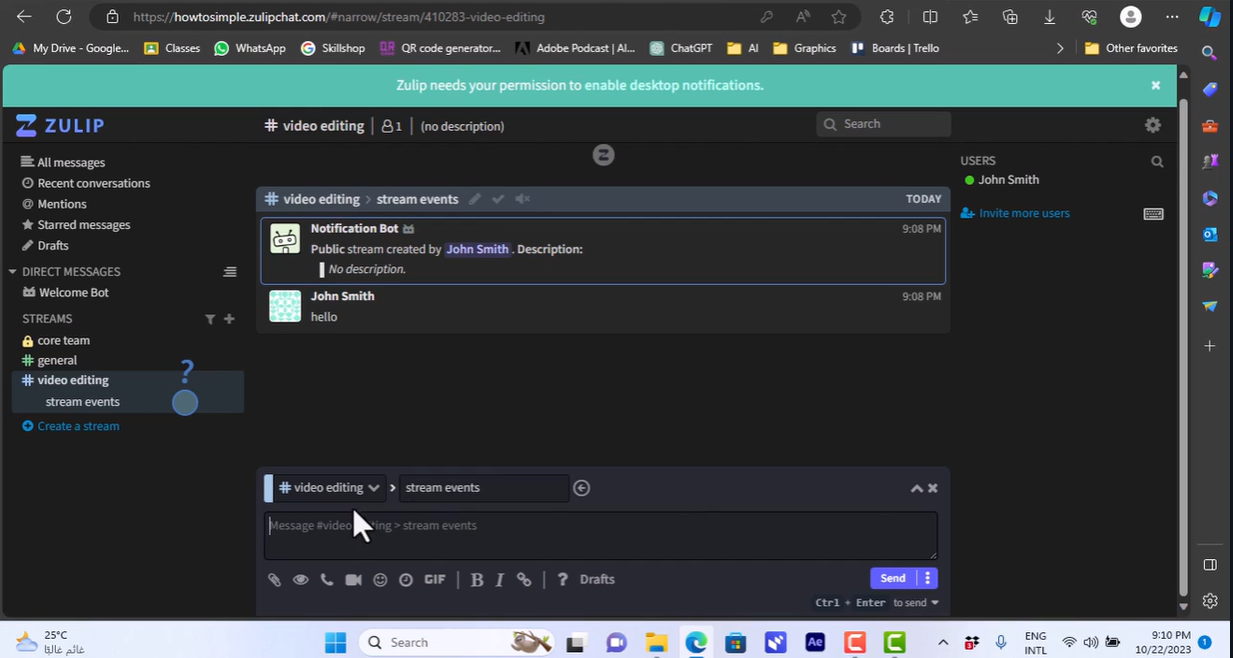
Zulip is a self-hosted open-source team chat platform built around topic-based conversations.
Its key difference from Slack is the messaging structure. Zulip combines channels with mandatory conversation topics, allowing several discussions to happen inside the same channel without collapsing into one timeline.
This model is particularly useful for engineering, research, open-source, and other teams that need to return to discussions after hours or days.
Zulip provides the same open-source software for cloud and self-hosted deployments. The platform supports message history, channels, topic-based threading, files, desktop and mobile applications, integrations, and enterprise authentication features.
Unlike several other alternatives in this list, Zulip does not position an integrated conferencing stack as its main strength. Voice and video can be connected through external providers.
Best for: technical teams and organizations where asynchronous discussion quality matters more than native video conferencing.
Strengths: open-source, topic-based conversations, self-hosting, search, SAML, LDAP, integrations, efficient asynchronous communication.
Limitations: organizations wanting a fully integrated chat plus native enterprise VCS environment may need additional software.
Insight 3. The closest Slack interface is not always the best Slack replacement.
Zulip changes the conversation model itself, while Element changes the server architecture through federation. A successful migration depends on the communication problem being solved, not just UI similarity.
4. Element

Element is a communication platform built on the Matrix open standard.
Instead of treating one server as the center of all communication, Matrix allows independently operated homeservers to communicate through federation. This makes Element relevant to organizations that need sovereign communication across departments, agencies, companies, or security domains.
Element Server Suite supports self-hosted and managed deployment models. Enterprise editions provide administration, SSO, role-based permissions, auditing, federation controls, secure gateways, and support for isolated environments.
Element also supports end-to-end encrypted messaging, voice, and video. Element Call uses MatrixRTC infrastructure and supports encrypted calling across federated deployments.
Federation is the defining capability. Organizations can operate separate servers while allowing users to participate in shared rooms under controlled policies.
Best for: organizations that need decentralized or federated communication rather than a single centralized Slack replacement.
Strengths: Matrix, federation, E2EE, self-hosting, isolated deployment options, enterprise administration, open protocol.
Limitations: Matrix architecture introduces more concepts and operational choices than a conventional single-server team messenger.
5. TrueConf Server

TrueConf Server approaches the Slack replacement problem from a different direction. It combines persistent corporate messaging with a complete video communication environment.
Users can work with personal and group chats, channels, files, presence, conferences, browser participants, desktop and mobile applications, and corporate directories. The full version can operate autonomously inside a local network without requiring internet access for server operation.
TrueConf Server supports video conferences with up to 2,000 participants and can display up to 49 speakers simultaneously. It also includes SIP and H.323 interoperability for connecting hardware video endpoints, PBXs, MCUs, and meeting-room systems.
This makes TrueConf different from text-first Slack alternatives. It is most relevant when the organization wants to consolidate the messenger and video conferencing infrastructure rather than deploy a separate chat server and meeting system.
Best for: enterprises, government, education, industrial organizations, and private networks where messaging and video conferencing need to operate together.
Strengths: corporate messenger, channels, file sharing, up to 2,000 conference participants, autonomous LAN operation, SIP, H.323, room-system integration.
Limitations: organizations looking only for a lightweight text messenger may not need the full video communication stack.
Boost your team’s productivity with TrueConf Server Free!
6. Nextcloud Talk
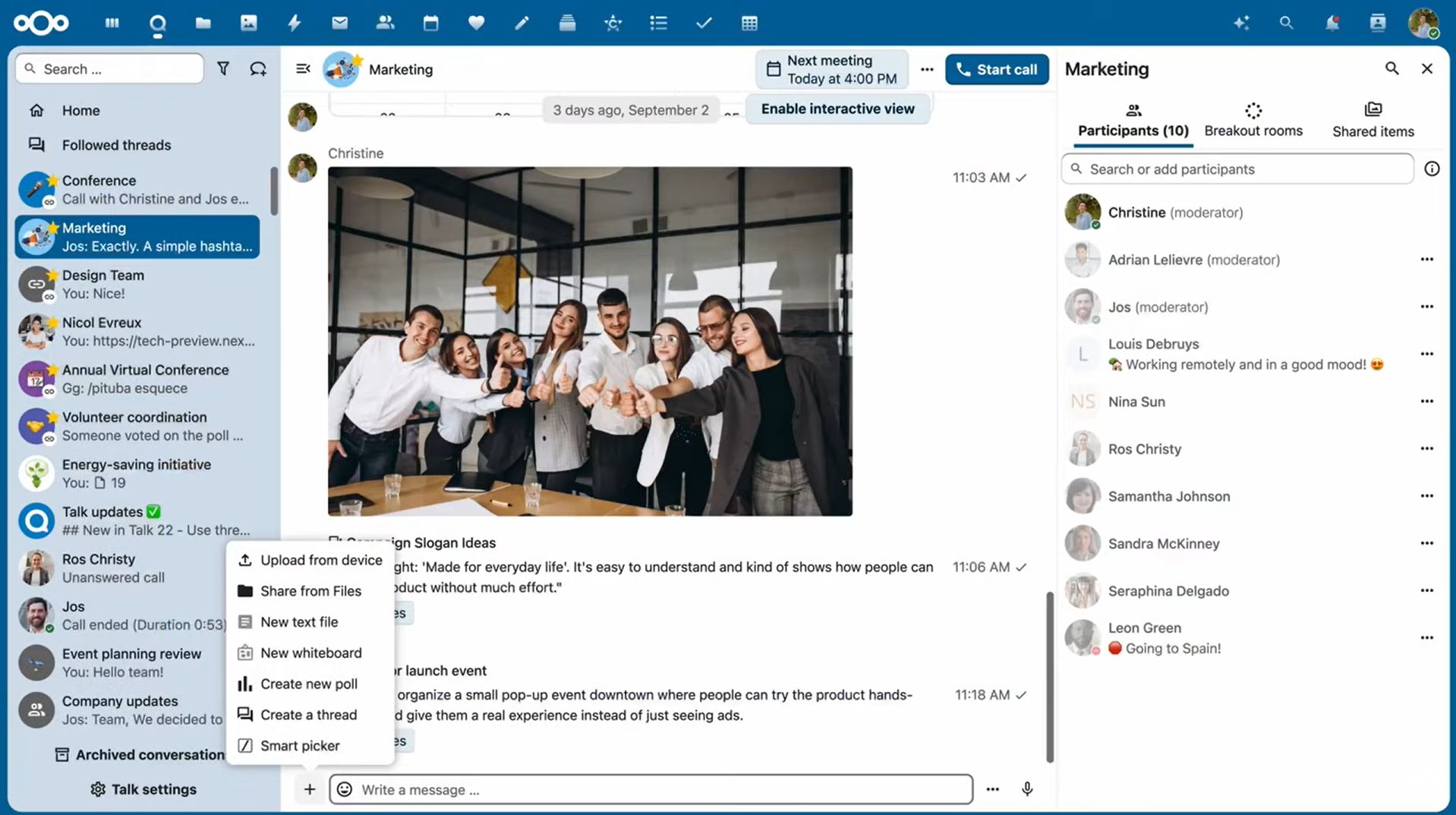
Nextcloud Talk is the messaging and conferencing component of Nextcloud Hub.
Its strongest use case is not replacing Slack in isolation. It is combining chat, calls, files, documents, calendars, and other collaboration tools inside a self-hosted Nextcloud environment.
Talk supports individual and group calls, chat, mobile applications, webinars, public meetings, participant permissions, polls, voice messages, message expiration, federation, and end-to-end encrypted calls.
For larger deployments, the High Performance Backend adds signaling and a WebRTC media layer, reduces load on the main Nextcloud server, and enables larger meetings. It can also connect a SIP bridge for phone dial-in.
Federated Talk allows users on separate Nextcloud servers to communicate and participate in shared calls.
Best for: organizations already using or planning to deploy Nextcloud for files, documents, calendars, and collaboration.
Strengths: self-hosted chat and video, Nextcloud integration, federation, E2EE calls, SIP bridge, webinars, file-centric workflows.
Limitations: large-scale calling requires the additional High Performance Backend and associated infrastructure.
7. Wire

Wire is a secure communication platform for messaging, calls, conferencing, and file sharing with self-hosted and cloud deployment options.
Its defining feature is end-to-end encryption. Wire protects messages, calls, and file communication with E2EE and uses Messaging Layer Security for scalable group communication.
Wire supports SSO, SCIM, granular administrative controls, external collaboration, guest rooms, self-hosted deployments, and isolated environments. Server and client source code required for private operation is publicly available.
The platform also supports large encrypted conferencing scenarios.
Best for: organizations where E2EE, cryptographic transparency, sovereign deployment, and secure external communication are primary requirements.
Strengths: E2EE, MLS, open-source server code, messaging, calls, file sharing, SSO, SCIM, self-hosted and private deployment.
Limitations: teams whose main requirement is a large ecosystem of casual productivity integrations may find security architecture more central than Slack-style app extensibility.
Self-Hosted Slack Alternatives Compared
|
Platform |
Messaging model |
Native video |
Federation |
Isolated-network option |
Enterprise identity |
Main architecture |
|---|---|---|---|---|---|---|
|
Mattermost |
Channels and threads |
Yes |
Specialized scenarios |
Yes |
SAML, OIDC, LDAP |
Centralized self-hosted |
|
Rocket.Chat |
Channels and direct chat |
Yes |
Matrix, XMPP |
Yes |
Enterprise identity options |
Centralized with federation |
|
Zulip |
Channels and topics |
External provider |
No primary federation model |
Private-network deployment |
SAML, LDAP |
Centralized open-source |
|
Element |
Rooms and spaces |
Yes |
Matrix |
Yes |
SSO and enterprise IAM |
Federated Matrix |
|
TrueConf Server |
Chats, groups, channels |
Yes |
Server federation |
Yes |
Corporate directory integration |
Local UC and messaging |
|
Nextcloud Talk |
Conversations and chats |
Yes |
Nextcloud federation |
Self-hosted |
Nextcloud identity ecosystem |
Collaboration suite |
|
Wire |
Conversations and secure groups |
Yes |
Enterprise federation options |
Yes |
SSO, SCIM |
E2EE secure communications |
Open-Source vs Commercial Self-Hosted Slack Alternatives
Self-hosted does not automatically mean open-source, and open-source does not automatically mean free enterprise deployment.
|
Model |
What you control? |
Typical advantage |
Typical tradeoff |
|---|---|---|---|
|
Community open-source |
Source and infrastructure |
Low entry cost and transparency |
More internal support responsibility |
|
Open core |
Core software and infrastructure |
Community ecosystem plus enterprise features |
Some controls require commercial edition |
|
Commercial self-hosted |
Infrastructure and deployment |
Vendor support and enterprise functionality |
License cost |
|
Federated open platform |
Server and protocol participation |
Reduced central dependency |
More architecture to manage |
|
Isolated enterprise deployment |
Entire private environment |
Maximum network control |
Highest operational responsibility |
Mattermost and Rocket.Chat combine open-source foundations with commercial enterprise functionality. Zulip emphasizes the same open-source software across cloud and self-hosted editions. Element builds on the open Matrix protocol. Wire publishes server and client code required for private installations. TrueConf Server uses a commercial server model.
The licensing model should therefore be evaluated separately from the deployment model.
Insight 4. Open-source, free, self-hosted, and isolated describe different properties.
A product may be open-source but require paid enterprise features, self-hosted but depend on external services, or commercially licensed while operating fully inside a private network.
How to Choose the Right Self-Hosted Slack Alternative?
Start with the architectural requirement that caused the organization to leave Slack.
If the priority is a familiar channel-based enterprise messenger, Mattermost is one of the most direct options. Rocket.Chat becomes more relevant when federation, sovereign operation, or isolated deployment are major requirements.
Zulip is worth considering when the main problem is information overload rather than infrastructure alone. Its topic-based model is designed to keep long-running technical discussions organized.
Element is a stronger fit when different organizations or departments need independent servers that can still communicate. Wire is oriented toward E2EE and high-security communication.
TrueConf Server is different because the migration can consolidate messaging and enterprise video conferencing into one locally deployed platform. Nextcloud Talk is strongest when communication needs to be integrated with a broader self-hosted file and collaboration environment.
Proof-of-Concept Checklist Before Migration
A proof of concept should test the actual operating environment rather than repeat the selection criteria.
|
Test |
What to verify? |
|---|---|
|
Login |
SSO, LDAP, AD, MFA, and deactivation work as expected |
|
Migration |
Required users, channels, files, and message history can be imported |
|
Mobile |
Mobile clients can connect through your network architecture |
|
Push |
Notifications still work under your network restrictions |
|
Backup restore |
A complete communication environment can be restored |
|
HA failover |
Communication continues after a node or service failure |
|
Offline test |
Core communication remains available without public internet access |
|
API compatibility |
Required bots, webhooks, and internal integrations still function |
A successful chat demonstration is not enough. The proof of concept should include authentication failure, backup restoration, node failure, network restriction, and migration tests.
Migrating from Slack to a Self-Hosted Platform
A migration should preserve communication context, not just user accounts.
Before choosing a platform, identify what must move:
- users and groups;
- public channels;
- private channels;
- message history;
- threads;
- files;
- reactions;
- integrations;
- bots;
- retention rules;
- guest accounts.
Slack has a large application ecosystem, so integration replacement often requires more work than moving messages.
Migration feasibility also depends on what Slack data can actually be exported. Before selecting a replacement, verify whether your current Slack plan, administrative permissions, and export options provide access to the private channels, direct messages, files, metadata, and app-related data you expect to transfer.
The migration plan should also define which Slack structures should not be reproduced. Old channels, unused bots, duplicate integrations, and obsolete workflows can be removed rather than transferred into the new environment.
Insight 5. The real migration cost is often integration and context reconstruction, not server installation.
A self-hosted Slack replacement can be technically deployed quickly while the transfer of history, identity, bots, workflows, and user habits takes much longer.
Self-Hosted Slack Alternative for an Isolated Network

For an isolated network, the evaluation criteria become stricter.
A product should not merely allow local server installation. Administrators need to verify whether core communication continues when access to public internet services is completely removed.
Mattermost, Rocket.Chat, TrueConf Server, and Wire provide deployment options relevant to restricted or isolated environments. The exact requirements differ by product, so administrators should test licensing, mobile notifications, integrations, software updates, authentication, and media services before production deployment.
This distinction is important because a locally installed server can still rely on external services for noncore functions.
Is Self-hosting Cheaper Than Slack?
Not necessarily.
Self-hosting can reduce or change software licensing costs, but it introduces infrastructure and operational expenses.
Total cost can include:
- server hardware or private cloud resources;
- databases and storage;
- backups;
- load balancing;
- monitoring;
- security maintenance;
- administrator time;
- high-availability infrastructure;
- disaster recovery;
- enterprise support;
- commercial feature licenses.
A small team may spend less using a SaaS product. A large organization may justify self-hosting through sovereignty, infrastructure consolidation, policy requirements, or the ability to use existing private infrastructure.
Cost should therefore be evaluated as total cost of ownership rather than subscription price alone.
Conclusion
The best self-hosted Slack alternative depends on why Slack is being replaced. Mattermost provides a familiar enterprise collaboration model, Rocket.Chat emphasizes sovereign and isolated deployments, Zulip restructures asynchronous communication around topics, Element provides Matrix-based federation, Nextcloud Talk connects messaging with a wider collaboration suite, and Wire focuses on end-to-end encrypted enterprise communication.
TrueConf Server is particularly relevant when replacing Slack is also an opportunity to consolidate corporate messaging and video conferencing inside private infrastructure. Regardless of platform, organizations should compare identity integration, export feasibility, migration, mobile dependencies, high availability, integrations, licensing, and backup architecture before moving production communication.
Empower your video conferencing experience with TrueConf!
FAQ
What is the best self-hosted alternative to Slack?
There is no single best option for every organization. Mattermost is a strong choice for familiar channel-based collaboration, Rocket.Chat for sovereign and isolated deployments, Element for federation, Zulip for topic-based discussion, and TrueConf Server when messaging and enterprise video conferencing need to operate together.
Can Slack be self-hosted?
No. Slack operates as a hosted service rather than a customer-operated server platform. Data residency can change where certain data at rest is stored, but it does not turn Slack into a self-hosted system.
What is the best open-source self-hosted Slack alternative?
Mattermost, Rocket.Chat, Zulip, Element, Nextcloud Talk, and Wire provide open-source components or platforms suitable for self-hosted communication. The best choice depends on whether the priority is Slack-like messaging, federation, video, file collaboration, encryption, or isolated operation.
Can a self-hosted messenger work without Internet access?
Yes, if the platform and all required components support isolated operation. Administrators should test not only messaging, but also licensing, mobile notifications, authentication, updates, media services, and third-party integrations.
Which Slack alternative is best for video conferencing?
TrueConf Server is a strong fit when native enterprise video conferencing is as important as messaging because it combines chats and channels with conferences for up to 2,000 participants and SIP/H.323 interoperability. Nextcloud Talk, Mattermost, Element, Rocket.Chat, and Wire also provide calling capabilities with different architectures.
Is a self-hosted Slack alternative more secure?
Self-hosting provides greater control over infrastructure and data location, but it does not automatically improve security. The organization becomes responsible for patching, authentication, network security, backups, monitoring, and incident response.
What should be migrated from Slack?
At minimum, evaluate users, channels, messages, threads, files, integrations, bots, guest accounts, and retention settings. Also confirm what your Slack plan and administrative permissions allow you to export before selecting a replacement.
About the Author
Diana Shtapova is a product specialist and technology writer with three years of experience in the unified communications industry. At TrueConf, she leverages her deep product expertise to create clear and practical content on video conferencing platforms, collaboration tools, and enterprise communication solutions. With a strong background in product research and user-focused content development, Diana helps professionals and businesses understand core product features, adopt new technologies, and unlock the full potential of modern collaboration software.


Follow us on social networks