
On-Premise Collaboration Software: 9 Platforms Compared
On-premise collaboration software gives an organization direct control over the infrastructure used for messaging, meetings, file sharing, documents, projects, and other teamwork functions. Instead of relying entirely on a vendor operated SaaS environment, the organization deploys the collaboration platform on infrastructure it owns or controls.
This model is especially relevant for government agencies, financial institutions, industrial companies, healthcare organizations, defense environments, regulated enterprises, and businesses that have strict requirements for data location, identity management, network isolation, or integration with existing systems. It can also make sense for organizations that already operate private cloud or hybrid infrastructure and want collaboration workloads to follow the same architecture.
The main difference between on-premise collaboration platforms is scope. Some products focus on messaging, some on video conferencing, some on document collaboration, and others combine several communication and productivity functions. The right choice depends less on the number of features and more on which collaboration workflows must remain under organizational control.
Executive Summary
|
Platform |
Main Collaboration Focus |
Best Fit |
|---|---|---|
|
Video conferencing, messaging, webinars, telephony integration |
Organizations that need communications on their own infrastructure, including isolated networks and existing SIP or H.323 systems |
|
|
Mattermost |
Messaging, operational workflows, calls, incident coordination |
Technical, defense, security, DevOps, and mission focused teams |
|
Rocket.Chat |
Team messaging, federation, customer communications |
Organizations that need extensible messaging and controlled cross organization communication |
|
Element Server Suite |
Secure messaging, voice, video, Matrix federation |
Organizations prioritizing federated communications and open standards |
|
Nextcloud Talk |
Chat, calls, files, calendar collaboration |
Organizations already using Nextcloud or seeking a broader private collaboration environment |
|
ONLYOFFICE Workspace |
Documents, projects, mail, CRM, calendar |
Organizations focused on document productivity and office workflows |
|
Zulip |
Topic based team messaging |
Engineering, research, and knowledge intensive teams with long running discussions |
|
Jitsi Meet |
Video conferencing |
Organizations that primarily need a customizable self-hosted meeting service |
|
OpenProject |
Projects, tasks, timelines, work tracking |
Organizations where structured project collaboration is more important than real time communications |
What Is On-Premise Collaboration Software?
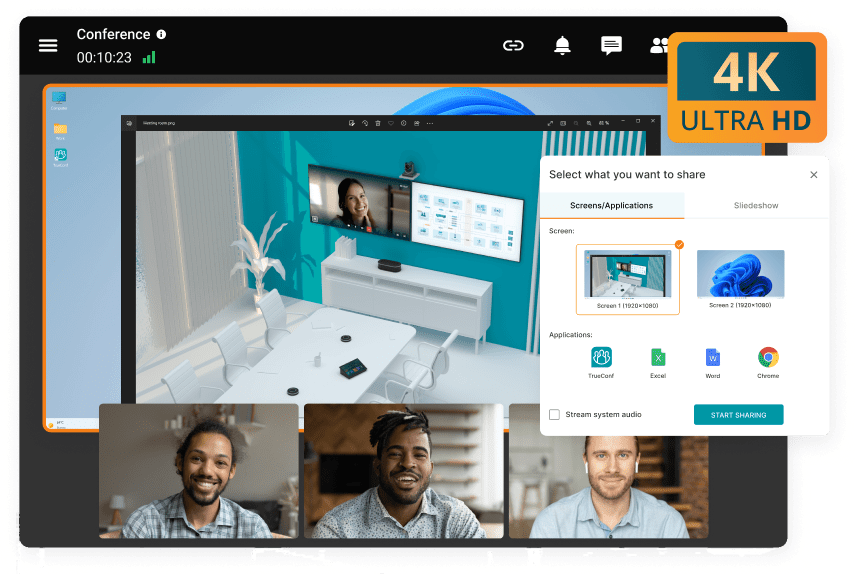
On-premise collaboration software is a communication or productivity platform deployed on infrastructure controlled by the customer. The servers may physically sit in the organization’s own data center, in a private cloud, or in another controlled environment. The defining factor is administrative and infrastructure control, not the physical location of a particular server rack.
A collaboration platform can include one or several of the following functions:
- Team and direct messaging
- Audio and video conferencing
- File exchange and shared storage
- Document editing and review
- Channels, spaces, groups, and communities
- Project and task management
- Corporate directories and centralized authentication
- Workflow automation and integrations
- Audit, retention, and administrative controls
On-premise does not automatically mean that every component is completely independent of external services. Push notifications, external identity providers, email delivery, AI services, conferencing gateways, update repositories, and integrations can still introduce outside dependencies. A serious evaluation therefore needs to examine the complete architecture rather than only the location of the application server.
Buyer Insight
The most important question is not simply whether a product can be installed on your server. The important question is which collaboration functions continue operating when external services are unavailable and which data flows remain inside infrastructure you control.
Types of On-Premise Collaboration Software
On-premise collaboration software is not one uniform category. Products follow different collaboration models, so the first selection step is to identify which type matches the organization’s primary workflow.
|
Type |
Main Purpose |
Typical Platforms |
|---|---|---|
|
Video conferencing, calls, messaging, webinars, telephony integration |
TrueConf Server |
|
|
Team messaging |
Channels, direct messages, threads, operational communication |
Mattermost, Rocket.Chat, Zulip |
|
Federated communications |
Communication across separately managed organizations or infrastructure domains |
Element, Rocket.Chat |
|
Private productivity suite |
Files, calendars, documents, office collaboration, communication |
Nextcloud, ONLYOFFICE |
|
Video platform |
Meetings and embedded conferencing |
Jitsi Meet |
|
Project collaboration |
Tasks, timelines, project planning, accountability |
OpenProject |
These categories can overlap. For example, TrueConf Server combines video with messaging, while Nextcloud combines file collaboration with chat and meetings. The taxonomy is useful because it shows the primary product philosophy rather than implying that every platform competes feature for feature.
What On-Premise Does Not Mean?

The term on-premise is often used too broadly. Several assumptions need to be separated before comparing products.
- On-premise does not automatically mean air gapped. A self-hosted platform may still connect to external identity, notification, update, storage, or integration services.
- On-premise does not automatically mean more secure. Security depends on hardening, patching, identity management, monitoring, access control, backups, and operational discipline.
- On-premise does not mean zero vendor dependency. Licensing, support, updates, integrations, and product development may still depend on the software vendor.
- On-premise does not mean every feature works offline. Some functions may depend on internet connected supporting services.
- On-premise does not necessarily mean a server physically located in an office. Customer controlled private cloud or data center infrastructure can follow the same operational model.
Why Organizations Still Use On-Premise Collaboration?
The growth of public cloud services has not eliminated private infrastructure. Many enterprises now operate mixed environments and place different workloads in different locations according to security, cost, performance, governance, and operational requirements.
Flexera reports that 73% of surveyed organizations use hybrid cloud environments. Among organizations with more than 5,000 employees, the reported share reaches 78%. The research reflects the broader infrastructure market, but it demonstrates how common mixed public and private environments have become in enterprise IT.
Nutanix reports that 80% of surveyed IT executives consider data sovereignty a high priority or mandatory infrastructure consideration. The same research reports that 52% of organizations run containerized applications on-premise or in private cloud environments, close to the reported level of public cloud deployment.
These studies measure enterprise infrastructure rather than collaboration software specifically. However, they help explain why private and hybrid deployment models remain relevant for communication and collaboration workloads that must follow the same security, sovereignty, and operational policies as other enterprise systems.
|
Infrastructure Indicator |
Reported Figure |
Why It Matters for Collaboration |
|---|---|---|
|
Organizations using hybrid cloud |
73% |
Collaboration workloads increasingly need to fit mixed public and private infrastructure strategies |
|
Hybrid cloud use among organizations with more than 5,000 employees |
78% |
Large enterprises frequently need collaboration software that fits complex infrastructure rather than one SaaS model |
|
Executives treating data sovereignty as a high priority or mandatory consideration |
80% |
Location and control of collaboration data can directly affect infrastructure decisions |
|
Containerized workloads running on-premise or in private cloud environments |
52% |
Private infrastructure remains a normal workload destination rather than a legacy exception |
These figures do not mean that on-premise collaboration is preferable for every organization. They show that modern enterprise infrastructure is increasingly hybrid, making workload placement and data control legitimate architectural considerations rather than purely historical preferences.
Main Benefits of On-Premise Collaboration Software

Control Over Data Location
A self-hosted deployment lets the organization decide where messages, files, recordings, user information, and other collaboration data are stored. This can simplify internal policies where sensitive information must remain in a particular infrastructure environment or jurisdiction.
Integration With Existing Identity Systems
Enterprise collaboration usually becomes easier to administer when accounts are connected to existing directories. Products in this category commonly support LDAP, Active Directory, SAML, OpenID Connect, or other identity technologies, although exact capabilities depend on the product and edition.
Network Isolation
Some platforms can work in networks with restricted or no public internet connectivity. TrueConf Server, Mattermost, Rocket.Chat, and Element provide deployment options that can support isolated environments when the required dependencies, licensing, update processes, and supporting services are planned appropriately.
Administrative Control
Organizations can control updates, maintenance windows, user policies, integrations, logging, network rules, and deployment architecture. This is particularly important when collaboration software is treated as part of critical operational infrastructure.
Integration With Existing Hardware
This matters most for video communication. TrueConf Server supports SIP, H.323, RTSP, and WebRTC scenarios and can connect to conferencing endpoints, PBXs, MCUs, and other communications infrastructure.
On-Premise vs Cloud Collaboration Software
|
Criterion |
On-Premise |
Vendor Cloud |
|---|---|---|
|
Infrastructure ownership |
Customer controlled |
Vendor controlled |
|
Deployment speed |
Requires infrastructure preparation and administration |
Usually faster to start |
|
Data location control |
Defined directly through the customer’s infrastructure |
Depends on vendor architecture and contractual options |
|
Maintenance |
Handled largely by internal teams or an infrastructure partner |
Handled largely by the service provider |
|
Customization |
Often broader at infrastructure and integration level |
Usually limited to options exposed by the service |
|
Offline or isolated operation |
Possible with platforms designed for this architecture |
Usually depends on external connectivity |
|
Scaling responsibility |
Organization must plan capacity and redundancy |
Provider manages most infrastructure scaling |
Buyer Insight
On-premise software does not remove vendor dependency. It changes the type of dependency. Hosting moves under customer control, while software updates, licensing, support, integrations, and product development can still depend on the vendor.
Best On-Premise Collaboration Software
1. TrueConf Server

TrueConf Server is a self-hosted unified communications platform that combines video conferencing, team messaging, webinars, file exchange, presence, calling, and administrative tools. It is designed to operate on customer controlled infrastructure and can support autonomous communications inside networks without public internet access when deployed for this scenario.
Its strongest distinction is the combination of software collaboration and traditional enterprise video infrastructure. TrueConf Server supports SIP and H.323 gateways, RTSP, WebRTC access, LDAP integration, Active Directory based identity scenarios, SSO options, two factor authentication, and interoperability with hardware conferencing systems. Administrators can manage accounts, groups, permissions, authentication, conferences, guest access, and network settings from the server control panel.
The platform includes personal chats, group chats, channels, file exchange, recurring conferences, webinars, conference access controls, public registration options, streaming, and federation between TrueConf Server instances. Large meetings can scale to substantial participant counts depending on the selected license, server resources, conference mode, and deployment architecture.
Best for: enterprises, government agencies, financial institutions, industrial organizations, education, healthcare, and other environments that need video, messaging, centralized identity, and infrastructure control in one communication platform.
Strengths: video focused unified communications, isolated network operation, SIP and H.323 interoperability, LDAP and Active Directory integration, webinars, messaging, federation, guest browser access, and centralized administration.
Limitations: deployment requires server resources and administration. Organizations must plan capacity, updates, backup, monitoring, security hardening, and network architecture themselves.
Boost your team’s productivity with TrueConf Server Free!
2. Mattermost

Mattermost is a self-hosted collaboration platform centered on messaging, operational coordination, workflow automation, and technical team communication. Its messaging environment provides public and private channels, direct messages, threaded discussions, search, file sharing, and collaboration across web, desktop, and mobile clients.
Mattermost Calls adds audio communication, screen sharing, and real time collaboration. When deployed inside customer infrastructure, the organization can keep the relevant call services under its own operational control, subject to the selected architecture and supporting network components.
Mattermost Playbooks supports structured workflows for recurring processes such as incident response, releases, onboarding, and operational procedures. Playbooks can combine checklists, status updates, automation actions, permissions, and workflow visibility. Mattermost also supports APIs, webhooks, slash commands, plugins, bots, and integration capabilities for engineering and operations environments.
Air gapped deployments can be implemented by preparing required packages, images, plugins, registries, mail services, and other dependencies inside the isolated environment. Features that normally rely on public services may need to be disabled or replaced with locally operated alternatives.
Best for: engineering teams, DevOps, security operations, incident response, defense, critical infrastructure, and organizations that value structured operational workflows.
Strengths: messaging, threaded collaboration, self-hosted calls, Playbooks and workflow tools, extensibility, support for isolated deployments, and technical operations use cases.
Limitations: Mattermost is primarily messaging and operations oriented. It is not a complete document productivity suite, and some enterprise capabilities depend on the selected edition or plan.
3. Rocket.Chat

Rocket.Chat is a collaboration platform built around channels, teams, discussions, direct messages, threads, file sharing, search, federation, and extensibility. It can run as a vendor hosted service or as a self managed deployment, including architectures designed for restricted or isolated environments when supported by the chosen edition.
A major differentiator is cross organization federation. Rocket.Chat supports Matrix based federation that can allow independently managed workspaces to exchange selected communications while retaining separate infrastructure. Federation capabilities differ from local workspace functions, so organizations should test messaging, file sharing, encryption, identity, and calling scenarios separately.
Rocket.Chat supports enterprise authentication and access control options such as LDAP, SAML, OAuth, and OpenID Connect. Depending on edition and configuration, organizations can also use audit capabilities, retention policies, end to end encryption, APIs, webhooks, applications, and custom integrations. Video conferencing can be connected through external conferencing services and integration options.
Best for: organizations that want a customizable messaging platform, federation, controlled external collaboration, or communications across independently managed organizations.
Strengths: flexible deployment, channels and threads, federation, external communication options, enterprise authentication, APIs, and an extensible integration model.
Limitations: advanced video conferencing can depend on additional services or integrations, and federation does not reproduce every local workspace capability across organizations.
4. Element Server Suite

Element Server Suite is a self-hosted communications platform built on the Matrix open standard. It supports messaging, voice, video, encrypted communication, federation, administrative control, and deployment inside customer infrastructure.
Matrix architecture makes Element particularly relevant when organizations need decentralized collaboration between separate organizations or security domains. Each organization can maintain its own server while exchanging communication through controlled federation.
Enterprise deployments can include SSO, role based permissions, auditing, moderation, retention controls, federation management, border controls, cross domain architectures, and isolated network deployment patterns. Larger environments may use Kubernetes based infrastructure and require careful planning for identity, federation, storage, and encryption related services.
Best for: organizations that prioritize open standards, encrypted messaging, federation, sovereignty, or collaboration between separate infrastructure domains.
Strengths: Matrix federation, self hosting, encrypted messaging, voice and video, isolated deployment options, administrative controls, and flexible federation architecture.
Limitations: Matrix based deployments can be architecturally complex. Organizations may need expertise in identity, federation, encryption key management, and container infrastructure for larger installations.
5. Nextcloud Talk
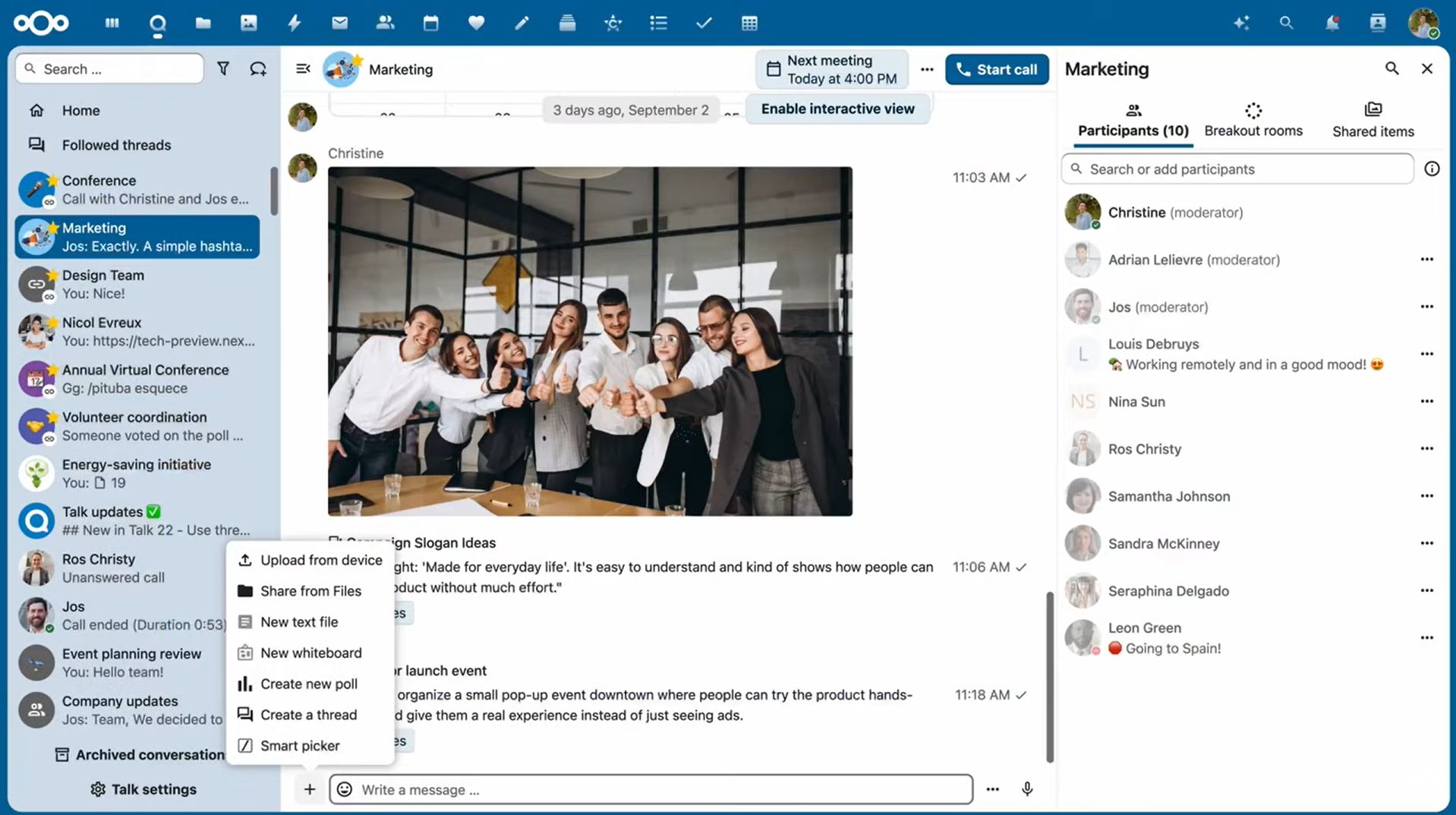
Nextcloud Talk adds audio, video, text chat, screen sharing, recording, webinars, breakout rooms, federation, guest participation, bots, commands, and file collaboration to the broader Nextcloud environment. Talk is integrated with Nextcloud Files and Calendar, allowing conversations to exist within the same private productivity environment as business documents and schedules.
For organizations already using Nextcloud, this integration is one of the strongest reasons to select Talk. Users can move between files, calendar entries, messages, and calls without shifting to a separate SaaS collaboration stack.
Nextcloud supports LDAP and Active Directory based identity integration. Directory users can authenticate with existing credentials and participate in the normal Nextcloud permission model, including groups and file sharing.
Larger Talk deployments may require additional signaling and media infrastructure for performance and scale. Administrators should therefore include real time communication services in capacity planning rather than treating Talk as only another standard Nextcloud application.
Best for: organizations seeking files, calendars, messaging, and meetings inside one private collaboration environment.
Strengths: tight integration with Nextcloud Files and Calendar, chat, calls, recording, webinars, breakout rooms, federation, guests, LDAP, and broad self-hosted collaboration.
Limitations: high scale real time communications require additional architecture and tuning. Organizations primarily focused on advanced enterprise video infrastructure may need a more specialized conferencing platform.
6. ONLYOFFICE Workspace
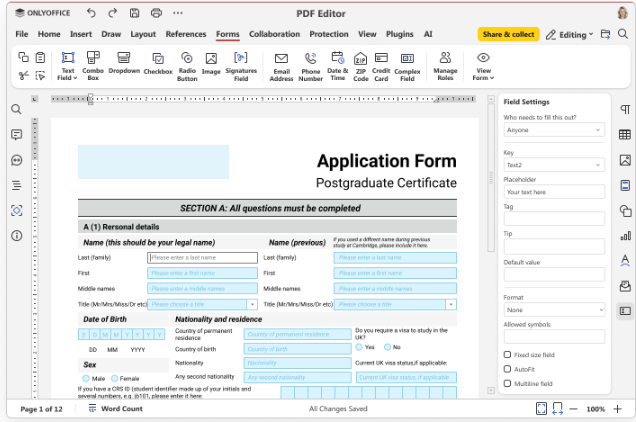
ONLYOFFICE Workspace takes a productivity suite approach rather than a communications first approach. It combines document storage and editing, projects, mail, CRM, calendar, and other workplace tools and can be hosted on customer infrastructure.
Its strongest capability is collaborative document work. Teams can edit text documents, spreadsheets, presentations, PDFs, and forms while managing sharing permissions and business workflows around those files. Projects include task prioritization, deadlines, time tracking, reports, and Gantt charts. CRM, mail, and calendar modules connect additional office processes inside the same workspace.
Administration can include LDAP, Active Directory integration, SAML based SSO, two factor authentication, IP restrictions, administrator roles, user activity information, audit records, backup, and integration settings depending on the selected edition.
Best for: organizations that want an on-premise office environment focused on documents, projects, calendars, mail, and business productivity.
Strengths: document editing, office file compatibility, project management, CRM, mail, calendar, LDAP, SSO, and broad workspace administration.
Limitations: organizations looking primarily for advanced enterprise video conferencing or operational messaging may need a specialized communications platform alongside it.
7. Zulip
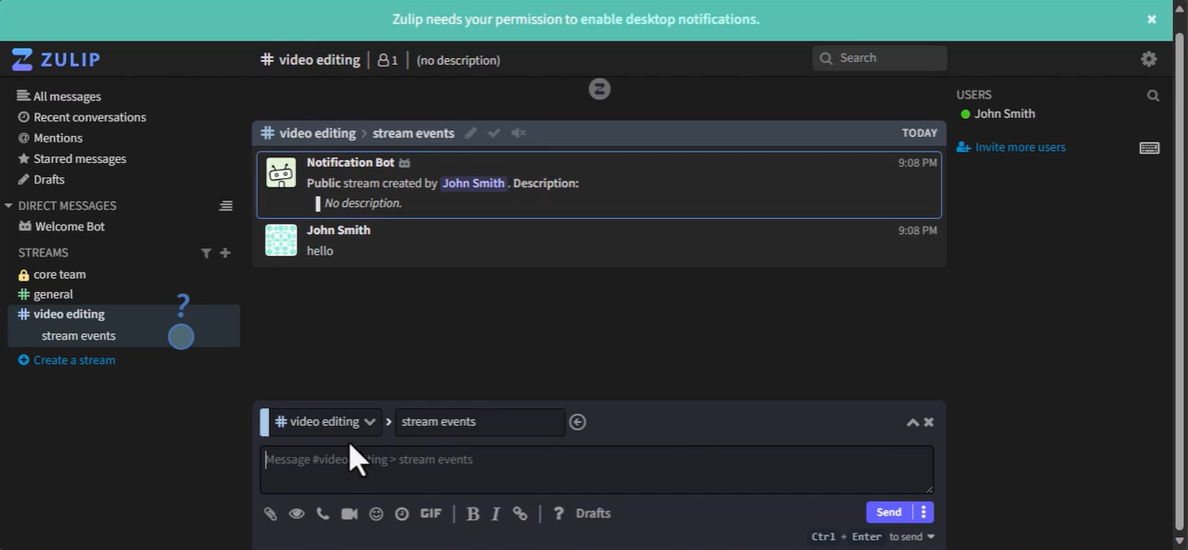
Zulip is a team messaging platform built around streams and topics. Instead of treating a channel as one continuous conversation, messages are organized into topic based threads. This structure is useful for technical and knowledge intensive teams that need conversations to remain understandable over long periods.
Zulip can be self-hosted in supported Linux and container environments. It also provides migration tooling for several competing messaging systems and supports a broad range of native integrations.
Self-hosted deployments can support authentication and identity options such as SAML, OpenID Connect, Microsoft Entra ID, SCIM, and AD or LDAP synchronization depending on configuration and edition.
Best for: software development, research, open source communities, engineering, and teams that need structured asynchronous discussion.
Strengths: topic based messaging, long term conversation organization, extensive integrations, self hosting, migration tools, and enterprise identity options.
Limitations: Zulip is primarily a messaging platform. Organizations needing built in enterprise video, document editing, or full project management will require additional tools.
8. Jitsi Meet
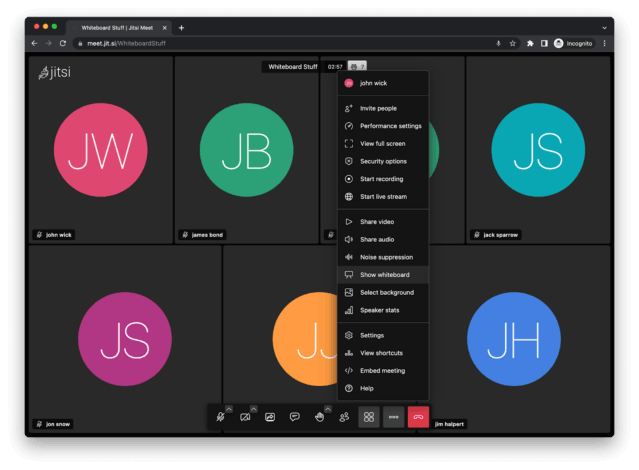
Jitsi Meet is an open source video conferencing platform that can be deployed on an organization’s own infrastructure. It supports browser based meetings, mobile clients, and APIs for embedding conferencing into web or mobile applications.
Jitsi is narrower than most other products in this comparison. Its core purpose is video meetings rather than providing a complete workplace with persistent enterprise messaging, files, tasks, and document collaboration.
Self-hosted deployments require administrators to manage certificates, authentication, network configuration, scaling, media components, and supporting infrastructure. The exact architecture becomes increasingly important as the number of concurrent conferences grows.
Best for: teams that need a customizable self-hosted video meeting component or developers embedding video conferencing into another application.
Strengths: open source code, self hosting, browser based conferencing, mobile support, APIs, and a focused video architecture.
Limitations: Jitsi is not a complete collaboration suite. Messaging, document management, project coordination, and broader governance typically require other systems.
9. OpenProject
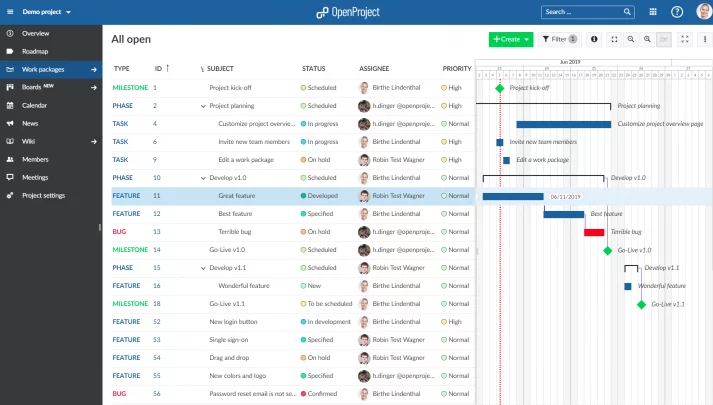
OpenProject focuses on project collaboration rather than conversational collaboration. Its self-hosted versions provide work packages, task management, timelines, project planning, documents, team coordination, and other structured project functions.
OpenProject supports several deployment methods, including Linux packages, container based installations, and orchestration based deployments. Enterprise environments can integrate with corporate directory and identity systems, while available authentication features depend on edition and configuration.
Security related capabilities can include SSO, two factor authentication, LDAP synchronization, access controls, and file security functions. This makes OpenProject relevant when structured project governance is more important than real time meetings or chat.
Best for: project offices, product teams, engineering organizations, public sector projects, and teams that need structured planning and accountability.
Strengths: project planning, task ownership, timelines, self hosting, enterprise identity options, access controls, and structured work management.
Limitations: it is not designed to replace a dedicated video conferencing or enterprise messaging platform.
Feature Comparison
|
Platform |
Primary Collaboration Model |
Messaging |
Video |
Files or Documents |
Project or Workflow Tools |
Isolated Deployment |
|---|---|---|---|---|---|---|
|
TrueConf Server |
Unified communications |
Yes |
Core capability |
File exchange |
Limited compared with project platforms |
Designed to support isolated network operation |
|
Mattermost |
Operational messaging |
Core capability |
Calls and screen sharing |
File sharing |
Playbooks and workflow tools |
Supported with appropriate deployment architecture |
|
Rocket.Chat |
Messaging and federation |
Core capability |
Calling and conferencing through supported options or integrations |
File sharing |
Integration based |
Available for suitable self managed deployments and editions |
|
Element |
Federated communications |
Core capability |
Yes |
File sharing |
Limited |
Supported with appropriate deployment architecture |
|
Nextcloud Talk |
Private productivity and communications |
Yes |
Yes |
Integrated with Nextcloud Files |
Via broader Nextcloud ecosystem |
Depends on architecture and enabled external services |
|
ONLYOFFICE Workspace |
Document productivity |
Basic communication tools |
Not the primary focus |
Core capability |
Projects, CRM, calendar |
Self-hosted deployment available, offline behavior depends on integrations |
|
Zulip |
Structured asynchronous messaging |
Core capability |
External integration approach |
File sharing |
Integration based |
Possible with self-hosted architecture, subject to dependency planning |
|
Jitsi Meet |
Video conferencing |
Meeting chat |
Core capability |
Limited |
No |
Possible with suitable network and supporting services |
|
OpenProject |
Project collaboration |
Project communication |
Not the primary focus |
Project documents |
Core capability |
Self-hosted deployment available, dependency profile varies by configuration |
How to Choose On-Premise Collaboration Software?
The best platform should be selected by architecture and workflow rather than by feature count. A company that mainly needs secure video conferencing has different requirements from a software engineering team that lives in threaded messaging or a project office that needs timelines and task ownership.
- Define the collaboration scope. Decide whether the platform must cover messaging, video, files, documents, projects, external guests, or all of them.
- Map the required data flows. Identify where messages, recordings, documents, logs, backups, and identity data may be stored or processed.
- Check offline dependencies. Determine which functions require external push services, identity systems, update repositories, AI services, email delivery, or third party APIs.
- Review identity and governance. Test LDAP, Active Directory, SSO, MFA, provisioning, roles, guest policies, audit information, and retention requirements.
- Test existing infrastructure. Include proxies, firewalls, storage, network segmentation, video endpoints, PBXs, directory services, and monitoring tools in the pilot.
- Model production load. Test realistic numbers of users, calls, files, messages, concurrent sessions, and remote connections.
- Calculate operational cost. Include licenses, servers, storage, administrators, backups, monitoring, disaster recovery, upgrades, and support.
What to Test Before Deployment?
|
Test Area |
What to Verify |
Why It Matters |
|---|---|---|
|
Identity |
Provisioning, role changes, deactivation, MFA, SSO |
Manual account management becomes difficult at enterprise scale |
|
Network behavior |
LAN, remote access, proxy rules, ports, segmentation, restricted internet access |
A platform may behave differently outside a simple test environment |
|
Data storage |
Messages, files, recordings, logs, backups |
The application database is only one part of the data footprint |
|
External dependencies |
Push, email, federation, integrations, AI, updates |
Some functions may stop when external connectivity is restricted |
|
Scale |
Concurrent meetings, active users, message volume, large files |
Production capacity may differ significantly from a small pilot |
|
Recovery |
Backup restore, failover, server loss, identity service failure |
Collaboration often becomes more important during operational incidents |
Buyer Insight
The best pilot is not a vendor demonstration. It is a controlled production style test using your directory, network rules, real endpoint types, security policies, expected concurrency, and recovery procedures.
Common Mistakes When Moving Collaboration On-Premise
Choosing a product only because it can be self-hosted. Installation location says little about whether the platform actually supports the organization’s collaboration workflow.
Underestimating administration. The organization becomes responsible for monitoring, backups, upgrades, capacity planning, disaster recovery, certificates, databases, and security configuration.
Trying to replace every collaboration function with one product. A specialized video platform, messaging platform, and project system can sometimes produce a better architecture than forcing every workflow into a single suite.
Comparing only license prices. Total cost includes infrastructure, storage, network capacity, administration, support, high availability, backup, and future scaling.
When On-Premise Collaboration Makes Sense?

On-premise collaboration is usually worth considering when infrastructure control solves a specific business, regulatory, operational, or security requirement.
- Sensitive collaboration data must stay within controlled infrastructure
- The organization operates private or hybrid infrastructure as a strategic platform
- Users must communicate inside isolated networks
- Existing LDAP, Active Directory, telephony, storage, or video systems need deep integration
- The company needs direct access to logs, configuration, and infrastructure
- Collaboration must continue when public cloud services or external connectivity are unavailable
A vendor managed cloud service can be a better choice when the organization has no special infrastructure constraints and prefers rapid deployment, minimal administration, automatic scaling, and vendor managed upgrades.
Conclusion
On-premise collaboration software is not a single product category with one universal winner. TrueConf Server emphasizes video conferencing and unified communications, Mattermost focuses on operational messaging and workflows, Rocket.Chat and Element provide federated communication models, Nextcloud combines communication with private file collaboration, ONLYOFFICE centers on documents and office productivity, Zulip specializes in structured messaging, Jitsi focuses on video, and OpenProject focuses on project execution.
The strongest selection process begins with workload requirements rather than vendor names. Define which communication data must remain under organizational control, which systems must integrate with the platform, which functions must work without external services, and who will operate the infrastructure. Once those requirements are clear, the number of realistic candidates becomes much smaller and the final pilot becomes far more useful.
For a complete on-premise stack, see our guide to self-hosted video conferencing.
Empower your video conferencing experience with TrueConf!
FAQ
What is on-premise collaboration software?
On-premise collaboration software is deployed on infrastructure controlled by the organization rather than being delivered entirely from a vendor operated SaaS environment. It can provide messaging, video conferencing, files, documents, projects, or a combination of these functions.
What is the best on-premise collaboration software?
There is no universal best platform because the products solve different collaboration problems. TrueConf Server is suited to organizations that prioritize enterprise video and messaging, Mattermost and Rocket.Chat focus more heavily on messaging, while Nextcloud and ONLYOFFICE cover broader productivity workflows.
Can on-premise collaboration software work without internet access?
Some platforms are designed for restricted or isolated networks, while others depend on external services for selected features. TrueConf Server can operate inside isolated environments, while Mattermost, Rocket.Chat, Element, and other self-hosted products require architecture specific planning for dependencies and supporting services.
Is on-premise collaboration more secure than cloud software?
Not automatically. On-premise deployment gives the organization more infrastructure control, but the organization also becomes responsible for patching, monitoring, backups, network security, administrator access, and recovery. Security depends on architecture and operations rather than deployment location alone.
Can on-premise collaboration software integrate with Active Directory?
Many enterprise collaboration platforms provide LDAP, Active Directory, SAML, OpenID Connect, SCIM, or related identity integration options. The exact synchronization, provisioning, SSO, and access control capabilities depend on the product, edition, and deployment configuration.
What is the difference between self-hosted and on-premise collaboration?
The terms often overlap, but self-hosted is broader. A self-hosted platform can run in the organization’s data center, private cloud, or another infrastructure environment controlled by the customer, while on-premise traditionally refers more specifically to infrastructure operated within the organization’s own environment.
What should enterprises test before choosing a collaboration platform?
Enterprises should test identity integration, access controls, data storage, network behavior, external dependencies, realistic concurrency, backup, recovery, and administration. A platform should be evaluated inside the intended infrastructure rather than only through a vendor demonstration.
About the Author
Diana Shtapova is a product specialist and technology writer with three years of experience in the unified communications industry. At TrueConf, she leverages her deep product expertise to create clear and practical content on video conferencing platforms, collaboration tools, and enterprise communication solutions. With a strong background in product research and user-focused content development, Diana helps professionals and businesses understand core product features, adopt new technologies, and unlock the full potential of modern collaboration software.


Follow us on social networks