
Microsoft 365 Outage 2026: What Happened and How Businesses Can Stay Connected
On November 12, 2026, a major Microsoft 365 outage disrupted Outlook, Microsoft Teams, Copilot, and other cloud services across multiple regions. Within approximately one hour, outage monitoring platform Downdetector recorded reports from 74 countries and territories. In the United States alone, complaints about Outlook peaked at nearly 130,000.
The disruption affected businesses, educational institutions, and government organizations that rely on Microsoft services for everyday operations. While Microsoft worked to restore the affected infrastructure, some recovery measures failed to produce the expected results, leaving users uncertain about when normal service would return.
Key takeaway
Even globally distributed cloud platforms can experience failures that disrupt business-critical communication across multiple regions simultaneously.
For organizations relying on Microsoft 365 as their primary communication environment, the question extends beyond when Outlook will recover. How can employees coordinate work, hold meetings, and exchange urgent information when a major cloud provider becomes unavailable?
This article examines what happened during the November 2026 Microsoft outage, its implications for business continuity, and how independent communication infrastructure can reduce operational dependency on a single cloud provider.
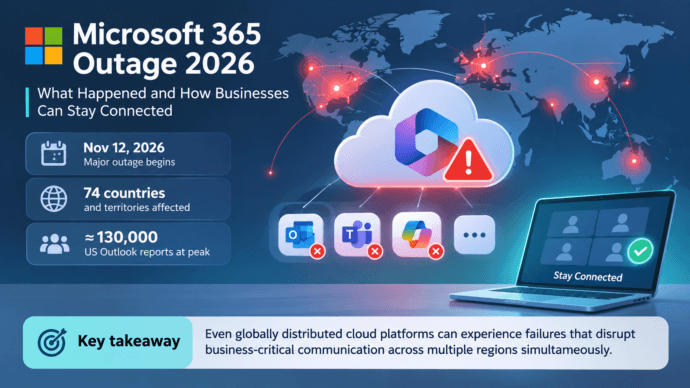
Microsoft 365 Outage: Key Facts
|
Detail |
What happened |
|---|---|
|
Incident date |
November 12–13, 2026 |
|
Geographic impact |
Reports from 74 countries and territories |
|
Affected services |
Outlook, Microsoft 365, Teams-related functionality, Copilot, and other connected services |
|
Peak reported impact |
Approximately 130,000 US Outlook outage reports |
|
Reported technical issue |
Elevated infrastructure load and unexpectedly unavailable servers |
|
Recovery measures |
Traffic redistribution, server restarts, infrastructure changes, and additional patches |
|
Cyberattack confirmed? |
No. Microsoft reported no indication of malicious activity |
|
Business impact |
Disrupted email, collaboration workflows, connected applications, and public-sector operations |
The figures describe reports submitted to Downdetector, not the verified number of people affected. The total impact may have been considerably larger, but Microsoft had not provided a confirmed global user count.
The main lesson for enterprises
A service can be highly scalable and still experience a widespread availability incident. Organizations should evaluate communication platforms not only by capacity and features but also by their ability to maintain essential operations when a provider fails.
What Happened During the November 2026 Microsoft Outage?
The disruption began on Thursday, November 12, when users reported difficulties accessing Outlook and Exchange Online mailboxes. Some could not open their inboxes, while others experienced delayed messages or failures when sending and receiving email.
According to reports published by the Associated Press, Euronews, and other international media, Microsoft initially investigated service connectivity problems in the Americas. The company later acknowledged that users in other geographic regions could also be affected.
The outage quickly extended beyond email. Problems were reported in Microsoft 365 applications, including functionality associated with Teams and Copilot.
By approximately 1:00 p.m. Eastern Time, Downdetector had recorded nearly 130,000 Outlook problem reports in the United States. Reports originated from 74 countries and territories within roughly an hour, illustrating the geographic reach of the incident.
Microsoft identified elevated load in parts of its infrastructure and unexpectedly unavailable servers. As recovery work continued, engineers attempted to redistribute traffic away from affected systems, restart servers, and restore available capacity.
However, bringing infrastructure back online proved difficult. Some restored servers experienced renewed problems when traffic returned, while certain mitigation measures did not work as expected.
By early November 13, Microsoft was still investigating recovery options and working to stabilize the affected environment.
Microsoft Outage Timeline
|
Date |
Development |
|---|---|
|
November 12, approximately 16:00 GMT |
Reports of Outlook connectivity problems begin increasing |
|
November 12, approximately 18:00 GMT |
Nearly 130,000 US Outlook outage reports are recorded |
|
November 12, later that day |
Microsoft confirms broader Microsoft 365 connectivity problems |
|
November 12–13 |
Engineers redistribute traffic, restart servers, and investigate infrastructure failures |
|
Early November 13 |
Microsoft reports that some mitigation measures are not working as expected |
|
November 13 |
Recovery work continues, with service availability varying across regions |
The timeline reflects publicly reported developments rather than a complete technical incident log.
Which Microsoft Services Were Affected?
Although Outlook was at the center of the disruption, the incident affected a wider ecosystem of Microsoft applications and integrations.
The consequences varied by service and geographic region. Not every Microsoft application became completely unavailable.
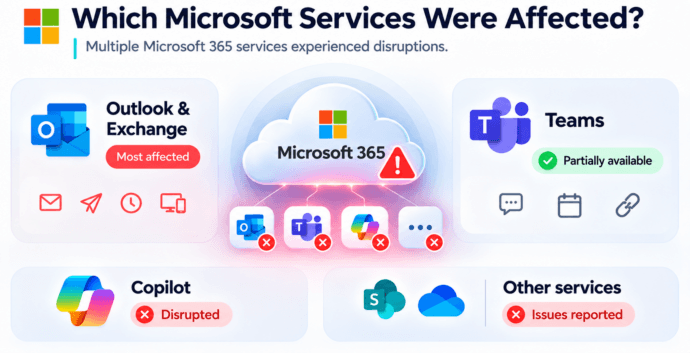
Microsoft Outlook and Exchange Online
Outlook users experienced some of the most severe problems.
Reported symptoms included inaccessible mailboxes, difficulties sending and receiving messages, delayed email delivery, and failures when connecting through web, desktop, or mobile applications.
For organizations that depend on email for customer inquiries, approvals, contracts, and internal coordination, even a temporary disruption can create operational backlogs.
Email is also frequently used for notifications from business applications. When messaging infrastructure becomes unavailable, employees may miss updates from CRM systems, service desks, or automated workflows.
Microsoft Teams
Microsoft Teams was also affected, although the disruption was not uniform across its functionality.
Some users experienced difficulties with messaging, connectivity, and integrated Microsoft 365 services. However, reporting indicated that Teams chats and calls continued working for many users.
Important distinction
The November incident should not be described as a complete worldwide shutdown of every Teams communication feature.
Nevertheless, organizations relying on Teams calendars, meeting coordination, authentication, and integrations could encounter interruptions even when basic calling functionality remained available.
Microsoft Copilot
Microsoft’s AI assistant Copilot was among the services affected by the broader disruption.
For organizations integrating AI functionality into document workflows, productivity applications, and business processes, the incident demonstrated how availability problems in underlying cloud infrastructure can affect tools beyond traditional communication software.
Other Microsoft 365 Services and Integrations
Problems were also reported with functionality involving SharePoint, OneDrive, and other connected Microsoft 365 applications.
The effects extended to some third-party integrations. OpenAI and Anthropic reported problems affecting their Microsoft-connected services during the incident.
This is an important characteristic of modern enterprise software ecosystems: a technical issue in one provider’s infrastructure can propagate into applications operated by other companies.
What Caused the Microsoft 365 Outage?
Microsoft attributed the connectivity problems to elevated load across parts of its infrastructure and unexpectedly unavailable servers.
According to the company’s updates, some servers became unavailable after failing automated health checks. This shifted additional workloads onto remaining infrastructure, contributing to traffic imbalances.
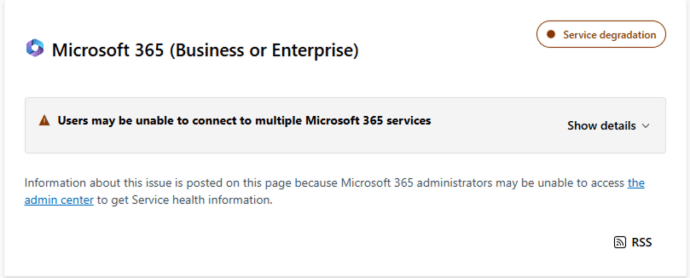
Engineers attempted to address the situation by restarting affected servers, redistributing traffic, and applying changes intended to restore capacity.
However, restoring individual components did not immediately resolve the wider problem. Some systems experienced renewed instability after traffic returned.
This created a difficult recovery scenario: available infrastructure had to accommodate additional workloads while other components were being brought back online.
Microsoft stated that it had found no indication of a cyberattack.
At the time of writing, the company had not published a final root-cause analysis. A recent configuration change was among the possibilities being investigated, but it would be premature to identify a particular update as the confirmed cause.
Why Can a Cloud Outage Spread Across Regions?
Large cloud services depend on multiple infrastructure layers, including networking, authentication, application servers, databases, traffic management, and service monitoring.
These systems are designed to distribute workloads and maintain availability when individual components fail.
However, geographic distribution does not eliminate every shared dependency. An issue involving a common infrastructure component or service-management process can affect multiple regions.
Failures can also become more difficult to contain when traffic is redirected toward infrastructure that lacks sufficient spare capacity.
The November Microsoft incident illustrates why enterprise resilience must be evaluated at the service and dependency level rather than simply by counting data centers or geographic regions.
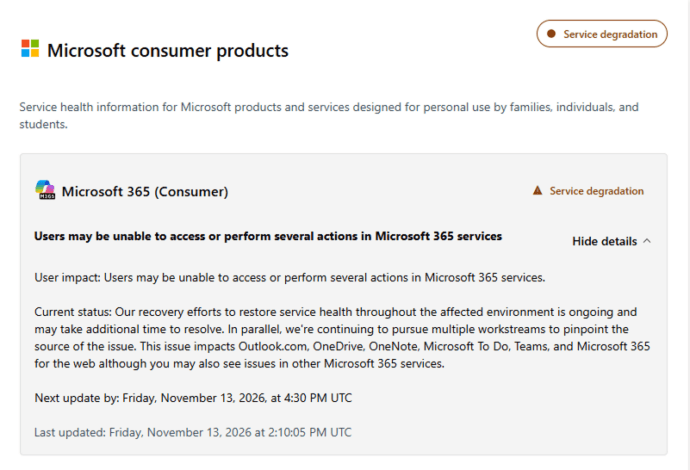
How the Microsoft Outage Affected Businesses and Government Organizations
The disruption reached far beyond individual Outlook users.
Government institutions in Australia and several Asian countries reported problems with Microsoft-related services. According to international reporting, affected organizations included public agencies, educational institutions, and other bodies performing essential administrative functions.
For businesses, the operational impact depended on how deeply Microsoft 365 was integrated into daily workflows.
A company using Outlook only for routine correspondence might experience delays and inconvenience. An organization relying on Microsoft 365 for email, identity-dependent workflows, document access, meeting coordination, and customer communications could face a broader disruption.
Business Functions at Risk
|
Business function |
Potential impact of a cloud service outage |
|---|---|
|
Internal communication |
Employees cannot reliably exchange urgent information through affected services |
|
Customer support |
Incoming requests and email responses may be delayed |
|
Management meetings |
Meeting invitations, calendars, or conferencing features may become unreliable |
|
Project coordination |
Teams lose access to some shared workflows and notifications |
|
External collaboration |
Communication with suppliers and customers may be interrupted |
|
Incident response |
IT teams may lose access to their normal coordination channels |
|
Government services |
Administrative processes depending on cloud applications may slow down |
One of the less obvious risks concerns incident response itself.
If an organization uses the same communication platform for everyday work and emergency coordination, a failure of that platform can make the recovery process more difficult.
IT administrators may need to notify employees, coordinate troubleshooting, communicate with management, and organize alternative workflows precisely when their primary communication services are impaired.
This is why a business continuity plan should include a communication channel that does not depend on the affected provider.
Why Cloud-Only Communication Creates a Business Continuity Risk
Cloud-based communication services offer important advantages. They simplify infrastructure management, support remote work, provide regular updates, and enable organizations to add users without maintaining their own application servers.
For many companies, these benefits outweigh the operational complexity of self-hosting.
The problem emerges when an organization treats one cloud ecosystem as its only viable communication environment.
If corporate email, messaging, meetings, file collaboration, and incident notifications all depend on the same provider, a sufficiently broad outage can affect several functions simultaneously.
A backup account or application does not necessarily resolve the problem if it shares critical dependencies with the primary service.
For example, an alternative messaging application may still become inaccessible if employees authenticate through an identity provider affected by the same incident.
The practical objective is therefore not to eliminate cloud software. It is to identify which business functions must remain available and ensure that their recovery options do not rely on the same failure points.
Self-Hosted Team Messenger with Video Conferencing
A cutting-edge team collaboration server with personal and group chats, UltraHD video conferences, and advanced AI-powered features — free for up to 1,000 users!
Cloud Availability Is Not the Same as Communication Independence
A service-level agreement may define an expected level of availability, but it cannot guarantee that interruptions will never occur.
Even when a provider operates multiple regions, customers typically have limited control over internal recovery procedures.
Organizations using exclusively vendor-managed cloud services must wait for the provider to restore affected components.
By comparison, a self-hosted communication system gives the organization direct control over its deployment, network access, and infrastructure recovery procedures.
Important distinction
This does not make self-hosting automatically more reliable. It changes where responsibility and operational control reside.
Cloud vs. On-Premises Communication During an Outage
The difference between cloud and on-premises communications becomes especially important when evaluating independent recovery options.
|
Criterion |
Cloud communication platform |
On-premises communication platform |
|---|---|---|
|
Infrastructure operation |
Managed by the provider |
Managed by the organization or hosting partner |
|
Dependence on provider infrastructure |
Usually necessary for core services |
Can be reduced through autonomous deployment |
|
Local network operation |
Often depends on external cloud connectivity |
Can operate within LAN/VPN if designed for it |
|
Data processing location |
Depends on provider configuration and contracts |
Controlled through deployment architecture |
|
Recovery responsibility |
Primarily provider-managed |
Organization-managed |
|
Main advantage |
Lower infrastructure management burden |
Greater control over infrastructure and dependencies |
|
Main limitation |
Reliance on provider availability |
Requires local expertise, maintenance, and resources |
A cloud service may be the most practical choice for organizations without an established IT department.
An on-premises platform may be more suitable when internal communication must continue during public cloud disruptions or internet connectivity problems.
Many enterprises can benefit from combining the two approaches.
For example, Microsoft 365 can remain the primary productivity environment, while an independent communication platform provides internal messaging and meetings during service interruptions.
The essential requirement is that the backup system remain accessible without relying on the same failed identity, network, or hosting components.
TrueConf Server: Independent Corporate Communication Infrastructure
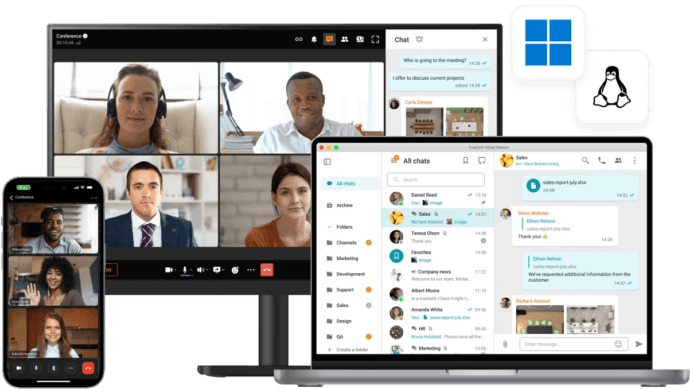
For organizations seeking a self-hosted communication environment, TrueConf Server provides corporate messaging, video conferencing, and collaboration tools that can operate within a private network.
Unlike cloud-only conferencing services, TrueConf Server can be installed on infrastructure controlled by the organization, including on-premises servers and private cloud environments.
This architecture allows administrators to manage communication traffic, access policies, server resources, and data storage without depending on a public cloud conferencing service for core internal communication.
TrueConf supports personal and group chats, video calls, file sharing, and collaboration features within a unified corporate communication environment.
According to the official product documentation, supported configurations allow video conferences with up to 2,000 participants, while enterprise deployments can address communication requirements across geographically distributed organizations.
How TrueConf Can Support Business Continuity
Independent internal messaging. Employees can exchange messages and coordinate work through TrueConf Server hosted within their corporate infrastructure. If the system is configured for autonomous operation, core messaging does not depend on Microsoft 365 availability.
Video meetings within the corporate network. Organizations can conduct video conferences using their own communication servers. This creates an alternative for essential internal meetings when a public cloud platform experiences problems.
Operation without internet access. TrueConf Server supports autonomous operation inside LAN/VPN environments. This can be particularly important for organizations with restricted networks or locations where internet access is unreliable.
Centralized administration. Administrators can manage users, communication policies, and system settings within the organization’s infrastructure. The platform supports Active Directory and LDAP integration, although backup authentication must be designed carefully if the primary identity infrastructure is also a dependency.
Interoperability with existing systems. SIP and H.323 support enables integration with compatible conferencing equipment and corporate communication infrastructure, subject to licensing and configuration.
Distributed communication environments. TrueConf supports federation between separate server deployments, enabling communication across organizational boundaries where network connectivity and the required configuration are available.
Try TrueConf Server Free!
- 1,000 online users with the ability to chats and mske one-on-one video calls.
- 10 PRO users with the ability to participate in group video conferences.
- One SIP/H.323/RTSP connection for interoperability with corporate PBX and SIP/H.323 endpoints.
- One guest connection to invite a non-authenticated user via link to your meetings.

When TrueConf Is Useful as a Backup to Microsoft Teams
Consider an enterprise that uses Microsoft 365 for email, document collaboration, and routine meetings.
The organization also operates TrueConf Server in its own infrastructure for internal communication.
If Microsoft 365 becomes unavailable, employees may still be able to exchange messages and conduct meetings through TrueConf, provided that the TrueConf deployment, network, authentication, and supporting infrastructure remain operational.
The organization does not need to replace every Microsoft application to benefit from this arrangement.
Instead, it can maintain Microsoft 365 as a primary productivity platform while using a separate communication environment for critical meetings and coordination.
This approach reduces dependence on a single provider without requiring a complete migration away from existing office applications.
Build an independent corporate communication environment
TrueConf Server combines team messaging, video conferencing, and collaboration within infrastructure controlled by your organization.
The free edition supports up to 1,000 online messaging users and group conferences with up to 10 participants. Larger deployments and advanced enterprise requirements can be addressed through commercial editions.
Frequently Asked Questions
What happened to Microsoft 365 on November 12, 2026?
Microsoft 365 experienced a widespread service disruption affecting Outlook, Teams-related functionality, Copilot, and other connected services. Downdetector recorded reports from 74 countries and territories. Microsoft investigated infrastructure overload and unexpectedly unavailable servers while working to restore normal operation.
Was Microsoft Teams completely down during the outage?
No. The impact varied by service and region. Although some Teams functionality and related Microsoft 365 integrations were disrupted, chats and calls remained available for many users. The incident should not be characterized as a complete worldwide shutdown of all Teams services.
Was the Microsoft outage caused by a cyberattack?
Microsoft stated that it had found no indication of malicious activity. The company identified infrastructure availability and traffic management problems, but had not published a final root-cause analysis at the time of writing.
How can businesses communicate when Microsoft Teams or Outlook is unavailable?
Organizations can maintain an independent communication platform for essential messaging, meetings, and incident coordination. The alternative system should be tested in advance and should not depend on the same unavailable infrastructure or authentication services.
Can on-premises communication software work without the internet?
Yes, some self-hosted communication systems can operate entirely within a local network. TrueConf Server, for example, supports internal messaging and video conferencing inside LAN/VPN environments without requiring public internet connectivity for core local operation. Remote access and external integrations may still have separate connectivity requirements.
Can TrueConf replace Microsoft Teams during an outage?
TrueConf Server can provide an alternative environment for corporate messaging and video meetings when configured independently of Microsoft 365. It does not replace every Microsoft productivity application or restore inaccessible cloud data. Its value during an outage lies in maintaining essential communication functions through separately managed infrastructure.
Conclusion: The Microsoft Outage Is a Reminder to Plan for Communication Failure
The November 12–13, 2026 Microsoft 365 outage demonstrated how infrastructure failures can affect widely used business applications across multiple regions.
Outlook experienced major disruptions, while Teams, Copilot, and connected services were also affected to varying degrees. Recovery efforts highlighted the challenges of restoring large, interconnected cloud environments.
The incident does not mean that enterprises should abandon cloud collaboration. Cloud services remain practical and effective for many organizations.
Business continuity should not depend entirely on the availability of one provider
Organizations can reduce operational risk by identifying essential communication processes, maintaining independent backup channels, testing authentication dependencies, and preparing clear incident response procedures.
For enterprises requiring greater infrastructure control, self-hosted communication platforms such as TrueConf Server can form part of that strategy, allowing internal messaging and video meetings to continue independently of public cloud conferencing services when the local environment remains available.
The most resilient communication strategy is not necessarily the one with the greatest number of applications. It is the one that ensures employees can continue essential work when their primary system becomes unavailable.
About the Author
Olga Afonina is a technology writer and industry expert specializing in video conferencing solutions and collaboration software. At TrueConf, she focuses on exploring the latest trends in collaboration technologies and providing businesses with practical insights into effective workplace communication. Drawing on her background in content development and industry research, Olga writes articles and reviews that help readers better understand the benefits of enterprise-grade communication.


Follow us on social networks