
Signal vs. Slack vs. TrueConf: An Honest Comparison for Teams That Actually Care About Their Data
If you’re reading this, you’ve probably already noticed that these three tools are barely in the same category. Signal is a private messenger built by a nonprofit. Slack is a cloud-based collaboration hub owned by Salesforce. TrueConf is a self-hosted video conferencing and messaging platform aimed at enterprises. Yet all three get compared regularly — because every organization eventually asks the same question: which communication tool do we actually trust with our conversations?
This article answers that question with specific numbers, real trade-offs, and a clear recommendation framework. The most important conclusions are right up front.
Quick Answer: Which Tool Should You Pick?
|
Your situation |
Best pick |
|---|---|
|
Personal privacy, activism, journalism |
Signal |
|
Startup or mid-sized team, cloud-first, integrations matter |
Slack |
|
Enterprise, government, healthcare, air-gapped networks |
TrueConf |
|
You want free + self-hosted + video for up to 1,000 users |
TrueConf Server Free |
|
You need E2E encryption + zero data collection, no budget |
Signal |
|
You want the largest third-party app ecosystem |
Slack |
Bottom line in one sentence per tool:
Signal — the gold standard for personal privacy; not built for workplace operations.
Slack — the most connected team chat on the market; your data lives on Salesforce servers.
TrueConf — the only option of the three where your data never leaves your building.
Your Messages Are Secure with TrueConf!
A powerful self-hosted video conferencing solution for up to 1,000 users, available on desktop, mobile, and room systems. Your confidential information is protected by 12 levels of security.
At-a-Glance Comparison Table
|
Feature |
Signal |
Slack |
TrueConf |
|---|---|---|---|
|
Primary purpose |
Encrypted personal messaging |
Team collaboration hub |
Enterprise video conferencing + chat |
|
Deployment |
Cloud only (Signal servers) |
Cloud only (Salesforce infra) |
On-premises, cloud, or hybrid |
|
End-to-end encryption |
Always, for everything |
In transit only (no E2EE) |
TLS/SRTP in transit; E2EE optional |
|
Self-hosting |
No |
No |
Yes (TrueConf Server) |
|
Group chat limit |
1,000 members |
Unlimited (channel-based) |
Unlimited |
|
Group video call limit |
Up to 50 participants |
Up to 50 (paid plans) |
Up to 1,500 participants |
|
Video quality |
HD |
HD |
4K Ultra HD |
|
Message history |
Full, locally stored |
90 days on free plan |
Full, stored on your server |
|
Third-party integrations |
None |
2,600+ apps |
API + SIP/H.323/RTSP |
|
Free tier |
Fully free, always |
90-day history cap, 10 apps |
1,000 users (TrueConf Server Free) |
|
Pricing (paid) |
Free forever |
From $7.25/user/month |
~$4/user/month (on-premises) |
|
Works offline/on LAN |
No |
No |
Yes |
|
Ads or data monetization |
None |
None (but Salesforce parent) |
None |
|
Open source |
Yes (AGPL-3.0) |
No |
Partially |
|
Phone number required |
Yes |
No |
No |
Who Runs These Platforms — and Why It Matters
The ownership structure of a communication tool is not a footnote. It’s one of the most important facts about it.
Signal is operated by the Signal Technology Foundation, a 501(c)(3) nonprofit funded by donations. The app runs on servers Signal controls, with no investors demanding revenue growth. The entire codebase is open source. Signal’s president Meredith Whittaker has stated the annual operating cost was approaching $50 million in 2025 — covered entirely by donations, not user data.
Slack was acquired by Salesforce in 2021 for $27.7 billion. It runs on Salesforce’s cloud infrastructure. The business model is subscription SaaS: Slack earns money from Pro, Business+, and Enterprise Grid plans. Your messages, files, and workspace metadata live on Salesforce servers, governed by Slack’s privacy policy and Salesforce’s data handling agreements.
Insight #1: The Metadata Problem Slack Doesn’t Advertise
Most security conversations focus on message content — who said what. But metadata is often more revealing: who communicated with whom, at what time, how frequently, about which project. Slack collects and retains this metadata. Signal minimizes metadata collection by design (Sealed Sender, no contact graph stored on servers). TrueConf’s on-premises deployment means metadata stays on company hardware.
For legal, M&A, or regulated-industry contexts, this distinction has real consequences. A law firm under litigation hold needs to know exactly what metadata exists, where it lives, and who can access it. That question has a simpler answer with TrueConf than with Slack.
TrueConf unlike the other two, it sells software licenses — not cloud subscriptions as its primary model. Organizations deploy TrueConf Server on their own hardware or private cloud, meaning the vendor has no access to the content of calls or messages unless you explicitly use TrueConf’s hosted service (TrueConf Online).
This distinction shapes every other comparison below.
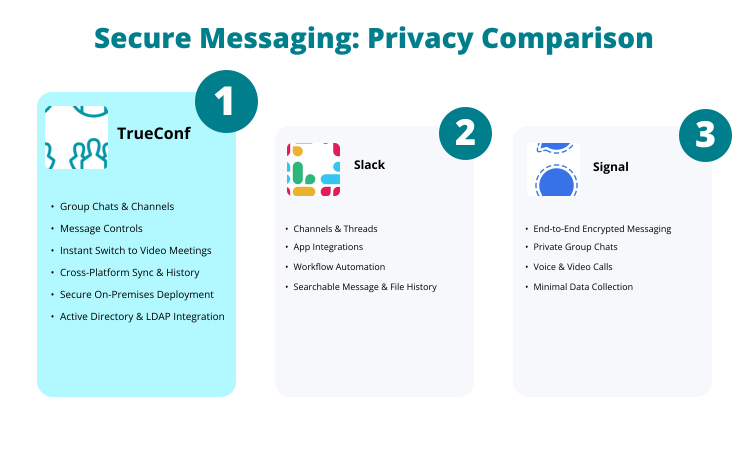
Security and Privacy: Where Each Platform Actually Stands
Signal
Signal uses its own Signal Protocol, which has become the industry benchmark for encrypted messaging — WhatsApp, Google Messages RCS, and Facebook Messenger’s Secret Conversations all borrowed it. Every message, call, and file transfer is end-to-end encrypted by default. Signal cannot read your messages even if compelled by a court order, because the keys exist only on user devices.
One specific feature worth noting: Sealed Sender. Normally, metadata — who is messaging whom — can be as revealing as message content. Signal’s Sealed Sender obscures even that, hiding the sender’s identity from Signal’s own servers in most cases.
The trade-off is architectural: Signal requires a phone number for registration, which ties the account to a real-world identity unless you use a dedicated number. There is no way to deploy Signal on your own servers, so you are relying on Signal Foundation’s infrastructure no matter what.
Slack
Slack encrypts data in transit and at rest — but this is not end-to-end encryption. Slack holds the encryption keys, which means Slack (and by extension Salesforce) can technically access message content. Enterprise Key Management (EKM), available on Enterprise Grid, lets organizations supply their own keys, which is a meaningful improvement, but it adds cost and complexity.
Slack’s free plan retains only 90 days of message history. This is not a security feature — it’s a monetization mechanism. When institutional knowledge quietly expires, teams upgrade. Organizations that discover months-old project discussions have vanished learn this lesson at cost.
TrueConf
TrueConf Server communicates over TLS for data in transit and SRTP for media streams. When deployed on-premises, the vendor has zero access to communications. No content passes through TrueConf’s infrastructure. For regulated industries — healthcare organizations subject to HIPAA, financial firms under SOC 2 requirements, or government agencies with air-gapped network mandates — this matters enormously.
TrueConf can also run on a closed local network with no internet access. This is not a theoretical capability: military installations, nuclear research facilities, and hospital networks have used exactly this configuration. Neither Signal nor Slack functions without an internet connection.

Messaging Features: Day-to-Day Reality
Signal
Signal handles one-to-one messaging and group chats (up to 1,000 members) well. You get voice notes, file sharing, disappearing messages with configurable timers, Stories, and pinned messages (added in 2025). The interface is clean and intentionally minimal.
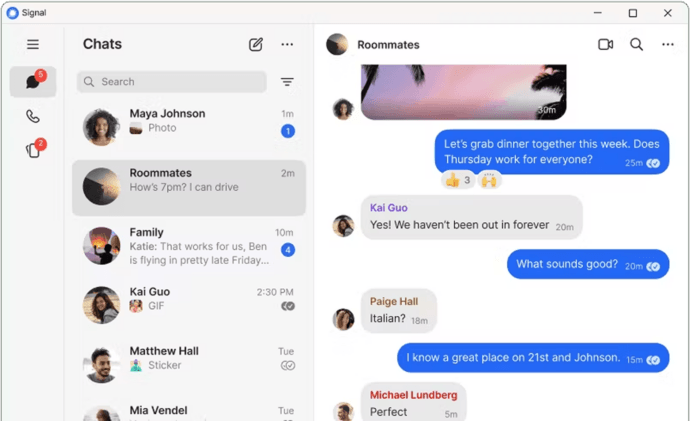
What Signal does not have: channels, threads, message scheduling, topic-based organization, or any kind of workflow tooling. It is a conversation tool, not a workspace. If your team needs to organize discussions by project, department, or topic, Signal will not accommodate that without creating separate group chats for everything — which quickly becomes unmanageable.
Slack
Slack’s channel model remains one of the most effective ways to organize team communication at scale. Channels can be public or private, searchable, and archived. Threads prevent conversations from cluttering the main channel feed. The Workflow Builder automates repetitive tasks without requiring code. Canvas lets teams create persistent, formatted documents within Slack itself.
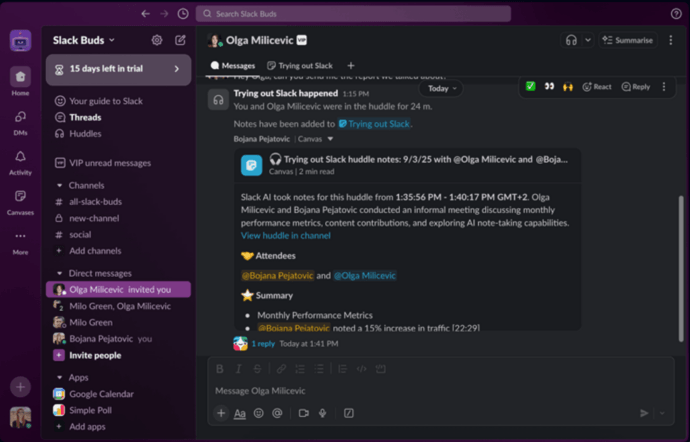
The integration ecosystem — over 2,600 apps — is genuinely one of Slack’s strongest advantages. Connecting GitHub, Jira, Google Calendar, PagerDuty, Salesforce CRM, and dozens of other tools into one notification layer reduces context-switching meaningfully.
The friction points: the free tier’s 90-day history limit is a recurring pain point. Slack’s notification model can generate constant interruptions without deliberate channel hygiene. And huddle calls, while useful for quick conversations, cap at 50 people even on Business+ — a hard ceiling for larger organizations.
TrueConf
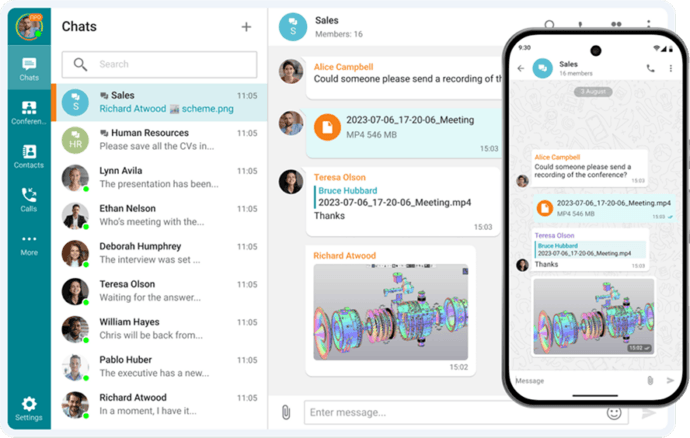
TrueConf’s messaging sits inside a broader platform. You get group chats, file sharing, full message history (stored on your server), and reaction support. It covers the communication basics competently. The chat is not as feature-rich as Slack’s — there’s no equivalent to Slack’s 2,600-app ecosystem — but TrueConf connects to other systems via API and supports SIP/H.323/RTSP protocols, which matters to organizations already running legacy telephony infrastructure like corporate PBX systems.
Video Conferencing: Where the Gap Becomes a Canyon
This is where TrueConf separates from the other two entirely.
|
Metric |
Signal |
Slack |
TrueConf |
|---|---|---|---|
|
Max video call participants |
50 |
50 (paid) |
1,500 (active) / 2,000 (webinar) |
|
Video quality |
HD |
HD |
4K Ultra HD |
|
Visible simultaneous feeds |
Limited |
Limited |
49 simultaneous |
|
Screen sharing |
Yes |
Yes |
Yes |
|
Recording |
No |
Paid plans |
Yes, server-side |
|
Works without internet |
No |
No |
Yes (LAN/VPN) |
|
Webinar mode |
No |
No |
Yes |
|
Room system support |
No |
No |
Yes (TrueConf Room) |
Signal’s group video limit sits at 50 participants with decent HD quality — functional for small team calls, but not designed for company-wide meetings or external presentations.
Slack huddles are convenient for casual voice/video drop-ins, capping at 50 participants with video on paid plans. For a 200-person all-hands meeting, Slack requires Zoom or a third-party tool anyway.
TrueConf supports 4K video with up to 1,500 active conference participants and 49 simultaneous on-screen video feeds. It also supports webinar mode for up to 2,000 attendees. The video engine runs entirely on infrastructure you control.
Self-Hosted Team Messenger with Video Conferencing
A cutting-edge team collaboration server with personal and group chats, UltraHD video conferences, and advanced AI-powered features — free for up to 1,000 users!
Pricing: What Teams Actually Pay
Signal
Free. No paid plans, no premium tiers. Funded by donations. The cost to your organization is zero, provided you accept its limitations as a collaboration tool.
Slack
|
Plan |
Price |
Key limit |
|---|---|---|
|
Free |
$0 |
90-day message history, 10 integrations, 1:1 calls only |
|
Pro |
$7.25/user/month (annual) |
Full history, unlimited integrations, calls up to 50 |
|
Business+ |
$12.50/user/month (annual) |
SAML SSO, compliance exports, 99.99% SLA |
|
Enterprise Grid |
Custom |
Custom policies, multiple workspaces |
Note: Slack requires a minimum of 3 paid users. A two-person operation still pays for three seats.
TrueConf
The TrueConf pricing model differs structurally from Slack. Instead of paying per user indefinitely, organizations can purchase perpetual licenses. At 50 users, TrueConf Server costs substantially less per year than Slack Pro — and that gap widens as the organization grows. The on-premises infrastructure investment is a real cost, but for organizations already managing IT infrastructure, it often represents better long-term economics.
Try TrueConf Server Free!
- 1,000 online users with the ability to chat and make one-on-one video calls.
- 10 PRO users with the ability to participate in group video conferences.
- One SIP/H.323/RTSP connection for interoperability with corporate PBX and SIP/H.323 endpoints.
- One guest connection to invite a non-authenticated user via link to your meetings.

Insight #2: TrueConf’s Offline Capability Is a Real-World Differentiator
The phrase “works without the internet” reads like a minor footnote. It isn’t. Consider a hospital during a regional internet outage needing to coordinate surgery schedules. Consider a manufacturing plant in a remote location with unreliable connectivity. Consider a defense contractor whose operational security policies prohibit internet-connected communications during certain phases of a project. For these scenarios, Signal and Slack cease to function. TrueConf on a local network continues running normally. This is not an edge case for the organizations that need it.
Which Platform Should You Choose?
Choose Signal if:
- You work in journalism, legal advocacy, healthcare privacy, or any field where confidential communications are essential
- Your team is small and primarily needs secure one-on-one or small-group messaging
- Budget is zero and privacy is the priority
- You’re comfortable with a phone number requirement and a minimal feature set
Choose Slack if:
- Your team lives inside an integration ecosystem (GitHub, Jira, Salesforce, Google Workspace)
- You want the most polished channel-based messaging experience
- You’re comfortable with cloud-hosted data and Salesforce’s data practices
- Your video calls stay under 50 people
- You’re at a startup or growth-stage company where fast onboarding matters
Choose TrueConf if:
- You work in a regulated industry (healthcare, finance, defense, government)
- You need video conferences with more than 50 participants
- Data sovereignty is non-negotiable — your data must stay on your servers
- You have existing SIP/H.323 infrastructure to integrate
- You need the system to function on a closed network without internet access
- You want a single platform for both video conferencing and team messaging
Can Signal be used as a team communication tool for a company? Signal works for small teams that need secure messaging, but it lacks channels, threads, admin controls, message organization by topic, and workflow tools. For a company of more than 10 people coordinating across multiple projects, it becomes impractical quickly. It covers secure communication; it does not cover workplace collaboration. Does Slack use end-to-end encryption? No. Slack encrypts data in transit and at rest, but Slack holds the encryption keys. Enterprise Key Management on Enterprise Grid allows you to supply your own keys, but standard Slack plans do not offer E2EE. Signal is the only one of these three tools with true end-to-end encryption on by default. Is TrueConf only for large enterprises? No. TrueConf Server Free supports up to 1,000 simultaneously connected users at no cost, with 10 PRO users able to host group video conferences. Small organizations with privacy concerns can deploy it on a single server and get secure messaging plus video conferencing without paying anything. Which of these three tools works if the internet goes down? Only TrueConf, when deployed on-premises. Signal and Slack both require internet access to function. TrueConf Server runs on your local network and continues operating through internet outages, making it the only viable option for air-gapped environments or locations with unreliable connectivity. How do the costs compare for a 100-person team over one year? Signal: $0. Slack Pro: roughly $8,700/year (at $7.25/user/month). TrueConf Server: approximately $4,800/year at ~$4/user/month, plus one-time infrastructure costs. For large teams, TrueConf’s economics improve further because the pricing model can shift to a flat server license rather than per-user monthly fees. Can Signal replace Slack for remote team collaboration? Not meaningfully. Signal handles private communication; Slack handles coordinated teamwork. Replacing Slack with Signal means losing channels, integrations, threads, searchable history, file organization, and workflow automation. These are not minor features — they constitute the core of what makes Slack useful as a work tool. Is TrueConf’s video quality actually better than Slack’s? Yes, by a significant margin for large meetings. TrueConf supports 4K Ultra HD video with up to 49 simultaneous on-screen feeds and 1,500 active participants. Slack huddles cap at HD quality and 50 participants on paid plans. For a 200-person company-wide meeting, TrueConf handles it natively; Slack requires a separate video platform. Which tool is best for a journalist or activist? Signal, without question. Its E2EE, Sealed Sender metadata protection, disappearing messages, and nonprofit structure with no ad revenue model make it the only choice among these three for people who face targeted surveillance. Both Slack and TrueConf are built for organizational use cases, not individual high-risk communication. Does TrueConf work with existing video conferencing hardware like Polycom or Cisco rooms? Yes. TrueConf supports SIP/H.323/RTSP protocols, which means it integrates with most corporate video conferencing hardware including Polycom, Cisco, and other room systems. Slack and Signal have no equivalent interoperability with legacy video infrastructure. Which tool has the best free tier? It depends on what you mean by “best.” Signal is completely free with no feature limits, but it’s a personal messenger. TrueConf Server Free gives up to 1,000 simultaneous users with messaging and one-on-one video calls — remarkable for a free tier. Slack’s free tier is capped at 90 days of history and 10 integrations, which makes it genuinely limited for any serious work use.FAQ
About the Author
Olga Afonina is a technology writer and industry expert specializing in video conferencing solutions and collaboration software. At TrueConf, she focuses on exploring the latest trends in collaboration technologies and providing businesses with practical insights into effective workplace communication. Drawing on her background in content development and industry research, Olga writes articles and reviews that help readers better understand the benefits of enterprise-grade communication.


Follow us on social networks