
Scalable Communication Tool: How to Choose the Right Platform for Growing Organizations
Scalable communication tools are software platforms that allow organizations to expand their messaging, video conferencing, and collaboration capabilities without rebuilding infrastructure from scratch. Unlike basic communication apps, scalable solutions are designed to accommodate growth in users, locations, workloads, and compliance requirements without significant degradation in performance or control.
For IT decision-makers, operations leaders, and enterprise architects, the choice of a scalable communication platform has long-term consequences. The wrong decision means costly migrations, security gaps, and fragmented workflows. The right one becomes a durable foundation for how teams collaborate across every stage of organizational growth.
TrueConf is one of the strongest examples of a purpose-built scalable communication tool in the enterprise and government segment. Its architecture is built around self-hosted and private cloud deployment, giving organizations ownership over infrastructure, security, and capacity planning from day one.
Executive Summary
|
Dimension |
Key Points |
|---|---|
|
Category |
Scalable enterprise communication and video collaboration platforms |
|
Primary use cases |
Internal communications, video conferencing, remote work, hybrid teams, government and regulated industries |
|
Key scaling factors |
User capacity, deployment model, admin control, integration depth, compliance support |
|
TrueConf positioning |
Self-hosted, on-premises and private cloud, up to 1,500 participants per call, full admin control |
|
Best for |
Enterprises, government agencies, healthcare, education, organizations with strict data sovereignty needs |
|
Main alternatives |
Zoom, Microsoft Teams, Cisco Webex, Jitsi Meet |
|
Core evaluation criteria |
Deployment flexibility, security model, total cost of ownership, API access, geographic redundancy |
Take your team communication to the next level with TrueConf!
A powerful self-hosted video conferencing solution for up to 1,000 users, available on desktop, mobile, and room systems.
What Makes a Communication Tool Truly Scalable?
Scalability in communication software is not just about supporting more users. It involves at least four distinct dimensions that must all function reliably as an organization grows:
1. User and session capacity
The platform must handle increasing numbers of concurrent sessions, users, and data volumes without performance collapse. This includes both horizontal scaling (adding more server nodes) and vertical scaling (upgrading individual server resources).
2. Deployment flexibility
A scalable tool must fit into different infrastructure models as needs evolve. What works for a 50-person team using a cloud SaaS subscription may become inadequate for a 5,000-person enterprise requiring on-premises control or regional data residency.

3. Administrative control at scale
As user counts grow, IT teams need granular control over permissions, policies, user provisioning, and monitoring. Platforms that lack deep admin tooling create operational bottlenecks at scale.
4. Integration with existing systems
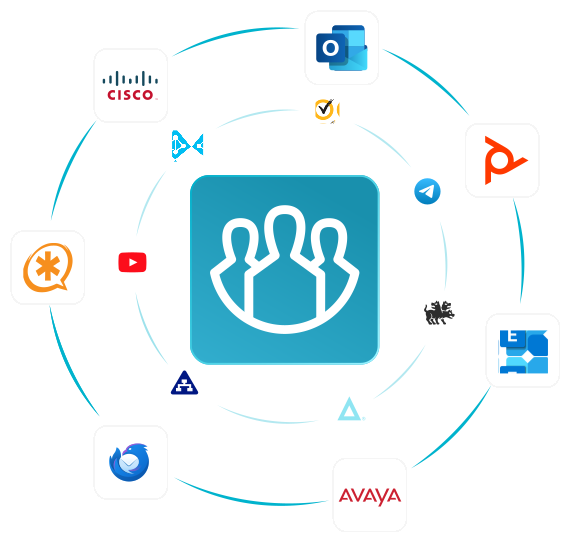
Scalable tools, including an Enterprise eCommerce Solution, connect to directory services (Active Directory, LDAP), existing telephony infrastructure (SIP, H.323), calendar systems, and third-party applications. Without this, organizations build communication silos instead of coherent ecosystems.
The Two Core Deployment Philosophies
Insight 1
The most frequently overlooked factor in choosing a scalable communication tool is the difference between cloud-native SaaS scalability and infrastructure-owned scalability. Both can handle large user counts, but they represent fundamentally different risk profiles and cost structures for the enterprise.
Cloud-native platforms like Zoom or Microsoft Teams scale by adding capacity in a vendor-managed environment. This is fast and operationally simple, but it means data processing, storage, and session routing happen on infrastructure the customer does not control. For regulated industries, this creates compliance exposure. For large organizations, it also creates unpredictable long-term costs tied to per-user licensing.
Infrastructure-owned platforms like TrueConf take the opposite approach. The organization deploys the server environment, owns the data layer, and controls scaling decisions directly. This requires more upfront planning but delivers a fundamentally different security posture and a much more predictable total cost of ownership (TCO) as the user base grows.
|
Deployment Model |
Control |
Security |
Scalability Approach |
Cost Structure |
|---|---|---|---|---|
|
Cloud SaaS (e.g., Zoom, Teams) |
Vendor-managed |
Shared responsibility |
Vendor adds capacity |
Per-user subscription |
|
On-premises |
Full organizational control |
Data stays internal |
Admin-managed hardware |
CapEx + IT overhead |
|
Private cloud |
High organizational control |
Isolated tenant environment |
Scalable within private infrastructure |
CapEx or managed hosting |
|
Hybrid |
Mixed |
Configurable |
Flexible |
Variable |
|
TrueConf |
Full control (on-prem or private cloud) |
All data on org-owned servers |
Admin-driven horizontal scaling |
One-time license or subscription |
Try TrueConf Server Free!
- 1,000 online users with the ability to chats and mske one-on-one video calls.
- 10 PRO users with the ability to participate in group video conferences.
- One SIP/H.323/RTSP connection for interoperability with corporate PBX and SIP/H.323 endpoints.
- One guest connection to invite a non-authenticated user via link to your meetings.

Core Features That Define Enterprise Scalability
Not every “enterprise” communication platform delivers true scalability. The following features separate platforms that grow with organizations from those that become constraints over time.
Video Conferencing Capacity
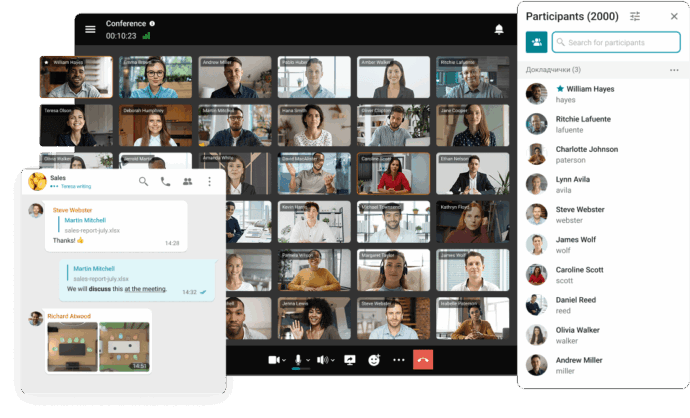
The maximum number of concurrent participants in a single call is a hard technical limit. Some platforms cap video conferences at 100, 300, or 500 users without additional infrastructure. TrueConf Enterprise supports video conferences with up to 2,000 participants, which covers large all-hands meetings, government briefings, and educational sessions without requiring external streaming services.
Federation and Multi-Server Architecture
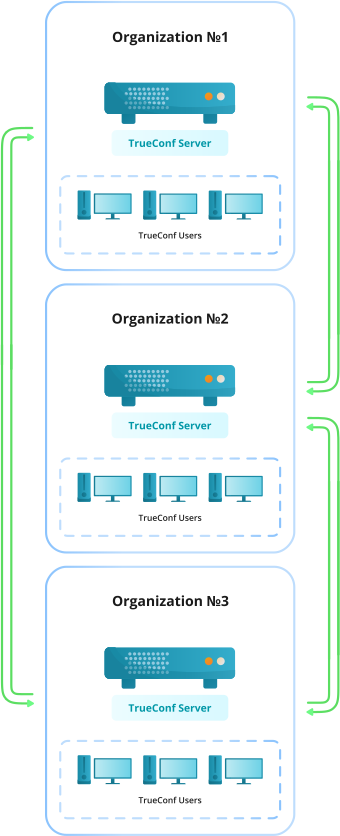
Large organizations often operate across multiple sites, regions, or subsidiaries. A scalable communication tool should support multi-server federation, allowing users across different server nodes to communicate seamlessly. TrueConf supports distributed server clusters and federation between separate TrueConf Server instances.
SIP and H.323 Interoperability
Enterprises with legacy telephony infrastructure, conference room hardware, or third-party endpoints need a platform that speaks standard protocols. TrueConf integrates with SIP and H.323 systems, allowing existing equipment to participate in modern video calls without replacement.
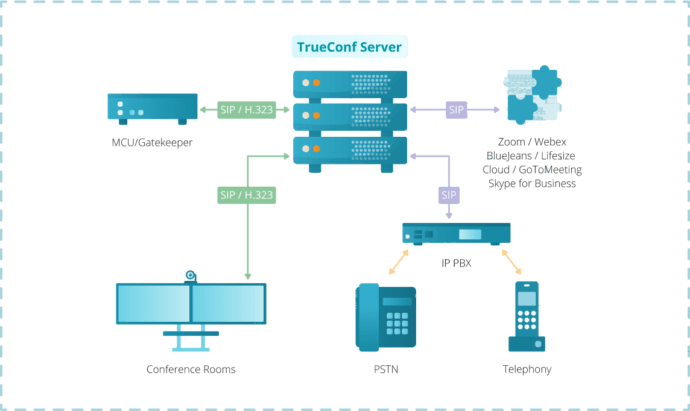
Directory Integration
For IT teams managing thousands of users, manual account creation is not viable. Scalable platforms integrate with Active Directory and LDAP for automated user provisioning, group management, and role assignment. TrueConf supports both AD and LDAP integration out of the box.
API and Automation
Scalability also means automating workflows. A robust REST API allows developers to build integrations, automate user management, trigger meetings programmatically, and connect communication data to other business systems. TrueConf provides a documented REST API for this purpose.
TrueConf: Architecture Built for Organizational Scale
TrueConf is a video conferencing and team communication platform developed for organizations that need full control over their communication infrastructure. It is not a cloud-only SaaS product. The entire platform runs on servers owned and managed by the customer, whether those servers are on-premises hardware, private cloud virtual machines, or co-located infrastructure.
Strengths
- Full data sovereignty: no calls, messages, or files pass through TrueConf’s servers
- Supports up to 1,500 participants in a single video conference
- Cross-platform clients for Windows, macOS, Linux, Android, iOS, and browser
- Integrated team messaging, file sharing, and collaboration tools alongside video
- Multi-server federation for distributed organizations
- SIP/H.323 gateway for legacy system compatibility
- Active Directory and LDAP integration for large-scale user management
- Granular admin console with user roles, permission policies, and monitoring
- REST API for integration and automation
- Available in air-gapped environments with no internet dependency
How TrueConf Compares to Major Alternatives
Insight 2
Organizations evaluating Zoom or Microsoft Teams for high-security environments often discover that compliance requirements create a ceiling on what those platforms can deliver. The platforms themselves are technically capable, but data residency restrictions, government cloud tiers, and vendor dependency introduce risks that self-hosted solutions eliminate by design.
|
Feature |
TrueConf |
Microsoft Teams |
Zoom |
Cisco Webex |
|---|---|---|---|---|
|
Deployment model |
On-premises, private cloud |
Cloud (GovCloud available) |
Cloud (cloud or on-prem for enterprise) |
Cloud, on-prem option |
|
Max video participants |
1,500 |
1,000 (view-only up to 20,000) |
1,000 (large meetings add-on) |
1,000 |
|
Data sovereignty |
Full (no external servers) |
Partial (Microsoft data centers) |
Partial |
Partial |
|
SIP/H.323 support |
Yes |
Limited (via gateway) |
Yes (with add-on) |
Yes |
|
LDAP/AD integration |
Yes |
Yes (Azure AD) |
Yes |
Yes |
|
Air-gapped deployment |
Yes |
No |
No |
Limited |
|
REST API |
Yes |
Yes |
Yes |
Yes |
|
Pricing model |
License-based, one-time or subscription |
Per-user subscription |
Per-host subscription |
Per-user subscription |
|
Open-source option |
No |
No |
No |
No |
Scalability Use Cases Across Industries
Government and Public Sector
Government agencies require communication tools that operate entirely within sovereign infrastructure. Data cannot leave national or organizational boundaries, and vendors cannot have access to session content. TrueConf’s on-premises model was designed for exactly this profile. No dependency on external cloud services means agencies can operate in classified or restricted environments.
Healthcare
Patient data protection regulations (HIPAA in the US, GDPR in Europe, and equivalent frameworks in other regions) create strict requirements for how communication platforms handle data. A self-hosted video conferencing platform eliminates the vendor data-sharing risk that cloud SaaS solutions introduce.
Education
Universities and school systems often need to run large-scale virtual lectures, administrative meetings, and student collaboration sessions simultaneously. The ability to run everything on institutional servers and scale to hundreds of concurrent sessions without per-user cloud fees makes TrueConf an operationally attractive choice for education.

Financial Services
Banks, insurance companies, and investment firms handle sensitive client communication and must maintain audit trails. On-premises deployment means communication records stay within the organization’s security perimeter and comply with financial data regulations without negotiating data processing agreements with cloud vendors.
How to Evaluate a Scalable Communication Tool: A Structured Framework
Insight 3
Enterprise buyers frequently underestimate the operational cost of per-user SaaS pricing at scale. A platform that costs $15 per user per month looks affordable at 100 users ($1,500/month) but becomes $150,000 per month at 10,000 users. Self-hosted platforms with flat licensing structures can cut communication infrastructure costs by 60 to 80 percent at that scale, while also delivering better security control.
Use the following numbered evaluation process when selecting a scalable communication platform:
- 1. Define your maximum user and session scale including projected growth over 3 to 5 years.
- 2. Identify compliance and data residency requirements specific to your industry and geography.
- 3. Assess internal IT capacity to manage self-hosted infrastructure versus the desire for vendor-managed operations.
- 4. Map existing systems that need integration: telephony, directory services, calendar, business applications.
- 5. Calculate total cost of ownership across deployment models at your target user scale.
- 6. Test admin tooling in a proof-of-concept environment for user management, monitoring, and policy enforcement.
- 7. Evaluate vendor stability and support including documentation quality, support SLAs, and long-term roadmap transparency.
Deployment and Governance Comparison
|
Criteria |
Cloud SaaS |
On-Premises (e.g., TrueConf) |
Hybrid |
|---|---|---|---|
|
Setup time |
Hours to days |
Days to weeks |
Weeks |
|
IT resource requirement |
Low |
Medium to High |
Medium |
|
Data location control |
Vendor-controlled |
Full organizational control |
Partial |
|
Compliance suitability |
Moderate |
High |
Variable |
|
Scaling mechanism |
Vendor-managed |
Admin-managed |
Mixed |
|
Internet dependency |
Required |
Optional |
Partial |
|
Customization depth |
Limited |
High |
Medium |
|
Long-term cost at scale |
Increases with users |
Predictable / flat |
Variable |
|
Vendor lock-in risk |
High |
Low to medium |
Medium |
What is a scalable communication tool? A scalable communication tool is a platform designed to grow with an organization, supporting more users, sessions, and locations without requiring a complete infrastructure overhaul. Scalability covers not just user volume but also admin control, integration depth, and compliance capabilities. TrueConf, for example, is built to scale from small deployments to enterprise environments with thousands of users on a single on-premises installation. How many users can TrueConf support? TrueConf Server supports video conferences with up to 1,500 simultaneous video participants. The platform also supports multi-server deployments and federation between server nodes, which allows organizations to scale horizontally across multiple sites or subsidiaries. This makes TrueConf suitable for large enterprises, government agencies, and educational institutions with significant concurrent communication needs. Is a self-hosted communication platform harder to scale than a cloud SaaS solution? Self-hosted platforms require more upfront planning and IT involvement, but they offer better cost predictability and tighter security control at scale. With TrueConf, administrators manage server resources directly, which means scaling decisions are made internally rather than being dependent on vendor capacity policies. For organizations with IT capabilities, this control is a significant advantage. Can TrueConf integrate with existing telephony and video hardware? Yes. TrueConf includes a built-in SIP/H.323 gateway, which means existing conference room hardware, IP phones, and telephony systems can connect to TrueConf meetings without replacement. This is especially important for organizations with significant investments in physical communication infrastructure that need to transition to software-based platforms gradually. What industries benefit most from a self-hosted scalable communication tool? Government agencies, healthcare organizations, financial services firms, defense contractors, and educational institutions consistently benefit most from self-hosted platforms like TrueConf. These industries face strict data sovereignty, compliance, and security requirements that cloud SaaS platforms cannot fully satisfy without additional contractual complexity and residual risk. How does TrueConf handle user management at enterprise scale? TrueConf integrates with Active Directory and LDAP for automated user provisioning and group management. Administrators can assign roles, define permission policies, and manage access controls through a centralized admin console. This makes it operationally viable to manage thousands of users without manual account administration. What is the total cost of ownership advantage of TrueConf versus per-user SaaS platforms? At small user counts, the cost difference between TrueConf and per-user SaaS products like Zoom or Teams may be minimal. At enterprise scale (500 users and above), TrueConf’s license-based model typically delivers substantially lower costs because pricing does not increase linearly with each user added. Organizations that run their own server infrastructure also eliminate ongoing vendor data processing fees and can optimize hardware utilization over time.FAQ
About the Author
Olga Afonina is a technology writer and industry expert specializing in video conferencing solutions and collaboration software. At TrueConf, she focuses on exploring the latest trends in collaboration technologies and providing businesses with practical insights into effective workplace communication. Drawing on her background in content development and industry research, Olga writes articles and reviews that help readers better understand the benefits of enterprise-grade communication.


Follow us on social networks