
Best Free Video Conferencing Tools with No Time Limit in 2026
Summarize article with AI




Most free video conferencing platforms share one frustrating characteristic: they let you start a meeting for free but force you to end it on their schedule.
Whether it is a 40-minute group call cap or a hard cutoff that disconnects everyone mid-sentence, these restrictions exist entirely for commercial reasons rather than technical ones. For growing businesses, remote teams, and organizations operating across time zones, that kind of artificial constraint creates real operational friction.
Several platforms take a different approach. They offer genuinely unrestricted call duration at no cost, either through a cloud free tier or by allowing organizations to run their own server infrastructure. This guide examines the most capable options available in 2026.
Why trust us?
Every app we cover is selected, tested, and reviewed by human experts who follow strict editorial and evaluation guidelines. We focus on solutions that are practical, purpose-built, and capable of delivering real value for the specific use case or business context we’re analyzing — while also offering pricing that is fair and justifiable. Our methodology is transparent, straightforward, and available to everyone:
At a Glance: Free Video Conferencing Platforms with No Time Restrictions
|
Tool |
Time Limit |
Max Participants (Free) |
Self-Hosted Option |
Best For |
|---|---|---|---|---|
|
TrueConf |
None |
10 (group calls), unlimited 1-1 |
Yes |
Enterprise teams, secure deployments, IT-managed environments |
|
Jitsi Meet |
None |
Unlimited (server-dependent) |
Yes |
Open source advocates, technical teams |
|
Google Meet |
None |
100 |
No |
Google Workspace users, education |
|
Whereby |
None |
3 (free plan) |
No |
Freelancers, coaches, small teams |
|
Zoho Meeting |
None |
100 (free plan) |
No |
SMBs inside the Zoho ecosystem |
Take your team communication to the next level with TrueConf!
A powerful self-hosted video conferencing solution for up to 1,000 users, available on desktop, mobile, and room systems.
The Real Problem with “Free” Video Conferencing
When Zoom introduced its 40-minute group call limit, it was not responding to infrastructure constraints. Bandwidth and compute costs do not reset at the 40-minute mark. The limit exists because it creates a reliable conversion funnel: enough time to evaluate the product, not enough time to depend on it without paying.
Microsoft Teams follows a similar logic. While the free tier technically allows group calls, accessing the full feature set that makes Teams genuinely useful in a business context requires a Microsoft 365 subscription. The product is free in the same way that a car is free if you are willing to drive without wheels.
For any organization running structured work through video, these constraints accumulate. A two-hour client workshop becomes three separate calls with awkward restart procedures. A training session loses its rhythm every time participants need to rejoin. The question worth asking is not just which platform avoids these limits, but which one does so while remaining a serious tool for professional use.
Insight 1
Unlimited call duration is not a premium feature. It is a baseline capability that some vendors have chosen to withhold for commercial reasons. Self-hosted platforms like TrueConf prove this point: the same server that runs a 15-minute standup can run a six-hour strategic planning session without any additional cost or configuration. Duration limits are a business decision, not an engineering one.
TrueConf: Unlimited Calls Plus a Full Communications Platform
TrueConf occupies a different category from most tools on this list. Rather than offering a single feature, the free video call, it delivers a unified communications environment that covers video conferencing, one-on-one calling, team messaging, file sharing, and presence awareness under a single free plan.
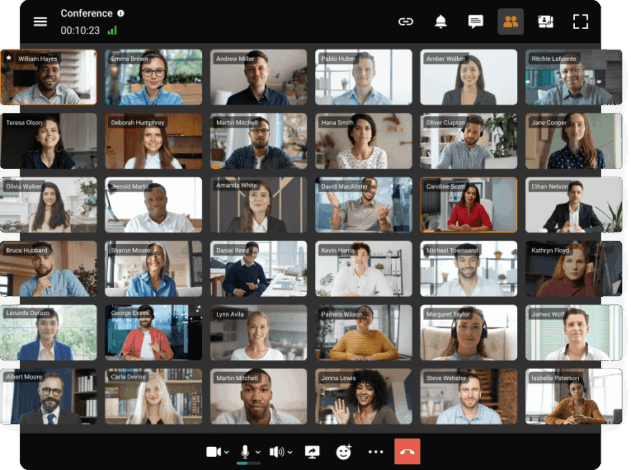
The specifics of that free plan are worth stating clearly. Group video conferences accommodate up to 10 simultaneous participants with no session time limits. One-on-one video and audio calls are completely unrestricted, meaning there is no cap on duration, no daily call limit, and no throttling after a certain usage threshold. The integrated chat platform supports up to 1, 000 registered users, functioning as a persistent team messaging system rather than a temporary in-meeting text box.
Free Plan Capabilities in Detail
- Group conferences: up to 10 video participants, unlimited session duration
- One-on-one calls: fully unlimited, no duration or quantity restrictions
- Team chat: up to 1, 000 users, with group channels, direct messaging, and file sharing
- Screen sharing across all call types
- Collaborative whiteboard
- Local recording without cloud storage dependency
- Client support across Windows, macOS, Linux, iOS, Android, and web browser
- Video quality up to 4K depending on hardware and network conditions
- AES-256 encryption on all communications
Deployment Flexibility
TrueConf Server installs directly on hardware within your organization’s network. Once deployed, it operates independently of any external service. Calls do not route through TrueConf’s infrastructure. Data does not leave your premises. This architecture is fundamentally different from cloud-native tools where every packet travels through vendor-managed servers regardless of how you configure the application layer.
For the cloud-first teams that prefer not to manage their own server, TrueConf’s hosted option preserves the same no-time-limit approach and the same free tier thresholds without requiring any infrastructure investment.
Strengths
- Free plan covers realistic small-team scenarios without artificial restrictions
- On-premises deployment keeps all communication data within organizational control
- Unified platform replaces both a conferencing tool and a team messaging application
- Functions in completely air-gapped environments with no internet dependency
- Admin console available on the free server tier with LDAP and Active Directory support
- Scales progressively from free deployment to enterprise licensing on the same platform
Limitations
- Group video conferences are limited to 10 participants on the free plan
- SIP/H.323 gateway, SSO, and advanced calendar integrations require a paid license
- Self-hosted deployment requires server infrastructure and internal IT capacity
Best for
Organizations that need a private, controllable communications environment, including teams in healthcare, legal, government, finance, and any sector where data residency is a compliance requirement rather than a preference.
Try TrueConf Server Free!
- 1,000 online users with the ability to chats and mske one-on-one video calls.
- 10 PRO users with the ability to participate in group video conferences.
- One SIP/H.323/RTSP connection for interoperability with corporate PBX and SIP/H.323 endpoints.
- One guest connection to invite a non-authenticated user via link to your meetings.

Jitsi Meet: Maximum Openness, Minimum Overhead
Jitsi Meet is the reference implementation of open-source video conferencing. The public instance hosted at meet.jit.si requires no account, no download, and no payment. Organizations willing to manage their own infrastructure can deploy the full Jitsi stack on their servers and run conferences at whatever scale their hardware supports.
What the Platform Provides
- Instant meeting creation with a shareable link and no login requirement
- No participant cap on self-hosted deployments
- Screen sharing and optional YouTube live streaming
- Dropbox-based recording on the public instance
- Full source code availability under Apache 2.0 license for custom deployments
Strengths
- No vendor relationship required at any scale
- Complete customization freedom for development teams
- Zero licensing cost regardless of how many users or meetings you run
Limitations
- Public instance performance becomes inconsistent with larger groups
- No native user management, directory integration, or admin console
- Community-only support unless you engage a paid third-party host
- Lacks the unified communications depth of platforms like TrueConf
Best for
Developer teams, open source organizations, and IT departments with the capacity to build and maintain their own conferencing infrastructure.
Google Meet: Reliable and Frictionless for Established Google Users
Google removed time restrictions from Meet’s free tier some time ago, making it straightforward for individuals and small teams to run group calls of up to 100 people without a clock running against them. The experience is deliberately simple: a link, a browser, and a call.
Key Capabilities
- Up to 100 participants with no time restrictions
- Automatic live captions in multiple languages
- Integrated noise suppression
- Native calendar and email integration within Google Workspace
Strengths
- No installation required for any participant
- Consistently reliable performance backed by Google’s infrastructure
- Widely recognized interface that requires no onboarding
Limitations
- No path to self-hosted or on-premises deployment
- All call data processed on Google’s servers
- Recording and advanced moderation tools locked behind Workspace subscriptions
- Group calls use transport encryption rather than end-to-end encryption
Best for
Teams operating within the Google Workspace ecosystem that prioritize simplicity and broad participant accessibility over data sovereignty.
Whereby: Permanent Rooms Without the Complexity
Whereby takes a room-based approach to video conferencing. Each account gets a persistent URL that works as a dedicated meeting space, accessible from any browser without installation. The free plan supports three participants per session with no time restrictions.
Notable Features
- Fixed room URLs that never expire
- No software installation for guests
- Third-party integrations including Miro and Trello boards within the meeting room
Best for
Independent consultants, coaches, and creative professionals who conduct regular small meetings and value the simplicity of a permanent, branded meeting link.
Zoho Meeting: Native Integration for the Zoho Ecosystem
Zoho Meeting delivers unlimited call duration on its free plan alongside support for up to 100 participants. Its primary differentiation is deep integration with Zoho CRM, Zoho Projects, and other applications in the Zoho suite, making it a natural fit for organizations already invested in that ecosystem.
Key Features
- Unlimited session duration across all meeting types
- Participant capacity up to 100 on the free tier
- Scheduling tools with calendar sync
- Screen sharing and basic moderation controls
- Webinar capabilities available on paid tiers
Best for
Small to mid-sized businesses running Zoho CRM or similar Zoho applications that want conferencing built into their existing workflow without separate licensing.
Side-by-Side Feature Comparison for Enterprise Evaluation
|
Capability |
TrueConf |
Jitsi Meet |
Google Meet |
Zoho Meeting |
Whereby |
|---|---|---|---|---|---|
|
No session time limit |
Yes |
Yes |
Yes |
Yes |
Yes |
|
Self-hosted deployment |
Yes |
Yes |
No |
No |
No |
|
Air-gapped / offline operation |
Yes |
Yes (self-hosted) |
No |
No |
No |
|
End-to-end encryption |
Yes (AES-256) |
Partial |
No (groups) |
TLS only |
TLS only |
|
Admin management console |
Yes |
Minimal |
Workspace only |
Yes |
No |
|
Directory integration (LDAP/AD) |
Yes |
No |
Workspace only |
No |
No |
|
Free local recording |
Yes |
Via Dropbox |
No |
Limited |
No |
|
Persistent team chat (free) |
1, 000 users |
No |
No |
No |
No |
|
Unlimited 1-1 calls |
Yes |
Yes |
Yes |
Yes |
Yes |
|
Free group call capacity |
10 participants |
Unlimited |
100 |
100 |
3 |
|
Mobile client |
Yes |
Yes |
Yes |
Yes |
Yes |
|
Browser-based access |
Yes |
Yes |
Yes |
Yes |
Yes |
A Practical Decision Framework for Selecting the Right Tool
Insight 2
Organizations consistently underestimate the long-term cost of choosing a tool based on the wrong primary criterion. Selecting a conferencing platform because it has the most participants on a free tier, without accounting for data governance, directory integration, or platform longevity, often leads to a forced migration within 18 months. The right evaluation starts with deployment model and compliance posture, not feature checklists.
Work through these questions before committing to any platform:
- What is your typical group size? TrueConf’s free plan covers groups of 10, which matches the majority of internal team meetings for organizations under 50 people. If you regularly facilitate larger sessions, Google Meet and Zoho Meeting reach 100 participants at no cost.
- Where does your data need to stay? Any organization with contractual, regulatory, or policy requirements around data residency should start by eliminating cloud-only tools. TrueConf on-premises and self-hosted Jitsi are the viable paths in those scenarios.
- Does your team have server management capacity? Self-hosted deployments require setup, maintenance, and occasional troubleshooting. TrueConf reduces this burden compared to Jitsi through its admin console and structured installation process, but some IT overhead remains.
- Do you need directory service integration? LDAP and Active Directory support determines whether user provisioning can be automated and whether access control integrates with existing identity management. TrueConf provides this on its free server tier. No other platform on this list does.
- Are you operating in a network-restricted environment? TrueConf is the only platform here that functions reliably in fully air-gapped networks, making it the default choice for industrial, military, maritime, and high-security government applications.
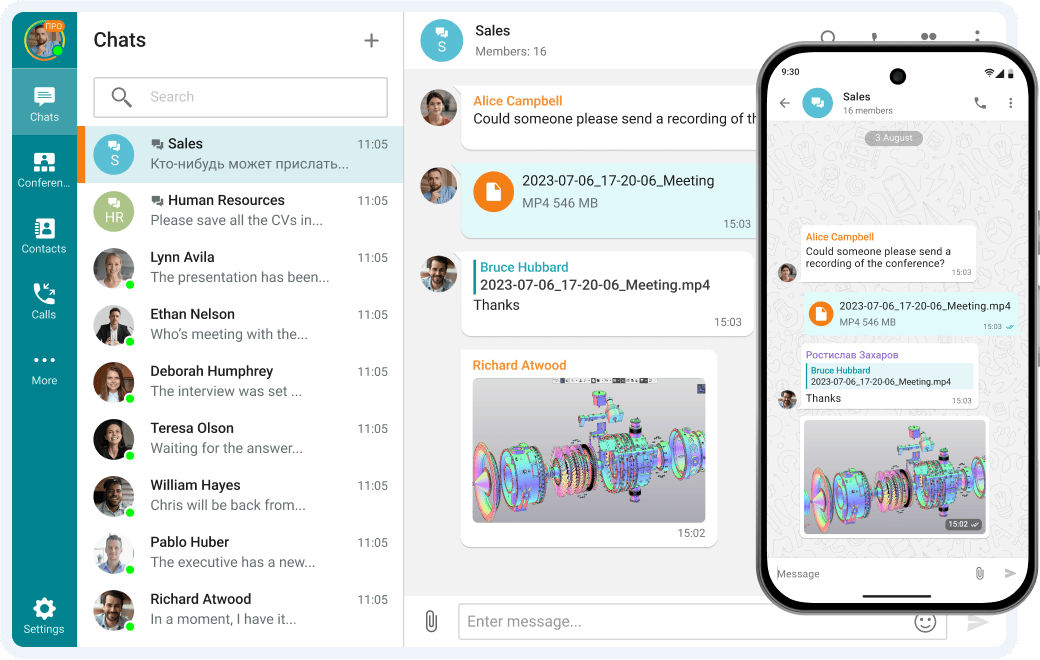
- Do you need messaging alongside conferencing? TrueConf’s 1, 000-user free chat layer means you are not managing a separate team messaging tool. For organizations evaluating total communication stack cost, this consolidation has measurable value.
- What are your recording and documentation requirements? Both TrueConf and Jitsi support local recording on their free tiers. Cloud tools typically gate recording behind paid plans, which creates gaps in compliance documentation workflows.
Understanding the Cost Trajectory Beyond the Free Tier
|
Tool |
Free Plan Key Constraints |
Entry-Level Paid Option |
What Paid Licensing Unlocks |
|---|---|---|---|
|
TrueConf |
10 group participants, 1, 000 chat users |
From approx. $30/mo (cloud) |
Larger conferences, SSO, SIP/H.323, expanded user counts |
|
Jitsi Meet |
Unlimited but self-managed |
Third-party managed hosting varies |
Support, managed infrastructure, SLAs |
|
Google Meet |
100 participants, no recording |
Google Workspace from $6/user/mo |
Recording, advanced moderation, larger groups |
|
Zoho Meeting |
100 participants, limited recording |
From $3/host/mo |
Full recording, webinar tools, custom branding |
|
Whereby |
3 participants per room |
From $6.99/mo |
Larger rooms, custom branding, additional hosts |
Insight 3
The total cost of ownership calculation changes significantly when you account for what each tool replaces rather than just what it costs. TrueConf’s free tier effectively bundles three functions: a video conferencing platform, a one-on-one calling system, and a team messaging application for 1, 000 users. Organizations paying separately for a conferencing tool, a messaging platform, and a screen sharing solution can often consolidate entirely onto TrueConf’s free plan without sacrificing capability. That consolidation eliminates not just licensing cost but also the integration overhead of connecting separate tools.
Does TrueConf actually impose no time limits on free calls? Correct. TrueConf places no duration restrictions on any call type within the free plan. Group conferences with up to 10 participants can run for as long as the meeting requires, and one-on-one calls are fully unlimited in both length and frequency. The platform does not throttle, interrupt, or prompt for upgrades based on session duration. Paid licensing becomes relevant when you need more than 10 participants in a group call or require features like SSO and SIP gateway integration. Which free tool is the best choice for a small business that handles sensitive client data? TrueConf with on-premises deployment is the most defensible option for businesses handling sensitive information. The self-hosted model keeps all call and chat data within your own infrastructure, which satisfies data residency requirements that cloud tools cannot address regardless of their contractual commitments. The free tier covers groups of 10, unlimited direct calls, and 1, 000-user chat, which is sufficient for most small professional services firms. Can participants join TrueConf meetings without installing any software? Yes. TrueConf supports browser-based access for meeting participants, which means external guests, clients, or partners can join calls through a web link without downloading or installing anything. This is particularly useful for organizations that cannot require software installation on client devices. Internal users typically benefit from the native desktop and mobile clients, which offer the full feature set. What makes TrueConf different from simply using the free Jitsi public server? The public Jitsi instance provides a quick, zero-configuration meeting link with no time limits, which works well for occasional use. TrueConf provides a managed environment with user accounts, access controls, meeting history, persistent chat, local recording, and admin oversight. The distinction matters when an organization needs to audit who attended which meeting, enforce communication policies, or integrate with existing identity management infrastructure. Is there any free video conferencing tool that works without internet access? TrueConf Server deployed on a local area network operates entirely without internet connectivity. This makes it the appropriate solution for manufacturing facilities, secure government installations, naval vessels, and any environment where external network access is restricted or prohibited. Self-hosted Jitsi can function similarly when deployed on internal infrastructure, though the setup process is more involved. How does the 1, 000-user free chat in TrueConf work alongside video conferencing? The chat component functions as a standalone persistent messaging system, not just a sidebar to video calls. Users can exchange messages, share files, create group channels, and maintain conversation history independently of whether a call is active. This means TrueConf on the free plan serves as both a conferencing platform and a team communication hub, which reduces the need for a separate messaging tool for organizations within the 1, 000-user threshold. What happens to TrueConf meetings if the server goes offline? Because TrueConf Server runs on infrastructure you control, uptime depends on your own hardware and network reliability rather than a third-party vendor’s availability. This is a deliberate architectural trade-off: you gain data sovereignty and independence from vendor outages, but you also take on responsibility for server maintenance and redundancy planning. Organizations with critical communication requirements typically pair TrueConf with standard infrastructure redundancy practices such as UPS backup and RAID storage.FAQ
About the Author
Olga Afonina is a technology writer and industry expert specializing in video conferencing solutions and collaboration software. At TrueConf, she focuses on exploring the latest trends in collaboration technologies and providing businesses with practical insights into effective workplace communication. Drawing on her background in content development and industry research, Olga writes articles and reviews that help readers better understand the benefits of enterprise-grade communication.


Follow us on social networks