
Communication Tools for Companies: 9 Platforms by Use Case
Communication tools for companies are business platforms used to connect employees, teams, customers, and external partners through messaging, meetings, voice calls, files, channels, and collaborative workflows. The category includes team messengers, video conferencing systems, unified communications platforms, business phone services, collaboration suites, customer communication systems, and secure self-hosted platforms.
The best communication tool depends less on the number of features than on the communication model a company needs. A small distributed team may prioritize simple chat and meetings. A large enterprise may need business telephony, identity integration, administration, retention, and multiple office locations. A regulated organization may prioritize self-hosting, local data control, restricted-network operation, or integration with existing communication infrastructure.
|
Business need |
Communication tool to prioritize |
What to verify? |
|---|---|---|
|
Daily team coordination |
Channels, threads, search, files |
|
|
Remote meetings |
Guest access, recording, screen sharing |
|
|
Business calling |
Cloud or enterprise telephony |
PSTN, routing, queues, numbers |
|
One communication environment |
Voice, video, chat, identity, administration |
|
|
Project coordination |
Collaboration workspace |
Tasks, files, workflows, integrations |
|
Customer communication |
Contact center or omnichannel tools |
Queues, routing, SMS, external channels |
|
Regulated or private communication |
Deployment, data control, offline operation |
|
|
External partner collaboration |
Federation or guest access |
Trust boundaries, account model, permissions |
A company usually does not need the platform with the most functions. It needs a communication architecture that matches how employees actually work, how IT manages identities and policies, and where the organization wants its communication data and infrastructure to live.
What Are Communication Tools for Companies?

Communication tools for companies are software systems that support structured communication between employees, departments, customers, and external organizations.
The category includes messaging, meetings, business telephony, unified communications, project collaboration, customer communication, and secure self-hosted platforms.
These categories increasingly overlap. Microsoft Teams connects messaging, meetings, collaboration, and telephony. Slack centers communication around channels and workflows. TrueConf combines self-hosted messaging, video conferencing, file exchange, directory integration, and SIP/H.323 interoperability. RingCentral places cloud telephony at the center of a broader communication environment.
The useful buying question is therefore no longer simply “Which chat or meeting app should we buy?”
It is:
Which communication functions should share the same identity, context, policy, administration, and infrastructure?
Insight 1: A company can reduce the number of communication apps without actually reducing communication fragmentation. Real consolidation happens when identity, conversation context, administration, and workflow move with the user across communication modes.
What Communication Tools Does a Company Actually Need?
Most organizations need several communication layers, but they do not necessarily need a separate product for each one.
|
Communication layer |
Typical use |
Can often be combined with |
|---|---|---|
|
Direct messaging |
Quick one-to-one communication |
Channels, files, calls |
|
Team and project discussions |
Tasks, workflows, search |
|
|
Scheduled and instant meetings |
Chat, calendar, recording |
|
|
Internal and external calls |
PBX, PSTN, queues |
|
|
File exchange |
Documents inside conversations |
Search, channels, meetings |
|
Presence |
Availability and communication status |
Voice, chat, meetings |
|
Partners, contractors, customers |
Federation, guest access |
|
|
Administration |
Policies, users, retention, devices |
Identity and security |
|
Summaries, transcripts, search |
Meetings, calls, messaging |
A small company may cover most of these needs with one cloud collaboration suite. A large enterprise may deliberately use several systems because business telephony, customer communication, secure internal messaging, and specialized workflows have different technical requirements.
Business Communication Software in Numbers
The market for communication and collaboration software continues to expand as companies replace separate calling, messaging, and meeting products with more integrated digital workspaces.
Grand View Research estimates the global team collaboration software market at $44.6 billion in 2026, up from $40.2 billion in 2025. In 2025, cloud deployments represented 51.8% of market revenue, while communication and coordination software formed the largest functional segment.
The same research projects the market to reach $85.2 billion by 2033, representing a 9.7% CAGR.
The more useful signal for buyers is structural: communication products increasingly combine messaging, meetings, voice, workflow automation, AI, project coordination, and customer communication instead of remaining isolated tools.
The Main Types of Communication Tools for Companies
Team Messaging
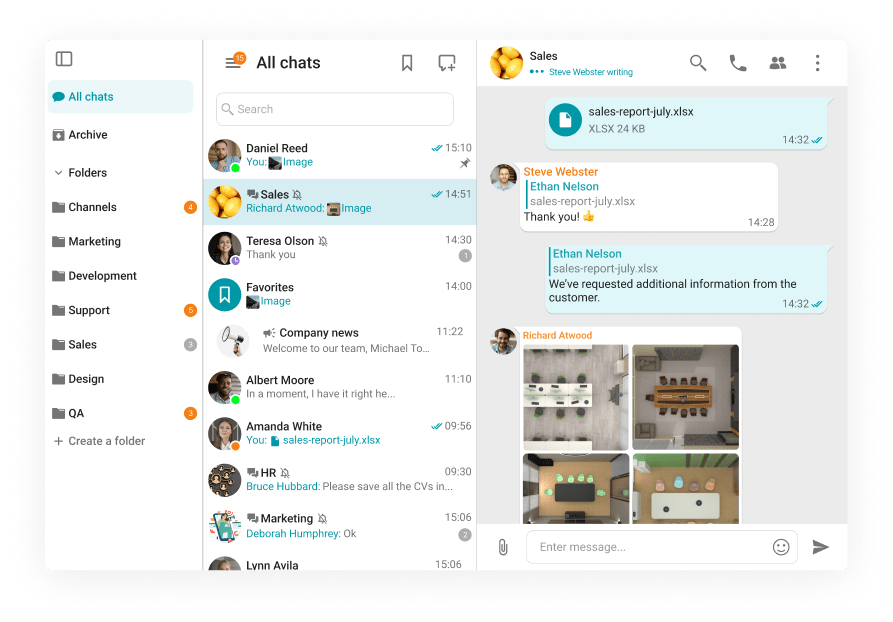
Team messengers organize communication around direct messages, group conversations, channels, threads, files, and search.
They are strongest when communication is asynchronous and persistent. Messaging is particularly useful for project discussions, distributed teams, technical collaboration, announcements, and knowledge sharing.
Slack, Mattermost, Rocket.Chat, Microsoft Teams, Google Chat, and TrueConf all address this layer differently.
Video Conferencing
Video conferencing supports scheduled meetings, instant calls, screen sharing, presentations, webinars, and remote collaboration.
A video platform becomes more valuable when meeting communication continues outside the meeting itself. Modern platforms often connect live meetings with persistent chat, recordings, files, summaries, and follow-up workflows.
Business Phone and Telephony
Business telephony extends internal communication to external phone networks.
Important capabilities include phone numbers, PSTN connectivity, call routing, auto attendants, queues, voicemail, transfers, emergency calling, and call recording.
Telephony introduces infrastructure and regulatory requirements that ordinary team messaging does not.
Unified Communications
Unified communications, or UC, connects several communication modes through shared applications, identities, policies, and administration.
A UC platform may combine:
phone + messaging + video + presence + meetings + directory + administration
The advantage is not simply having all these functions in one application. The advantage is reducing the operational boundaries between them.
Project and Workflow Collaboration
Project collaboration tools organize communication around shared work rather than around conversations alone.
They may add tasks, assignments, shared documents, project spaces, approvals, workflow automation, and status tracking.
The important distinction is that communication becomes attached to a task, document, process, or project outcome.
Customer Communication Tools
Customer communication platforms organize external interaction around service workflows.
They may include inbound and outbound calling, queues, web chat, email, SMS, routing, case context, and analytics.
Contact centers and omnichannel platforms fit this category more naturally than employee messengers.
Secure and Self-Hosted Communication
Some organizations need communication to remain on infrastructure they operate themselves.
This can be relevant to government, defense, financial institutions, industrial companies, healthcare organizations, critical infrastructure, and organizations with internal data-location or restricted-connectivity requirements.
Self-hosting changes who controls infrastructure, software updates, data paths, administrative access, and external dependencies. It does not automatically make a system secure, but it creates a different control model.
Internal Communication vs Customer Communication
Internal and customer communication solve different operational problems.
|
Internal communication |
Customer communication |
|---|---|
|
Employee messaging |
Customer chat |
|
Team channels |
Service queues |
|
Internal calling |
Inbound and outbound customer calls |
|
Meetings |
Customer appointments |
|
Presence |
Agent availability |
|
Project coordination |
Case handling |
|
Knowledge sharing |
Omnichannel customer history |
An employee messenger does not automatically replace a contact center. A contact center designed around customer queues and service metrics may also be inefficient for everyday internal collaboration.
The stronger architecture identifies where the two environments should remain separate and where context needs to pass between them.
Insight 2: Internal and customer communication should share context when useful, but they do not need identical workflows. Employee communication is organized around people and teams. Customer communication is usually organized around queues, cases, channels, and service outcomes.
What Makes a Company Communication Stack Fragmented?
Fragmentation is not measured only by the number of applications.
A company may use several tools without major friction if identity, policy, and workflows connect well. It may also use one broad suite while still maintaining separate administrative, data, and telephony systems behind the interface.
|
Fragmentation signal |
What it reveals |
|---|---|
|
Users maintain several communication identities |
Identity fragmentation |
|
Meeting context disappears after the call ends |
Workflow fragmentation |
|
IT repeats the same policy in several consoles |
Administrative fragmentation |
|
Employees manually move files between tools |
Data fragmentation |
|
External users require unmanaged accounts |
Governance fragmentation |
|
Calls cannot escalate into meetings or collaboration |
Channel fragmentation |
|
Reporting is split across unrelated systems |
Analytics fragmentation |
This framework is more useful than counting applications because it identifies where communication actually breaks down.
9 Communication Tools for Companies
The following platforms represent different approaches to company communication. This is not a ranking.
1. Microsoft Teams
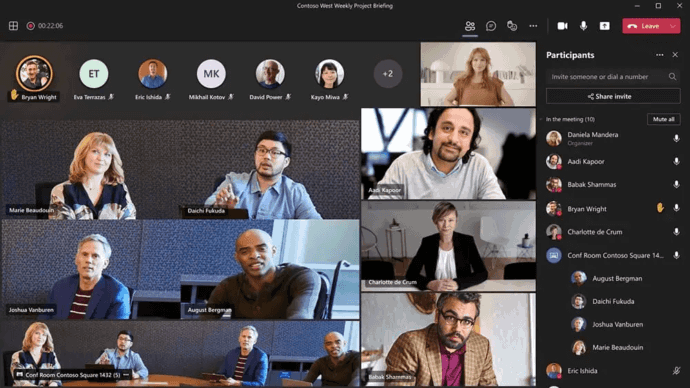
Microsoft Teams combines business messaging, channels, meetings, calling, collaboration, Microsoft 365 integration, and AI-assisted work.
Meeting chat can continue before, during, and after meetings, helping preserve context instead of treating meetings as isolated events. Teams Phone adds VoIP and PSTN calling options, auto attendants, call queues, transfers, shared calling, emergency calling, certified devices, centralized administration, and several methods of connecting to the public telephone network.
Its strongest advantage is integration with the Microsoft 365 environment. Organizations already using Outlook, SharePoint, OneDrive, Microsoft 365 identity, and related applications can connect communication closely to the rest of their productivity stack.
Best for: Companies already standardized on Microsoft 365.
Strengths: Messaging, meetings, channels, enterprise calling, Microsoft 365 integration, rooms, external collaboration, AI, centralized administration.
Limitations: Licensing and telephony design can become complex when Teams Phone, PSTN connectivity, contact center functionality, advanced meetings, and AI features are combined.
What to verify: Teams licensing, Teams Phone requirements, PSTN model, data residency, guest access, retention, contact center, meeting-room strategy, and AI governance.
2. Slack

Slack is primarily a collaboration and messaging platform organized around channels, direct messages, threads, files, integrations, and searchable workplace knowledge.
Slack also includes Huddles for lightweight real-time communication, Canvas for persistent documents and shared context, Lists for work coordination, Workflow Builder for automation, and a broad integration ecosystem.
Its AI layer can support conversation summaries, huddle notes, search answers, recaps, file summaries, translations, and workflow-related tasks depending on plan and configuration.
Slack is strongest when messaging acts as the central layer connecting other business systems.
Best for: Companies that want channel-based collaboration and extensive application integration.
Strengths: Channels, threads, search, Huddles, Canvas, Lists, Workflow Builder, Slack Connect, large integration ecosystem, AI-assisted knowledge retrieval.
Limitations: Slack is not primarily an enterprise PBX or full business telephony platform. Companies needing extensive PSTN calling generally integrate another communication system.
What to verify: Retention, external collaboration, Slack Connect policies, AI availability, workflow requirements, enterprise search sources, telephony integrations, and security controls.
3. Zoom Workplace

Zoom Workplace extends the Zoom meeting environment into messaging, business telephony, whiteboarding, documents, calendar functions, clips, and AI-assisted collaboration.
Zoom Chat provides persistent channels and direct messages and connects messaging with meeting workflows. Users can continue discussions before and after live sessions instead of treating each meeting as an isolated communication event.
Zoom Phone adds business telephony to the same ecosystem.
Best for: Companies where video meetings are central but messaging and telephony also need to be part of the same environment.
Strengths: Meetings, external participation, team chat, Zoom Phone, continuous meeting chat, whiteboards, recordings, AI Companion, calendar and scheduling workflows.
Limitations: Organizations requiring fully customer-operated communication infrastructure should examine cloud dependencies and deployment requirements carefully.
What to verify: Zoom Phone availability, regional numbers, recording controls, meeting capacity, data location, AI processing, customer communication requirements, and licensing.
4. TrueConf Server
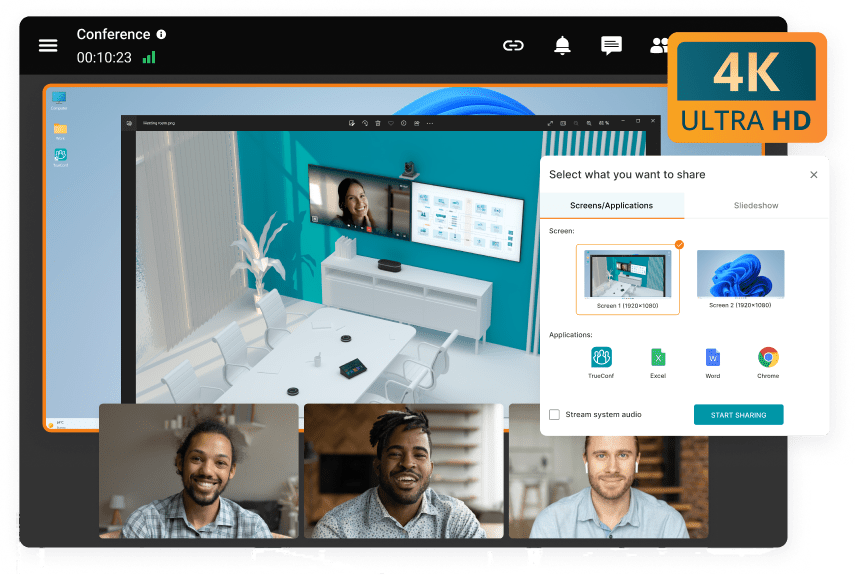
TrueConf Server is a self-hosted communication platform combining enterprise messaging, channels, file exchange, video conferencing, voice and video calls, administration, directory integration, and interoperability with existing communication infrastructure.
The full version can operate autonomously inside a corporate network without requiring continuous public internet access. Chats, files, and conference recordings can remain under organization control. TrueConf Server also supports personal and group chats, channels, webinars, conference streaming, and conferences with up to 2,000 participants.
For organizations with existing communication infrastructure, TrueConf supports SIP and H.323 systems, WebRTC, LDAP and LDAPS directories, RTSP, RTMP, QoS mechanisms, federation between servers, APIs, and multiple authentication options.
This makes the platform structurally different from communication products designed primarily around a vendor-operated public cloud.
Best for: Enterprises and regulated organizations that need self-hosted communication, internal messaging, video meetings, infrastructure control, or operation inside a private network.
Strengths: Self-hosted deployment, messaging, channels, video conferencing, large meetings, files, LDAP/AD integration, SIP/H.323 interoperability, federation, offline network operation.
Limitations: Companies that want all communication infrastructure operated by a public-cloud provider may prefer a cloud-first service.
What to verify: Server capacity, deployment topology, conference scale, federation, directory integration, recording storage, external access, telephony architecture, high availability, and licensing.
Boost your team’s productivity with TrueConf Server Free!
5. Google Chat and Meet
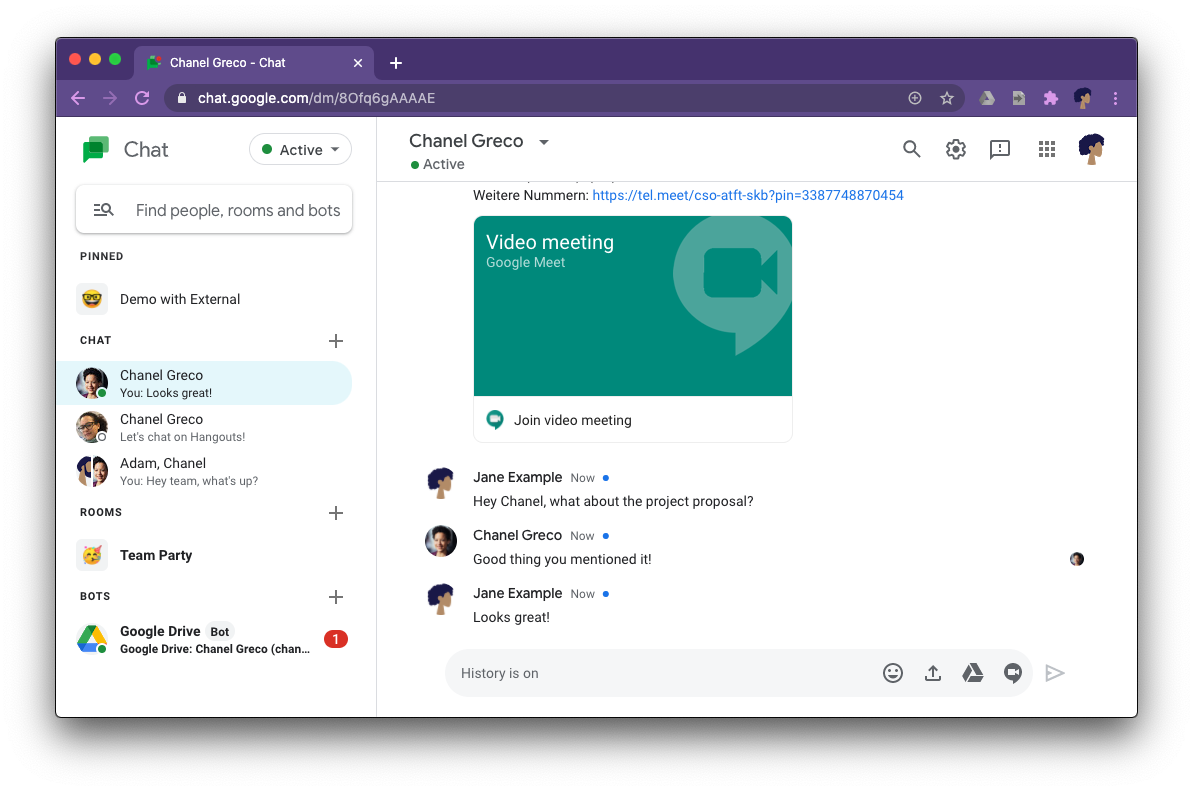
Google Chat and Google Meet provide the main real-time communication layer inside Google Workspace.
Google Chat supports direct conversations and Spaces for team messaging, while Meet handles video meetings. Their value increases through integration with Gmail, Calendar, Drive, Docs, and other Workspace applications.
The main strength is ecosystem continuity. Employees can move between email, files, calendars, documents, meetings, and team communication while staying inside the same productivity environment.
Best for: Companies already centered on Google Workspace.
Strengths: Chat, Spaces, Meet, Gmail, Calendar, Drive, Gemini, search, file collaboration, Workspace security controls.
Limitations: Companies requiring traditional enterprise telephony, extensive PBX interoperability, or self-hosted communication may need additional systems.
What to verify: Workspace edition, Meet limits, external users, retention, Google Voice availability where relevant, identity policy, Gemini controls, and regulatory requirements.
6. Cisco Webex

Webex combines meetings, messaging, calling, webinars, events, whiteboarding, polling, video messaging, devices, and AI capabilities in a broad enterprise communications environment.
Cisco is particularly relevant when a company needs both communication software and a substantial meeting-room or communications-device ecosystem.
Webex also provides centralized administration, analytics, diagnostics, provisioning, and customer-experience integrations.
Best for: Enterprises with advanced meetings, calling, physical meeting spaces, and centralized communications management.
Strengths: Meetings, messaging, enterprise calling, devices, webinars, events, whiteboarding, polling, centralized administration, AI, customer-experience integration.
Limitations: The broad portfolio can create more deployment and licensing complexity than a lightweight communication tool.
What to verify: Calling architecture, PSTN availability, room devices, contact center needs, licensing, hybrid requirements, interoperability, data handling, and AI administration.
7. RingCentral RingEX

RingCentral RingEX is a cloud unified communications platform that combines business phone, team messaging, video meetings, SMS, and fax.
RingEX also provides centralized user, phone-number, office, permission, and call-flow administration. Its functionality includes call routing, business numbers, team chat, file exchange, cross-device communication, AI-powered meeting summaries, call notes, transcription, and message assistance.
Its core strength is business telephony combined with collaboration.
Best for: Companies that want cloud business phone capabilities to sit at the center of their communication environment.
Strengths: Cloud calling, numbers, routing, SMS, messaging, video meetings, fax, centralized administration, integrations, AI.
Limitations: Primarily cloud-oriented deployment is less suitable when communication must operate entirely inside customer infrastructure.
What to verify: Number coverage, international telephony, SMS availability, emergency calling, contact-center needs, integrations, AI policy, data handling, and local regulatory requirements.
8. Mattermost

Mattermost is a self-hosted collaboration platform focused heavily on secure and mission-critical communication.
Its collaboration environment includes channels, direct and group messaging, threads, searchable history, file sharing, Calls, Playbooks, integrations, APIs, user provisioning, SSO, access controls, audit functions, and administrative controls.
Mattermost supports self-hosted, private-cloud, and air-gapped deployments and is positioned for defense, critical infrastructure, regulated environments, and operational workflows.
Best for: Technical, operational, regulated, and security-sensitive teams that prioritize self-hosted messaging and structured workflows.
Strengths: Channels, threads, secure messaging, Calls, Playbooks, APIs, integrations, air-gapped deployment, audit controls, workflow automation.
Limitations: Organizations seeking a broad public-cloud business telephony suite may require additional voice or UC infrastructure.
What to verify: Calls topology, mobile requirements, licensing, identity integration, air-gapped deployment process, integrations, retention, and operational support.
9. Rocket.Chat

Rocket.Chat is a communication platform that supports team messaging, self-managed infrastructure, cloud deployment, and air-gapped operation.
Its core collaboration model uses channels, teams, discussions, direct messages, threads, file sharing, and search. Rocket.Chat can also support voice, conferencing integrations, Matrix federation, omnichannel customer engagement, APIs, apps, and external-system integrations.
The platform can run in cloud-hosted, self-managed, or air-gapped environments, giving companies several levels of deployment control.
Best for: Organizations that need flexible deployment, messaging, federation, or controlled communication infrastructure.
Strengths: Messaging, channels, self-hosting, federation, air-gapped deployment, voice, SIP integration, omnichannel communication, APIs, customization.
Limitations: Some conferencing scenarios depend on integrated conferencing providers rather than one native conferencing stack.
What to verify: Voice architecture, conference provider, federation, mobile requirements, deployment model, external services, integrations, and licensing.
Communication Tools for Companies Compared
|
Platform |
Primary strength |
Best fit |
Messaging |
Video |
Business calling |
Self-hosted option |
|---|---|---|---|---|---|---|
|
Microsoft Teams |
Microsoft 365 communication |
Microsoft-centered enterprises |
Yes |
Yes |
Yes |
No |
|
Slack |
Channel-based collaboration |
Messaging-first digital teams |
Yes |
Huddles |
Via integrations |
No |
|
Zoom Workplace |
Meetings-centered collaboration |
Meeting-heavy distributed teams |
Yes |
Yes |
Yes |
No |
|
TrueConf Server |
Customer-controlled UC |
Self-hosted enterprise communication |
Yes |
Yes |
SIP/H.323 integration |
Yes |
|
Google Chat + Meet |
Productivity-suite communication |
Google Workspace organizations |
Yes |
Yes |
Via additional services |
No |
|
Cisco Webex |
Enterprise communications and devices |
Large enterprises with calling and rooms |
Yes |
Yes |
Yes |
Hybrid options |
|
RingCentral RingEX |
Cloud business telephony |
Telephony-centered businesses |
Yes |
Yes |
Yes |
No |
|
Mattermost |
Secure operational messaging |
Technical and regulated teams |
Yes |
Calls |
Not primary focus |
Yes |
|
Rocket.Chat |
Flexible controlled communications |
Self-managed messaging and federation |
Yes |
Via providers |
Voice and SIP |
Yes |
The comparison shows why “communication tool” is too broad to be treated as one product category.
Slack and Mattermost are strongest around persistent team communication. Zoom emphasizes meeting-centered collaboration. RingCentral puts business telephony close to the center. TrueConf, Mattermost, and Rocket.Chat provide customer-controlled deployment options. Teams and Google Chat with Meet derive substantial value from integration with their wider productivity ecosystems.
How to Choose Communication Tools for a Company?
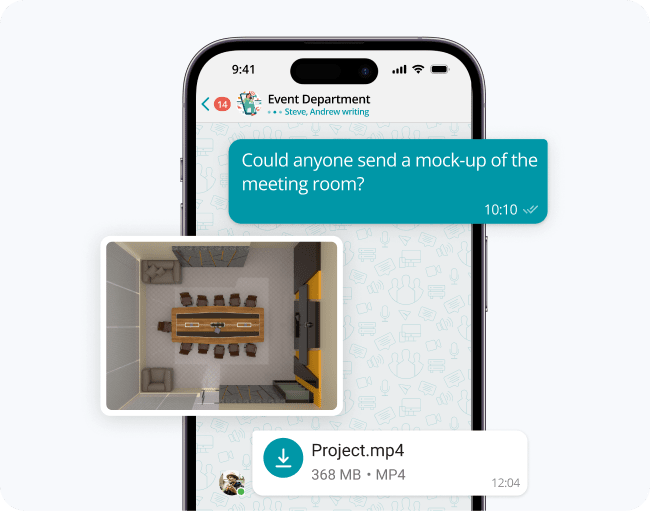
A useful selection process starts with workflow continuity, not product names.
The strongest test is whether communication context survives when a user changes channel.
For example:
message → voice call → meeting → file → follow-up
If every transition requires a new identity, new application, duplicated file, lost history, or separate administration, the communication stack remains fragmented even if every individual product works well.
A practical evaluation can follow five steps:
1. Map the current workflow
Document how communication moves between messaging, meetings, calls, files, customer interaction, and external collaboration.
Identify where context is lost or manually copied.
2. Separate required functions from convenience
Reliable voice routing, identity integration, retention, and administration may be operational requirements.
Cosmetic or infrequently used collaboration features should not outweigh them.
3. Define the deployment boundary
Decide whether communication can depend on a vendor-operated public cloud or whether some services need to run in private, self-managed, hybrid, or isolated infrastructure.
Determine which system controls user creation, deactivation, groups, permissions, and authentication.
Identity fragmentation frequently becomes an administrative problem after deployment.
5. Test transitions, not isolated features
A platform may perform well in a meeting test while still creating poor day-to-day workflows.
Test how quickly users can move from a message into a call, from a call into a meeting, from a customer request into internal collaboration, and from live communication into searchable follow-up.
Communication Consolidation: One Platform or Multiple Tools?
There is no universal reason to force all company communication into one product.
A useful architecture can combine several specialized systems.
|
Use one primary platform when |
Keep separate tools when |
|---|---|
|
The same employees use chat, calls, and meetings |
Workflows serve fundamentally different users |
|
Identity is duplicated across several tools |
Regulatory separation is intentional |
|
Administrators repeat the same policies |
Specialized functions are difficult to replace |
|
Employees constantly switch applications |
Integration costs less than migration |
|
Multiple tools store the same communication context |
Customer and internal workflows require different controls |
A single communication suite can reduce administration and user friction.
A multi-product architecture can preserve specialized functionality.
The choice should depend on workflow overlap, not on a general preference for consolidation.
Insight 3: Application count is a poor measure of communication complexity. Three well-integrated tools can create a simpler environment than one “all-in-one” suite with separate identities, licenses, consoles, and external dependencies behind the interface.
Cloud vs Self-Hosted Communication Tools
Deployment affects more than where a server runs.
|
Factor |
Cloud communication tools |
Self-hosted communication tools |
|---|---|---|
|
Infrastructure operations |
Primarily provider-managed |
Customer-managed |
|
Deployment speed |
Usually faster |
Requires deployment planning |
|
Data location |
Provider architecture and region options |
Customer-selected infrastructure |
|
Internet dependency |
Usually significant |
Can be reduced depending on product |
|
Identity dependency |
May rely on external identity services |
Can remain local depending on architecture |
|
Failure domain |
Vendor infrastructure and internet availability |
Customer infrastructure and internal network availability |
|
Updates |
Mostly provider-controlled |
Can often be scheduled internally |
|
Custom network integration |
Depends on vendor |
Often greater |
|
Offline internal communication |
Usually limited |
Possible with suitable architecture |
|
Internal IT workload |
Lower infrastructure burden |
Higher infrastructure responsibility |
Cloud products are often easier to introduce quickly across distributed organizations.
Self-hosted products can provide more control where communication must remain inside a company network or where external service dependencies are restricted.
Neither approach is inherently better.
The decision depends on operational responsibility, acceptable failure domains, identity architecture, and control requirements.
Security Questions Companies Should Ask
Security evaluation should not stop at whether a vendor says communication is encrypted.
A company should also ask:
- Where are messages, recordings, files, and metadata stored?
- Which identity system authorizes users?
- Who has administrative access?
- Which functions require external cloud services?
- How are software updates controlled?
- Can communication continue if an external dependency becomes unavailable?
- How are departing users and guest accounts removed?
A secure platform with weak account governance can still create substantial risk.
A self-hosted platform that is poorly maintained can also be less secure than a well-operated cloud service.
Security depends on both product architecture and operational practice.
AI Is Changing Company Communication Tools
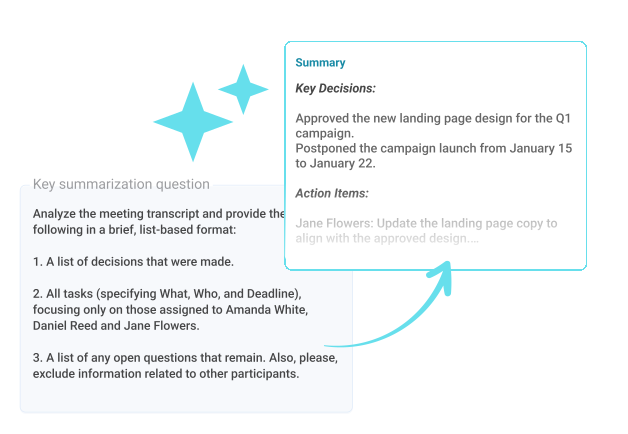
AI is becoming a common layer across messaging, calling, and meeting products.
Typical functions now include conversation summaries, meeting transcripts, call notes, semantic search, message drafting, translation, action-item extraction, and automated routing.
Companies should evaluate AI as part of the communication architecture rather than as an isolated productivity feature.
A typical flow can become:
conversation → transcript → summary → extracted action items → searchable derived data
That creates new questions about processing, retention, administrator control, external services, and access to derived content.
Insight 4: AI can add a new external dependency to a communication stack even when the underlying chat or meeting platform is otherwise under company control. Buyers should evaluate the data path of AI features separately from the data path of ordinary communication.
Common Mistakes When Selecting Communication Tools
Choosing by feature count
A product with more features is not necessarily a better fit.
Unused functionality can increase licensing, administration, training, and policy complexity.
Treating chat, meetings, and telephony as identical problems
They overlap, but they have different infrastructure requirements.
Business telephony introduces numbers, carriers, emergency calling, routing, and regional regulation that normal team messaging does not.
Ignoring external collaboration
Companies often design communication only around employees.
Partners, contractors, clients, suppliers, and temporary project members may require different identity and access models.
Focusing only on user experience
A product can look simple to employees while creating several administrative systems behind the interface.
IT teams should evaluate administration as carefully as the front end.
Migrating everything at once
Communication systems have many dependencies.
A phased migration makes it easier to preserve telephony, directories, room systems, customer communication, and historical data while new workflows are tested.
Best Communication Platforms by Company Scenario
|
Company scenario |
Platform worth evaluating |
Why? |
|---|---|---|
|
Microsoft ecosystem |
Microsoft Teams |
Communication integrates closely with Microsoft 365 and identity |
|
Messaging-first collaboration |
Slack |
Channels and workflows remain the center of daily communication |
|
Self-hosted unified communication |
TrueConf Server |
Messaging, video, directories, and interoperability remain customer-controlled |
|
Meeting-centered collaboration |
Zoom Workplace |
Meetings connect with persistent chat and cloud telephony |
|
Telephony-first cloud communication |
RingCentral RingEX |
Business phone and routing remain central |
|
Secure operational collaboration |
Mattermost |
Self-hosted messaging and structured operational workflows |
This table is not a ranking. It identifies the architectural scenario in which each platform is most naturally positioned.
Conclusion
Communication tools for companies now cover far more than internal chat. Modern platforms connect messaging, meetings, calling, files, presence, workflows, AI, customer interactions, and administration. The right communication environment should reduce fragmentation across identity, context, policy, and workflow rather than simply reduce the number of applications.
Microsoft Teams, Slack, Zoom Workplace, TrueConf Server, Google Chat and Meet, Cisco Webex, RingCentral, Mattermost, and Rocket.Chat represent different approaches to that problem. The most useful selection criteria are workflow continuity, deployment model, business telephony, identity, administrative control, integration, security, external collaboration, and failure behavior. Companies should choose the communication architecture first and the product second.
Empower your video conferencing experience with TrueConf!
About the Author
Diana Shtapova is a product specialist and technology writer with three years of experience in the unified communications industry. At TrueConf, she leverages her deep product expertise to create clear and practical content on video conferencing platforms, collaboration tools, and enterprise communication solutions. With a strong background in product research and user-focused content development, Diana helps professionals and businesses understand core product features, adopt new technologies, and unlock the full potential of modern collaboration software.
FAQ
What is the difference between business communication software and unified communications?
Business communication software is a broad category that includes messaging, meetings, telephony, customer communication, and collaboration tools. Unified communications specifically focuses on connecting several communication modes through shared identity, administration, presence, policy, and workflows.
What is the best communication tool for a small company?
Small companies often benefit from a cloud platform that combines messaging and meetings with minimal administration. The best choice depends on whether the company also needs business telephony, customer communication, advanced integrations, or self-hosted infrastructure.
What communication tools do large companies need?
Large companies typically need messaging, meetings, business calling, centralized identity, administration, external collaboration, compliance controls, and integrations with existing business systems. TrueConf can be relevant when self-hosting, video conferencing, messaging, SIP/H.323 interoperability, and directory integration are important requirements.
Should a company use one communication platform or several?
One platform can reduce account, administration, and workflow fragmentation when communication requirements overlap. Several products can be preferable when specialized telephony, contact-center, regulated, or technical workflows require distinct capabilities.
What is the difference between a communication tool and a collaboration tool?
A communication tool focuses on interaction such as messaging, calls, and meetings, while collaboration tools add shared workspaces, files, tasks, documents, and workflows. Modern products increasingly combine both categories.
Are self-hosted communication tools better for security?
Self-hosting gives an organization more direct control over infrastructure, data location, administration, and some external dependencies, but it also creates additional operational responsibility. TrueConf is relevant when a company specifically needs this customer-controlled deployment model, but security still depends on configuration, identity policy, updates, network design, and administration.
What should a company check before replacing its current communication tools?
Map existing messaging, telephony, meetings, identity, room systems, integrations, customer communication, and regulatory requirements before choosing a replacement. Test complete workflows and migration dependencies rather than comparing only individual feature checkboxes.


Follow us on social networks