
Benefits of Video Conferencing for Business
The main benefits of video conferencing for business include reduced travel requirements, faster communication, better support for distributed teams, wider access to customers, partners, candidates, and specialists, and more flexible collaboration across locations. Modern platforms can also combine live meetings with screen sharing, chat, recording, captions, whiteboards, files, room systems, and AI-assisted meeting tools.
Video conferencing is useful for small businesses, global enterprises, public sector organizations, healthcare providers, educational institutions, customer-facing teams, and any company whose employees or external contacts regularly work from different locations.
The benefits are most significant when video conferencing is treated as part of the company communication infrastructure rather than as a standalone calling tool. A business should consider meeting quality, room systems, administration, security, integrations, deployment model, accessibility, and interoperability together.
|
Business Benefit |
Practical Impact |
|---|---|
|
Less travel |
Employees can meet customers, partners, and other offices without traveling for every discussion |
|
Faster communication |
Teams can discuss complex issues in real time instead of relying only on asynchronous messages |
|
Better support for distributed teams |
Remote, hybrid, and office employees can participate in the same meetings |
|
Wider access to people |
Companies can work with candidates, experts, customers, and partners regardless of location |
|
Richer collaboration |
Screen sharing, chat, whiteboards, files, recordings, and transcription can support the meeting |
|
Meeting continuity |
Employees can move between individual calls, group meetings, webinars, and room systems |
|
Centralized administration |
Enterprise platforms can provide identity integration, policies, permissions, and meeting controls |
|
Infrastructure flexibility |
Businesses can choose cloud, private cloud, or self-hosted deployment depending on their requirements |
What Is Video Conferencing for Business?

Business video conferencing is real-time communication between two or more participants using video, audio, and collaboration tools over a network. It can be used for internal meetings, customer calls, training, interviews, webinars, consultations, project reviews, and large company events.
Consumer video calling and enterprise video conferencing overlap technically, but business systems normally add capabilities such as centralized administration, corporate directories, meeting moderation, recording policies, identity integration, room systems, reporting, webinars, and support for larger participant numbers.
For a small company, video conferencing may primarily be a way to connect employees and customers. For a large organization, it can become part of a broader unified communications environment linking personal devices, offices, conference rooms, external guests, telephony, and business applications.
What Are the Main Benefits of Video Conferencing for Business?

The main benefits of video conferencing for business are lower travel requirements, faster communication, better collaboration across locations, wider access to customers and specialists, and more flexible training and recruitment. Enterprise platforms can also improve business continuity, meeting room connectivity, accessibility, and IT control.
1. Reduces the Need for Business Travel
Video conferencing allows companies to conduct many customer meetings, project reviews, supplier discussions, interviews, and internal meetings without moving participants between cities or countries.
This does not eliminate the need for in-person meetings. Negotiations, site visits, events, and relationship building may still benefit from physical presence. The advantage is that businesses can reserve travel for situations where it creates additional value rather than using it for every routine discussion.
The effect can include lower travel expenses and less employee time spent moving between locations. It can also make short meetings practical when an in-person trip would be disproportionate to the purpose of the discussion.
2. Connects Distributed and Hybrid Teams
Video conferencing gives employees in offices, at home, and in other company locations a common meeting environment. Participants can hear the same discussion, view the same presentation, and contribute in real time.
Business data shows that remote meetings are now a routine activity for companies of different sizes. Research on European businesses found that approximately 53% conducted online meetings, while adoption among large organizations reached about 94%.
For geographically distributed organizations, video meetings can also help connect headquarters with branches, production facilities, regional offices, and customer-facing teams without creating separate communication processes for each location.
3. Speeds Up Decision Making
Some questions are difficult to resolve through long email threads or fragmented chat messages. Video conferencing gives decision-makers a synchronous environment where participants can ask questions, clarify objections, review data, and agree on next steps during the same session.
Screen sharing is particularly useful when the discussion depends on visual information such as a document, design, dashboard, technical system, presentation, or financial model.
The benefit is not that every issue needs a meeting. Rather, video conferencing gives businesses an escalation path when asynchronous communication becomes too slow or ambiguous.
4. Expands Access to Customers, Partners, and Specialists
Video communication reduces geographic constraints on business interaction. A company can interview candidates in another city, consult a specialist in another country, demonstrate a product to a prospect, or bring an external expert into a project meeting without arranging travel.
This can also support organizations with multiple offices. A specialist based at headquarters can participate in meetings with several branches without being permanently assigned to each location.
For customer-facing teams, browser-based guest access can lower the barrier to joining a meeting because external participants may not need the same corporate account or device environment as employees.
5. Adds Visual Context to Remote Communication
Video adds facial expressions, gestures, visual demonstrations, and immediate reactions that are absent from text communication. This can help during discussions where interpretation, explanation, or presentation matters.
At the same time, effective business communication does not require cameras to be enabled in every meeting. Audio, chat, screen sharing, and documents may be sufficient in many situations. The value of video is that it is available when visual context improves the conversation.
6. Combines Meetings With Collaboration Tools
Modern video conferencing platforms increasingly combine the live meeting with other communication functions.
Common capabilities include:
- screen and application sharing;
- meeting chat;
- file exchange;
- whiteboards and annotations;
- breakout rooms;
- recording;
- captions and transcription;
- polls and reactions;
- AI-generated summaries and action items.
This reduces the need to move between separate tools during the same discussion. For example, a team can review a presentation, annotate an idea, exchange a file, and preserve a meeting recording within one workflow.
Insight 1: The main business value of video conferencing is not simply replacing physical meetings with online meetings.
Its broader value comes from removing location as a constraint when employees need synchronous discussion, specialist input, customer interaction, or visual collaboration. This distinction matters because the strongest use cases are often meetings that would otherwise be delayed, fragmented across other channels, or impractical to organize.
Business Video Conferencing Statistics
Available business data shows that remote meetings remain a normal part of business operations rather than a temporary working pattern.
Research on European businesses found that approximately 53% conducted online meetings. Adoption among large organizations was much higher, at about 94%.
Research on US knowledge workers found an average of five online meetings per week. It also found that 77% of respondents had lost time because of technical difficulties, with hybrid meeting setup taking more than six minutes on average.
These figures highlight two different sides of video conferencing. The technology is widely used, but the business benefit depends heavily on how easy and reliable the meeting experience is.
|
Statistic |
Reported Figure |
Business Implication |
|---|---|---|
|
Businesses conducting remote meetings |
Approximately 53% |
Online meetings are a standard business activity |
|
Large businesses conducting online meetings |
Approximately 94% |
Video collaboration is especially common in large organizations |
|
Average online meetings per knowledge worker |
5 per week |
Video communication is part of routine work |
|
Workers reporting lost time from technical difficulties |
77% |
Poor meeting technology can reduce the expected productivity benefit |
|
Average hybrid meeting setup time lost |
More than 6 minutes |
Simpler room and joining workflows can have operational value |
The statistics do not show that video conferencing automatically increases productivity. They show that remote meetings are embedded in modern work and that usability and reliability directly affect whether organizations receive the expected benefit. For organizations running hundreds or thousands of meetings, reducing average meeting startup time can create more measurable operational value than adding another rarely used collaboration feature.
7. Supports Remote Training and Knowledge Sharing
Video conferencing can connect instructors, employees, and external experts without requiring everyone to attend the same physical training location.
Training sessions may combine live presentation, screen sharing, participant questions, recordings, breakout rooms, and supplementary files. Recorded sessions can also create a reusable resource for employees who could not attend the live meeting, subject to company policies.
This approach can be useful for onboarding, technical training, sales enablement, internal education, compliance sessions, and product demonstrations.
8. Makes Recruitment Less Dependent on Location
Video interviews allow recruiters and hiring managers to speak with candidates before either side commits to travel.
A company can involve several interviewers from different locations in the same hiring process. Candidates can also meet future team members who work remotely or in other offices.
For organizations hiring across regions, this can increase the practical candidate pool because the first stages of recruitment no longer depend on physical proximity.
9. Improves Business Continuity
Video conferencing provides an alternative communication channel when employees cannot reach the same office. Disruptions may result from travel restrictions, weather, infrastructure problems, office closures, or geographically distributed operations.
Cloud platforms can provide access from external locations, while self-hosted systems can support organizations that want communication infrastructure under their own control. Some platforms can also operate inside private networks without dependence on public cloud conferencing services.
Business continuity requirements therefore influence not only which meeting features are needed, but also where the conferencing infrastructure should run.
10. Connects Meeting Rooms With Remote Participants
Video conferencing is not limited to laptop and smartphone users. Enterprise systems can connect dedicated conference rooms with remote employees and external participants.
This is important for organizations that already own cameras, displays, microphones, codecs, or SIP and H.323 video endpoints. Interoperability can extend the useful life of existing equipment and avoid creating separate meeting environments for room users and desktop users.
A room strategy becomes particularly important in hybrid meetings because remote participants need to hear and see people who are physically sharing the same meeting space.
11. Creates More Accessible Meeting Formats
Business video platforms can provide features such as live captions, transcription, keyboard controls, speaker identification, and translated captions.
Enterprise meeting platforms increasingly provide recording, transcription, multilingual speech recognition, captions, and translation capabilities. Availability depends on the specific platform and selected configuration.
Accessibility still depends on the complete meeting design. Good microphones, clear visual materials, appropriate moderation, readable content, and accessible documents remain important even when the conferencing platform provides automated accessibility features.
12. Gives IT More Control Over Enterprise Communication
Consumer video applications are often optimized for individual users. Enterprise systems add administration that allows organizations to manage video conferencing as an IT service.
Depending on the platform, administrators may be able to control:
- user identities and directories;
- guest access;
- recording permissions;
- meeting roles;
- authentication;
- room devices;
- software versions;
- integrations;
- data placement;
- retention and security policies.
This becomes increasingly important as the number of users, offices, rooms, and external participants grows.
Insight 2: The strongest video conferencing benefit is measurable only when it is tied to a business process.
Travel reduction can be measured through avoided trips, recruitment through shorter interview cycles, training through attendance and completion, and hybrid collaboration through meeting start time and room reliability. This makes video conferencing easier to evaluate as infrastructure rather than as a generic productivity tool.
How to Measure Video Conferencing Benefits
Businesses can measure video conferencing value by connecting each expected benefit to an operational metric. This is more useful than relying on meeting counts alone, because a larger number of video calls does not necessarily mean that collaboration has improved.
|
Benefit |
Useful Metric |
What It Shows |
|---|---|---|
|
Reduced travel |
Avoided trips × average trip cost |
Direct financial savings from meetings moved online |
|
Faster meeting access |
Average time to join or start a room meeting |
How much working time is lost to meeting setup |
|
Room reliability |
Failed starts and support incidents per meeting room |
Whether meeting infrastructure works consistently in practice |
|
Recruitment |
Time from application to first live interview |
Whether remote interviews accelerate access to candidates |
|
Training |
Attendance, completion, and recording reuse |
Whether training reaches more employees efficiently |
|
Specialist access |
Time required to bring the right expert into a discussion |
How effectively the platform removes geographic constraints |
|
Tool consolidation |
Number of separate systems or subscriptions replaced |
Whether conferencing reduces communication stack complexity |
What Is the ROI of Video Conferencing for Business?
The return on investment from video conferencing depends on how the organization uses it. A useful ROI calculation compares measurable savings and operational improvements with software licensing, infrastructure, meeting room hardware, administration, training, support, and network costs.
A practical ROI calculation can include:
- avoided-trip value based on the number and average cost of replaced journeys;
- working hours recovered by reducing travel and meeting setup time;
- reduced support effort caused by simpler room and joining workflows;
- value from faster access to specialists or decision-makers;
- savings from consolidating overlapping communication tools;
- costs of licenses, infrastructure, administration, support, and room hardware.
A self-hosted deployment may require greater initial infrastructure investment, while a cloud platform typically shifts more of the cost toward recurring subscriptions. The comparison should therefore cover the expected ownership period rather than only the first month or initial purchase.
ROI also depends on meeting quality. If employees regularly lose time joining meetings, fixing audio problems, or switching between incompatible room systems, technical friction can offset part of the expected benefit.
|
ROI Factor |
How to Calculate or Track It |
|---|---|
|
Avoided travel |
Replaced trips × average travel cost |
|
Recovered employee time |
Travel and setup hours avoided × internal labor cost |
|
Meeting reliability |
Track failed starts, support tickets, and average setup time |
|
Tool consolidation |
Compare retired subscription and administration costs with the new platform cost |
|
Infrastructure utilization |
Measure use of existing rooms, endpoints, and communication infrastructure |
|
Total platform cost |
Licensing + infrastructure + support + administration + hardware |
Insight 3: Video conferencing ROI depends as much on reducing meeting friction as on reducing travel.
A platform can reduce travel expenses but still produce weak operational value if employees regularly lose time joining calls, configuring room equipment, resolving audio problems, or switching between incompatible systems. For frequent meeting environments, small amounts of friction can accumulate across hundreds or thousands of sessions.
Cloud vs Self Hosted Video Conferencing Benefits
The benefits of video conferencing can vary according to deployment architecture.
|
Criterion |
Cloud Video Conferencing |
Self Hosted Video Conferencing |
|---|---|---|
|
Deployment |
Vendor manages most service infrastructure |
Organization runs the conferencing platform |
|
Initial setup |
Usually faster |
Requires infrastructure planning |
|
Infrastructure responsibility |
Primarily vendor-managed |
Primarily customer-managed |
|
Data placement |
Determined by provider architecture and selected regions |
Determined by organization deployment |
|
Updates |
Usually controlled by the provider |
Organization can control deployment schedules |
|
Internal network operation |
Normally relies on external services |
Can support internal operation depending on the platform |
|
Custom infrastructure integration |
Depends on provider options |
Can offer greater infrastructure flexibility |
|
Best fit |
Organizations prioritizing rapid SaaS deployment |
Organizations prioritizing infrastructure control |
Neither approach is universally better. Cloud conferencing reduces infrastructure administration, while self-hosted software gives the organization more responsibility and more direct control.
Insight 4: Deployment model changes which video conferencing benefit the organization is optimizing for.
Cloud services primarily reduce deployment and infrastructure management requirements, while self-hosted systems can increase control over data placement, internal network operation, integrations, and maintenance schedules. The deployment decision therefore affects business governance as well as technical architecture.
Video Conferencing Platforms for Business
The business benefits available in practice depend on the platform. Some products focus on cloud collaboration, some integrate closely with a productivity ecosystem, and others emphasize private infrastructure, open-source deployment, room interoperability, or webinar workflows.
1. Zoom

Zoom Workplace combines video meetings with team chat, whiteboards, documents, rooms, events, recording, and AI-assisted meeting workflows.
Best for: businesses that want cloud-based meetings within a broader collaboration environment.
Strengths: mature meeting controls, broad client support, rooms, whiteboards, chat, recording, AI meeting summaries, and event capabilities.
Limitations: many advanced capabilities depend on the selected plan, add ons, and cloud-based service model.
2. Microsoft Teams
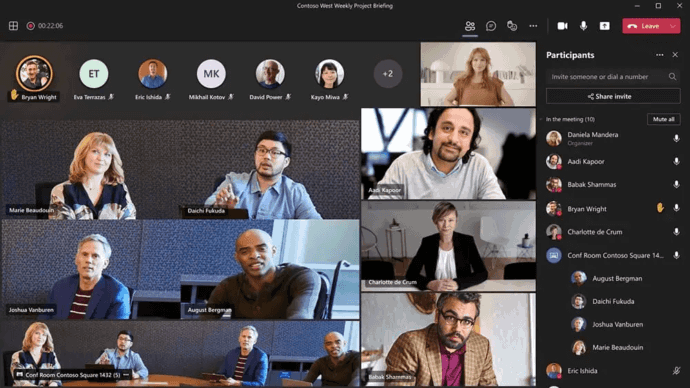
Microsoft Teams integrates meetings with Microsoft 365, chat, calendars, files, enterprise identities, webinars, transcription, and AI-assisted collaboration.
Best for: businesses already using Microsoft 365 and Microsoft identity services.
Strengths: close integration with productivity applications, enterprise identity, meeting controls, transcription, webinars, chat, and AI assistance.
Limitations: the platform delivers the most workflow value when the organization already relies on the Microsoft ecosystem.
3. Google Meet

Google Meet is a cloud video conferencing platform integrated with Google Workspace, with browser participation, screen sharing, meeting controls, and additional collaboration features depending on the selected Workspace edition.
Best for: organizations that use Google Workspace as their main productivity environment.
Strengths: browser access, simple scheduling, Workspace integration, host controls, reactions, screen sharing, and breakout rooms in supported plans.
Limitations: advanced capabilities depend on the Workspace edition, and the service is centered on Google’s cloud environment.
4. TrueConf

TrueConf Server is a self-hosted video conferencing and team messaging platform designed to run on infrastructure controlled by the organization. It supports meetings with up to 2,000 participants, messaging, webinars, recording, browser guest access, SIP and H.323 interoperability, WebRTC, RTSP, LDAP directories, room systems, and server federation.
The full version can operate autonomously inside an organization’s network without requiring internet access, making the deployment model relevant to organizations that prioritize infrastructure control and private network operation.
Best for: enterprises, public sector organizations, and other businesses that want to operate video communication on their own infrastructure.
Strengths: self-hosted architecture, operation inside private networks, large meetings, messaging, room products, SIP and H.323 interoperability, LDAP integration, and centralized administration.
Limitations: the organization needs to provision and maintain server infrastructure rather than delegating the complete infrastructure layer to a SaaS provider.
Boost your team’s productivity with TrueConf Server Free!
5. Cisco Webex
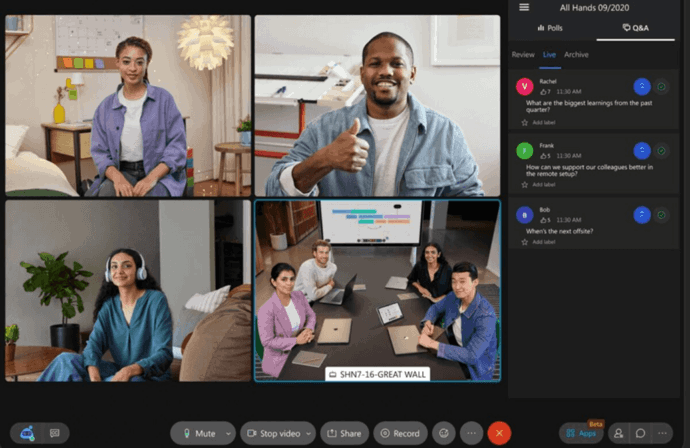
Webex combines meetings with messaging, calling, room devices, webinars, transcription, AI-assisted collaboration, and enterprise administration.
Best for: large businesses that want enterprise meetings integrated with a wider Cisco communication environment.
Strengths: meetings, messaging, calling, room systems, webinars, transcription, AI assistance, and enterprise integrations.
Limitations: available functions depend on licensing and the broader Webex configuration selected by the organization.
6. RingCentral Video

RingCentral Video combines cloud video meetings with transcripts, notes, action items, whiteboards, annotations, breakout rooms, recordings, and integration with a broader business communications environment.
Best for: businesses that want video meetings as part of a broader cloud communications environment.
Strengths: transcripts and notes, whiteboards, annotations, breakout rooms, browser access, and integration with business calling.
Limitations: organizations focused on fully self-managed conferencing infrastructure may need a different deployment model.
7. Pexip Infinity

Pexip Infinity focuses on flexible enterprise video infrastructure, SIP and H.323 interoperability, room systems, and deployments that can run on premises or across cloud environments.
Best for: enterprises with existing room systems, interoperability requirements, or specialized private infrastructure.
Strengths: flexible deployment, SIP and H.323 support, room interoperability, browser participation, and customer-controlled infrastructure.
Limitations: its infrastructure-focused approach may require more planning and specialist administration than a simple SaaS meeting product.
8. Jitsi Meet
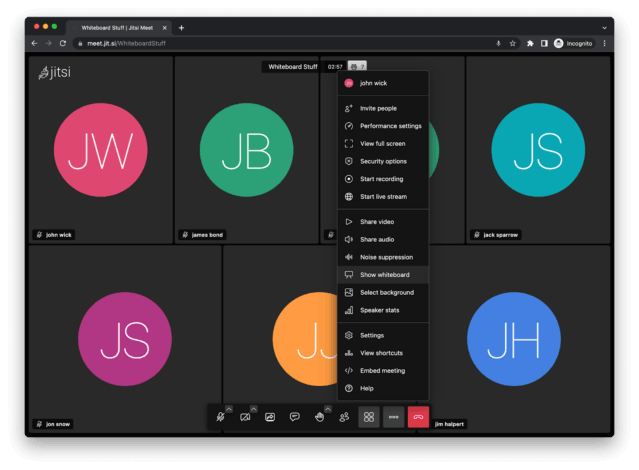
Jitsi Meet is an open-source video conferencing platform that can be hosted or deployed on an organization’s own infrastructure. It supports browser meetings, screen sharing, chat, mobile clients, embedding, and extensibility for custom deployments.
Best for: organizations and development teams that want open-source video conferencing or need to embed video meetings into another product.
Strengths: open-source code, self-hosting, browser access, screen sharing, chat, mobile applications, extensibility, and application embedding.
Limitations: organizations operating their own production instance are responsible for infrastructure, scaling, configuration, security, monitoring, and maintenance.
9. GoTo Meeting

GoTo Meeting is a cloud video conferencing platform with browser access, screen sharing, annotation, recording, transcription, presenter controls, meeting diagnostics, and business application integrations.
Best for: businesses that want a cloud meeting platform with recording, transcription, annotation, and business application integrations.
Strengths: browser joining, screen sharing, drawing tools, transcripts, cloud recording, mobile support, and workflow integrations.
Limitations: organizations that require a fully self-hosted conferencing environment may need a platform with a different deployment architecture.
10. Zoho Meeting

Zoho Meeting is a web-based platform for online meetings and webinars with browser participation, screen sharing, recording, scheduling, whiteboards, polls, registration workflows, Q&A, and reporting.
Best for: businesses that want browser-based meetings and webinars within the wider Zoho ecosystem.
Strengths: meetings and webinars, browser access, screen sharing, recording, polls, Q&A, whiteboards, remote control, registration management, and webinar reporting.
Limitations: organizations should confirm that participant limits, integrations, administration, and deployment model meet their enterprise requirements before standardizing on the platform.
Business Video Conferencing Platform Comparison
|
Platform |
Main Model |
Notable Business Benefit |
Typical Fit |
|---|---|---|---|
|
Zoom |
Cloud |
Broad meeting and collaboration ecosystem |
General business collaboration |
|
Microsoft Teams |
Cloud |
Microsoft 365 integration |
Microsoft-centered organizations |
|
Cloud |
Workspace and browser integration |
Google Workspace users |
|
|
TrueConf |
Self hosted |
Infrastructure control and private network operation |
Enterprises requiring customer-controlled deployment |
|
Cloud and enterprise collaboration ecosystem |
Meetings, calling, rooms, and AI |
Large enterprises |
|
|
RingCentral Video |
Cloud |
Video integrated with business communications |
Companies using cloud communications |
|
Pexip Infinity |
Self hosted and flexible cloud deployment |
Interoperability with rooms and meeting services |
Complex enterprise video environments |
|
Jitsi Meet |
Open source and self-hosted |
Code, deployment, and embedding flexibility |
Developers and custom deployments |
|
GoTo Meeting |
Cloud |
Meeting productivity tools and integrations |
Business meetings and distributed teams |
|
Zoho Meeting |
Cloud |
Meetings and webinars in one service |
Businesses using web meetings and webinars |
When Does Video Conferencing Deliver the Most Business Value?

Video conferencing creates the most value when it solves a specific communication problem rather than adding more meetings to the calendar.
Strong use cases include customer conversations that would otherwise require travel, distributed project teams, remote interviews, expert consultations, training, meetings between company locations, and hybrid sessions involving conference rooms and remote participants.
Organizations should also define when video is unnecessary. Routine status updates, simple approvals, documentation, and short questions may be handled more efficiently through chat, project management tools, or asynchronous documents.
Potential Limitations of Video Conferencing
The benefits of video conferencing depend on implementation quality. Poorly designed meeting practices can create new problems.
Technical friction is one example. Meeting room systems that are difficult to start, unreliable audio, incompatible devices, and complex joining workflows can consume the time that video conferencing is supposed to save.
Other limitations can include meeting fatigue, inadequate microphones or cameras, unstable networks, poor moderation, accessibility gaps, and excessive use of synchronous meetings.
The practical objective is therefore not to maximize the number of video meetings. It is to make video available where synchronous visual communication provides more value than another communication format.
How to Choose Video Conferencing Software for Business?
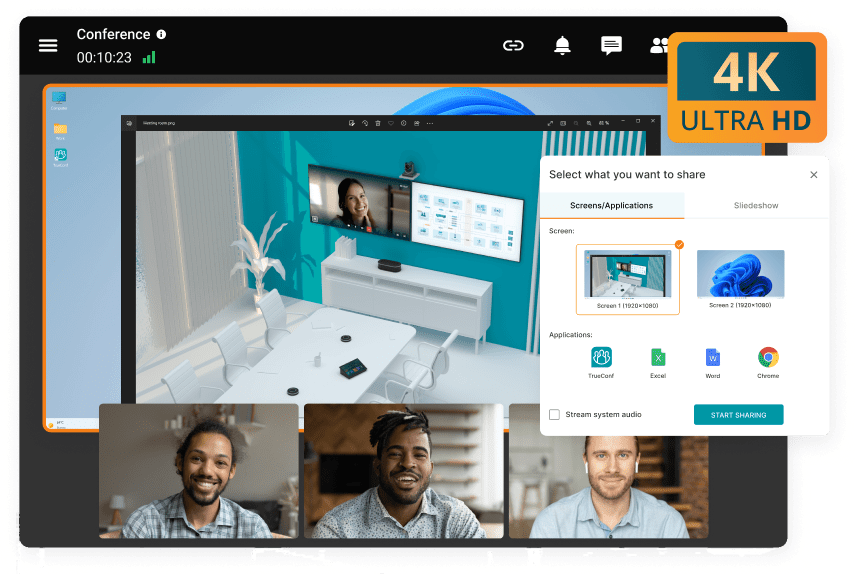
Businesses should evaluate a platform according to operational requirements rather than choosing only by brand recognition or the number of listed features.
- Define the primary use cases. Identify internal meetings, customer calls, webinars, training, room meetings, interviews, and large events separately.
- Determine participant scale. Check active participant capacity as well as webinar or broadcast capacity.
- Choose the deployment model. Decide whether public cloud, private cloud, self-hosted infrastructure, or a combination is appropriate.
- Check existing infrastructure. Identify room endpoints, SIP or H.323 systems, identity services, calendars, and business applications that need integration.
- Evaluate security and administration. Review authentication, guest access, recording controls, permissions, data handling, logs, and update responsibility.
- Test the complete meeting experience. Test joining, room equipment, screen sharing, weak network conditions, audio quality, guest workflows, and administration before broad deployment.
Video Conferencing Benefits by Business Scenario
|
Scenario |
Main Benefit |
Features That Matter Most |
|---|---|---|
|
Distributed teams |
Real time collaboration across locations |
Video, audio, chat, screen sharing |
|
Customer meetings |
Faster access without routine travel |
Guest access, screen sharing, recording |
|
Recruitment |
Access to candidates in more locations |
Browser access, scheduling, waiting rooms |
|
Training |
Live instruction for distributed groups |
Recording, breakout rooms, presentations |
|
Executive meetings |
Faster discussion and decision making |
High quality audio, moderation, room systems |
|
Hybrid work |
Connects office and remote employees |
Room integration, captions, reliable audio |
|
Regulated organizations |
Control over communication environment |
Identity, administration, deployment controls |
|
Multiple offices |
Connects branches without travel |
Room systems, directories, interoperability |
Conclusion
The main benefits of video conferencing for business are reduced dependence on travel, faster real-time communication, support for distributed teams, wider access to customers and specialists, more flexible recruitment and training, and richer collaboration through screen sharing, recording, captions, chat, and other meeting tools. For larger organizations, video conferencing can also become infrastructure that connects employees, meeting rooms, directories, existing video systems, and external participants.
The value depends on choosing the right architecture and measuring outcomes that matter to the organization. Cloud platforms can reduce infrastructure management, while self-hosted systems such as TrueConf Server can provide greater control over deployment, data placement, internal network operation, and integrations. Businesses should compare meeting scale, usability, security, room interoperability, administration, deployment, and measurable operational results before selecting a platform.
Empower your video conferencing experience with TrueConf!
FAQ
What are the main benefits of video conferencing for business?
The main benefits are lower travel requirements, faster communication, access to people across locations, and more flexible collaboration. TrueConf adds a self-hosted option for organizations that also want control over their conferencing infrastructure and internal network operation.
How can a business measure the ROI of video conferencing?
A business can track avoided travel costs, meeting setup time, support incidents, tool consolidation, and time required to reach specialists or candidates. With TrueConf, organizations can apply the same metrics while also accounting for the infrastructure and administration costs of a self-hosted deployment.
When should a company use video instead of chat or email?
Video is most useful when a topic requires rapid clarification, visual explanation, negotiation, or participation from several people at the same time. TrueConf supports synchronous video alongside messaging and file exchange, allowing teams to use a live meeting when asynchronous communication is no longer efficient.
What can reduce the benefits of video conferencing?
Technical problems, slow meeting startup, poor room audio, unstable networks, unnecessary meetings, and incompatible systems can offset expected productivity gains. When deploying TrueConf, businesses should test the complete workflow, including clients, meeting rooms, guest access, network conditions, and administration.
Does self-hosted video conferencing provide different benefits from cloud conferencing?
Yes. Cloud services generally reduce infrastructure responsibility, while self-hosted systems can provide more direct control over deployment, data placement, update schedules, and internal network operation. TrueConf Server is designed for the self-hosted model and can operate on infrastructure controlled by the organization.
Why does room interoperability matter in enterprise video conferencing?
Room interoperability can help organizations connect existing meeting spaces and video endpoints instead of maintaining separate communication environments. TrueConf supports SIP and H.323 integration, which can be useful for companies with established conference room infrastructure.
What should an enterprise evaluate before choosing a video conferencing platform?
An enterprise should evaluate participant scale, joining experience, room systems, identity integration, security, administration, interoperability, deployment model, and measurable business outcomes. TrueConf is particularly relevant when self-hosting, private network operation, centralized administration, and integration with existing video infrastructure are priorities.
About the Author
Diana Shtapova is a product specialist and technology writer with three years of experience in the unified communications industry. At TrueConf, she leverages her deep product expertise to create clear and practical content on video conferencing platforms, collaboration tools, and enterprise communication solutions. With a strong background in product research and user-focused content development, Diana helps professionals and businesses understand core product features, adopt new technologies, and unlock the full potential of modern collaboration software.


Follow us on social networks