
On-Premises AI Meeting Notes: Keep AI Processing Inside Your Network
AI meeting notes can turn a meeting into a searchable transcript, summary, task list, and set of key takeaways. For enterprises, however, the critical question is increasingly not only what the AI can generate, but where meeting data has to go before those results are created.
What are on-premises AI meeting notes?
On-premises AI meeting notes are transcripts, summaries, action items, and other structured meeting records generated by AI models running inside an organization’s own infrastructure. Unlike a cloud AI note taker, an on-premises system can process meeting audio without sending it to a third-party AI service.
TrueConf AI Server brings this model directly into an enterprise communication environment. It runs on customer-controlled infrastructure and works with TrueConf Server and TrueConf Enterprise to create speaker-attributed transcripts and AI-generated summaries inside the corporate network. No separate cloud AI note-taking service is required for the processing workflow.
Cloud AI note-taking
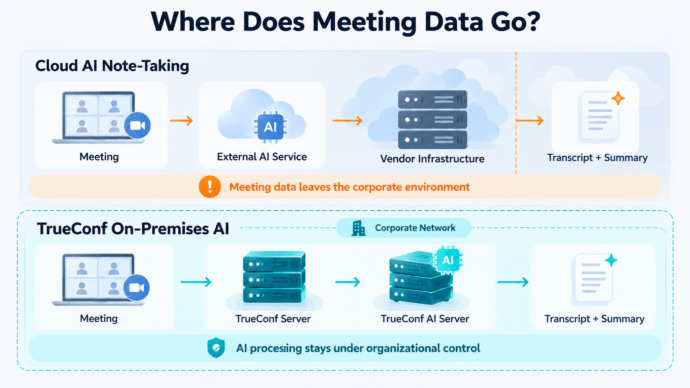
Meeting → external AI service → vendor infrastructure → transcript → summary
TrueConf on-premises AI
Meeting → TrueConf Server → corporate network → TrueConf AI Server → transcript → summary
The key architectural difference
For organizations that treat meeting content as part of the enterprise data perimeter, on-premises AI changes the problem from protecting data after it reaches a third-party service to keeping AI processing under organizational control from the start.
Why Are Enterprises Moving AI Meeting Notes On-Premises?
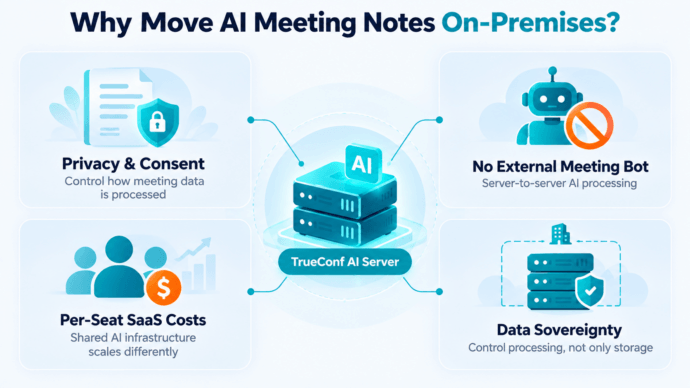
Four issues make the deployment model increasingly important: privacy and consent disputes, restrictions on external meeting assistants, per-user SaaS costs, and data sovereignty.
1. Privacy and Consent Are Becoming Operational Requirements
Automatic meeting transcription can involve more than ordinary application security. Organizations may also need policies governing recording consent, participant notification, access to transcripts, retention, and the processing of voice data.
Recent litigation illustrates the issue. In In re Otter.ai Privacy Litigation, plaintiffs alleged that Otter’s meeting assistant recorded and transcribed conversations without consent from all participants. In August 2026, a federal court granted Otter’s motion to dismiss in part and denied it in part. These remain allegations, not a finding that Otter violated the law.
Fireflies has also faced putative class actions in Illinois alleging violations of the state’s Biometric Information Privacy Act related to voiceprints. Those claims are likewise allegations rather than established liability.
On-premises deployment does not remove legal or consent requirements. What it changes is the technical processing path.
With TrueConf AI Server, transcription and summarization can run on infrastructure controlled by the organization, reducing the need to introduce a separate external AI processor into the meeting workflow.
2. External AI Meeting Bots Can Be Restricted
Many AI note-taking products capture meetings by joining them as an additional participant. That approach can create an external identity that must be admitted to the meeting and permitted to access its audio.
TrueConf does not require that model.
After TrueConf AI Server is integrated with TrueConf Server, conference audio can be sent directly to the AI server for recognition. The AI system does not need to join the meeting as a third-party participant.
Shorter AI processing chain
TrueConf: TrueConf user → TrueConf Server → TrueConf AI Server
External AI workflow: meeting platform → external meeting assistant → external AI service
This is particularly relevant for organizations that restrict third-party bots, external SaaS integrations, or additional identities inside corporate conferences.
Not every cloud AI note taker requires a bot. Granola, for example, captures audio locally from the user’s device rather than joining the meeting as a participant. Fireflies also offers alternative capture methods. The distinction is therefore not simply bot versus no bot.
The stronger TrueConf advantage is that the complete AI processing workflow can remain part of the organization’s own communication infrastructure.
3. Per-User SaaS Costs Increase with Adoption
Most cloud AI note-taking products use a seat-based subscription model.
As of October 2026:
- Granola Business costs $14 per user per month, while Enterprise costs $35 per user per month.
- Fireflies Business costs $19 per user per month when billed annually, while Enterprise costs $39 per user per month.
- Otter Business is listed at $20 per user per month.
That model is simple for small teams, but annual cost grows with the number of licensed users.
|
Users |
Annual SaaS subscription at $19/user/month |
|---|---|
|
25 |
$5,700 |
|
50 |
$11,400 |
|
100 |
$22,800 |
|
250 |
$57,000 |
TrueConf AI Server uses a different model.
An annual license with automatic transcription and summarization starts at $4,995. The organization also needs the required TrueConf infrastructure, GPU resources, storage, administration, and other operational resources.
The relevant cost question
Should AI meeting intelligence scale primarily by licensed seats, or should it run as shared corporate infrastructure?
For organizations already operating TrueConf Server or TrueConf Enterprise, the AI layer becomes a centralized processing resource rather than another individual SaaS subscription for every employee.
4. Data Sovereignty Requires Control Over Processing, Not Only Storage
Cloud AI services can provide encryption, compliance controls, private storage, and retention policies.
For example, Fireflies offers Private Storage for Enterprise customers, allowing meeting data to be stored in a customer-controlled bucket. However, Fireflies states that the data is still processed on its servers in the United States before being stored in that bucket.
Granola does not store meeting audio after transcription, but it uses third-party transcription and AI providers and stores notes in a U.S.-hosted AWS VPC.
Otter stores data using AWS infrastructure in the United States and applies server-side AES-256 encryption.
These are valid security approaches.
Secure cloud processing and on-premises processing answer different questions.
Cloud security: How is our data protected when it is processed by the provider?
On-premises architecture: Does the meeting data need to enter the provider’s infrastructure at all?
TrueConf addresses the second requirement. Its AI Server is deployed within the corporate network, allowing organizations to keep transcription and summarization on infrastructure they control.
How TrueConf On-Premises AI Meeting Notes Work
TrueConf separates video communication from AI processing while keeping both within the same controlled infrastructure.
TrueConf AI processing architecture
Employees → TrueConf applications → TrueConf Server or TrueConf Enterprise → TrueConf AI Server
TrueConf AI Server then performs speech recognition, speaker attribution, transcript generation, AI summarization, and custom summary generation.
TrueConf Server sends conference audio directly to TrueConf AI Server for recognition. The AI Server converts speech into text, separates participants by speaker, and can generate summaries from the resulting transcript.
This architecture keeps the AI layer inside the existing TrueConf environment instead of creating another external meeting-data silo.
Why Use TrueConf for On-Premises AI Meeting Notes?
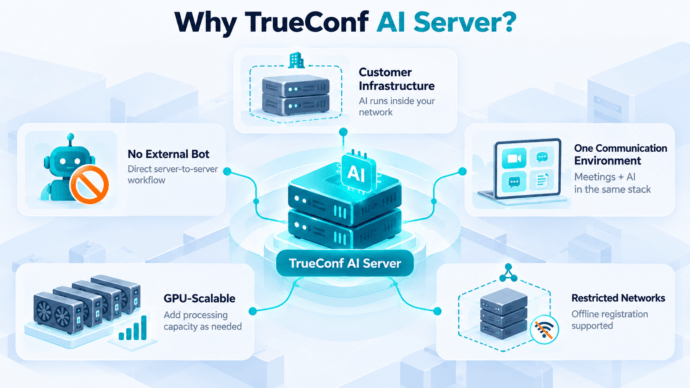
AI Processing on Customer Infrastructure
TrueConf AI Server is installed on infrastructure controlled by the organization. Meeting transcription and summarization can therefore take place inside the corporate network rather than through a public AI note-taking platform.
No External AI Meeting Bot Required
TrueConf Server can send conference audio directly to the AI Server. There is no requirement for a third-party AI participant to join each conference.
One Corporate Communication Environment
TrueConf AI Server integrates with TrueConf Server and TrueConf Enterprise instead of operating as an unrelated standalone meeting application.
Users can work with transcripts and summaries as part of the existing TrueConf communication environment rather than introducing another SaaS workspace for meeting data.
GPU-Scalable Processing
Recognition speed can be increased by assigning additional GPU resources. TrueConf supports multiple GPUs for transcription workloads.
Support for Restricted Networks
TrueConf AI Server supports offline registration, while TrueConf Server can operate without Internet access when communications remain inside the corporate network. This makes the architecture suitable for environments where external connectivity is limited or prohibited.
What Can TrueConf AI Server Generate?
TrueConf AI Server goes beyond producing a plain text transcript.
- Automatic speech recognition
- Speaker attribution
- Timestamps
- Punctuation
- Searchable transcripts
- Meeting summaries
- Task lists
- Key meeting takeaways
- Administrator-defined summary types
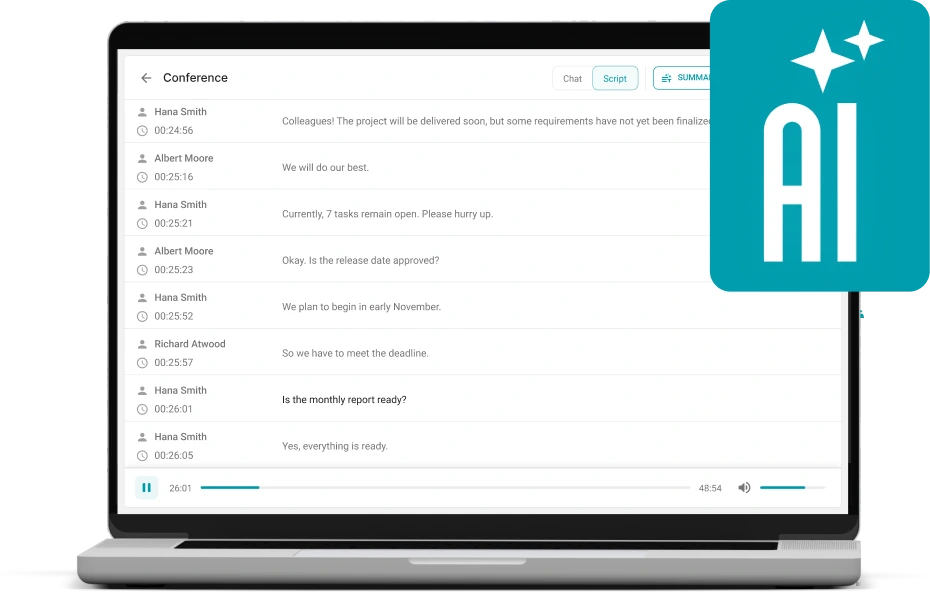
- Transcription of uploaded audio and video files
- Controlled transcript sharing
- Export for further processing or archiving
This makes AI meeting notes only one layer of the system.
From AI notes to on-premises meeting intelligence
TrueConf AI Server can turn meeting audio into structured, searchable information without moving the AI processing layer outside the corporate environment.
Administrators can also define different summary formats.
Project meeting
Decisions → Tasks → Owners → Deadlines
Interview
Topics → Answers → Follow-up Questions
Incident review
Incident → Causes → Actions → Responsible Teams
The same transcription infrastructure can therefore serve different business workflows.
TrueConf AI Server Specifications
|
Capability |
TrueConf AI Server |
Why it matters |
|---|---|---|
|
Deployment |
Customer infrastructure |
AI processing remains under organizational control |
|
Architecture |
x86-64 |
Compatible with standard enterprise server hardware |
|
Operating system |
Modern Linux with Docker support, such as Debian 12+ |
Suitable for standard server environments |
|
CPU |
Intel Xeon Silver 4310T level or higher, 10+ cores |
Provides the processing baseline for AI workloads |
|
GPU for transcription |
NVIDIA RTX A4000 16 GB or better |
Hardware acceleration reduces transcription time |
|
GPU for summarization |
NVIDIA RTX A5000 24 GB or better |
Dedicated resources support local AI summarization |
|
RAM |
16 GB minimum, 32 GB recommended |
Supports AI model workloads |
|
Storage |
SSD, at least 512 GB |
Keeps AI data on customer-controlled storage |
|
TrueConf Server integration |
TrueConf Server 5.5.0+ |
Adds AI processing to the existing communication platform |
|
TrueConf Enterprise integration |
Supported |
Extends AI processing across enterprise deployments |
|
Speaker attribution |
Yes |
Produces structured meeting records |
|
Custom summary types |
Yes |
Different teams can generate different output formats |
|
Multiple GPUs |
Supported |
Processing capacity can scale with workload |
|
Separate transcription and summarization servers |
Supported |
AI workloads can be distributed |
|
Uploaded media transcription |
Supported |
Not limited to live conferences |
|
Offline registration |
Supported |
Suitable for restricted network environments |
How Fast Can TrueConf AI Server Process Meetings?
Performance is one of the advantages of treating AI as infrastructure rather than as an external API.
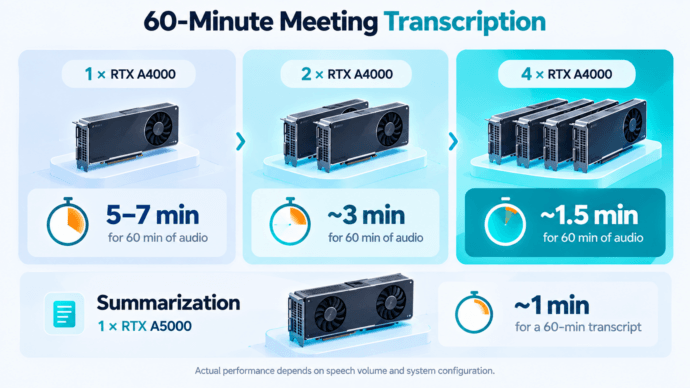
TrueConf publishes approximate transcription times for a 60-minute recording:
|
GPU configuration |
Approximate transcription time |
|---|---|
|
1 × NVIDIA RTX A4000 |
5–7 minutes |
|
2 × NVIDIA RTX A4000 |
~3 minutes |
|
4 × NVIDIA RTX A4000 |
~1.5 minutes |
TrueConf notes that actual performance depends on the amount of speech and participant activity.
The summarization workload is separate. For example, a single NVIDIA RTX A5000 can summarize approximately 60 minutes of transcribed audio in about one minute.
A different scaling model
Organizations can increase AI processing capacity by adding computing resources instead of purchasing another AI meeting-note seat for each additional employee.
TrueConf vs Cloud AI Meeting Notes: Who Controls the Processing Boundary?
For an on-premises buyer, the most useful comparison is not a generic feature checklist.
The key question is: Who controls the infrastructure where meeting content is processed by AI?
|
Architecture criterion |
TrueConf AI Server |
Otter.ai |
Fireflies.ai |
Granola |
|---|---|---|---|---|
|
AI runs in customer infrastructure |
Yes |
No public on-premises deployment |
No standard on-premises deployment |
No |
|
Meeting content can stay inside company infrastructure during AI processing |
Yes |
No |
No standard deployment |
No |
|
Customer controls AI server |
Yes |
No |
No |
No |
|
External meeting bot required |
No |
Can use Otter Notetaker |
Bot and alternative capture options available |
No |
|
Direct integration with private TrueConf video infrastructure |
Yes |
No |
No |
No |
|
Customer controls AI infrastructure location |
Yes |
No |
No |
No |
|
Customer-controlled storage |
Yes |
Vendor-managed |
Enterprise Private Storage available |
Vendor-managed |
|
Processing can be part of a restricted corporate environment |
Yes |
Cloud-dependent |
Cloud-dependent |
Cloud-dependent |
|
Separate external AI workspace required for integrated TrueConf workflow |
No |
Yes |
Yes |
Yes |
Fireflies deserves an important distinction: Enterprise customers can use Private Storage to place transcripts, audio, and summaries in their own storage bucket. Fireflies nevertheless states that processing takes place on Fireflies servers in the U.S.
Granola also avoids a meeting bot and does not retain meeting audio, but its transcription and AI workflow still uses external providers.
The difference is the processing boundary
Cloud privacy controls govern data inside a vendor-operated processing model. TrueConf allows the AI processing model itself to remain under customer control.
The deployment model also changes how AI meeting intelligence is purchased.
Cloud AI note takers generally charge by user.
TrueConf AI Server starts at $4,995 per year for automatic transcription and summarization and operates as centralized AI infrastructure.
Consider a SaaS plan priced at $19 per user per month:
|
Users |
Annual SaaS subscription |
|---|---|
|
25 |
$5,700 |
|
50 |
$11,400 |
|
100 |
$22,800 |
|
250 |
$57,000 |
TrueConf should not be compared with these figures using license price alone.
An on-premises deployment also requires:
- GPU hardware
- CPU and RAM
- SSD storage
- Server administration
- Backup and retention infrastructure
- Power and data-center resources
- TrueConf Server or TrueConf Enterprise
There is therefore no universal user count at which on-premises AI becomes cheaper.
The economic difference is the scaling model.
SaaS: costs generally increase with licensed users.
TrueConf AI Server: AI is operated as shared infrastructure whose capacity is primarily determined by workload and computing resources.
For organizations already using TrueConf Server or TrueConf Enterprise, this can be particularly important because AI processing extends infrastructure that is already part of the communication environment rather than creating another per-user application layer.
How to Deploy TrueConf AI Server
TrueConf AI Server is delivered as software for installation on customer infrastructure.
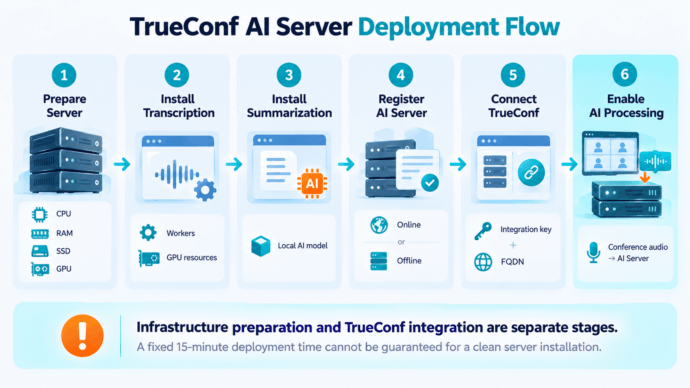
A deployment consists of several stages.
1. Prepare the Server
Provision an x86-64 Linux server with the CPU, RAM, SSD storage, and GPU resources required for the expected workload.
For GPU acceleration, install the appropriate NVIDIA drivers and CUDA components.
2. Install the Transcription Module
Install the TrueConf AI Server transcription package.
Administrators can configure:
- Transcription workers
- CPU threads per worker
- GPU resources
The AI models are downloaded during installation, so initial preparation requires access to the necessary packages or their offline equivalents.
3. Install the Summarization Module
The summarization module is installed separately and uses its own AI model and GPU resources.
Transcription and summarization can run on the same machine or on separate servers.
4. Register TrueConf AI Server
TrueConf AI Server supports both online and offline registration.
Offline registration allows the server to be activated even when direct access to the registration service cannot be provided.
5. Connect TrueConf Server or TrueConf Enterprise
Generate an integration key and connect the required communication servers.
TrueConf Server and TrueConf AI Server need mutual FQDN resolution to communicate.
6. Enable AI Processing
Once integration is complete, TrueConf Server can begin sending conference audio directly to TrueConf AI Server for recognition.
The resulting transcripts and summaries become part of the corporate TrueConf workflow rather than a separate external note-taking environment.
Can TrueConf AI Server Be Deployed in 15 Minutes?
A universal 15-minute deployment claim would not accurately describe every installation.
If the Linux server, GPU drivers, Docker environment, DNS configuration, AI packages, and models are already prepared, integration with an existing TrueConf environment can be relatively short.
A deployment from a clean server may also require:
hardware preparation → NVIDIA drivers → CUDA → Docker → AI modules → model downloads → registration → DNS → TrueConf integration → testing
The official installation process therefore does not promise a fixed 15-minute deployment time.
Deployment planning
For enterprise planning, it is more useful to separate infrastructure preparation from TrueConf integration.
Is On-Premises AI Necessary for Every Team?
No.
A small team without private infrastructure requirements may find a cloud AI note-taking subscription easier to deploy and maintain.
TrueConf AI Server is designed for a different operating model.
It is especially relevant when an organization:
- Already operates TrueConf Server or TrueConf Enterprise
- Requires AI processing to remain inside company-controlled infrastructure
- Restricts external SaaS services or meeting bots
- Needs centralized AI for many employees
- Works in a restricted or isolated network
- Needs control over the infrastructure performing transcription and summarization
- Wants AI-generated meeting intelligence to remain part of the existing communication stack
In those environments, the key advantage is not simply that TrueConf produces transcripts or summaries.
Many products can do that.
The architectural advantage
TrueConf can generate AI meeting intelligence without moving the AI processing layer outside the enterprise communication perimeter.
On-Premises AI Meeting Notes as Enterprise Infrastructure
AI meeting notes are becoming more than a convenience feature.
Once meetings are transcribed, indexed, summarized, converted into tasks, and stored for later search, they become part of the organization’s information base.
That makes deployment architecture increasingly important.
A cloud AI note taker can provide strong security controls while outsourcing the AI processing layer.
TrueConf takes a different approach.
TrueConf AI Server brings AI meeting intelligence into the same customer-controlled environment that hosts enterprise communications.
One private AI meeting workflow
Meetings → transcription → speaker attribution → summaries → structured meeting records
For organizations choosing on-premises AI meeting notes because infrastructure control matters, this is the core difference of TrueConf.
FAQ
What are on-premises AI meeting notes?
On-premises AI meeting notes are transcripts, summaries, action items, and other structured meeting records generated by AI software running on infrastructure controlled by the organization rather than by an external cloud AI service.
Can TrueConf generate AI meeting notes without a meeting bot?
Yes. TrueConf Server can send conference audio directly to TrueConf AI Server for recognition, so a third-party AI participant does not need to join the meeting.
Does TrueConf AI Server send meeting data to a cloud AI service?
TrueConf AI Server is designed for deployment within customer infrastructure. Speech recognition and summarization run on the organization’s AI Server rather than requiring meeting content to be processed by a public cloud AI note-taking platform.
Can TrueConf AI Server work in a restricted or isolated network?
TrueConf AI Server supports offline registration, while TrueConf Server can operate without Internet access when communications remain inside the corporate network. Initial software and AI model deployment must be prepared accordingly.
How fast can TrueConf AI Server transcribe a meeting?
TrueConf estimates that one NVIDIA RTX A4000 can transcribe approximately 60 minutes of audio in 5–7 minutes on average. Two A4000 GPUs reduce the estimate to about three minutes, while four reduce it to approximately 1.5 minutes. Actual performance depends on the amount of speech and system configuration.
About the Author
Olga Afonina is a technology writer and industry expert specializing in video conferencing solutions and collaboration software. At TrueConf, she focuses on exploring the latest trends in collaboration technologies and providing businesses with practical insights into effective workplace communication. Drawing on her background in content development and industry research, Olga writes articles and reviews that help readers better understand the benefits of enterprise-grade communication.


Follow us on social networks