
Top 10 Self-Hosted Chat Software Solutions in 2026
Executive Summary
Taking full ownership of your communication infrastructure is no longer just a technical preference — for a growing number of organizations, it is a strategic and legal imperative. Self-hosted chat platforms give IT teams direct authority over where data lives, who can access it, and how long it is retained. No vendor updates forced overnight. No policy changes applied without notice. No third-party custody of sensitive internal communications.
This guide examines ten platforms that represent the strongest available options for organizations considering self-hosted deployment. Each has been assessed across the dimensions that drive real purchasing decisions: security architecture, whether video conferencing is genuinely native or added through integrations, offline deployment capability, compliance framework alignment, and long-term scalability.
Choosing by Use Case: Quick Reference
|
Primary Requirement |
Recommended Platform |
|---|---|
|
Full offline / LAN operation with native video |
TrueConf Server |
|
Open-source code with broad integration support |
Rocket.Chat or Mattermost |
|
High-volume async communication for technical teams |
Zulip |
|
Federated architecture with default E2E encryption |
Element (Matrix) |
|
Unified file storage, chat, and video in one system |
Nextcloud Talk |
|
Government or defense-grade security requirements |
Wire or Wickr |
|
Frictionless video meetings without user accounts |
Jitsi |
|
Straightforward messaging for small office teams |
Troop Messenger |
Why trust us?
Every app we cover is selected, tested, and reviewed by human experts who follow strict editorial and evaluation guidelines. We focus on solutions that are practical, purpose-built, and capable of delivering real value for the specific use case or business context we’re analyzing — while also offering pricing that is fair and justifiable. Our methodology is transparent, straightforward, and available to everyone:
Platform Overview: All 10 Solutions at a Glance
|
Platform |
Open Source |
Video Conferencing |
Offline/LAN |
GDPR Compliant |
SSO/NTLM |
Best For |
|---|---|---|---|---|---|---|
|
TrueConf |
No |
Yes (built-in, 4K) |
Yes |
Yes |
Yes |
Enterprise, regulated industries |
|
Rocket.Chat |
Yes |
Yes (built-in) |
No |
Yes |
Yes |
Dev teams, open-source communities |
|
Mattermost |
Yes |
No (via integration) |
No |
Yes |
Yes |
DevOps, compliance-heavy teams |
|
Zulip |
Yes |
Yes |
No |
No |
Yes |
Technical teams, async workflows |
|
Element (Matrix) |
Yes |
Yes |
No |
No |
Yes |
Privacy-first, federated deployments |
|
Nextcloud Talk |
Yes |
Yes |
Yes |
No |
Yes |
All-in-one collaboration |
|
Wire |
Yes |
Yes |
No |
No |
No |
Government, defense, G7 |
|
Troop Messenger |
No |
No |
No |
No |
Yes |
Office teams, SMBs |
|
Wickr |
Partial |
No |
No |
No |
Yes |
Defense, high-security enterprise |
|
Jitsi |
Yes |
Yes |
No |
No |
No |
Lightweight video, education |
What Self-Hosted Actually Means — and Why It Matters
The term “self-hosted” circulates widely across the software industry, often applied loosely to products that do not genuinely satisfy the definition. For the purposes of this guide, a self-hosted chat platform is one where the server software operates exclusively on infrastructure that the deploying organization owns and administers. The vendor supplies the software. The organization supplies everything else: physical or virtual servers, network configuration, storage architecture, identity management, backup systems, and the people responsible for keeping it running.
This is categorically different from a “private cloud” arrangement where a vendor hosts a dedicated instance on the customer’s behalf. In a genuine self-hosted deployment, communication traffic never passes through vendor infrastructure at any stage. Message content, file attachments, call recordings, and user metadata all reside on servers that the organization physically or contractually controls in full.
Several distinct business cases drive organizations toward this architecture. Regulatory compliance is the most frequently cited driver: GDPR, HIPAA, financial industry data handling regulations, and national data sovereignty frameworks across multiple jurisdictions either mandate or strongly favor keeping sensitive communications within a controlled environment. Risk exposure is the second consideration: an organization controlling its own messaging infrastructure carries no dependency on a third party’s security practices, breach history, or financial continuity. Customization depth is the third: self-hosted platforms can be connected to internal identity systems, HR software, and enterprise tooling in ways that SaaS products typically do not permit.
The tradeoffs deserve equal clarity. An internal team becomes fully responsible for server availability, security patching, capacity planning, disaster recovery procedures, and resolving any technical failures — work that the vendor handles in cloud deployments. Organizations without dedicated IT infrastructure experience should factor this operational reality into their evaluation before selecting any self-hosted platform.
Insight #1 — The Control Inversion That SaaS Buyers Rarely Calculate
Adopting a cloud-based communication tool transfers a surprising amount of organizational authority to the vendor. Encryption key custody, retention policy defaults, update timing, feature availability, data residency decisions, and even product continuation are all vendor-controlled. A genuine self-hosted deployment reverses this arrangement. Your IT team determines update schedules, sets retention rules, manages encryption keys, and decides who holds administrative access. For organizations subject to GDPR, HIPAA, or data localization requirements, this reversal is not a preference — it is frequently the difference between a legally permissible deployment and one that creates documented regulatory exposure. The infrastructure cost of self-hosting is real and must be budgeted honestly, but it purchases something concrete: auditable, verifiable control over sensitive organizational communications.
Evaluation Criteria for Self-Hosted Chat Platforms
Selecting a platform without structured evaluation criteria produces deployments that look reasonable on paper but fail under operational conditions. The factors below reflect what most consistently determines whether a self-hosted messaging deployment succeeds or fails in enterprise environments.
Network independence is the first and most frequently overlooked filter. Many platforms described as self-hosted still require external internet connectivity for authentication checks, media relay, update verification, or push notification delivery. True air-gapped or LAN-only operation is a capability that only a small number of platforms in this category genuinely support.
Video conferencing architecture matters more than most evaluations acknowledge. A platform requiring a separately administered Jitsi instance for video doubles the infrastructure footprint, creates two independent maintenance cycles, and introduces a second failure surface. Native video and integration-dependent video are not equivalent from an operational standpoint.
Source code availability functions as a binary filter for many security and compliance teams. Organizations in regulated industries frequently require the ability to review source code as part of their software approval process. Open-source platforms satisfy this requirement automatically. Proprietary platforms do not, regardless of other security credentials they may hold.
Compliance posture at deployment determines how much configuration work stands between initial installation and a production-ready, regulation-compliant environment. A platform that ships with GDPR-aligned defaults and independently verified certification is a materially different proposition from one that requires custom implementation to reach the same state.
Identity integration depth affects day-to-day administration across any organizational scale. Support for LDAP, Active Directory, SAML 2.0, and NTLM allows user provisioning and deprovisioning to run through existing enterprise identity systems. Without these integrations, manual user management becomes unsustainable above a few hundred users.
Growth architecture determines whether the platform remains viable as the organization scales. A solution that performs well at 100 users but requires architectural rework at 500 is a deferred problem, not a long-term solution.
Three-year total cost of ownership consistently receives less attention than it deserves during platform evaluation. License pricing is one line item. Infrastructure provisioning, ongoing IT administration hours, security patch management, storage expansion, backup systems, and enterprise support contracts all contribute to real operational cost. Comparing platforms on license pricing alone produces systematically misleading results.
Deployment Readiness Questions
Before finalizing any self-hosted platform selection, work through these questions against your actual organizational situation:
- Does your IT team have the Linux server administration experience required for ongoing maintenance and incident response?
- Is there a documented, tested backup and recovery procedure that specifically covers communication data?
- Do you have an internal process for applying security patches and platform updates on a defined schedule?
- Have you projected infrastructure costs — hardware, storage growth, bandwidth — across a multi-year horizon?
- Do regulatory requirements impose specific constraints on data residency, retention periods, or audit log format?
- Is internet-independent operation a firm architectural requirement, or would a VPN-accessible deployment satisfy the underlying need?
- Is video conferencing a core daily operational workflow, or an occasional activity that a third-party integration could reasonably handle?
10 Best Self-Hosted Chat Apps: Platform Reviews
TrueConf
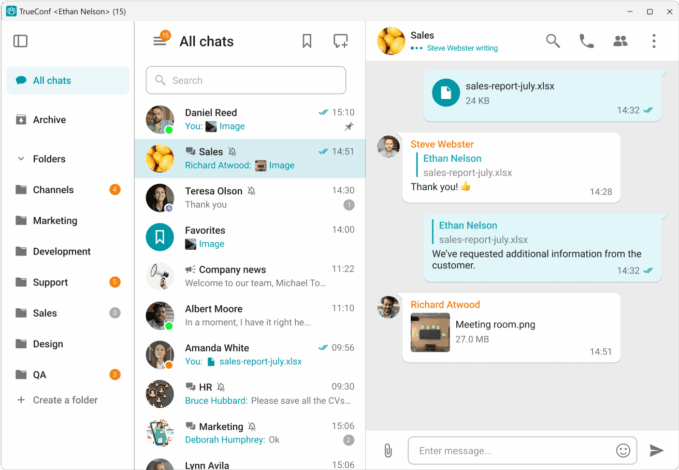
TrueConf Server is a unified communications platform built around a single foundational principle: the deploying organization should retain complete control over its communication infrastructure, with no dependency on external services at any operational stage. Every component — video processing, message storage, file handling, authentication, and call routing — runs on infrastructure the organization manages directly.
What separates TrueConf Server from every other platform reviewed here is the coherence of its native capabilities. Most self-hosted messaging platforms deliver either a messaging system or a video conferencing tool, and often require third-party services for the other. TrueConf delivers both natively, and adds verified offline LAN operation — meaning the platform functions without any internet connection, not merely without vendor cloud dependency. These three capabilities coexist within a single deployment, without requiring separate infrastructure components for each.
The licensing structure is equally distinctive. A free tier supporting up to 1,000 users with no per-seat charges removes the cost barrier that makes comparable enterprise platforms prohibitively expensive for mid-sized organizations. Beyond that threshold, commercial licensing uses a server-based model rather than per-user pricing, which means cost does not escalate linearly with headcount growth.
Key capabilities:
- Fully on-premises deployment architecture with no vendor cloud dependency at any operational stage
- Native 4K video conferencing supporting up to 2,000 simultaneous participants, with Scalable Video Coding providing adaptive bitrate delivery across variable network conditions
- Complete team messaging functionality: individual conversations, group channels, file transfers, and indexed message history with search
- Verified offline operation within corporate LAN and VPN environments — no external connectivity required at any stage
- Encryption applied to all media streams and stored data
- ISO 27001 certification and GDPR compliance as platform defaults, not post-deployment configuration
- SIP and H.323 protocol support for interoperability with existing VoIP infrastructure and hardware conference endpoints
- Client applications for Windows, macOS, Linux, iOS, Android, and browser access
- SSO, NTLM, and Active Directory integration
- Free license covering up to 1,000 users with no per-seat fees at any scale
Best for: Government agencies, healthcare organizations, defense contractors, regulated financial institutions, manufacturing enterprises, and any organization where internet-independent operation is a non-negotiable architectural requirement.
Strengths: The only platform in this guide natively combining 4K video, offline LAN operation, and a 1,000-user free tier within a single deployment. ISO 27001 certified. Server-based pricing eliminates per-seat cost scaling.
Limitations: Proprietary source code unavailable for external inspection. Requires internal IT resources for deployment, patching, and ongoing administration.
Try TrueConf Server Free!
- 1,000 online users with the ability to chats and mske one-on-one video calls.
- 10 PRO users with the ability to participate in group video conferences.
- One SIP/H.323/RTSP connection for interoperability with corporate PBX and SIP/H.323 endpoints.
- One guest connection to invite a non-authenticated user via link to your meetings.

Rocket.Chat
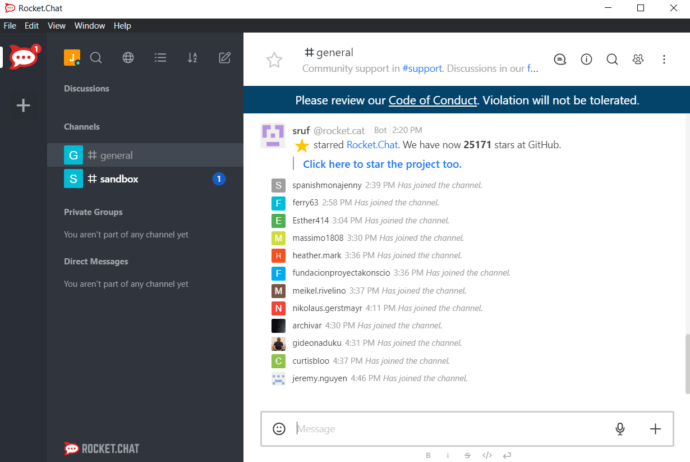
Rocket.Chat holds the dominant position among open-source self-hosted messaging platforms — the most widely adopted alternative to Slack for organizations that require code transparency alongside enterprise-level functionality. Development teams, open-source communities, and compliance-conscious organizations across industries have made it the reference implementation in this category.
The channel architecture covers the standard organizational communication structure: public channels open to all members sit alongside private channels restricted by invitation, with direct messaging between individuals running in parallel. What distinguishes Rocket.Chat within the open-source category is the breadth and maturity of its integration library combined with a consistent development cadence. Real-time message translation, deep developer tool integration, and an active maintenance community make it a platform that grows with organizational needs.
Key capabilities:
- Public and private channel architecture alongside direct messaging at any organizational scale
- Native media handling for documents, images, video files, and link previews within conversation threads
- Built-in video call interface and voice message capability
- Complete open-source codebase available for inspection, forking, and security auditing
- Automated real-time message translation across languages for distributed teams
- Pre-built integrations with GitHub, GitLab, Jira, Trello, and a broad developer and productivity tooling library
- Native iOS and Android applications with desktop feature parity
- End-to-end encryption for private channels and direct messages
- LDAP, SAML, and OAuth 2.0 support for enterprise identity integration
Best for: Software development organizations, open-source communities, and enterprises seeking a transparent self-hosted messaging platform with a mature integration library and full code auditability.
Strengths: Most established open-source self-hosted messenger; broad integration ecosystem; real-time translation; large active contributor community.
Limitations: Video conferencing requires a third-party integration — typically a self-hosted Jitsi instance — adding a separate infrastructure dependency. No native offline or LAN-only operating mode within the core platform.
Insight #2 — Why Three-Year TCO Looks Very Different From License Page Pricing
The zero-cost licensing of open-source platforms creates a compelling first impression that systematic cost analysis tends to complicate. A realistic three-year total cost of ownership for Rocket.Chat or Mattermost deployments must include server infrastructure provisioning and management, IT administration hours across the deployment lifecycle, security patch management, storage capacity planning, and — for most enterprise scenarios — a paid enterprise subscription to access compliance exports, advanced authentication controls, and support SLAs. Both platforms gate these capabilities behind per-user monthly charges that accumulate significantly at scale. TrueConf structures its commercial model differently: server-based licensing that eliminates per-seat cost scaling, combined with a free tier covering organizations up to 1,000 users entirely. For organizations in the 300–900 user range needing enterprise-grade features, these structural differences can produce materially different three-year cost outcomes. The comparison requires modeling actual TCO, not comparing what appears on licensing pages.
Mattermost
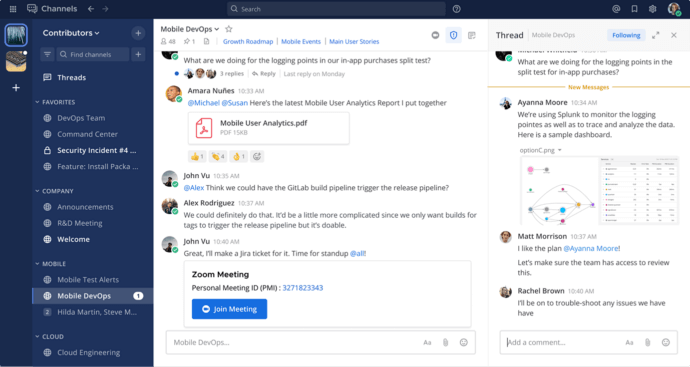
Mattermost was purpose-built to address a requirement that general-purpose messaging tools consistently fall short on: enterprise-grade team communication combined with the compliance architecture, administrative control granularity, and audit trail integrity that regulated industries and security-conscious organizations actually require for production deployment. The technology choices — Go on the backend, React on the frontend, Linux-native deployment against MySQL or PostgreSQL — reflect deliberate engineering decisions prioritizing code auditability, runtime performance, and integration with existing enterprise database environments.
Mattermost’s clearest differentiation from Rocket.Chat and other open-source options is the depth of its compliance tooling. Structured audit logging with configurable retention, granular role-based administrative controls, compliance export functionality, and proactive security bulletin delivery to administrators collectively position Mattermost as the preferred open-source choice for DevOps organizations, financial institutions under formal regulatory oversight, and public sector teams that treat communication infrastructure as a formal compliance surface requiring documented controls.
Key capabilities:
- Open-source architecture on a Go and React stack, selected specifically for auditability and enterprise-grade runtime performance
- Linux-native deployment against MySQL or PostgreSQL for clean integration with existing enterprise database infrastructure
- Public channels, private channels, and direct messaging with full search indexing and persistent message history
- File sharing with version tracking and comprehensive search indexing across all content
- Integrations covering Jira, GitHub, GitLab, Jenkins, and most enterprise DevOps toolchain components
- Multi-factor authentication and end-to-end encryption across all communication types
- Proactive security bulletin notifications to administrators before public vulnerability disclosure
- Compliance export and structured audit log functionality in the Enterprise tier
- LDAP, SAML 2.0, and Active Directory integration for centralized identity and access management
- Regular community release cycle with optional enterprise support agreements available
Best for: Software engineering teams, DevOps organizations, and regulated enterprises requiring a fully auditable self-hosted messaging platform with deep developer toolchain integration and formal compliance controls.
Strengths: Leading developer tool integration depth in the open-source category; structured compliance controls with detailed audit capability; technically active open-source community with strong governance.
Limitations: No native video conferencing — video requires a separately administered Zoom, Jitsi, or equivalent integration. No offline or air-gapped operating mode in the core platform architecture.
Zulip

Zulip’s defining architectural decision sets it structurally apart from every other platform covered here. Rather than organizing conversations into flat channel timelines where messages accumulate sequentially, Zulip requires every message to be associated with a named topic within its channel. The consequence is a communication environment that scales differently under high message volume: team members follow specific topics selectively, return to a thread after extended absences without losing context, and navigate channel history with precision that flat-timeline models cannot match.
This architecture serves a specific user profile well: engineering organizations tracking multiple concurrent workstreams, research groups managing parallel projects, and distributed teams whose collaboration patterns are fundamentally asynchronous. The platform also includes capabilities specifically valuable in technical and scientific environments — LaTeX rendering for mathematical content, syntax highlighting across programming languages, and direct GitHub pull request referencing within conversation threads.
Key capabilities:
- Topic-based threading requiring every message to be filed under a named subject within its channel — no flat timeline
- Native support for inline images, embedded video content, link previews, and emoji reactions
- LaTeX rendering for mathematical notation, scientific formulas, and equations
- Syntax highlighting across programming languages for inline code within conversations
- Cross-platform client availability with a documented public API for custom integration development
- GitHub integration with native pull request ID referencing directly in conversation threads
- On-premises support, LDAP integration, and expanded storage capacity available through paid service tiers
- Complete open-source codebase available for inspection and modification
- Native mobile applications for iOS and Android
Best for: Engineering organizations, academic and research institutions, and distributed teams where asynchronous communication discipline and precise organization of multiple concurrent topic threads are operational priorities.
Strengths: Threading model structurally reduces notification overload and improves long-term conversation retrievability; serves async-first teams with a distinctly different UX approach; LaTeX and code rendering differentiate it meaningfully in technical environments.
Limitations: No native offline operating mode; GDPR compliance requires deliberate configuration beyond platform defaults; the third-party integration ecosystem is considerably smaller than Rocket.Chat or Mattermost.
Element (Matrix)

Element’s architectural distinctiveness stems from the protocol layer. It is built on Matrix — an open, federated standard — rather than a proprietary communication architecture. This produces practical capabilities unavailable in any other platform reviewed here. An organization running its own Element homeserver can communicate with users on completely independent Matrix deployments without routing any data through third-party infrastructure, or can operate in a fully isolated private network with federation disabled entirely. No other platform in this guide offers this structural flexibility.
Encryption in Element is not an optional configuration — it is the architectural default across all communication types. Text messages, voice calls, video sessions, and file transfers are all encrypted before they leave the sender’s device. Only the intended recipient holds the decryption capability. This encryption-by-default posture makes Element the strongest choice in this guide for organizations where specific communications carry confidentiality requirements that cannot tolerate any architectural compromise.
Key capabilities:
- End-to-end encryption applied as an architectural default across messaging, voice, video, and file transfers — not a configurable option
- Fully operator-managed infrastructure with no mandatory external service dependencies
- Federated and decentralized architecture built on the open Matrix protocol — interoperable across independent homeservers or fully isolated
- Protocol-level bridge support enabling communication with Slack, Discord, IRC, Telegram, and other external messaging platforms
- Third-party integrations with Jira, GitHub, and Google Drive
- Browser access alongside native desktop and mobile applications for iOS and Android
- Active open-source development community with a published roadmap
Best for: Privacy-focused organizations, government agencies, enterprises requiring cross-platform federation, and security teams for whom encryption architecture is the primary selection criterion.
Strengths: Strongest decentralization and privacy architecture in this guide; cross-platform bridging through the Matrix protocol; fully auditable open-source codebase with continuous development.
Limitations: Steeper adoption curve for non-technical users compared to most alternatives; homeserver administration requires meaningful technical expertise; GDPR readiness requires configuration work beyond defaults.
Nextcloud Talk

Nextcloud addresses self-hosted collaboration at a higher level of abstraction than any messaging-specific platform. Rather than delivering a chat tool, it delivers a complete self-hosted workspace: file management, team messaging, video conferencing, calendar, contacts, and collaborative document editing as a single coherent deployment. Organizations currently maintaining separate self-hosted systems for files, communication, and meetings can consolidate all of these functions onto a single Nextcloud instance under one administrative overhead.
The Talk component handles messaging and video natively within this broader ecosystem. For IT teams, the consequence is a single deployment to administer, a single identity system to manage, and a single update cycle to follow — rather than several independent systems with separate maintenance requirements and failure modes.
Key capabilities:
- Four tightly integrated workspace components: Files, Talk (messaging and video), Groupware (calendar and contacts), and Office (collaborative document editing)
- Desktop, mobile, and browser client access across all major platforms
- Offline access capability for core productivity features including file access and document editing
- Native video conferencing through the Talk component, without third-party dependencies
- Data compliance management tools for handling regulatory obligations at the storage layer
- Full metadata control and configurable storage security policies
- LDAP, SAML, and SSO authentication support
- Enterprise support available through Nextcloud GmbH alongside the open-source foundation
- Unified data access across multiple connected storage backends and configurations
Best for: Organizations seeking a single self-hosted deployment that consolidates file storage, team messaging, video meetings, calendar, and document editing into one administered system.
Strengths: Most comprehensive all-in-one self-hosted workspace in this guide; strong file management architecture; offline access for core features; reduces multi-system administration complexity significantly.
Limitations: GDPR compliance requires configuration beyond platform defaults; server performance under high concurrent user load depends heavily on available hardware; the broader scope increases initial deployment complexity compared to messaging-only alternatives.
Insight #3 — Why the Video Integration Question Changes Your Total Infrastructure Model
Most self-hosted chat platform comparisons list video conferencing as a binary yes/no capability, which obscures an operationally significant distinction. Mattermost has no native video capability whatsoever. Rocket.Chat includes a video interface but depends on WebRTC relay infrastructure. Both are typically paired with a separately deployed Jitsi instance in production — which means a second server to provision, a second codebase to patch, a second set of failure scenarios to plan for, and a second administrative surface for your IT team to monitor. TrueConf Server and Nextcloud Talk are the two platforms in this guide where video conferencing is architecturally native: same deployment, same identity system, same administrative interface, same update cycle. For organizations where video meetings represent a daily operational requirement rather than an occasional supplement, the difference between these two architectures is not cosmetic. It changes how complex your deployment is, how much your IT team maintains, and how many failure points exist in your communication stack.
For a complete overview of TrueConf as a self-hosted chat server with video meetings, see the product page.
Wire

Wire occupies a position in the self-hosted landscape that most enterprise messaging platforms cannot substantiate: active, production deployment securing communications for government executive bodies at the national level. Its use across G7 country government branches represents a validated capability against institutional security requirements that commercial platforms are rarely evaluated against.
The encryption architecture carries specific technical weight. Wire implements Messaging Layer Security — an IETF-standardized protocol representing the current frontier of group messaging encryption, advancing beyond the Signal Protocol that most other end-to-end encrypted platforms employ. For organizations whose security requirements are defined by national security frameworks or equivalent institutional standards, this protocol commitment represents a meaningful differentiator.
Key capabilities:
- End-to-end encryption across all communication types — messaging, conferencing, and file transfers — as an architectural default
- Deployment options spanning fully cloud-hosted and completely on-premises configurations
- Active production deployment in government executive bodies and defense sector organizations
- Messaging Layer Security (MLS) implementation — an IETF-standardized protocol at the current leading edge of group encryption standards
- Native applications for Windows, macOS, iOS, and Android
- Open-source codebase available for independent security review
Best for: Government agencies, defense sector organizations, critical infrastructure operators, and enterprises where communication security requirements are defined by national security or institutional frameworks.
Strengths: Verified production deployment in government and defense environments at the national level; MLS protocol positions Wire at the current frontier of group messaging encryption standards.
Limitations: SSO and NTLM authentication are not supported, limiting integration with standard enterprise identity systems; scalability constraints make it less suitable for large-scale commercial deployments; GDPR readiness requires post-deployment configuration.
Troop Messenger

Troop Messenger addresses a specific and practical need: organizations that want a self-hosted messaging tool without the deployment complexity or feature scope of an enterprise platform. It handles the fundamental communication requirements — individual messaging, group conversations, basic media sharing, and simple audio-video calls — in a package that non-technical teams can adopt without extended onboarding.
Key capabilities:
- Real-time secure messaging for individuals and groups with practical group management functionality
- Document, file, and media attachment sharing within conversation threads
- Third-party integrations with Google Drive, Dropbox, and Trello for common productivity workflows
- End-to-end encryption across all communication types
- Basic audio and video call capability for individuals and groups
- On-premises deployment option for organizational data control
Best for: Small and mid-sized businesses, departmental teams, and office environments that require self-hosted messaging without the administrative overhead of an enterprise-grade platform.
Strengths: Approachable feature set with minimal adoption friction; suitable for non-technical teams; on-premises deployment available.
Limitations: Closed-source with no code transparency for auditing; video capability covers basic calls rather than full conferencing; no offline or LAN-only operating mode; not designed for large organizational scale.
Wickr

Wickr was engineered around a security model that most messaging platforms cannot address: the operational scenario where retaining message content creates security liability rather than reducing it. Every message sent through Wickr — including those containing images, video, or file attachments — can be configured to expire and permanently delete after a defined period. This ephemeral messaging architecture satisfies operational security requirements that persistence-based platforms are structurally incapable of meeting.
The product line spans personal use through defense field operations. Wickr RAM is the tier most specifically relevant to extreme operational environments — engineered to maintain communication security under conditions where conventional infrastructure availability cannot be assumed.
Key capabilities:
- End-to-end encrypted messaging with configurable automatic expiration across all message and attachment types
- Attachment handling for images, video files, and documents within encrypted conversations
- Cross-platform support: iOS, Android, macOS, Windows, and Linux
- Product tiers covering personal use (Wickr Me), business teams (Wickr Pro), defense field operations (Wickr RAM), and large organizations (Wickr Enterprise)
- Wickr RAM engineered for operational security in extreme field conditions where infrastructure availability is uncertain
- SSO integration and compliance controls in the Enterprise tier
Best for: Defense organizations, intelligence agencies, and enterprises where automatic message expiration is a security requirement rather than a convenience feature.
Strengths: Most capable ephemeral messaging implementation in this guide; production-validated in defense and intelligence environments; broad platform compatibility across operating systems.
Limitations: No video conferencing functionality; GDPR compliance tooling is limited; open-source components cover the cryptographic library only, not the full application.
Jitsi
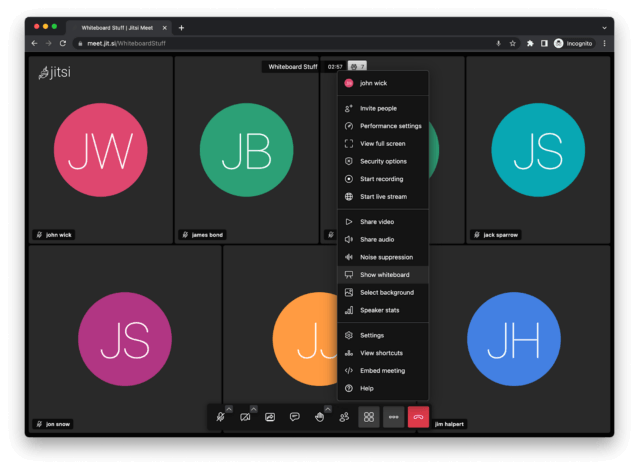
Jitsi Meet approaches video conferencing from a design philosophy diametrically opposed to enterprise platform thinking: remove every possible friction point between a participant and a meeting. No account registration, no software installation, no license key, no administrative provisioning. Participants join via a browser link and are immediately in the meeting. That is the complete participation flow.
This friction-free architecture makes Jitsi the fastest path to functional self-hosted video conferencing for organizations where participant accessibility outweighs the need for feature depth or administrative control. Large-scale educational deployments demonstrate that the platform handles real-world concurrent usage reliably when deployed on appropriate hardware.
Key capabilities:
- Multi-participant video conferencing supporting up to 100 users on standard self-hosted hardware
- In-meeting text chat with link and file sharing during active sessions
- Screen sharing for presentations and collaborative content review
- Interface customization including organizational branding options
- Architecture that scales with available server resources in self-hosted configurations
- Zero account requirement for participants — browser link access as the complete joining flow
- Full open-source codebase with complete self-hosting capability
- Native mobile applications for iOS and Android
Best for: Educational institutions, nonprofits, small teams, and organizations that need frictionless self-hosted video meetings with the flexibility to embed the conference interface within existing applications or web portals.
Strengths: Lowest possible participation barrier; completely open-source and self-hostable; straightforward to embed and customize within existing digital environments.
Limitations: No persistent team messaging outside of active meetings; no document collaboration; SSO and NTLM not supported; GDPR readiness requires configuration; performance under large participant counts depends significantly on available server resources.
Feature Comparison Tables
Core Capabilities
|
Platform |
SSO/NTLM |
Video (Native) |
Offline/LAN |
Open Source |
E2E Encryption |
Document Sharing |
GDPR Compliant |
Enterprise Scale |
|---|---|---|---|---|---|---|---|---|
|
TrueConf |
Yes |
Yes (4K) |
Yes |
No |
Yes |
Yes |
Yes |
Yes |
|
Rocket.Chat |
Yes |
Yes |
No |
Yes |
Yes |
Yes |
Yes |
Yes |
|
Mattermost |
Yes |
No |
No |
Yes |
Yes |
Yes |
Yes |
Yes |
|
Zulip |
Yes |
Yes |
No |
Yes |
Yes |
Yes |
No |
Yes |
|
Element (Matrix) |
Yes |
Yes |
No |
Yes |
Yes |
Yes |
No |
Yes |
|
Nextcloud |
Yes |
Yes |
Yes |
Yes |
Yes |
Yes |
No |
Yes |
|
Wire |
No |
Yes |
No |
Yes |
Yes |
Yes |
No |
No |
|
Troop Messenger |
Yes |
No |
No |
No |
Yes |
Yes |
No |
No |
|
Wickr |
Yes |
No |
No |
Partial |
Yes |
Yes |
No |
No |
|
Jitsi |
No |
Yes |
No |
Yes |
Yes |
No |
No |
Yes |
Security and Compliance Architecture
|
Platform |
E2E Encryption |
ISO 27001 |
GDPR Default |
Audit Logs |
Air-Gap Support |
Protocol Distinction |
|---|---|---|---|---|---|---|
|
TrueConf |
Yes |
Yes |
Yes |
Yes |
Yes |
SVC adaptive video |
|
Rocket.Chat |
Yes |
No |
Yes |
Enterprise only |
No |
— |
|
Mattermost |
Yes |
No |
Yes |
Enterprise only |
No |
— |
|
Element (Matrix) |
Yes |
No |
Partial |
No |
No |
Open Matrix protocol |
|
Wire |
Yes |
No |
Partial |
No |
No |
MLS encryption |
|
Wickr |
Yes |
No |
No |
Enterprise only |
No |
— |
|
Nextcloud |
Yes |
No |
Partial |
No |
Partial |
— |
|
Zulip |
Yes |
No |
No |
No |
No |
— |
|
Troop Messenger |
Yes |
No |
No |
No |
No |
— |
|
Jitsi |
Yes |
No |
No |
No |
No |
— |
Insight #4 — The Practical Difference Between Configurable Compliance and Certified Compliance
Platform comparison tables frequently show compliance capabilities as binary yes/no entries, which creates a misleading equivalence between very different operational realities. Most platforms in this guide can theoretically be brought into GDPR alignment — but the implementation work, third-party auditing, custom policy configuration, and ongoing documentation effort fall entirely on the deploying organization’s IT and legal teams. That work carries real cost in staff time, consulting fees, and delayed deployment timelines. TrueConf Server holds ISO 27001 certification independently and ships with GDPR-compliant configuration as a default rather than a post-deployment objective. For organizations in regulated industries where compliance readiness must be demonstrable to external auditors or regulators, this distinction determines deployment timeline, audit preparation workload, and the risk exposure associated with configuration gaps during the period between installation and compliance verification.
Pricing Structure
|
Platform |
Free Tier |
Commercial Model |
Per-User Fees |
Enterprise Tier |
|---|---|---|---|---|
|
TrueConf |
Up to 1,000 users |
Per server license |
No |
Yes |
|
Rocket.Chat |
Open-source community edition |
Per user/month |
Yes |
Yes |
|
Mattermost |
Open-source community edition |
Per user/month |
Yes |
Yes |
|
Zulip |
Open-source self-hosted |
Per user/month (cloud) |
Yes |
Yes |
|
Element (Matrix) |
Open-source self-hosted |
Per user/month (managed) |
Yes |
Yes |
|
Nextcloud |
Open-source community edition |
Per user/year |
Yes |
Yes |
|
Wire |
None for self-hosted deployment |
Per user/month |
Yes |
Yes |
|
Troop Messenger |
Trial period only |
Per user/month |
Yes |
Yes |
|
Wickr |
Personal consumer tier only |
Per user/month |
Yes |
Yes |
|
Jitsi |
Open-source self-hosted |
Per user/month (8×8 hosted) |
Yes |
Yes |
Decision Framework
The platform selection decision ultimately rests on four variables working together: the technical capacity your IT team can realistically sustain, the compliance obligations your organization operates under, your current and projected user base size, and whether video conferencing is a core daily workflow or an occasional activity.
Work through this sequence to narrow your options:
- Is internet-independent operation a firm requirement? If yes, viable options reduce to TrueConf Server and — partially — Nextcloud. Every other platform in this guide requires external connectivity.
- Is video conferencing a daily operational workflow? If yes, prioritize platforms with native video architecture. TrueConf Server and Nextcloud Talk avoid the infrastructure overhead that third-party video integrations introduce.
- Does source code auditability factor into your software approval process? If yes, the evaluation narrows to Rocket.Chat, Mattermost, Zulip, Element, Nextcloud, Wire, and Jitsi.
- Do you need compliance certification at deployment rather than through configuration? If ISO 27001 or GDPR certification by default is required, TrueConf Server is the only platform in this guide that satisfies this condition from the initial deployment.
- What is the realistic three-year TCO? Model infrastructure, administration, support contracts, and enterprise tier licensing together — not just licensing page figures.
- What is the user count, current and projected? For organizations under 1,000 users, TrueConf’s free tier eliminates licensing cost entirely. For organizations with a strong open-source requirement, Rocket.Chat and Mattermost community editions are cost-effective until enterprise features become necessary.
Need video along with chat? Compare self-hosted video conferencing options for your team.
Self-Hosted Team Messenger with Video Conferencing
A cutting-edge team collaboration server with personal and group chats, UltraHD video conferences, and advanced AI-powered features — free for up to 1,000 users!
What distinguishes a genuinely self-hosted platform from a private cloud arrangement? A genuinely self-hosted platform runs exclusively on infrastructure the deploying organization owns and manages, with no communication traffic passing through vendor servers at any point. A private cloud arrangement involves the vendor hosting a dedicated instance on the customer’s behalf — the organization gets data isolation, but the vendor retains infrastructure control. TrueConf Server, Rocket.Chat, and Mattermost all support genuine self-hosting. Some platforms marketed as self-hosted still require external connectivity for authentication or media services, which disqualifies them from true air-gapped deployments. Which platform operates in a completely offline or air-gapped environment? TrueConf Server is the only platform in this guide architecturally designed for fully offline operation — running entirely within a corporate LAN or VPN with no external internet connectivity at any stage, including for video conferencing. Nextcloud provides partial offline capability for file access and document editing. Every other platform covered here requires some degree of external connectivity even in self-hosted configurations. Which self-hosted chat platforms provide video conferencing without a separate deployment? TrueConf Server and Nextcloud Talk are the only platforms delivering video conferencing as a fully native, architecturally integrated capability. Rocket.Chat includes a video interface that relies on external WebRTC relay infrastructure. Mattermost requires a separately administered Jitsi or Zoom integration with no native video capability. The distinction matters because separate video integrations double the infrastructure footprint and create an additional maintenance and failure surface. How does TrueConf Server’s pricing compare to open-source alternatives at enterprise scale? TrueConf Server offers a free license covering up to 1,000 users with no per-seat charges — the most generous free tier in this guide. Commercial licensing uses a server-based model that does not scale linearly with headcount. Rocket.Chat and Mattermost are free as community editions but require per-user monthly enterprise subscriptions to access compliance exports, advanced authentication, and support SLAs. For organizations in the 300–900 user range needing enterprise-tier features, TrueConf’s server-based model frequently produces a lower three-year cost outcome. Which platforms are validated for government or defense deployments? Wire and Wickr hold the most documented government and defense deployment records. Wire actively secures executive-level communications for G7 government branches and implements Messaging Layer Security at the protocol layer. Wickr RAM is purpose-engineered for military field operations under extreme conditions. TrueConf Server is the appropriate choice when government or defense organizations additionally require native video conferencing, verified offline LAN operation, and ISO 27001 certification within a single platform. How does Element differ architecturally from other self-hosted messaging platforms? Element is built on the Matrix open protocol — a federated standard enabling organizations to run their own homeserver while communicating with users on entirely independent Matrix deployments, or to operate in complete network isolation. No other platform in this guide offers this federated interoperability model. End-to-end encryption is applied as an architectural default to all communication types rather than as an optional configuration. The tradeoff is administrative complexity: Matrix homeserver management requires more technical depth than deploying most other platforms reviewed here. Is Jitsi a viable replacement for a complete self-hosted team communication platform? For organizations whose only requirement is frictionless self-hosted video meetings, Jitsi Meet is a capable and well-maintained option. It does not qualify as a complete team communication platform: it has no persistent messaging outside active sessions, no document sharing, no enterprise user management architecture, and no SSO or NTLM support. Organizations needing both persistent messaging and integrated video conferencing should evaluate TrueConf Server for a fully native single-deployment solution, or Rocket.Chat paired with a self-hosted Jitsi instance as an open-source alternative.FAQ
About the Author
Nikita Dymenko is a technology writer and business development professional with more than six years of experience in the unified communications industry. Drawing on his background in product management, strategic growth, and business development at TrueConf, Nikita creates insightful articles and reviews about video conferencing platforms, collaboration tools, and enterprise messaging solutions.


Follow us on social networks